⚠️ Important information
All models already include the Lightning LoRAs, except the SVI models, where Lightning is not included.
Do not use additional Lightning LoRAs on models that already have Lightning integrated, or the quality will be degraded.
For SVI models, you can use Lightning LoRAs if you want faster video generation.
2or3 ksampler (for svi) https://civarchive.com/models/2079192?modelVersionId=2668801
v2.1 (for nsfw v2) https://civarchive.com/models/2079192?modelVersionId=2562360
v2.1 with MMAUDIO (for nsfw v2) by @huchukato https://civarchive.com/models/2320999?modelVersionId=2613591
Another wf triple KSampler KSampler https://civarchive.com/models/1866565/wan22-continuous-generation-svi2-pro-or-gguf-or-32-phase-or-upscaleinterpolate-w-subgraphs-and-bus?modelVersionId=2559451
triple KSampler wf setup allows for more motion and helps prevent slow-motion issues. In exchange, your videos will take longer to generate.
For those having issues with my SVI workflow , you can try Kijai's wf here: https://github.com/user-attachments/files/24364598/Wan.-.2.2.SVI.Pro.-.Loop.native.json. Alternatively, you can try fmlf wf https://github.com/wallen0322/ComfyUI-Wan22FMLF/tree/main/example_workflows they will be simpler. There are others on Civitai that work very well too.
Qwen-VL workflow as an alternative to Grok for creating your dynamic NSFW prompts. Thanks @huchukato for his work: https://civarchive.com/models/2320999?modelVersionId=2611094
🟣 SVI Update – NSFW
⚡ Model Presentation (SVI-compatible version)
This update was made because the NSFW V2 models were not fully compatible with SVI LoRAs.
This version was created to work smoothly with SVI, while still functioning without them (though the workflow must be adapted).
Be careful, SVI LoRAs will only work with a workflow specifically designed for them, otherwise, it won't work.
There are two models available for SVI:
✔ Fast Move (FM) – Sexual scenes may differ from the Consistent Face model and will generally be faster.
✔ Consistent Face (CF) – Slightly better image quality, which may be preferable for anime-style videos; sexual scenes differ from Fast Move, but the difference is minimal.
You can also mix models between High and Low LoRAs:
FM (Fast Move) as High + CF (Consistent Face) as Low
CF (Consistent Face) as High + FM (Fast Move) as Low
Both combinations work and give slightly different results, offering more flexibility for your videos.
For this version, the main improvements include:
✔ Fully adapted for SVI LoRAs
✔ Greater flexibility: Lightning and SVI LoRAs must be loaded manually for custom workflows
🟣 SVI LoRAs – Strengths & Weaknesses
⚡ Overview
✅ Strengths
Best solution for making long videos
Excellent transitions between video segments
Reduced degradation compared to other solutions
Strong character coherence: the model retains information from the previous video, helping maintain consistency
⚠️ Weaknesses
Weaker prompt understanding
Weaker camera understanding
Videos are less dynamic
Sometimes slow-motion effect
(can be improved with proper Lightning LoRAs, dynamic prompts or triple ksampler)
🟣 SVI LoRAs – Download Links
⚡ Download
Note: Both LoRAs must be loaded manually in your workflow.
🟣 Suggested Lightning LoRA Combos (Optional)
⚡ Overview
You don’t have to use these Lightning LoRA combos. They are optional and allow you to fine-tune motion and degradation.
You can also use other Lightning LoRAs or assign different combos per video for more control.
🔥 Combo 1 – More Motion (Rapid Video Degradation)
High LoRA →
https://huggingface.co/Kijai/WanVideo_comfy/blob/709844db75d2e15582cf204e9a0b5e12b23a35dd/Lightx2v/lightx2v_I2V_14B_480p_cfg_step_distill_rank128_bf16.safetensors
Weight: 4
or
💜 Combo 2 – Less Image Degradation
or
or
🟢 Combo 3 – Balanced Motion / Moderate Degradation
High LoRA →
https://huggingface.co/Kijai/WanVideo_comfy/blob/709844db75d2e15582cf204e9a0b5e12b23a35dd/Lightx2v/lightx2v_I2V_14B_480p_cfg_step_distill_rank128_bf16.safetensors
Weight: 3
Low LoRA →
https://huggingface.co/Kijai/WanVideo_comfy/blob/709844db75d2e15582cf204e9a0b5e12b23a35dd/Lightx2v/lightx2v_I2V_14B_480p_cfg_step_distill_rank128_bf16.safetensors
Weight: 1.5
🧠 Advanced Usage Tip
You can disable global Lightning LoRAs (in my wf) and assign different combos per video:
Combo 1 for Video 1, Combo 3 for Video 2, Combo 2 for Video 3.
Each combo produces different motion and degradation behavior.
If you want to create several-minute-long videos while maintaining high quality, it is possible, but it will take a very long time. You just need to avoid using Lightning LoRAs and use the full model instead.
🧠 Dynamic Prompts – Better Control & More Motion
You can use dynamic prompts to have better control and this helps to make the video more dynamic.
You just need to give this example prompt to an LLM like ChatGPT. It will be enough for it to describe the image you have and what you want as a video while keeping the same structure of the prompt in the following example.
⚠️ This will be a NSFW prompt; ChatGPT will not accept it.
You can use GROK https://grok.com, which can make NSFW prompt modifications.
For more examples of prompts with different poses, check:
Enhanced FP8 Model.
Give these prompts to GLM with the dynamic prompt structure if you want.
Example 1
(At 0 seconds: Wide shot showing a slightly overweight man casually walking down a city street, camera fixed in front, urban environment with buildings and cars.)
(At 1 second: Suddenly, a massive shark bursts from the pavement ahead, looking terrifying at first, pavement cracking, dust and debris flying, camera from side angle.)
(At 2 seconds: Medium shot from the side, the man stumbles backward in shock, while the shark dramatically slows down and strikes a comically exaggerated sexy pose, revealing large, exaggerated shark breasts, covered by a colorful bikini.)
(At 3 seconds: Close-up on the man’s face, eyes wide in disbelief, as he turns to look at the shark, small cartoon-style hearts floating above his head to emphasize his amazement, camera slightly low-angle.)
(At 4 seconds: Dynamic travelling shot showing the man frozen in the street, the shark maintaining its sexy pose, water splashes and debris still moving realistically, urban chaos around.)
(At 5 seconds: Wide cinematic shot pulling back, showing the man standing in the street, staring at the bikini-wearing shark with hearts above his head, epic perspective highlighting absurdity and humor.)
Example 2 – Anime NSFW
(At 0 seconds: The couple in a cozy bedroom, anime style, soft lighting highlighting their intimate embrace, her back arched slightly as he positions himself.)
(At 1 second: The man’s hips moving rhythmically, the head of his penis sliding effortlessly into her vagina, her body responding with a gentle, fluid motion, anime-style motion lines emphasizing the smooth penetration.)
(At 2 seconds: Her back arching deeply against him to intensify the pleasure, hips swaying with each thrust, breasts bouncing subtly, small hearts floating around them to capture the erotic energy.)
(At 3 seconds: Her face, eyes closed in bliss, a soft moan escaping, hands resting behind her head, anime-style blush on her cheeks, the air filled with a seductive aura.)
(At 4 seconds: The man penetrating her deeply, her body moving in sync with his, the bed sheets slightly rumpled, the room’s warm lighting enhancing the intimate, lustful atmosphere.)
(At 5 seconds: The couple locked in a passionate embrace, the scene exuding vibrant, seductive energy, anime style with smooth lines and soft shadows.)
🟣 Lightning Edition – NSFW I2V V2
⚡ Model Presentation (2 new versions available)
I originally planned to release only one V2, but some people preferred the NSFW V1 over the Fast Move V1 version, so depending on what you’re looking for, one version may suit you better than the other.
For these V2 versions, I tried a new approach:
✔ I made sure that most sexual poses work, while the model is also good for SFW content
✔ More flexible for general use
🔥 NSFW Fast Move V2
Improvements included in this version:
Better prompt understanding
Better camera understanding
Reduced unnecessary back-and-forth movements outside sexual poses
(cannot be completely removed, but strongly reduced)Improved bounce effect on the buttocks
If a man appears, he will no longer automatically attempt to penetrate the woman when she is nude
This version is designed for those who want more dynamic scenes with more movement.
💜 NSFW V2
The difference between this version and NSFW Fast Move V2:
Less camera control
Less camera understanding
But body movements are less pronounced (breasts and buttocks)
Some preferred V1 NSFW to V1 NSFW Fast Move, and this version keeps that spirit
For varied sexual poses, check the previews — there are many.
You can use the shown prompts and adapt them to your images, but of course, other prompts will work as well.
Don’t hesitate to use other LoRAs for creating specific concepts.
🔧 Recommended Settings
Steps: 2+2
(Jellai recommends 2+3 for even better results, and I agree)Sampler: Euler simple
CFG: 1
This model already includes the Lightning LoRAs, don’t use them, or the quality will be degraded
You need to download both models: H for High and L for Low.
Here is an example made with the base workflow + the First/Last Frame workflow + upscaler (only on the starting images) + inpainting (cum).
https://civarchive.com/images/114733916
🔞 LoRA Examples (with links and recommended weights)
LoRA: Penis Insert WAN 2.2
LoRA weight: 1
Face → Doggy
https://civarchive.com/images/112864483Face → Missionary
https://civarchive.com/images/112864718
https://civarchive.com/images/112864835Face → Doggy (leg aside)
https://civarchive.com/images/112864885Another example
https://civarchive.com/images/112864972
Other examples with different LoRAs
Face → Reverse Cowgirl — LoRA weight: 0.7
https://civarchive.com/images/112865189Face → Cowgirl — LoRA weight: 0.5
Face → Missionary — LoRA weight: 0.3
https://civarchive.com/images/112865381Face → Missionary — LoRA weight: 0.5
Face → Doggy leg aside — LoRA weight: 0.6
https://civarchive.com/images/112865551Face → Doggy — LoRA weight: 0.7
https://civarchive.com/images/112865696Face → Spoon — LoRA weight: 0.7
https://civarchive.com/images/112868124
Recommended LoRA to obtain a very realistic vagina and anus:
https://civarchive.com/models/2217653?modelVersionId=2496754
💡 Tip for Anime Style:
If you’re working in an anime style, feel free to follow the advice of @g1263495582 thanks to him for this.
Try these LoRAs together or separately; they help maintain face consistency:
🔹 Note:
For these LoRAs, use only Low Noise.
For the examples mentioned above, use High and Low Noise as indicated.
LoRA weight: 0.3
Many things can be done with the model, but don’t hesitate to use other LoRAs for specific purposes. And don’t hesitate to lower the LoRA strength to preserve the face as much as possible.
📷 Dynamic prompt example with different camera angles:
(at 0 seconds: wide shot showing the woman standing in the snowy plain, a massive giant dragon emerging behind her, snow cracking and dust rising).
(at 1 second: the woman jumps backward onto the dragon’s back as it bursts fully from the sky, camera tracking the motion from a side angle, debris and snow flying).
(at 2 seconds: medium shot from the side, the woman balances heroically on the dragon’s back as it begins to run forward across the snowy plain, slow-motion on her posture).
(at 3 seconds: close-up on the woman’s determined face, camera slightly low-angle to emphasize her heroic stance, snow and debris flying around).
(at 4 seconds: dynamic travelling shot alongside the dragon, showing the snowy plain, scattered debris and ice fragments flying everywhere as it gains speed).
(at 5 seconds: wide cinematic shot pulling back, showing the dragon taking off with the woman riding on its back, soaring above the snowy plain, epic perspective with snow, wind, and scale emphasizing the drama).
For available camera angles, check further down in the “cam V2” model description.
🔞 Normal Clip vs NSFW Clip:
You can also use the NSFW version for your clip.
It can bring positive effects for sexual scenes, but it can also cause issues, as in this example:
NSFW Clip:
https://civarchive.com/images/112864204Normal Clip (same seed):
https://civarchive.com/images/112864295
Here are the links to NSFW clips (thanks to zoot_allure855 for correcting the BF16 version):
BF16 fixed version:
https://huggingface.co/zootkitty/nsfw_wan_umt5-xxl_bf16_fixed/tree/mainFP8 version:
https://huggingface.co/NSFW-API/NSFW-Wan-UMT5-XXL/tree/main?not-for-all-audiences=true
❓ If you have any questions, don’t hesitate to ask!
Many people ask me for help via private message. You can do that, no problem, but I would appreciate it if you could do it in the comment section, it could help other people. Thank you.
🟣 Lightning Edition – NSFW I2V camera prompt adherence
⚡ Model Presentation (2 versions available)
I decided to release 2 versions. Both can produce different results, as you can see in the previews (the seed was the same).
Fast Move Version: provides more movement, and the movements will be faster, with better prompt understanding and camera handling
(you can see it in the 4th preview "fast move high" where the man slaps the woman)Natural Motion Version: offers more natural breast movements depending on the situation and produces slower scenes.
👉 Check both and choose the one that works best for you.
This NSFW edition is, of course, focused on sexual poses.
You should achieve very good results.
To create specific concepts, feel free to use specific LoRAs — they work very well with this model.
🔧 Recommended Settings
Steps: 2+2
(Jellai recommends 2+3 for even better results, and I agree)Sampler: Euler simple
CFG: 1
This model already includes the Lightning LoRAs, don’t use them, or the quality will be degraded
You can also use this T5, which may improve understanding:
https://huggingface.co/NSFW-API/NSFW-Wan-UMT5-XXL/tree/main?not-for-all-audiences=true
📝 Usage Tips
Start with a clean, high-resolution image for better results.
The model will not change the face; if it does, increase the resolution.
Also adjust your prompt if you are not getting what you want.
Wan understands some terms well, but not all.
For prompts, check the video previews: adapt them to your image.
Other prompts will work too.
🎥 Training
I trained 2 LoRAs:
The first one using several videos and images of different sexual positions.
The second one to bring more dynamic motion.
Respect to everyone who creates this type of LoRA — it requires a lot of work.
🙏 Credits
This model wouldn’t exist without the incredible work of these creators:
alcaitiff : https://civarchive.com/models/1295758/nsfw-fluxorwan-22orqwen-mystic-xxx?modelVersionId=2300332
Sweet_Pixeline : https://civarchive.com/models/1844313/penis-play-wan-22
anonimoose : https://civarchive.com/models/2008663/slop-twerk-wan-22-i2v
dtwr434 https://civarchive.com/models/1331682?modelVersionId=2098405
A special thanks to Alcaitiff and CubeyAI, two very kind and humble people.
🔔 Important
Please don’t support my work with buzzes here, I don’t need it.
If you want to support someone, support the creators listed above — they truly deserve it.
💬 Feedback
Feel free to give me feedback, positive or negative, to help improve future updates.
Update WAN 2.2 V2 CAM I2V – NEW feature Camera & Prompt Improvements
This custom version of WAN 2.2 I2V has been updated to deliver better prompt comprehension and improved handling of camera angles and cinematic movements. It provides more accurate scene interpretation, smoother transitions, and enhanced control over dynamic.
Key Features:
Excellent understanding of prompts and scene composition.
Supports various camera angles and movements, including zoom, dolly, pan, tilt, orbit, tracking, and handheld shots.
Ideal for cinematic storytelling, animated sequences, and creative video-to-image projects.
Flexible multi-step prompts, standard 4 steps (2+2), can be increased for higher fidelity.
Recommended sampler: Euler simple.
You can, of course, use your usual prompts; this is just one example among many.
Example Prompt with Different Camera Angles
(at 0 seconds: wide frontal shot of a man standing in front of an open fridge, cinematic lighting, subtle ambient kitchen reflections, the fridge contents visible, camera static).
(at 1 second: medium shot from the front as he opens the fridge fully, reaches for a can, slight zoom-in to emphasize the action, cinematic framing).
(at 2 seconds: camera shifts to a side medium shot, tracking him as he lifts the can to his mouth, fluid movement, maintaining lighting and reflections).
(at 3 seconds: camera starts a smooth 360-degree orbit around the man, following him as he drinks from the can, motion fluid, background slightly blurred for cinematic effect).
(at 4 seconds: close-up on his face and upper body while drinking, orbit continues subtly, fridge reflections accentuating realism, cinematic polish).
(at 5 seconds: final wide shot as he lowers the can, camera completes orbit to original angle, showcasing the kitchen space, lighting, and dynamic movement).
Available Camera Movements
Zoom / Dolly
zoom in
zoom out
camera zooms in on subject
camera zooms out gradually
dolly in
dolly out
camera dollies in slowly
camera dollies out steadily
crash zoom
Pan
pan left
pan right
camera pans across the scene
gentle pan left
sweeping pan right
Tilt
tilt up
tilt down
camera tilts up to reveal…
camera tilts down from…
Orbital / Tracking / Arc / Rotation
orbit around subject
360° orbit
camera circles around
tracking shot
camera tracks alongside subject
arc shot
curved camera movement
Other Movements & Styles
static camera / static shot
handheld shot
camera roll
Note:
LoRAs work perfectly with this model, offering full compatibility and consistent results across styles and concepts.
# SUPPLEMENTARY ADVICE
You can use negative prompts, but be careful: this will double the generation time.
Only use them if you really want to prevent something from appearing in your video.
In that case, enable the corresponding node; otherwise, keep it disabled.
⚠️ Important
The model must be used with CFG set to 1, so negative prompts do not work by default.
However, there is a simple way to enable them.
How to enable negative prompts:
Open the Manager
Search for kjnode and install it
In your workflow, add the WAN Nag node
To use it correctly:
Connect this node after the LoRA Loader
Feed it with the negative prompt
Then connect it to the first kSampler (High)
👉 Only use this option when necessary, to avoid unnecessarily increasing generation time.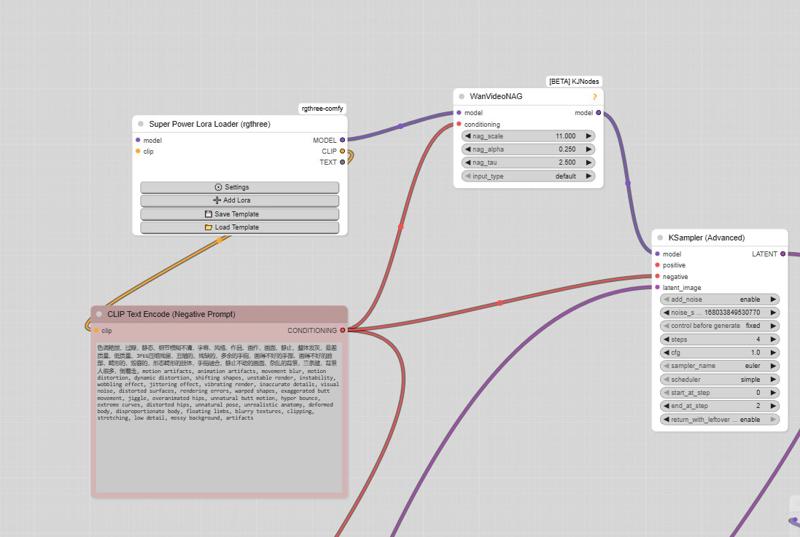
And here is the negative prompt for unwanted movements:motion artifacts, animation artifacts, movement blur, motion distortion, dynamic distortion, shifting shapes, unstable render, instability, wobbling effect, jittering effect, vibrating render, inaccurate details, visual noise, distorted surfaces, rendering errors, warped shapes, exaggerated butt movement, jiggle, overanimated hips, unnatural butt motion, hyper bounce, extreme curves, distorted hips, unnatural pose, unrealistic anatomy, deformed body, disproportionate body, floating limbs, blurry textures, clipping, stretching, low detail, messy background, artifacts, butt bounce, moving hips, swinging hips, shaking butt, wiggling butt, moving lower body, moving pelvis, jiggling buttocks, bouncing butt, unstable stance, unnatural hip motion, exaggerated hip movement, hip sway, hip rotation, bottom motion, pelvis motion, wobbling hips, fidgeting lower body, dancing hips, pelvic movement, motion blur, unnatural movement
And here is the negative prompt from the official ComfyUI workflow:色调艳丽,过曝,静态,细节模糊不清,字幕,风格,作品,画作,画面,静止,整体发灰,最差质量,低质量,JPEG压缩残留,丑陋的,残缺的,多余的手指,画得不好的手部,画得不好的脸部,畸形的,毁容的,形态畸形的肢体,手指融合,静止不动的画面,杂乱的背景,三条腿,背景人很多,倒着走
Note: If you use the default workflow without the node, this negative prompt will not work.
UPTDATE: Lightning Edition – T2V
I’m not really experienced with T2V myself, but a colleague who works with it a lot tested this version and confirmed that it performs very well. From the few tests I managed to do on my side, I got the same impression, although I haven’t compared it directly with the base version yet.
The settings are the same as in the image-to-video version: 2+2 steps or more if you prefer, CFG at 1, and Euler simple (though other samplers also work great).
I don’t plan to make an NSFW version for the T2V release,
but for the I2V version, I’m already quite happy with the first results.
Update WAN 2.2 V1.1 I2V
Updated version of the original Lightning merge — same settings 2+2 steps or more, featuring more movement and smoother flow (depending on the prompt).
The model already works very well in NSFW. Just use the right LoRAs, and the movement will improve.
WAN 2.2 V1 I2V
This checkpoint is based on the original WAN 2.2, with the Lightning WAN 2.2 and Lightning WAN 2.1 LoRAs already integrated. This improves image quality, makes motion smoother and more dynamic, and removes the slow-motion effect that can occur with the Lightning models.
A common setup is to use 2 steps on the high model and 2 steps on the low model, though other settings may work as well. Do not apply the Lightning LoRAs manually — they’re already included in this checkpoint.
My workflow
https://civarchive.com/models/2079192/wan-22-i2v-native-enhanced-lightning-edition
Description
FAQ
Comments (46)
What is the minimum amount of RAM and VRAM required to run the workflow?
Hello! It depends on the model you are using; the Q4_K_M will be the one that requires the fewest resources.
so whats like the best version for 720 20 second video with or without lightning on a 5090 astral oc? can any of them manage a decent svi 20 sec at least +30 fps with my hardware? oh yeah 32 gb ram... x1.5 and x3 pagefile
Hello! There are several previews where I made videos longer than 20 seconds 1024P, even using Q4_K_M models.
@taek75799 lol ive been dling too many fp8 and Q8 models, need to give the lower quants a try
Hey @taek75799 Just wanted to say that your v2 I2V NSFW is amazing at all types of NSFW....the only thing I'm noticing (slightly) compared to standard WAN 2.2 with Loras is that the face changes slightly when it moves. Wondered if you was planning a V3 and could look into this? I'm using hi-res images but was scaling them to 720p for WAN recommended res?
Hello and thank you for your feedback. For the time being, I am not planning any v3. Try lowering the LoRA strength; it should work very well normally.
Hi, thanks for the work. I'm trying to understand the different uses possible with your models and i have multiple questions
1) If I understand correctly when using the nolightning models, we should load the SVI LoRAs with the lightx2v LoRAs, and for the N*FW V2 GGUF, no external SVI or lightx2v LoRAs file should be use (correct me if i'm wrong). So my question is do you find any advantage to use your NSFW with LoRAs integrated instead of being able to tweak the LoRAs weight with the nolightning models ? Faster generation, better result, less VRAM use ? And any disadventages ?
2) I've had difficulties to have face consistency with your model (CF FP8 one), whereas i find that the official base model for Wan 2.2 does have more consistency in my use. Have you faced any difficulty in this part ? I tried tweaking the low noise lora to have more weight, but it's far from satisfying against the result of the base model.
3) Does your Negative prompt not used in any of your workflow if you don't add the WanVideoNAG ?
4) In your 3KSamp workflow you say this "The first High LoRA corresponds to the first KSampler without Lightning.
In most cases, it is recommended to use it, otherwise the Lightning LoRA may not be applied correctly.". When you say you "recommand to use it", what do you mean ? Is it the use of the high LoRA lightx2v in the "lora no lightning high" node or is it the use of the KSampler without any lightning ?
Thanks in advance for your response
hi
1: "Yes, clearly. The NSFW v2 model will have better prompt comprehension, better camera control, and above all, more dynamics. I couldn't include these features in the SVI model as they caused degradation issues."
2: "To be honest, I haven't encountered that problem. Look at the previews: the face doesn't change on the first frame, even in long videos of about 30 seconds. If you use LoRAs, don't hesitate to lower the strength; even 0.2 will work for some."
3: "The negative prompt is only useful if we really want to exclude something from the video. Otherwise, you shouldn't enable it, as it will double the generation time."
4: "Actually, the first KSampler uses a CFG of 4. This adds more dynamics to the SVI LoRA, since it tends to struggle with that. Therefore, the Lightning LoRA is not applied to this first KSampler."
Summary: "If you want long videos, use SVI. You will get a clearly better video with less degradation and fewer coherence breaks. If you want shorter videos, the NSFW model will be better. For SFW content, use the CM v2 model; it is even better for prompt and camera comprehension."
@taek75799 Understood, thanks for the explanation !
100% for effort but the readme for this is a horrid mixture of seemingly disjointed warnings, caveats, explanations, contexts, histories, previous version, assumptions about what the user already knows, scattered links, instructures etc.
Please make this an article with a TOC and real thought about what the priorities of explaining this to a user should be.
hey guys, I ran these workflows, but the output was not as expected, getting distorted videos with broken faces. What's the mistake I made here?
Hello! Send me your WF after generating the video. Save it so that I can check it.
Hi @taek75799 I shared my WF here. all the setup as instructed, but the output was shattered
https://civitai.com/models/2359667
Everyone, please try this. I tried the High model and it feels great. The camera and movement respond very naturally to prompts. I used lightning-lora-massive-speed-kijai at 0.75, with 5 steps of 2-3, and tested the low model using Dasiwa. I think you're missing out on something with the incomprehensible names and cluttered page. This is the best High model so far; the other NSFW models lose a lot from the base. The High model is very important for facial consistency, because if you lose too much information on the High side, the Low model won't be able to handle it.
Wich high model? High speed? v2 or svi?
So you use "nolightning SVI cf Q8" for the High model and a Dasiwa model for the Low? Does this give better results in movement and facial consistency? Because for me, using the nolightning SVI cf Q8 High and Low models seem to change the faces quite a bit.
show me your result, also which high model?
hey i suggest using the cf-model with wan2.2_i2v_A14b_high_noise_lora_rank64_lightx2v_4step_1022 on strength 1.2 and the low on 1 for it has much better controll over the movement, while being pretty good with face consisteny. 3 Ksampler 1 Step without lightning 3 steps high with lighning, 4 steps low
thanks for this comment, been expermenting with so many loras this combination worked best.
@SmurfypieThanks, but after a lot more testing I noticed a slight color drift, mostly around 35–45 seconds. Higher model sampling in SD3 helps, but it’s still noticeable.
Thanks for your work. You asked for feedback so I will just say, please work on making your documentation easier to follow and understand. It is often convoluted and difficult to follow.
anyway you could attach this your triple k sampler workflow to speed things up?: https://github.com/Jasonzzt/ComfyUI-CacheDiT
Hello! This is something that has been around for a while. I had tried this one: https://github.com/rakib91221/comfyui-cache-dit. It's easier to use; you just need to add a single node.
@taek75799 what stopped you from adding it into your workflow? did it end up with reduced quality?
atm, your triple k sampler takes me 36min roughly to generate a 1216x832 19sec video and was hoping to reduce that time without affecting quality
@larrylang Let's just say that this kind of node is fairly optional and very easy to set up. I can't remember if I stopped using it because it wasn't compatible with Lightning LoRAs, much like Easy Cache and TeaCache.
@larrylang It takes the full 20 steps for the best performance. Using lower steps with a Lighting LoRA doesn't actually save much time.
If you want to save time, you can set the CFG to 1 (High without Lighting LoRA) and use NAG to help out.
Hello,
thanks for the wide selection, however (as I am not very well versed) I am struggling a bit with understanding what does it denote when something is Q8 or Q6, FP8 and so on. Can you either explain or point me where I can find out? One more question: is there a way for me to reduce the wonky super fast movement/shake of the Fast Move Q8? (its too fast and the non-fast ones for some reason produce much worse quality image)
Thanks!
ChatGPT will help you. Or a simple Google search.
So which workflow should I use if I have a 4080 with 12GB Vram? I want to be able to generate videos quickly but decent enough where it doesnt look like garbage, I dont care if the resolution is 512x512
Also which model should I use? I want realism? Im aiming for something like Onlyfans streaming quality but low res
@alancreator90545 Hello! The best one will be Q8, followed by Q6_K. Give those a try. Then, it all depends on what you want to do: for short videos, the NSFW V2 model will be better for adult content, if it's SFW, use Cam V2. For long videos, go with the SVI CF models.
@alancreator90545 My wan workflow is made just for 12gb. Although I was having best results with Taek's model "cameraprompt_nsfwv2fp8.safetensors" but I think he got rid of the safetensors model in support of gguf and svi I couldn't find that one anymore.
Why I found the image are bright in first few frames but getting dark in follow frames? I use the fmQ4K and you supplied workflow btw.
Same here, im always getting dark frames in the last part
great work as usual!
im trying to train a character lora to support my face identity loss but Im struggeling a bit and would appriciate your guidance.
secondly Ai tools only support sharded/diffusers format, is that something you could provide to enable training on your model directly? Also other recommendation to minimize face drift and identity loss? is performing fine but not great. generating on 1024px q8 gguf fastmove(fp8 and svi made no real major difference. training on 16gb vram from images with t2v, used on i2v)
also all gallery images seem to have incredible facial consistency, whats going on there.
Hello! Do you make videos longer than 5 seconds? If so, all existing workflows only take the last frame of the previous 5 seconds to continue the video. Thus, if the face is not clearly visible, consistency will be lost. The best solution for this is using SVI LoRAs, which allow for long videos with less degradation and maintain maximum facial consistency. Some resolutions will work better than others, but I don't have that information here. You just need to have the right workflow and download the SVI LoRAs; check the description, there are a few SVI workflows listed.
For training my models, I use either AI Toolkit or Musubi. Neither of them allows for it because they are scaled models.
thanks for taking the time to answer. Are you suppose to use SVI lora + Combo 1/2/3 = totaling 4 loras. or just svi OR combo = total of 2?
im seeing identity loss even at 5 seconds more than 50% of the time
@bekejej6031201 Use only one combo: combo 2 is the best for maintaining consistency. Just one Lightning LoRA for High and a single LoRA for Low.
How to set it up on comfyui? where do i put this?
I used your NSFW model with SVI Pro and it worked very good. What makes the SVI-Model special and why should I use it instead?
Hello! Yes, it will work, but not all the time. Let's just say it suffers from more slowdown issues, and also, sometimes the faces degrade starting from the very first video, especially with realistic images.
@taek75799 Thank you for the explanation. Just for information: I am using the desima svi aio workflow and don’t get any slowdowns on my end.
Is there a T2V long format workflow that you know (and works well)? One where you can add character loras too?
Gonna give this a try too.
I'm not very interested in T2V , I don't have any workflows for that, but it's easy to do: you just need to replace a few nodes. The principle is the same it picks up the last frame. I think you can find one, or else just try putting a black image into my workflow and adding a prompt that works too
Details
Files
Available On (1 platform)
Same model published on other platforms. May have additional downloads or version variants.