⚠️ Important information
All models already include the Lightning LoRAs, except the SVI models, where Lightning is not included.
Do not use additional Lightning LoRAs on models that already have Lightning integrated, or the quality will be degraded.
For SVI models, you can use Lightning LoRAs if you want faster video generation.
2or3 ksampler (for svi) https://civarchive.com/models/2079192?modelVersionId=2668801
v2.1 (for nsfw v2) https://civarchive.com/models/2079192?modelVersionId=2562360
v2.1 with MMAUDIO (for nsfw v2) by @huchukato https://civarchive.com/models/2320999?modelVersionId=2613591
Another wf triple KSampler KSampler https://civarchive.com/models/1866565/wan22-continuous-generation-svi2-pro-or-gguf-or-32-phase-or-upscaleinterpolate-w-subgraphs-and-bus?modelVersionId=2559451
triple KSampler wf setup allows for more motion and helps prevent slow-motion issues. In exchange, your videos will take longer to generate.
For those having issues with my SVI workflow , you can try Kijai's wf here: https://github.com/user-attachments/files/24364598/Wan.-.2.2.SVI.Pro.-.Loop.native.json. Alternatively, you can try fmlf wf https://github.com/wallen0322/ComfyUI-Wan22FMLF/tree/main/example_workflows they will be simpler. There are others on Civitai that work very well too.
Qwen-VL workflow as an alternative to Grok for creating your dynamic NSFW prompts. Thanks @huchukato for his work: https://civarchive.com/models/2320999?modelVersionId=2611094
🟣 SVI Update – NSFW
⚡ Model Presentation (SVI-compatible version)
This update was made because the NSFW V2 models were not fully compatible with SVI LoRAs.
This version was created to work smoothly with SVI, while still functioning without them (though the workflow must be adapted).
Be careful, SVI LoRAs will only work with a workflow specifically designed for them, otherwise, it won't work.
There are two models available for SVI:
✔ Fast Move (FM) – Sexual scenes may differ from the Consistent Face model and will generally be faster.
✔ Consistent Face (CF) – Slightly better image quality, which may be preferable for anime-style videos; sexual scenes differ from Fast Move, but the difference is minimal.
You can also mix models between High and Low LoRAs:
FM (Fast Move) as High + CF (Consistent Face) as Low
CF (Consistent Face) as High + FM (Fast Move) as Low
Both combinations work and give slightly different results, offering more flexibility for your videos.
For this version, the main improvements include:
✔ Fully adapted for SVI LoRAs
✔ Greater flexibility: Lightning and SVI LoRAs must be loaded manually for custom workflows
🟣 SVI LoRAs – Strengths & Weaknesses
⚡ Overview
✅ Strengths
Best solution for making long videos
Excellent transitions between video segments
Reduced degradation compared to other solutions
Strong character coherence: the model retains information from the previous video, helping maintain consistency
⚠️ Weaknesses
Weaker prompt understanding
Weaker camera understanding
Videos are less dynamic
Sometimes slow-motion effect
(can be improved with proper Lightning LoRAs, dynamic prompts or triple ksampler)
🟣 SVI LoRAs – Download Links
⚡ Download
Note: Both LoRAs must be loaded manually in your workflow.
🟣 Suggested Lightning LoRA Combos (Optional)
⚡ Overview
You don’t have to use these Lightning LoRA combos. They are optional and allow you to fine-tune motion and degradation.
You can also use other Lightning LoRAs or assign different combos per video for more control.
🔥 Combo 1 – More Motion (Rapid Video Degradation)
High LoRA →
https://huggingface.co/Kijai/WanVideo_comfy/blob/709844db75d2e15582cf204e9a0b5e12b23a35dd/Lightx2v/lightx2v_I2V_14B_480p_cfg_step_distill_rank128_bf16.safetensors
Weight: 4
or
💜 Combo 2 – Less Image Degradation
or
or
🟢 Combo 3 – Balanced Motion / Moderate Degradation
High LoRA →
https://huggingface.co/Kijai/WanVideo_comfy/blob/709844db75d2e15582cf204e9a0b5e12b23a35dd/Lightx2v/lightx2v_I2V_14B_480p_cfg_step_distill_rank128_bf16.safetensors
Weight: 3
Low LoRA →
https://huggingface.co/Kijai/WanVideo_comfy/blob/709844db75d2e15582cf204e9a0b5e12b23a35dd/Lightx2v/lightx2v_I2V_14B_480p_cfg_step_distill_rank128_bf16.safetensors
Weight: 1.5
🧠 Advanced Usage Tip
You can disable global Lightning LoRAs (in my wf) and assign different combos per video:
Combo 1 for Video 1, Combo 3 for Video 2, Combo 2 for Video 3.
Each combo produces different motion and degradation behavior.
If you want to create several-minute-long videos while maintaining high quality, it is possible, but it will take a very long time. You just need to avoid using Lightning LoRAs and use the full model instead.
🧠 Dynamic Prompts – Better Control & More Motion
You can use dynamic prompts to have better control and this helps to make the video more dynamic.
You just need to give this example prompt to an LLM like ChatGPT. It will be enough for it to describe the image you have and what you want as a video while keeping the same structure of the prompt in the following example.
⚠️ This will be a NSFW prompt; ChatGPT will not accept it.
You can use GROK https://grok.com, which can make NSFW prompt modifications.
For more examples of prompts with different poses, check:
Enhanced FP8 Model.
Give these prompts to GLM with the dynamic prompt structure if you want.
Example 1
(At 0 seconds: Wide shot showing a slightly overweight man casually walking down a city street, camera fixed in front, urban environment with buildings and cars.)
(At 1 second: Suddenly, a massive shark bursts from the pavement ahead, looking terrifying at first, pavement cracking, dust and debris flying, camera from side angle.)
(At 2 seconds: Medium shot from the side, the man stumbles backward in shock, while the shark dramatically slows down and strikes a comically exaggerated sexy pose, revealing large, exaggerated shark breasts, covered by a colorful bikini.)
(At 3 seconds: Close-up on the man’s face, eyes wide in disbelief, as he turns to look at the shark, small cartoon-style hearts floating above his head to emphasize his amazement, camera slightly low-angle.)
(At 4 seconds: Dynamic travelling shot showing the man frozen in the street, the shark maintaining its sexy pose, water splashes and debris still moving realistically, urban chaos around.)
(At 5 seconds: Wide cinematic shot pulling back, showing the man standing in the street, staring at the bikini-wearing shark with hearts above his head, epic perspective highlighting absurdity and humor.)
Example 2 – Anime NSFW
(At 0 seconds: The couple in a cozy bedroom, anime style, soft lighting highlighting their intimate embrace, her back arched slightly as he positions himself.)
(At 1 second: The man’s hips moving rhythmically, the head of his penis sliding effortlessly into her vagina, her body responding with a gentle, fluid motion, anime-style motion lines emphasizing the smooth penetration.)
(At 2 seconds: Her back arching deeply against him to intensify the pleasure, hips swaying with each thrust, breasts bouncing subtly, small hearts floating around them to capture the erotic energy.)
(At 3 seconds: Her face, eyes closed in bliss, a soft moan escaping, hands resting behind her head, anime-style blush on her cheeks, the air filled with a seductive aura.)
(At 4 seconds: The man penetrating her deeply, her body moving in sync with his, the bed sheets slightly rumpled, the room’s warm lighting enhancing the intimate, lustful atmosphere.)
(At 5 seconds: The couple locked in a passionate embrace, the scene exuding vibrant, seductive energy, anime style with smooth lines and soft shadows.)
🟣 Lightning Edition – NSFW I2V V2
⚡ Model Presentation (2 new versions available)
I originally planned to release only one V2, but some people preferred the NSFW V1 over the Fast Move V1 version, so depending on what you’re looking for, one version may suit you better than the other.
For these V2 versions, I tried a new approach:
✔ I made sure that most sexual poses work, while the model is also good for SFW content
✔ More flexible for general use
🔥 NSFW Fast Move V2
Improvements included in this version:
Better prompt understanding
Better camera understanding
Reduced unnecessary back-and-forth movements outside sexual poses
(cannot be completely removed, but strongly reduced)Improved bounce effect on the buttocks
If a man appears, he will no longer automatically attempt to penetrate the woman when she is nude
This version is designed for those who want more dynamic scenes with more movement.
💜 NSFW V2
The difference between this version and NSFW Fast Move V2:
Less camera control
Less camera understanding
But body movements are less pronounced (breasts and buttocks)
Some preferred V1 NSFW to V1 NSFW Fast Move, and this version keeps that spirit
For varied sexual poses, check the previews — there are many.
You can use the shown prompts and adapt them to your images, but of course, other prompts will work as well.
Don’t hesitate to use other LoRAs for creating specific concepts.
🔧 Recommended Settings
Steps: 2+2
(Jellai recommends 2+3 for even better results, and I agree)Sampler: Euler simple
CFG: 1
This model already includes the Lightning LoRAs, don’t use them, or the quality will be degraded
You need to download both models: H for High and L for Low.
Here is an example made with the base workflow + the First/Last Frame workflow + upscaler (only on the starting images) + inpainting (cum).
https://civarchive.com/images/114733916
🔞 LoRA Examples (with links and recommended weights)
LoRA: Penis Insert WAN 2.2
LoRA weight: 1
Face → Doggy
https://civarchive.com/images/112864483Face → Missionary
https://civarchive.com/images/112864718
https://civarchive.com/images/112864835Face → Doggy (leg aside)
https://civarchive.com/images/112864885Another example
https://civarchive.com/images/112864972
Other examples with different LoRAs
Face → Reverse Cowgirl — LoRA weight: 0.7
https://civarchive.com/images/112865189Face → Cowgirl — LoRA weight: 0.5
Face → Missionary — LoRA weight: 0.3
https://civarchive.com/images/112865381Face → Missionary — LoRA weight: 0.5
Face → Doggy leg aside — LoRA weight: 0.6
https://civarchive.com/images/112865551Face → Doggy — LoRA weight: 0.7
https://civarchive.com/images/112865696Face → Spoon — LoRA weight: 0.7
https://civarchive.com/images/112868124
Recommended LoRA to obtain a very realistic vagina and anus:
https://civarchive.com/models/2217653?modelVersionId=2496754
💡 Tip for Anime Style:
If you’re working in an anime style, feel free to follow the advice of @g1263495582 thanks to him for this.
Try these LoRAs together or separately; they help maintain face consistency:
🔹 Note:
For these LoRAs, use only Low Noise.
For the examples mentioned above, use High and Low Noise as indicated.
LoRA weight: 0.3
Many things can be done with the model, but don’t hesitate to use other LoRAs for specific purposes. And don’t hesitate to lower the LoRA strength to preserve the face as much as possible.
📷 Dynamic prompt example with different camera angles:
(at 0 seconds: wide shot showing the woman standing in the snowy plain, a massive giant dragon emerging behind her, snow cracking and dust rising).
(at 1 second: the woman jumps backward onto the dragon’s back as it bursts fully from the sky, camera tracking the motion from a side angle, debris and snow flying).
(at 2 seconds: medium shot from the side, the woman balances heroically on the dragon’s back as it begins to run forward across the snowy plain, slow-motion on her posture).
(at 3 seconds: close-up on the woman’s determined face, camera slightly low-angle to emphasize her heroic stance, snow and debris flying around).
(at 4 seconds: dynamic travelling shot alongside the dragon, showing the snowy plain, scattered debris and ice fragments flying everywhere as it gains speed).
(at 5 seconds: wide cinematic shot pulling back, showing the dragon taking off with the woman riding on its back, soaring above the snowy plain, epic perspective with snow, wind, and scale emphasizing the drama).
For available camera angles, check further down in the “cam V2” model description.
🔞 Normal Clip vs NSFW Clip:
You can also use the NSFW version for your clip.
It can bring positive effects for sexual scenes, but it can also cause issues, as in this example:
NSFW Clip:
https://civarchive.com/images/112864204Normal Clip (same seed):
https://civarchive.com/images/112864295
Here are the links to NSFW clips (thanks to zoot_allure855 for correcting the BF16 version):
BF16 fixed version:
https://huggingface.co/zootkitty/nsfw_wan_umt5-xxl_bf16_fixed/tree/mainFP8 version:
https://huggingface.co/NSFW-API/NSFW-Wan-UMT5-XXL/tree/main?not-for-all-audiences=true
❓ If you have any questions, don’t hesitate to ask!
Many people ask me for help via private message. You can do that, no problem, but I would appreciate it if you could do it in the comment section, it could help other people. Thank you.
🟣 Lightning Edition – NSFW I2V camera prompt adherence
⚡ Model Presentation (2 versions available)
I decided to release 2 versions. Both can produce different results, as you can see in the previews (the seed was the same).
Fast Move Version: provides more movement, and the movements will be faster, with better prompt understanding and camera handling
(you can see it in the 4th preview "fast move high" where the man slaps the woman)Natural Motion Version: offers more natural breast movements depending on the situation and produces slower scenes.
👉 Check both and choose the one that works best for you.
This NSFW edition is, of course, focused on sexual poses.
You should achieve very good results.
To create specific concepts, feel free to use specific LoRAs — they work very well with this model.
🔧 Recommended Settings
Steps: 2+2
(Jellai recommends 2+3 for even better results, and I agree)Sampler: Euler simple
CFG: 1
This model already includes the Lightning LoRAs, don’t use them, or the quality will be degraded
You can also use this T5, which may improve understanding:
https://huggingface.co/NSFW-API/NSFW-Wan-UMT5-XXL/tree/main?not-for-all-audiences=true
📝 Usage Tips
Start with a clean, high-resolution image for better results.
The model will not change the face; if it does, increase the resolution.
Also adjust your prompt if you are not getting what you want.
Wan understands some terms well, but not all.
For prompts, check the video previews: adapt them to your image.
Other prompts will work too.
🎥 Training
I trained 2 LoRAs:
The first one using several videos and images of different sexual positions.
The second one to bring more dynamic motion.
Respect to everyone who creates this type of LoRA — it requires a lot of work.
🙏 Credits
This model wouldn’t exist without the incredible work of these creators:
alcaitiff : https://civarchive.com/models/1295758/nsfw-fluxorwan-22orqwen-mystic-xxx?modelVersionId=2300332
Sweet_Pixeline : https://civarchive.com/models/1844313/penis-play-wan-22
anonimoose : https://civarchive.com/models/2008663/slop-twerk-wan-22-i2v
dtwr434 https://civarchive.com/models/1331682?modelVersionId=2098405
A special thanks to Alcaitiff and CubeyAI, two very kind and humble people.
🔔 Important
Please don’t support my work with buzzes here, I don’t need it.
If you want to support someone, support the creators listed above — they truly deserve it.
💬 Feedback
Feel free to give me feedback, positive or negative, to help improve future updates.
Update WAN 2.2 V2 CAM I2V – NEW feature Camera & Prompt Improvements
This custom version of WAN 2.2 I2V has been updated to deliver better prompt comprehension and improved handling of camera angles and cinematic movements. It provides more accurate scene interpretation, smoother transitions, and enhanced control over dynamic.
Key Features:
Excellent understanding of prompts and scene composition.
Supports various camera angles and movements, including zoom, dolly, pan, tilt, orbit, tracking, and handheld shots.
Ideal for cinematic storytelling, animated sequences, and creative video-to-image projects.
Flexible multi-step prompts, standard 4 steps (2+2), can be increased for higher fidelity.
Recommended sampler: Euler simple.
You can, of course, use your usual prompts; this is just one example among many.
Example Prompt with Different Camera Angles
(at 0 seconds: wide frontal shot of a man standing in front of an open fridge, cinematic lighting, subtle ambient kitchen reflections, the fridge contents visible, camera static).
(at 1 second: medium shot from the front as he opens the fridge fully, reaches for a can, slight zoom-in to emphasize the action, cinematic framing).
(at 2 seconds: camera shifts to a side medium shot, tracking him as he lifts the can to his mouth, fluid movement, maintaining lighting and reflections).
(at 3 seconds: camera starts a smooth 360-degree orbit around the man, following him as he drinks from the can, motion fluid, background slightly blurred for cinematic effect).
(at 4 seconds: close-up on his face and upper body while drinking, orbit continues subtly, fridge reflections accentuating realism, cinematic polish).
(at 5 seconds: final wide shot as he lowers the can, camera completes orbit to original angle, showcasing the kitchen space, lighting, and dynamic movement).
Available Camera Movements
Zoom / Dolly
zoom in
zoom out
camera zooms in on subject
camera zooms out gradually
dolly in
dolly out
camera dollies in slowly
camera dollies out steadily
crash zoom
Pan
pan left
pan right
camera pans across the scene
gentle pan left
sweeping pan right
Tilt
tilt up
tilt down
camera tilts up to reveal…
camera tilts down from…
Orbital / Tracking / Arc / Rotation
orbit around subject
360° orbit
camera circles around
tracking shot
camera tracks alongside subject
arc shot
curved camera movement
Other Movements & Styles
static camera / static shot
handheld shot
camera roll
Note:
LoRAs work perfectly with this model, offering full compatibility and consistent results across styles and concepts.
# SUPPLEMENTARY ADVICE
You can use negative prompts, but be careful: this will double the generation time.
Only use them if you really want to prevent something from appearing in your video.
In that case, enable the corresponding node; otherwise, keep it disabled.
⚠️ Important
The model must be used with CFG set to 1, so negative prompts do not work by default.
However, there is a simple way to enable them.
How to enable negative prompts:
Open the Manager
Search for kjnode and install it
In your workflow, add the WAN Nag node
To use it correctly:
Connect this node after the LoRA Loader
Feed it with the negative prompt
Then connect it to the first kSampler (High)
👉 Only use this option when necessary, to avoid unnecessarily increasing generation time.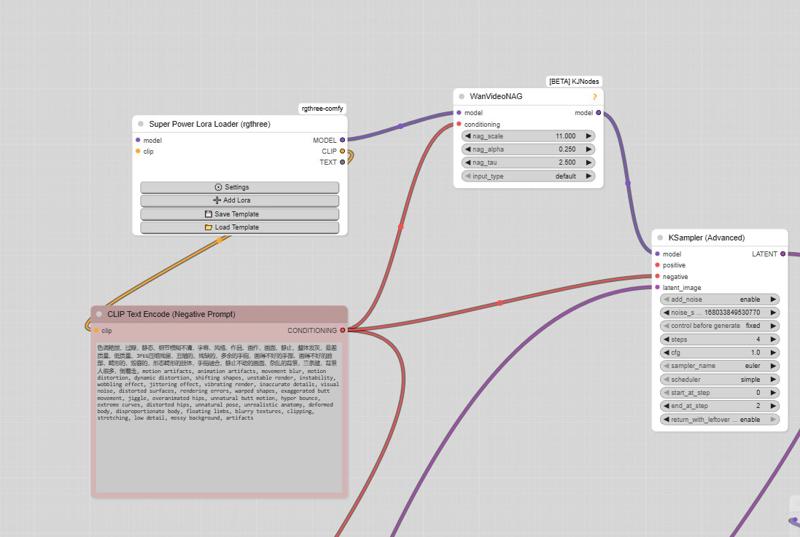
And here is the negative prompt for unwanted movements:motion artifacts, animation artifacts, movement blur, motion distortion, dynamic distortion, shifting shapes, unstable render, instability, wobbling effect, jittering effect, vibrating render, inaccurate details, visual noise, distorted surfaces, rendering errors, warped shapes, exaggerated butt movement, jiggle, overanimated hips, unnatural butt motion, hyper bounce, extreme curves, distorted hips, unnatural pose, unrealistic anatomy, deformed body, disproportionate body, floating limbs, blurry textures, clipping, stretching, low detail, messy background, artifacts, butt bounce, moving hips, swinging hips, shaking butt, wiggling butt, moving lower body, moving pelvis, jiggling buttocks, bouncing butt, unstable stance, unnatural hip motion, exaggerated hip movement, hip sway, hip rotation, bottom motion, pelvis motion, wobbling hips, fidgeting lower body, dancing hips, pelvic movement, motion blur, unnatural movement
And here is the negative prompt from the official ComfyUI workflow:色调艳丽,过曝,静态,细节模糊不清,字幕,风格,作品,画作,画面,静止,整体发灰,最差质量,低质量,JPEG压缩残留,丑陋的,残缺的,多余的手指,画得不好的手部,画得不好的脸部,畸形的,毁容的,形态畸形的肢体,手指融合,静止不动的画面,杂乱的背景,三条腿,背景人很多,倒着走
Note: If you use the default workflow without the node, this negative prompt will not work.
UPTDATE: Lightning Edition – T2V
I’m not really experienced with T2V myself, but a colleague who works with it a lot tested this version and confirmed that it performs very well. From the few tests I managed to do on my side, I got the same impression, although I haven’t compared it directly with the base version yet.
The settings are the same as in the image-to-video version: 2+2 steps or more if you prefer, CFG at 1, and Euler simple (though other samplers also work great).
I don’t plan to make an NSFW version for the T2V release,
but for the I2V version, I’m already quite happy with the first results.
Update WAN 2.2 V1.1 I2V
Updated version of the original Lightning merge — same settings 2+2 steps or more, featuring more movement and smoother flow (depending on the prompt).
The model already works very well in NSFW. Just use the right LoRAs, and the movement will improve.
WAN 2.2 V1 I2V
This checkpoint is based on the original WAN 2.2, with the Lightning WAN 2.2 and Lightning WAN 2.1 LoRAs already integrated. This improves image quality, makes motion smoother and more dynamic, and removes the slow-motion effect that can occur with the Lightning models.
A common setup is to use 2 steps on the high model and 2 steps on the low model, though other settings may work as well. Do not apply the Lightning LoRAs manually — they’re already included in this checkpoint.
My workflow
https://civarchive.com/models/2079192/wan-22-i2v-native-enhanced-lightning-edition
Description
FAQ
Comments (367)
Showing latest 351 of 367.
If I produce a video at 16fps, can I change it to 60fps if that's what I want?
Or should we just make it at 60fps from the start?
Yes, you can. That's actually what I do to save time: if you like the video at 16 fps, set all the seeds to "fixed", enable the 60 fps group (the group where your 16 fps video is located), and generate again. The only thing that will be processed is the interpolation to 60 fps.
@taek75799 Thank you very much !
@OQQO I just checked, and unfortunately, the node I included changes the seed after each generation. You should change it. Try "Seed RGTree"—it doesn't behave that way. It's the one I personally use, but it can be confusing for those who aren't used to it.
@OQQO I have updated the workflow by adding a note and replacing the correct seed nodes.
If you set it to 60fps to start it'll most like end up generating a video that moves super duper fast! Save as 16fps and then use RIFE to increase the FPS. Do that AFTER upscaling.
Generate video, save as 16fps, upscale, and then increase the FPS.
tbh, I didnt expect videos to generate THAT fast and with such a great quality. It's insane, in a very good way, using Q6 models in 5s videos.
Question though, for anyone: is there a way to add a workflow to add sound?
bro did you tried tastysin v8 fp8 ? its so faster and as compare to this it has even more good quality and prompt adherence , i was using this for a long time but when i tried tastysin belive its another level
@kumarkishank959811 link
@ApexArtist1 It's still in Early Access, so you'll have to wait 4 days. but you can try GGUF version
@ApexArtist1 I think this one https://civitai.com/models/2190659?modelVersionId=2466822
@kumarkishank959811 Actually, they are the same speed.
@g1263495582 i tried the latest one dasiwa, i prefer the enhanced version, it has better prompt comprehension and better camera movement.
Next mission Higgs field style cinematic movie
umm i know this is a stupid comment but where do i get those high and low noise models because when i try to download the model you mentioned or the civitai only one file downloads which is "wan22EnhancedNSFWCameraPrompt_nsfwFASTMOVEV2Q6KH.gguf"
so idk what to do with it .......
@qek if you have a workflow can you share
@kayas https://civitai.com/models/2079192 ?
Hi - I did some first quick I2V tests with your Q6 model and I`m really impressed about quality and movements 👍🙂 Never tested a "combined" model that worked so well out of the box.
Is there any way to get T2V running too?? If I use a simple standard workflow I get pretty movements but only washed-out "sepia" toned colors 🙄
@taek75799 ...or is the Q6 model just not suitably for T2V??
Hi sorry, this is only I2V. Try this: put a black image into "load image" and then enter your prompt. The model will be "transformed" into T2V, but be careful: I've never tried it myself, though I've seen many people doing it.
@taek75799 Thank you so much for your fast reply. Wow - this trick works perfect. I never thought it would be so easy 🙂 And btw. your multi-scene workflow is really awesome. I just did some short tests and the results are amazing. I actually landed here by chance because I saw some remarkable videos from other users.
@arkinson Thanks for your feedback, I'm glad you found it! The AI world moves extremely fast; there are already better workflows for transitions with SVI V2 Pro, which creates seamless transitions. I'm currently preparing a workflow and will release it very soon, thanks again.
@taek75799 Hi - thank you for the hint to SVI V2 Pro too. This looks very interesting. I just started to have a look into it. You are right, this stuff moves much too fast 🙂 I`m keen to see your new workflow😉 But I´m still learning from your "old" one. And thanks again for sharing all this knowlage 👍
Thank you for the models!
Yeah, my own comment sounds like a nitpicky nag, but overall this is such an improvement!
@Ooloolool Haha, no worries, I understood! I accept all criticism. In fact, I made three NSFW models; I had to delete the first one, and it's thanks to people like you that I was able to achieve this result. Thank you!
so this is a lora merge right?
Hello, yes exactly.
Hey, I'm using the fp8 model, does anyone know what causes this error? Is it just a notification or does it actually slow down the blackwell GPU?
model weight dtype torch.float16, manual cast: torch.float16
model_type FLOW
unet unexpected: ['scaled_fp8']
Comfy or other?
@g1263495582 Comfy portable from: ComfyUI-Easy-Install
@Noobuser95 Is the video generation done? Or did you cancel it when you saw the message?
@g1263495582 Everything is generated and "works", but this error worries me.
I don't see any errors in generation, the waiting time is not huge. 720x720px 5 seconds is generated at a speed of 25-28 s/it.
However, I wanted to find out what this error is and whether it slows down my generation or model loading.
@Noobuser95 No, it doesn't slow down the generation at all. It's just a harmless warning about metadata. Btw, which GPU ?
@g1263495582 Ok, thank you!
5060ti 16GB, upgrade from 3060 12GB vram, I'm very pleased, speed increase with illustrious (SDXL based) almost 2.5x. From 1.6it/s to 3.8it/s.
so this q8 version is the latest and greatest for my 5090 or what type of version would that be, what setup shall i run. im doing i2v but mine has a smash cut in it and after the smash cut it kind of changes the face. im using this for the lora, what shall i adjust, the strength? or steps? the image is high resolution https://civitai.com/models/1452829/bbc-ride-wan-22?modelVersionId=2464946
Hi, maybe the cut is in the prompt? It's quite surprising I don't get any cuts unless I specify it in the prompt, and the LoRA doesn't seem to have any. Are you starting with an image that doesn't match the sexual pose, and the cut occurs specifically to transition into that pose?
@taek75799 yes the image isnt really in that pose, but i have used qwen to get it as close as i can to the pose yet it still changes the appearance. i have upped the resolution to 1024 x 1024 also. this might just be the limit of this tech tho. Have you seen this civitai.com/models/1866565?modelVersionId=2547973 , https://www.reddit.com/r/StableDiffusion/comments/1pzj0un/continuous_video_with_wan_finally_works/ any way to implement?
@dolantrampf474 hello, this is about the SVI LoRA. I had offered a workflow, but there are still issues with certain GGUFs and many people couldn't manage to install the node. I decided to delete it. Check out my latest workflow, it makes good transitions. This Saturday, I plan to release an improved version with better transitions. I try to offer simple and functional things so that everyone can enjoy them.
I tried your model + your workflow. The model itself is fine, although I noticed that things that are close to each other and both movable (e.g., feet in the background) overlap, which doesn't look very good. The workflow itself also works, although it looks messy; it could definitely be done much better. The upscaling option doesn't work for me, the resulting resolution is the same. Is something not working for me, or did I set it up wrong? Overall, upscaling seems to be the weakest option in your workflow. For clarity's sake, it would also be better to specify something like: result 10 sec (+5 from first 5) when adding seconds. For new users who are using someone else's workflow, this could be a crucial help. Interpolation should be a separate option. If you want complete interpolation of all videos, you select it; if you don't want it, you don't select this option. What we have now is strange: why don't the first two have interpolation and you have to select a separate option for it, but the third one has it automatically? Everything seems to be done well, but not entirely well thought out.
Hello and thanks for your feedback! I’m taking note of it for a future version. Actually, the scaling option does work: it only takes the last image to do it, which prevents degradation for the next video, but the video stays at the desired resolution from the start. We could do an upscale at the end, but I didn't include it because it's extremely time-consuming. Regarding the FPS choice, I chose this system because people sometimes prefer generating their videos at 16 FPS. I occasionally do it too so I can edit the videos later with other programs; it's more practical. I’m already planning to update my workflow to get better transitions—that’s the main point I’m trying to improve right now. We already have various tools for this, but I think I’ll keep the same spirit for the workflow. I’ll certainly take your suggestions into account and think about them, thanks.
Okay, let me preface this with: This thing does things I want so much better than the standard basic model with selected LoRAs. So I’m now much happier with this thing.
As for the dynamic prompting: complete bust. (In the standard model, too, though.)
So far all I was ever able to do was tell it in simple English (preferably looking like Chinese translated into English poorly) what I wanted, and occasionally it would happen and I was happy. Just writing ”[…]. Then […].” often does the trick.
If it doesn’t do what I want it to do then no suggested round brackets, curly brackets, C-code looking prompt “(at [n] seconds: […]).” ever works. The thing either does what I want using the old “Far East Asian language automatically translated to English” prompt style or it doesn’t do it any other way, either.
Hello and thx for ur feedback, all I can advise is to use the dynamic prompt example: give it to an LLM and dictate the image you have and the action you want to achieve, including camera movements if you wish.
Overall, what you have done here is nothing short of revolutionizing Wan 2.2 NSFW. Before this model, I couldn't get a solid missionary thrust out of base Wan 2.2 to save my life no matter how many loras I stacked up and this thing comes in like a machine gun.
If I have one critique, it is that it is difficult for it to produce low key serious faces on women experiencing sex or pleasure using the base model. So far women generally either look bored or like they are cartoonishly screaming their lungs out losing their minds with pleasure. To achieve something in-between, I have been leaning on playtime_ai's i2v orgasm lora with fairly low weights, 0.1-0.2 with some success. It is also difficult to actually slow down the motion below rapid and the orgasm lora helps with that too at higher weights. But it would be nice if the base model could handle the nuance.
Hello and thank you very much for your feedback!
{EDIT : MOSTLY SOLVED USING https://civitai.com/models/2131565/wan-22-casting-sex-doggy-by-mq-lab} (NSFW - Fast Move - FP8 - v2 - H+L) Great work, but I'm still fighting with the genitals, especially in the side view doggystyle position. Women have testicles and the men have labia, and you can't tell who owns the penis between them, as it's mostly sliding into the man. No amount of prompting nor specialized loras could fix it. Some basic genital training is still missing. Hoping it'll be fixed in v3 !
This model is a LoRA merge, so the knowledge is a bit fragmented. It's normal.
Lol, yes, there are still some issues. It depends on the image you give it and the prompt as well, but it's not perfect yet. There will always be problems. For instance, when I notice one, I try inpainting; it can help, but sometimes, even with that, there's nothing you can do. Thanks for your feedback!
@taek75799 Thnx, have a nice day.
@randomchatter1234776 thx u too ;)
@taek75799 just found this newer lora and having better results with this one for what I described. https://civitai.com/models/2131565/wan-22-casting-sex-doggy-by-mq-lab
@randomchatter1234776 Ah, I see! Look at my description, I use it too, but I don't do cuts, I do a zoom.
@randomchatter1234776
we in the early stages my dude, all models go through that, SD, SD 1.5, SD 3, SDXL, PONY, IL, etc,etc..
I've been using AI for longer than everybody else (no joke) and let me tell you this, patience is key.
over the months we will have something godly,don't worry, after someone creates the first penis/vagina LoRa (that is decent) then it will snowball and we will have our degenerate models in no time.
plus people still at nails pace, they don't follow the flow, most are still stuck on IL/Pony and don't know how ridiculous strong ZIT is.
Patience is fine, but without a pioneer to pave the way, waiting is meaningless. Also, the current ZIT is just a distilled version from the base, which is why creators aren't jumping in seriously yet. People still stick to IL/Pony because of the Anime focus. ZIT's future really depends on whether the rumors turn out to be true.
hey guys I just found this newer lora and having better results with this one for what I described. https://civitai.com/models/2131565/wan-22-casting-sex-doggy-by-mq-lab
What VAE do I need for this model? Cant seem to get it working
Hello, try my workflow, the links are included as well: https://civitai.com/models/2079192. If you don't like the workflow, just take the links.
if only i could remove the lightning lora :[
Use the lora with a negative strength value
Hello everyone, I've updated my workflow with SVI Pro. It works very well for transitions. Give it a try, it's simple. https://civitai.com/models/2079192?modelVersionId=2545541
Hi, does exist a way to avoid facefucking during a bj scene? The man "keeps moving" even i i prompted that the girl should do "the job" and the man has to be totally passive
Hello, take a look at the previews, you have a few examples including this one: https://civitai.com/images/111198707
can you reccomend which model should I use for my system? 4070 12gb vram
RAM?
@qek I have 16gb ram atm, but I am going to get 32ram soon. can you suggest me for both please?
@NaughtyRat1 Use Q4, Q5, or maybe Q6 (I think your system can handle it) for 16GB RAM + 12GB VRAM. If you get 32GB RAM, you can go for FP8/Q8.
I had that card and replaced it with a 5090 and 128 GB of RAM. Aim to be able to run Q8 quality or better (BF16, FP16) of any model you use. If you don't have enough VRAM for Q8 then, in my view, you're better off taking your energy and putting it toward saving for a card with my VRAM. You can run less-demanding models while you wait. RAM prices are astronomical right now and Nvidia has held back VRAM for years. But, it's not like any of us has any choice in the pricing.
Spent some more time with this and I am just blown away what a swiss army knife of sex it is. Woman's got a dick in her hand. Want her to do a hand job? Just ask. Blow job? Sure. Let go of the dick and give a deepthroat blowjob? No problem. Simple prompt. NO LORAS. Dick's in her mouth now. Want thick white cum? Done. Too thick? Translucent white cum? Done.
I think the most transformative addition that I must commend you for is the pov hands. She's laying on her back nude, framed from waist up? "the viewer reaches down with their hands and slowly caresses her nipples with his thumbs." Beautiful. Legs spread showing her pussy? "The camera zooms in toward her vagina as the viewer's hand reaches up from the bottom of the screen and rubs her vagina and anus." It can take some experimentation to get right but it is magic.
The critique I'll give on these gens is that they are universally just too fast for me to enjoy. My workflow is to run the mp4s through Topaz AI Video, which I did have to buy, but worth it. I upscale 2x from a base of 848x1200 and raise from 16 to 120 fps then play them back at 0.3 speed in a custom HTML video player I developed with Gemini. I have to admit that since I have this setup I don't actually think I would want you to change the base model though. Being able to slow them down like this, I get a nice long sensual, seductive video for 16 seconds out of a 5 second video due to the 120 fps interpolation from Topaz.
The other challenge is just getting the girl into position so the model can work its magic. The blink loras you suggested for this, still available on civitarchive, can be critical. And sometimes I have to rely on the base wan model and wait for a slow gen with loras like the Ultimate Pussy and Anus helper, which don't always play nice with this model.
Which is the other thing I didn't mention: the speed of this thing. Goddamn what a godsend feature. My base wan model gens take 8 minutes for the 848x1200 and this thing does the same size in 3 minutes. Always prefer this if I can get a scene to work.
Hello, and thank you very much for your kind comment.
Hiya! What a great model, Taek! But I've got a problem with the eyes, which get blurry or deformed. I have no idea what I'm doing wrong, as the rest of the video looks quite decent. I tried various images and the same problem appeared with the eyes. Are the settings in Taek's workflow that I'm using wrong? Or is this normal for Wan videos in I2V? I stuck and have no clue what else I could do :)
My source image:
https://ibb.co/S4H7Cc7J
Frame example after render and upscale:
https://ibb.co/yc0SsCdj
Hello and thank you for your comment. Are you using one or more LoRAs? If so, don't hesitate to lower the strength, as I have the same issue. Otherwise, if you can, increase the resolution.
Try inpainting the video
@taek75799 Thank you for your prompt reply, Taek. I really like your art, and your videos are so colourful and clear. There are also no facial deformations or eye issues. They're just perfect!
The funny thing is that I'm not using any Loras at this stage yet!
- I'm using the same original INT constant value of 720 that you set up in your workflow, but should I increase it? My source image resolution is 1664x2432.
- In positive prompts, I use static faces with minimal facial movement and stable eyes with no deformation.
- For negative prompts, I use: eye deformation, crossed eyelashes, warped eyes, melted eyes, extra eyelashes and blurry eyes.
The models I use are:
- wan22EnhancedNSFWCameraPrompt_nsfwV2Q6KH (low and high). GGUFS.
- umt5_xxl_fp8_e4m3fn_scaled.safetensors
- wan2.1.vae
- NO LORAS
- The samplers are on Euler Simple with the same steps that you proposed in the workflow (4 steps).
Perhaps my source image isn't perfect for VAN ?
However, I've tried many of my previous image generations on VAN and the result is the same.
Thank you for your help!
@Timonos666 Hmm, I see. I always use 1024x1024, then the "Find Perfect Resolution" node will adapt the correct ratio. If you want, send me your base image along with the prompt; I'll give it a try and send you the result. The metadata will be included inside so you can reproduce the same video. Via DM of course, if you'd like. https://www.swisstransfer.com/fr-fr
@qek
Thank you for your reply! Can you please let me know what would be the best solution and it worked out for you? I've tried FaceDetailer but it took ages to generate and the results were poor :(
@Timonos666 n my opinion, you should just increase the resolution. Download a preview video the 5-second ones, as the others don't have metadata. Once downloaded to your desktop for example, drag it onto your ComfyUI interface; you will get the workflow used to create the video. I hope it works, as sometimes it doesn't work with certain versions of ComfyUI.
@taek75799 perfect! Thanks! I will play around with 1024x1024 and looking forward to your results with my base image!
PROBLEM SOLVED!
I was using a base image with imperfectly generated eyes, so the image had to be retouched with the eyes fixed and upscaled to 2048x2992 pixels. Then the WAN video was generated at a resolution of 1024x1024 in the great Taek WAN workflow. It did the job! Her eyes are perfect!
Thanks Taek for all your suggestions! Much appreciated!
What are the différences between the q8, q6, fp8 and q4 versions of the fast move édition ? Thanks !
Hello, the Q8 version will be the best, followed by Q6_K_M, then FP8, and finally Q4_K_M.
@taek75799 Why FP8 is not best? Shouldnt be FP8 best for GF 4000/5000? I've heard that if there is the same .gguf and .safetensors model, safetensors is always faster for newer cards.
@Tozi_White Hello, it really depends on your GPU and RAM. I have 16GB of VRAM and 64GB of RAM. The Q8 probably takes 10 seconds longer to generate, but it is the most accurate version; it's the one that comes closest to the FP16 version.
I just can't thank you enough for your work. I'm very new to video generation from image, but I was using the stock Q6 gguf wan so I would have room for loras. quality was good, but motion timing was always off. I was initially worried about render time of a Q8 version, but wanted to at least try. My jaw hit the floor of how easy this was to use in my workflow and how much it improved my outputs; in quality and following my vision from the prompt.
You solved so many things with this;
> Quality and prompt following is incredibly accurate
> by not needing loras, they no longer compete with one another and take over the scene
> Motion timing is perfect
> overall package size is down with reduced amount of loras needed.
A month ago I was waiting 30 minutes for a 320x240 6s framepack video.
Is your multi stage prompt video combination workflow usable on a 16gb vram card? I'm very interested but want to know if its worth using on my 5070 ti before I spend too much time trying to figure it out.
Hello, and thanks for your comment, I really appreciated it. You can use all my workflows . I try to keep things simple, even if version 1 might look complicated; but honestly, it’s not, it's just repetitive. The latest ones are much simpler visually. The goal is for anyone to be able to enjoy Wan easily. I also have 16GB of VRAM and 64GB of RAM (4060ti) I use the Q8 version, and it works well. If you have any issues with a workflow, feel free to ask, and I'll try to solve the problem. Thanks again!
Tried your WAN vs vanilla 2.2_14B_FP8. Original provides lots more detail from the original picture and general elements: face, body, enviroment, remain more like the originals, any comment on that? Output is generally more blurry. Looking for hints/advice. BTW I added LORA lightx2v_4steps (high and low) at 0.2 and stuff improves a lot. But its not like the original WAN.
Hello, I noticed exactly the same thing. I think my models nsfw v2
don't work well with SVI Pro. I'll look into making a version that will work well with it.
And according to other tests, the CAM v2 model does not have this problem.
I preferred to take down the workflow. Many people are still having a lot of problems with it; I think I'll update it tomorrow.
I have just run some tests. It seems that the FP8 version doesn't have this problem while the Q8 does. Can you confirm that you used a GGUF version with the SVI workflow?
@taek75799 The workflow does not work.
@NoahJiang Hello, yes many people are having this problem. It seems that the new node, the one that makes SVI work, is not appearing. I’m going to wait a bit longer to see how things evolve. Thanks for your feedback.
This is the best model I found
Easy and I can run the Q8GGUF on my 5070ti laptop 12g Vram. I also have 32g Ram
5 sec video @ 60 fps comes out at 8-9 mins
Quality of the first batch is ok to great
Quality of the second batch is really bad unfortunatly, could not make it work so i'm sticking with 1 batch only
I'm playing with the parameters to fine tune and see how i can still improve
Thanks a lot for your work , well done to the creators
looking foward for more !
PS: I haven't been able to use your lastest workflow, too many errors so just quit this one
@taek75799
Recommended LoRA to obtain a very realistic vagina and anus:
https://civitai.com/models/2217653?modelVersionId=2496754
link here does not work anylonger. Do you have an updated link or name of the lora ?
thanks
@jasonbourne6699 https://www.swisstransfer.com/d/38eff426-eb6b-4ded-a3e9-7ba8c60a07d0
@taek75799 thanks buddy !
Ok, I think I'm really missing something here ... Should I use this model in both HIGH and LOW model loaders in ComfyUI? Sorry for this basic question but when I do it like this the generated video is ugly and full of noise. I'm using the recommended workflow
Since I'm an artist and give zero fucks about technical stuff I just go the smoothbrain route, which is the default workflow provided by ComfyUI templates, use it if you are having trouble as the default workflow is meant to work for everyone without any extra nodes (base), and with time you should learn editing said workflow, I now have my custom one edited using the default one, for crispy animations at 1.5K res+
There are two models, with an H and an L in the top list,
For Wan 2.2: the model and loras are split into two models which are ran in passes. First the high noise pass which deals with the motion and then the latent is fed into the low noise which deals with the details. If you try out a default wan 2.2 workflow you will be able to see how its connected and all that.
How do I use this? Doesn't wan 2.2 usually require a low and high model? Only one model file is provided here. I'm new to this :(
H stands for HIGH, L stands for LOW, the creator provides both models.
Yes. To get the best results, you'll need to use both the High and Low modes together. Even if you're making low-resolution videos!
@xDegenerate when I click the download button, it only downloads a single gguf file called:
wan22EnhancedNSFWCameraPrompt_nsfwFASTMOVEV2Q8H.gguf
@pnwphotosandthings409 below the title and aboue the first pics you can choose which version you are looking at and downloading. Get the H and L version
@andycricketfan660 thanks! the UX on this website is kinda confusing when you're new to this
I love how these follow the prompts so well but they do not handle any male on male or femdom type of stuff. Does the new version handle that?
Hello, which version are you talking about? The latest models are the NSFW ones; they handle penises and vaginas, but you can also add LoRAs at low strength to make them even more realistic.
@taek75799 I don't recall the version but it was about a month or so I commented on it. I've tried various combos and strengths but most of the time when the one male goes to penetrate the other male's penis turns into some type of vagina or gets deformed.
@pittmanerotica849 I thinks You might need to find a specific LoRA for that. Also, keep your prompting precise and just use the word 'anus' explicitly to prevent it from generating a vagina. I'm not very knowledgeable about M/M content, though.
@g1263495582 I've tried various prompts, lora, and the like with the checkpoint but it keeps overriding it. It is awesome for all the others and why I want to make it work but just haven't found the right combination yet. I think it is because of the strong prompt adherence that it has the issue with MM stuff. I haven't played around with the new version much yet.
I have installed all the required nodes (KJNodes, Fill-Nodes, PainterI2V, PainterLongVideo, etc.), but when I run it, I keep getting a validation error in the KSamplerAdvanced:
"Given groups=1, weight of size [5120, 36, 1, 2, 2], expected input[1, 32, 21, 88, 62] to have 36 channels, but got 32 channels instead"
How to fix it?
Hello, are you using the correct VAE? Would it be possible to send me the workflow that is giving you this error so I can check? Even if I assume it's mine, many people tend to get errors and, after checking, everything gets sorted out.
@taek75799 I'm using the VAE downloaded from here: https://huggingface.co/Comfy-Org/Wan_2.2_ComfyUI_Repackaged/blob/main/split_files/vae/wan_2.1_vae.safetensors
But I still get the 32/36 channels error. Please help me.
@Kiempc Can u try re-check again in workflow?
Im getting this error:
Cannot execute because a node is missing the class_type property.: Node ID '#297:279'
Hello, have you installed all the missing custom nodes? If so, it could be because ComfyUI might not be up to date. Update it via the Manager and also via the comfyui/update folder.
@taek75799 I fixed it. My comfyUI was out of date (version 3.2) and I was unable to update because of old extensions and bloat. I just reinstalled it from fresh and now it working.
Hi, I know this model is meant for fast movement, but do you have any prompting tips in case I want the scene to go very slow with little movement (i.e. very low thrusting count)
I think it could work with the prompt to some extent, but the goal of this model is to add dynamics. So, the best advice I can give you is to check out the normal NSFW version instead.
The download button here only get me the high noise safetensor. Where do i get the low noise one?
you'll see above the example images there's a row of various versions of this available.. you'll need to choose your model size (FP8, Q8, Q4, etc..) then look for "L" or "H" versions of the same. it looks like they sometimes mark them as "LOW" and "HIGH" for some sizes, and versions.
Look for things like:
NSFW FAST MOVE V2 Q8 H
NSFW FAST MOVE V2 Q8 L
@sfract which of this quantized one can i run decently with 16gb vram and 32gb ram
my results are very blurry, did you know why?
same here,following all the note and using those SVI lora but still vey blurry,not sure what seems to be the problem here
More details?
Can you share your workflow and results?
Cut back on the alcohol. That usually works for me.
Such a versatile model, thank you. My only complaint is sometimes schlongs are 20 inch monsters :D and movement is kind of "wavy."
I do pure T2V and it always comes out greenish tint and hyper 3d model looking. But when I do your workflow that is a combo of T2V & I2V it comes out perfect with the VHS node. Bravo for that, but just curious if I can do pure T2V, it doesn't seem like with vanilla workflow template for wan 2.2 14b it is possible.
Hello and thank you for your comment. I should be releasing a new workflow this weekend and, specifically, the new node I’m going to incorporate removes that greenish tint and adds other features. I'm not very familiar with T2V people often tell me that you just need to put a black image in "load image" and enter a prompt, and that transforms the I2V model into T2V. Try it if you like, I can't really give you my opinion on that.
我用了好多个模型,这个感觉最好
I have two images that didn't yield good results for penetration:
Image 1: I couldn't get the penis to enter the woman's anus/vagina; it always stays outside. https://i.postimg.cc/h4sQsSMg/000298.png
Image 2: The testicle tends to disappear, and the penis doesn't slide smoothly into the anus. https://i.postimg.cc/PqdkSkSf/000231.png
Is there a prompt that works with these images to achieve correct penetrations?
Hello, try a LoRA for the first image. I don't know if my model will do it, it's not detecting a man. For the second image, I tried as well; this pose is quite complicated to achieve, maybe with a LoRA too.
I was wondering, how come you don't use recommend a GGUF clip file? Why go with .safetensor? I've tired using .safetensors and it seems to not want to work.
Ps this is the best Wan 2.2 model I have used, thanks for the enduring hard work!
Hello, you can also run GGUF for the CLIP; it should work as well. Personally, I use either FP8 or FP16, but Q8 is a good option as well, you're right.
And thanks for your feedback :)
@taek75799 I've been using GGUF, I was wondering what sort of difference using FP8 and FP16 could do?
And also, I'm having an issue where the last frame of a video seems to get slightly washed out (when looping a video), so you know what could be causing the issue?
@lemonypudding FP16 will be more precise in prompt understanding. It's the same for GGUF: Q5 is the equivalent of FP8, and Q8 is almost as good as FP16. Regarding your video, the last frame often has small issues unfortunately; did you use a "First/Last Frame" workflow?
@taek75799 Thanks for the clarification on GGUF.
I used a Wan 2.2 Smooth Workflow by Digital Pastel. I modified it to have a first/last frame node, a GGUF CLIP loader and a frame trimmer (to take 1 frame off so there isn't a duplicate frame for when it loops). Is there any way to alleviate the wash out issue? Appreciate the help, brother
@lemonypudding Unfortunately, for the moment, I haven't found a way to fix this with the "First/Last Frame" workflows. There are some very interesting nodes I use personally, which are Painter's nodes. He recently released a node that fixes certain color issues, but it hasn't been incorporated into the "First/Last Frame" workflow yet. Maybe later.
I am releasing a "long video" workflow this Saturday with this new node.
@taek75799 Where do I find Painter's nodes? Can I just find it through the ComfyUI Manager? I look forward to the longer video workflow! Honestly, I appreciate you giving me the lay of the land and promptly answering my questions!
@lemonypudding https://github.com/princepainter/ComfyUI-PainterI2V: these nodes are all available on the Manager, except perhaps "PainterAdvanced" which is very recent. Personally, I use the node on almost all my "PainterI2V" workflows; it allows for improving movements or accelerating them as well. There are also "PainterLongVideo" and "PainterFLF2V". Take a look at my latest workflow, it incorporates the "Long Video" and "PainterI2V" nodes. This Saturday, I will release an update with "PainterAdvanced" which seems to improve transitions even further according to my tests.
I have already posted two workflows with Painter; the latest one incorporates "Long Video".
Can anyone tell me how to work with this? I tried the official Workflow that has been linked on the bottom of this post but when I try it this way, the following happens:
I'm having trouble with a missing note and comfyUI won't tell me how to get it. Did anyone else have that problem?
FindPerfectResolution
PainterLongVideoin subgraph '2 Subgraph'
PainterI2Vin subgraph '1 Subgraph'
When i click on Install All, ComfyUI acts like it has been installed but when I restart it, I have to install it again... and again... and again.
I can't be the only one with this issue, can I?
Hi, Try to install them manually: https://github.com/princepainter
Can nsfw fast move v2 q8 be used on this model t2v?
Hello, try putting a black image in "Load Image" and write your prompt.
Can you adjust the speed of the fast move? @taek75799
@iozxasqw213 Hello, try the normal version; it will be slower. :)
A very good result for a model that does not require others NSFW Lora
I really don't know why the model isn't visible, I don't understand what to do.
Check which folder you installed your checkpoint to, and make sure you're using a .GGUF loader. Typical model checkpoint loader won't work.
Where did you put the model? It needs to be in the diffusion model folder, not checkpoint.
@g1263495582 Unet telling the truth.
I dont know why but model doesnt follow my instructions i am using your workflow first creating the video with normal prompt sometimes it listens sometimes not.
when creating second video it never listens the second prompt it just does whatever it wants.
after second when creating the third it does whatever it wants too.
using v2 fp8 btw with some loras you mentioned.
*And you mentioned you added note about adding sage attention couldnt find it on your workflow where does it located?
f you put the same prompt as the first one on the second one, does it follow the instructions?
Look at the first subgraph in the top left for "Sage Attention" if you have it installed on your PC; otherwise, leave it disabled.
i found the sage attention thanks.
for prompt it only follows first video's movement not instructions if i force the instructions like explaining every move output becomes weird like hands coming from thin air or body vanishes like that.
I wish you a very happy new year 2026.
Okay, I've come to the limit of what I know how to do. Been trying to get this off and on for a while, so I'm coming to get your take, Taek. :)
I can run your safetensor models just fine. But I've downloaded two of your workflows and tried your GGUF models on your workflows and other workflows, and I simply cannot get them to work. Always getting this:
UNETLoader
Weights only load failed. In PyTorch 2.6, we changed the default value of the weights_only argument in torch.load from False to True. Re-running torch.load with weights_only set to False will likely succeed, but it can result in arbitrary code execution. Do it only if you got the file from a trusted source. Please file an issue with the following so that we can make weights_only=True compatible with your use case: WeightsUnpickler error: Unsupported operand 4 Check the documentation of torch.load to learn more about types accepted by default with weights_only https://pytorch.org/docs/stable/generated/torch.load.html.
Are you using a portable version of ComfyUI? No "Sage" installer? Otherwise, go to ComfyUI/update/update_comfyui_and_python_dependencies.bat.
@taek75799 so I'm using the installed native app on Windows. And I did update a dependency, which seems to have helped, but I realized the GGUF models needed to go into the UNET folder and be loaded by the UNET LOADER, then I still used the safetensor FP8 High and Low in the diffusion model loaders, and THEN it worked. And it works very very well. I have to say, you make the best models and workflows I have yet used. Thank you for that. Maybe, if anyone else is confused about where the GGUF models should go and where the safetensor models should go, someone new to ComfyAI like I am, you might add a few words in your model write up.
Anyway, thank you for the reply! :)
can you use this in ComfyUI?
omg, iam so blind, NO LIGHTNING LORA !!!!. FML,
Does anyone know how to prevent character face distortion? I often get distorted faces, especially around the chin area :(
Are you using any LoRAs?
大佬,未量化的模型会放出来吗?
hmm... i think im totally blind or this page really dont have t2v models?
Not blind, no t2v
I believe if you use them with a start image entirely true black, it should behave like a t2v.
For T2V (using comfyui) I feed an 'empty latent' node into the sampler's latent image connector instead of an image. The same model works for both T2V and I2V.
Hello, on the far right of the models, there is a T2V version, but it is not NSFW.
Hi, do you think it's possible to integrate the Infinite video of Stable Vision Infinity Pro 2, in your finetune? What's your thought on it?
Hello, I could do it, but it's not a good idea, or perhaps I could make an SVI version. To be honest, I don't like the fact that the video is very often in slow motion, and there are other issues like prompt adherence starting from the second video. Actually, these two problems go against the idea and the concept of my model.
Thank you for your wonderful work! Since I have never used video combine, I would need some advice. When I decide that I like the video thanks to the fixed seed, I set it to 16fps and start the first video at 60fps, right? But then? Does the second video automatically take the last frame of the first video, or do I have to upload it myself to then do the same process?
Hello, yes, the second video will take the last frame of the first one and continue it to create a total of 10 seconds (5+5 sec). The videos generated by Wan are 16 fps. Only enable 60 fps for the first video if you only want the first 5 seconds. If you want to make a 10-second video with 60 fps, just enable the second video and set the 60 fps only for that second video.
Okay so I just tried this model, but my generation was horribly distorted and blurry. I just added two unet loader nodes to my workflow and connected them to my lora loaders instead of my regular load diffusion model nodes and also disabled the lightning lora's. I'm sure I did something wrong, or I'm missing something, but I don't know what 😕
Hello, send me your workflow if you want me to be able to check that: https://www.swisstransfer.com/fr-fr
не выдумывай. всё пашет, как Отче наш.
Thank you very much for your model and work.
However, I seem to be encountering some issues with generating the second and third video segments: I've noticed that the generated second video is slightly grayer and less detailed than the first, and the third video suffers from further quality degradation and is even grayer. This causes sudden drops in image quality during the final video stitching stage.
I'm not sure if it's a parameter setting issue. I used your provided workflow and simply changed the number of steps in the three subgraphs to 2+3.
Hello and thank you for your comment. Indeed, the longer the videos, the more the quality will degrade. I could have added even more segments, but I feel that 15 seconds is still reasonable; beyond that, the quality will be significantly degraded. Unfortunately, we don't have another choice yet. After the first 5 seconds, the second section will take the last frame of the previous video. Try to increase the resolution as much as possible and try to have a very sharp image, as this helps a lot. Don't hesitate to use upscalers for that.
There was an error in the Lightning Edition V2 workflow: the LoRAs from the first video were also being applied to the subsequent videos, which was impacting the quality. Sorry about that.
There is a very annoying problem: in gay sex, certain positions can cause the recipient's penis to disappear.
Hello! Lol, I haven't tried gay sex and, sorry, I wasn't able to include it in the model. Try using LoRAs; I believe there are two available.
@taek75799 Thanks, but I couldn't find that kind of Lora, looks like I'll have to learn how to train it myself...
@sishen06sishen06 https://civitai.com/models/2206922/wan22-i2v-gayanalsex
There is another one, but I haven't found it.
Or else, try a Futanari lora, that might help: https://civitai.com/models/2040641?modelVersionId=2476982
@taek75799 Thank you, they look fantastic.
@sishen06sishen06 Try not to set the lora strength to 1. You can get very good results by lowering it, and it helps maintain facial consistency.
@taek75799 Thanks, it still disappears. Adding LoRa doesn't help. But I found a solution. For these kinds of tricky problems, I just use SFW's Checkpoint and then add NSFW's LoRa, and it works.
Hi, interesting work, thanks for sharing. Which of the Wan 2.2 Lightning LoRas are included in your v2 NSFW models, please?
Maybe the official ones? https://huggingface.co/lightx2v/Wan2.2-Lightning/tree/main
Hello, I use the low 1022 and the high 1030
@taek75799 Hey, thanks for your helpful reply! Is that the Kijai 1030 version, perhaps?
And I should mention that your Q8 V2 Fast model is making me revisit old workflows, because it's offering prompt adherence I never experienced before.
@pufferjacketeven475 Thank you, I'm glad to hear that. These are just the official Lightning versions.
At some point, the second video stopped working properly.
While the first video was created correctly,
the second video was created with very poor quality, and
the first and second videos were not merged (in the final output). What should I do? Please help me.
Hello, sorry, I updated the workflow yesterday. There was a LoRA connection issue; I've already fixed the problem and replaced the workflow, but I plan to update it in a few hours, it will be simpler.
I have another question.
In your workflow, i have a person sample image (upper body),
and i masked the sample image so that only the upper body, arms and hands move, while the head (face) remains stationary.
However, I don't know how to connect the nodes.
image load (mask) -> Find Perfect Resolution (mask) -> ? -> ?
@taek75799 Sorry, my English is bad. To put it simply, I want to keep my head (face) still. What's the best way to do this?
@OQQO It's likely to be very hard to do, I've already tried for other things. Try using negatives, but you need to connect a 'WanVideoNegative' node; check the description, there is a tutorial.
Sorry guys ... I am going crazy with this AI stuff which is new to me. I want to create NSFW videos from photos. So I have downloaded the NSFW Fastmove v2 FP8 H version as safetensors file because I am using Draw Things on a Mac.
First strange thing is, when I import the model into Draw Things, in the strength section I can just find the buttons "Text to Video" and "Video to Video". I would also expect a "Photo to Video" button. When I choose "Text to Video" the strength gets set to 100%. When I choose "Video to Video" it is set to 70%.
Then I import a photo and set the other settings as follows:
Image Size: 576x768
Steps: 35
Number of Frames: 53
Text Guidance (CFG): 7,0
Sampler: DDIM Trailing
Shift: 5,0
Nevertheless if I choose "Text to Video" oder "Video to Video" in the strength section, I get a result which just shows a lot of noise like a snow storm. :-(
And it seems to take a long time. With these settings, it takes about 40 minutes to generate the "snow storm" on my Mac Studio M4 Max with 36 GB RAM. Is this normal?
Oh buddy... I legit feel bad for you, you need to get yourself a very simple beginner workflow, get the template one from ComfyUI templates (the one with the waving duck wearing a shirt with a C on it), that's the one I use, you don't need a MLG NOSCOPE 420.69 workflow.
Start small then climb your wall up otherwise you will get frustrated and quit.
@xDegenerate Do you have a link for me? The other question I am asking myself is about the correct tool. I heard several times that Draw Things would be the one to go for Mac users but when I take a look on several created images and videos around here I just find some when I filter on Draw Things as the tool. But with Comfy UI created ones I find much more.
So did we find a fix for the blur/distortion?
using GGUFs one lora which was suggested.
diffusion models disconnected.
using your workflow on a rtx5080
The link is not working for you. Can you update it?Recommended LoRA to obtain a very realistic vagina and anus:
https://civitai.com/models/2217653?modelVersionId=2496754
Thanks for Lor.however, they don't draw the anus for some reason. the workflow is awesome.
Try my new workflow this time, I promise I didn't make too many mistakes haha!
I am using your previous workflow, but I dl'ed the new 2.1 workflow to see what changed. Although the workflow was better organized, I noticed that many nodes were unconnected. I think this one would possibly be more difficult to get up an running for a newer user. Just my feedback. Thanks for your good work on the model.
@reloadUI Hello and thanks for your feedback! I can understand that it might be confusing to see almost all the nodes connected via 'Wireless' (Wifi) nodes, haha, using Set and Get. However, this one is much easier for a beginner who wants to extend the workflow.
Check out the tutorial inside the workflow on how to extend it to create videos longer than 20 seconds. The subgraphs might also seem confusing at first, but I hope it encourages people to be more curious and eager to learn.
@taek75799 yeah i understand subgraphs and modified them, i just didn't realize some nodes were connected wirelessly however. I can try again. I wanted to use a diffusion model instead of the gguf and when i started swapping the wires i noticed many others were unconnected. I wasn't about to go track it all down so I just swapped back to the older version of the workflow. I am assuming the fp8 model is likely better for my 5070 ti.
@reloadUI I'm using the Q8 version; it’s actually better quality.the main highlight of this workflow is the new PainterAdvanced node. If you're not interested in that, V2 will be the same; or you can easily add it to the V2 version by simply replacing the PainterI2V node with PainterAdvanced.
@taek75799 I will dl and try the Q8 version. I re-attempted the v2.1 workflow and now agree it is superior. I think this is due to the 'protect color strength' Is this coming from PainterAdvanced? This seems to be doing a much better job of capturing the color profile of the original image.
@reloadUI Exactly, it's thanks to this node.
Hi (again)
I'm currently trying the V8 fast move gguf.
Is it any way thos "choose" the expressio that the subject has to perform? It kinda ignores any promt.
And also, it seems like that ignores the "cumshot" suggestion... at least, sometimes it does, but it's random ahah
Hi! Yes, sometimes just changing the prompt or simply the seed is enough. Wan is more familiar with certain prompts. Check out the previews for the different models; I tried to include as many different situations as possible.
안녕하세요. 잘사용하고 있으면 귀하의 노력에 깊은 감사의 인사를 드립니다.
WAN 2.2 향상된 NSFW | 카메라 프롬프트 준수 (라이트닝 에디션) I2V 및 T2V FP8 GGUF를 사용중입니다.
질문이 있습니다. (아래는 KSampler 설정들 입니다)
KSampler (높음)
add_noise: noise_seed 활성화
: 1010115286654161
생성 후 통제: 무작위화
스텝: 8
CFG: 1.2
sampler_name: 오일러
스케줄러: 간단합니다
start_at_step: 0
end_at_step: 2
return_with_leftover_noise: KSampler (낮음) 활성화
add_noise: 비활성화
noise_seed: 0
생성 후 제어: 고정
스텝: 8
CFG: 1.1
sampler_name: 오일러
스케줄러: 간단합니다
start_at_step: 2
end_at_step: 4
return_with_leftover_noise: disable
이렇게 설정시 빠르긴한데 얼굴이 뭉개지고 화질이 너무 떨어지는 현상들이 발생합니다. 올바른 수치 및 조성또는 다른 방법의 말씀 부탁드립니다.
Hello and thank you for your feedback. You changed the total number of steps: it's set to 4 by default, but did you change it to 8? Right now, you are only performing 4 total steps, not 8.
You could also try 6 steps on the 'High' KSampler, with 'start_at_step' at 0 and 'end_at_step' at 3. Then, on the 'Low' KSampler, set it to 6 steps, with 'start_at_step' at 3 and 'end_at_step' at 6.
Did you also increase the CFG? To be honest, I haven't tried increasing it in a while because it might tend to 'burn' the image. My model has Lightning LoRAs integrated, and it works well with a CFG of 1.
Please note that if the issue occurs with the second generated video, it's normal to lose facial consistency. To prevent this, try increasing the resolution. One important thing: the face must be clearly visible in the last frame of every video.
@taek75799 대단히 감사합니다. 덕분에 많은것이 한번에 해결되었습니다. 새해 복 많이 받으세요!
@horojs853 Thank you, and a very Happy New Year to you too!
which non gguf version works best with a 12b card?Im having issues getting comfyui manager installed rn, so im stuck with just the regular versions for now.
The only non-GGUF version is the fp8 version. If you're having trouble installing the Manager, is it because the 'git pull' isn't working? Have you installed Git on your system?
Holy hell this model is awesome! I don't even need any LoRAs, it just understands what I need XD
Exactly ! It's awesome !
These models are just amazing! I am using the latest NSFW Fast Move V2 Q8 models and while they work great with prompt adherence, it tends to add a lot of bouncing movement. For example, I have a character sitting on a chair, and just bounces up and down despite this not being prompted for at all. Hugging characters also tend to start bumping their pelvises into each other... Is there any way around this, or do you maybe intend to release some NSFW V2 Q8 models (without fast motion)?
Hello and thank you for your feedback. Unfortunately, this kind of behavior can happen sometimes; it's inevitable. To avoid this, if you aren't doing NSFW, use the CAM v2 version. It’s even better at understanding prompts and camera movements, but it is not NSFW-friendly.
Otherwise, try playing around with the prompt, as that works well too. For instance, ask the AI to cross her legs... you get the idea—ask it to perform specific body or head movements; sometimes that does the trick. I will release the standard Q8 version later; I haven't had the time yet.
@taek75799 Thanks! Does the CAM V2 know about softer NSFW like genitals etc.? I tend to do more softcore stuff (nudity with walking, dancing, twerking, and so on), so if that's the case, CAM might be better for me. :)
@Eshinio This one won't render penises or vaginas, lol. You can always add the appropriate LoRAs to it afterwards.
@taek75799 I have been testing the CAMV2 model and it's just perfect, I can do what I wanted, without all the extra bouncing. Thanks again for these amazing models!
Feeling stupid to ask (but I am a bit overwhelmed by this HUUUGE workflow) but what am I doing wrong when I took your recommended https://civitai.com/models/2079192?modelVersionId=2562360 workflow 1:1, downloaded this checkpoint and put it into the GGUF loaders and used an image + prompt. Missed anything?
The result is a completely pixelated video (persons body can be recognized, but no details)
Hello! After generating your video, completely pixelated, save your workflow and send it to me here so I can check it, if you'd like: https://www.swisstransfer.com/fr-fr
@taek75799 Thanks for helping, here is the workflow + the failed video and input image
https://www.swisstransfer.com/d/3ecf479b-c696-4743-880f-4da87e539d89
@BadgerSlayer3 You're using the same model twice. Set the H (High) model at the top and the L (Low) model at the bottom.
New FunVace workflow: it's extremely easy to use. If you have separate videos and want to join them with a seamless transition, use this! Thanks to Bob once again, excellent work: https://civitai.com/models/2277993?modelVersionId=2563927
Hi! Tell me, don't you have a good workflow image to image nswf? Sorry to bother you.
@cantayou527 Sorry, I don't use image-to-image.
The workflow is just a bomb! 20 seconds of continuous, seamless video in half an hour on a 16 GB RTX 4060 ti. Advanced and convenient.Which, of course, cannot be said about the model itself. She makes men uncontrollable. A man fucks the air at the sight of a girl without panties.He becomes inadequate.No complex query solves the problem.The developer does not think about preliminary caresses at all, the model has a straightforward "way of thinking".Maybe she's good outside of a sexual context, I haven't tried it)
Hi! Grab the CAM V2 model, it won't screw anyone over, haha
@taek75799 @taek75799 Hi!Thank you. I read the comments, so I downloaded this model. I haven't noticed any difference yet, so I'll try again.
@taek75799 Hi! The model is beautiful! Thank you.! just tell me why is it bad listening to camera prompts? I am writing this text : (from 0 to 5 seconds : static camera / static frame,the zoom is disabled) and nevertheless the zoom still turns on.(
@cantayou527 Thanks for the feedback! That can happen with the camera; Wan is sometimes stubborn. Try emphasizing it in the prompt with 'static camera' or 'static shot,' but sometimes even that doesn't work. You should also try using a simple 'first/last frame' workflow; it's very effective for this kind of thing.
@taek75799 Hi! Thanks for the feedback! And how do I specify camera requests? at the beginning of the request? in quotation marks or maybe in square brackets? how is this more efficient, which is better understood by the model? Oh, and could you suggest a link to the "first last frame" workflow? and which model should I download for this workflow?Thank you in advance, with respect.
@cantayou527 I'm using the base one, it works well: https://blog.comfy.org/p/wan22-flf2v-comfyui-native-support. Any Wan2.2 model will work with it. For the camera, try this prompt structure: https://civitai.com/images/108547936. Just give it to an LLM, tell it what the image represents, and ask it to adapt it to what you want (action and camera).
@taek75799 thank you very much!
@taek75799 and CAM V2, will it work on this workflow?
@cantayou527 Yes
@taek75799 Hi! I'm sorry to bother you. The problem is that I copied the node groups to increase the video duration to 30 seconds. I seem to have connected everything correctly, but it doesn't work. Could you take a look my workflow?
@cantayou527 Hi, Yes, you can send it here.
@taek75799 Thank you in advance : https://www.swisstransfer.com/d/502f2add-3ca6-4b28-a5b8-10ddc35d354a
@taek75799 so fast? Thanks a lot.! I can't explain where I went wrong.
@cantayou527 Sorry, I didn't look however, the names of the different groups should be changed, I haven't done it yet.
@taek75799 I understood from your edits that you should duplicate the groups in the middle, and always leave the last group last at number 4.
@taek75799 Hi! I tried out your new models on the workflow that you sent me.The camera listens perfectly, but for some reason the video quality dropped.
@cantayou527 Unfortunately, the longer the video, the more the quality degrades over time. This Saturday, I'm releasing new models with a workflow; it will offer better quality, perfect transitions, and improved consistency.
@taek75799 I I tested it on a 10-second video. The quality is better on the fast and cam models with the same promt, but it doesn't respond to requests for the camera.And in the new model, he breaks people's faces.
I really love this model and have been using it exclusively for the past month, but something doesn't work well for me with LoRAs and I wonder if anyone has any tips:
When I create a video with 2+2 steps or even 3+3 steps for example, with JUST the model - it looks great and maintains a good quality.
When I add different LoRAs (happens with most loras) in a 0.5-0.7 strength - I get a much more blurry and smudged result, the people get less detailed, etc.
Any thoughts?
HI you can lower the LoRA strength even further; sometimes I set it as low as 0.2 or 0.3.
Really nice model. What consistently goes wrong is how often times the guy just starts to suck his own dick instead of the woman doing it (in a non-pov image that doesn't have a male figure in it to begin with and who is simply entering the scene via prompt).
I assume this could be fixed with the nsfw-clip? I haven't tested that one yet.
The NSFW clip is likely to cause even more issues. Try to bypass it using the prompt, such as 'man looking at the camera,' 'smiling,' or other head movements.
@taek75799 Ah, right, just making more precise descriptions of the male - makes sense. Thank you.
Excellent model, and your workflow works well. You put a link for a 'realistic vagina and anus' lora, but it seems this model has been removed from civitai. Do you know if there are any others that work well, or if this resource can be found elsewhere?
@taek75799 Thank you, this lora is a great addition.
One problem I face is making the woman fully naked if the input image (i2v) is clothed. The bottom wear is removed but top keeps on. Any tricks?
Can you give me an example of a prompt you use?
@g1263495582 prompt:
The video begins with a close-up of a woman. It then cuts to the same woman fully naked having sex in the missionary position. She lies on her back on a bed, her legs spread wide. From below, the man's large penis can be seen inserted into her vagina. Kneeling between her legs, he thrusts his penis into her vagina. Throughout this scene, she appears to be experiencing pleasure
@limbojunkie I think the problem might be the cuts. Maybe you need to emphasize 'no clothes' to reinforce the 'fully naked' tag. Or try describing her 'exposed skin' or something similar.
I am not familiar with GUFF model. Where should I put it? I can not find the model in the list even if I tried put it inside unet folder or checkpoints folder.
Put them in the unet folder. Then use this custom node to load them: https://github.com/city96/ComfyUI-GGUF From there you wire their outputs the same way as the normal Load Diffusion Model node. There are a bunch of workflows on here you can find that utilize them too.
@contentaway Thank you! However, the video generated from using this GUFF model is very blurry and filled with mosaic fragments. Do you have any idea how it turned out like this?
@HighlegAnime Hi! Can you send me the workflow used for these videos? Often, people use the High model twice; are you actually using both the High and Low models?
Hello! As you know, I believe that your model is the best. It covers most of my needs. But can you recommend a good LoRA for anal sex and cum in ass? I am having trouble with two scenes:
1. I have a close-up of the ass and pussy. But during the animation, the penis constantly penetrates the pussy, not the ass, even though I specify anal sex in the prompt.
2. I need to animate sperm flowing out of the anus. But it still flows out of the pussy.
Thanks in advance.
Hi, and thanks for your comment! I've already tried with LoRAs. It's very difficult to get something realistic coming out of the vagina, so I do it without LoRAs. I sometimes manage to get a decent result by pushing through different seeds and using 'cum slowly flows from the vagina'. In this case, it doesn't come out of the vagina or the anus, but the cum covers the penis and slowly disappears. To get this effect, I have to keep trying different seeds; I often spend quite some time getting exactly what I want. I test many prompts, and when I see that it's possible, I keep going by changing the seeds.
For your specific case, I think the best move isn't to do what I just said lol, but rather to use inpaint. That’s how I get exactly what I want. Try Fooocus; it’s an interface that runs Pony and has an excellent inpaint feature. You just have to add the cum dripping from the anus and then use the first/last frame method. It does take quite a bit of time, though. Good luck!
@taek75799 Thanks for the reply. Yes, I can also get cum flowing out of the vagina using the prompts in your model this way. The problem is only with anuses. I will take your advice.
I'm getting very noisy video. Not sure why. I followed the instructions.
Workflow?
Hi! Did you make sure to download both the H (High) model and the L (Low) model?
@g1263495582 How do I share it? Sorry, i haven't done that before here.
@taek75799 Yes. I have both running.
@LdfY346t5Gbd I just saw your video. You put the High model on the Low KSampler, and the Low model on the High KSampler.
@taek75799 Euler Simple, 1cgf, 129 frames, 560x720 same result even on 720x912, crf19, 4 steps, refiner at 2, seed 1120370757823255,
@taek75799 Oh god dang it! XDDDD Thx. My bad
That's cause my dumb ass put the two Sage patches the other way around.
Works beautifully now. Thank you.
Two questions.
Are these based off the original ComfyUI versions and what version of the LightX did you use.
VERY stupid question, but your in your recommended model is just wan22EnhancedNSFWCameraPrompt_nsfwFASTMOVEV2Q8H.gguf
without high and low versions
Hi, 'H' for High and 'L' for Low.
Thank you found them at last :)
but for all those smart otherwise like me out there:
Different versions are above the preview images, not in the files tab haha
@miikiious375 thank you!!!! I thought I was the only one seeing and downloading only one model
No stupid question around here! Glad you got your answer!
Thank you, I love your models, they are awesome. I have one problem though. I find it very difficult to get them to stop doing that open mouth thing in missionary. I tried specifying facial expressions in many different ways, multiple loras with varying strengths, I tried putting in the prompt that she relaxes and keeps her mouth closed. But nothing works. It would be cool to have better control over her facial expressions. Got any tips?
@Kambai
Anime and semi-realistic problem mostly.
Realistic images (score 7+ on CivitAi) don't have that problem.
This is reason number 1 I don't do semi-realistic or catoon as the characters start talking, and I don't want my women talking.
Do I need to do anything different to create an animated (2D) video with this? Like modifying the prompts?
Hello, look at the different previews, many are done in 2D. The prompts are there, also check the description for help with the LoRA if you want as well.
Is there a safetensors version of this?
it should work just the same. I was also concerned but it worked. I just used the comfyui WAN2.2 template and plugged in these; it just seemed more fool proof than having to scavenge for custom nodes god knows where
What do you mean by 2+3 by Jellai?
The default 2+2 is (from your workflow)
Hight: Steps: 4, endAt: 2
Low: Steps: 4, startAt: 2 and endAt: 4
So, is it valid for 2+3 ?
Hight: Steps: 4, endAt: 2
Low: Steps: 6, startAt: 2 and endAt: 5
Hello, you can add steps, it can help sometimes. I often use 2+2 steps, but I also happen to do 3+3, and 2+3 works well too. For example, for KSamplers with 6 steps: for the 1st KSampler (high), set 6 steps, set start_step to 0, and end_step to 3. On the 2nd KSampler (low), set 6 steps, set start_step to 3 and end_step to 6.
For 2+3 specifically, your setup would be:
High KSampler
Steps: 5
Start at step: 0
End at step: 2
Low KSampler
Steps: 5
Start at step: 3
End at step: 5 (or much higher, it doesn't really matter)
Everything works very well, but there’s one thing I can’t get to work: i2v — a photo of a girl grabbing a penis so she does a handjob… there’s no way, she keeps putting it in her mouth all the time. Any advice? I’ve tried the NSFW text encoder and nothing.
Hello, try it without the NSFW text encoder, and if that doesn't work, try using the prompt to make the woman not do that like describing a head movement or an emotion such as screaming or smiling, otherwise, maybe a LoRA.
tell her to wash it
Hi thanks for the workflow and checkpoint. I works for me but the face change every time. How do i fix this ? with the low or high k sampler ? And its blurry. I have the high and low in the right loader. Only i have cfg at 2.0 on both and high 6 steps 0-3 low 6 steps 3-6. Thank you
Hello, have you tried CFG at 1? Also, try increasing the resolution if you can.
@taek75799 thanks brother. I will try both ! WORK ! Thanks Again
Hola en este paquete incluyes el flujo de trabajo para crearlo en comfiui??
@hpinventa2007953 Hi https://civitai.com/models/2079192?modelVersionId=2562360
Hi! Sorry if it's a dumb question, but I'm missing Wan2_2-I2V-A14B-HIGH_Q8_(lightning edition)V1.1.gguf and Wan2_2-I2V-A14B-LOW_Q8_(lightning edition)V1.1.gguf
Where can I get them? I have the main model, the VAE and text encoders but I'm missing those files. Many thanks!!
Hello, here is version 1.1 in Q8. I'm not sure if it's actually the version you're looking for; check out the previews on it, you just have to scroll to see all the versions: https://civitai.com/models/2053259?modelVersionId=2364540
The base of the checkpoint is good, but unfortunately it doesn't follow the prompt very well. The penis detaches from the body, cumshots fall from the sky or come out of the mouth. Otherwise, a very good checkpoint. Thank you for the checkpoint.
Hi, maybe dumb question but I seem to be getting a lot of trouble with NSFW generation. The model has a very high tendency to create a green jacket or green background no matter the subject. Is this a known issue or am I doing something wrong? Thanks
Hello, unknown problem lol. Send me your WF so I can check it if you want.
It seems to be unfriendly to snake women,most of the time, their lower bodies are always split into two legs.
The item in the image above (load Diffusion Model HIGH & LOW) does not reflect wan22EnhancedNSFWCameraPrompt_nsfwFASTMOVEV2Q8L. The file save destination is neither checkpoints nor diffusion_models, but it does not appear.
Must use "GGUF Loader"
@qek
https://tadaup.jp/1sXoi3cz.jpg

So, is it correct to place models only within GGUF, as shown in the image?
The models themselves are all stored in ComfyUI\models\diffusion_models, but in this case, you cannot enter anything in the Load Dofffisopm item below.
@ozawa252521 Save the GGUF models in "Unet" folder reload the comfyui window and it will show up in the selector.
@aibillybob I moved four files to the "Unet" folder (wan22EnhancedNSFWCameraPrompt_nsfwFASTMOVEV2Q8H wan22EnhancedNSFWCameraPrompt_nsfwFASTMOVEV2Q8L wan2.2_i2v_high_noise_14B_Q8_0 wan2.2_i2v_low_noise_14B_Q8_0). I moved them, but I still can't enter anything in the Load Dofffisopm field. Sorry, I'm a beginner.
@ozawa252521 you only need to use the "Load Diffusion Model" High/Low if you have a non quantised models. The GGUF Nodes above them are the ones you want to use for these models from Taek on this page. If when you run the workflow and you are getting an error about those diffusion models not being found then just select them and bypass them by selecting them and pressing "Ctrl+B" on each node.
@ozawa252521 Use only the GGUF Loaders above in the image you attached. Ignore the Load Diffusion Models nodes. You can select them and press "Ctrl+B" to Bypass them if they are throwing you errors. The GGUF Loaders will have your downloaded models from the "unet" folder.
I love the NSFW fast move V2 Q8 model. Is there another one of your models you would recommend in addition for other tasks? Because the number of models is overwhelming. I would like to stay with the Q8 version. fp8 gave me OOM at highres.
Hello , will you do a ltx2 NSFW checkpoint?
Gotta wait for the NSFW LoRA first + see how good it actually is. IMO, LTX-2 is better suited for T2V. For I2V, it's okay if there isn't much movement. Plus, LTX-2 is super sensitive to prompts. We'll have to wait and see.
Which one has better results, Q8 or F8? I saw that Q8 is the latest version..~
Q8 offers better quality than FP8, while FP8 is roughly equivalent to Q6 or Q5.
@g1263495582 Thank you so much!
My favorite checkpoint by far ! But the boobs are always bouncing crazy, even when the model don't move. How to fix that ? I would like to see the breast hanging naturally.
try to Use the NSFW V2 version (not the FAST one). (WAN 2.2 Enhanced NSFW | camera prompt adherence (Lightning Edition) I2V and T2V fp8 GGUF - NSFW V2 Q8 High | Wan Video Checkpoint | Civitai)
@g1263495582 Thanks a lot ! I had the same issue.
Will this work well with the svi 2.0 pro continous workflow on civit?
All models work with SVI Pro. Sometimes the scenes will be in slow motion; if you are doing NSFW, it won't be in slow motion. This one was made with SVI Pro: https://civitai.com/images/116998000
I'll have some time this week; I'll see if I can make an optimized version with SVI Pro.
I don't know what you did. But you nailed it! I am getting great results and can run a 5 second video in less than 50 seconds. Which is about 25-30 seconds less than the FAST Q8.
50 seconds 5 seconds? i have 13 minutes! can you please share with me your workflow so that i can check it?
@kaybee1984 I am using the suggested workflow in the model page :)
Also, I'm only doing 480x720 to keep things quick.
@archerjones1985 5090?
@g1263495582 yes. 5090. 64gb Ram
@archerjones1985 oh ok. 24VRAM 3090 + 48 GB RAM here
this explains anything
@kaybee1984 I was using a 4080 Super (16gb VRAM) 2 weeks ago and getting 5 second vids in under 110 seconds. 13 min still seems very long.
hi,
Kindly share your workflow for your checkpoint WAN 2.2 Enhanced NSFW.
It´s right there on the models page...
this seems much more promising for everybody, but hello, i am a newbie. been searching here and on the internet how to activate this in wan2gp. anybody got a tutorial how to activate a new checkpoint. just adding it to the checkpoint folder does not work. May bee an idea to put it in the tools section here on Civitai... . thanxxxx
Works good sofar the CameraNSFW prompt version, even with more steps. The movement is fast, it seems to stick to the camera prompts.
One question though:
What prompt can I use for pulling out an object (p*nis for example) ?
this is the best model I tried so far, nothing even comes closer with angles and motion. Something I'd like help with is female genitalia, if I use the suggested Lora (2.2_i2v_high_ulitmate) the quality degrades alot, should I use both the low and high loras on it or just one of them, and which value would you suggest? thanks
Details
Files
wan22EnhancedNSFWSVICamera_nsfwFASTMOVEV2Q8H.gguf
Mirrors
wan22EnhancedNSFWCameraPrompt_nsfwFASTMOVEV2Q8H.gguf
wan22EnhancedNSFWCameraPrompt_nsfwFASTMOVEV2Q8H.gguf
wan22EnhancedNSFWSVICamera_nsfwFASTMOVEV2Q8H.gguf
wan22EnhancedNSFWCameraPrompt_nsfwFASTMOVEV2Q8H.gguf
wan22EnhancedNSFWSVICamera_nsfwFASTMOVEV2Q8H.gguf
wan22EnhancedNSFWSVICamera_nsfwFASTMOVEV2Q8H.gguf
wan22EnhancedNSFWSVICamera_nsfwFASTMOVEV2Q8H.gguf
wan22EnhancedNSFWCameraPrompt_nsfwFASTMOVEV2Q8H.gguf
wan22_fast_q8_high.gguf
wan22EnhancedNSFWSVICamera_nsfwFASTMOVEV2Q8H.gguf
wan22EnhancedNSFWSVICamera_nsfwFASTMOVEV2Q8H.gguf
wan22EnhancedNSFWSVICamera_nsfwFASTMOVEV2Q8H.gguf
Enhanced NSFW SVI camera prompt adherence (Lightning Edition) I2V and T2V v2.0 Q8 FP8 HIGH - Wan2.2.gguf
wan2.2_i2v_high_noise_14B_Q8_O.gguf
wan2.2_i2v_high_noise_14B_Q8_H.gguf
wan22EnhancedNSFWSVICamera_nsfwFASTMOVEV2Q8H.gguf
wan22EnhancedNSFWSVICamera_nsfwFASTMOVEV2Q8H.gguf
wan22EnhancedNSFWCameraPrompt_nsfwFASTMOVEV2Q8H.gguf
wan22EnhancedNSFWSVICamera_nsfwFASTMOVEV2Q8H.gguf
wan22EnhancedNSFWSVICamera_nsfwFASTMOVEV2Q8H.gguf
wan22EnhancedNSFWSVICamera_nsfwFASTMOVEV2Q8H.gguf
wan22_high_noise.gguf
wan22EnhancedNSFWSVICamera_nsfwFASTMOVEV2Q8H.gguf
wan2.2_i2v_high_noise_14B_Q8_H.gguf
wan22EnhancedNSFWSVICamera_nsfwFASTMOVEV2Q8H.gguf
wan22EnhancedNSFWSVICamera_nsfwFASTMOVEV2Q8H.gguf
Wan22_Enhanced_Camera_High.gguf
Wan2_2_Enhanced_FastMove_HIGH_Q8.gguf
wan22EnhancedNSFWSVICamera_nsfwFASTMOVEV2Q8H.gguf
wan22EnhancedNSFWSVICamera_nsfwFASTMOVEV2Q8H.gguf
wan22EnhancedNSFWCameraPrompt_nsfwFASTMOVEV2Q8H.gguf
wan22EnhancedNSFWSVICamera_nsfwFASTMOVEV2Q8H.gguf
wan22EnhancedNSFWSVICamera_nsfwFASTMOVEV2Q8H.gguf
wan22EnhancedNSFWCameraPrompt_nsfwFASTMOVEV2Q8H.gguf