⚠️ Important information
All models already include the Lightning LoRAs, except the SVI models, where Lightning is not included.
Do not use additional Lightning LoRAs on models that already have Lightning integrated, or the quality will be degraded.
For SVI models, you can use Lightning LoRAs if you want faster video generation.
2or3 ksampler (for svi) https://civarchive.com/models/2079192?modelVersionId=2668801
v2.1 (for nsfw v2) https://civarchive.com/models/2079192?modelVersionId=2562360
v2.1 with MMAUDIO (for nsfw v2) by @huchukato https://civarchive.com/models/2320999?modelVersionId=2613591
Another wf triple KSampler KSampler https://civarchive.com/models/1866565/wan22-continuous-generation-svi2-pro-or-gguf-or-32-phase-or-upscaleinterpolate-w-subgraphs-and-bus?modelVersionId=2559451
triple KSampler wf setup allows for more motion and helps prevent slow-motion issues. In exchange, your videos will take longer to generate.
For those having issues with my SVI workflow , you can try Kijai's wf here: https://github.com/user-attachments/files/24364598/Wan.-.2.2.SVI.Pro.-.Loop.native.json. Alternatively, you can try fmlf wf https://github.com/wallen0322/ComfyUI-Wan22FMLF/tree/main/example_workflows they will be simpler. There are others on Civitai that work very well too.
Qwen-VL workflow as an alternative to Grok for creating your dynamic NSFW prompts. Thanks @huchukato for his work: https://civarchive.com/models/2320999?modelVersionId=2611094
🟣 SVI Update – NSFW
⚡ Model Presentation (SVI-compatible version)
This update was made because the NSFW V2 models were not fully compatible with SVI LoRAs.
This version was created to work smoothly with SVI, while still functioning without them (though the workflow must be adapted).
Be careful, SVI LoRAs will only work with a workflow specifically designed for them, otherwise, it won't work.
There are two models available for SVI:
✔ Fast Move (FM) – Sexual scenes may differ from the Consistent Face model and will generally be faster.
✔ Consistent Face (CF) – Slightly better image quality, which may be preferable for anime-style videos; sexual scenes differ from Fast Move, but the difference is minimal.
You can also mix models between High and Low LoRAs:
FM (Fast Move) as High + CF (Consistent Face) as Low
CF (Consistent Face) as High + FM (Fast Move) as Low
Both combinations work and give slightly different results, offering more flexibility for your videos.
For this version, the main improvements include:
✔ Fully adapted for SVI LoRAs
✔ Greater flexibility: Lightning and SVI LoRAs must be loaded manually for custom workflows
🟣 SVI LoRAs – Strengths & Weaknesses
⚡ Overview
✅ Strengths
Best solution for making long videos
Excellent transitions between video segments
Reduced degradation compared to other solutions
Strong character coherence: the model retains information from the previous video, helping maintain consistency
⚠️ Weaknesses
Weaker prompt understanding
Weaker camera understanding
Videos are less dynamic
Sometimes slow-motion effect
(can be improved with proper Lightning LoRAs, dynamic prompts or triple ksampler)
🟣 SVI LoRAs – Download Links
⚡ Download
Note: Both LoRAs must be loaded manually in your workflow.
🟣 Suggested Lightning LoRA Combos (Optional)
⚡ Overview
You don’t have to use these Lightning LoRA combos. They are optional and allow you to fine-tune motion and degradation.
You can also use other Lightning LoRAs or assign different combos per video for more control.
🔥 Combo 1 – More Motion (Rapid Video Degradation)
High LoRA →
https://huggingface.co/Kijai/WanVideo_comfy/blob/709844db75d2e15582cf204e9a0b5e12b23a35dd/Lightx2v/lightx2v_I2V_14B_480p_cfg_step_distill_rank128_bf16.safetensors
Weight: 4
or
💜 Combo 2 – Less Image Degradation
or
or
🟢 Combo 3 – Balanced Motion / Moderate Degradation
High LoRA →
https://huggingface.co/Kijai/WanVideo_comfy/blob/709844db75d2e15582cf204e9a0b5e12b23a35dd/Lightx2v/lightx2v_I2V_14B_480p_cfg_step_distill_rank128_bf16.safetensors
Weight: 3
Low LoRA →
https://huggingface.co/Kijai/WanVideo_comfy/blob/709844db75d2e15582cf204e9a0b5e12b23a35dd/Lightx2v/lightx2v_I2V_14B_480p_cfg_step_distill_rank128_bf16.safetensors
Weight: 1.5
🧠 Advanced Usage Tip
You can disable global Lightning LoRAs (in my wf) and assign different combos per video:
Combo 1 for Video 1, Combo 3 for Video 2, Combo 2 for Video 3.
Each combo produces different motion and degradation behavior.
If you want to create several-minute-long videos while maintaining high quality, it is possible, but it will take a very long time. You just need to avoid using Lightning LoRAs and use the full model instead.
🧠 Dynamic Prompts – Better Control & More Motion
You can use dynamic prompts to have better control and this helps to make the video more dynamic.
You just need to give this example prompt to an LLM like ChatGPT. It will be enough for it to describe the image you have and what you want as a video while keeping the same structure of the prompt in the following example.
⚠️ This will be a NSFW prompt; ChatGPT will not accept it.
You can use GROK https://grok.com, which can make NSFW prompt modifications.
For more examples of prompts with different poses, check:
Enhanced FP8 Model.
Give these prompts to GLM with the dynamic prompt structure if you want.
Example 1
(At 0 seconds: Wide shot showing a slightly overweight man casually walking down a city street, camera fixed in front, urban environment with buildings and cars.)
(At 1 second: Suddenly, a massive shark bursts from the pavement ahead, looking terrifying at first, pavement cracking, dust and debris flying, camera from side angle.)
(At 2 seconds: Medium shot from the side, the man stumbles backward in shock, while the shark dramatically slows down and strikes a comically exaggerated sexy pose, revealing large, exaggerated shark breasts, covered by a colorful bikini.)
(At 3 seconds: Close-up on the man’s face, eyes wide in disbelief, as he turns to look at the shark, small cartoon-style hearts floating above his head to emphasize his amazement, camera slightly low-angle.)
(At 4 seconds: Dynamic travelling shot showing the man frozen in the street, the shark maintaining its sexy pose, water splashes and debris still moving realistically, urban chaos around.)
(At 5 seconds: Wide cinematic shot pulling back, showing the man standing in the street, staring at the bikini-wearing shark with hearts above his head, epic perspective highlighting absurdity and humor.)
Example 2 – Anime NSFW
(At 0 seconds: The couple in a cozy bedroom, anime style, soft lighting highlighting their intimate embrace, her back arched slightly as he positions himself.)
(At 1 second: The man’s hips moving rhythmically, the head of his penis sliding effortlessly into her vagina, her body responding with a gentle, fluid motion, anime-style motion lines emphasizing the smooth penetration.)
(At 2 seconds: Her back arching deeply against him to intensify the pleasure, hips swaying with each thrust, breasts bouncing subtly, small hearts floating around them to capture the erotic energy.)
(At 3 seconds: Her face, eyes closed in bliss, a soft moan escaping, hands resting behind her head, anime-style blush on her cheeks, the air filled with a seductive aura.)
(At 4 seconds: The man penetrating her deeply, her body moving in sync with his, the bed sheets slightly rumpled, the room’s warm lighting enhancing the intimate, lustful atmosphere.)
(At 5 seconds: The couple locked in a passionate embrace, the scene exuding vibrant, seductive energy, anime style with smooth lines and soft shadows.)
🟣 Lightning Edition – NSFW I2V V2
⚡ Model Presentation (2 new versions available)
I originally planned to release only one V2, but some people preferred the NSFW V1 over the Fast Move V1 version, so depending on what you’re looking for, one version may suit you better than the other.
For these V2 versions, I tried a new approach:
✔ I made sure that most sexual poses work, while the model is also good for SFW content
✔ More flexible for general use
🔥 NSFW Fast Move V2
Improvements included in this version:
Better prompt understanding
Better camera understanding
Reduced unnecessary back-and-forth movements outside sexual poses
(cannot be completely removed, but strongly reduced)Improved bounce effect on the buttocks
If a man appears, he will no longer automatically attempt to penetrate the woman when she is nude
This version is designed for those who want more dynamic scenes with more movement.
💜 NSFW V2
The difference between this version and NSFW Fast Move V2:
Less camera control
Less camera understanding
But body movements are less pronounced (breasts and buttocks)
Some preferred V1 NSFW to V1 NSFW Fast Move, and this version keeps that spirit
For varied sexual poses, check the previews — there are many.
You can use the shown prompts and adapt them to your images, but of course, other prompts will work as well.
Don’t hesitate to use other LoRAs for creating specific concepts.
🔧 Recommended Settings
Steps: 2+2
(Jellai recommends 2+3 for even better results, and I agree)Sampler: Euler simple
CFG: 1
This model already includes the Lightning LoRAs, don’t use them, or the quality will be degraded
You need to download both models: H for High and L for Low.
Here is an example made with the base workflow + the First/Last Frame workflow + upscaler (only on the starting images) + inpainting (cum).
https://civarchive.com/images/114733916
🔞 LoRA Examples (with links and recommended weights)
LoRA: Penis Insert WAN 2.2
LoRA weight: 1
Face → Doggy
https://civarchive.com/images/112864483Face → Missionary
https://civarchive.com/images/112864718
https://civarchive.com/images/112864835Face → Doggy (leg aside)
https://civarchive.com/images/112864885Another example
https://civarchive.com/images/112864972
Other examples with different LoRAs
Face → Reverse Cowgirl — LoRA weight: 0.7
https://civarchive.com/images/112865189Face → Cowgirl — LoRA weight: 0.5
Face → Missionary — LoRA weight: 0.3
https://civarchive.com/images/112865381Face → Missionary — LoRA weight: 0.5
Face → Doggy leg aside — LoRA weight: 0.6
https://civarchive.com/images/112865551Face → Doggy — LoRA weight: 0.7
https://civarchive.com/images/112865696Face → Spoon — LoRA weight: 0.7
https://civarchive.com/images/112868124
Recommended LoRA to obtain a very realistic vagina and anus:
https://civarchive.com/models/2217653?modelVersionId=2496754
💡 Tip for Anime Style:
If you’re working in an anime style, feel free to follow the advice of @g1263495582 thanks to him for this.
Try these LoRAs together or separately; they help maintain face consistency:
🔹 Note:
For these LoRAs, use only Low Noise.
For the examples mentioned above, use High and Low Noise as indicated.
LoRA weight: 0.3
Many things can be done with the model, but don’t hesitate to use other LoRAs for specific purposes. And don’t hesitate to lower the LoRA strength to preserve the face as much as possible.
📷 Dynamic prompt example with different camera angles:
(at 0 seconds: wide shot showing the woman standing in the snowy plain, a massive giant dragon emerging behind her, snow cracking and dust rising).
(at 1 second: the woman jumps backward onto the dragon’s back as it bursts fully from the sky, camera tracking the motion from a side angle, debris and snow flying).
(at 2 seconds: medium shot from the side, the woman balances heroically on the dragon’s back as it begins to run forward across the snowy plain, slow-motion on her posture).
(at 3 seconds: close-up on the woman’s determined face, camera slightly low-angle to emphasize her heroic stance, snow and debris flying around).
(at 4 seconds: dynamic travelling shot alongside the dragon, showing the snowy plain, scattered debris and ice fragments flying everywhere as it gains speed).
(at 5 seconds: wide cinematic shot pulling back, showing the dragon taking off with the woman riding on its back, soaring above the snowy plain, epic perspective with snow, wind, and scale emphasizing the drama).
For available camera angles, check further down in the “cam V2” model description.
🔞 Normal Clip vs NSFW Clip:
You can also use the NSFW version for your clip.
It can bring positive effects for sexual scenes, but it can also cause issues, as in this example:
NSFW Clip:
https://civarchive.com/images/112864204Normal Clip (same seed):
https://civarchive.com/images/112864295
Here are the links to NSFW clips (thanks to zoot_allure855 for correcting the BF16 version):
BF16 fixed version:
https://huggingface.co/zootkitty/nsfw_wan_umt5-xxl_bf16_fixed/tree/mainFP8 version:
https://huggingface.co/NSFW-API/NSFW-Wan-UMT5-XXL/tree/main?not-for-all-audiences=true
❓ If you have any questions, don’t hesitate to ask!
Many people ask me for help via private message. You can do that, no problem, but I would appreciate it if you could do it in the comment section, it could help other people. Thank you.
🟣 Lightning Edition – NSFW I2V camera prompt adherence
⚡ Model Presentation (2 versions available)
I decided to release 2 versions. Both can produce different results, as you can see in the previews (the seed was the same).
Fast Move Version: provides more movement, and the movements will be faster, with better prompt understanding and camera handling
(you can see it in the 4th preview "fast move high" where the man slaps the woman)Natural Motion Version: offers more natural breast movements depending on the situation and produces slower scenes.
👉 Check both and choose the one that works best for you.
This NSFW edition is, of course, focused on sexual poses.
You should achieve very good results.
To create specific concepts, feel free to use specific LoRAs — they work very well with this model.
🔧 Recommended Settings
Steps: 2+2
(Jellai recommends 2+3 for even better results, and I agree)Sampler: Euler simple
CFG: 1
This model already includes the Lightning LoRAs, don’t use them, or the quality will be degraded
You can also use this T5, which may improve understanding:
https://huggingface.co/NSFW-API/NSFW-Wan-UMT5-XXL/tree/main?not-for-all-audiences=true
📝 Usage Tips
Start with a clean, high-resolution image for better results.
The model will not change the face; if it does, increase the resolution.
Also adjust your prompt if you are not getting what you want.
Wan understands some terms well, but not all.
For prompts, check the video previews: adapt them to your image.
Other prompts will work too.
🎥 Training
I trained 2 LoRAs:
The first one using several videos and images of different sexual positions.
The second one to bring more dynamic motion.
Respect to everyone who creates this type of LoRA — it requires a lot of work.
🙏 Credits
This model wouldn’t exist without the incredible work of these creators:
alcaitiff : https://civarchive.com/models/1295758/nsfw-fluxorwan-22orqwen-mystic-xxx?modelVersionId=2300332
Sweet_Pixeline : https://civarchive.com/models/1844313/penis-play-wan-22
anonimoose : https://civarchive.com/models/2008663/slop-twerk-wan-22-i2v
dtwr434 https://civarchive.com/models/1331682?modelVersionId=2098405
A special thanks to Alcaitiff and CubeyAI, two very kind and humble people.
🔔 Important
Please don’t support my work with buzzes here, I don’t need it.
If you want to support someone, support the creators listed above — they truly deserve it.
💬 Feedback
Feel free to give me feedback, positive or negative, to help improve future updates.
Update WAN 2.2 V2 CAM I2V – NEW feature Camera & Prompt Improvements
This custom version of WAN 2.2 I2V has been updated to deliver better prompt comprehension and improved handling of camera angles and cinematic movements. It provides more accurate scene interpretation, smoother transitions, and enhanced control over dynamic.
Key Features:
Excellent understanding of prompts and scene composition.
Supports various camera angles and movements, including zoom, dolly, pan, tilt, orbit, tracking, and handheld shots.
Ideal for cinematic storytelling, animated sequences, and creative video-to-image projects.
Flexible multi-step prompts, standard 4 steps (2+2), can be increased for higher fidelity.
Recommended sampler: Euler simple.
You can, of course, use your usual prompts; this is just one example among many.
Example Prompt with Different Camera Angles
(at 0 seconds: wide frontal shot of a man standing in front of an open fridge, cinematic lighting, subtle ambient kitchen reflections, the fridge contents visible, camera static).
(at 1 second: medium shot from the front as he opens the fridge fully, reaches for a can, slight zoom-in to emphasize the action, cinematic framing).
(at 2 seconds: camera shifts to a side medium shot, tracking him as he lifts the can to his mouth, fluid movement, maintaining lighting and reflections).
(at 3 seconds: camera starts a smooth 360-degree orbit around the man, following him as he drinks from the can, motion fluid, background slightly blurred for cinematic effect).
(at 4 seconds: close-up on his face and upper body while drinking, orbit continues subtly, fridge reflections accentuating realism, cinematic polish).
(at 5 seconds: final wide shot as he lowers the can, camera completes orbit to original angle, showcasing the kitchen space, lighting, and dynamic movement).
Available Camera Movements
Zoom / Dolly
zoom in
zoom out
camera zooms in on subject
camera zooms out gradually
dolly in
dolly out
camera dollies in slowly
camera dollies out steadily
crash zoom
Pan
pan left
pan right
camera pans across the scene
gentle pan left
sweeping pan right
Tilt
tilt up
tilt down
camera tilts up to reveal…
camera tilts down from…
Orbital / Tracking / Arc / Rotation
orbit around subject
360° orbit
camera circles around
tracking shot
camera tracks alongside subject
arc shot
curved camera movement
Other Movements & Styles
static camera / static shot
handheld shot
camera roll
Note:
LoRAs work perfectly with this model, offering full compatibility and consistent results across styles and concepts.
# SUPPLEMENTARY ADVICE
You can use negative prompts, but be careful: this will double the generation time.
Only use them if you really want to prevent something from appearing in your video.
In that case, enable the corresponding node; otherwise, keep it disabled.
⚠️ Important
The model must be used with CFG set to 1, so negative prompts do not work by default.
However, there is a simple way to enable them.
How to enable negative prompts:
Open the Manager
Search for kjnode and install it
In your workflow, add the WAN Nag node
To use it correctly:
Connect this node after the LoRA Loader
Feed it with the negative prompt
Then connect it to the first kSampler (High)
👉 Only use this option when necessary, to avoid unnecessarily increasing generation time.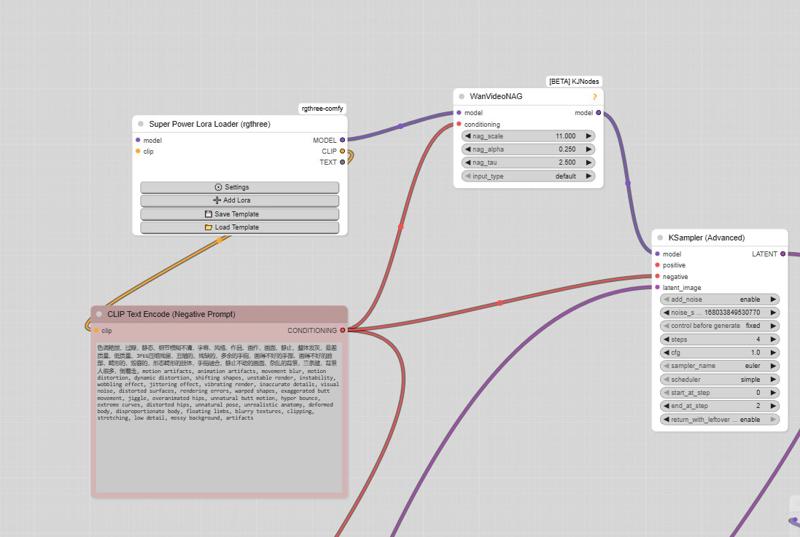
And here is the negative prompt for unwanted movements:motion artifacts, animation artifacts, movement blur, motion distortion, dynamic distortion, shifting shapes, unstable render, instability, wobbling effect, jittering effect, vibrating render, inaccurate details, visual noise, distorted surfaces, rendering errors, warped shapes, exaggerated butt movement, jiggle, overanimated hips, unnatural butt motion, hyper bounce, extreme curves, distorted hips, unnatural pose, unrealistic anatomy, deformed body, disproportionate body, floating limbs, blurry textures, clipping, stretching, low detail, messy background, artifacts, butt bounce, moving hips, swinging hips, shaking butt, wiggling butt, moving lower body, moving pelvis, jiggling buttocks, bouncing butt, unstable stance, unnatural hip motion, exaggerated hip movement, hip sway, hip rotation, bottom motion, pelvis motion, wobbling hips, fidgeting lower body, dancing hips, pelvic movement, motion blur, unnatural movement
And here is the negative prompt from the official ComfyUI workflow:色调艳丽,过曝,静态,细节模糊不清,字幕,风格,作品,画作,画面,静止,整体发灰,最差质量,低质量,JPEG压缩残留,丑陋的,残缺的,多余的手指,画得不好的手部,画得不好的脸部,畸形的,毁容的,形态畸形的肢体,手指融合,静止不动的画面,杂乱的背景,三条腿,背景人很多,倒着走
Note: If you use the default workflow without the node, this negative prompt will not work.
UPTDATE: Lightning Edition – T2V
I’m not really experienced with T2V myself, but a colleague who works with it a lot tested this version and confirmed that it performs very well. From the few tests I managed to do on my side, I got the same impression, although I haven’t compared it directly with the base version yet.
The settings are the same as in the image-to-video version: 2+2 steps or more if you prefer, CFG at 1, and Euler simple (though other samplers also work great).
I don’t plan to make an NSFW version for the T2V release,
but for the I2V version, I’m already quite happy with the first results.
Update WAN 2.2 V1.1 I2V
Updated version of the original Lightning merge — same settings 2+2 steps or more, featuring more movement and smoother flow (depending on the prompt).
The model already works very well in NSFW. Just use the right LoRAs, and the movement will improve.
WAN 2.2 V1 I2V
This checkpoint is based on the original WAN 2.2, with the Lightning WAN 2.2 and Lightning WAN 2.1 LoRAs already integrated. This improves image quality, makes motion smoother and more dynamic, and removes the slow-motion effect that can occur with the Lightning models.
A common setup is to use 2 steps on the high model and 2 steps on the low model, though other settings may work as well. Do not apply the Lightning LoRAs manually — they’re already included in this checkpoint.
My workflow
https://civarchive.com/models/2079192/wan-22-i2v-native-enhanced-lightning-edition
Description
FAQ
Comments (285)
Showing latest 224 of 285.
What is the best settings to change if I want to improve the output quality and sharpness? I'm currently using your latest Q8 CF models and your SVI triple Ksampler workflow with default settings (7 total steps, 1 no lightning step, 4 high step) and render at 720x720. The output motion is nice, but the image itself is grainy/blurry and face consistency seem to drift a bit. Would it help to increase total steps to something higher or should I make other adjustments?
My images just fade to brown when I use these. What gives?
Are you using SVI? You might be missing the lightning loras
T2V with this workflow, how can you do it? do you just load a black image as input the subgraph? If I disconnect the image pixels input, the workflow refuses to run. Can someone help me how to use this workflow as T2V? Thanks!
yes make a jpeg which is a black rectangle the size you want the video. so maybe you make a black rectangle jpeg which is 640 pixels wide and 400 pixels high.
Biggest frustration I have with local AI is the entire community assumes ever person has been messing with this on an ultra-technical level for years already. The language is borderline incomprehensible and it makes huge assumptions. I don't even know what folder to dump a .gguf file in. I downloaded the workflow - so I need to download everyone on the 'left' side? So I need four different files or not?
Do I need all four "NSFW V2" or just one? Do I also need all four "WAN REMIX v2.1 Q6" or just one? Is it 'use one or the other' so I only need four, or do I need all eight? Or what? Instead of just a basic rundown saying 'this this this' the description is a wall of text longer than the Book of Genesis.
Try searching pixorama on youtube. They released 5 hour video a month ago about comfyui basics. Before watching it I couldn't get a thing. Now it's a bit easier.
Also search for "ComfyUI-Lora-Manager" custom node. And their extension for civitai. It helps download models and loras.
Yeah I agree, this description is a bit much.
I agree with the others.
Remember nobody forces you to make a.i, this is a choice. You wanna make it, you gotta learn it and lots of ppl are willing to put their time to make videos to help you learn. Everyone just wants to make and not have to do the work. I learned by asking GPT everything.
Most workflows are gonna give you frustrations but if you post your error codes or simply ask GPT what this means, you’ll likely get your answers instead of venting that frustration to the community. Pixorama is perfect for learning this.
man how i agree with this. a simple readme file for starters is always appreciated.
Yeah, if you try to process it with GPT then it really doesn't help much; parsing all this data with Claude helps, but it's still basically doing a fuckton of steps that make 0 sense to newcomers. It's like telling a dude during his 1st day on Linux to compile something from source on Arch.
The main issue, however, is:
1. There is no streamlined, well-explained, newbie-friendly guide explaining the nitty-gritty w/o all the extra fat. A handful that exist are mutually exclusive, and focus on a single use case.
2. It's difficult to explain it in a pithy manner because the tech and toolkit around it are pretty damn complicated. There's also ComfyUI which is great for optimizing, customizing and chasing new users away. So all in all: it's complicated because it kinda has to be. And the only way to fix it, would be for an equivalent of A1111 to show up - severely limitting the capabilities, by making everything work straight out of the box:
Install.bat -> dependencies.bat -> config.bat -> (test.bat ->) run.bat
instead of forcing its users to first get a PhD at generating 2.5D porn with a postdoc in applied prompt linguistics.
Could you add sigma value info for your model infos? AFASK baked lightning lora changing the default sigma.
Are the v2 Q8 fp8 base?
Hey, just wanted to say thanks for all the work you put into this model and for keeping it updated.
I’ve noticed it does blowjobs really well. From your experience, what other kinds of scenes does it handle best?
If you have a list of scenes that tend to work well, I’d love to hear about it. And if anyone else has tried it and found scenes that work great, feel free to share.
Thanks again.
Uncontrollable humping is back with this one. If man with meat bat entering the frame no matter what the prompt he will be humping.
What makes it even wilder is that, without the use of a lora, they wont penetrate anything but thrusts into the air if its a man from offscreen. And its a shame too because the size of the penis the model provides is much bigger than the tiny peckers the lora have.
I tried to use the NSFW V2 model, the output motion is nice, but the image itself is grainy/blurry.
Where is the setting for global lightning lora in your workflow? is it in the first subgraph that loads high/low SVI lora and the high/low lightning lora plus vae and text encoder? Anytime I add loras to the three lora loaders above each of the video section subgraphs it turns the video into a gray/gold pixelated mess
So in your info for SVI, with regards to: "Combo 3 – Balanced Motion / Moderate Degradation" Both the high and low are the same link, the only difference is the weight. Is that correct?
Also, I'm wondering, with the models in this workflow, is 32GB VRAM enough for the entire model without offloading anything? Or do you think that would require a commercial-grade GPU?
can i use this model with my ai model? not only random girl?
sorry to bother you. I have a problem. I’m using NSFW V2, which does not come with SVI annotations. According to the instructions, it has Lighting LoRA built‑in. I used the official NSFW workflow.
First, it failed to generate a video. After troubleshooting, I found it was a path issue with the save node; after fixing that, it saved normally. But the real problem appeared: the generated video is severely pixelated and has color distortion, with a brownish tint.
I did not add any LoRA this time. Then I tried adding the SVI LoRA — the problem remained. I tried adding the Lighting LoRA — still the same issue. I tried adding both LoRAs — no change.
I have no idea what’s going on, and I don’t know what to do to make it work properly. I can see the motion is excellent, but the color and graininess are ruining it. Any help would be greatly appreciated.
Exact same issue. Can't make heads or tails of it.
Hello, I am a skilled craftsman. May I ask if I have downloaded it WAN 2.2 Enhanced NSFW | SVI | camera prompt adherence (Lightning Edition) I2V and T2V fp8 GGUF After the model was developed, High LoRa and Low LoRa were downloaded without any changes to the parameters. However, the generated video had a lot of noise, and I don't know why WAN 2.2 Enhanced NSFW | SVI | camera prompt adherence (Lightning Edition) I2V and T2V fp8 GGUF Where should it be, thank you for your answer!
I'm confused, has the FAST MOTION V2 FP8 version SVI or Lightning baked in?
FAST MOTION V2 FP8 has lightning already ; 4 steps, no lightning lora
if it doesn't have SVI in the name, it's not SVI
@MysteriousString420508 All models have SVI in the filename when you click download, that's why I ask. But I guess it's just the general prefix.
Thanks for the detailed guide! I was having a major issue where my VRAM and RAM wouldn't offload after the first 5 seconds, freezing the whole workflow. After setting --cache-none, I can finally generate 5-second videos without the instance crashing, though the workflow still gets stuck and won't move past that point. I’m running this on a runpod instance with an RTX 4090 - any idea how to fix this hang?
make sure that you have swap file on C set to 64gb. yesterday i struggled with the same problem. you can check if I'm right by entering the Windows event log, where you should find a message about Python crashing due to the lack of pagefile.
PathchSageAttentionKJ
No module named 'sageattention'
What is the solution to this problem?
install sage attention
uv pip install git+https://github.com/thu-ml/SageAttention.git --no-build-isolation --no-cache-dir
or you can delete the node and not use sageattention, but you're gonna want it. it's way faster than what ships with pytorch
Hey OP, I've been messing around with your models and WFs for a couple days now but i keep having the same issues where i keep getting either body horror or just fleshy throbbing non-human masses lol, this happens even in the cleanest runs possible. i.e. dragged one of your videos to get the workflow, left ALL settings as they come and only change the models according to my specs, which is just SVI Q6 CF, ive tried many different combinations of lightning loras and i still get this issue 9/10 times, any idea what might be wrong? and yes this is without using any additional loras. default t5 and vae as well.
possibly are you using the same H model for both the high and low model loaders?
@sickdude9630 no thats not the issue, i noticed the triple K method is way more unstable in terms of these bizarre generations, im guessing its a matter of motion being too much or too unstable, so i see why you might think im using the wrong models but sadly no :(, any other ideas?
im very new to ai generation and maybe this is a dumb question, but in your workflow you use wan2.2\Wan2_2-I2v-A14B-HIGH_consistent_face_Q8.gguf and wan2.2\Wan2_2-I2v-A14B-LOW_consistent_face_Q8.gguf I was not able to find these anywhere ? I only got your wan22EnhancedNSFWSVICamera_nolightningSVICfQ8H.gguf
I tried it with that but onyl got a very pink video.
I am happy with any tipps or ressources to help me
i think you downloaded only the "H" (High) model. if you look at the top of this page, there are many tags you can select from, and you see this page is actually only the "H" model of this version, you need to click the "L" (Low) model tag and download the model gguf from that page as well, then you will have the complete H&L model pair for this version. Then in the workflow, put the H model into the high gguf loader and L into low gguf model loader and your output will start looking more reasonable.
i feel so stupid haha, thank you though :)
我也是新手,我遇见了和你一样的问题,也没找到wan2.2\Wan2_2-I2v-A14B-HIGH_consistent_face_Q8.gguf和wan2.2\Wan2_2-I2v-A14B-LOW_consistent_face_Q8.gguf这两个文件。你现在在哪里找到了吗?
Sometimes, when I change something in a later block, all blocks starts re-generating videos without me changing seed/prompt/lora or anything. How can I stop that from happening? It seems to happen more often when I'm coming back to the workflow some hours later.
Could you be hitting Ctrl+Enter maybe? Either way, maybe go into Settings and double-check your keybinds.
Do you have a date stamp anywhere in your workflow? Could be triggering if the date rolls over maybe?
Same problem as karsder309. When I modify the prompt in the last block, it reloads all the blocks from the beginning. It doesn't happen every time, but it does happen from time to time.
what's up with all the winking to the camera? any idea where those weights are from? you just never see that in real videos hardly ever, so I feel like it has to be intentionally included in a dataset somewhere along the line. it freaks me out
Try adding a WanVideoNAG node in between the lora loader and sampler (incl. an isolated negative clip text node connected to the NAG node and 'winking' added to it), might help.
for the dynamic prompt, do you have to keep increasing the "At x second" beyond the 5 sec like "At 6 seconds" and so on? or do you just repeat back down from 0 only go up to 5 in each subgraph again? cus it looks like each subgraph is separate 5 sec generation and stitching afterwards so maybe dont need to keep increasing seconds beyond 5 ? or does the svi lora need correct seconds even beyond 5 for it to work correctly? thanks!
There a walkthrough for how to do text to video with this somewhere? i'm new to text to video and tried it out but cant seem to get it to work. it gets stuck mid run
Recommended LoRA to obtain a very realistic ****** and ****:
https://civitai.com/models/2217653?modelVersionId=2496754
Where can I download it? Thanks
search for it on civitaiarchive.com
No quant'd SVI fm? I tried the quant'd cf (and I could run SVI fp8 fm, but it's just overkill in my case) - I did find both versions way too stiff for my use-case. Considering Slop Twerk WAN 2.2 is part of the training data, I had hoped for more bounce effect without having to load the actual Slop Twerk WAN 2.2 on top. I'm using my own SVI Pro V2 workflow with ComfyUI-TripleKSampler. I mostly need fast motion but with bounce effect which one can get plenty of simply using the Slop Twerk WAN lora and a quant'd Wan2.2-I2V model. But I wanted to give Wan 2.2 Enhanced a try, for reduced degradation in longer 15+ sec videos. I tried Smooth Mix Wan 2.2 14B (I2V), but it's a bad match with the SVI loras. A great alternative is DaSiWa-WAN 2.2 I2V 14B SynthSeduction v9 | Lightspeed | GGUF ...goes great with the SVI loras, but this is also lacking in bounce effect (I at least have to add the Slop Twerk WAN lora at full strength, but this degrades the DaSiWa-WAN model too much, I feel).
For context: I'm trying to recreate a bounce effect on two characters facing eachother while standing (like a fighting stance similar to old-school 2D Neo-Geo fighters). Originally, I achieved this to my utmost satisfaction using two ClownsharKsamplers (RESLYF) + Euler/beta57, with the Slop Twerk Wan lora and a quant'd Wan2.2-I2V model. Sadly, the Clown samplers fail to work with my SVI Pro V2 workflow when set up in batches (batch 1 finishes without issues, but triggers a crash when the latent samples are handed over to batch 2). I assume the Clown samplers are simply not compatible with WanImageToVideoSVIPro (kj-nodes). It's unfortunate, as the Clown samplers offer a superior quality output when compared to anything I've so far seen with Ksamplers.
Very nice. However, the Lora link for the realistic vagina and anus is currently showing a 404 error. Could you please correct the link?
Hey guys, after months of experimenting with outputs in wan 2.2 I've recently stumbled on something that in hindsight I probably should have played with before. Try messing around with different combinations of the various lightning lora's; the same way you would with other loras. I think you all will be surprised at the vast difference between outputs and varying prompt adherence. Dunno if this is just common knowledge, but I'm sure theres a few others out there who don't know this.
Once again to Taek, I really appreciate you releasing the version without lightning baked in. I like your checkpoints but the baked lightning can be a little tricky to work with imo. Great for speed, but you know what I mean. I'll stop waffling now.
EDIT: Oh, and since I know people will ask. Try lightx2v_I2V_14B_480p_cfg_step_distill_rank256_bf16 and/orlightx2v_I2V_14B_480p_cfg_step_distill_rank128_bf16. I've been enjoying the outputs I get with these lately. Good prompt adherence and seems to be very friendly with other loras. You can double up the same one in both slots or mix em for if you fill like it. I've notices with the 1022/1030 lightnings that with things like blowjob, for example, the penis will get more wet with the lora's mentioned. And there seems to be more natural human motion. Oh, and these work A LOT better with cum loras. Good luck, have fun
should I play with the lora strength too? how much do you usually set it at?
@2kodaffa7235 I usually have it set to 1. But you can mess with it if you like. It depends a lot on the checkpoints you're running. And steps.
I've got rank256_bf16 in high and, as weird as it sounds, the high slot 1030 lightning in the low slot. Running nolightning SVI high checkpoint and easywan low checkpoint. The benefit of running nolightning svi in high is you can pull some loras out of the high slot and get quicker outputs. low slot will need loras if you are running one with minimal loras merged in, as I prefer. I like dreamerlay nsfw lora set to 1 in low. But if you have a penis already in frame, might wanna lower it to 0.6 to prevent to lora from altering it's appearance too much.
I'm really getting out there with some weird mix and match workflows. I would link them but I'm of the opinion people need to experiment on their own. It's more fun and you learn some things. I'm just modifying existing SVI workflows myself.
Ah yeah, I think easywan may have lightning baked in. So going to try running without lightning in low later.
Does it really work? Those lightx loras seem to be for wan2.1
I think I've locked down what's creating the difference in results. I believe since easywan has baked in lightning I'm getting a greater strength from the lightning I'm running with it. which is why having it in low slot is getting such crazy results. Again, probably just obvious to big smarty pants. I've noticed it can cause some screw ups with anatomy and AI hallucinations, after adjusting the lightning in low slot down to .4 I'm still getting the improved prompt adherence and motion; but none of the hallucination. So yeah, use whatever checkpoints you want and just mess around with your lightnings loras and their weights for interesting results. Remember to run the same seed if you want to see the differences properly.
Could anyone point to a guide on how to install comfy for this insane workflow? :D
I have tried but get tooons of node errors that cant be installled.
Almost everyone creator ignore this issue.
When you got message of errors try this - open manager and click on missing node (if you see it) then on right side find link to website where it originaly belong then just download it, unpack and add it manualy to your comfyui custom nodes
@yeti842 Thanks for your reply. I actually know all this, but when I do that on this - and many other - workflows i get conflicts galore... great with a wf that can do miracles, if you just know how to use it... but I understand that I am too noobish for this.
You can just use comfyui easy install, then load the workflow and use comfyui manager to install all nodes, takes 10 minutes. GitHub - Tavris1/ComfyUI-Easy-Install: Portable ComfyUI for Windows, macOS and Linux 🔹 Nvidia GPUs 🔹 Pixaroma Community Edition 🔹 · GitHub
You even have bat files for sageattention, flash attention etc.
@Smurfypie ok.. thanks.. will try... again ;)
why white liquid everywhere? it's so hard to make normal cum, saliva and lactating..
q8 is better than FP8, right?
Depends on your hardware. 40xx and up gets more out of fp8 than 30xx for example. With 50xx fp8 tend to be both faster and more accurate.
could any one teach me how to stop the charater speaking or opening their mouth/eyes wide during the video
Add "talking, open eyes" to negative prompt. Add "eyes closed" to positive prompt.
Hey im new in this world, i have a quick question :)
This is a "merge" so how to assimilate it into my wan workflow ?
Just starting with wan so, on a 4080 16GB VRAM, which ones are the right ones, fp8, q8 or even lower? Maybe anyone can help me out (of experience) before I dl >25GB multiple times? Thanks in advance!
I'm able to run the NSFW v2 Q6 pretty fine on just 8GB vRAM, maybe like 18 minutes. The Fast move v2 Q4 works but is rather long and I prefer the other model.
I'm not seeing the no lightning fast move Q8 version?
Your models are great, giving some of the best results I've personally had with wan models. But man, this page is a mess. Maybe consider splitting it up so there's a dedicated page for the SVI stuff. Also, it's kind of unclear whether "no lightning" means "don't use lightning with this because it's built in" or "use lightning because it's not built in".
not sure if this has been discovered yet, but I may be close to cracking the code on fixing slow motion on the SVI model.
It seems all you have to do is somehow weave the token "rubbing" to your prompt, optionally with speed related tokens (quickly, rapidly, etc). This model seems to really understand that token, which kinda makes sense because you could argue that "rubbing" is the most ubiquitous way to visually describe the motion of most, if not all sex acts.
I tested it on a few BJ generations, prompting something like "she is quickly rubbing his penis back and forth with her mouth" along with a general description of the scene was all it needed to get rid of the slow motion effect. Still need to test more on other acts, but "rubbing the penis back and forth with her vagina" seems to work for penetration so far.
Ive only tested it a little bit without loras. This may be useful for those trying to avoid loras for extended videos, as some loras can be used to improve motion, but at the cost of increased degradation over each generation.
Is there a full BF16 version?
are you able to lower the strength of the build in lightning loras?
I'm really struggling with camera movements. Most of the time nothing happens at all with them. With or without loras. Zoom in and out are about the only movement I've been able to get and that is spotty at best. Any tips?
using FAST MOVE V2 FP8, wondering how i can get a character to stand still especially the man, when prompting a handjob, thank you
Same.
Hey guys, bit of a beginner here and kind of confused with the GGUF files for high and low. I can't load them in the workflow with the "Diffusion Model Loader KJ" nodes as it only allows safetensors. I heard I need to add GGUF nodes, but what would I connect them to in order to keep the workflow operational?
just replace "Diffusion Model Loader KJ" with "Unet Loader GGUF"
@jimzlf Just tried it. It definitely changed things, but now it turns the characters in the image into unrecognizable porn stars and generates disproportionate, borderline horrific movement. Anything I may have done wrong?
@tisecah474742 i'm not sure, you may have to check your settings, such as loras, prompt, sampler, parameters and so on. if you haven't changed anything except the model loader, check especially lightening lora maybe
Can anyone send me the link for GGUF model for nsfw high and low? after loading the workflow i need those models but here is no link and i can't find them anywhere
You have to keep clicking the directional right arrow until you see the GGUF files
Hi, I seem to be having the same issue, It says "wan22EnchancedNSFWCameraPrompt_nsfwFASTMOVEV2Q8L.gguf"
But I cannot find any the have the same file name (is it the SVINSFW one, all the ones I tried to download have SVI in the filename) - sorry if being dumb, I got the safetensors ok though the V2FP8H .
@Dracken1986 it's literally on this page, this one: https://civitai.com/api/download/models/2540896?type=Model&format=GGUF&size=full&fp=fp8
@shapeshifter83 Thank you very much will download that and the H now :).
My issue is I am too literally >_<, on the workflow the GGUF said:
"wan22EnhancedNSFWCameraPrompt_nsfwFASTMOVEV2Q8L.gguf"
and
"Wan22EnhancedNSFWCameraPrompt_nsfwFASTMOVEV2Q8H.gguf"
the one in the link you posted has the added text SVI
"wan22EnhancedNSFWSVICameraPrompt_nsfwFASTMOVEV2Q8L.gguf"
I wasn't sure if there was a difference, guessing not. Thank you again for your help.
Hi guys, someone share me about this lora below?
I google it but nothing.
wan_2_2_i2v_a14b_high_test-derniere-version-selforcing
wan2.2_i2v_a14b_low_selforcing_last-version_rank64_lightx2v_4stop_1022
wan2_2-i2v-a14b-high_svi_consistent_face_nsfw_fp8
wan2_2-i2v-a14b-low_svi_consistent_face_nsfw_fp8
i'd also like to know.
why include multiple models without links and can't be found online?
Where has the whole community gone? There used to be a lot of interesting content on Wan 2.2. Now it seems like everything has stopped. Has Wan 2.2 reached its technological limit? Or am I missing something?
everyone following carrot on a stick, probably chasing LTX2.3 or other models now. I do not really like it, since the LORAs are following this trend as well.
What makes me wonder, WAN2.2 is pretty capable, it is not comparable to SD1.5 => SDXL or HUN => WAN.
LTX is interesting, no doubt, but does not serve consumer cards well. Shame the compute power wasted on creating LORAs for every new architecture from scratch.
I tested this model on my computer with a GeForce RTX 3060 graphics card, 12 GB of video memory, and 128 GB of RAM. I was amazed by how efficiently comfy UI uses resources. I downloaded the 45 GB LTX2.3 model. I decided to run the render in 1280P resolution. What do you think happened? Everything worked without any errors. Yes, it was slow, but the fact is that the size of the video memory doesn't seem to matter as much. The amount of RAM is crucial.
@dirtysem can ltx 2.3 do complex nsfw scenes well? Is it limited to 5 seconds but can we extend like in wan 2.2?
@androsny LTX 2.3 is in its early stages, like wan 2.2 in its time. It doesn't handle NSFW well yet. However, I believe this model has great potential. It's developing slowly because it requires significant computer resources. And the declared length of the video is 20 seconds. I checked it like this.
To me, Wan is good enough to not chase the new, shiny thing. As a community we'd be better off just trying to push Wan to it's ceiling.
@dirtysem no kidding? Can you share the workflow you using? Any special attention mode? Sage, Flash, PyTorch?
@dnu75950132 Really, no kidding. Any workflow provided here works. I'm constantly having installation issues with Sage, so I'm using the standard comfyui with nodes that are included in the workflows.
Hi, Excellent workflow and model – you are the first person I managed to create an animation without errors or failures. I still have room to improve on my side. Thanks again, you are the best
Hello, which workflow are you using?
That's the only model that really works perfectly, ty a lot man!!!! but, u have a fp8, fp16 or bf16 version? Just curious
where to find wan2_2-I2V-A14B-LOW_consistent_face_Q8.gguf?
What LoRAs are baked into this merge?
Hey, how many steps do you recommend for nolightning SVI cf fp8? You list a number of recommendations for different lightning lora combinations and steps and mention the possibility of generating with no speed-up loras, but I can't find a mention of the recommended settings when doing that.
Default is 10 and 10
Hi @logoth would you mind sharing the values to change in the 2or3 ksampler SVI workflow to run without the speed loras? I tried multiple combinations but no success, getting blurry results. Thanks again for the great workflow, works great with the lightx2v loras enabled
@HerMcGraugh sorry, this isn't my workflow.
the values that need changing without lightning loras are steps (max steps to 20 and stop/start at 10ish) and CFG to 3.5
im not sure with 3ksamplers, it depends if any are turbo.
i would just like to know where can i add my custom loras? and i honestly dont understand that 2+2 step, like where do i do that 2+2 and what does 2+2 even mean?
In general, Wan 2.2 has two models, high noise first, then low noise. Those go in ksampler with typically 2 steps each, 4total.
Loras go between model load and ksamplers, both respectively high and low noise. If you want a very easy image to video workflow, you may check my profile. Those here are more advanced.
conect ur loras just after the model loader, an the 2+2 means that u need put 2 advanced ksampler working together, the first ksampler put in total steps 4, start on step 0 and end on step 2, and the second ksampler start on step 2 and end on step 4 this is to improve the quality of the fast video
@logoth @Belfang thanks a lot for your reply, i kind of understand it now, but the issue im getting in the workflow is that the result is CRAZY!! lets say the girl is lying on her back rubbing her fingers on her private part and im prompting that she just rubs it and for some reason blood comes out of her private part and her legs are shaking insanely in the air, it is so weird!!
@marcelinorafik01419 lol, never had that kind of issue... as for movements, it requires some treis to figure out what the wan model will do in what situation, some words won' work, some will work only in certain conditions.
@logoth Im not going to lie, i might have found the issue, im exploring other workflows and i just learned that i should use both the low and high version of the loras i want to use, and i think i have been using the high only, could that be the issue?
@marcelinorafik01419 depends on the lora. high noise will help with desired action more, low noise with detailed look. as long as you don't put them in the wrong place you often don't need to use both.
Can i try RTX 3060 12GB
Yes i'm running this on a 8GB RTX and it works but you need more System RAM and fast NVME SSD to make up for lack of GPU vram which is why System Ram and NVME is so expensive
Has anyone tried it with a 5070? Which quantization model do you recommend?
if 12gb Q4-Q5. Your model should be GPUgb -1-2gb size
I have an RTX 5070 12gb - 32 DDR5 and everything works even at 1024x768. Length 81/121... Q8.gguf
@gambikules858 Q8 work on 4060 even
I recommend using the Q8. I used the Q6 and Q8 even recently when I had a 3060 Ti with 32GB of RAM. With the 5070, it is more than enough.
@mangho9123389 I have a 32 GB Ram and 5070 TI 16 VRAM card, which would would be okay?
It also depends on the length of your video and the render size
You might be able to render HD but probably not over 5 seconds ;)
i keep getting a grey blurry picture on my generatations. With the workflow either triple ou 2ksampler doesn't change a thing. I have a 4070ti 12G vram and 32g ram. Is it because of my hardware or I missed something in the settings probably ?
Same
Also same on a 4090
wan2_2-I2V-A14B-LOW_consistent_face_Q8.gguf - this, and high one - cant find this files everywhere, no "consistnt_face" :(
It's the SVI "CF" Low version on the top of this page.
Is it possible to get a bf16 version?
Have u ever tried using MMAUDIO for your checkpoint?
To be honest, I didn't use this checkpoint. I used a pure FP8 wan checkount with enchantment movement Lora
https://civitai.com/images/126962109
If you're looking for sounds for NSFW videos, you should check out the models MMAudio on HiggingFace
decent checkpoint. but... a lil washed out. looks dang blurry and adds a greenish tint compared to the regular model. also... there is no way to slow down the motion. in my test shot... at 24 fps it goes full fucks mode. what if i wanted to be a lil more gentle? like 16 fps without the visual stuttering.
The motions are pretty much always fucking lol no matter what you prompt haha
I think you use something like ComfyUI right?
If you add color correction to your workflow it'll improve a lot depending on how well-lit the starting image is.
In my test I noticed my previews being horrible, but I only use low pixels to test my prompt and motions.
What will help a lot in the quality is increasing the steps (total steps 8, refiner steps 4) and at least have a high enough resolution like HD or a little above (5-8 seconds depending on your VRAM).
Hope it helps, I had a very similar issue you had.
Hey guys. I can't reduce the size of penis during generation, I want to make a realistic video. I am using wan22EnhancedNSFWCameraPrompt_nsfwFASTMOVEFP8Low.safetensors and the High version. I don't use loras as they often break the quality. Can you recommend something? Maybe there are some trigger words in prompt, or good loras?
I've been using "thin, erect circumcised penis."
@BlackLitez it doesn't work
Hi there! I’m using the NSFW FAST MOVE V2 Q8 (Lightning baked) model and I’m having some trouble getting LoRAs to 'stick' properly.
My current setup:
Genitals Helper LoRA: 0.6 str (Applied to Low Noise)
Fingering LoRA: 0.6 str (Applied to Low Noise)
Oral/POV Insertion LoRA: 0.8 str (Applied to both High & Low Noise)
Even with these settings, it feels like the model is mostly ignoring the LoRAs or the effects are barely visible. Since this is a Lightning baked model, should I be using higher strengths than the usual 0.6 recommendation?
Regarding steps: I’ve tested the recommended 2+3 step configuration, and I’ve also pushed it up to 8+12 steps to see if it helps with detail retention during SVI chaining. In your experience, is there any actual benefit to increasing step counts this high (or higher) on a distilled Lightning model? Does it actually improve LoRA compliance and texture quality, or am I just hitting diminishing returns due to the model's architecture? Thanks for the help!
The NSFW tend to be a bully to have the best results most of the time I'm using the Non NSFW to combine it with lora and the NSFW alone as it's pretty good to make NSFW thing by itself.
Some Lora however work also with the NSFW, depend if they are "pulling in the same direction" we can say so you need to make some test, maybe increasing the lora weigth to make it work checking case by case.
@ai_phanotm_red1893 thank you. I'll give it a try.
sorry, i must be dumb, but i can't find which model is a text to video one ?
it says t2v on the text to video models
yo guys, cant i mix fast movement with cam, or consistent face with cam?
is there no mmaudio included for this?
which folder do i download the models to? checkpoints didn't work. neither did unets. getting frustrated
Far as i know: Diffusion_Models
.gguf goes under unet dir. .safetensors should go under diffusion_models normally.
If you use .gguf versions you will need to use a gguf loader node, and maybe other workflow changes.
Seems like I am too noob... all the workflows I try to use are NOT for Q versions. Is there a way to use the model in the standard wan workflow from comfy? This is all way too complicated for me :D
Hey bro just wanted to say I've been using your stuff for a while and I love your work Just got into some LTX2.3 and was wondering if you ever plan on training anything for LTX?
hey guys i keep on getting this video generation issue when i run a consisted face svi high and a fast movement svi low models together. the result is very pixelated, is this an issue with the steps? or lighting loras or what exactly? How do i fix this please and thank you?
CFG填1
might be an idiot, but using Fast Move Q8 all my videos come out really blurry and artifacting. Like the movement and prompt adherence is there but it feels like I'm missing something. Do i need to add additional loras?
OP, could you recommend one? or add like a "deprecated" tag if any are deprecated or a version-num? there are like 30 workflows and I'd love to learn, but its kinda overwhelming. it would help me a lot <3
为什么我生成的视频只有尾帧,就一张图片
I also had the same problem with the v2.1 workflow. I switched to the svi one and it worked fine. not sure why tho probably some version mismatch
Has anyone come to a consensus on which merge is better? For NSFW I2I where character consistency is valued,
Between WAN 2.2 Enhanced NSFW fast move v2/cf
and remix 3.0, 2.1 or 2.0, or Even DaSiWa, so many choices.
I am struggling to decide what to keep <3
Both this one and Dasiwa's are good models but for different reasons.
This one is better at motion.
Dasiwa's is better at retaining detail.
@MaGiC48x thanks for the input, do you mean retaining detail as in including Character/face consistency details?
@Kenzato I found all models tagged with NFSW in this site did not maintain consistency. The only models for consistency were nolightning SVICF for me. Also SmoothXXX models gave good consistency sometimes.
Can you use this model in Forge Neo?
yes, works perfect in forge neo. just be sure to also have the wan2.1vae and umt5_xxl_fp8_e4m3fn_scaled text encoder selected in the dropdown up top.
@robotnic7 what settings and version of model do you use and resolution for img2video? all my gens are buzzy.
files not available?
是否可以做个一键整合包,方便我们小白直接下载使用。
Appreciate you sharing these checkpoints and workflows. FYI, your workflow for nolightningSVI CF seemed to have some issues because including SVI lora made video extremely blur and video loses consistency after 5 seconds without the lora. The other workflow for SVI Pro V2 from another author worked fine with your checkpoint. I also found that zoom in works fine but pan left/right didn't do anything for my case... I gotta try more for sure though.
As OP suggested, I found camera control can be enhanced with different lightning loras. In my case, the lightning loras of 1030 (high) and 1022 (low) work fine. I tested OP's workflows more and abandoned them as it's hard to control outputs. But the workflow for SVI Pro V2 from the other author worked well with this checkpoint.
Hi @taek75799
Can you upload bf16 version of your model. Now we can convert BF16 to INT8 which vga from RTX3000 and above can run double speed while enjoy the quality better than GGUF Q8.
which of the 8000 files do you need to download for a fp8 file? You cannot see filenames
they are all fp8, even the one that says fp16.
i would use the CF version (there is a version for better quality, and a version for speed with worse quality).
for comfyui i would use these 2, you need both high and low;
also i would use kijais lightning loras with this to get faster speed, check out the example workflows and these files on huggingface:
https://huggingface.co/Kijai/WanVideo_comfy/blob/main/LoRAs/Wan22_Lightx2v/Wan_2_2_I2V_A14B_HIGH_lightx2v_4step_lora_v1030_rank_64_bf16.safetensors
and last but not least, i would use uncensored text encoder that can be found here:
https://huggingface.co/zootkitty/nsfw_wan_umt5-xxl_bf16_fixed/tree/main
@yopisej508953 Is there a specific workflow you like to sue with all your suggestions? I tried tweaking one suggested from the description of this model above and it didn't work for me.
start with the original image-to-video workflow in comfyui, it is in the templates section of comfyui, just replace the wan22 with these uncensored versions, and another important part is to replace the textencoder with an uncensored version, use this one: https://huggingface.co/zootkitty/nsfw_wan_umt5-xxl_bf16_fixed/tree/main
now you have uncensored wan22 basic workflow that works.
you need to play around with it and see what everything does, and when you learn the nodes and prompts, then you can download those advanced workflows that are here at civitai..
that is what i did, currently i have my own workflow.
you can take any picture from internet and then just prompt "the woman takes off her clothes and dances" or something. the video generating works best with an input image, it barely works without input image.
my own workflow is that i generate an image with zimageturbo-uncensored moody version, then i input that image to this wan22 uncensored version. for a good uncensored zimage model check out "moody" here on civitai.
why is the result is blurry
hmm, on the fast move version i'm getting colour shifts and washed out colours, any idea why?
if you have svi-pro loras but you are not using "WanImageToVideoSVIPro" node, you will get washed out colors. try using the svipro node and see if that fixes the issue. and even if you do not use the svipro loras, some of these models have svi baked-in.
@yopisej508953 I'm doing a simple 5s video. Also i'm using another workflow because i can't install llama-cpp for the auto prompter.
5s or 10s does not matter if the model has svi baked in, then you must use the svi node. you just swap the 1 node, nothing else. no need to increase video duration or add anything else, just copy the pins and possible settings from the old node.
load image node -> resizenode for the image -> vae encode (use the wan vae) input the image here -> now the latent from the encode goes to "WanImageToVideoSVIPro" anchor_samples pin, then connect negative and positive, set length to whatever you had for 5secs, motion_latent is 0. -> connect to KSampler.
done, now you have svi support, it should fix the video.
@yopisej508953 ok ty
Was not able to download the safetensor versions of V2 NSFW (H or L) or the V2 Fastmove NSFW (H or L). Gave me "file not found."
FIXED!
Found the issue, and I'll put it here for anyone who has the same. I had previously bookmarked all of those pages before CIVITAI-RED launched. When I used the old bookmark to get to this page it would ask if I wanted to launch in CIVITAI-RED, which I did, but then could not download the files. I had to NOT come if from the bookmark (I actually deleted the old bookmark and made a new that routed properly to CIVITAI-RED), and THEN I could download the files.
Not sure why that worked, but it did. :)
@primalsteam thanks
@primalsteam can you send me link
Where is the consistent face nsfw fp8 link?
Tried your I2V workflow with nolightning SVI cf fp8 model... it runs, nothing crashes, but get only black output. Standard 14B Fp8 works fine. What cold I miss?
same here
Civitai is not suited for a model with all these versions. It's so difficult browsing through that version slider (not your fault, civitai design issue)
any chance that there's a main huggingface repo somewhere with all of these cleanly posted? would help so much
Couldn't agree more. Browsing versions horizontally sucks in Civitai, big time. Plus: if someone posts an SVI version, but SVI is not in the MAIN title of the page: then the model doesn't appear in the crappy search engine...
@hawkfreedom1177 i vibe coded a little chrome extension that breaks that header bar out of horizontal and makes them individual buttons. it looks like garbage but at least everything is clickable instantly.
go get the free google 'antigravity' and point it to a page with lots of versions. ask it to make you one. it has browser control so it will be able to find and make your extension.
有没有人告诉我这个东西怎么用啊
Sorry I'm kinda new to this, exploring all these models, so I'm a bit confused. I got the NSFW Q6 model. I checked one of the linked workflows and the gguf loader is connected to the SVI. Do I also need to get the SVI files to make it work better?
You need to satisfy all the models that are requested by the used nodes. It won't work otherwise. SVI is to extend the generated videos; instead of 5 second you can extend it another 5sec, another, etc. Quality will obviously diminish if extended too long. If you don't need it, use another workflow without SVI.
Hi,
I am using your nsfw fp8 models in my custom workflow and it works well. but when i add some custom character lora to the workflow, it does'nt work. but I increased the strength to 3, then character lora face appears but the video quality sucks. any suggestions!!
Hi Is there any chance you could add int8 variants of the cf & fm versions from what you used to make Q8 ggufs?
Just to add to this, is there any chance you could share what was used to make the different nsfw CF & FM merges? I'd happily make int8 versions and share if I knew what to use. My initial testing I'm getting 196 second gen times (warmed up) which is a massive improvement over the q8 ggufs on a 3090. Quality is great but the motion and nsfw knowledge is lacking as this was just converted f16 base models
Fucking incredible models. Any chance to add NVFP4 version? That would be amazing.
I fully support you; Q4 runs slower than NVFP4, but the generation quality is almost the same.
@sar090909 Actually even FP8 runs A LOT faster than Q4KM on Blackwell gpu's thank's to the native support, but a NVFP4 version with the quality this model have would be absolutely nice.
@SeikKV Yes, NVFP4 is 150%-200% faster than Q4, but when I use several other NVFP4 checkpoints, the videos generated are basically 0.5x slow motion, and only this checkpoint is running normally
Just use another model for low noise.
@aurelius Thanks,I will try~
Is it possible for you to make a merge for BERNINI? With the lightx inside?
A very good model! By the way, if you're not doing porn, the model is very flexible and versatile!
NVFP4 verson pls !
I am soooooooo confused. I have a 3080. I know how to do I2V and stuff with WAN using the AIO v23 engine. can someone please explain what I need to Download if I want good quality videos? I don't care if i need to wait a while. (unless difference is not that big) What do i download and how do I use it? Will give buzz for a great answer because i am truly confused.
just use chatgpt for instruction lmao
Personally, I use DaSiwa's workflow; it's very simple and the instructions are perfect. Then I place this High and Low checkpoints, and that's it. It might not be optimal, but I make quality videos.
I've tried both fast motion and default fp8 and results are too fast in both models idk, if I want default motion speed I cannot get. Everything is too quickly/shaking etc.
Can somebody recommend a VAE for these models?
Wan2.1 vae. (Defolt)
How does this compare to the Daisawa models like tasteysin? Is this one better?
if i were you i would not use DaSiwa model, that guy is a major Cu**, try to say something critical about his models and he'll block you, that person is known to be a huge pain.
I use the Q4 model, and if like me you have issues with renderings full of artifacts, consider removing the noise from the Ksampler of the low noise model. That fixed all the problems for me.
as far as i'm concerned, you are not supposed to have noise enabled in Low part of Ksampler, high model adds/creates noise, low model clean noise
so yeaah... don't do that
@AltairTheArc Indeed, I knew nothing about video generation, and I tell myself that if I made the mistake, it could help other noobs not to make it lol
in AtlasCloud wan 2.2 ... getting this error. What should the high and low scale settings be? error: [inference] SafetensorError: Error while deserializing header: header too large (***)
Is it possible to release an int8 version of your models?
Hello, may I ask where to download the model (wan2.2 \ Wan2-2-I2V-A14B-NSFW_fast_mave-HIGH_Q8 (lightning_idition) V2.gguf) and the model (wan2.2 \ Wan2-2-I2V-A14B-NSFW_fast_mave-LOW_Q8lightning_idition) V2.gguf?
Where are these consistent face models he talks about?
So suppose I want to move to T2V and I2V as a total dum-dum-dummy, what do I actually download?
Details
Files
wan22EnhancedNSFWSVICamera_nolightningSVICfQ8L.gguf
Mirrors
wan22EnhancedNSFWSVICamera_nolightningSVICfQ8L.gguf
wan22EnhancedNSFWSVICamera_nolightningSVICfQ8L.gguf
wan22EnhancedNSFWSVICamera_nolightningSVICfQ8L.gguf
wan22EnhancedNSFWSVICamera_nolightningSVICfQ8L.gguf
wan22EnhancedNSFWSVICamera_nolightningSVICfQ8L.gguf
wan22EnhancedNSFWSVICamera_nolightningSVICfQ8L.gguf
wan22EnhancedNSFWSVICamera_nolightningSVICfQ8L.gguf
wan22EnhancedNSFWSVICamera_nolightningSVICfQ8L.gguf
wan22EnhancedNSFWSVICamera_nolightningSVICfQ8L.gguf
wan22EnhancedNSFWSVICamera_nolightningSVICfQ8L.gguf
wan22EnhancedNSFWSVICamera_nolightningSVICfQ8L.gguf