
WARNING: Hey, I've lately moved towards LTX2.3 but I will publish a fix to workflow issues mentioned in comments once I have enough free time.
I've officially switched to LTX due to slowmo issues with lightx2v loras. I might share a workflow but that model is already capable of 30s on 720p on a 4070ti so I'm not so motivated to do so. This one would still work if you found the missing packages. Thanks everyone for their support.
It finally happened!
Now there's a way for smoother continuous videos thanks to SVI team and Kijai.
We are at v1.0!
I've updated the workflow to add a few more features;
Video extend option by loading an initial video then converting it to latent that goes into first I2V(WIP)Option to switch between 3 and 2 ksampler phases by setting the initial step
Option to set cfg > 1 if you wanted to disable lightx2v
Images are saved partially in loseless format (use something like VLC to view them) and only loaded again on final merge, if something goes wrong you can merge those files to get a flowing video.
Implemented a bus system to reduce connections. Report if you have any issues but things should work as long as you have the right models and loras selected.
You can set and fix the seed for each part
There are options to upscale and interpolate before final save
Final save happens on main graph so you can preview your output
Slow motion issue probably persists. Couldnt find a consistent solution since when speed up using a third party tool every part becomes faster since they take previous latents as input until everything breaks.
Weak points of most SVI workflows right now is that it references first image in all parts so you might have background warping/chaning shape/textures on switches if the background has changed a lot.
I'll only be updating the workflow if kijai updates the node (there are two merge requests about end frame and better consistency(?)) and/or something breaks. So we can call this a semi final :)
Comfyui compatible SVI lora's;
LightX2V lora's I'm using;
FP32 vae:
Ultra Flux VAE for sharper !"Z Image"! outputs:
https://huggingface.co/Owen777/UltraFlux-v1/blob/main/vae/diffusion_pytorch_model.safetensors
GGUF still seems to be performing better than fp8 scaled in my experience.
Just share your outputs with us folks as well :)
v0.9
Left sampling on (1 + 3 + 3) steps with 4 parts (19s~). Takes around 10mins on my 4070ti with sage + torch compile. Feel free to extend it further if you need.
Everything is GGUF. Patch sage attention and torch compile are disabled by default but you are welcome to enable them back since they speed things up a lot if you have the environment set up.
You can set part specific or common lora's thanks to rgthree power lora node.
Happy generations! \('-')
Description
Changes;
set plain vae decode to default, fixed tiled decode variables to some extend if you get a OOM and want to switch to tiled
seperated high/low step counts
adjusted temporal motion blur
not connecting T2V output anywhere will get it skipped
FAQ
Comments (114)
This is brilliant 👏! Great WF thanks for sharing.
Happy to see a 0.4!
Great job, the quality degradation is much better now, although the image still gets "brighter" over time somehow. I uploaded a new video I managed to produce with the 0.4.
Unfortunately, the eye color changes throughout the generations since wan simply ignores my prompt that in the last frame, the eyes must be open :/
Yeah it gets bloomy and loses saturation. Can you try original I2V lightx2v lora's if you have the kijai ones and see if that makes any difference;
https://huggingface.co/lightx2v/Wan2.2-Lightning/tree/main/Wan2.2-I2V-A14B-4steps-lora-rank64-Seko-V1
Next step would be color correcting the entire video but I'm not sure if we have a proper node for that. Unfortunately there's still no character consistency. I'm waiting if the thing enabled for 2.1 would come for 2.2 as well.
Also after making a few tests, my generations based on cartoon characters didnt degrade this much. The lora you are using might be the real issue here.
Someone said they used t2v lora and got similar faded results, maybe thats the issue?
@iLegoLoon nah.. it was my own stupidity. I was greedy and wanted 10-second vids even through WAN only supports 81 frames. I rendered 121 fraames and later joined them to a vid at 12 fps (= 10 secs) and interpolate them to 60 with rife.
I found out that especially only the last 4 frames EXTREMLY degrade in quality. I found that out by saving the pictures to a folder instead of joining them immediately.
If I use 5 secs, the result is MUCH MUCH better.
@iLegoLoon Oh and there is a "color correction" node from kijai which works pretty good.
It takes a target frame and a reference frame. The algorithm "hm-mvgd-hm" with strength 1 lifts up the color to the colors of the original frame pretty well - Just add the color correct node before feeding the last frame of vid1 to vid2
Why is the image I created in my paper blurry and ghosted, as if it hasn't been fully fitted。为什么我文生图出来的图就是模糊有虚影的,似乎没有完全拟合
Are you using a custom lora? can you tell if it looks less blurry without custom loras?
@iLegoLoon No, I only used the wan2.2_t2v_lightx2v_4steps_lora_v1.1
It's not related to your workflow, I found out that I use T2V like this all the time
@ggyy173 Hmm were you using t2v lora instead of i2v? I hope it is fixed.
I compared 32 and 16 bit vae. there is no difference (at least on quantized models)
Could be negligible but depends on how long the video is, it would make more sense to use fp16 if vram/ram is scarce.
Used downloaded WF, only changed models and loras to my paths (exactly the same), but I only get a long video of sequential scenes. each iterration doesnt use previous image at all.
What am I doing wrong?
If last images of previous node is connected into first image of the next one, could you be using T2V models instead of I2V? Make sure your comfyui_frontend version is correct tho.
@iLegoLoon
This got me too... turns out I set t2v on the i2v subgraph, so I got different subjects each time. Making sure I had the high and low i2v set on the i2v subgraphs fixed it. Appreciate the hint!
@iLegoLoon I came here to ask cause I felt stupid but glad I ran into this, I didn't even check to see if I was choosing T2V or I2V .... I was however just excited I created a 30 second video for first time! Its just a different person in each transition 🤣
Hi, first of all thx for the WF, but, when I create the video, there are a lot of artifacts and the face distort, why? im using lightx2v lora, when i use other WF the image is clear, but with this WF don't
Make sure you are running correct model and lora's (Only T2V in first, I2V for the rest). You can change sampling step counts for less artifacts overall.
I was not expecting this to work on my 4060 laptop but holyshit man great work, thank you for sharing!!
I just get a static image produced when running the workflow. No video output. Any ideas?
I would check if the vae is correct first, you might wanna disable sage and triton next to see if it works.
Also having wrong frontend version might cause whole lot of problems. Make sure its 1.26.2
@iLegoLoon Thank you, really appreciate the help. I'll disable sage and triton as I think the issue could be there. Currently using the latest version.
the problem might be that you activated the lora section just after sage attention which has a lightning model loader while also having a lightning lora loaded right after model samplingSD3, I switch the lighting model in the lora loader subgraph to the reward loras(you can use which ever loras) and the one after SD3 to lightning and it works.
This is beautifully well-thought-out, well-designed workflow with solid tips and notes. Nice work!
How do i pause between generations? For example I want to check the quality of the first video before starting the second generation.
There's no built in native pause in comfyui. You can check temp folder and open part .mkv files using vlc media player.
You can enable previews in your samplers, sometimes I interrupt the process if I see it’s going to be bad, what I would like to be able to do is rerun from a certain step using the previous videos and image from the prior step.
Can someone explain the use of High-Nolora, High Lora, Low Lora - Why three - What is the function of Nigh- nolora sampler?
It is told to reduce slow motion and improve movement quality but I implemented it very subtle, suggested is 2 + 2 + 2 which causes bright outputs but you can try 2 + 2 + 4.
@iLegoLoon Thank you for this information. Slow motion is such a huge problem - It kinds destroy sometine hours of work LOL.
Do you have some workflow that personally worked for you for minimizing that? (unrelated to this workflow)
@dksharp There's no absolute solution as long as you use lightx2v.
The ligtx2v team posted an update 5 days ago that they were working on a new version but told to be released in a few weeks.
Hi @iLegoLoon - I always get these earthquake/wobble/glitches right after 1 video - literally using your workflow - Tried Q4_KS gguf on 4090 and FP8 on 5090. same thing. Tried a hell lot of prompts - https://civitai.com/posts/22717128
Hi, I've been playing with your workflow for few days now and I really like it. I made some changes to have more control over generated videos. One thing I haven't done was adding a new I2V subgraph node. I thought it would be as easy as cloning one of the existing ones making the missing connections but it doesn't really work. It makes a copy of subgraph itself but the copy one also points to the nodes of the original one ,so you can't customize it without effecting the other one. There is still only a few resources for subgraphs and none of them mentions how to copy a subgraph along with all its base nodes. One thing come to my mind is to unpack one of the I2V subgraphs then clone all the nodes that's unpacked and convert all the nodes to subgraphs. But this method messes up the cloned I2V subgraph too, because there is no repack option for it and you have to create a new subgraph from unpacked nodes. So, is there any other method to do this? Thanks.
Linked subgraphs is a great feature. It isnt as linked as it was in latest versions tho. In the 1.26.2 version everything changes with the reference since they all have same unique id but are in different subgraphs. New versions give them linked ids with different ids. So doing some basic manipulation like bypassing a node, changing a value persists along all but once you change an input or output link breaks. Thats why I used 1.26.2
For the modification part, if you copy/paste a subgraph every subgraph inside is linked (at least for 1.26.2). If you copy/paste the linked subgraphs inside and delete the previous ones they are no longer linked.
when trying to run it i2v, it runs for 0/5 second and quit without error on the ui.
on the console i get:
Return type mismatch between linked nodes: images, received_type(VAE) mismatch.
any idea why? i bypass t2v node and connected "load image" node's image to "start image" on first i2v.
it says you somehow tried to connect vae into images input of firstlastlatent node. Make sure you use comfyui frontend 1.26.2 and reimport the workflow.
I am sure I am doing something wrong, but, when I run the workflow, after the T2V ends, the process stops and nothing happens. Any help will be appreciated.
Make sure to;
- check and share console logs
- set I2V models inside one of the I2V subgraphs
- set comfyui frontend version to 1.26.2
maybe upscaling the last frame would fix the video drift?
The main issue is that only one frame makes it to the next latent. And upscaling would make that single frame different from previously generated video's last frame. I'm still experimenting but there's not much to do. I hope vace will be compatible with multiple frame inputs or wan team intoroduce something similar. But they already would if it was possible.
Comfyui team are silent about the context windows, I've only heard it was used in kijai's workflow with custom samplers but nothing about the native.
If you already have a story, generating those images using some edit model would work otherwise this is the best we got.
@iLegoLoon continuous video context window is the key, and they are for sure working on this right now...
I heard some other guy in some other workflow talking about "reference frame injection" but I have no idea how to do that. He means he injects the first frame as a reference into the latent at every passing, so wan is reminded how the subject looks and does not drift.
Here's the comment:
m0no1
@K3NK yeah, that's not the reason I removed the interpolation in one go - I added interpolation to scale up the last frame x2 and then inject the reference frame (you'll see x2 load image nodes) into the latent at the start so that wan is reminded what the subject looks like between segments. as you can see from my video the subject remains pretty constant throughout.
That's the workflow (it's super blown up and much more complicated)
And then I also found this workflow here which is similar
Missionary Loop Animator (NSFW) - v1.0 | Wan Video Workflows | Civitai
But it's also really complicated and does some weird loop stuff which blows up my head every time I try to understand it :D
@iLegoLoon Maybe you can get some "inspiration" from those 2 ;)
Hi. I'm loving this workflow. Works perfectly for all of the ITV clips. However when it gets to the Final Save subgraph it gives an error when the "Sublist To Image Batch (mtb)" node is active, so my clips never get to the final upscale and interpolation. Giving chatgpt my error log it stated this: “Sublist to Image Batch (mtb)” is trying to concatenate a very large list of frame tensors into one giant batch all at once. At 1080p float32 RGB, a single frame is ~24–25 MB; 180–190 frames ≈ 4.5–4.8 GB, and it adds overhead too → boom.
Why it happens in your chain
Your Load Video (path) → rSplit created big chunks (or one huge sublist).
Sublist to Image Batch (mtb) then tries to merge that sublist into a single tensor batch on CPU, which doesn’t fit.
But I'm a bit of a newbie and don't understand. Are there parameters inside that subgraph before this crash I can tweak to help? Any help is greatly appreciated!
Hey, if it can not load all the latents I'd suggest disabling save node and merging them manually. Part files are inside temp folder, you can open them using vlc media player and merge them using a video edit software like shotcut.
@iLegoLoon ah ok. That is what I've been doing actually and it's totally fine. Just wondering if there's anything I can adjust to get that final node to do what it's supposed to do!
really hoping we get context windows for native soon, cba to use kijai nodes. nothing against them but they are just far too cumbersome and require his own models. i don't have infinite drive space dawg
Yeah I'd love if he at least used native data types so we could make a mixed workflow but everything is so custom that they only work with eachother.
With the lightx2v I2V LORAs I was getting weird mottled skin starting with the 3rd I2V stage, example here
I fixed this by using Kijai's Lightning I2V LORAs found here.
Also, I switched to https://github.com/yuvraj108c/ComfyUI-Rife-Tensorrt for VFI and it's MUCH faster on my 5090, like maybe 10 seconds versus 5+ minutes. Was easy to set up and good result for not a lot of effort.
where do i put the node? never used this before want to, its taking 25 min for 5 i2v currently :(
actually was pretty easy to install and create node. Coming from someone with only a few days ComfyUI experience. Cut my output time in half!
@bobsaget69 Hi there! Sorry where did you put the node? :)
I got missing nodes in ksample x3!!
here is a printscreen: https://i.ibb.co/1tsJkg19/88.jpg
how can be solved?
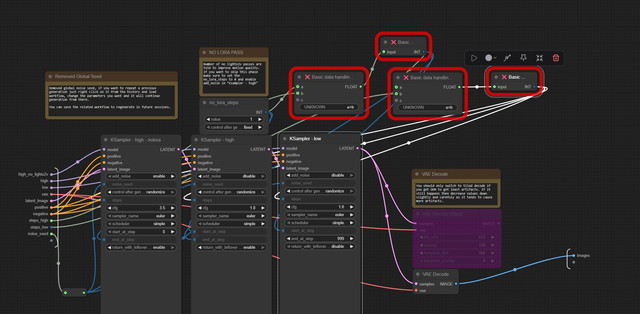
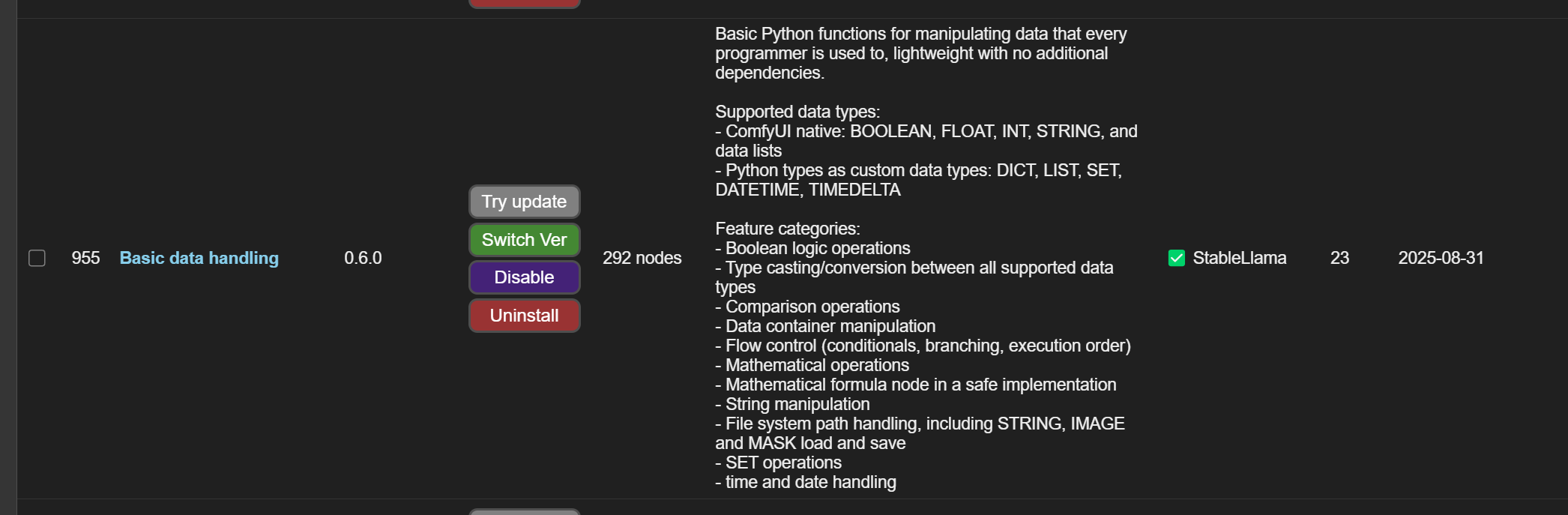
Those are in the Basic Data Handling package in ComfyUI Manager: https://objects.cekkent.net/2025/09/57996afe-ed99-43f1-8a2e-b6566a6d04ed.png
Manual install instructions here: https://github.com/StableLlama/ComfyUI-basic_data_handling although I'd recommend just using ComfyUI Manager to fix missing.
it sucks by using too much subgrahs which only makes the workflow more complicated
The subgraphs are there because the same tasks are being repeated. I'd much rather have a subgraph container of repeating actions than 1231289371983198198754 task nodes all over the screen that only makes sense to the person that built it.
Go take a look at the workflows with looping spaghetti monsters where you have no control over the rendering process then get back to us.
I get this error when trying to run a generation -
VHS_LoadVideoPath
video is not a valid path:
I noticed in the 'load video path' node within the final save section the first tab shows a directory which is greyed out but I can see 'X://insert/path/here.mp4'. I'm not sure if I need to edit that line, nor can I figure out a way to do so, but for some reason that node is causing my generation to error and not process fully.
If you deleted first I2V and replaced it with a plain I2V that could be the issue. I'm sending my system to service since the CPU is cooked again so cant debug deeper.
You need to hook up the filenames nodes
Great workflow!
I'm trying to understand how you got such smooth transitions and from what I see it comes down to whatever is done in "Temporal" subgraph.
I have no idea what you're doing there though, because the way I'm reading it, it should give an awful result and that obviously didn't happen.
From what I understand (i2v only)
Generate let's say 80 frames in VIDEO 1
Take the last frame off of VIDEO 1
Blend that last frame with the 79 frames of VIDEO 1 (???)
Send this blended frame as the first frame of VIDEO 2
Generate 80 frames in VIDEO 2
Take the last frame off of VIDEO 2
Blend that last frame with the 79 frames of VIDEO 2 (???)
Send that last frame as the starting frame of VIDEO 3
etc
Wan 2.2 cries a lot if you give it more than one frame. So what I'm doing is blending last few frames (was 10 if I remember correctly) with different multipliers starting from 5% and reducing (again cant remember the exact number) so it embeds a weird ghosty motion blur into a single image and hopefully next run understands what was going on. Just like people saving photos with low quality to make LTXV output videos with more motion but a little more advanced.
@iLegoLoon Got it, I'm basically trying to do that with the last 16 frames.
@iLegoLoon The other workflows that utilize WanVaceToVideo do a good job of frame/motion matching between clips with multiple frames. You should try to integrate that. Your workflow is by far the best in terms of organization, the other workflows are so messy they're hard to work with. You just need some better motion matching between clips.
There are newer Wan2.2 models that are supposed to help with this as well.
@mmrabati2154 Which other workflow does that too and how?
@Visento Benji has it in the "continue extend video" section. The car section at the end of the video displays the amazing motion matching.
https://www.youtube.com/watch?v=6cDWP5AY7CQ
Free workflow available
https://www.patreon.com/posts/139254327?utm_source=youtube&utm_medium=video&utm_campaign=20250919
And apparently there's new Lora's that only require the two ksampler method, however either method should work with the WanVaceToVideo motion matching,.
@mmrabati2154 will take a look, thanks!
@mmrabati2154 Just checked, sadly this is for another model, wan animate, not wan 2.2 i2v.
@Visento The first part has Wan Animate but later it doesn't. https://youtu.be/tIQNxi95AzQ?t=709 with the cars it uses
Wan2.2-T2V-A14B-4steps-lora-rank64-Seko-V1.1-forKJ.json
Pusa-Wan2.2-V1
Wan2.2-VACE-Fun-A14B
I'm going to try modifying it myself, it should definitely work with the Seko model, it does have an image input so it's at least partially I2V
@Visento The newest version has these I'm going to try it out as well. Motion matching and context transference shouldn't be difficult.
Wan2.2-T2V-A14B-4steps-250928-dyno-high-lightx2v
@mmrabati2154 If you do please post the workflow.
@Visento The confusing part is how Benji puts the entire multi-action multi-line prompt into one textbox then has loops with complicated latent frame count and trim logic based on new line. If you watch the video though, the car one, Benji has figured out motion matching somehow. It just needs to be engineered so that it's like yours with subgraphs and logic chains instead of one large looping prompt.
My main goal is simple; make it so foliage(e.g. trees, grass, butterflies, birds, animals) maintain smooth motion between clips. Benji has it so the cars and camera stay moving the same speed so that's a start.
Sent my system to service thanks to intel 14th gen (hopefully 2nd replacement). Have a 3060 but not sure if its worth a try lol.
To learn what sort of changes the high/low steps make in the I2V stages, I ran through the following and am sharing with the class so you don't have to do so yourself.
I'm doing four stages of I2V starting with the output of an SDXL workflow, because I can't stand WAN's T2V output. Output (from SDXL) to input (this workflow's First I2V) image size is 720x1280. I'm doing this because WAN T2V can only seem to produce 80's soft focus photos (or I'm using it wrong), and I want the videos to be clear and sharp.
High, low steps for each of the four I2V stages:
High 1, Low 6: https://objects.cekkent.net/2025/10/b109b392-5b5a-4c00-a9ba-ac9ff2996823.mp4 - it's alright. Video speeds up and loses sharpness towards the end.
High 6, Low 1: https://objects.cekkent.net/2025/10/25fdf1e8-a463-4392-b32d-1ff2cf64e091.mp4 - lighting gets hilariously out of control by the end of the video.
High 10, Low 10: https://objects.cekkent.net/2025/10/71886c7d-9123-4e7b-90f8-dd7c4067c08d.mp4 - video brightens slowly, and is generally not very sharp despite the sharpness of the start image. This also took forever to generate, like 18 minutes on a 5090.
High 1, Low 1: https://objects.cekkent.net/2025/10/0e2a9b10-6929-4142-b839-48e068685a46.mp4 - this actually turned out better than I thought it would, but there's ghosting of frames and face changes within the same video, and features like hair move too fast.
High 3, Low 6: https://objects.cekkent.net/2025/10/b3be7b49-3a59-4ce8-9b7d-dd5bc99e0d4c.mp4 - pretty good! Motion is mostly fine, subject doesn't change appreciably between stages.
High 4, Low 6: https://objects.cekkent.net/2025/10/54a9ce2a-8fed-475c-b34e-267763dc8c8f.mp4 - where I ended up as a daily driver. Sharpness and subject is maintained as well as it can be between stages, doesn't get too bright or soft focus-y by the end of the run. Generation times are alright, around 400 seconds on a 5090. There's still some stilted/stiffness that can be noted between stage transitions, but as @iLegoLoon has shared in other comments, there's only a single frame that moves between stages, so the workflow and WAN is doing the best it can.
This may not be news to anyone else, but the WAN "low" seems to define the video, with it then refined by "high", but too much "high" over-applies that refinement.
Thank you so much! Please don't give up on this.
anyone else got the Rsplit error and the VHS problem . I cant seem to figure it out
Make the sure the filename nodes are connected
What is "the Rsplit error" or "the VHS problem"?
Can someone explain what I need to do if I want to create a video from less than 6 I2V parts, from 3 for example? Any help would be appreciated.
Hey, just delete last X number of I2V subgraphs and feed the latest subgraphs filenames output into save subgraph's input.
Hey, awesome workflow! 👏
I’ve been using a similar i2v looping setup with WAN2.2 — generating short clips (like 5 sec each) and chaining them together to make a long video.
But I keep running into a weird problem:
the longer the video gets, the more it starts turning slightly purple or magenta.
Seems like some kind of color drift happens over multiple i2v runs.
Do you know how to keep the colors stable between loops?
Maybe working in latent space instead of RGB could help, but I’m not sure.
Would love to hear if you’ve found a good way to fix or reduce this drift 🙏
Hi, for me I call them artifacts and they may appear due to tiled decode or the model itself.
- Switch to default vae decode (it will run tiled if it runs out of memory)
- try to adjust shift value, lowering or increasing it may change the way things look. Especially slight difference to how they end may cause the incremental degradation. lora files kijai shared were less problematic as well but you still need to test for yourself.
In the end its still there but not as noticable until 30s mark.
@iLegoLoon
Thanks for the advice!
I checked various things, and in the end, it turned out to be my own setup mistake.
The intermediate videos I was saving with the Video Combine node were encoded as h264.mp4, so the color drift was simply due to lossy compression and reloading those clips repeatedly.
Your workflow appears to have a bug. I'm not sure how to fix it. I removed the text portion and am just using it for I2V as instructed and noticed that when it shifts from the first initial 5s video to the second render it dramatically shifts details warping into a completely different result. After that, the rest of the video generations follow the new one so those ones seem to be set properly and the issue lies with the initial first to second render context only.
So I've tested several more runs and dug around and still can't figure out why it is behaving this way but can confirm the workflow is broken until this bug is fixed since that first transition destroys all the rest, even though the rest clearly maintain their identity... just of the destroyed 2nd transition. Hopefully this can be fixed.
@kudon44 I'll test it when my system comes back from the service. Could be due to an update made to nodes used. I'd suggest making sure that you are running I2V instead of T2V and even test with the provided working comfyui_frontend version.
@iLegoLoon Yeah, the initial 5s matches my image but then it warps very heavily on the transition to the second pass of 5 seconds. From there on it seems to mostly main consistency with that warped version for the rest of the transitions so it seems to be between the first and 2nd group. I deleted the text node in the main layer completely and hooked up the image. In case it helps/relevant, I have not tested with the older front end you mentioned just the last 3 newest versions of ComfyUI. So that might be related.
Hi !
I'm trying to make this work for I2V. I've deleted the T2V node and linked the i2V node at the start.
I've enabled the high's and low's lora in the I2V subgraph, kept the no_light2fx disabled
I'm getting this :
Output will be ignored
Failed to validate prompt for output 395:111:68:
Output will be ignored
Failed to validate prompt for output 394:115:
Output will be ignored
Failed to validate prompt for output 393:111:77:
Output will be ignored
Failed to validate prompt for output 393:111:68:
Output will be ignored
Failed to validate prompt for output 395:111:77:
Output will be ignored
Failed to validate prompt for output 395:115:
Output will be ignored
Failed to validate prompt for output 382:115:
Output will be ignored
Failed to validate prompt for output 396:111:68:
Output will be ignored
Failed to validate prompt for output 396:115:
Output will be ignored
The original image is just displayed at the end, nothing seems to be running;
Am I doing something wrong?
I'd suggest not bypassing or disabling anything. If you connect Load image to first I2V then T2V will be ignored.
If you set the no lora steps to 0 inside ksampler subgraph and enable add noise for the second sampling step "no lora sampling" will be ignored.
I will eventually make a 2 sampler workflow since the new lora's are out once my pc comes back from service. I hope they fixed subgraphs meanwhile..
I got this too it was a missing connection between a model and an image input think. Also I had uses a wan22 VAE instead of the wan21 and that caused issues too. Fixed by replacing the vae and making sure all the connections are to live nodes not bypassed nodes. The original workflow has gguf connected but the original models had no connection so when I used the original models I forgot to connect the nodes. My issue now is that it seems the workflow will disable parts of itself after each run which is super weird. I have to reload the saved workflow every time so that i KNow all the nodes are still enabled.
I'm giving this workflow a whirl. I'm stuck, the opening image is created in output\Wan2.2-sub-merged but the flow stops, no error but also no video is produced.
Check console for errors, it sounds like it could be the one happening in previous comment. I'd suggest going back to working comfyu_frontend version mentioned in messages.
I've run ConfyUI under the recommend front end version. I have an issue now "VHS_LoadVideoPath video is not a valid path". I assume its because the value for "video" on the VHS VideoHelper node "Load Video (Path)" in the sub under Final Save isnt filled in. Trouble is, i cant find a way to add a value here. The field seems to be un-editable.
I like this workflow, but I have a problem, I usually use 3 generations for 15 seconds video, but sometimes I want to use less than 3 nodes, for example 2 or 1, if i simply connect the final node that I want to the "Final save", the other nodes keep executing althought the work is finished
Hey, I suggest deleting last N parts and saving a copy without them. Subgraphs are broken and linked subgraphs are completely disabled in latest version of comfyui frontend so we dont have a fix until they decide to implement it.
@iLegoLoon Sad to read this, but thank you for answer me 👌
I wrote with a CL problem earlier, but deleted as I found a resolution, but not a solution to my overall problem. I've included that resolution here, as well as new issues.
Original error after downgrading the frontend and trying the workflow (with my own 800x800 test image, and my own text in the prompts):
Exception Message: RuntimeError: Compiler: cl is not found.
I tried updating Visual Studio but that didn't help. Here are my error logs:
ComfyUI Error Report
## Error Details
- Node ID: 425:6
- Node Type: KSamplerAdvanced
- Exception Type: torch._dynamo.exc.InternalTorchDynamoError
- Exception Message: RuntimeError: Compiler: cl is not found.
I managed to resolve the CL issue by adding my actual cl.exe path to my VS installation and the C compiler path. (see here: https://github.com/comfyanonymous/ComfyUI/issues/5216)
Now, I'm having different issues. To eliminate moving parts, I've done a fresh portable install, along with Triton and SageAttn (for Torch 1.29w130). If I run it straight with the front end you recommend (1.26.2) and all the default models and nodes from the original workflow, I get this error:
Dynamo failed to run FX node with fake tensors: call_function <built-in method conv3d of type object at 0x00007FFED2EDA8E0>(*(FakeTensor(..., device='cuda:0', size=(1, 32, 21, 100, 100)), Parameter(FakeTensor(..., device='cuda:0', size=(5120, 52, 1, 2, 2), requires_grad=True)), Parameter(FakeTensor(..., device='cuda:0', size=(5120,), requires_grad=True)), (1, 2, 2), (0, 0, 0), (1, 1, 1), 1), **{}): got RuntimeError('Given groups=1, weight of size [5120, 52, 1, 2, 2], expected input[1, 32, 21, 100, 100] to have 52 channels, but got 32 channels instead')
Thinking if might be sage, I tried it with Sage turned OFF I and get this error:
Dynamo failed to run FX node with fake tensors: call_function <built-in method conv3d of type object at 0x00007FFED2EDA8E0>(*(FakeTensor(..., device='cuda:0', size=(1, 32, 21, 100, 100)), Parameter(FakeTensor(..., device='cuda:0', size=(5120, 52, 1, 2, 2), requires_grad=True)), Parameter(FakeTensor(..., device='cuda:0', size=(5120,), requires_grad=True)), (1, 2, 2), (0, 0, 0), (1, 1, 1), 1), **{}): got RuntimeError('Given groups=1, weight of size [5120, 52, 1, 2, 2], expected input[1, 32, 21, 100, 100] to have 52 channels, but got 32 channels instead')
If I bypass the Sage-Attention KJ nodes and Torch Compile Node (model direct to Model Sampling, I get this error:
KSamplerAdvanced
Given groups=1, weight of size [5120, 52, 1, 2, 2], expected input[1, 32, 21, 100, 100] to have 52 channels, but got 32 channels instead
At this point, I'm not sure what to do next. Any ideas?
How do you think, what can cause generating worse and worse clips, beginning from second clip?
First one looks perfect as usual, but at the 5th hands are blending to a body and hallucinating at all. Also prompt is ignored almost absolutely from second clip too. From that clips people begin shaking like a crazy, motion artifacts and much faster movements with each new clip in row. Tried with these models:
wan2.2_i2v_low_noise_14B_Q8_0.gguf
wan2.2_i2v_lightx2v_4steps_lora_v1...safetensors
umt5_xxl_fp8_e4m3fn_scaled.safetensors
Wan2_1_VAE_fp32.safetensors
Used sageattention, but not from patch node. Used --use-sage-attention --fast fp16_accumulation, as usual
UPD: Number of no lightx2v passes set to 0. Made it much better, but still far from perfect first clip. Prompt being ignored more and more for each clip is still a problem
UPD2: Tried with exactly yours lightx2v, it works almost like without them, problem with prompts and degrading quality is still exists
I think it was because of the temporal motion thing I've implemented. Maybe the package got updated. Removed it completely and used new lightx2v loras. It doesnt look as consistent now but at least works.
It gets more blurry at the end of the video, how can I prevent this?
bro, how should i make the subgraph affects the current part, not all parts? For example, i wanna generate part1 with A checkpoint model and part2 with B checkpoint.
I've also answered in pm, just copy paste model loader inside that node and the link will break. You may have to reconnect the input/outputs tho.
Sorry if this is a silly question I am new, I find as my clips go on the speed of my video increases leading to insane character speed movements.
Is this due to the lightning loras by any chance?
Thank you for making this as well! <3
If the output framerate is correct it can be because of loras. Also watch out for any trigger words in prompt. Here are the ones I use.
- Wan_2_2_I2V_A14B_HIGH_lightx2v_MoE_distill_lora_rank_64_bf16
- Wan2.2-Lightning_I2V-A14B-4steps-lora_LOW_fp16
completely fucking useless
Hey buddy I'm limited by the technology of my time. I hope SVI implementation works for you.
@iLegoLoon I agree with SB121262
Well I'd like people to kindly stop downvoting the guy because 5 days ago it was just a last frame to new video workflow since the temporal image system I designed stopped working after a node package update. We can direct our frusturation towards @qek instead :)
@iLegoLoon Thank you for this workflow, it works very well and opens up a lot of potential with being able to apply loras to the different sections.
Ok so you have a better version or something? Or are you blaming the workflow for your bad gens when your prompts are "A car diving fast" using a q2 wan 2.2 quant with 4 steps? Shut up and don't be a retard leech.