
WARNING: Hey, I've lately moved towards LTX2.3 but I will publish a fix to workflow issues mentioned in comments once I have enough free time.
I've officially switched to LTX due to slowmo issues with lightx2v loras. I might share a workflow but that model is already capable of 30s on 720p on a 4070ti so I'm not so motivated to do so. This one would still work if you found the missing packages. Thanks everyone for their support.
It finally happened!
Now there's a way for smoother continuous videos thanks to SVI team and Kijai.
We are at v1.0!
I've updated the workflow to add a few more features;
Video extend option by loading an initial video then converting it to latent that goes into first I2V(WIP)Option to switch between 3 and 2 ksampler phases by setting the initial step
Option to set cfg > 1 if you wanted to disable lightx2v
Images are saved partially in loseless format (use something like VLC to view them) and only loaded again on final merge, if something goes wrong you can merge those files to get a flowing video.
Implemented a bus system to reduce connections. Report if you have any issues but things should work as long as you have the right models and loras selected.
You can set and fix the seed for each part
There are options to upscale and interpolate before final save
Final save happens on main graph so you can preview your output
Slow motion issue probably persists. Couldnt find a consistent solution since when speed up using a third party tool every part becomes faster since they take previous latents as input until everything breaks.
Weak points of most SVI workflows right now is that it references first image in all parts so you might have background warping/chaning shape/textures on switches if the background has changed a lot.
I'll only be updating the workflow if kijai updates the node (there are two merge requests about end frame and better consistency(?)) and/or something breaks. So we can call this a semi final :)
Comfyui compatible SVI lora's;
LightX2V lora's I'm using;
FP32 vae:
Ultra Flux VAE for sharper !"Z Image"! outputs:
https://huggingface.co/Owen777/UltraFlux-v1/blob/main/vae/diffusion_pytorch_model.safetensors
GGUF still seems to be performing better than fp8 scaled in my experience.
Just share your outputs with us folks as well :)
v0.9
Left sampling on (1 + 3 + 3) steps with 4 parts (19s~). Takes around 10mins on my 4070ti with sage + torch compile. Feel free to extend it further if you need.
Everything is GGUF. Patch sage attention and torch compile are disabled by default but you are welcome to enable them back since they speed things up a lot if you have the environment set up.
You can set part specific or common lora's thanks to rgthree power lora node.
Happy generations! \('-')
Description
v0.2
Main workflow is Wan2.2-sub-merge-v0.2 (bigger file)
Sharing extra Wan2.2-sub-convert-mp4 workflow so when if generation somehow doesn't complete then you can convert latest .mkv file in temp folder to .mp4
Changes;
moved model selection inside subgraphs
added last frame auto saving (to be used as first frame)
added global seed subgraph inside sampler subgraph to affect all samplers
added interpolation option
added incremental video merging
saved part files as ffv1 to achieve loseless quality during transitions
saved final file as 264 crf19 for better size
added notes for generic information
FAQ
Comments (101)
Could you release a flat version without the subnodes?
The subnodes keeps it logical though, you can actually comprehend the workflow.
I cant imagine copying and pasting samplers and connect all models 6 times
I agree with this, i've been looking 10 minutes trying to find where the stupid model nodes are, this is a cute idea but extremely annoying to follow, i'm skipping this wf.
skyrimer3d You kidding bro? It takes two seconds to find.
I'm sure its a great concept once you get the flow working, but it makes it a nightmare to find where your break is. I'm willing to admit it could be user error.
After looking at it for hour or so, I think it's neat proof-of-concept but definitely makes it difficult to play around with settings or experiment when everything is nested so deep inside subnodes.
I'm thinking this works best if you tweak the settings for each 5sec segment outside in a different workflow, then copy those settings over into this workflow and render them together into a 30sec video.
Appetizer101 You can just add a float/int/string to the input then plug it into what you want to modify then tweak each subnode.
Hey, I would like to collaborate with you and possible fund some of this for my work.
Is it possible to
1. Take a existing character in the video
2. Integrate with multi-talk and make the characters speak
Feel free to use it and improve it as you like but I dont think I've the time for going too custom :)
updated comfyui to 0.3.50, updated requirements.txt, got the comfyui_frontend updated. I still can't use the new nodes and comyfui comfirms its at the 0.3.50 version :/ wtf is going on lol
Same issue 🥲
Had the same issue, I got it to work by random. Try go over to another workflow, like generate an image, and then load his workflow and maybe it will work... Course that's how it ended up working for me.
jayhartford I spent a lot of time with that, decided to learn dependencies. Recommend doing manual install with a virtual environment (venv). I eventually got this continuous gen workflow working. https://www.youtube.com/watch?v=Ms2gz6Cl6qo
Did you all try updating comfyui frontend?
Portable:
.\python_embeded\python.exe -m pip install comfyui_frontend_package --upgrade
Desktop:
pip install comfyui_frontend_package --upgrade
Same issue. ComfyUI, ComfyUI Frontend and ComfyUI manager have all been updated but the custom nodes are not found.
iLegoLoon 秋葉版怎更新python
Eu estou com o mesmo problema.
I was able to resolve this error by installing ComfyUI completely from scratch.
I'm using RunPod and I think those premade templates are just built to work with the one specific version. So I just took the standard Py-Torch 2.8 Template and installed everything manually, step-by-step.
This is great, thank you!
I am curious: why do you use the WanFirstLastFrameToVideo node with no end frame instead of WanImageToVideo? Is there any difference in behavior?
No difference, just lets you guys use start/end frames throughout the video so its for flexiblilty.
Just got to figure out motion capture at the end to keep it smooth. Multi-frame passing instead of single frame.
I'm still testing. I have a question: How do you manage to change the models only in one i2v subgraph, and have this setting applied in the other i2v subgraphs automatically? Are they somehow linked?
Yes they are linked. So first thing I noticed with subgraphs is if you make a subgraph in a subgraph and copy the parent subgraph, inner subgraphs get the same id (you can check from properties panel) and become common.
If you check the json file common subgraphs are only defined once no matter how many times you've used them. Then they are referenced on different subgraphs.
Copying a subgraph gives it a new id, cloning it keeps the id but clones on same page might work weirdly or may not work at all. I havent checked if its possible to clone a subnode to outer scope.
iLegoLoon thats very helpful thanks. it's like photoshops smart layers, they behave very similar.
If I may suggest... your workflow still uses ComfyUI_essentials nodes by Matteo, that are not updated anymore since april. It would be better to use different custom nodes for the math node you use. Great WF btw, I am learning a lot about WAN video with your workflow.
Thanks for the feedback, I kinda see it used all the time. I'll switch to something else if we dont get another groundbreaking video model in next few months.
I get a bunch of errors like this, how to fix?
Prompt outputs failed validation: Value not in list: format: 'video/ffv1-mkv' not in ['image/gif', 'image/webp', 'video/16bit-png', 'video/8bit-png', 'video/av1-webm', 'video/ffmpeg-gif', 'video/h264-mp4', 'video/h265-mp4', 'video/nvenc_av1-mp4', 'video/nvenc_h264-mp4', 'video/nvenc_hevc-mp4', 'video/ProRes', 'video/webm'] Value not in list: format: 'video/ffv1-mkv' not in ['image/gif', 'image/webp', 'video/16bit-png', 'video/8bit-png', 'video/av1-webm', 'video/ffmpeg-gif', 'video/h264-mp4', 'video/h265-mp4', 'video/nvenc_av1-mp4', 'video/nvenc_h264-mp4', 'video/nvenc_hevc-mp4', 'video/ProRes', 'video/webm']
you need to update comfyUI and the notes, this looks like you don't have comfyUI-Videohelpersuite Node installed
If you have the node but missing the format do this;
Open one of the I2V subgraphs in main scene, open Temp Save subgraph in there and pick a fitting format that doesnt have much quality loss.
Update your ComfyUI-VideoHelperSuite in the custom node manager. They pushed and update last month to add the ffv1-mkv codec (which as the OP mentions is a lossless codec).
Thanks. I cannot get it working on 8GB VRAM (OOM) but it works fine on 12GB VRAM. It seems to me WAN2.1 using even just last frame has less temporal problem (at least color) than WAN 2.2 Vace (that overlapped 10 frames) workflow that tried to do somthing similar. Wan 2.1 has color problem after first 5 seconds video and color matching cannot fix much.
It worked for me on an 8Gb RX6600, just lowering the resolution and disabling sageattention and torchcompile which I can't get my card to support.
You might giving a try after disabling T2V and generate images seperately then run I2V only using gguf weights, perhaps Q3 wouldnt be that bad
Prompt outputs failed validation: VHS_SplitImages:
Have seen this one before, people always manage to fix similar issues just not a clear way how they do it.
Make sure;
- comfyui is up to date
- comfyui frontend is up to date
- triton windows is up to date
- all packages are up to date
check the console logs for confirmation.
then restart your pc and import fresh workflow.
this happened to me when i tried I2V and bypass T2V as instructed. This is causing to also bypass the ksampler for both I2V and T2V
A great flow but a great mystery Some nodes require a newer version of ComfyUI (current: 0.3.50). Please update to use all nodes. Requires ComfyUI 0.3.50: 0cbb2ad3-8b50-4c3f-acb1-20995638726e, 12aa0ff7-d11f-46e9-bbb0-80f47cb15c08, 3d5f08b5-0370-4854-acaf-4cdd8254e175, 44e38e5d-3df3-40be-89ae-8e2c5ca3d319, 4ccfeac9-ce6d-4d4d-8c7e-18563872072a, 6231e609-4e0d-4f5c-96ae-1b71489c82c6, b06bec7f-2509-4059-8024-9eddcf07115a, ce5d3291-e45d-4916-8717-fe5a4b2e872a
Same here.
same
same here
Upgrade your comfyUI version
Evric Done 🫠
is comfyui frontend up to date? those are subgraphs that are not being recognized.
Portable;
.\python_embeded\python.exe -m pip install comfyui_frontend_package --upgrade
Make sure;
- comfyui is up to date (switch to nightly/stable version)
- comfyui frontend is up to date
- triton windows is up to date
- all used packages are up to date
check the console logs for confirmation.
then restart your pc and import fresh workflow.
iLegoLoon i've tried standalone version - no luck.. now trying the portable version, everything updated to the latest version:
ComfyUI version: 0.3.50
ComfyUI frontend version: 1.26.4
But still the same errors:
Some nodes require a newer version of ComfyUI (current: 0.3.50). Please update to use all nodes.
Requires ComfyUI 0.3.50:
0cbb2ad3-8b50-4c3f-acb1-20995638726e, 12aa0ff7-d11f-46e9-bbb0-80f47cb15c08, 3d5f08b5-0370-4854-acaf-4cdd8254e175, 44e38e5d-3df3-40be-89ae-8e2c5ca3d319, 4ccfeac9-ce6d-4d4d-8c7e-18563872072a, 6231e609-4e0d-4f5c-96ae-1b71489c82c6, b06bec7f-2509-4059-8024-9eddcf07115a, ce5d3291-e45d-4916-8717-fe5a4b2e872a
mamemame333 there was a comment in the github thread for comfy that these new nodes are only in the portable build, and not in the desktop comfy yet because it can't update them and you have to wait for the desktop version to be updated (i have the same issue)
ollymolly20073840 I have the desktop version installed and this is my issue as well
same, doesnt work on the desktop version. you need the github install (standalone)
Yeah I've the portable one. Can you not switch between nightly/stable builds to trigger a working state? I didnt know the portable and desktop repo's were seperate even tho the version numbers match??
Opened an issue on github but got an autoreply saying it might be an issue with subgraphs themselves. Let me see if updating mine will cause any issues since they pretty much update it everyday.
Edit: I've updated to the latest, still loads without any issues. I have no further suggestions than to do basic troubleshooting. Can someone confirm if it works on their comfyi desktop?
Edit2: I was told this; Subgraphs are not available on desktop until the next release in a couple days. Waiting it is for you people :( Or perhaps its time to try portable in nightly version (it wasnt officially in portable yet either).
Generally speaking the desktop version is crap, you shouldn't use it. Reason being is it's just not as well supported. Most of the community uses the portable version or installs directly from GitHub
@magicballoon On the contrary, I refused portable builds in favor of the desktop one, I have nothing but negativity about the portable one and a waste of a lot of time after updates on dependencies. But the desktop version has always worked stable and there are many like me.
@ollymolly20073840 This thread kind of proves my point, certain nodes and features just aren't updated on the desktop version
Hi, not sure what I am doing wrong but getting a long video with each section being quite different...
Can you reimport the workflow if you initially had problems? It may be corrupt. I've imported the version here and used without any issues.
I am using I2V, I have bypassed the T2V and I have linked the input Load Image -image node to the start_image.
When I ran getting this error please help.
No input found for flattened id [58:72] slot [-1]
People have told the shortcut bypass breaks it. Can you try to right click on T2V and click bypass, if that doesnt work just right click and set the mode to never.
This only generates the last frame of the first T2V...no continuation.
Do you have any errors or console logs?
I loved your work. Thank you.
Whmakes this unusable for me, Is that I get the Value not in list: unet_name: 'wan2.2\Wan2.2-I2V-A14B-LowNoise-Q4_K_S.gguf' not in ['qwen-image-Q3_K_M.gguf' error 8 times, and I am ubable to find the notes because they hidden somewhere in the subgraphs
The model files can be edited;
For T2V -> double click T2V node, double click Loader_T2V node, there you have them.
For I2V -> double click any of the I2V nodes, double click Loader_I2V node, there you have them.
There are also notes in workflow telling these tho.
Thanks so much for putting this together - it's really clever. If I can get it to work, I think it could really streamline some of my project. However, I am getting the following error when I try to run it: "Cannot execute because a node is missing the class_type property.: Node ID '#132:89:84'". Any idea what node could be causing this? I did have to replace the SimpleMath+ with the ABC Math node because all attempts to install or even find SimpleMath+ failed (even the GitHub page returns an error 404). Any help you or anybody else could provide would be appreciated!
try ai
for me it looks like its in comfyui_essentials if you are sure its simple math node. I guess I would need to check the json file manually to find the exact id. Tell me if installing essentials fixes it.
Thanks for replying - it looks like some of the updates resolved things broken yesterday. Got through most of the run until hitting this error: SaveImage
index 0 is out of bounds for dimension 0 with size 0
It doesn't work. It's a different woman and scene each time. It doesn't save or transmit the last frame.
Are you sure you've picked the I2V models in I2V_Loader node? thats a common mistake.
I used your template and only changed the links to the models. https://drive.google.com/file/d/1G4-3cU4JdxKZ55LJVl74VVBP0eVsjwqs/view?usp=sharing
Is it easy to add different loras for each section?
I guess it wouldnt be that hard but needs a bit subgraph knowledge to make it look clean. You just have to add them manually into First I2V and I2V node, make the corresponding models go through them (high_no_lightx2v, high, low), then you can duplicate I2V nodes.
iLegoLoon Any chance you could provide a workflow with Loras for each generation?
@iLegoLoon That would be super cool if you could provide an adjusted workflow for this
gives me error: KSamplerAdvanced
RuntimeError: ptxas failed with error code 4294967295 ptxas stderr: ptxas C:\Users\**USERNAME**\AppData\Local\Temp\tmpo_7hrrmz.ptx, line 71; error : Feature '.bf16' requires .target sm_80 or higher ptxas C:\Users\**USERNAME**\AppData\Local\Temp\tmpo_7hrrmz.ptx, line 71; error : Feature 'cvt with .f32.bf16' requires .target sm_80 or higher ptxas C:\Users\**USERNAME**\AppData\Local\Temp\tmpo_7hrrmz.ptx, line 74; error : Feature '.bf16' requires .target sm_80 or higher ptxas C:\Users\**USERNAME**\AppData\Local\Temp\tmpo_7hrrmz.ptx, line 74; error : Feature 'cvt with .f32.bf16' requires .target sm_80 or higher
Set TORCHDYNAMO_VERBOSE=1 for the internal stack trace (please do this especially if you're reporting a bug to PyTorch). For even more developer context, set TORCH_LOGS="+dynamo"
Try to disable torch compile nodes as quick solution, otherwise its either your gpu or torch version something is not happy with.
iLegoLoon I would also add it may be the CUDA toolkit version. Might want to check that your GPU, PyTorch version, and CUDA version all agree. There is a chart on PyTorch website that shows which versions are compatible with which CUDA toolkits.
I've experienced a similar error with SageAttention not working when I upgraded PyTorch and CUDA to the latest (2.9.0 nightly) on a 3080 Ti. However when I upgraded to a 5090, it worked with the same toolkit and PyTorch.
@iLegoLoon removing torch compile not give me the same error but it just save the last frame and also gives error on prompt: https://files.catbox.moe/skpbgu.png
EDIT: Fixed the problem.
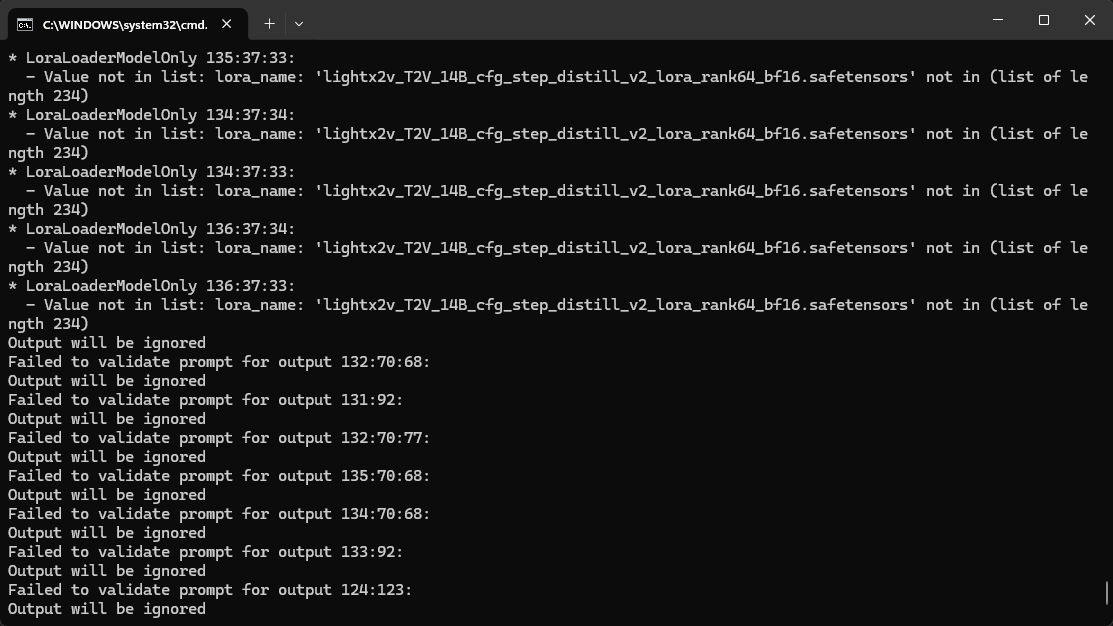
@Luxaria I am getting this issue as well. What did you do to fix the problem?
@mrawesomer34477 I stopped using it as I have more control if I do it manually... but you have to open the subgraphs and select the lightx2v Lora again, it is trying to load the Lora but the path on the node is from iLegoLoon PC, not yours.
@Luxaria figured it out too, I went to the Loader_I2V and bypassed the two TorchCompileModel nodes. I have another workflow for wan that works and it doesn't have this so I figured it's where it's failing, fixed now.
Today I learned that subgraphs exist. I will have to try this later. Would make my workflows look cleaner, though I may have to take the LoRA loader out and put it on the main graph because I tweak it so often.
some subgraphs are shared between outer subgraphs. taking one out will probably break that link and you will need to do it manually for each, I might add a new version with more control over lora's in the future.
Great WF - thanks OP :)
I wasn't getting the results i was hoping for - no matter what i did, it was still producing cartoon/anime outputs when i was trying to do a video of a person.. or - the output was a mess with bad quality, deformed, etc..
Based on the testing it looks like the original model is not capable of creating a good single images of people/females - other concepts worked OK.
So i've modified the WF and now i'm testing it - this is one of the first results https://civitai.com/posts/21179946
Looks good, but i will be tweaking it a bit - for now it's a spaghetti mess :) i'll try to use a WF with using only the LOW Wan 2.2 model to see the results..
The basic concept is - for T2I - i'm using completely separate sub-WF using Wan 2.1 (or Wan 2.2 if i'll find a way to get acceptable results) to generate the first image.. ksampler - euler/sgm_uniform, etc..
Just add in photography at the end of the prompt, it usually works.
For me GGUF models provide a better output than fp8. You have a werid undersampled dot matrix effect with fp8 which isnt present with even Q4.
Cant see the post.
Well its not that spagetti if you compare it to a 6x native I2V workflow put end to end.
Copy pasting existing T2V workflows entirely, converting to subgraph and connecting the image output to first image input works fine.
"Copy pasting existing T2V workflows entirely, converting to subgraph and connecting the image output to first image input works fine."
This is exactly what i did and it seems to be working OK with either Wan 2.1 model, or the LOW version of Wan 2.2.. still testing..
Btw. the "photography" word in the prompt wasn't near as good as i'm getting now with the modified WF - if you want i can send it to you afterwards, and you can test it yourself a potentially use for you new version - it's your idea/creation anyway (the original WF)
I'm not using fp8 - i'm using GGUF for Wan 2.2 Q6_K - you can check everythign that is posted on my profile is using this GGUF Wan 2.2 model (it's bigger than Q4, but i have 4090 and it loads a lot faster the the fp8 models, while still is a few gigs smaller)
Btw - by the spaghetti mess i meant my WF ;)
Thanks, v0.2 works very well for T2V.
But if I follow yours notes to start directly with an image ( Bypass T2V, load image on First I2V start_image ), I got 6 times this error:
Prompt outputs failed validation: VHS_SplitImages: - Required input is missing: images.
And no way to find the soluce inside First I2V...
Can you post the workflow for I2V only?
Well they broke linked subgraphs and bypassing only the outer instance. Last stable subgraph for that was 1.26.2, here's the command to rollback to that;
.\python_embeded\python.exe -m pip install comfyui_frontend_package==1.26.2
after linking the image from I2V, don't bypass the T2V node. just edit it to have 0 steps (and the subgraph within in it too).
Thanks! Working now. I was on 1.26.5 frontend...
Bypass T2V returns always errors. But like suggest vegeja, no bypass with 0 steps for T2V sub is fine for me.
Can anyone share working I2V version of this because none of the workarounds work.
May be easier if you just paste the console error when you try to queue a run. That'll be easier to just tell you the problem and how to fix.
also, as mentioned in another post. don't bypass the t2v as per the notes suggest, as you end up with vhs errors. instead, set the steps in that node and its subgraphs to zero (after linking i2v), which then doesnt do anything during a run.
@vegeja5390630 I am not getting errors, it just loads t2v instead on i2v models. T2V set to 0.
I suggest downgrading to comfyui frontend 1.26.2 and reloading workflow from json file, command included in main post. Right click bypass and linked subgraphs work fine in there.
@iLegoLoon Thank you kindly, i just might try that.
@vegeja5390630 You really helped me thank you so much hope you'll have a great weekend
Awesome template — love the subgraph approach and the merge flow! A few small ideas that might make it even smoother:
• Maybe save the intermediate I2V parts as FFV1 MKV and export the final video as H.264 MP4. If the temp I2V files could auto-clean between runs, that would keep things lossless while saving disk space.
• An optional AI upscaler step before the final save could give a nice quality boost.
• For the default preset, it might be easier for newcomers if LoRAs are off by default and the first I2V uses Loader_I2V → Load Clip (non-GGUF). I hit errors when running stock (non-quantized) models. A note on how to switch to GGUF/quantized models would be perfect.
Thanks for sharing this — it’s already super useful and has tons of potential!
Hey thanks for the feedbacks;
- I would need an extra custom package and node if I wanted to force clean temp, idk if its worth for such a small detail but might change my mind.
- upscale using model options could be added but it would significantly increase the duration. I believe those should be seperate or we need easier controls. Maybe getNode setNode support between subgraph contexts would make that possible.
- I didnt think this workflow would be used a lot, maybe in the future versions but I'm certainly waiting for bugs(? at least for this workflows use cases) introduced with latest versions of comfyui frontend to be fixed. I'm already thinking of a v0.25 but workflow broke mid design so I gave up.
@iLegoLoon Sure, totally fair—take your time and think it through. The workflow is already solid. If you revisit it later, a couple lightweight tweaks could help without adding complexity: save the intermediate I2V parts as FFV1 MKV, export the final as H.264 MP4, and default the first I2V to Loader_I2V → Load Clip (non-GGUF) for people using standard models. Temp auto-clean would be nice-to-have but not critical, and I agree upscaling is best as an optional step to keep runtimes reasonable. Thanks again for sharing this!
my comments are enhanced by AI, sorry about that, I'm doing this for better flow :)
Works on comfyui portable?
Here I got a lot missing things that the manager can't find to download :/
I guess you would need comfyui essentials and comfyui frontend 1.26.2 besides the missing nodes that show up on comfyui manager.
I had to google for the package names and install them manually. I think it was StableLlama's Basic data handling and MTB nodes for Sublist To Image Batch.