


TAME Pony: The Authenticity MachinE
IMPORTANT ANNOUNCEMENT!!! - Please do NOT use anything with the word "Karras" in it to generate images with any of the TAME models. They are NOT compatible, and you will NOT get clean images. Best settings are Euler a with SGM Uniform scheduler.
You can use other samplers, but always choose SGM Uniform or Simple as your scheduler (unless you have read the version information on the right, which provides a fix for other schedulers, depending on the TAME version you are using).
Remember: the showcase images are meant to be reproducible. There are no special techniques used to produce them, just good settings and a mild upscale (1.5x-2x) using highres fix. If you are not getting images that nice, the problem is your settings. I suggest to try downloading one of the sample images and load it into your image generator, then use the settings for your own prompts until you figure out settings that works better for you.
Version 2.5 is here!
Like version 2, the changes in this version have been achieved only through merging.
Since I had a lot of feedback that people missed the vivid colour and Pony knowledge (characters, men) from version 1, I went back and reworked the recipe from the start to try to get as much of that as possible back into the model while retaining the improvements from version 2.
I also improved the diversity somewhat. It's still limited, but at least now you can actually prompt for Asian girls and get them!
I did have to compromise slightly on anatomy and realism, but overall I think it worked pretty well. Let me know what you think in the comments.
Version 2.5 Usage:
I like CFG 5 for this one, but anything from 2-7 generally works well. It has the same wide CFG range like version 2, so feel free to crank it up higher as long as you raise the steps to compensate.
I haven't tested the samplers as thoroughly as I did with version 2, but the DPM samplers are still working well with SGM Uniform or Simple. Still not working out of the box with Karras, but it does work if you set sigma min to 0.1 (note that Version 2 required 0.3). You can set this in options/sampler parameters in A1111, or with a node in ComfyUI.
In my opinion, DPM++ SDE and DPM++ 3M SDE with SGM Uniform scheduler typically give nicer results than Euler a on this model, but try around.
As always, please post images and feedback so I can see what everyone is up to!
P.S. This will likely be the last version for a while, as I don't think I can squeeze much more out of merges. Version 3 will come, but not until I manage to do more custom training.
Version 2:
No new training this time, but hundreds of hours of merging, testing, and tweaking to squeeze more quality and realism out of the model. Two more SDXL models (bigASP and NightVision) and two more Pony models (CinEro and One-Trick) were introduced to the mix. Version 2 still has the realism, responsiveness and capabilities of the TAME you know and love, but with improved anatomy, clarity, image quality, sampler compatibility, lighting, and artistic capabilities.
This is NOT just a porn checkpoint. Yes, it can do realistic XXX really well, but there is much more it can do, so look at the example images and try around.
Version 2 Usage:
Same guidelines as version 1, but with a few extra tips:
CFG 3 will give good, realistic, high quality results, but the output will be less vivid than version 1. If you prefer that bright and colourful feel, increase CFG to between 5-7.
If you want to get artistic, higher CFG even up to 20+ can give interesting results! But increase the number of steps if you start seeing colorful artifacts or other issues.
All the DPM samplers are now working well, IF you choose SGM Uniform or Simple as your scheduler. If you are using an old version of Auto1111 or something where you cannot independently choose the scheduler, they may not work.
If that is the case, or if you want to use one of the non-working schedulers, you can go to settings, sampler parameters, and set sigma min to 0.3 (may not be the optimal value, but works pretty well for me). This should fix Karras and most other schedulers except KL Optimal. BUT remember to set it back to 0 at some point because it will negatively affect the results if you use schedulers that were already working!
Please post interesting results so myself and others can see what you have been up to with the model, and get some new ideas of what it is capable of!
Version 1:
This model is all about maximum realism and sexiness. It aims to achieve a new level of realism for Pony models. While there are a lot of amazing Pony realistic models out there, most of them suffer from "Ponyness": their Pony heritage is immediately clear when you look at faces or anatomy. TAME certainly has its flaws, some of which I hope to remedy in future versions, but from what I can tell the amount of "Ponyness" is very low.
Many creators are jumping on the Flux bandwagon now, which is understandable. It's a great model. But for those of us stuck with older GPUs I don't think it is the best option (if it is an option at all). I've also noticed a degree of "Fluxness" is present in most/all of the fine tunes.
TAME began with a series of checkpoint merges, using block weight merge to combine a set of realistic PonyXL and SDXL models in a way that maintained the prompt adherence and flexibility of Pony. I then trained the resulting model on my own dataset to further improve the realism.
The Authenticity MachinE will not win any awards for creativity but it is damned good at making realistic pictures of women in any state of dress or undress.
Quick start:
Sampler: Euler a
Steps: 20
CFG Scale: 3
Resolution: 912x1280, 1024x1400, 1280x1536
Hires fix: ESRGAN_4x
Upscale by: 1.5
Hires steps: 10
Denoise: 0.3
Usage guide:
Score tags: You do not need score tags with TAME. Putting them in may not hurt but it likely won't help either, so why waste the prompt space?
Quality words: You do not need quality words (8k, masterpiece, best quality, etc) with TAME. They are a waste of prompt space.
Negative prompts: You do not need negative prompts with TAME unless there are specific things you want to exclude.
Positive prompts: Prompt length doesn't matter too much, but keep it simple. Words and phrases with commas in between. The model understands Pony style prompts, but does not do well with natural language prompts. TAME usually responds well to gentle prompting (take a look at the example image prompts), so don't use a lot of emphasis e.g., (large breasts:1.8) unless the model is being stubborn. Start by just telling it what you want, then play with emphasis, rearranging words, and more advanced techniques if you aren't getting the right results.
Don't fill up your prompt with nonsense words. Look at this example I copied from another model's gallery (RealVis XL V5.0):
photograph the little catgirl, cat ears, wearing fur dark coat, 50mm . cinematic 4k epic detailed 4k epic detailed photograph shot on kodak detailed cinematic hbo dark moody, 35mm photo, grainy, vignette, vintage, Kodachrome, Lomography, stained, highly detailed, found footage, (masterpiece), (best quality), (ultra-detailed), the little catgirl, cat ears, wearing fur dark coat, illustration, disheveled hair, detailed eyes, perfect composition, moist skin, intricate details, earrings, cinematic still the little catgirl, cat ears, wearing fur dark coat . emotional, harmonious, vignette, 4k epic detailed, shot on kodak, 35mm photo, sharp focus, high budget, cinemascope, moody, epic, gorgeous, film grain, grainy, the little catgirl, cat ears, wearing fur dark coat, detailed, elegant, highly colorful, warm light, sharp focus, beautiful, intricate, expressive, rich deep colors, cinematic, cute, enhanced quality, creative, positive vibrant romantic atmosphere, depicted, perfect background, professional, thought, iconic, best, thoughtful, pretty, attractive, charming, confident, passionateI can't speak for RealVis because I didn't create it, but I strongly suspect that much of that prompt is doing nothing. What I can tell you is if you use that prompt with TAME you will not get great results. Here is a quick rewrite:
catgirl,earrings,cat ears,wearing dark fur coat,warm lightingSee how simple that is? From 142 words down to 10, that's more than a 90% reduction. Now, observe the difference in the actual renders using TAME:
Long prompt:
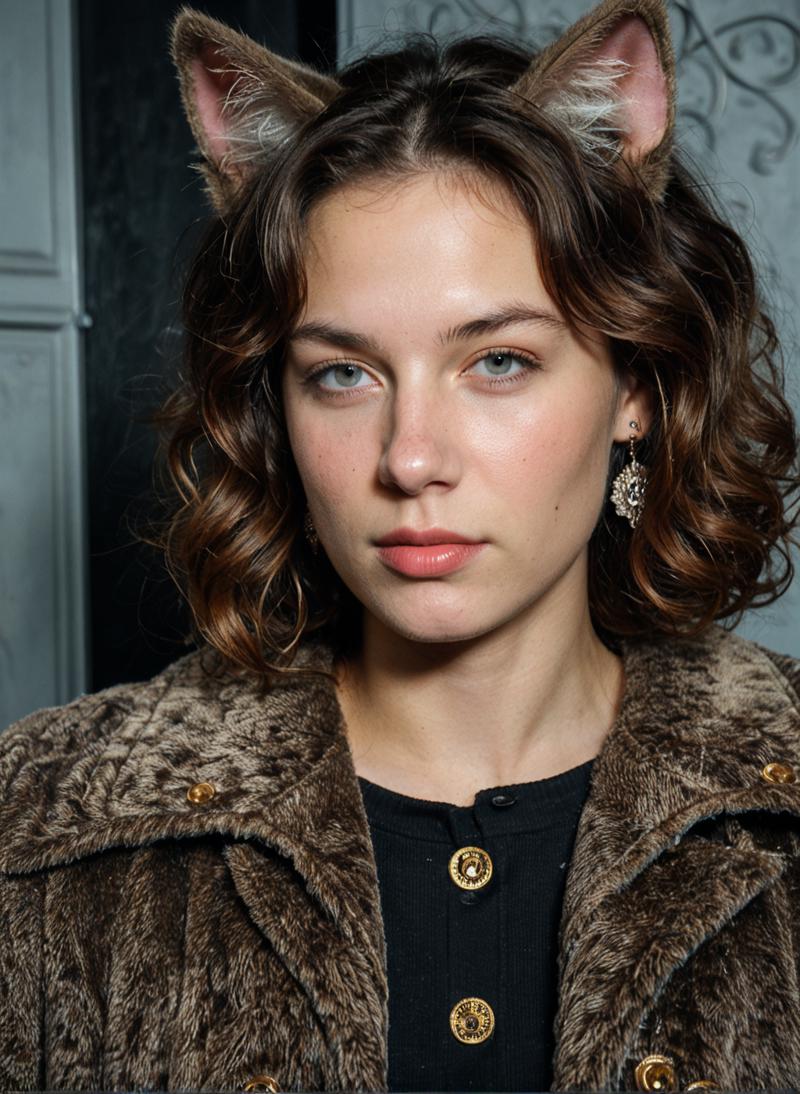 Not terrible, but probably not what the user was looking for.
Short prompt:
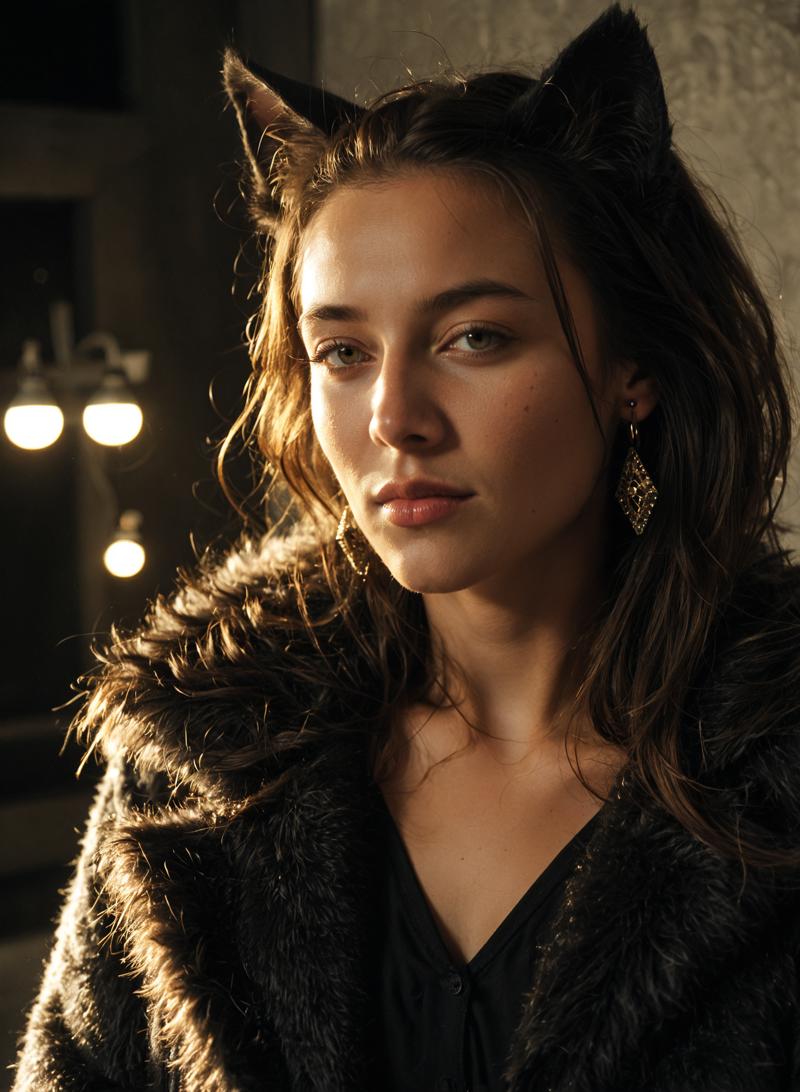 See the difference? 90% less words and a much better image that is likely also closer to what the user was looking for (romantic atmosphere, elegant, etc). In fact, it looks so good that I decided to use it in the model showcase!
Adetailer: I do not recommend using Adetailer with TAME. In my experience it makes things worse. Most of the time you are better off with just Hires fix. If you are having trouble with e.g. a really small face then maybe give it a go, but don't expect miracles. Often changing the settings (sampler, prompt, resolution, steps, denoise, etc) will get you a better solution. For example, full body poses often render best at a more narrow resolution (square resolution often makes the faces smaller) and e.g. work better with Euler a than with DPM++ SDE. Too few steps can make things blurry while too many can cause artifacts and strange eyes. Higher denoise can fix more issues but can also mess things up.
Resolution: This model was trained on a high quality dataset with a max training resolution of 1536x1536. That means you can often generate at up to 1536x1536 without deforming your subjects. The model also works well at pretty much any width-height combination, even extreme ones.
For example the image below was generated at 2048x408:
 And this one was generated at 504x2048:
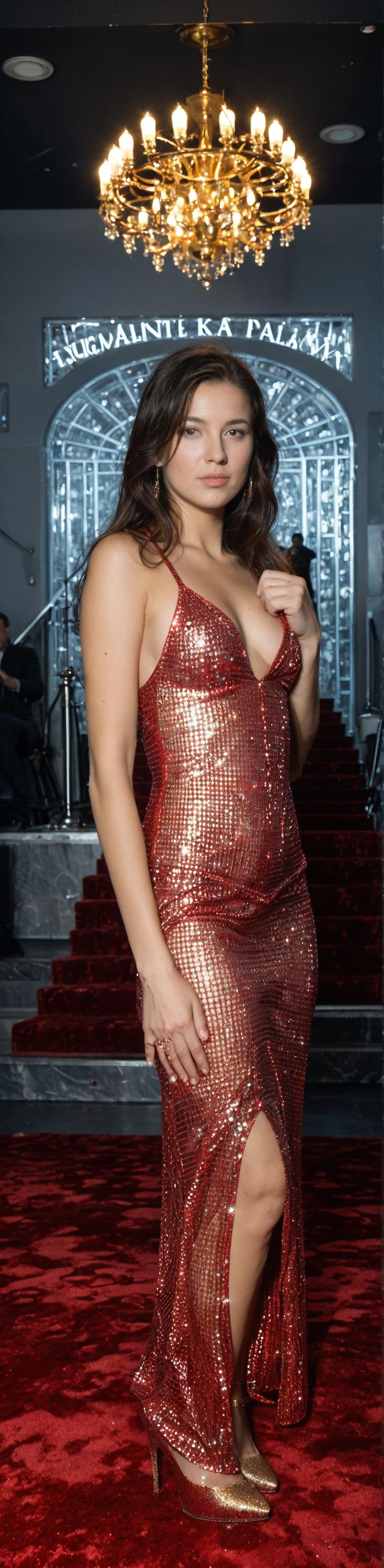 These are just test images done on the fly, without Hires fix, but as you can see neither of them has any obvious deformities or other major issues. The second image would look significantly better with Hires fix and the extra finger could likely be eliminated by trying a different seed.
Basically you have about 2.4 million pixels to work with, and as long as you don't exceed that by much (width x height) the model works. For example, you can crank the width all the way up to 2048 and set the height to 400, 800, or 1200... but if you go much above 1200 you will need to reduce the width or you will start to see weird things happen.
Even a tiny change in the resolution typically has a large effect on the image (pose, etc). So be creative, try different resolutions!
Upscaling: I highly recommend using Hires fix, but make sure you choose a good upscaler. My favourite is 4x_NMKD-Siax_200k, but 4x_foolhardy_Remacri and ESRGAN_4x are also good choices. I generally set it to 1.5x resolution with approximately half the number of steps used for the first pass and a denoise strength of 0.2-0.4 (default for me is 0.3). You can of course upscale further if you desire.
Samplers: Euler a is highly recommended as it will give you good results with a range of settings. DPM++ SDE can work well with some images (avoid it for full body poses) but it really has to be dialed in or it will look terrible. Other working samplers include DPM++ 2S a, DPM++ 3M SDE, Euler, DPM2, DDPM, and LCM. Most others do not work properly with this model.
Schedulers: I haven't played around much with different schedulers, so you are on your own with that. I use Forge (an offshoot of Auto 1111) which has limited options for sampler/scheduler combos, but I haven't noticed huge differences in any case.
CFG Scale: Typically 1.5-5 is best (I keep it at 3 most of the time), but you can try going higher if you wish. Worst case you get a bad looking image or two, right?
Steps:
Euler a - 15-30 steps + 8-15 hires steps (for best quality I typically use 25 + 12)
DPM++ SDE - 6 steps + 4 hires steps (for pure speed you can even drop it to 5 steps and turn off hires fix, but don't expect mind blowing quality with this sampler)
DPM++ 2S a / DPM++ 3M SDE / Euler - 12 steps + 6 hires steps (these are decent starting points, but I haven't done in-depth testing with these samplers)
DPM2 / DDPM / LCM - I haven't played with these except to test that they work, so you are on your own
Notes:
On occasion you might notice a watermark appearing. This is either due to one of the models I merged in, or I made a few mistakes in cropping my own dataset. Either way just change the seed and it should go away.
The model is not great at counting fingers and sometimes creates too many or too few, especiallly in close-ups. If you have the the rest of the image dialed in but can't get the hands right, start generating batches using variation seed at a low strength... hopefully one of them will give you the correct number of fingers without drastically altering the rest of the image.
This model can generate very realistic vulvas, including the inside bits...the closer you are to your subject, the more realistic the vulva will be (see examples in the sample images). To get your subject to show you her innermost parts, use the term "spread pussy". Variations might work, but this is the term the model was trained on. You can also use "pubic hair" or "female pubic hair" in the positive or negative prompt or with an emphasis of less than one (e.g. pubic hair:0.5) to dial in the amount of pubic hair. You can try adding clitoris and urethra to the prompt if the anatomy isn't quite right, especially in close-ups, but I'm not sure how reliably this works. The model should also understand "gaping pussy" or "pussy gape" but again I am not sure how reliably.
The model can also do peeing, squirting (to a limited extent), penetration, masturbation, fingering, dildo, vibrator, anal, titfucking, etc. If you are having trouble getting the girl to e.g. stick a cucumber in her ass, don't fill the prompt with different words and phrases. Use something like this: anal object insertion, anal cucumber. Those two phrases, in that order, should do the trick. The same trick works for bananas, bottles, etc. Usually the phrase "cucumber in anus" will render a cucumber, but the girl will not put it in her ass. This is generally true for many other models too, in my experience. If you are having trouble getting cunnilingus or titfucking to work, try altering the positions of your subjects to something that makes anatomical sense (might take a bit of trial and error, giving directions to multiple subjects in one prompt can be a pain in the ass).
Please use this model with care, given its realistic capabilities. I have used only images of adults in the training dataset, but the model may still be capable of generating inappropriate images due to existing content or merged models. I have thus far not encountered anything inappropriate by accident, and I do not have any intention of testing for it. In any case, please do not post anything inappropriate in the gallery. Furthermore, I am not responsible for any misuse that may occur.
Finally, I would like to acknowledge and thank the creators of these other wonderful models, whose work I built upon:
GODDESS of Realism by Oppkllll
CreaPrompt_Lightning_Hyper-SDXL by jice
Another Pony Realistic Merge by Error666
iCatcher Realistic by iCatcher
LEOSAM's HelloWorld XL by LEOSAM
Pony Diffusion V6 XL by PurpleSmartAI
Better Cum - Pony (Lora) by Topplok2
NightVisionXL by socalguitarist
One-Trick Pony XL by DarkDescent
Description
Version 2 has no additional training but has undergone a number of merges.
Improvements:
Better anatomy (vulvas and penises)
Better faces at a distance
Better lighting
More artistic
Better sampler compatibility
More clarity
More stability
...
Don't worry, it still has the realism and pony capabalities of version 1!
However, this one has a different look and feel (it has better image quality and clarity but is not as bright or vivid), so some of the prompts that work well with TAME v1 may not look as good with TAME v2. If you increase the CFG to 5 or 6 you might get something closer.
Weaknesses:
Often has trouble getting the right number of fingers, still lacks diversity, still can't generate good images of men, not very good at lesbian stuff either.
Notes:
Works with most samplers if you select SGM Uniform or Simple as your scheduler. Best results with:
Euler a (20+ steps)
DPM++ SDE (8+ steps)
DPM++ 3M SDE (20+ steps)
DPM++ 2M SDE (10+ steps)
DPM++ 2M (15+ steps)
If you want to use Karras or other non-working schedulers, here's a tip: set sigma min to around 0.3 (go to settings/sampler parameters in Auto1111 or use a node in ComfyUI). All schedulers except KL Optimal should then work well with most samplers. However, it will negatively affect working schedulers, so don't forget to set it back to 0 again!
Resolution: 1024x1400, 1280x1400, 768x1400, 1280x1280... these are my goto standard resolutions, but use whatever you like, it shouldn't matter much.
I higly recommend upscaling (e.g. high res fix) for best quality, but at least with Version 2 the initial output is typically better.
For general use, CFG of 3 will yield clean, crisp, realistic renders. If you want more vivid images increase it to around 5-7. If you want to get more artistic you can crank it up as high as you want, even 20+ can yield interesting results depending on the prompt. If brightly colored artifacts start appearing, increase the number of steps
FAQ
Comments (21)
Absolutely the most incredible model.
I'm not sure if I'm doing something wrong, but it doesn't seem to be following my basic prompts at all. I will put skirt, thong, and it keeps generating pants or a full on dress
Usually it is pretty responsive, although it can get confused if the prompt gets too complex. Maybe it is also something about the prompting style. If you want to share an example that isn't working, I can have a look later and see if I can help..
thank you for the version 2, btw I still prefer the vivid colors and sharpness of the ver. 1. btw keep up the good work!
p.s. i have found that the word the word "canon" generates men
Thanks for the feedback! I totally agree, version 1 is much more vivid.
But just out of curiosity, have you tried increasing the CFG to 7? It will still not be as vivid as version 1, but it gets a lot closer while maintaining realism and clarity. Cranking up the CFG does not cause oversaturation and loss of detail the way it does with version 1 (until you get to much higher values at least).
Also, version 2 has a good understanding of lighting styles, so you can often get a much more aesthetic result if you add something to the prompt, e.g. "narrow depth of field, natural lighting".
There are loads of different lighting styles it understands, rim lighting, volumetric lighting, studio lighting, dramatic lighting, hollywood lighting, golden hour, sunset, sunlight, soft lighting, warm lighting, candlelight, backlight, fluorescent lighting, specular lighting, dappled lighting, dim lighting, radiant god rays, etc. And you can add emphasis to get a more dramatic effect (e.g. hollywood lighting:1.5).
I am surprised you found it sharper though. For me, version 2 produces much sharper images on most (though not all) prompts. But if version 1 gives you better results, and you are happy with it, stick to it!
Interesting find regarding the word 'canon'. I have no idea why this would be the case, but good to know!
yes i tested multiples CFG til 7 but still i can't see the cleaness of the ver.1. Maybe i have to test more the lighting options as you suggested
I'm in awe of this model still. I can clearly see the influence of SatPony and Goddess of realism.
Most strinking is the fact that faces that are in lets say mid-range are not as distorted like in other models.
ver. 1 became my favorite model.
I still can't handle vers. 2 properly, but it's still great.
Its true that it effortlessly looks more realistic than ver. 1, but it seem very much of the Pony knowledge is gone, which is a shame, as Loras can be tough to handle, which seemed far easier in ver. 1.
I'll try the "canon" thing next time. But right now
its seem that the model became more bias towards creating women. In the first 5 Steps you could see it wanted to create a man, but then it turns.
Also happens with High-Res fix.
To sum it up ver 1. Got me far more interesting results even with a wild mix of loras.
Hi, thanks for the feedback! I'm sorry to hear you are having trouble getting the new version to do what you want. I create the models with my own interests in mind. I did spend many many hours testing and tweaking to try to minimize loss, and so far I was not aware of any Pony knowledge lost from the first version. But of course I am not really aware of what others are trying to create, besides what I see posted on the model gallery. I do keep an eye on what is posted and tried to ensure the interests I saw there (e.g. monsters, futas, cyborgs, mouse girl, giantess, gaping assholes, etc) could still be easily reproduced. But clearly I have missed some other losses!
I am aware that there is an interest in creating men (other than just as background items or to provide penises for sex scenes), but since I don't do this myself it hasn't really been a priority. That said, training men into the model is on my to do list. But it is a really time consuming task to compile and tag a high quality dataset, so I am not too sure when it will happen.
I tried around just quickly to create some men and I didn't have any trouble, at least in solo situations. Perhaps it is a prompting issue? For example, "a man ..." worked on the first try, but it required some forcing with 1man or 1boy. Male-on-male sex scenes, on the other hand, seem to be a particular issue with this version. It is not something I ever tried with version 1, so I was not aware of what the model could or could not do. Now I have tried both and seen the difference, and it is very clear. So, I am sorry to have neglected this aspect, and I will see if I can do something about it for the next version!
Thanks again, your feedback is really helpful for improving the model!
@zyxt99565
Thank you so much for your effort. And thank you for even considering other peoples wishes.
I'm an absolute layman, so I guess what I mean with pony knowledge ist the knowledge about anime/game characters that usually are inherent to most pony checkpoints/merges. In the various testing images it immediately comes to attention, that hair-style-colour and clothing is harder to reproduce.
I'm Not making a lot of buzz but I keep pumping, because I know it is in good hands :-). That doen't mean anything. So no preassure. I'm still testing version 2, because it's definitely woth it and as a whole 90 % of the images are beautiful an anatomically well done. So I'm having a good time anyways :D
Oh, anime characters! Ok, that will be a bit more challenging to test for because I know literally nothing about anime. I only chose the Pony base because of how responsive it is to prompting. I will find out some character names and add them to my test prompts though. :-)
If it ends up too difficult to maximize both realism and pony knowledge, I may have to diverge the model into separate checkpoints.. but I will see what's possible. And thanks for the buzz :-)
@zyxt99565
After further testing an generating hundreds of images I have to say that I was able to get results regarding the earlier mentioned Pony-Outut. I'll post example image soon. I just want to say that I'm increasingly happy with the model as I get to know what it needs to show me what I want to see.
Generally it helps to extremely crank up the weights of individual tokens for example "chun-li" does not enough, but "(chun-li:1.8) will do. as will most tokens. Most models i used explode if you exaggerated like that, but it seem v2 need that ;.). Plus it runs far more stable than v1 when it comes to posing.
The only thing that still persist. Hands... well a known problem. Maybe if I used other samplers or scedulers more often (besides euler a / Normal) more often it would help.
I have to be careful. I'm getting obsessed with your model. v1 & 2 are my favourites. Thanks again!
V2 indeed feels a bit more realistic. Though, I rather have the vivid colors from V1 than the desaturated colors from V2 (IMO). Also, it seems like V1 was a bit more pony craziness capable than V2 (probably I can work around this with proper prompt),
Anyway, if V1 was 10/10, V2 is 9.9/10.
I'll probably switch between these 2 models depending on the subject.
Both are the best model at CivitAI right now.
The best NSFW model ever made for SDXL so far.
This might be the only SDXL/Pony model that does faces at a distance really well. Basically, I'd say this model is almost the pinnacle of what can be achieved with both PDXL and SDXL.
Amazing model. It's on par with PonyRealism for realism or maybe slightly better (need more testing). It adds a lot more nice background detail though. The biggest draw back is it loses a lot of pony flexibilty.
From the little testing I did V2 seems like a big improvement over V1 as well.
Tested V1 rigorously and so far it's the best realistic PonyXL so far!
Just noticed V2 is out and will test that as well!
By the way, with the intent of using your model for generation, would you suggest training (realistic) Loras with this checkpoint model or still rather use the default V6Pony model for training?
Good model, but it's really bad at rendering non-Caucasian ethnicities. Trying to render an Asian person gets you someone that looks like they're 1/4 Asian and 3/4 white at the best of times. Hopefully this is something that can be fixed in a future version because otherwise this model is top-notch.
Thank you for the feedback!
Yes, diversity is one of the big weaknesses, in both versions! Also V2 is terrible at men, it prefers to swap them with women. I am working on datasets and will do some more custom training at some point, but that could take a while. In the meantime I have a new merged version in the works which already improves on these issues, and will be coming soon. :-)
Details
Files
Available On (1 platform)
Same model published on other platforms. May have additional downloads or version variants.