












 VERSION LINKS: FP8 • FP16 • NF4 • GGUF Q8_0 / Q6_K / Q5_KM / Q5_KS / Q5_0 / Q5_1 / Q4_KM / Q4_KS / Q4_0 / Q4_1 / Q3_KM / Q3_KS
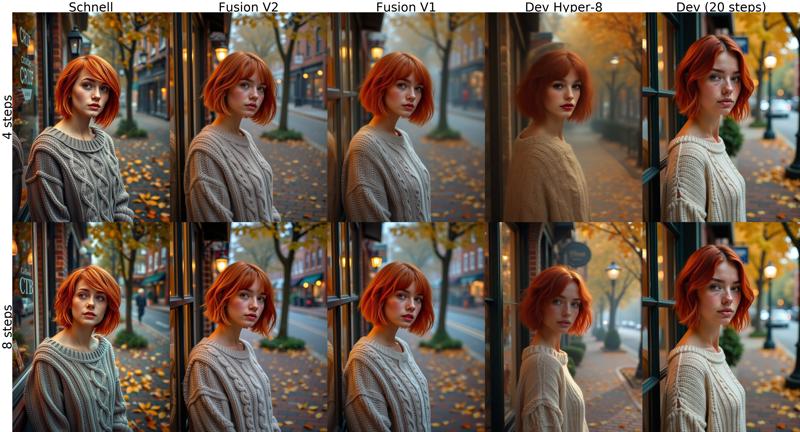
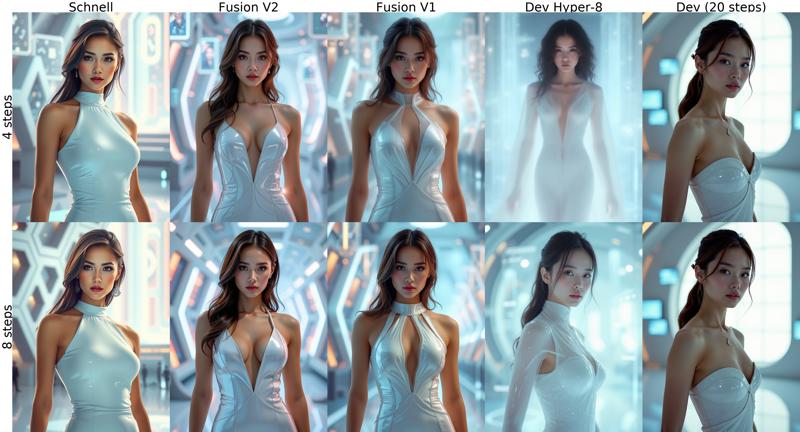
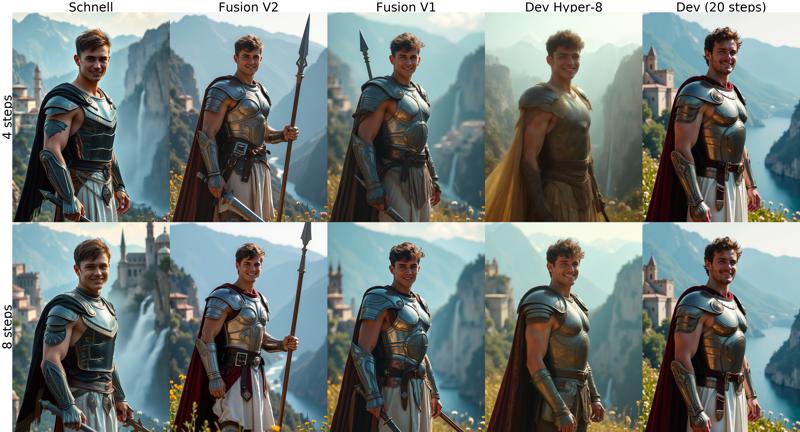
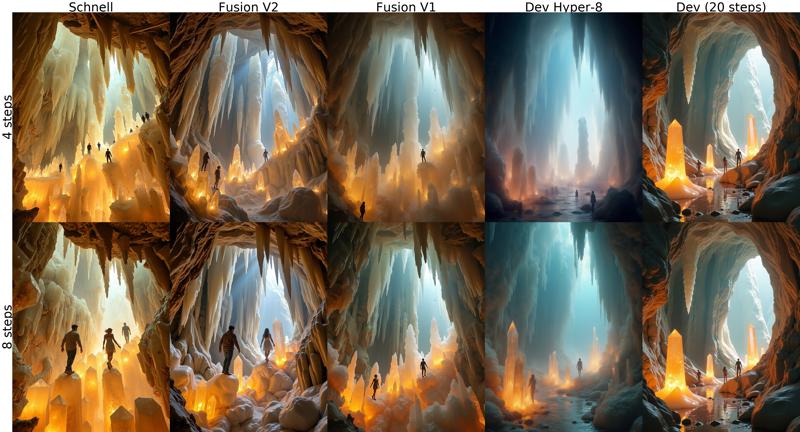
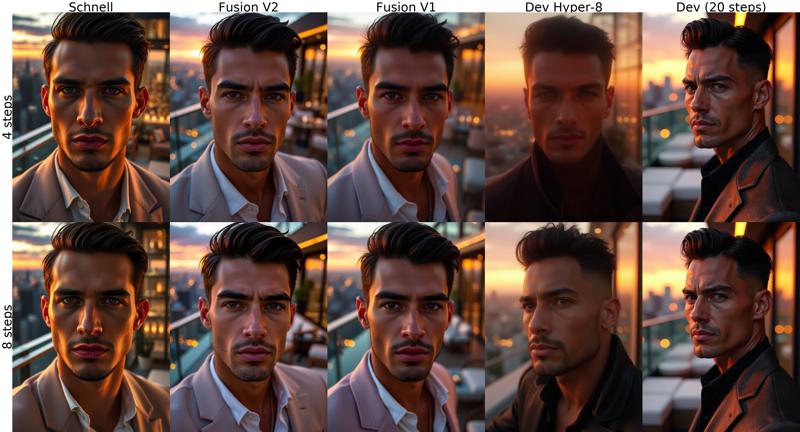
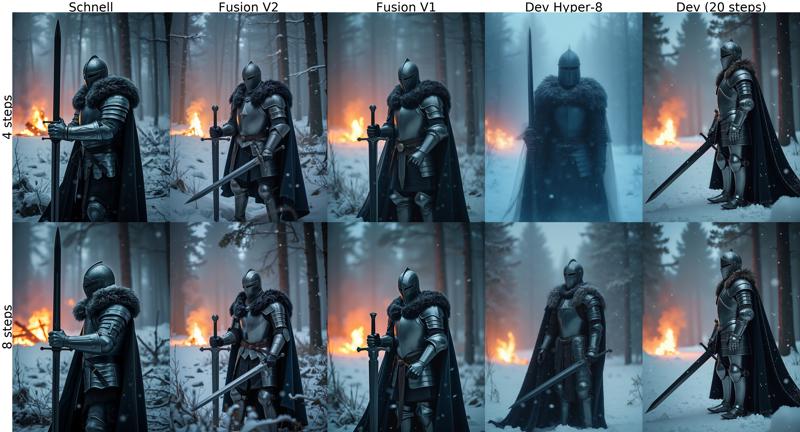
V2 is an alternative to V1 with sharper good quality images from 4 steps. This version merges Schnell + Finetuned Dev + Hyper using the same but refined formula of variable block ratios from V1. Check comparison images below!
 MAKE SURE TO RENAME YOUR FILES AFTER DOWNLOAD, CIVITAI GIVES THEM WRONG NAMES!
Tested sampler/scheduler for low steps:
ComfyUI: euler sampler, simple or beta scheduler.
Forge: euler, flux realistic sampler. KL Optimal or beta scheduler.
This model doesn't take guidance parameter, like schnell.
The versions with AIO (All in one) in the name include UNET + VAE + CLIP L + T5XXL (fp8). Also known as Checkpoint or Compact version.
Using BNB NF4 & GGUF quants in ComfyUI requires installing custom nodes that add special model loaders:
NF4 + Lora support: https://github.com/bananasss00/ComfyUI_bitsandbytes_NF4-Lora
(outdated) NF4 UNET: https://github.com/DenkingOfficial/ComfyUI_UNet_bitsandbytes_NF4
(outdated) NF4 AIO checkpoint: https://github.com/comfyanonymous/ComfyUI_bitsandbytes_NF4
For using UNET versions, you also need to have the TEXT ENCODERS and VAE.
If you don't have them, download them from here:
T5XXL - CLIP L: https://huggingface.co/comfyanonymous/flux_text_encoders/tree/main
GGUF T5XXL: https://huggingface.co/city96/t5-v1_1-xxl-encoder-gguf
VAE: https://huggingface.co/black-forest-labs/FLUX.1-schnell/tree/main/vae
Place the model in "models/diffusion_models" or "models/unet", both text encoders in "models/clip" and vae in "models/vae" folder.
In ComfyUI, use the standard flux workflow or add 'Load Diffusion Model', 'DualClipLoader' and 'Load VAE' nodes to replace the checkpoint loader and complete the setup.
In Forge, set the option "Diffusion in low bits" to "bnb-nf4"
Thanks to city96 for gguf quantization script.
Thanks to reddit user a_beautiful_rhind for bnb quantization script.
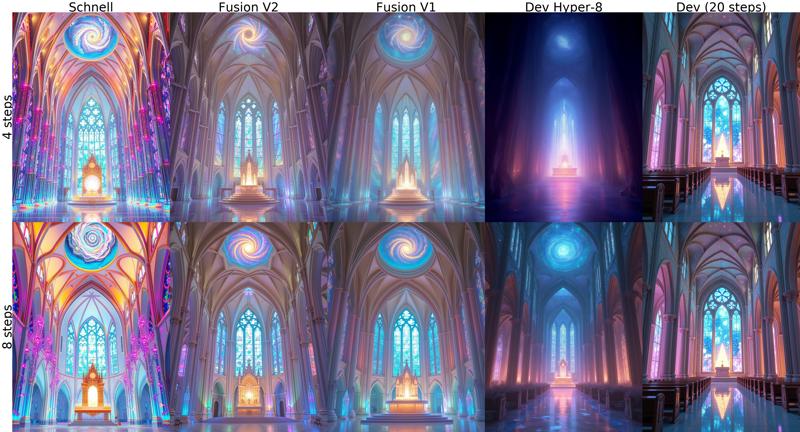
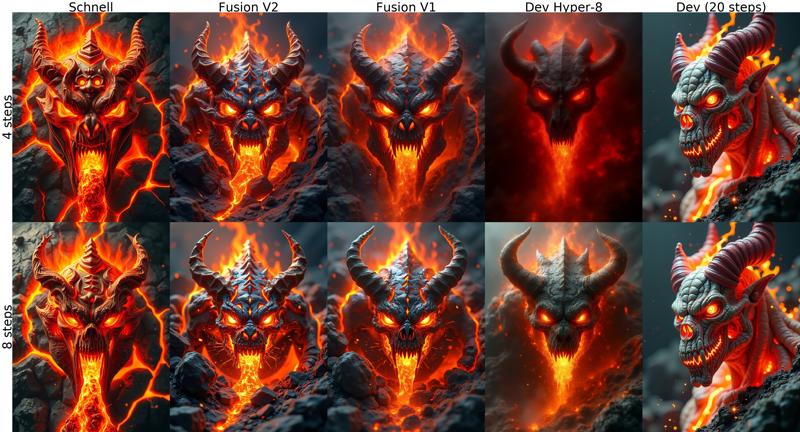
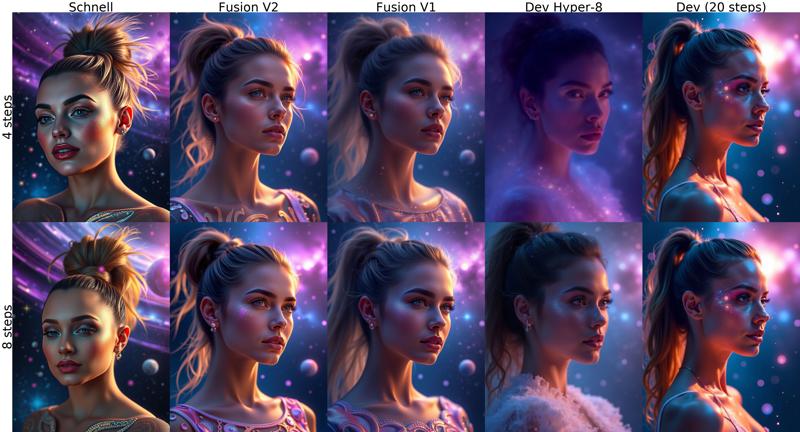
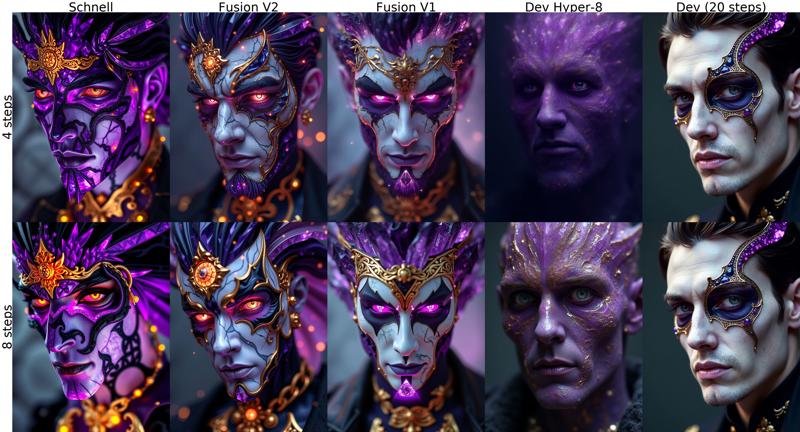
FLUX FUSION VERSION 1
Merge of Schnell and Dev variants of the Flux.1 model with a irregular smoothed ratio for each of the layers.
Quick comparison between versions. Prompts and settings at the end.
↓↓ Click show more for more examples and instructions ↓↓
 Recommended use around 8 steps. If textures like skin look overworked, try lowering steps.
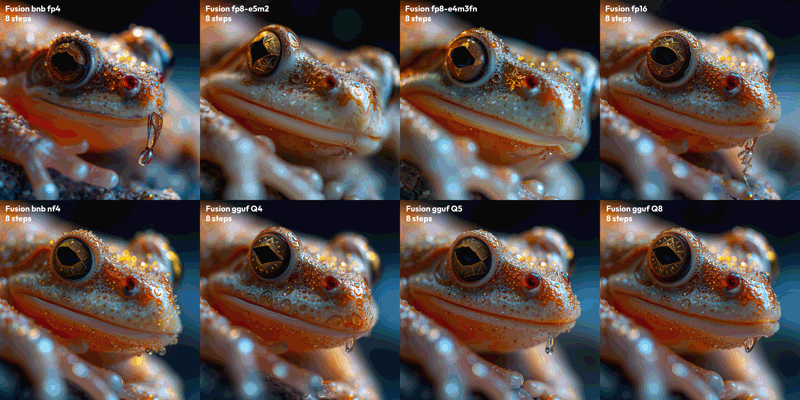
Comparison of V1 QUANTS:
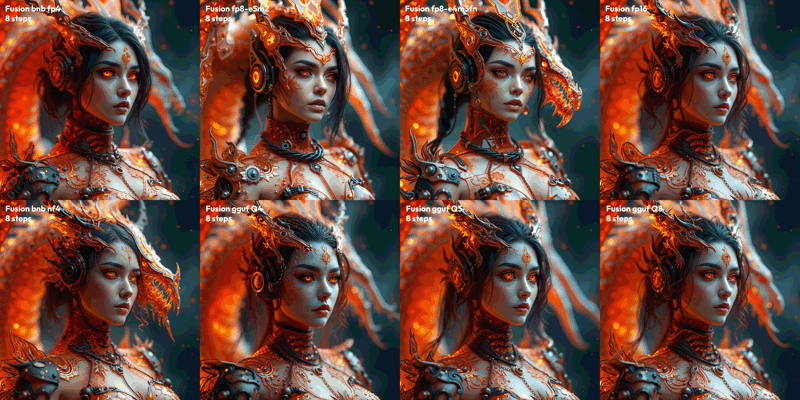
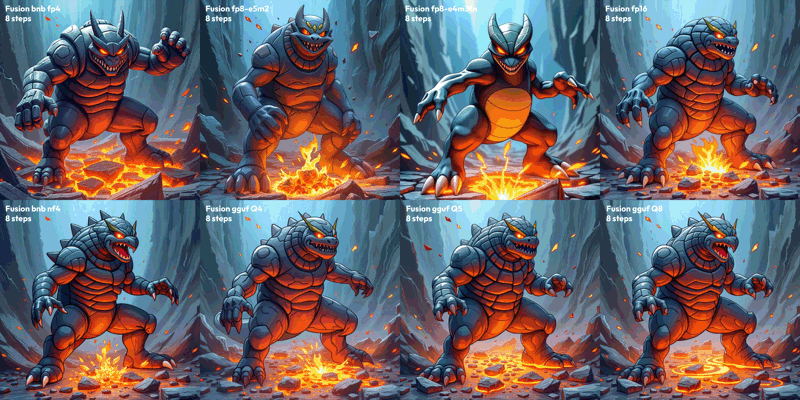
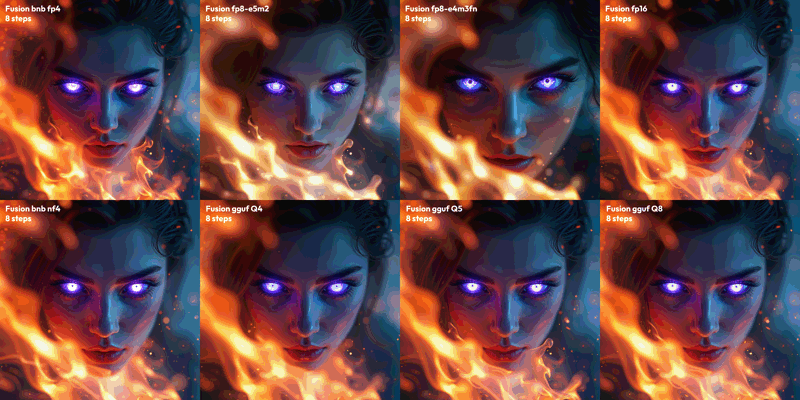
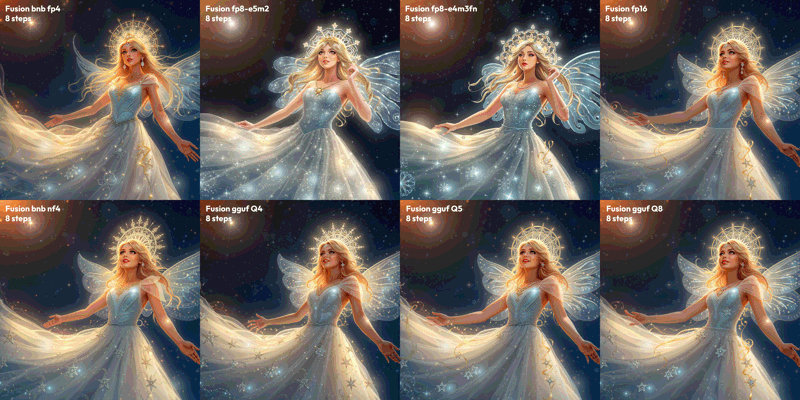
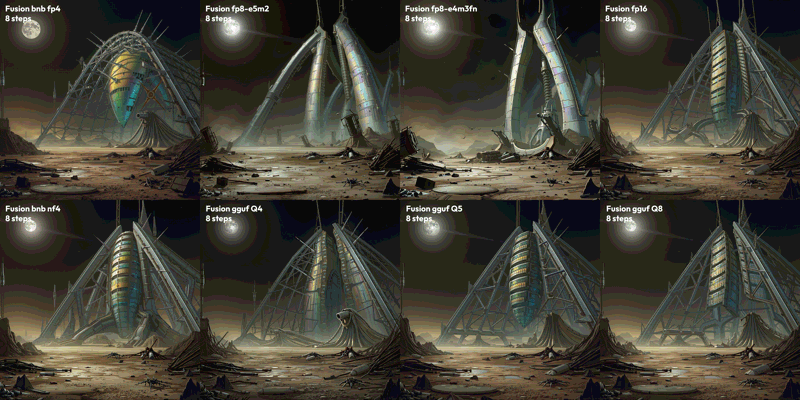 Test parameters: 8 Steps, CFG 3.5, 1536x1536, seed 0
Prompts:
"Extreme closeup, frog face, star crystal structure, intricate designs, glowing hues. Extreme depth of field, celestial light, shimmering details, otherworldly charm, majestic elegance."
"extremely detailed 3d render portraits of a cyber-dragon themed flaming gothic arcane tech woman, cables, arcane tech-dragon inspired design, exposed machinery. the casing is glittery transparent tinted orange, red and black, allowing to see the internals. sophisticated fantasy design. abstract thematic background. extreme depth of field. dragon behind"
"classic pokemon 3DCG illustration. thick outlines. pokemon render style. extremely dynamic composition showcasing the special ability power. flowing pose with extreme closeup on the face in the upper area of the image. intense perspective, in motion movement effects, dynamic impactful vfx, eye catching.. A rock Pokémon with earthquake powers poses dynamically, its body a twisted mass of rugged terrain and molten lava flows. The upper area zooms in on its face, a mask of stone and fury with blazing eyes. Earth shatters beneath its feet as it stomps, unleashing seismic waves that ripple through the abstract background like a fractured canvas. Intense perspective compresses space, conveying unstoppable power. Vibrant colors dance: fiery oranges, electric blues, and smoldering grays. Movement effects blur edges, blurring boundaries between rock and energy. Impactful VFX burst forth in the foreground, echoing the Pokémon's raw force.. masterpiece, professional, best quality, sharp, extreme detail, Hyper-detailed, high-resolution, intricate, vivid. "
"Ethereal female face in 4K ultra closeup, eyes radiating eerie mystical aura with crystalline composition tinted purple-blue hues. Surrounding inferno blazes with dynamic flames and motion effects, creating a vertiginous atmosphere. Extreme depth of field emphasizes surreal otherworldly presence. Glowing eyes at the focal point contribute to haunting mystique, shot from an altered viewing angle emphasizing mysticism. Use Octane and Redshift raytracing for realistic fire and light effects, achieving ultra-realistic 3D render with intense, dreamlike quality."
"Ethereal star princess, diaphanous gown, shimmering stardust, intricate halo, luminous beauty. Night sky, glowing constellations, soft light, dreamy ambiance, mesmerizing allure."
"Sci-fi landscape, derelict alien structure, holographic iridescence, massive metal arches, dark skies, damaged antennas. Ground littered with debris, scattered wreckage, distant moon, dim light."
Description
FAQ
Comments (72)
V2 NF4 checkpoint is up!
I will add the remaining gguf versions tomorrow, I have yet to make the sample images but I'm feeling a bit sick today.
This is a very good and fast model, obviously not regular flux dev quality but definitely good with text and prompt adherance and great if you cannot run flux dev or it takes too long to run. Good work :)
What are the recommended sampler and scheduler?
hi, euler/simple or euler/beta works great, normal scheduler won't work so well with low steps. I will add this to the post
@Anibaaal Thank you for answering! I have been trying with euler/simple, and I think your model works great! Big improvement over the FLux Dev gguf8 I was using before!
v2 Q4 would be nice! :)
Hi, It's up! Along with all the other gguf versions
where should I put the NF4 AIO safetensor v2 file?
Hi, it should be placed in the models/checkpoints folder from comfyui.
Does running v2 NF4 AIO require a special workflow, or do you need to install a specific node?
Hi, yes, in comfy you need a custom node, for NF4 checkpoint install this one: https://github.com/comfyanonymous/ComfyUI_bitsandbytes_NF4
@Anibaaal how to install it? There are no step-by-step tutorials there
@SyamsQ download the files from github repo and place the unzipped folder inside the comfy custom_nodes folder. You also need to install the python package bitsandbytes.
Or you could use comfyui manager to install easier directly in comfy. A google search will get you there.
@Anibaaal Can't Instal because "ComfyUI_bitsandbytes_NF4 [EXPERIMENTAL] install failed: With the current security level configuration, only custom nodes from the "default channel" can be installed."
How to fix this?
@SyamsQ are you using the comfy manager? if so, I think you have to change this setting to be able to install this node: https://i.imgur.com/2CsYLiy.png

@Anibaaal I've done that before. And it didn't work
@Anibaaal ya, I am using comfy manager and change the setting. But still can't install bitsandbytes
for civitai-loras the NF4_V2 bad quality and if it works only on 6 steps not more and not less...
on normal DEV 23GB its works perfect and even on BNBNF4 from
https://civitai.com/models/638187?modelVersionId=721627
works okay
i hate LOW steps models ! unstable like SDXL low steps
Sad to hear, but low step are like that, and NF4 obviously lower quality. Fusion is for users who prioritize speed, and better quality than schnell
@Anibaaal maybe you can ask how https://civitai.com/user/RalFinger create the hyper-model ;)
I notice a big drop in quality when using NF4 version in Forge, it looks pixelated, in ComfyUI the results look right and a lot better. That could explain your bad experience, maybe some settings in Forge have to be changed... I will have to see, I'm not a forge user
See here, first image is comfy, second is forge, both with same generation parameters, 4 steps, euler, simple scheduler, 1024x1024... https://civitai.com/posts/7800418
@Anibaaal i see ... thx for explanation ...
Great upgrade!
why does AIO NF4 not have gguf in the title... that would have been helpful to know
gguf seem to crash on my pc all the time
They are different kinds of quantization, NF4 is by bitsandbytes, GGUF by llama.cpp, it was intended for language models but it started being used in image with flux.
I'm not sure if Forge supports gguf, and if you use comfy you need to install custom nodes to use those versions. There are links to them in the post.
Indeed, it's just that your other variants mention GGUF in their version title. The AIO does not, but the filename says GGUF. Perhaps you mislabeled the file?
fluxFusionV24StepsGGUFNF4_V2NF4AIO.safetensors
I only mention it because every other GGUF variant is labeled as such. I'm guessing this one isn't actually a GGUF unless during the creation process it's somehow both?
Forge does support them but my 8GB Vram system perhaps can't run them, making me further suspect this one isn't GGUF despite it's filename.
BTW: Without hiresfix realism has some artifacts like a lot of flux models but it absolutely looks fantastic with hiresfix. I'll post a couple of examples with some loras.
@Eggbena Ohh, that's because civitai renames the files when there are more than one version of the model. It will name it with the post name+version name, a really annoying feature... the NF4 is not a gguf file :)
Nice to hear you're still getting good results. I have been testing Forge today and I get really bad quality with the NF4 version, compared to comfy where it looks as good as the other versions. Sadly in comfy NF4 won't work with loras.
@Anibaaal Damn man... thats dumb as hell lmao. Thanks for the info, and the model. It's convincing to me embrace flux a bit more.
@Anibaaal I find hiresfix is nearly essential for many renders to iron out the artifacts, sucks for those of us with weak hardware. I believe loras work with all flux models? I do find some that straight up do not work but i'm not sure, I think your model has wider compatibility than others i've tried.
It's either that or flux will steer you hard away from the style of the lora if your prompt isn't related, unlike older stability models where a lora will make any render no matter the subject in the style of XY or Z.
@Eggbena they should, but it seems the comfy devs stopped working on the NF4 implementation when GGUF came out, so loras were never supported there. Thanks for the tips, I have also had good results with loras for dev and schnell.
By the way, I have tested more and found that the KL Optimal scheduler really improves the image quality at 4 steps in Forge to comfy ui level. Tried euler, heun and flux realistic samplers and it looks really nice.
heads up some of the comparison images broke
thanks for the heads up :)
As a complete beginner which model should I download given that I have 8GB of ram? What to download I have a problem with your workflow!!!
Hi, I'm not so informed about running flux on low vram, but you should try the smallest versions NF4 or GGUF Q3 or Q4 in that case.
There is also a GGUF t5 text encoder https://huggingface.co/city96/t5-v1_1-xxl-encoder-gguf/tree/main that will help further reduce memory usage.
You need to install this to be able to use GGUF in comfy https://github.com/city96/ComfyUI-GGUF
It's good and fast a fuck you the MVP today
Thank you :D
Finally wait for the V2 version update, can't wait to download immediately. The previous V1 FP16 I think is the best flux model, V2 will not disappoint. thank you,Anibaaal!👍👍👍
I hope you like it, and thanks ! ♥
wow, this model, its so quick and so high quality, thank you for v2 fp16, amazing
Thank you for the comment :)
How to load Q8 model in ComfyUI. I download the model with .gguf, but can't be load with comfyui gguf node.
The v2 fp16 is the best at this time in my opinion.
Thanks for the tip! :D
The model flux_Fusion_V2_Fp16, if you enable Text Encoder: t5xxl_fp16 - an error occurs, if you enable t5xxl_fp8 - generates well, is this how it should be?
Amazing job with the v2 fp16 version. I have a 4080 Super and running with ComfyUI can still take some time. This was incredible for speeding up image generation! Thanks! I am following and looking forward to more of your work!
The author is a workaholic! So many variants of models - I am confused which one is for what! Author keep it up! Thank you for your enthusiasm! This is crazy!) More descriptions of how one differs from the other =)
Hi, thank you. All are the same model with different types of quantization to reduce size and memory usage, with a tiny compromise in quality.
If your system can handle it, it's best to use the fp16 version, it should provide the highest quality. fp8 is half the size but it's a bit lower quality.
GGUF versions are a different kind of quantization which is like a compression and they are a little bit slower than the others but come in wide range of sizes, I don't know the specific differences between all of them, just that the smaller it is, it should be lower quality. I've seen claims that Q8 is better in quality than fp8 though
NF4 version is also other kind of quant used mainly in Forge, in comfy it doesn't have much support. It's very small and is the fastest I think.
To be honest, I don't think the quality difference is noticeable unless you compare them
I can’t get over this model, it makes just about any type of content without the bias we are seeing with other flux fine tunes that lead the model to be single purpose and just pretty party tricks. Other than some niche style use cases (like the cinema tilt to pixel wave) or commercial use with schnell, there is little reason to use other models is needed anyone who hasn’t pulled the trigger do it!
Thank you! I'm glad you are enjoying it :D
as stupid as this question might be is this model under apache or since it used dev its not
@jychopathib186 it is not apache because its a merge of dev and schnell though the whole system is a mess, schnell as is not this merge remains the only way to be by book in terms of being able to use both the images and the models commerically (as in more than selling images or using images as branding like if you wanted to host schnell in aws and let others make images the apache license allows it). that being said good luck to anyone trying to prove ownership of any images coming out of any of these models the lawsuits will come from people making apps powed by flux, not images or even loras. we are in a world where marketing teams have been replaced by Dalle3 (which is not allowed to be used commercially).
@joehorse yeah im planning on running a website ill fine tune a model with 20k images and it will be focused on one subject with some loras etc , im thinking about going with schnell or sdxl but realistically speaking i dont think there is a way to prove if im using dev version or not .
@jychopathib186 well i wouldn't say that out loud haha but i have had really good luck pixelwave schnell i wish there was another version of it but it has a apache license and has been duplicated across hugging face into even a transformers package. though for training not sure the best route. good luck with your endeavor.
How to pick a proper model? I have 8gb vram card, which would you recommend?
Hi, maybe NF4 or one of the GGUF Q4/Q3 versions, since those are around 6-7GB and below. Sorry I couldn't tell you precisely, I haven't tested in cards with less memory and don't have access to one.
@Anibaaal Thanks, I'll try :)
Q5 is working fine with a 2070 (8 giga)
Extremely good!
- Fast,
-works out of the box with 4 steps and not only after calibrating a bazillion things,
- very little grain
Good morning Anibaaal, I downloaded your checkpoint, fluxFusionV24StepsGGUFNF4_V2NF4AIO.safetensors (10.5GB).
Where should I put this file?
What other files should I download so that this checkpoint can generate images?
Hi, this NF4 version comes with clip l + t5 encoder + vae, so you need to place it in Comfy's models/checkpoints folder, or in models/Stable-diffusion folder for Forge. You don't need other separate files.
I would advise you to rename the file to FluxFusionV2_NF4_AIO.safetensors to avoid confusion in the future, civitai renames them to something wrong upon download.
@Anibaaal I have placed it in models/checkpoints but it does not appear in ComfyUI workflow. What's your suggestion?
@Anibaaal I put it in models/diffusion_models, but it can't produce an image, instead this kind of error appears in comfyui:
Error Report
## Error Details
- Node Type: UNETLoader
- Exception Type: RuntimeError
- Exception Message: Error(s) in loading state_dict for Flux:
size mismatch for img_in.weight: copying a param with shape torch.Size([98304, 1]) from checkpoint, the shape in current model is torch.Size([3072, 64]).
size mismatch for time_in.in_layer.weight: copying a param with shape torch.Size([393216, 1]) from checkpoint, the shape in current model is torch.Size([3072, 256]).
size mismatch for time_in.out_layer.weight: copying a param with shape torch.Size([4718592, 1]) from checkpoint, the shape in current model is torch.Size([3072, 3072]).
size mismatch for vector_in.in_layer.weight: copying a param with shape torch.Size([1179648, 1]) from checkpoint, the shape in current model is torch.Size([3072, 768]).
size mismatch for vector_in.out_layer.weight: copying a param with shape torch.Size([4718592, 1]) from checkpoint, the shape in current model is torch.Size([3072, 3072]).
size mismatch for txt_in.weight: copying a param with shape torch.Size([6291456, 1]) from checkpoint, the shape in current model is torch.Size([3072, 4096]).
size mismatch for double_blocks.0.img_mod.lin.weight: copying a param with shape torch.Size([28311552, 1]) from checkpoint, the shape in current model is torch.Size([18432, 3072]).
size mismatch for double_blocks.0.img_attn.qkv.weight: copying a param with shape torch.Size([14155776, 1]) from checkpoint, the shape in current model is torch.Size([9216, 3072]).
size mismatch for double_blocks.0.img_attn.proj.weight: copying a param with shape torch.Size([4718592, 1]) from checkpoint, the shape in current model is torch.Size([3072, 3072]).
size mismatch for double_blocks.0.img_mlp.0.weight: copying a param with shape torch.Size([18874368, 1]) from checkpoint, the shape in current model is torch.Size([12288, 3072]).
size mismatch for double_blocks.0.img_mlp.2.weight: copying a param with shape torch.Size([18874368, 1]) from checkpoint, the shape in current model is torch.Size([3072, 12288]).
size mismatch for double_blocks.0.txt_mod.lin.weight: copying a param with shape torch.Size([28311552, 1]) from checkpoint, the shape in current model is torch.Size([18432, 3072]).
size mismatch for double_blocks.0.txt_attn.qkv.weight: copying a param with shape torch.Size([14155776, 1]) from checkpoint, the shape in current model is torch.Size([9216, 3072]).
size mismatch for double_blocks.0.txt_attn.proj.weight: copying a param with shape torch.Size([4718592, 1]) from checkpoint, the shape in current model is torch.Size([3072, 3072]).
size mismatch for double_blocks.0.txt_mlp.0.weight: copying a param with shape torch.Size([18874368, 1]) from checkpoint, the shape in current model is torch.Size([12288, 3072]).
size mismatch for double_blocks.0.txt_mlp.2.weight: copying a param with shape torch.Size([18874368, 1]) from checkpoint, the shape in current model is torch.Size([3072, 12288]).
size mismatch for double_blocks.1.img_mod.lin.weight: copying a param with shape torch.Size([28311552, 1]) from checkpoint, the shape in current model is torch.Size([18432, 3072]).
@SyamsQ Hi, sorry for the late response. It looks like the error comes from 'UNETLoader' node, but since you're trying to use the NF4 version, you'd need to install and use 'UNETLoaderNF4' or 'CheckpointLoaderNF4'.
• NF4 unet: https://github.com/DenkingOfficial/ComfyUI_UNet_bitsandbytes_NF4
• NF4 AIO checkpoint: https://github.com/comfyanonymous/ComfyUI_bitsandbytes_NF4
There's a fork that supports lora as well, but I haven't tried it yet: https://github.com/bananasss00/ComfyUI_bitsandbytes_NF4-Lora
This is unbelievable! 4.5 seconds to generate on FLUX for me. Thank you so much Anibaaal. I used your workflows too and wasn't aware of the easy generator nodes, it's so simple to use.
Details
Available On (1 platform)
Same model published on other platforms. May have additional downloads or version variants.