


 VERSION LINKS: FP8 • FP16 • NF4 • GGUF Q8_0 / Q6_K / Q5_KM / Q5_KS / Q5_0 / Q5_1 / Q4_KM / Q4_KS / Q4_0 / Q4_1 / Q3_KM / Q3_KS
V2 is an alternative to V1 with sharper good quality images from 4 steps. This version merges Schnell + Finetuned Dev + Hyper using the same but refined formula of variable block ratios from V1. Check comparison images below!
 MAKE SURE TO RENAME YOUR FILES AFTER DOWNLOAD, CIVITAI GIVES THEM WRONG NAMES!
Tested sampler/scheduler for low steps:
ComfyUI: euler sampler, simple or beta scheduler.
Forge: euler, flux realistic sampler. KL Optimal or beta scheduler.
This model doesn't take guidance parameter, like schnell.
The versions with AIO (All in one) in the name include UNET + VAE + CLIP L + T5XXL (fp8). Also known as Checkpoint or Compact version.
Using BNB NF4 & GGUF quants in ComfyUI requires installing custom nodes that add special model loaders:
NF4 + Lora support: https://github.com/bananasss00/ComfyUI_bitsandbytes_NF4-Lora
(outdated) NF4 UNET: https://github.com/DenkingOfficial/ComfyUI_UNet_bitsandbytes_NF4
(outdated) NF4 AIO checkpoint: https://github.com/comfyanonymous/ComfyUI_bitsandbytes_NF4
For using UNET versions, you also need to have the TEXT ENCODERS and VAE.
If you don't have them, download them from here:
T5XXL - CLIP L: https://huggingface.co/comfyanonymous/flux_text_encoders/tree/main
GGUF T5XXL: https://huggingface.co/city96/t5-v1_1-xxl-encoder-gguf
VAE: https://huggingface.co/black-forest-labs/FLUX.1-schnell/tree/main/vae
Place the model in "models/diffusion_models" or "models/unet", both text encoders in "models/clip" and vae in "models/vae" folder.
In ComfyUI, use the standard flux workflow or add 'Load Diffusion Model', 'DualClipLoader' and 'Load VAE' nodes to replace the checkpoint loader and complete the setup.
In Forge, set the option "Diffusion in low bits" to "bnb-nf4"
Thanks to city96 for gguf quantization script.
Thanks to reddit user a_beautiful_rhind for bnb quantization script.
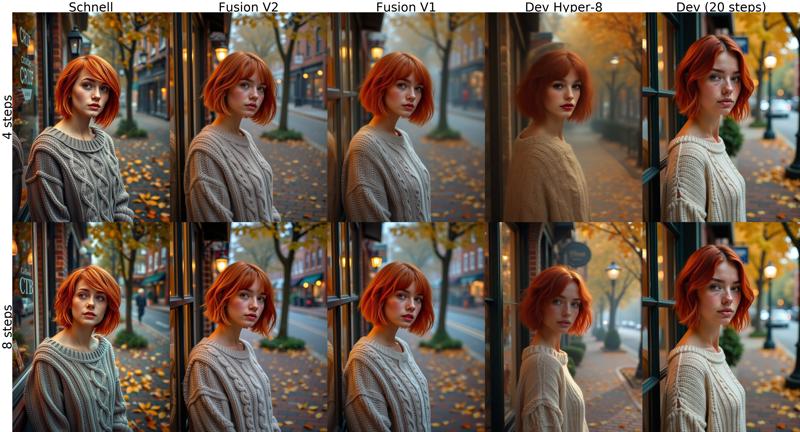
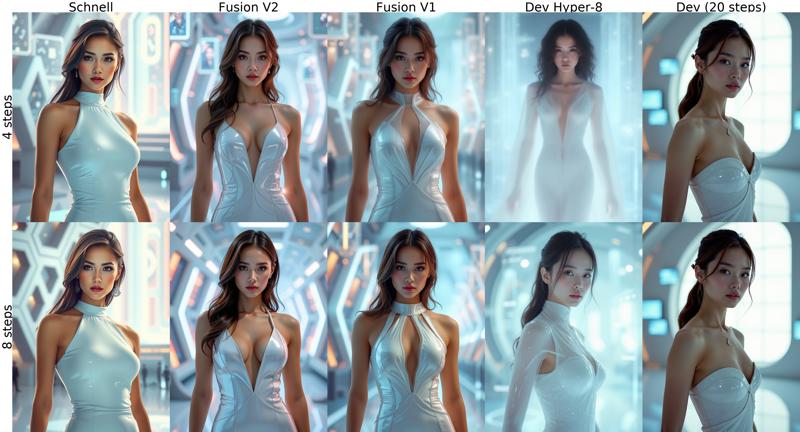
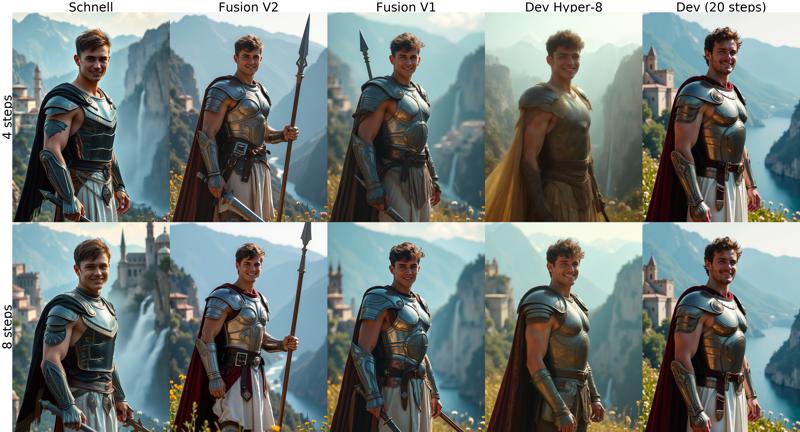
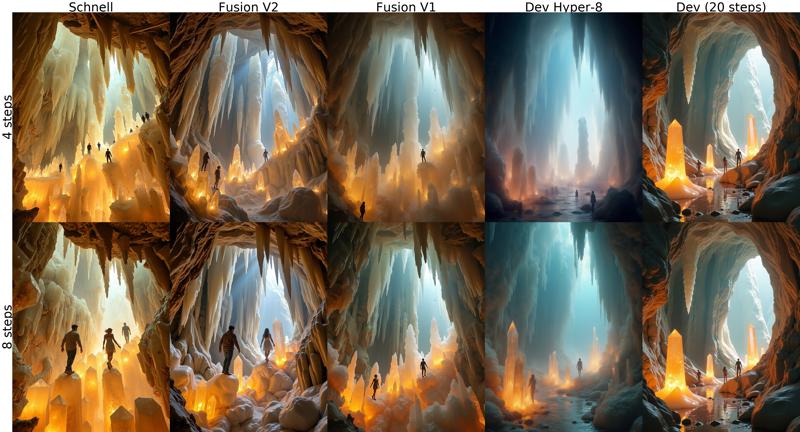
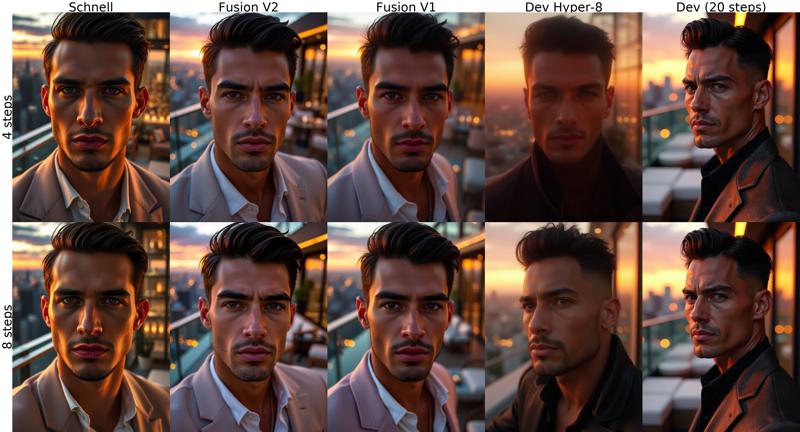
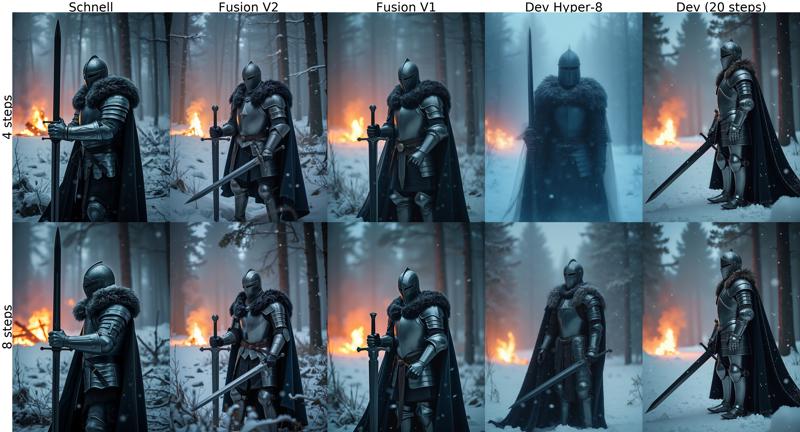
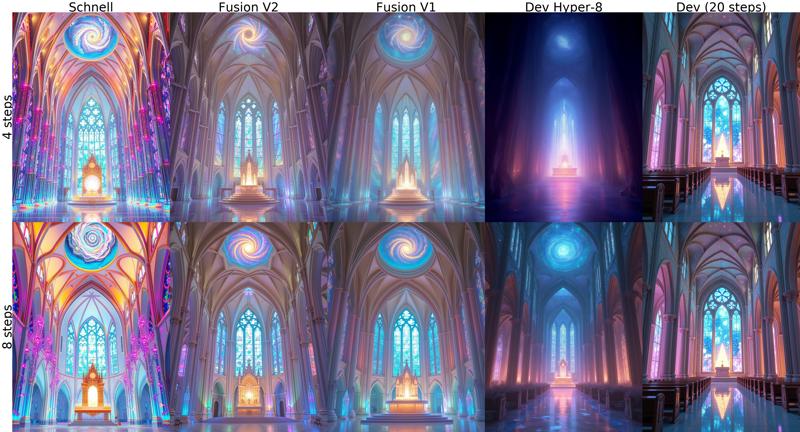
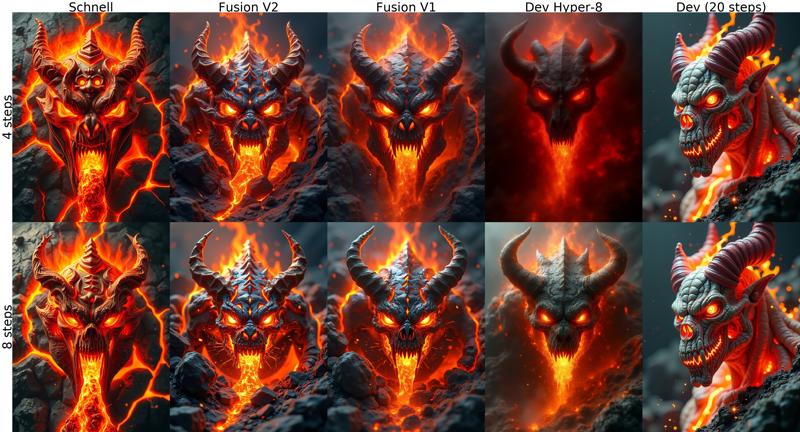
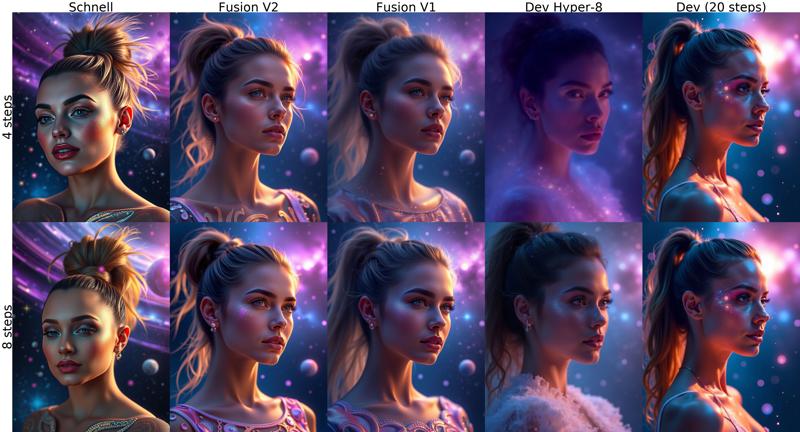
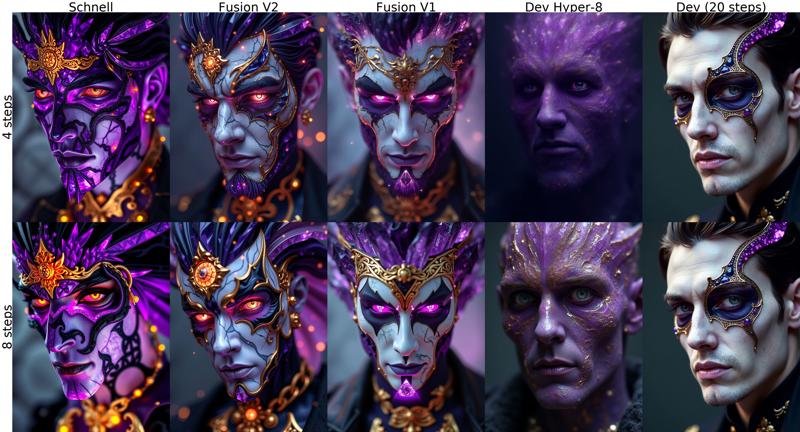
FLUX FUSION VERSION 1
Merge of Schnell and Dev variants of the Flux.1 model with a irregular smoothed ratio for each of the layers.
Quick comparison between versions. Prompts and settings at the end.
↓↓ Click show more for more examples and instructions ↓↓
 Recommended use around 8 steps. If textures like skin look overworked, try lowering steps.
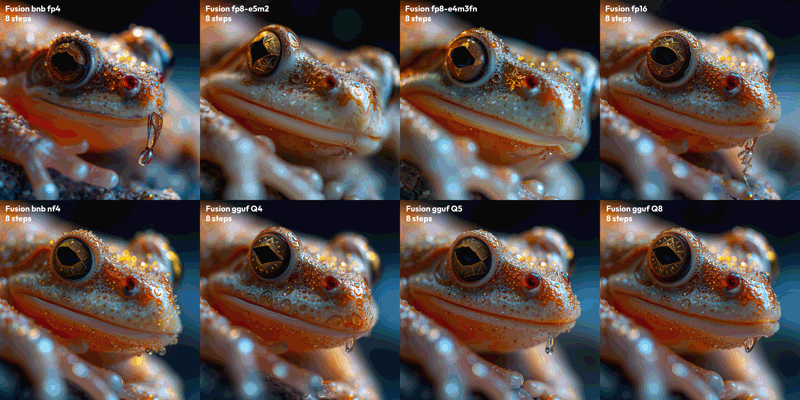
Comparison of V1 QUANTS:
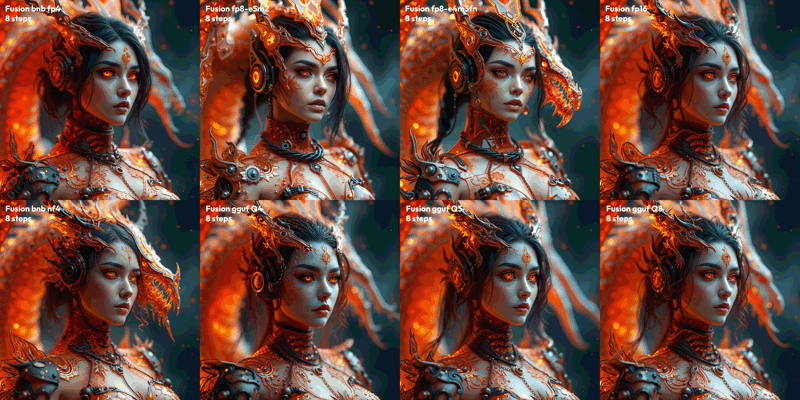
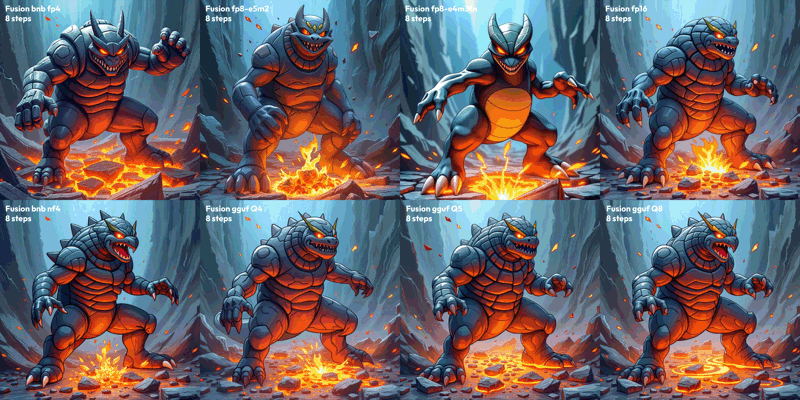
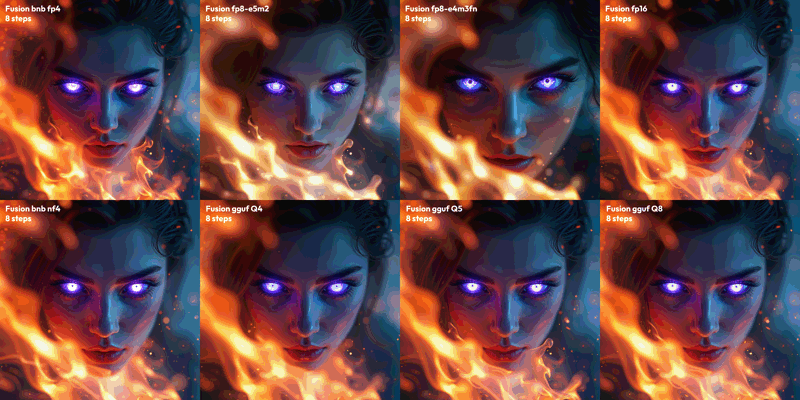
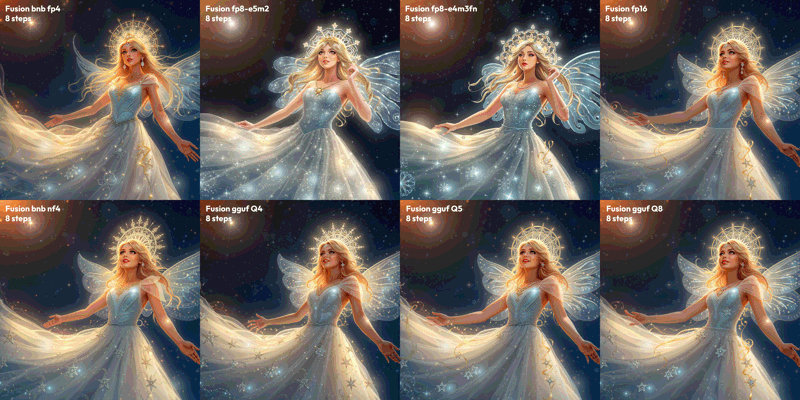
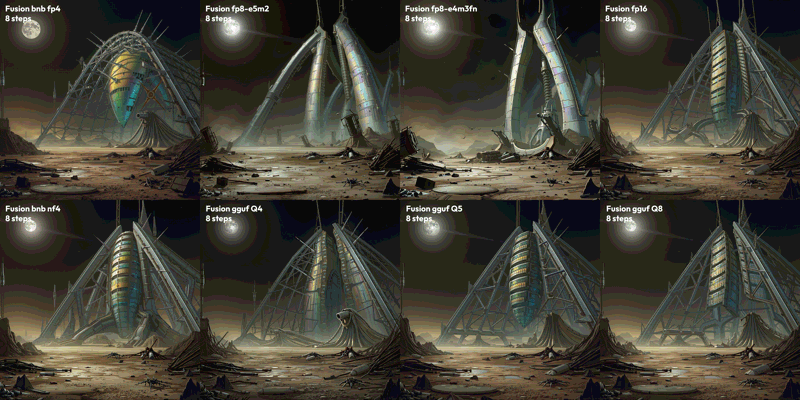 Test parameters: 8 Steps, CFG 3.5, 1536x1536, seed 0
Prompts:
"Extreme closeup, frog face, star crystal structure, intricate designs, glowing hues. Extreme depth of field, celestial light, shimmering details, otherworldly charm, majestic elegance."
"extremely detailed 3d render portraits of a cyber-dragon themed flaming gothic arcane tech woman, cables, arcane tech-dragon inspired design, exposed machinery. the casing is glittery transparent tinted orange, red and black, allowing to see the internals. sophisticated fantasy design. abstract thematic background. extreme depth of field. dragon behind"
"classic pokemon 3DCG illustration. thick outlines. pokemon render style. extremely dynamic composition showcasing the special ability power. flowing pose with extreme closeup on the face in the upper area of the image. intense perspective, in motion movement effects, dynamic impactful vfx, eye catching.. A rock Pokémon with earthquake powers poses dynamically, its body a twisted mass of rugged terrain and molten lava flows. The upper area zooms in on its face, a mask of stone and fury with blazing eyes. Earth shatters beneath its feet as it stomps, unleashing seismic waves that ripple through the abstract background like a fractured canvas. Intense perspective compresses space, conveying unstoppable power. Vibrant colors dance: fiery oranges, electric blues, and smoldering grays. Movement effects blur edges, blurring boundaries between rock and energy. Impactful VFX burst forth in the foreground, echoing the Pokémon's raw force.. masterpiece, professional, best quality, sharp, extreme detail, Hyper-detailed, high-resolution, intricate, vivid. "
"Ethereal female face in 4K ultra closeup, eyes radiating eerie mystical aura with crystalline composition tinted purple-blue hues. Surrounding inferno blazes with dynamic flames and motion effects, creating a vertiginous atmosphere. Extreme depth of field emphasizes surreal otherworldly presence. Glowing eyes at the focal point contribute to haunting mystique, shot from an altered viewing angle emphasizing mysticism. Use Octane and Redshift raytracing for realistic fire and light effects, achieving ultra-realistic 3D render with intense, dreamlike quality."
"Ethereal star princess, diaphanous gown, shimmering stardust, intricate halo, luminous beauty. Night sky, glowing constellations, soft light, dreamy ambiance, mesmerizing allure."
"Sci-fi landscape, derelict alien structure, holographic iridescence, massive metal arches, dark skies, damaged antennas. Ground littered with debris, scattered wreckage, distant moon, dim light."
Description
FAQ
Comments (118)
v2 nf4 is being recognized as schnell - just fyi
Thanks for letting me know, although I think it's OK because this model is closer to Schnell than Dev since it doesn't take guidance parameter. I set as Flux Dev here in Civit because it inherits its license and it displays license info.
This model is somehow terrible for img2img. With denoise strength < 0.85, the output near does no changes to the input. When tune up to > 0.9, this model suddenly ignores the input image all together.
The original Flux 1D doesn't have this issue; the denoise strength behaves linearly.
Hi, that has nothing to do with the model, but with the amount of steps. If you use 4 steps, 0,9 denoise is not possible because it can’t do fractions of a step, so it rounds up to 1.0 full denoise.
4 step with 0.8 denoise is same as start at step 1, because 4 steps exactly is 80% of 5 steps.
I hope it’s more clear. For image to image, I do 3 steps with 0.75 denoise or 2 steps 0.66 denoise, and it works nicely
For a more sensitive denoise value, you need to increase steps.
I made a little Google sheet calculator for this same purpose a while back, to see the equivalent of denoise to starting step, you will notice from 0.81 to 1.0 all start at step 0, making a completely new image: https://docs.google.com/spreadsheets/d/1_RYo3SF-d5lbmpq6ol9DmDXlpT_gNDWjTl0EleogQ-E/edit?gid=1895966030#gid=1895966030
It helps to understand the usable denoise values for low steps.
@Anibaaal thanks for this breakdown. does that mean if im using schnell for example that i should do 5 steps at 0.8 denoise to get a proper image?
@namee You have to make sure the denoise value is low enough that there's at least one step left without denoise. This prevents the input image from being ignored. You can calculate it easily like this:
For example, if you’re using 5 steps, imagine it as 6 steps (5 steps + 1). The additional step is a 'skipped' step, because you're providing the image, the model doesn't have to come up with anything in the first step.
Dividing the desired 5 steps by 6 results in 0.83 as the maximum denoise value. You can go lower with denoise of course to increase the influence of the original image, but not higher for img2img. If you go above 0.83, rounding will cause it to treat the input image as fully denoised within 5 steps
Say adding two steps instead of one to increase influnce, so 5 / 7 = 0.71 denoise. This means between 0.72 and 0.83 it will be exactly the same result, because all those values approximate to starting at step 1 (full denoise starts at step 0).
I hope this helps, Also you can try ksampler advanced, it uses steps/start at step parameters instead of denoise, which can be harder to manage with low step models without doing math.
@Anibaaal you are amazing thank you
Finally decided to give this a try and I'm so glad I did. The styles it can produce are amazing.
Did it work on comfyui from blacklabs?
AIO gives
'NoneType' object has no attribute 'cdequantize_blockwise_fp32'
on amd rocm 6.2
Hi, for V2 only the NF4 quant is available as AIO checkpoint, I assume you are trying that one.
Are you sure NF4 is supported there? Is bitsandbytes requirement installed?
I have zero experience with AMD, sorry !
what is K_S and K_M version
Hi, in GGUF models, the suffixes _0, _1, _K_S, and _K_M mean different quantization methods and configurations that balance between model size and quality.
_0 and _1 are legacy quantization methods. For example, Q4_0 and Q4_1 are 4-bit quantization schemes. Generally, _1 indicates improved quality and larger model size over _0 .
_K_S and _K_M: The _K denotes k-means clustering-based quantization, which often gives better quality at similar bit rates compared to legacy methods. The letters S, M, and also L stand for Small, Medium, and Large, respectively, indicating the precision mix used:
- _K_S (Small): Prioritizes minimal size, using lower-precision quantization throughout.
- _K_M (Medium): Balances size and quality by using higher precision on essential tensors.
- _K_L (Large): Focuses on quality with higher precision on more tensors, resulting in a larger model.
Sources:
https://huggingface.co/QuantFactory/Meta-Llama-3-8B-Instruct-GGUF/discussions/3
https://github.com/ggerganov/llama.cpp/discussions/2094
and ChatGPT
Can someone explain the exact differences between the k_s, k_m, Q5_1 and Q5_0 models?
Hi, in GGUF models, the suffixes _0, _1, _K_S, and _K_M mean different quantization methods and configurations that balance between model size and quality.
_0 and _1 are legacy quantization methods. For example, Q4_0 and Q4_1 are 4-bit quantization schemes. Generally, _1 indicates improved quality and larger model size over _0 .
_K_S and _K_M: The _K denotes k-means clustering-based quantization, which often gives better quality at similar bit rates compared to legacy methods. The letters S, M, and also L stand for Small, Medium, and Large, respectively, indicating the precision mix used:
- _K_S (Small): Prioritizes minimal size, using lower-precision quantization throughout.
- _K_M (Medium): Balances size and quality by using higher precision on essential tensors.
- _K_L (Large): Focuses on quality with higher precision on more tensors, resulting in a larger model.
Sources:
https://huggingface.co/QuantFactory/Meta-Llama-3-8B-Instruct-GGUF/discussions/3
https://github.com/ggerganov/llama.cpp/discussions/2094
and ChatGPT
@Anibaaal Thank you for explaining!
Hello civitai's, do you want to become a professional? Then read this :)
First of all, this model is very well assembled and has a very good command perception, but at the end of the day we need to consider some technical details, as what we want to see is a technically original photo.
In all versions of the model, the plastic skin - very high contrast, high reflection problem. According to my knowledge, this problem exists because the Schnell infrastructure was mainly used when defining the model. Of course I have tried many prompts to overcome this problem, but the result is the same. Apart from the recommended schedule extension, you can also use DDIM-SGM Uniform and Simple.. And you can activate the PerturbedAttentionGuidance Integrated function between parameters 5-25 with 20 Step render.
This may give you better results.
These details I mentioned are valid for V2 FP8 - V2 NF4 versions. Because these are the most used versions.
As a result, general colors, prompt matching, text matching and processing time speed are quite high.
Tested by Forge
If one uses a 20 step render as you suggest, it negates the reason to use this 4-6 steps model. In that case let's just use a regular model...
@LiteSoulHD this model is a merged model, merged means that the results will have more variations than the regular model, it is not how many steps you do the operation. the quality of the result is important. try to learn a little bit about what you use instead of making amateurish comments.
What's your recommended hires fix upscale method, X, steps and denoise?
Hi, sorry for the delay. For hires fix or img2img upscale, I typically use one of these settings for the upscale sampling:
- 2 steps, 0.66 denoise or less
- 3 steps, 0.75 denoise or less
- 4 steps, 0.8 denoise or less
You can't use higher denoise with each step amount listed, otherwise it will ignore the input image.
At around 0.5 denoise and below, I recommend you use pixel space upscale instead of latent.
It would work with any X, x1.5, x2, x3, just make sure your last upscale doesn't exceed 4096px per side or you will get terrible artifacts.
Be careful over 2048px per side, because line artifacts will start to show up, the only way to mitigate is to reduce upscale steps. More steps, more noticeable.
the gguf q8 version , it should be gguf q8 , but it said in file name while download gguf nf4 q8 ?? it's not nf4 right ?
Hi, sorry for the confusion. This is caused by CivitAI system, which renames downloaded files to the Title of the Post + version name at the end. I added a warning in the post advicing to manually rename the files to the proper version after download.
It makes it really confusing, but at the same time I can't remove GGUF / NF4 from title so users can find the model when they use the search feature.
These work awesome ty! Could you consider working on a de-distilled or schnell fine tune that would have a commercial license? Thanks!
Thanks for the suggestion! I will definitely consider that option, I would also like to move away from Dev.
My only trouble would be Dev lora compatibility, but we will have to see..
@Anibaaal FWIW lots of dev loras do still work with schnell. I wouldn't worry about that too much!
Although I’m having fun with other artsy or realism models this is still the fastest and most forgiving flux model out there you can really try all sorts of bad workflows and it still comes out ok, I wish this model got more attention.
Thank you !! ♥
Mr. Anibaaal ( Hani Ba'al ), all of your fusion models are a mavel, " Une Merveille " , especially the GGUF model are tender-hearted with my modest PC, 4 GB Vram, 32 GB Ram. It generates wonderful images in less than 4 minutes which used to be genrated in more than 8 minutes. Thanks a lot for your efforts to provide for the others.
Thank you for the kind words, I'm glad it's useful for you.
Sorry, I'm totally confused. ) What's the difference between fp8 and q8guff? They weigh the same. Which one is a better choice? I'm using the gguf version and I'm very happy with the result (there are some problems with a lora, but as a pure flux it's very cool for 4 steps), should I experiment and try another version?
GGUF are probably lighter, but LoRa-s would not work. Like in the text models, Lora should be integrated into the model, otherwise they'll not work.
These two models are about the same size. Lora works, but sometimes requires more steps to get a clear picture, and for more steps I prefer the other model (standard dev with turbo lora for 8 steps at the end of the lora chain).
@qqandroid132 Hi, Q8 is same size as fp8, but is comparable in quality to fp16 according to general opinions.
As you say, Loras might not work perfectly with this model, although fp8 or fp16 should be better than GGUF for compatibility. You can also play with increasing lora strength when going with lower steps.
Good luck !
@aifan Loras work fine with GGUF models... just increase a bit the Lora strength...
the download keep stucking and fail, you have HF page ?
Hi, that sucks. Here is Hf link https://huggingface.co/Anibaaal/Flux-Fusion-V2-4step-merge-gguf-nf4
@Anibaaal finally downlaoded properly , thank you
going to test it on my super slow pc.
This is a very excellent model! I have followed up with V1 to V2 untill now, and recently, I released a model which was based on your excellent model by merging the De-distilled model and the Block Layer fine-tuning method, which can be found in https://civitai.com/models/941929, thank you again for your excellent work.
Best FLUX Version!
This is NICE!
dpmpp_2s_a + beta + 4step - excellent result! Best for me!
A HINT
-> GGUF is much slower than FP8
most times also loras works better with FP8
On the other hand, GGUF versions allow for lower VRAM systems. And for the Loras, simply increase strength.
A HINT: GGUF work in some places where fp8 doesn't
Just wanted to thank you, this is the BEST model in my opinion, managing excellent generations on 4-8 steps, mind-blowing!
Thanks for the GGUF versions, and your Workflows too.
what is the recommended schedular sampler ?
I've been using v2-GGUF_Q8_0, it has great image quality and very nice detail at 8 steps. my card has only 6GB Vram, but with simple setup in comfyUI, it takes about 1 minute to render one 1024x1024 image. This is so far my favorite version ( tried couple of others - but no fun )
Q8 doesn't fit on 6GB VRAM, you should use Q3, it will render at half the time
Best model better than original
How do you manage to load v2-GGUF_Q8_0 when it is 11.83 GB with only 6GB VRAM? Are you offloading to RAM some how? 1 minute for how many steps?
@przeszycha gguf node is smart to offload to ram if you have enough
@przeszycha comfyUI manages memory ( it simply works )
@LiteSoulHD unfortunately q3 has much worse quality and diversity, somehow comfyui manages the Memory and 1 minute is quite fast.
@przeszycha sorry, it does it in 8 steps - 1 minute gpu rtx 3060, 6GB Vram
@1girls yes! <3
does it support loras in in comfyui ?
@thelatinodancer Yes. I am using multiple Loras.
Best flux model
Flux fusion fill model coming ?
Yeah we need this
yes for sure
i took some time comparing this to "DedistilledMixTuned" at first i thought dedistilledmix is better but then i realized it captures some prompts as cartoonish and unrealistic, Fusion v2 is the best so far
best flux model update it more often
So far after testing multiple models this one is the ultimate holy grail, it's fast, very fast but my only grip is that it's very fast on forge ui but a lot slower on comfy ui as an example: Same settings for a 800X600 4 steps on comfy ui 148 seconds and on forge 23 seconds. Also is there an inpainting model for it?
it give no inpaint on flux only with segmentation workflow
search for it here "flux inpaint" ;)
best for me is inpaint with an SDXL model
Ok thank for clarifying the matter!
your comment is the same on every models on this page xD i'm not sure what kind of models you talking about can you help me ? lol
this is a distilled model, right? Not good for training over?
Bro is there a diffrence between full and prunned nf4 version of the model one is 10.54 and another is 11.49 gb.I downloaded the fusion v2 nf4 which is 10.54 gb its a very fast model but it seems to have the same plastic face problem of flux schnell models.i am using forge .
Hi, sorry for very late answer. The only difference was the method used to convert original model into NF4, 10.5 GB one was quantized with a custom script and the other 11.5 GB was converted in Forge.
fp8 runs well on 4GB 3050 Notebook GPU ✌️
whats your generation time please
@ground_control ~80 seconds for 8 steps and 1024x1440 size
What UI do you use? I cannot run fp8 on 16Gb in forge webui...
@lsdkfgjfdlg ComfyUI
https://civitai.com/articles/10486/low-vram-flux-comfy-workflow
We need Fp8(AIO)
Sorry for extreme delay haha
For anyone looking for this version, download from here: https://huggingface.co/Anibaaal/Flux-Fusion-V2-4step-merge-gguf-nf4/blob/main/FluxFusionV2_fp8_AIO.safetensors
I haven't had time to make a proper post here.
@Anibaaal which folder do you put the model in for Stability Matrix?
@Astolfo2001 I have no experience with that software, I'd try the same folder where you put other SD or Flux checkpoints.
Can you do hires upscale with this model
You can, I recommend to upscale in pixel space before doing the hires fix.
And since we use low steps with this model, you only need denoise 2 or 3 steps.
Make sure to use proper denoise value, 0.99 is the same as 1.0 denoise because of rounding. For example with 3 steps you have to start at 0.75 denoise or lower to do img2img because lowering denoise is equal to skipping the first inference steps.
So you need to skip at least 1 step to mantain original image: 3+1 = 4 steps ----> 3 is 75% of 4 ----> so 75% = 0.75 denoise.
You can check here the calculated values for 2, 3 and 4 steps. Every denoise amount that "start at step" = 0 will change the original image completely. https://docs.google.com/spreadsheets/d/1_RYo3SF-d5lbmpq6ol9DmDXlpT_gNDWjTl0EleogQ-E/edit?gid=1895966030#gid=1895966030
What do you mean by wrong names? Wrong extension or filename?
The extension should be fine. It's the filename that changes upon download and it doesn't state clearly what Quant version it is.
great work,thanks. but there is a new fantastic model type int4,can you convert to this model?1s a picture. https://huggingface.co/mit-han-lab/svdq-int4-flux.1-schnell
does it support loras in in comfyui ?
yes it does
@Astolfo2001 Not for NF4
Thx for the hard work! I am using it for my simple posts. Have a question: Is fp8 (aio) better than the GGUF Q# series?
i cant get it to show vaginas, it always puts some sorta underwear on
😁hehe what to say.......like wow😱and😁
Which one will work best with 4gb vram?
I'm using the NF4 v2 (AIO) model. I have 3GB of VRAM and 16GB of RAM, and with Forge webui I can easily generate images at 4 or 6 steps. I can also add LORAs without having to set "Diffusion in Low Bits" to fp16; just set it to the "bnb-nf4" option and it loads LORAs without increasing the generation time.
@MirandoPaCuenca , I got 4gb vram and only 8gb ram and as thinking of using a Q4 gguf, but the All in one seems like a better idea, thanks. (Even if I wasn't the one that asked)
I use NF4 AIO, is there any INPAINTING model for it?
Hi guys,I wonder why I always got anime style even I use prompts like "real life, realistic“, anybody can help me? Thx!
Try "cinematic still" at first,like this :
cinematic still,A girl in a T-shirt and jeans walks out of an alley, with a vendor, reversing car sounds, and incomplete spray-painted text behind her. Sunlight highlights her back and left face, while her shadow and wet ground reflection are visible on the ground.
This might be a dumb question, but I want to use the UNET version, and I'm wondering what would be the most ideal model for RTX 5070 Ti 16GB with 64GB RAM? I'm currently using '8StepsCreartHyperFlux_creartUltimate' UNET version, but I'd like to try the model being introduced here as well.
flux fp16 would work with your setup but you should load clip files into cpu rather than default/cuda0 device
Hey Anibaaal , on Tensor it is a [F1S] Model.. but here it is a [F1D] Model - is there a difference or is it the same?
Wish you would make a new version of this, with more updated images and better, its so good.
I'm genuinely impressed by this 4-step NF4 model. Thanks for sharing it! I hate waiting for 20 steps on my old machine!
There are some caveat, but it is still quite resource friendly.
In case anyone come across incomplete images on 4-steps, simply run the prompt at 20 steps. It fixes for me.
can i make NF4 V2 work with 3060 12gb? i usually add some loras
I'm using the Q6_K with a 12GB 4070 while also running loras along with a single ControlNet. Don't see why you couldn't do the same with an NF4 model that's 3GB smaller.
Yes, you can
Thanks for work!
Verison V2GGUFQ3KS = V2GGUFQ3KM
Maybe you posted km, ks instead of km.
i get this on the fluxFusionV24StepsGGUFNF4_V2NF4
any advice
Server error: Error(s) in loading state_dict for Flux:
size mismatch for img_in.weight: copying a param with shape torch.Size([98304, 1]) from checkpoint, the shape in current model is torch.Size([3072, 0]).
size mismatch for time_in.in_layer.weight: copying a param with shape torch.Size([393216, 1]) from checkpoint, the shape in current model is torch.Size([3072, 256]).
size mismatch for time_in.out_layer.weight: copying a param with shape torch.Size([4718592, 1]) from checkpoint, the shape in current model is torch.Size([3072, 3072]).
size mismatch for vector_in.in_layer.weight: copying a param with shape torch.Size([1179648, 1]) from checkpoint, the shape in current model is torch.Size([3072, 1]).
size mismatch for vector_in.out_layer.weight: copying a param with shape torch.Size([4718592, 1]) from checkpoint, the shape in current model is torch.Size([3072, 3072]).
size mismatch for txt_in.weight: copying a param with shape torch.Size([6291456, 1]) from checkpoint, the shape in current model is torch.Size([3072, 4096]).
size mismatch for double_blocks.0.img_mod.lin.weight: copying a param with shape torch.Size([28311552, 1]) from checkpoint, the shape in current model is torch.Size([18432, 3072]).
goes on ........
I use this with SD.NXT. Can some one help me with where to place the model and is there something else I need to download and place for a fp8 version.
The Q3_k_m model works incredibly well with an 8GB GPU, congratulations to the creator of these amazing models, 10/10 impressive.
Could you compare the Q3 to fp8? (speed and quality) Thanks in advance.
any Idea how to fix RuntimeError: mat1 and mat2 shapes cannot be multiplied ?
My experience this is almost always incorrect VAE/CLIP for a given diffusion_model/unet:
vae: ae.safetensors
text_encoders: t5xxl_fp16.safetensors, clip_l.safetensors (this will use Dual Clip Loader)
if you have 24G try:
diffusion_models: flux1-dev-fp8.safetensors
if you have 8G:
unet: flux1-dev-Q5_0.gguf (need GGUF model loader node)
When I first got into AI, I was getting triggeredAF with that farkin' error message.
oh snap.. .if this is for Flux2... I want to say the VAE is different for Flux2 so be sure to hit up BlackForest Flux2 repo & pull direct from there. Haven't used Fusion, so no clue on specifics
I'm new to Flux generation. What are AIOs and which version should I use if I have RTX 4060 8GB VRAM and 32 GB RAM?
Flux requires 4 things to run. The model (unet), 2 x text encoders (called CLIP and T5-XXL) and a VAE. The AOI includes all those for simplified workflows. It depends which program you're using to run it. In ComfyUI the standard set up for people using Quantized models (GGUF of other) is to not use the all-in-one because most Flux models are not all in one so you would set up the other three things independent of the Unet. For 8GB I imagine you can use the Q5 and maybe Q6 models, you have to see which is too high and crashes you PC because you get out of memory when you try to load it.
@ferrrett33 Q4/NF4 =~1Gb offload and ~35sec generation for 4 steps
Details
Available On (1 platform)
Same model published on other platforms. May have additional downloads or version variants.