


 VERSION LINKS: FP8 • FP16 • NF4 • GGUF Q8_0 / Q6_K / Q5_KM / Q5_KS / Q5_0 / Q5_1 / Q4_KM / Q4_KS / Q4_0 / Q4_1 / Q3_KM / Q3_KS
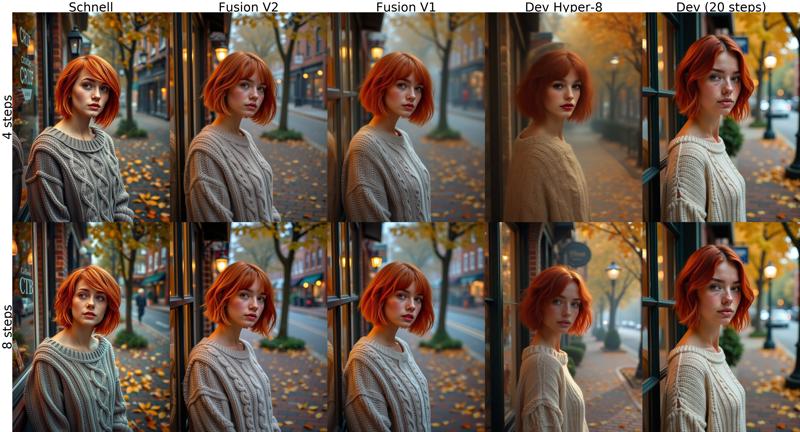
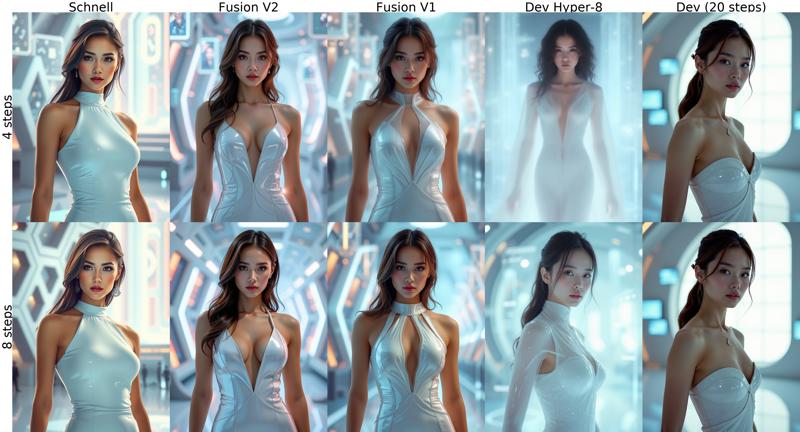
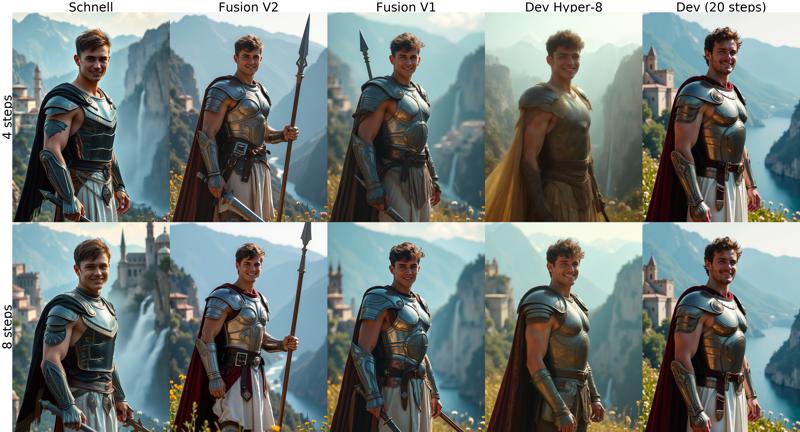
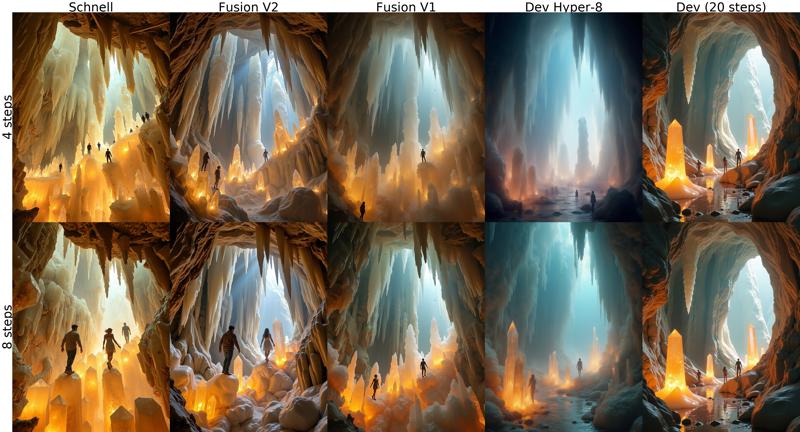
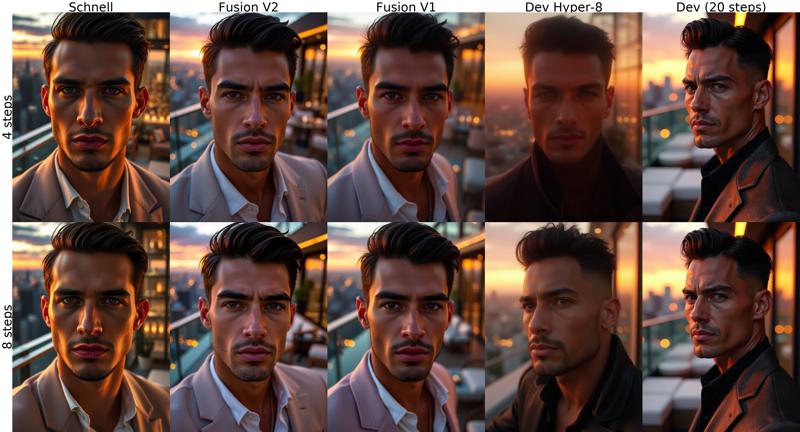
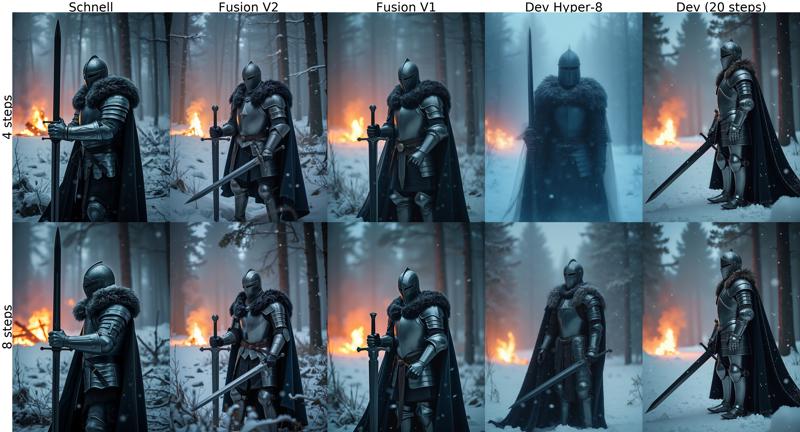
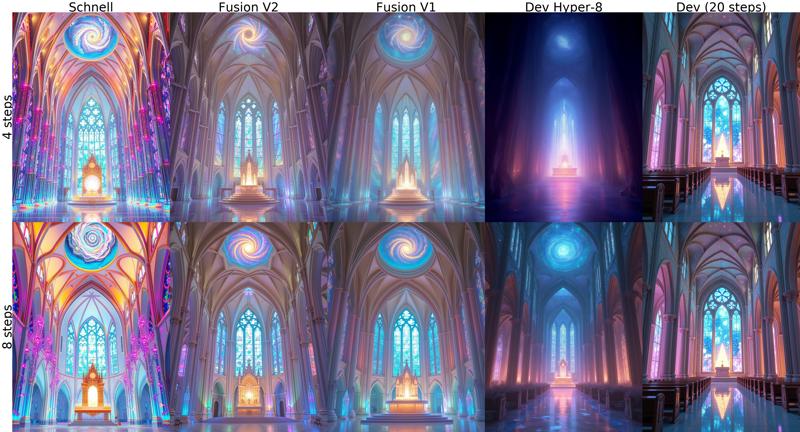
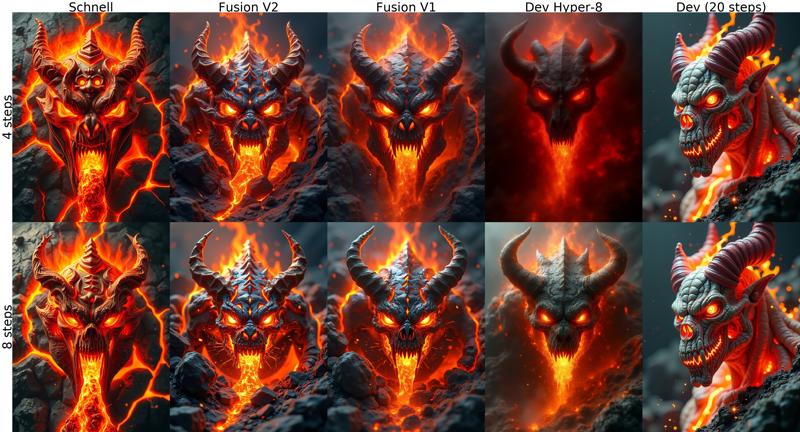
V2 is an alternative to V1 with sharper good quality images from 4 steps. This version merges Schnell + Finetuned Dev + Hyper using the same but refined formula of variable block ratios from V1. Check comparison images below!
 MAKE SURE TO RENAME YOUR FILES AFTER DOWNLOAD, CIVITAI GIVES THEM WRONG NAMES!
Tested sampler/scheduler for low steps:
ComfyUI: euler sampler, simple or beta scheduler.
Forge: euler, flux realistic sampler. KL Optimal or beta scheduler.
This model doesn't take guidance parameter, like schnell.
The versions with AIO (All in one) in the name include UNET + VAE + CLIP L + T5XXL (fp8). Also known as Checkpoint or Compact version.
Using BNB NF4 & GGUF quants in ComfyUI requires installing custom nodes that add special model loaders:
NF4 + Lora support: https://github.com/bananasss00/ComfyUI_bitsandbytes_NF4-Lora
(outdated) NF4 UNET: https://github.com/DenkingOfficial/ComfyUI_UNet_bitsandbytes_NF4
(outdated) NF4 AIO checkpoint: https://github.com/comfyanonymous/ComfyUI_bitsandbytes_NF4
For using UNET versions, you also need to have the TEXT ENCODERS and VAE.
If you don't have them, download them from here:
T5XXL - CLIP L: https://huggingface.co/comfyanonymous/flux_text_encoders/tree/main
GGUF T5XXL: https://huggingface.co/city96/t5-v1_1-xxl-encoder-gguf
VAE: https://huggingface.co/black-forest-labs/FLUX.1-schnell/tree/main/vae
Place the model in "models/diffusion_models" or "models/unet", both text encoders in "models/clip" and vae in "models/vae" folder.
In ComfyUI, use the standard flux workflow or add 'Load Diffusion Model', 'DualClipLoader' and 'Load VAE' nodes to replace the checkpoint loader and complete the setup.
In Forge, set the option "Diffusion in low bits" to "bnb-nf4"
Thanks to city96 for gguf quantization script.
Thanks to reddit user a_beautiful_rhind for bnb quantization script.
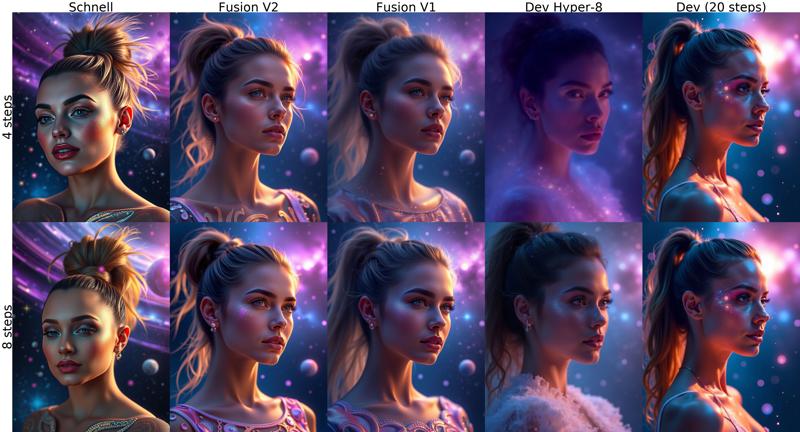
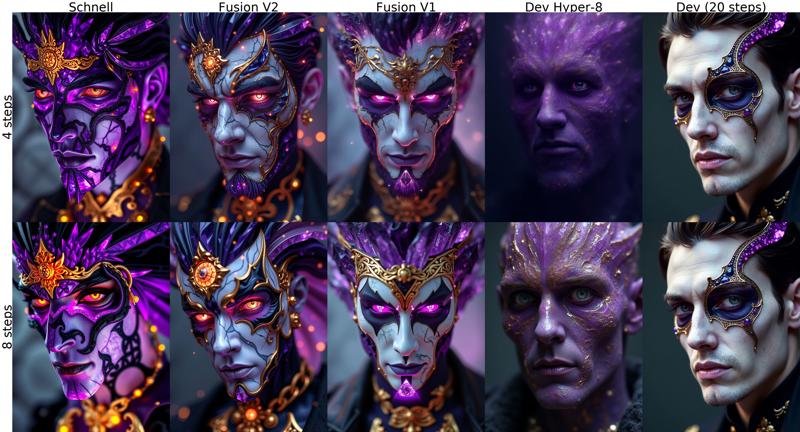
FLUX FUSION VERSION 1
Merge of Schnell and Dev variants of the Flux.1 model with a irregular smoothed ratio for each of the layers.
Quick comparison between versions. Prompts and settings at the end.
↓↓ Click show more for more examples and instructions ↓↓
 Recommended use around 8 steps. If textures like skin look overworked, try lowering steps.
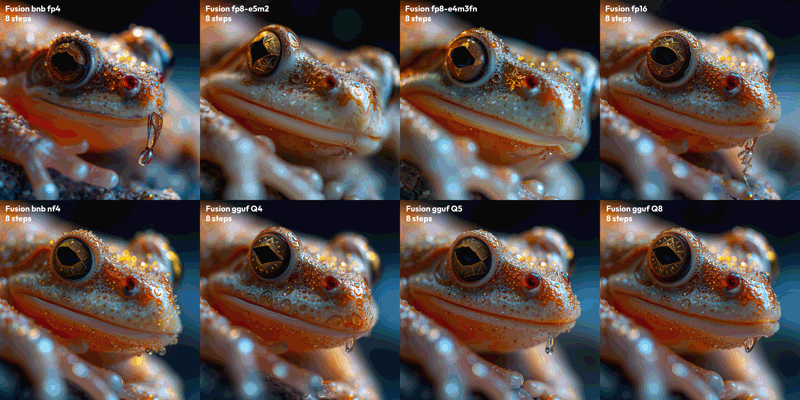
Comparison of V1 QUANTS:
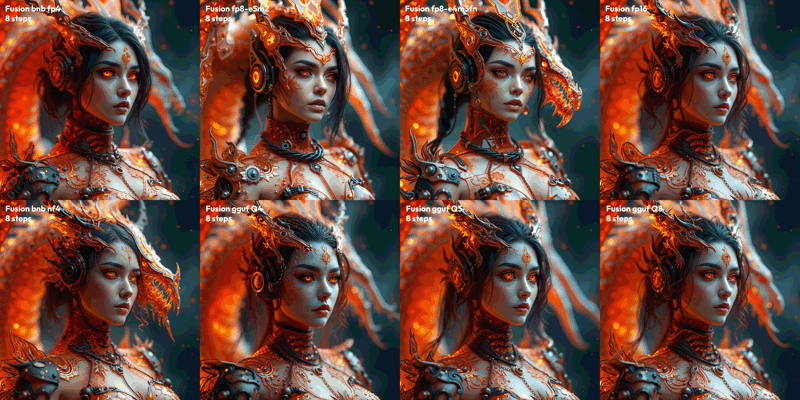
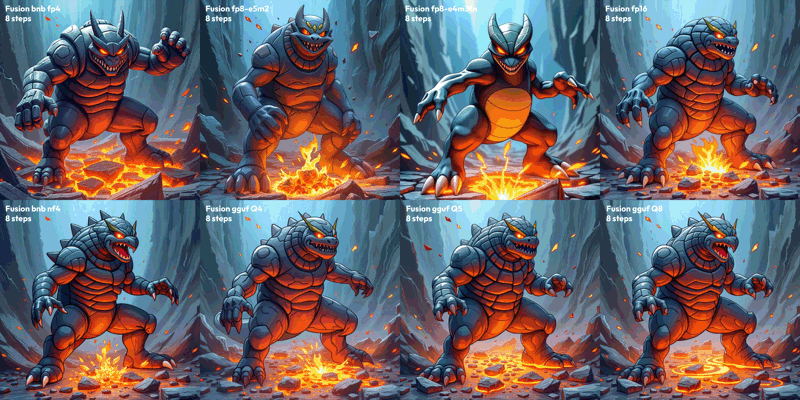
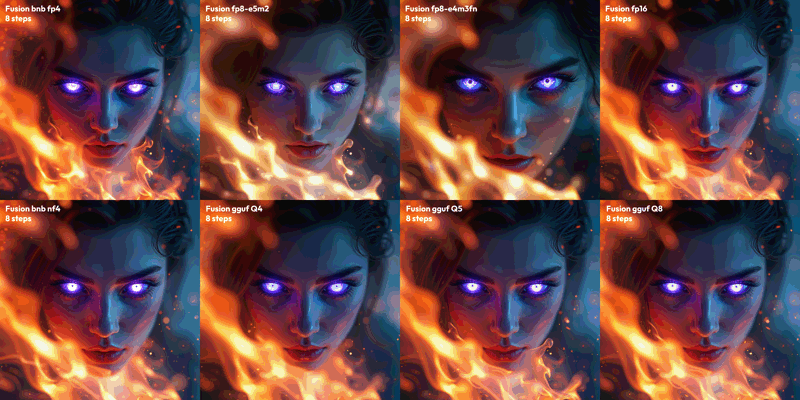
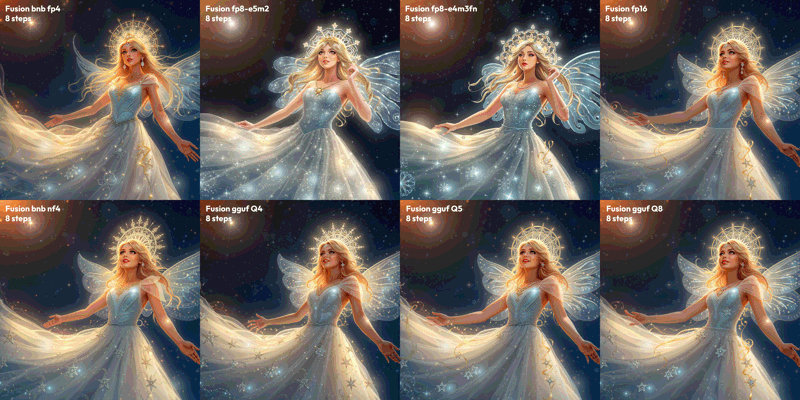
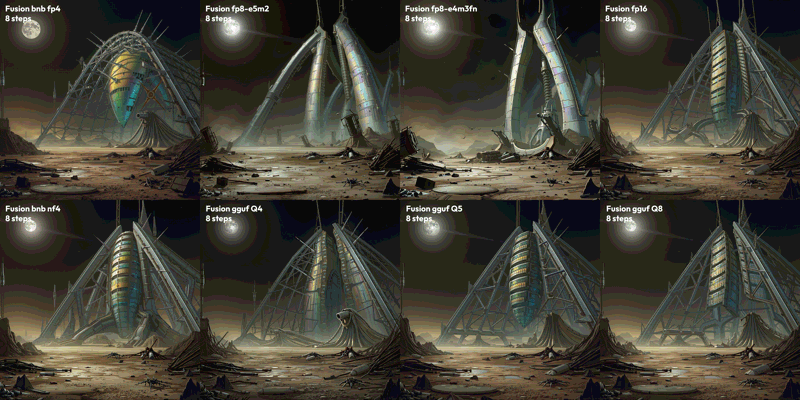 Test parameters: 8 Steps, CFG 3.5, 1536x1536, seed 0
Prompts:
"Extreme closeup, frog face, star crystal structure, intricate designs, glowing hues. Extreme depth of field, celestial light, shimmering details, otherworldly charm, majestic elegance."
"extremely detailed 3d render portraits of a cyber-dragon themed flaming gothic arcane tech woman, cables, arcane tech-dragon inspired design, exposed machinery. the casing is glittery transparent tinted orange, red and black, allowing to see the internals. sophisticated fantasy design. abstract thematic background. extreme depth of field. dragon behind"
"classic pokemon 3DCG illustration. thick outlines. pokemon render style. extremely dynamic composition showcasing the special ability power. flowing pose with extreme closeup on the face in the upper area of the image. intense perspective, in motion movement effects, dynamic impactful vfx, eye catching.. A rock Pokémon with earthquake powers poses dynamically, its body a twisted mass of rugged terrain and molten lava flows. The upper area zooms in on its face, a mask of stone and fury with blazing eyes. Earth shatters beneath its feet as it stomps, unleashing seismic waves that ripple through the abstract background like a fractured canvas. Intense perspective compresses space, conveying unstoppable power. Vibrant colors dance: fiery oranges, electric blues, and smoldering grays. Movement effects blur edges, blurring boundaries between rock and energy. Impactful VFX burst forth in the foreground, echoing the Pokémon's raw force.. masterpiece, professional, best quality, sharp, extreme detail, Hyper-detailed, high-resolution, intricate, vivid. "
"Ethereal female face in 4K ultra closeup, eyes radiating eerie mystical aura with crystalline composition tinted purple-blue hues. Surrounding inferno blazes with dynamic flames and motion effects, creating a vertiginous atmosphere. Extreme depth of field emphasizes surreal otherworldly presence. Glowing eyes at the focal point contribute to haunting mystique, shot from an altered viewing angle emphasizing mysticism. Use Octane and Redshift raytracing for realistic fire and light effects, achieving ultra-realistic 3D render with intense, dreamlike quality."
"Ethereal star princess, diaphanous gown, shimmering stardust, intricate halo, luminous beauty. Night sky, glowing constellations, soft light, dreamy ambiance, mesmerizing allure."
"Sci-fi landscape, derelict alien structure, holographic iridescence, massive metal arches, dark skies, damaged antennas. Ground littered with debris, scattered wreckage, distant moon, dim light."
Description
Requires custom node: https://github.com/city96/ComfyUI-GGUF
FAQ
Comments (45)
Added GGUF Q2_K, Q3_K_S/M, Q4_1/K_S/K_M, Q5_1/K_S/K_M, Q6_K.
Awesome!
nice, what are you using to convert the models to gguf?
@kjs195 hi, thanks. I used the conversion script and instructions that come along with the GGUF custom node for comfy. You can find more info in the github repo
(AOI) Poor quality all oversharped overexposed at 8 steps may you dont merged V2?
AND lower steps / turbo / light / S(peed) allways bad quallity in detail
who can show me a nice shoulder portrait of a person? with a simple prompt (no workflow)
I get normal results with nf4 all in one: https://civitai.com/posts/5833744?returnUrl=%2Fmodels%2F630820%3FmodelVersionId%3D735521
Assuming you talk about nf4 btw, since it's the only with a V2, but I didn't merge the nf4 quants, I quantized my original merge instead.
I have seen what you mention in other people posts tho, maybe it has something to do with low vram mode.
@Anibaaal the link i saw .. all puppy faces more than in model
https://civitai.com/models/638187?modelVersionId=721627
i have 16GB and i think no swap memory is in use for
@sevenof9247 i'm not sure if you're just trying to be negative.. I was showing that the images don't have the problems mentioned in original comment ("Poor quality all oversharped overexposed at 8 steps").
Comparison between Fusion merge nf4 and Schnell nf4 v2: https://civitai.com/posts/5836845
The link you sent is for Dev, I try Schnell because it's more comparable to the merge than Dev.
@Anibaaal no negativ OK
for now for webFORGE users they have 16GB the checkpoint
https://civitai.com/models/638187?modelVersionId=721627
is more usefully ... but try it ... tell me if you have better results
@sevenof9247 but that link is for NF4 V2 for DEV which doesn't do well with with 8 steps.
I compare the schnell v1 from the link vs v2 from huggingface and it's almost the same: https://civitai.com/posts/5835928
@Anibaaal thx for the test .. make NF4 V2 with 20steps?
ok all in all ... turbo models not stable, step in cartoon mode fast ... loras are heavy and less samplers/shedulers are usefuly
Your suggested Flux Workflow is the ONLY ONE which isnt ignoring the LoRas. Huge thanks for that!
I tried literally thousands of checkpoints, workflows, tried Forge, spent days without getting a solution. Now in the end it was obviously the generator that made the difference. The one from your workflow is slow AF but atleast it recognizes the LoRas^^
I'm glad that it works for you. The workflow I shared simply uses the built-in nodes but grouped in a single node, maybe other workflows use custom node packs that don't support flux loras yet.
Highly appreciate you adding the prompts of the examples at the end
Even with a 4090 I'm always using Flux with it loaded in fp08. From what I can tell GGUF Q8 would fit better and actually be closer to the model in FP16 comparing to using the original in Fp8 right? (I know this is a merge for 8 steps, but I think the logic would be the same)
Q8 is very, very good.
Compared many models, this one is the best! Well done! Come on!💖💖💖
I've been using it exclusively over at tensor art ever since it was added there and it's hands down THE best flux model bar none. It still struggles with people lying down tho, especially if they perform activities while doing so, it's fine with hands but it struggles with feet in different positions and from non standard perspectives. I wish I could run flux locally like I do SDXL so I could test it properly without limitations, awesome work.
Interestingly enough I'm getting phenomenal results with 5 steps and CFG set at 7 over at tensor art. I didn't know flux CFG could go that high without issues, it's usually 1-3.5 but this gives me very precise and clean results at 7 CFG.
EDIT: After testing many flux checkpoints I keep coming back to Fusion.
- It has a very good understanding of prompts and can create many different poses and interactions between characters.
- It creates very different looking people compared to other, event he big flux models don't seem to have this array of faces, hairstyles and expressions.
- Interactions between several subjects are usually well interpreted and delivered
- Something many Flux checkpoints/models lack are more realistic diverse mature, more real people in their 40's and 50's, this model excels at this.
- Flux Fusion works with LORAs or at least benefits from LORAs that may not have been catered to it or supposedly aren't compatible with it. Feet and hand fix loras, hidden camera and CCTV loras, cam effects and so forth all take to this checkpoint model well and with the right combination some truly amazing things can be made.
- Wonderful environmental diversity and creativity
- Camera positioning is excellent
- Subject positioning in scenes is better than most if not all other flux models I've tried. Maybe it's a skill issue but I'm getting the best results with Flux Fusion.
- Photo quality is very natural, lighting is also much much better than all other flux models.
- Flux Fusion understands lighting better, it's especially good at interpreting polaroid style photos well.
thanks for sharing, i might give it a go then
@JustJoe It's still my go to checkpoint for flux, definitely the best and I tried most of what's over on tensor art. It's also very flexible and many loras that claim won't work with it work and produce great results.
I edited my original post with a bit of a mini review, this particular model is far and beyond of what other flux models to for the most part, so I felt I my review is well deserved and informative.
Wow! Thank you so much for the detailed review!
@Anibaaal Now combining your checkpoint with KLING is a whole different level of realism when done right and you add a few LORAs that refine the anatomy even further. :)
can you use dev loras with it?
Personally I had problems first time (Forge), but now loras I tried work.
Sometimes they need more steps but I generally havent had issues locally on forge.
@Songbirb but can i use dev loras with it?
@dominik1996d840 yes you can use dev loras, but as @Songbirb said, sometimes it needs a bit more steps around 8-10
@Anibaaal wich version is the best? the first?
@dominik1996d840 fp16 should be the best quality, now I use more the gguf q8 to q4 versions to save vram. The quality might be a bit worse, but I don't notice it much without comparing.
@Anibaaal what about nf4?
@dominik1996d840 Nf4 is fine, I only tested it for releasing but haven’t used it much because it doesn’t support Lora in Comfy, and it looks like it won’t be developed further in favor of gguf.
Should be a little faster than gguf tho.
You can check the comparison images I added in the post to see the difference between versions.
@Anibaaal how i can make realistic images like im normal dev nf4?
I'm using this with my LoRa and I LOVE it!!! it has an amazing imagination for graphics! great job! 💪💜
works great in Ruined Fooocus 1.55 ! thanks a lot !
how u getting them to load? no flux checkpoint shows up in the models list in Ruined for me
Thanks a lot for this awesomeness🤩
The best gift for people who are looking for a 5 steps and high quality Flux model, it's my goto model now 👍
Q8 is the best model I've used thus far. I personally consider it completely different than 'Flux.1 D' at this point given my experience. I don't know how the technology works, but I know this one is better. Thank you!
Thank you! At the moment I made this I was just experimenting, but it really felt like the best of schnell and dev together, it's the reason why I decided to share it. I'm glad the gguf versions have been useful for you!! I also use them exclusively, I find Q4 variants good enough for my needs and I save a lot of vram.
The merge will be optimized a little more, testing merges of huge models takes long :P but it's coming!
@Anibaaal Cool news! As for the model, I find it most useful of all for img2img purposes - surprisingly enough. It's a very nice refiner. It's better than Flux-dev for some things, but not for "very fancy-looking" images.
Somehow it also manages to not fall apart doing lineart refinement of very weird subjects, while getting the job done in 3-4 steps, which is what makes it a reliable refiner.
Hands down, one of the best NF4's out there for Prompt Adherence and Text. Fast renders and nice visuals.
Hi, does it support nsfw?
Details
Available On (1 platform)
Same model published on other platforms. May have additional downloads or version variants.