


Dramatic light, realistic textures, romantic color, and long depth-of-field photos
Version 2.0 - simpler prompting and greater consistency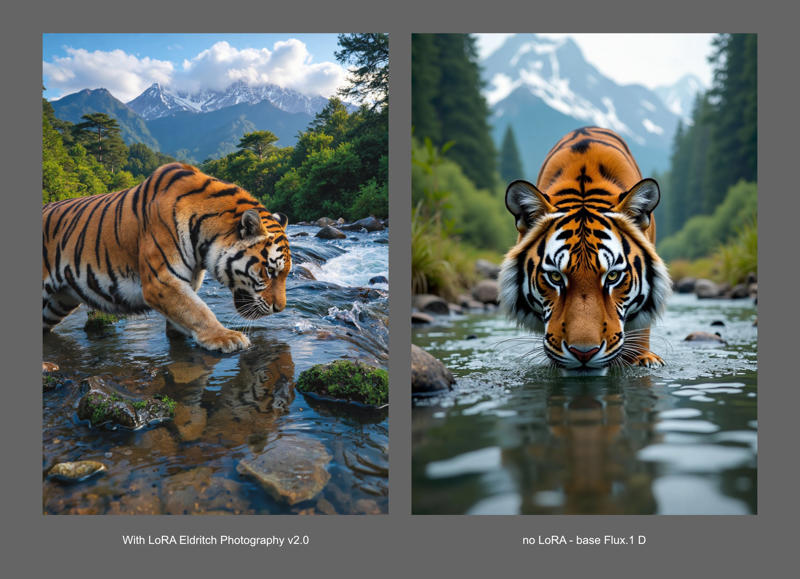 Above is the same prompt/settings for a tiger, with and without the LoRA. For more comparisons, please check this long image at Imgur.
plenty of models figured out how to get Flux to render backgrounds, but almost always by training on analog, or snapshot-style photography. This model wants to give you the backgrounds while still focusing on maximal drama and cinematic style.
I set out to improve on the model's interiors. But what I got from this attempt was an all-around-improved model. Most notably, you can get consistent results in the target aesthetic with minimal prompting. Previously, you needed to write elaborate descriptions of backgrounds to have them in detail. But the model had an aha! moment and now understands its real purpose: always give us a detailed background.
Prompt for photographic scenes, don't worry overly much about how detailed you are, and enjoy the results.
As always, I'll gladly hear feedback for how it may still be improved.
notes for previous versions:
in Forge, please enable 'FP16 LoRA mode'
Use the word 'Photography' in your prompt: This model is prone to generate illustrations - really nice ones! - if you don't emphasize 'photography' enough. Be sure to prompt clearly for photographs! For fantasy and sci-fi scenes I begin and end prompts with photo terms.
If you want long depth of field/in-focus background: describe your background. Just write up some unique characteristics about what's back there - you'll get more focus on it.
Unlike with most other approaches taken with Flux, this won't mean you need to abandon cinematic/professional photo styles. Things can look both epic and have long depth of field. You can push this model toward snapshot or analog style images, though it's better done with a specific LoRA aimed at such.
If you want a blurred background: describe a foreground subject and refer to the background as sparsely and generically as possible. It will give you a focus on the subject and blur the background most of the time. Or reduce the strength of or don't use this LoRA, LOL. It's got positive impact outside of DOF so for photo prompts, I'm using it by default.
I started by training Flux on the same dataset as used for the SDXL model, Eldritch Candid Photography - that didn't yield pleasing results at all. So I changed the dataset a bunch, reduced the noise texture a ton, and modified the color/tonal edits. This produced a very nice Beta model.
But I didn't think the imposed tone and grain were doing as much service to this model as to the inspiration XL model. So, I trained a new model on the same dataset (very long DOF images) without any processing to them. On its own, images output from it were kind of harsh and austere looking. So I merged that with the beta model and got a really nice v1.0
But this still wasn't quite what I was looking for. So I tried a few other approaches and merge techniques before deciding on a simple curves adjustment to my dataset to heighten contrast and achieve a consistent dramatic lighting across them all. This one all on its own was close to the final target! But I tested a bunch of simple merges with my various models and settled on what is v 1.2 - I expect to be the final state of this thing for Flux.1 D
Description
Beta - initial version
FAQ
Comments (17)
Interesting LoRA, however I don't see much difference based on 15 minutes of testing (note: I'm mainly interested in removing shallow focus), tried it on some generated images I've created that suffer from shallow depth of field, I only saw minor changes in generated shapes in defocus areas, and if I cranked the LoRA strength to something like 1.8 (using Forge) only change was film grain and clothes started to drift towards old school (70s? 80s?) from sci-fi style, but there was no major changes in DOF. I guess I thought this would be a "remove the shallow DOF" LoRA, maybe it is useful for some other things though.
I haven't used Forge but on my end, using ComfyUI, the difference is stark! Here for instance is the exact same prompt with and without the LoRA. https://imgur.com/a/xbxdNNX There's no way to get that detail on the background space ship, or the room with girl with her hand on her face without LoRA help. It's definitely very effective in my setup!
it may help (if your prompt doesn't do so already) to describe details of the background. If it remains blandly "in a forest" you may get a more blurry forest than if you describe the specific trees or geography and an interesting feature such as a large rotting stump ...
added a couple more comparisons to imgur and put them in the model description too. I wish I could help with Focus, but this LoRA should, in fact, work as a 'remove the shallow DOF' LoRA to a great extent.
@eldritchadam I'll test this more tomorrow, I will try with ComfyUI.
Ok, now I've tested this a bit more, with ComfyUI. Seems like Forge (which is a fork of A1111) doesn't seem to be working properly with this LoRA, at least some LoRAs have worked, but the strength of the LoRA effect seems to be way weaker than with ComfyUI. In Comfy the effect is quite linear, it does remove part of the blur in defocused areas, however, even if I added detailed descriptions about background characters (like something about their hair) it didn't help a lot, I had to crank LoRA strength to 1.5 or something, and then I started to get noticeable effect, not complete sharpness, but some features became visible when before bg was completely blurred, however, with this strength, stuff from training material starts to creep in, character look changes dramatically, shading gets high contrasty, and film grain creeps in. I guess this will be somewhat useful for something else, but as it is, it doesn't work in my case (but this seems to be the case with most LoRAs at least with SD that was the case). Example - I created woman in shiny bodycon suit (think Star Trek but shinier uniforms), however, going from 0.1 or higher in strength of the LoRA, her suit turned immediately into diffuse looking cloth. Same happens for all the other characters too. With background there were changes too of course, but the effect wasn't so strong.
@ezez OK - I hadn't realized quite how limited you were hoping a LoRA to perform. I wouldn't anticipate that there exists such a thing too soon. To train the concept of long depth of field, you have to feed the model a dataset of images and they will bring some concept and style with them.
That said, if you haven't tried my second upload here, the impact is less stylized in terms of grain/noise and color range compression. It might be closer to what you want but to get detailed backgrounds it will definitely impact the entire image generation. I'm afraid I have no solution for retaining the foreground of an existing image output and simply 'de-blurring' the background. The very process of writing details for the background (still necessary while using this LoRA) will change what the model does in its image output.
Possibly doing a lot of inpainting would be the best approach.
@eldritchadam Love these LoRAs, personally I'm enjoying the one with a stronger stylistic effect more.
But I noticed a strange quirk in their behavior on Forge. The other person was complaining that it doesn't work, however with some troubleshooting I found that both of these LoRAs require the FP16 LoRA mode to be enable in the "Diffusion in Low Bits" section on top.
Perhaps there's some setting during the training process that breaks their FP8 functionality? At the very least this is something I recommend specifying on in the description so people know how to properly use it.
@Walternate thank you - will do!
edit: it was updated to v1.0 in under 24hours
Does it really bug people when I upload a model, and then have an update less then a day later? Cuz I think I will have an update to this thing in really short order ...
yeah, annoying or not, I've got an update imminent.
@eldritchadam Its not a checkpoint so its ok.. otherwise RIP data.
Not at all! If there is any improvement, then it's worth uploading asap. Thanks for this lora!
I didn't pay for it, I don't complain.
No, not at all, just keep them coming whenever you have a better one 🙏😅
If the new version is better than the old one, then update as often as you like. It's always nice to see improvements.
For me, not at all. This is one of the fastest advancing technologies in what is already, technology, one of the fastest advancing fields in human history. I don't expect things to remain set in stone at all.