


UPDATED 02.07.2025
02.07. Updated sdxl-to-flux worklow to 4.6 (fixed the SDXL CN part, it was misbehaving)
02.07. Updated Kontext workflow to 1.4 and bundled with it a Kontext inpaint workflow.
Basics:
1) Download ComfyUI portable from:
https://docs.comfy.org/installation/comfyui_portable_windows
Update ComfyUI from Update folder (using update_comfyui_and_python_dependencies.bat) REGULARLY.
2) You will need Node Manager and use it to install some custom nodes.
https://github.com/ltdrdata/ComfyUI-Manager
Remember to update your nodes regularly.
3) Lately, the Get and Set nodes don't seem to be found by the install manager. Since they are very helpful, just go to the repo and install them manually:
https://github.com/kijai/ComfyUI-KJNodes
and unzip it in:
ComfyUI\custom_nodesTo install the requirements, just go into the ComfyUI\custom_nodes\ComfyUI-KJNodes folder and copy the "requirements.txt" file and paste it in the python_embeded folder.
Then, run cmd inside the python_embeded folder (which is the folder that ComfyUI uses for all its dependencies) and run the command:
pip install -r requirements.txt4) Choose the workflow you need from the top of the Civitai page, and Download the .zip file and unzip it here:
ComfyUI\user\default\workflows 5) In ComfyUI, Load (or drag) the .json file to open the workflow.
NOTE: Using a picture onto your ComfyUI might load an older version of the workflow. Use the json files instead.
NOTE: The Prompt box has 2 boxes. Do NOT prompt into the clip_l box, it follows prompts poorly and gives weird results.
NODE COLORING:
GREEN Nodes: In these nodes you can freely change numbers to get what you want.
RED Nodes: These are my recommended settings. Feel free to experiment, though.
Blue Nodes: These are loader nodes. Ensure you load your files here (just click on a filename and select one from your options). If you don't see any option, it's because you didn't place any file in the correct path or, if you did, you might need to refresh ComfyUI.
Press "R" to refresh ComfyUI if you are adding any model, etc. while ComfyUI is running.
=============================================
FEATURES:
LORAs
\ComfyUI\models\lorasWildcards
\ComfyUI\custom_nodes\ComfyUI-Impact-Pack\wildcardsyou can place them in subfolders too.
WILDCARD NODE:
Populate mode allows you to prompt into the upper box with Wildcards.
Fixed mode allows you to prompt in the lower box without Wildcards.
LLM
\ComfyUI\models\llm_gguf\You can use an LLM AI model to generate a descriptive prompt from a shorter one that you type.
Link to the model I use (Mistral-7B-Instruct-v0.3-GGUF)
https://huggingface.co/MaziyarPanahi/Mistral-7B-Instruct-v0.3-GGUF/tree/main
Choose a quantization level that works for your PC.
ControlNet (CN)
\ComfyUI\models\controlnetBest Depth pre-processor: DepthAnythingv2
Best OpenPose pre-processor: DWPreprocessor
NOTE: You need to play with settings if you are getting weird results.
ADetailer
\ComfyUI\models\ultralytics\bbox\ComfyUI\models\ultralytics\segmIf you get a "no Dill" warning, either use a bbox model, or "no Dill" segmentation models that you can find from Anzhc on Huggingface.
If you want to install some more models for Adetailer, just search CivitAI or Huggingface.
Ultimate SD Upscaler
\ComfyUI\models\upscale_modelsUltimate SD Upscaler takes a lot of system resources! It will generate 4+ tiles that will eventually be merged to create the final image, but enhances the final image with an incredible level of detail.
As an upscaler model, I have tested many, and the best ones seem to be from the SwinIR category.
Flux Redux (IP Adapter)
Requires two files
flux1-redux-dev:
https://huggingface.co/black-forest-labs/FLUX.1-Redux-dev/tree/main
ComfyUI\models\style_modelssiglicp_vision_patch14_384
https://huggingface.co/Comfy-Org/sigclip_vision_384/blob/main/sigclip_vision_patch14_384.safetensors
ComfyUI/models/clip_visionFlux Infill Inpaint
Requires
FLUX.1-Fill-dev:
https://huggingface.co/black-forest-labs/FLUX.1-Fill-dev/tree/main
ComfyUI\models\diffusion_models=============================================
Workflows:
F.1 img2img
Version 1.1: Added LORA support, as well as the ability to set image resolution.
NOTE: Using a person's LORA while using img2img will basically work as a face changer by attaching the LORA's face to the body that is being img2img-ed.
=============================================
F.1 Style Changer (RF Inversion)
This worflow allows you to input an image, and change its style with FLUX as well as with LORAs.
Then, it takes the output and passes it through Ultimate SD Upscaler and finally to Adetailer to improve hands, etc.
NOTE: Keep the Prompts empty. Use LORAs for styling instead. This work best.
NOTE: You can use a Character LORA + face Adetailer to switch faces at this stage.
=============================================
F.1 text2img 4.0
This one does:
text2img. It can use wildcards, LORAs, and 2x ControlNet.
High Res Fix using Flux.
Ultimate SD Upscaler
Adetailer (up to 3) with LORA support.
You should look here on CivitAI for extra models for detection, such as nails, glasses, eyes, etc. It can use LORAs.
For models, see the Suggested Resources section. Those are models I am currently using.
NOTE: If you don't want to use some node or feature, just click on a node (or box select multiple while holding Ctrl) and press ctrl+b to Bypass it (it's a toggle).
NOTE on LLM: At this point I would not use it, since it has become obsolete. Just go to ChatGPT and ask for a prompt from your idea, it will give it to you even on the free version.
PRO TIP!
This workflow generates an image at each stage.
If you get a bad result at any step:
1) CANCEL the process from the queue.
2) Load in ComfyUI the last good image (drag and drop in the interface).
3) Change the options that resulted in things turning bad (in adetailer, for example, you might need either increase or decrease denoise).
4) Generate the image. The process resumes from the image you are using, NOT FROM THE BEGGING, so you don't waste time! (typically valid for Adetailer, as long as it's in the cache, at least).
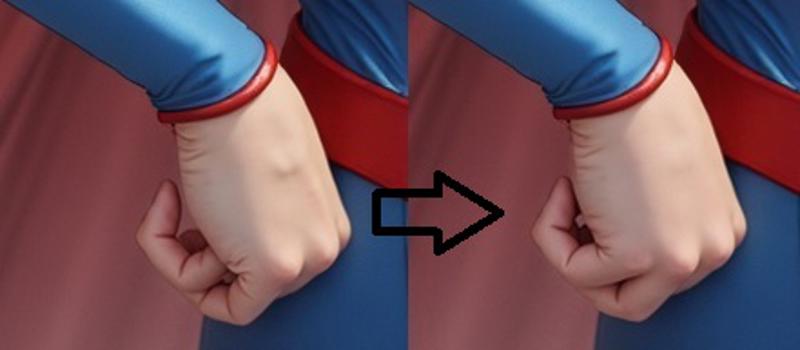 In this example, I got an insufficient hand fix. So I stopped the process, re-loaded the last good image, increased denoised in the hand detailer node, and the process resumed from the last step (the hand fix, in this case ADetailer #2) without having to re-do everything.
=============================================
F.1 text2img LLM (Upcoming update)
While an interesting concept to have "all in one" where a simple concept prompt is transformed into a verbose one, it is far easier to get it from ChatGPT, which will deliver the result without taking up your resources or needing extra models.
=============================================
SD TO FLUX Ultimate
NOTE: This workflow requires SD ControlNets (not flux)!
This one does:
STEP 1: SD txt2img (SD1.5 or SDXL/PonyXL),
ControlNet is at this stage, so you need to use the correct model (either SD1.5 or SDXL).
It has Wildcards, and SD LORAs support.
STEP 2: Flux High Res Fix
Has SD LORAs support
STEP 3: Flux USDU. One for upscaling and one for enhancing.
STEP 4: Adetailer(s) (up to 6, I typically use Face and Hands)
Important, the denoise value needed depends on the image. If you get a bad result at any stage, use the PRO TIP above.
Here, I added 3 Flux Adetailers (face, hands and feet) since they to the best job, and up to 3 SD Adetailers (for NSFW support, since SD is much better at doing these, especially in non photographic styles).
=============================================
F.1 Fill Inpainting
1. Press "choose file to upload" and choose the image you want to inpaint.
2. Right-Click on the image and select "Open in Mask Editor". There, you'll be able to paint the mask.
3. When you are done with the inpainting, press "Save ".
NOTE: This is slower than inpainting, since the whole image is re-calculated, but tends to work better.
=============================================
F.1 Inpainting (with Sampling from another image)
1. Press "choose file to upload" and choose the image you want to inpaint.
2. Right-Click on the image and select "Open in Mask Editor". There, you'll be able to paint the mask.
3. When you are done with the inpainting, press "Save to Node".
4. Sampling: You can use elements from either the same or a different image to inpaint. The second image can be any image at all (but must be same size, or resized to that). Just load it in the second Load Image Node, and mask the part you want to be used as "source material" to inpaint your first image.
If you don't want to use this option, just disable the 2nd image node (ctrl+B)
This is FAST. Only the inpainted area is re-calculated.
=============================================
SDXL inpainting (with Sampling from another image)
Why this workflow here?
As of right now, I am not getting certain "image details" from LORAs, so this is a workaround.
Just generate your images with FLUX, and then inpaint nipples and other stuff using SDXL or Pony or SD1.5 models to get your desired results.
Why not adetailer? Simple, it's faster to generate many times only the details you want rather than regenerating the whole image each time and hope the details are right. Especially in ComfyUI.
Sampling: Now you can use elements from either the same or a different image to inpaint. The second image can be any image at all (but must be same size, or resized to that). Just load it in the second Load Image Node, and mask the part you want to be used as "source material" to inpaint your first image.
If you don't want to use this option, just disable the 2nd image node (ctrl+B)
=============================================
Outpainting:
Not 100% super duper, but you can get some decent results by extending by up to 256 pixels per side. You might need a bit of RNG though.
=============================================
=============================================
DEPRECATED: aka no longer supported
High-Res fix 1.3 LITE (deprecated)
Basically, this workflow works in 2 stages:
text2img: Here I added a node that allows you to select Flux safe resolutions by clicking the dimensions button in the Green Node.
img2img: This regenerates the image at a higher resolution, the Green Node is where you select the upscaling factor, similar to A1111.
Version 1.1: Added a preview for each stage of the process.
Version 1.2: Added the dedicated Flux node for prompting. It includes the Guidance scale, but only use the T5XXL box (the lower one).
Version 1.3: Removed the secondary upscaling. It was added as a separate workflow.
=============================================
High-Res fix CN (Wildcards, Loras, ControlNet) (deprecated)
NOTE: Please use version 1.6+. Previous version were not working with LORAs properly.
2-Pass workflow:
Flux txt2img
Flux High Res Fix
This has everything High-Res fix 1.3 LITE has, plus Wildcards and LORAs support.
High-Res fix CN + Upscale (ControlNet, Wildcards, Loras, Ultimate SD Upscaler) (deprecated)
3-Pass workflow:
Flux txt2img
Flux img2img
Ultimate SD Upscale
This workflow offers everything that High-Res fix does, but also has the Ultimate SD Upscaler (upscales by creating one tile at a time of the final image).
=============================================
text2img CN (ControlNet, Wildcards and Loras) (deprecated)
1-Pass workflow:
Flux txt2img
text2img with Wildcards and LORA support. This one has no High-Res fix.
Now includes Resolution Chooser (see the high res version above for explanations).
text2img CN + Upscale (ControlNet, Wildcards, Loras, Ultimate SD Upscaler) (deprecated)
2-Pass workflow:
Flux txt2img
Ultimate SD Upscale
Just like text2img but also with Ultimate SD Upscaler.
text2img Adetailer (Wildcards, Loras, Adetailer) (deprecated)
Up to 3-pass workflow:
Flux txt2img
Adetailer #1
Adetailer #2 (disable nodes with CTRL+B if not needed).
Each Adetailer pass supports its independent prompting and LORA.
=============================================
SDXL to FLUX CN (ControlNet, Wildcards and Loras)
Works with SDXL / PonyXL / SD1.5
2-Pass workflow:
SD txt2img
Flux High Res Fix
This allows you to generate images in any of your favorite style and automatically send them to img2img with FLUX. You might need to play with the denoise value to get best results.
SDXL to FLUX CN + Upscaler (ControlNet, Wildcards, Loras, Ultimate SD Upscaler)
Works with SDXL / PonyXL / SD1.5
3-Pass workflow:
SD txt2img
Flux High Res Fix
Ultimate SD Upscaler
=============================================
Upscaling: Just like the "EXTRA" Tab in A1111 / Forge
\ComfyUI\models\upscale_modelsNot such a great way to upscale images IMO, but I included it here if you want it.
Upscaling:
The math is a bit weird. If you are using a x4 upscaler, that x4 will be applied automatically, so you need to multiply that number by the factor you want to get the final scaling factor.
Example: 4 x 0.25 = 1 (no upscaling)
Just use any upscaler you want.
Description
Updated 20.06.2025
FAQ
Comments (48)
Hey, thank you for sharing your amazing WF, can you implement InstantX Union Controlnet ?
The ControlNet is still in beta, but I'll take a look at it when I have some time.
Have you tried it with the existing workflow? Both the nodes and ComfyUI have received updates since I made it, so it might work now.
@Daedalus_7 I did try before and canny was just very bad, I will try it again, Ty!
@williasmblood No worry, I figured it out. It just needs a different node. I tried an openopse too. Please wait until I update the files...might take a bit. Thanks.
@williasmblood Done! Just download v2.2 and you are all set. Also, read the note in the controlnet section.
OpenPose worked flawlessly! Thanks!
@williasmblood no way to edit the pose if it's not dectected correctly? right?
@tazztone I really don't know, I had no issues with detections, sometimes you just need to tune the CNet weight a little bit.
Thank you for the information. I am grateful. I have a small problem with IMG to IMG (I am a beginner). Most of the images are generated tattoos, although I have clearly specified in the negative "body art, tattoo design, tattoos, watermark, logo, text, writing, branding, symbols, insignia". Can you help me with some advice? Thank you in advance.
It depends on your starting image, since img2img typically recreates a quite similar image to the original one unless you crank up the denoise. So, if the original image has tattoos and you want to get rid of them, you are better off using inpaint, or a combination of photoshop to mask the tattoos and then img2img to fix the masking.
Alternatively, you'll have to use ipadapter.
@Daedalus_7 Thanks for your answer. Comfyui, Flux is new to me. So far I've been using SD 1.5 entirely.
I can say that Flux is a remarkable evolution. A beginner question, in "ClipTextEncodeFlux" do I have to put mostly what I put in Positive and Negative? I apologize if I am asking beginner questions. The initial picture does not contain any tattoos and yet it generates my whole body full of tattoos. Hence my puzzlement. Thank you in advance.
@drak0n
ClipTextEncodeFlux IS the positive prompt. It just has 2 clips since each understands things differently. From my tests, I avoid using clip_l (the top box) and only use the lower one.
So, effectively, you are using the positive prompt by writing stuff in the lower box.
Also note that originally, Flux wasn't really designed for negative prompting, but some people have created some limited workarounds (which may take 3-4 tags at most), which I have not implemented.
@Daedalus_7 Thanks for the answer, now I understand. I appreciate your patience. One last question and I won't stress you anymore as I know you are a busy person. When I try that get "workflow" from image, I get most of the time the error "Unable to find workflow in undefined". Can you please tell me what this means? Not all pictures give this error but most.
@drak0n civitai sometimes converts images to jpg. That's why I am indicating to download the json file. I explain it at the start of my guide.
@Daedalus_7 I just want to express some feedback on your work regarding this Workflow Flux. I must admit I am pleasantly surprised. The quality that this "upscale" brings is incredible, especially in terms of environment and clothes. The most important performance is on the hands. I had big problems in SD 1.5 with the hands, the only solution I found was through control net. With this workflow, even a 4-fingered hand, for example, is "totally fixed. I was even surprised to see even the fingernails done, which in SD 1.5 I couldn't do. Only one mention is about the skin realism. No matter what lora specializing on realism I use I cannot bring an improvement to the skin. But for sure, in the next updates, you will bring a higher quality in terms of skin realism. So, congratulations for your hard work, I am grateful for the quality of this workflow. Keep up the good work.
Hi again, I'm trying to appeal to your goodwill regarding a problem with "Flux Ultimate 2.2".
Generating images and upscaling works without problems. When I activate one of the "Controlnet", I get this error "SamplerCustomAdvanced
The size of tensor a (3072) must match the size of tensor b (45) at non-singleton dimension 3". In controlnet I used DWPreprocessor. The image uploaded in controlnet has the same size as the one specified in "Resolution Mode". I googled, tried with AI to find a solution and failed. It's definitely something simple but I can't figure it out. Can you please give me some advice? Thanks in advance.
Provided you are using the correct controlnet (flux based), I would recommend updating comfyUI and custom nodes.
@Daedalus_7 That was my mistake, thanks for the advice. I definitely still have a lot to learn. I hope I'm not stressing you too much, I'm encountering a little situation in controlnet (Controlnet Union + DWPreprocessor). Whatever model, I see no effect on the image when using the options in "Pixel Perfect Resolution". I was very interested in the "Resize and Fill" option which I used a lot in SD 1.5, but unfortunately all the images are cropped at the bottom as well as the top.
@drak0n thanks for pointing that something wasn't working. I tried to rework the auto-resize feature. Now everything follows to size of your main output image and should work correctly. Please download the 2.3 version of the workflow.
@Daedalus_7 I've downloaded version 2.3 but unfortunately I encounter the same problem. I'll give you more details, the image in "Load Image" is 9:16. I wanted to use "Resize and fill" for a new 3:4 image. Based on the image in Controlnet, I want to create another new image but in a different aspect ratio. On SD 1.5, I was able to do this without problems. Maybe I am doing something wrong. The best combination for me (maybe I'm wrong) would be UNION with DWPreprocessor but unfortunately it doesn't work at the moment. Thanks in advance.
@drak0n I am using Union Pro https://huggingface.co/Shakker-Labs/FLUX.1-dev-ControlNet-Union-Pro/tree/main
Also, I just tried a 3:4 (in controlnet) to 9:16 (output) with DWPreprocessor and it's working fine for me.
@Daedalus_7 I know, it's strange, if you put a 3:4 (720x960 or 1440x1920) image in controlnet, the final image is ok. If I put a 9:16 image in the controlnet, the image is cropped.
Eventually, I finally got to the bottom of it. I had to add "DWPose Estimator" and "Enchance And Resize Hint Images" where the "Resize and fill" function now works without problems. Something is wrong with the old build (DEPREC).
llm's folder is /ComfyUI/models/llm_gguf
not /ComfyUI/llm_gguf
Thanks for letting me know. I have fixed it now.
@Daedalus_7 still you have multiple typos in your LLM setup instructions. correct: (from searge node readme): Create a new folder called llm_gguf in the ComfyUI/models directory.
awesome workflow thank you
Your OCD in keeping your Workflows neat and tidy is highly commendable.
This evening I was setting up a new workflow for inpainting, so I decided check out some of the Workflows I downloaded to see how others are doing their inpainting.
Upon viewing your Workflows I was inspired and impressed by how organized they are, which make them easy to follow...
...or maybe I'm too high right now, in that stage where everything just seems to be awesome and amazing.
P.S. I just realized that I spent 30 minutes writing this message. Damn I love edibles.
Thank you for the words of appreciation. They are always welcome. :)
what i miss here in the txt2img flow is some "simplechooser" node that pauses after the initial generation. only if it's a good one is it sent further trough the hiresfix, upscaler etc.
or is there a better way to control this?
I just cancel the queue and stop the generation.
When I use Lora, the generate time becomes incredibly long(more than 3000s).when i close it,generate time just 35s! how can i fix this(use lora)?
It seems that loading a LORA is going into a resource in which you are already at the limit. Try looking at the Task Manager > Performance while generating images with and without LORA to see what seems to be the problem.
could u please make a gguf version? awesome work bro
someone made a custom node for gguf version . you can search in youtube
Is the JSON file available to download here the wrong one? I dragged it to ComfyUi just now and it has no ADetailer, no Controlnet. Not Red, but simply not there.
Which workflow did you try?
I also have the same issue, the only workflow available to download is img2img, I don't see any other workflows in the zip file.
@plow183995 You need to select the workflow at the top of the page. Then you can download the corresponding workflow.
Ahh, thank you! Not used to civitai's UI.
SamplerCustomAdvanced
module 'tensorflow' has no attribute 'Tensor'
I always get this error, any help?
It seems that you haven't properly loaded some model or clip. Try to re-assign them in the node.
@Daedalus_7 Sorry I am very, veery stupid, is there any video about this?
looks amazing; thks for sharing it help me a lot to learn comfy
I'm glad you found my workflows useful.
you did things right. specifically in the description indicating the paths to put the downloaded safetensors.
This is practical for a beginner and avoids accumulating errors and wasting time.
I don't have much time to test but I can't wait...the possibilities are so vast
)
OP should update this now that Flux Redux is out