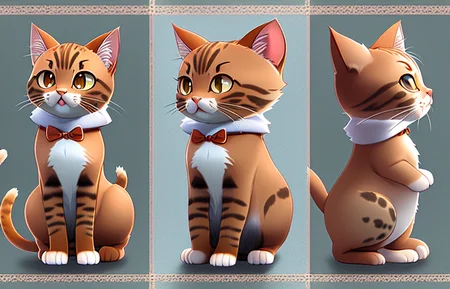
CharTurner
Edit: controlNet works great with this. Charturner keeps the outfit consistent, controlNet openPose keeps the turns under control.
Three versions, scroll down to pick the right one for you.
If you're unsure of what version you are running, it's probably 1.5, as it is more popular, but 2.1 is newer and gaining ground fast.
Version 2, for 2.0 and 2.1 models
Version 2, for 1.5 models
Version 1, for 1.5 models
BONUS: Experimental LORA released
used at your own risk. :D (mixes well tho)
Hey there! I'm a working artist, and I loathe doing character turnarounds, I find it the least fun part of character design. I've been working on an embedding that helps with this process, and, though it's not where I want it to be, I was encouraged to release it under the MVP principle.
I'm also working on a few more character embeddings, including a head turn around and an expression sheet. They're still way too raw to release tho.
Is there some type of embedding that would be useful for you? Let me know, i'm having fun making tools to fix all the stuff I hate doing by hand.
v1 is still a little bit... fiddly.
Sampler: I use DPM++ 2m Karras or DDIM most often.
Highres. fix ON for best results
landscape orientation will get you more 'turns'; square images tend toward just front and back.
I like https://civarchive.com/models/2540/elldreths-stolendreams-mix to make characters in.
I use an embedding trained on my own art (smoose) that I will release if people want it? But it's an aesthetic thing, just my own vibe.
I didn't really test this in any of the waifu/NAI type models, as I don't usually use them. Looks like it works but it probably has its own special dance.
Things I'm working on for v2: EDIT: V2 out, see below! (also v2 2.1)
It fights you on style sometimes. I'm adding more various types of art styles to the dataset to combat this. - V2 has much better styles
Open front coats and such tend to be open 'back' on the back view. Adding more types of clothing to the dataset to combat this. - Still has this problem
Tends toward white and 'fit' characters, which isn't useful. Adding more diversity in body and skin tone to the dataset to combat this. - v2 Much more body and racial diversity added to the set, easier to get different results.
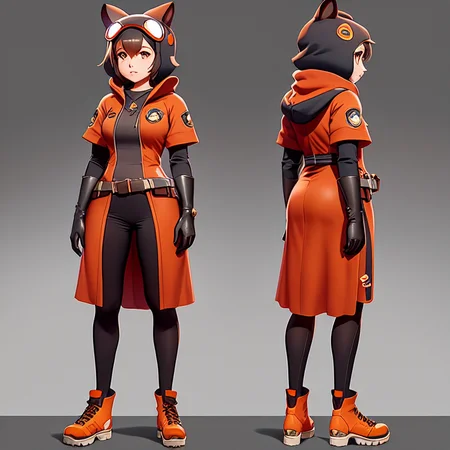
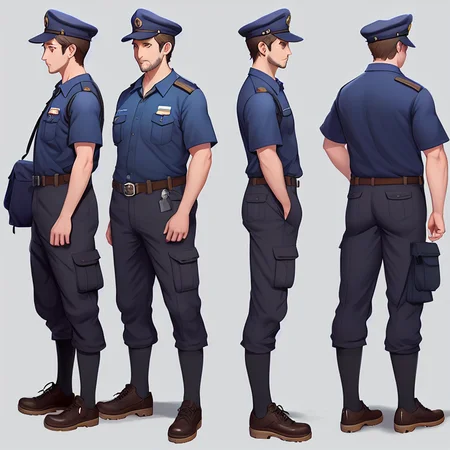
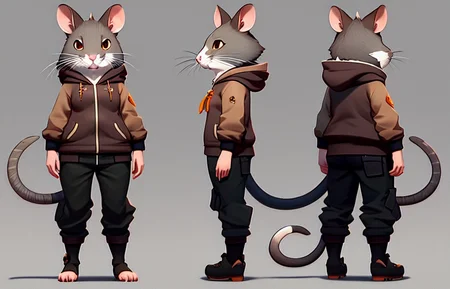
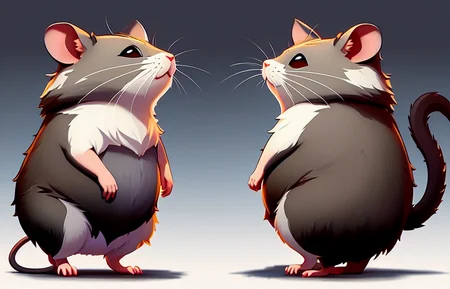
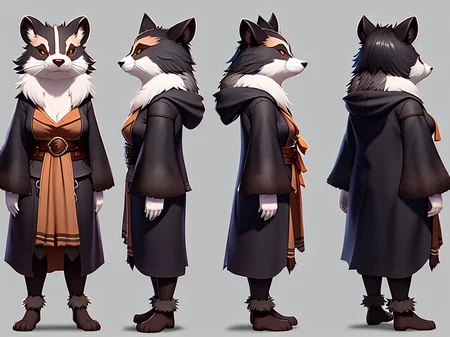
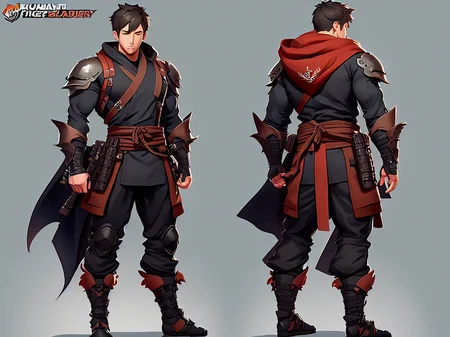
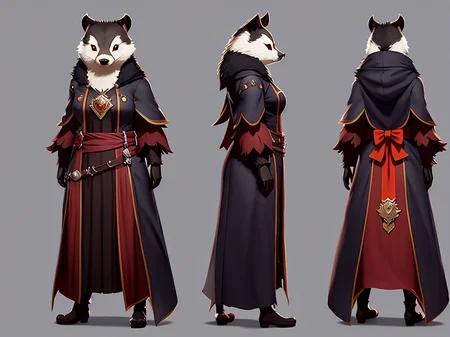
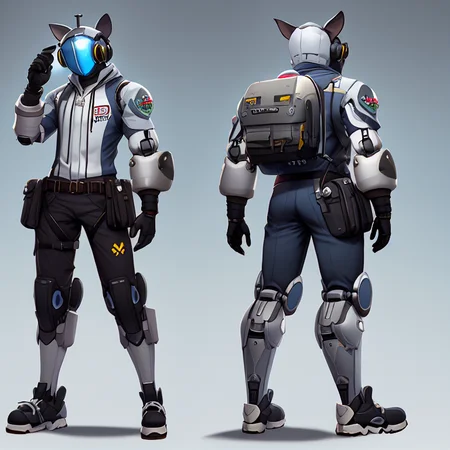
Helps create multiple full body views of a character. The intention is to get at least a front and back, and ideally, a front, 3/4, profile, 1/4 and back versions, in the same outfit.
Description
First version. Still has things I'm working on fixing. Adding "multiple views of the same character" can help if your character is being stubborn.
FAQ
Comments (70)
This will particularly be helpful when NeRF photogrammetry will be fine tuned and ready for production!
This is more than a little bit amazing! thanks!
May i ask what CKPT u used to generate your anthro characters?
this is amazing. i wonder if a checkpoint of this would do a better job
It might, but then you couldn't use it in other checkpoints? I prefer embeddings most of the time, I find them vastly more useful.
I installed it by putting into the embeds folder, but how exactly do I use this? Can I bring up a character I've drawn from one view and generate the rest?
It's an embedding, so you reference it in your prompt. As of right now, it is set up to do a whole turn around, but doesn't take in a source image. You can absolutely try it in img2img, tho! If you click on the little i with a circle around it on the source image, you can see the prompt I used (and where I used the embedding in the prompt, as where you put it in the sentence changes how strong it is).
I love this in theory, but I'm having a tough time getting it to work.
Make sure you're doing a wider-than-it-is-tall image, and Highres.fix is on. What prompt are you using?
How much wider? And I actually snatched the prompt off of your main gallery image and made some tweaks of my own to personalize. I'll try this though, thank you.
Really curious how you trained this... care to explain and share training images?
Collected some of my own turnarounds and some from the web/ art books, trained it the same way you train any other embedding. When making images square, I padded the top and bottom, not cropped the sides, to preserve the turn around.
Question for you, does this only work on a specific model? Or would it work on any model? I'm new to this and I've noticed that when I try to apply this to a prompt that generates say an ordinary looking man in a trench coat. If I use the same seed and settings and then add the <CharTurner> tag to the prompt it turns the character only the character becomes a cat girl... which was... not what i was expecting. I feel I fundamentally don't understand how this works.
it works in multiple models, but it's not as well behaved in some as others. Moving charTurner to the end of the prompt can help with it trying to make things into anime catgirls. I'm working on v2 being better about that. But you can also add "cat ears" "woman" "girl" "anime" to the negative prompt to help, too.
Think of it like it speaks with a thick accent, some languages you can understand it easier than others. Might need to change the sentence to make it more understandable.
I would very very very much be interested in using this with SD 2+ versions.
I understand why a lot of people are sticking to the older models. But I find that specifically for embeddings, SD2+ really really shines.
I can also see myself using depth2img in combination with this
(getting poses from this embedding and applying different styles on the exact same poses using depth2img)
I understand the time involved with creating an embedding, so if you don't feel like expanding into SD2+, I'm interested in your workflow (how many traning images and where you got them) so I can try it for myself.
A 2.+ version is in progress, as well as a V2 for 1.5. Working on the new dataset, hoping to fix some of the issues this one has.
Great embedding!! For some reason I managed to get better results in Automatic1111 than in Invokeai, not sure why. Just saying in case someone else struggles with Invokeai to make it work.
I didn't test in in Invoke at all, so I have no idea what's different about it. Glad it's working for you.
I am trying to get my character have turnaround from IMG2IMG - but i only have a variation of existing drawing without any additional views. Was trying different options but for some reason can't get the result right(
yeah, I didn't initially train it with Img2Img, and it's fiddly doing that, but people have made it work. v2 should be better about that.
Thank you for the response, i will keep trying)
There are ways to get SD to ingest an image for "style" instead of structure, kinda like txt2img but it takes images instead. Image variations in invokeAI is one, but other pipelines are in development.
Can you use Charturner on an existing character with outpainting/inpainting?
With v1, you can but it's a little difficult. This checkpoint helps a lot with that part: https://civitai.com/models/4118/spybgs-toolkit-for-digital-artists
Could someone explain how to use these extra embeddings pls? or point to some docs :D
In general, use a prompt like "highly detailed Full body charturner of a postman. multiple views of the same character." (but with your character description). If you leave it square, you'll likely just get a front and back, a wider images will get more turns. Using Highres fix with latent-nearest is pretty good to refine.
Overall for embeddings, put them in the embedding folder and then reference them in your prompt. WHERE in the prompt you put it effects how it works (just like any words in SD)
https://youtu.be/YqcrsQA_Gdg
HOW TO USE?
In general, use a prompt like "highly detailed Full body charturner of a postman. multiple views of the same character." (but with your character description). If you leave it square, you'll likely just get a front and back, a wider images will get more turns. Using Highres fix with latent-nearest is pretty good to refine.
hey can i use it on my own work, like if i have made a forward looking guy in my style and make it to do a charturner
You can, but it's a little bit fiddly. Easiest way is make one that is 'close' to your character, replace the front view with your character in something like photoshop, and then mask that character and run the image again in image to image. I'm working on a v2 that will make this better I hope.
@zenker Awesome video! My spanish is terrible but your video is beautiful!
I added to my prompt but nothing happened? Can you explain how to use it..
In general, use a prompt like "highly detailed Full body charturner of a postman. multiple views of the same character." (but with your character description). If you leave it square, you'll likely just get a front and back, a wider images will get more turns. Using Highres fix with latent-nearest is pretty good to refine.
Hi how can we contact you for commissions?
I'm not taking commissions at the moment, don't have any extra time. Thank you for the thought, though!
@mousewrites
Bro is offering you money XD, id take no hesitations
@odawgthat I have a full time job, I am not selling any more of my time. I'd rather play with this stuff on my own time. But I appreciate the concern. :D
@mousewrites Fairs my guy, its a sick textual inversion! I got a 8GB GPU so have issues with dreambooth, love the work your doing!
hhh
Hi , how to install in SD 1.5 webUI Automatic 1111 ?
Download the file and put in the embeddings folder, and then put charTurner in your prompt (usually at the end.)
I think you would be better off training this with LORA, as its kinda a difficult concept compared to, say, a face: https://github.com/kohya-ss/sd-scripts
(Not that the results are bad as a TI)
I'm trying to make a lora of it now. :)
Did anyone try to mix it up with SamDoesSexy Blend ?
it's an embed, so it can be used with any model (1.5). Should work in that blend.
i feel so dumb rn, i downloaded the file, but where do I place it and how do I use?
Put it in your embedding folder, and then add "charTurner" somewhere in your prompt. If you click on the little "i" in a circle on the example pictures, it will show you the prompt I used. Don't feel dumb, this stuff is all new and changing fast. Let me know if you need more help. :D
im new and was wondering if a safetensor is available for this? or is textural inversion not safe tensorable?
As far as I know, it's not safetensorable.
This is really cool for an MVP! One question, I tried using it on some more realistic characters, and it turned them into cartoons. Any chance you can get this working with more realistic characters too?
Yup, that's what I'm working toward with V2. I'm about halfway there, still working on consistency.
When I use SD2.1, the load skips this embedding, is it seems not working with SD2.0/2.1 yet? Any chance can upgrade this awesome embedding to support SD2.0/2.1?
Yeah, it's a 1.5 embed RN. v2 will have both 1.5 and 2.+ versions. I am training the 2.1 version right now.
Can you please make it a LoRa ?
As far as I can tell, LoRa are created from trained models. I don't HAVE a trained model of this, it's an embedding. If I figure out how to make an embedding a LoRa I will, but i'm not going to train a whole model just to extract a lora. :D
well, if you drop the dataset somewhere I'd do it xD
@beaufondbeachstudios I finally got kohya's gui running, so if I can't get it in the next few days i'll shoot you the dataset. XD
I used the same prompt with its parameters, but I get a very bad result, I don't know why ?
it that because I use a different model ?
My used model : v1-5-pruned-emaonly.ckpt
Thank you so much
It does work better in more refined checkpoints vs the base one, but it should work ok in the base. Version 2 is in progress, trying to make it work better in all models. :)
Amazing model. I want to create something similar but for product design. I am currently working on a design project for a rooftop cargo box for cars. How can I create a model that can generate all views for one specific cargo box product and then make design variations for it? Do you have any tips for me?
So can I turn any character that i already designed/generated?
With inpainting, yes, but it doesn't work perfectly. Easiest way is to make a characracter turnaround of a similar character, replace your finished character in the correct 'slot' (front, or 3/4th, or whatever), and then mask that character and inpaint the rest. I'm working on a LoRa version that hopefully will be better at that.
Which model is the best for this embedding? (Non-Anime results?)
I like photogen58 or stollenDreams, personally.
@mousewrites Thanks