


Photanima is an experimental finetune of Anima Base v1.0 to see whether it is a viable architecture for photography. Spoiler alert: it totally is.
Turbo LoRA baked in. If you're on a 30-series GPU, I recommend converting this on the fly with Quantization Toolkit + Lazy Torch Compile node for wicked fast gen times. All demo images generated with that combo. These are raw outputs; no upscaling or post-processing.
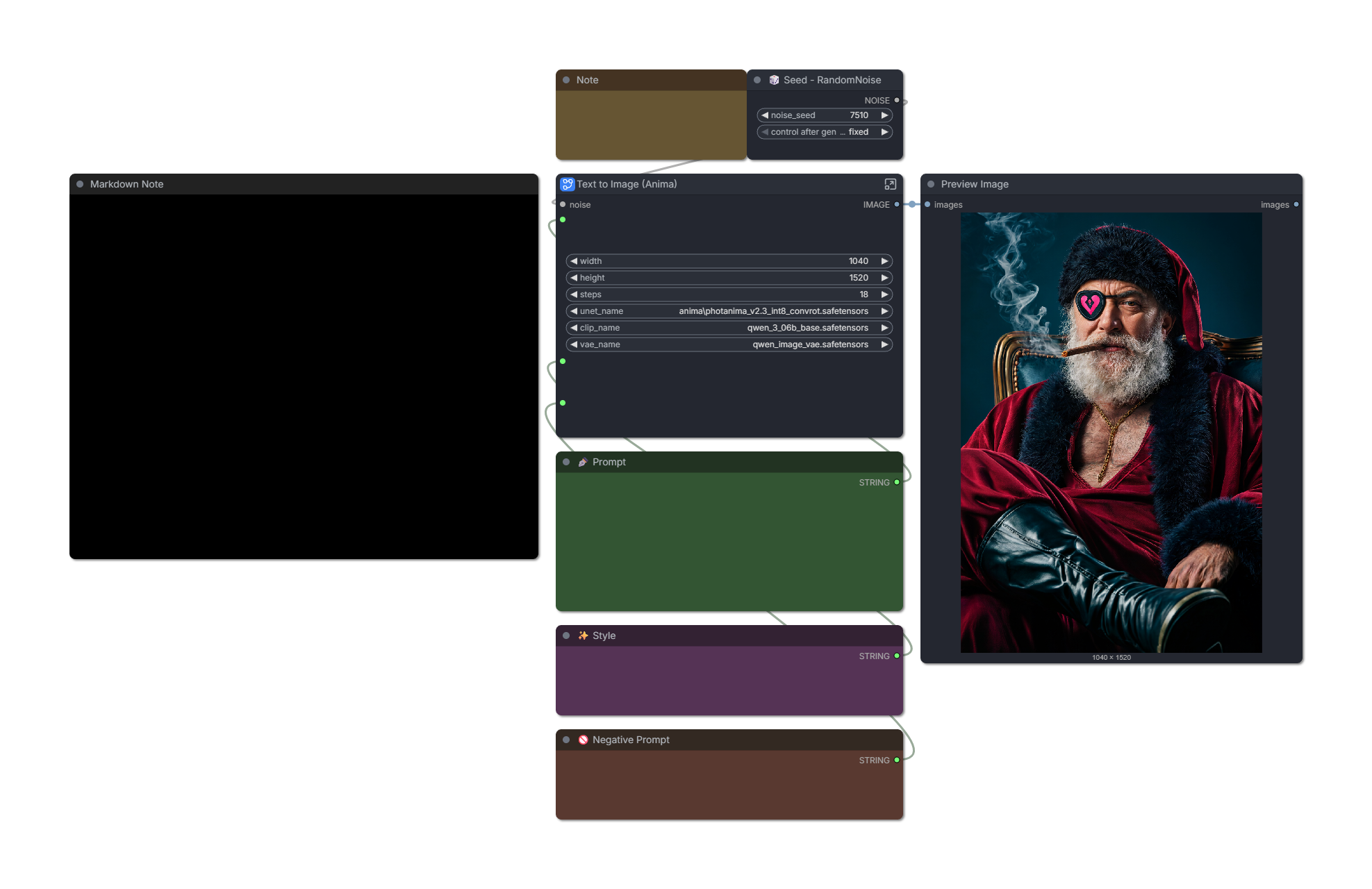
Most demo images contain workflows with custom sigma curve and ODE sampler. These both help significantly with realism. Standalone workflows provided further down this post.
❤️ If you enjoy Photanima, you can help offset the cost of training:
🤓 Technical details
v2 is trained on ~2000 images for 45,000 steps. This is an expansion of my Snakebite 2.3 dataset with around 700 new images and captions reworked for Anima. Training took approximately 48 hours on a Geforce 3090.
Pros:
Extremely fast.
Extremely good prompt adherence.
Anatomy is pretty stable. If it screws something up, changing your steps by +1/-1 usually fixes it.
Supports up to nearly 2MP with little-to-no distortions.
At first, I noticed that Photanima's style was inconsistent - it had a tendency to regress toward a cartoony/CGI look as my prompts became more complex. I was able to mostly overcome this by splitting Photanima into constituent content, style-early, and style-late blocks, then boosted the style blocks well past a strength of 1.
"Style-late" maps to blocks 7, 8, and 9 - these do alter composition to a degree, so we can't boost them as hard as "style-early."
Images are pretty consistent now, but there are some notable drawbacks.
Cons in v2:
It loses a little knowledge of certain artistic terms like
silhouette.Microdetail quality is somewhere between SDXL and ZIT. Honestly, it's really good for a 2B model. Two-step upscaling with Anima doesn't help much, but I'm sure the results would be amazing if you sent a Photanima image to a different model for refinement. Or if that's too much work: just add a little film grain. It does wonders and requires no extra VRAM.
Text capabilities are not as good as those of base Anima. Anything beyond 3 or 4 words is likely going to require numerous re-rolls. This is at least partly due to the Turbo LoRA.
Excessive fluff tags like
masterpiece, absurdres, hyperrealtend to fry the image. The model is photographic and highly aesthetic by default, so there's no need to drive it harder in that direction.
🛠️ Recommended Settings
v2.3 Turbo:
8-9 steps.
er_sde sampler on "ODE" mode.
CFG exactly 1.
Preferred resolution: 1040x1520 or 832x1216.
For maximum realism, begin your prompt with
real life photo. If that's not enough, addphoto \(medium\)and increase its strength until satisfied. You can usually go up to a crazy strength value like 5 or 6 without breaking the image.You can remove NegPip fluff to improve anatomy (e.g. fingers) at the cost of some photographic texture.
Workflow optimized for realism (recommended): Download
Workflow with zero custom nodes (sacrifices realism and speed): Download
v2.3 Base/Non-Turbo:
15-20 steps.
er_sde sampler on "ODE" mode.
CFG between 1-2. Raising CFG brightens the image.
beta or bong_tangent scheduler.
Workflow optimized for realism: Download
v2.2 Turbo:
6-8 steps. Images often look best at 6, but anatomy is more stable at 8-10, especially with complex prompts.
Custom sigma curve or simple scheduler: "1, 0.94, 0.9, 0.825, 0.6, 0.5, 0.3, 0.29, 0.2, 0.0"
You can reduce the first number on the sigma curve to 0.95-0.99 to improve realism. This reduces saturation and adds a little noise, but makes the model less stable.
Workflow optimized for realism (recommended): Download
Simple workflow with fewer custom nodes: Download
v2.2 Base/Non-Turbo:
You can get a good image in 25 steps, but 40 is often better.
er_sde sampler on "ODE" mode.
Custom sigma curve or simple scheduler: "1, 0.94, 0.9, 0.825, 0.6, 0.5, 0.3, 0.29, 0.2, 0.0"
CFG between 3.5 to 4.
Recommended fluff: "(photo \(medium\):1), real life, score_9, aesthetic"
Recommended negative prompt: "toon \(style\), anime coloring, painting \(medium\), airbrushed, mutation, distortion, ai-assisted, glossy, shiny, shiny skin, worst quality, score_3, score_4"
I have found it's helpful to decay conditioning strength from 2 to 1 over the first ~40% of steps. The stock workflow does this.
Workflow optimized for realism: Download
🗺️ Roadmap
I'm pretty excited about the potential of Anima, but let's be clear: I'm not claiming that this checkpoint is a "ZIT killer." The correct model to compare this against is SDXL/IL - and I'm confident that Anima can dethrone it with enough community effort.
Directions I'd like to explore next:
(✅ Done in v2) There are a handful of Anima "detailer" LoRAs on Civitai. These are not intended for photography, but with enough block pruning, you never know. The right mix could go a long way.
I suspect further increasing the dataset to ~3k images would help resolve remaining issues related to certain textures or model biases.
(✅ Done in v2) I'm eagerly awaiting the release of Anima Turbo 1.0. The current Turbo solution is based on Preview3 and I think it's holding back this model's potential a little.
I'm also looking forward to Anima support in OneTrainer. It will make trying experimental configs a lot less of a hassle compared to kohya-ss. For this v1 run, I stuck with safe values (prodigy, 1.0 LR, no fancy flags.)
Thank you. As always, I look forward to your feedback. Please share the model and upload some images to help it gain traction.
Description
The Base variant pulls way back on my style blocks and uses the 20k checkpoint instead of 27.5k.
I found that adding Turbo to the mix requires much stronger style injection. But without Turbo, that much style injection causes images to look "hyperreal" instead of "real."
Pros versus Turbo:
More tolerant of quality tags (e.g.
score_9,masterpiece) and responds well to negatives.More diverse in terms of style, faces, bodies.
Suitable for further training.
More realistic if you get a good roll.
Cons:
Anatomy is far less stable.
Very slow by comparison (30-50 steps instead of 8-12)
FAQ
Comments (29)
I noticed on a lot of "realistic" models for anima, the images come out looking sort of blurry, or airbrushed? Not sure what is causing that
Yeah. I think there's a limit to how much microdetail we're going to be able to get out of a 2B model. But maybe a larger-scale finetune will prove me wrong on that.
@liftweights Frankly, I doubt that's the chokepoint. Anima is a more intelligent and capable flexible model than probably even any XL derivative. It's most likely that Anima was trained specifically NOT to do photorealism, so any model that tries for it is going to have to sacrifice quality and crispness because it's exactly what this entire model line is trained not to do.
Give v1.1 a try and let me know what you think - it should feel a bit less blurry/airbrushed 🙂
@hushicho there is nothing intelligent about generative AI. Anima has better prompt adherence because it understands normal speech and tag based prompting and is using proper text encoder, also if i remember correctly unlike lets say illustrious it doesn't automatically fill the "missing" prompts so Anima requires more details in prompt but rewards it with actually generating what you want.
Difference can be seen with low effort prompts or empty generations, illustrious will do just fine while anima will most likely do early sd 1.5 "monsters".
But you are absolutely right on anime front, Anima as name suggest was made for anime with complete disregard for realism. Its actually amazing how well it can do it and 3d visuals despite being designed specifically to not do it.
Example with/without film grain + 1xSkinContrast-SuperUltraCompact upscale model to help fight against the "airbrushed" look:
https://imgdiff.net/s/fcf51a5891c6ef72369e568ef5ca00a5
These are still early days for Anima, and hopefully such workarounds won't be necessary in the future.
prolly better as a lora, right? and no turbo
Looking for feedback: I'm testing a base (non-Turbo) version of Photanima and it seems that I need to pull way back on the style blocks to avoid the "hyperreal" look with that mix.
Thoughts on the following images? Thanks!
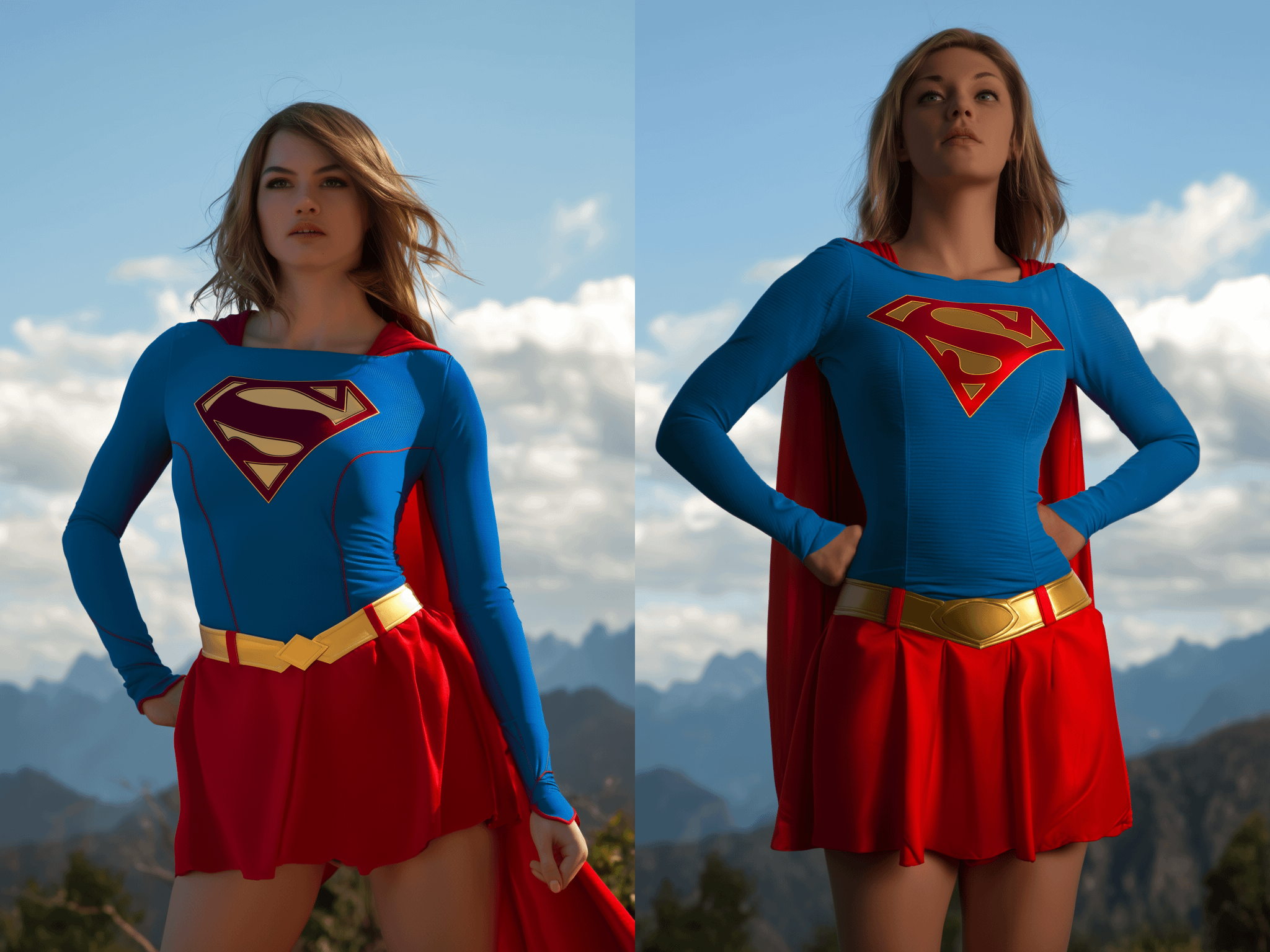
I like the look on the right. But so far I've found that the turbo version of this model has drastically different outcome from the non-turbo verison. Like the turbo version has a more natural look than the non-turbo version.
I don't have a lora to test character consistency, however. Turbo version seems to like red color accent.
The one on the left is hotter.
One on the left looks more correctly lit and looks less plastic.
Handles high-fantasy realism very well! It does favor the itty-bitty-titty-committee though. I had to use "huge" instead of "large" or "big" breasts in my prompts to get anything close to what I would normally consider to be "medium" breasts.
This is so true 😂
There are definitely other types of women in the training data, so I was surprised to see how strong the bias is toward A or B cups. I'll need to see if it's a captioning problem.
But yeah, it's nothing "huge massive boobs" can't fix. Repeat the phrase a few times for taste.
Can Anima work on an old 1080TI, and if so, can someone share a Workflow for that?
That card has enough VRAM, though I'm not sure what your inference speed would be like. The standard workflow should work fine: Anima Anime Text-to-Image Generation - ComfyUI Workflow
You can also try quantizing to INT8. May or may not improve speeds:
@liftweights I got it to work, it was a bit fiddly since my ComfyUI is run via Krita and patching that always breaks something.
The model is itself very promising, even for my old PC the inference times are absolutely ok, basically on SDXL level. The colors are intense and the prompt adherence is great. its basically looking how Id like Snakebite to look.
Its downsides as far as I can tell are as you said the blurriness, and it looks in general still a bit uncanny in certain regards, but that being said its absolutely worth it so far!
This is a really good Anima realistic checkpoint. It's impressive!
Thank you! I can't wait to share the next version--I found and fixed a lot of issues in my dataset--but the training may take some time.
Testing different sampler-scheduler combos. Euler/simple is always a safe pick but I'm seeing promising results out of er_sde/beta. Better details. I posted an example below.
Anima by default can generate something close to realistic with specific prompts, so it shouldn't be difficult to polish the model for even better results. Dataset should be bigger and more diverse - focus should be on textures and new objects / angles / other things which are default in real life, but not so common in art. Avoid professional photos - they are bad for training realistic model (makeup bias ruins skin textures, perfect angles ruin diversity of outputs). There should be not so much profit from training model specifically on default photos of real people - they should be a part of dataset, but not a big part. As base model is mostly n_sfw it would be better to make ~30-40% of dataset n_sfw as well.
Thanks, I tend to agree with your opinions on the dataset. The next version of Photanima will include many new images that feature interesting textures and lighting conditions. I do think it's important to also throw in some material of what the model already knows as it serves the function of regularization/grounding.
My visual taste does lean toward professional photography, but I'm very selective about choosing high-quality images that are not airbrushed. I like natural imperfections, and as you said, we don't want to reinforce Anima's tendency toward an overly-clean look.
I got poor results using tags and NL simultaneously. Faces become ugly, and emotions are exaggerated. Also, the colors are sometimes too bright. I think what's missing now (for photorealism) is good skin/textures. (100% agree here). But for now, the official base and turbo models with the correct prompts are still (subjectively) better. I tried adding different Lora (+turbo), but didn't get the perfect result (old rdbt is closest, but not new versions).
This model V1.0 with the cosmos predict dmd2 set to 0.85 and lenovo ultrareal set to 1.00 @ 12 steps 1.3 cfg er_sde beta, image size 544x784 is in my estimation the best Anima has to offer. Prompt weights go up to like 5-6, so if there's something it struggles with rendering or focusing on well just hike it up to like 4 and see. You can weight single words in whole sentences too.
Thanks. Yes, the prompt weight finding is key - I have been able to push tags like photo \(medium\) up to 5 or 6 without breaking the image, and it actually does improve photographic texture. Pretty incredible stuff. The next version of Photanima will try to incorporate such findings, and I really can't wait to share it here. Training is starting soon.
Great, looking forward to it. For the brotherhood
Training on v2.0 has commenced. It's gonna take a few days but I'm pretty sure it will be worth the wait.
Currently using this and ultrareal fine tune v2 base merged at 0.5 with ModelMergeSimple. Imo a lot of the "hyperrealistic plastic" stuff is circumvented by dimming the lights. "low lights, dim character illumination, in the dark, at night" maybe weighted, will definitely resolve a lot of that and even add realism. If you don't want it that dark you can then add lighting instead, particular sources of light, I find that works well.
Training's done. Still testing different merges but first impressions are looking very good. Will post a couple examples on my profile.
Thanks