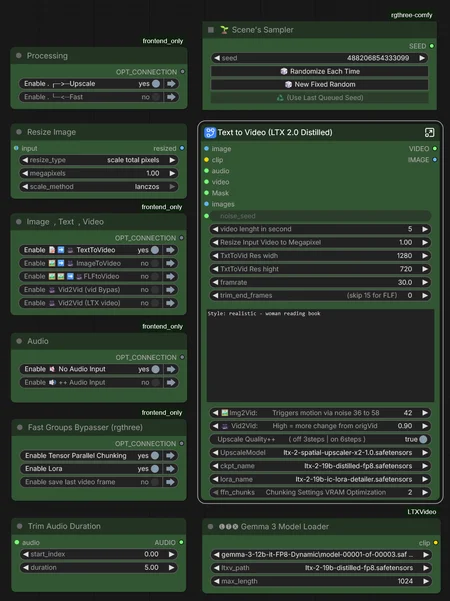
My approach: I generate everything in "Fast" mode first to quickly iterate and find the best results, then I selectively upscale only the videos worth keeping by reusing the same seed.
Generation Modalities
📝➡️🎥 Text-to-Video Create completely new videos from scratch using text prompts.
🖼️➡️🎥 Image-to-Video Animate static reference images using text prompts.
🖼️🖼️➡️🎥 First-Last-Frame-to-Video Generates a coherent video sequence that bridges a defined starting and ending image.
🎥➡️🎥 Video-to-Video Generates synchronized audio and speech driven by video visuals. Offers options to pass through or entirely regenerate the source video.
Audio Input Settings
🔇 No Audio Input No external audio file used. The AI generates new audio based on your text prompt.
🔊 Audio Input Upload an existing voice or music file to drive the animation and lip-sync.
🚀 VRAM Optimization & Long Videos
⚙️ Chunking Settings for Longer Videos
Adjust ffn_chunks based on your video length (at 24fps):
10 seconds (240 frames): ffn_chunks=1-2
15 seconds (360 frames): ffn_chunks=2-4
20 seconds (480 frames): ffn_chunks=4-6
25 seconds (600 frames): ffn_chunks=8-10
33 seconds (800 frames): ffn_chunks=12-16
If you encounter OOM (Out of Memory) errors:
Increase ffn_chunks value
Reduce resolution slightly
Description
NEW: 🎥 Vid2Vid (Masked Face)
Face-targeted video refinement that applies a mask specifically to the facial region using automatic segmentation. This mode preserves the entire original video while exclusively regenerating the face area for enhanced lip-sync precision and facial animation quality. Perfect for when you want to improve lip movements and facial expressions without altering the rest of your video content. (Note: Achieving natural speech animation can still be challenging - best results occur when the source video already shows speaking-like movements)
CHANGE: 🎥 Vid2Vid (Vid Bypass)
You can now downscale the video input (e.g., to 0.6 megapixels) for sound generation while the original video is always passed through in its native resolution.
FAQ
Comments (45)
using a rtx 4090 + 192GB RAM I was already able to produde videos longer than 20 sec. BUT.. it seems that there is a frame limit for ffmpeg, which drops an error if you try to save clips, that have more than a certain amount of frames. I'm able to produce clips 23sec long at 50 fps native. if I try to save a 20sec clip at 100 fps (50fps native + interpolation), ffmpeg fails. hopefully someone here can figure it out since google was not able to give me the right answers. I tried both, the native video save node and the save video node by videohelpersuite.
I tested it with 0.5 megapixels res . at 60s with 50 fps — it works for me, and also with 20s at 100 fps.
what about this folder? where do I put it?ComfyUI_LTX2_SeqParallel
Extract the three folders from GitHub into the customs_nodes folder in ComfyUI.
I get this though. The Gemma3LoaderModer node is pink
# ComfyUI Error Report
## Error Details
- Node ID: 110
- Node Type: LTXVGemmaCLIPModelLoader
- Exception Type: TypeError
- Exception Message: unsupported operand type(s) for //: 'int' and 'list'
I have an rtx3090 with 64gb ram and it took a while, but I was able to replicate your woman on the street interview with fewer errors. Audio was smoother than in the version supplied with your files. For some reason, although it's not specified in your prompt, my version also starts with a camcorder autofocus coming into focus effect as the woman approaches . LTX 2 has a weird Flux smoothness quality to the skin that can be pretty creepy at times. Not as creepy in this generation. No British accent. And the videos refuse to say the line about techbros being d--kheads. And the file is only 13MB. Thanks!
3090 here, it takes me 4 minutes to generate a 1240 x 720 video. idk how u did that in 25 sec but this workflow aint for me
Please add first, middle and last frame 🔥
it would be awesome!
The workflow runs very fast at the first run but any future run need 3x-4x more time, any idea why ? (same settings, adjusted prompt)
# ComfyUI Error Report
## Error Details
- **Node ID:** 92:3
- **Node Type:** CLIPTextEncode
- **Exception Type:** torch.OutOfMemoryError
- **Exception Message:** Allocation on device
This error means you ran out of memory on your GPU.
tried img2vid I have 3090 and 64gb ram
You need Gemma 3 >>> FP8
@petunia866 downloaded all the files and put them inside a folder under text_encoders the node gemma3 model loader does point to gemma-3-12b-it-FP8-Dynamic
I've spent hours trying to get this workflow running, and no matter what it hangs. It seems like the only v2v solution, just wish I could get it to run.
Updated the LTX custom nodes but your recent workflow with firstlastframe nodes might be outdated already? The nodes LTXVFirstLastFrameControl_TTP don't seem to exist in the latest LTX custom nodes?
That’s the problem I had too — you have to do this:
https://github.com/TTPlanetPig/Comfyui_TTP_Toolset/issues/47
while yo workflow uses ComfyUI_LTX-2_VRAM_Memory_Management . its only for single gpu made or can turn in multi-gpu?
Yeah, that works. There was an update on GitHub recently — just replace the v3 node.
@petunia866 replaced with v2 , v6 still uses just main gpu till gives oom , to complex workflow for me :D
about the ComfyUI_LTX-2_VRAM_Memory_Management, I was using git clone for that but it couldnt load on comfyui launch. as they wrote on their page, I only kept the 2 folders (comfyui_tensor_parallel_v2 and v3) and deleted the main folder with other files. You wrote to download the 3 folders. which ones?
You only need this:
ComfyUI_LTX2_SeqParallel
comfyui_tensor_parallel_v3
THanks for your WF. I really wanted to use it but I cant. I mark just T2V but anyway is asking me for mp4 clip, Why ?
[Errno 2] No such file or directory: 'F:\\ComfyUI 3.10\\ComfyUI\\input\\22.mp4'
https://postimg.cc/QHBV6hSB
load any image and video, even if it isn’t used.
CreateVideo.execute() missing 1 required positional argument: 'images'
Is there a guide on how to use it? There are so many errors when I try to fix something.
Thanks for your work, I'm getting
Cannot execute because a node is missing the class_type property.: Node ID '#92:258' any idea what it could be ?
Using ComfyUI 0.11.1
If you enter 258 into the "NodesMap" side panel you will see it refers to "Tensor Parallel V3 (FFN Chunking)" which you likely haven't installed yet, so you need to download the repository from https://github.com/RandomInternetPreson/ComfyUI_LTX-2_VRAM_Memory_Management and copy the folders ComfyUI_LTX2_SeqParallel and comfyui_tensor_parallel_v3 into your ComfyUI\custom_nodes directory.
@petunia866 Thanks for the help, I did install it !
In the NodesMap when searching for 258, it says "No nodes found in the search". When trying to load the WF it still says "When loading the graph, the following node types were not found: [object Object]".
Despite this, it kinda works. Audio input very distorted etc, not sure if that is normal, video isn't great... oh well, I never really got very good outputs with LTX-2 even with 2880x2880 resolutions (using 5090 and 128GB)...
Also is there a place to add LORAs ? Checked the subgraph but didn't see.
Appreciate your time !
Thanks for publish this. I'm having issues getting basic txt2vid to run. First, I had to disable the Gemma 3 model loader and replace it with a LoadClip. I gave gemma_3_12B_it.safetensors but the gemma3 model loader had an error. I loaded a dummy image and video, but then I get "GetVideoComponents 'NoneType' object has no attributes 'get_components'"
Please help !
I have this simple error with the math node but i tried to fix it , but it didn't work
https://postimg.cc/1fsHJtgW
Look at the Subgraph node and where it says "FFN chunks" make sure it's a "2". Mine showed a 'NaN' and this was causing the error.
If you have errors, try this version: https://github.com/Tavris1/ComfyUI-Easy-Install
Desktop ComfyUI also has errors for me.
i am using it with the latest comfyui and nodes updates ... and still have a math node error
Please help !
I have this simple error with the math node. i tried to fix it , but it didn't work
https://postimg.cc/1fsHJtgW
Look at the Subgraph node and where it says "FFN chunks" make sure it's a "2". Mine showed a 'NaN' and this was causing the error.
“I managed to make a 30-second video in 5 minutes, but how can I improve the quality? Everything looks very blurry.”
vram optimization 10
framrate 24
resize imput video 1
1280 720
trim end frames 0
Other default settings
i have 4080S
64 ram
I2V just seems to be a still image with a camera panning in, and out there is no movement at all. Why is this the case?
This is the last one on 5070ti:
CUDA error: invalid argument Search for cudaErrorInvalidValue' in https://docs.nvidia.com/cuda/cuda-runtime-api/group__CUDART__TYPES.html for more information. CUDA kernel errors might be asynchronously reported at some other API call, so the stacktrace below might be incorrect. For debugging consider passing CUDA_LAUNCH_BLOCKING=1 Compile with TORCH_USE_CUDA_DSA` to enable device-side assertions.
Please, help me! I have a 4070 super ti 16 gb vram, 64 Gb DDR4 system RAM
RuntimeError: Sizes of tensors must match except in dimension 2. Expected size 33 but got size 1 for tensor number 1 in the list.
TensorParallelV3: Setting up FFN chunking...
Chunks: 10
Found 96 FFN modules
Wrapped 96 FFN modules
Sampling split indices: [3, 6]
Sigmas chunks: [tensor([1.0000, 0.9937, 0.9875, 0.9812]), tensor([0.9812, 0.9750, 0.9094, 0.7250]), tensor([0.7250, 0.4219, 0.0000])]
Sampling with sigmas tensor([1.0000, 0.9937, 0.9875, 0.9812])
!!! Exception during processing !!! Sizes of tensors must match except in dimension 2. Expected size 33 but got size 1 for tensor number 1 in the list.
Traceback (most recent call last):
File "/home/juanma/ComfyUI/execution.py", line 527, in execute
output_data, output_ui, has_subgraph, has_pending_tasks = await get_output_data(prompt_id, unique_id, obj, input_data_all, execution_block_cb=execution_block_cb, pre_execute_cb=pre_execute_cb, v3_data=v3_data)
^^^^^^^^^^^^^^^^^^^^^^^^^^^^^^^^^^^^^^^^^^^^^^^^^^^^^^^^^^^^^^^^^^^^^^^^^^^^^^^^^^^^^^^^^^^^^^^^^^^^^^^^^^^^^^^^^^^^^^^^^^^^^^^^^^^^^^^^^^^^^^^^^^^^^^^
File "/home/juanma/ComfyUI/execution.py", line 331, in get_output_data
return_values = await asyncmap_node_over_list(prompt_id, unique_id, obj, input_data_all, obj.FUNCTION, allow_interrupt=True, execution_block_cb=execution_block_cb, pre_execute_cb=pre_execute_cb, v3_data=v3_data)
^^^^^^^^^^^^^^^^^^^^^^^^^^^^^^^^^^^^^^^^^^^^^^^^^^^^^^^^^^^^^^^^^^^^^^^^^^^^^^^^^^^^^^^^^^^^^^^^^^^^^^^^^^^^^^^^^^^^^^^^^^^^^^^^^^^^^^^^^^^^^^^^^^^^^^^^^^^^^^^^^^^^^^^^^^^^^^^^^^^^^^^^^^^^^^^^^^^^^
File "/home/juanma/ComfyUI/custom_nodes/comfyui-lora-manager/py/metadata_collector/metadata_hook.py", line 168, in async_map_node_over_list_with_metadata
results = await original_map_node_over_list(
^^^^^^^^^^^^^^^^^^^^^^^^^^^^^^^^^^
File "/home/juanma/ComfyUI/execution.py", line 305, in asyncmap_node_over_list
await process_inputs(input_dict, i)
File "/home/juanma/ComfyUI/execution.py", line 293, in process_inputs
result = f(**inputs)
^^^^^^^^^^^
File "/home/juanma/ComfyUI/comfy_api/internal/__init__.py", line 149, in wrapped_func
return method(locked_class, **inputs)
^^^^^^^^^^^^^^^^^^^^^^^^^^^^^^
File "/home/juanma/ComfyUI/comfy_api/latest/_io.py", line 1710, in EXECUTE_NORMALIZED
to_return = cls.execute(*args, **kwargs)
^^^^^^^^^^^^^^^^^^^^^^^^^^^^
File "/home/juanma/ComfyUI/custom_nodes/ComfyUI-LTXVideo/easy_samplers.py", line 1020, in execute
(_, latent_image) = SamplerCustomAdvanced().execute(
^^^^^^^^^^^^^^^^^^^^^^^^^^^^^^^^
File "/home/juanma/ComfyUI/comfy_extras/nodes_custom_sampler.py", line 961, in execute
samples = guider.sample(noise.generate_noise(latent), latent_image, sampler, sigmas, denoise_mask=noise_mask, callback=callback, disable_pbar=disable_pbar, seed=noise.seed)
^^^^^^^^^^^^^^^^^^^^^^^^^^^^^^^^^^^^^^^^^^^^^^^^^^^^^^^^^^^^^^^^^^^^^^^^^^^^^^^^^^^^^^^^^^^^^^^^^^^^^^^^^^^^^^^^^^^^^^^^^^^^^^^^^^^^^^^^^^^^^^^^^^^^^^^^^^^^^^^^^^
File "/home/juanma/ComfyUI/comfy/samplers.py", line 1007, in sample
latent_image, latent_shapes = comfy.utils.pack_latents(latent_image.unbind())
^^^^^^^^^^^^^^^^^^^^^^^^^^^^^^^^^^^^^^^^^^^^^^^
File "/home/juanma/ComfyUI/comfy/utils.py", line 1285, in pack_latents
latent = torch.cat(tensors, dim=-1)
^^^^^^^^^^^^^^^^^^^^^^^^^^
RuntimeError: Sizes of tensors must match except in dimension 2. Expected size 33 but got size 1 for tensor number 1 in the list.
[KikoStats] Workflow completed in 344.83s
Prompt executed in 344.83 seconds
got prompt
^C
Stopped server
Scheduler service stopped, all schedules cleared
Now audio works, but when video is longer than 5 seconds there is a hum in the audio. how can I fix this? (10 or 8 or 6 sec/24 fps/small video resolution)
very smart workflow, Thank You! running on ubuntu with 5000 series rtx gpu. would not work until i changed the clip loader to ltxv2textecoderloader node. i have 3 gpus so im using the multi-gpu node but even if you just have 1 use this node then everything works like magic. im using gemmafp4 and ltxdistlled19bfp8. seems like you have to have everything matched up in the right combo to work. owner should put this in the notes and take cash donations for all his work. thanks.
im having promblem with the TensorParallelV3Node, cant find it.
Same. Why do you have a workflow of custom nodes that cannot be found?
CANNOT USE THIS WORKFLOW:
Missing custom nodes that are NOT found when clicking on INSTALL MISSING CUSTOM NODES. These are as follows:
Install RequiredTensorParallelV3Node
in subgraph 'Text to Video (LTX 2.0 Distilled)'
Install RequiredLTXVFirstLastFrameControl_TTP
in subgraph 'Text to Video (LTX 2.0 Distilled)'
I also had this issue, for me the fix was to not use "Install missing custom nodes" option.
instead :
- uninstall ComfyUI_TTP_Toolset if it's already reported as installed
- navigate to custom_nodes
- manually git clone https://github.com/TTPlanetPig/Comfyui_TTP_Toolset