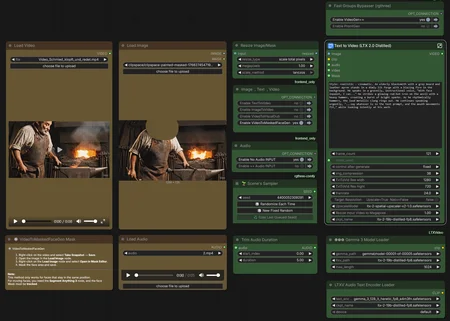
My approach: I generate everything in "Fast" mode first to quickly iterate and find the best results, then I selectively upscale only the videos worth keeping by reusing the same seed.
Generation Modalities
📝➡️🎥 Text-to-Video Create completely new videos from scratch using text prompts.
🖼️➡️🎥 Image-to-Video Animate static reference images using text prompts.
🖼️🖼️➡️🎥 First-Last-Frame-to-Video Generates a coherent video sequence that bridges a defined starting and ending image.
🎥➡️🎥 Video-to-Video Generates synchronized audio and speech driven by video visuals. Offers options to pass through or entirely regenerate the source video.
Audio Input Settings
🔇 No Audio Input No external audio file used. The AI generates new audio based on your text prompt.
🔊 Audio Input Upload an existing voice or music file to drive the animation and lip-sync.
🚀 VRAM Optimization & Long Videos
⚙️ Chunking Settings for Longer Videos
Adjust ffn_chunks based on your video length (at 24fps):
10 seconds (240 frames): ffn_chunks=1-2
15 seconds (360 frames): ffn_chunks=2-4
20 seconds (480 frames): ffn_chunks=4-6
25 seconds (600 frames): ffn_chunks=8-10
33 seconds (800 frames): ffn_chunks=12-16
If you encounter OOM (Out of Memory) errors:
Increase ffn_chunks value
Reduce resolution slightly
Description
FAQ
Comments (9)
Anyone else having an issue with ImageToVideo using this workflow? I switched the toggle but it does not seem to bypass the Video input node. If I manually bypass the video input the Save Video node throws an error as it is expecting a video input.
Try v1.0, it should work. Just load something into the Image/Video node, even if it’s not being used.
yeah u need to load any video, video will be just placeholder it will not be used if you go with i2v mode...
@petunia866 Thanks
Alternatively, you can manually toggle the loader nodes (audio does this too for me) with Ctrl-b.
It says you can do text to video but when I disable the input image or video nodes, or simply input nothing; it tells me I'm missing an image.
Do not disable the nodes simply load any image and video, even if it isn’t used.
@petunia866 do the resolutions of the input image and video determine the resolution of the output?
@Gradasho The input image or video only determines the aspect ratio of the output.
The final resolution is scaled up or down to the selected megapixel value in the Resize Image node, which can be switched to scale by multiplier (1×) to keep the original resolution