


A workflow for Z-Image-Turbo focused on high-quality image styles and ease of use.
Style Selector: Choose from eighteen (x2) customizable image styles.
Refiner: Improves final quality by performing a second pass.
Upscaler: Increases the resolution of any generated image by 50%.
Speed Options:
7 Steps Switch: Uses fewer steps while maintaining the quality.
Smaller Image Switch: Generates images at a lower resolution.
Extra Options:
Sampler Switch: Easily test generation with an alternative sampler.
Landscape Switch: Change to horizontal image generation with a single click.
Spicy Impact Booster: Adds a subtle spicy condiment to the prompt.
Preconfigured workflows for each checkpoint format (GGUF / SAFETENSORS).
Includes the "Power Lora Loader" node for loading multiple LoRAs.

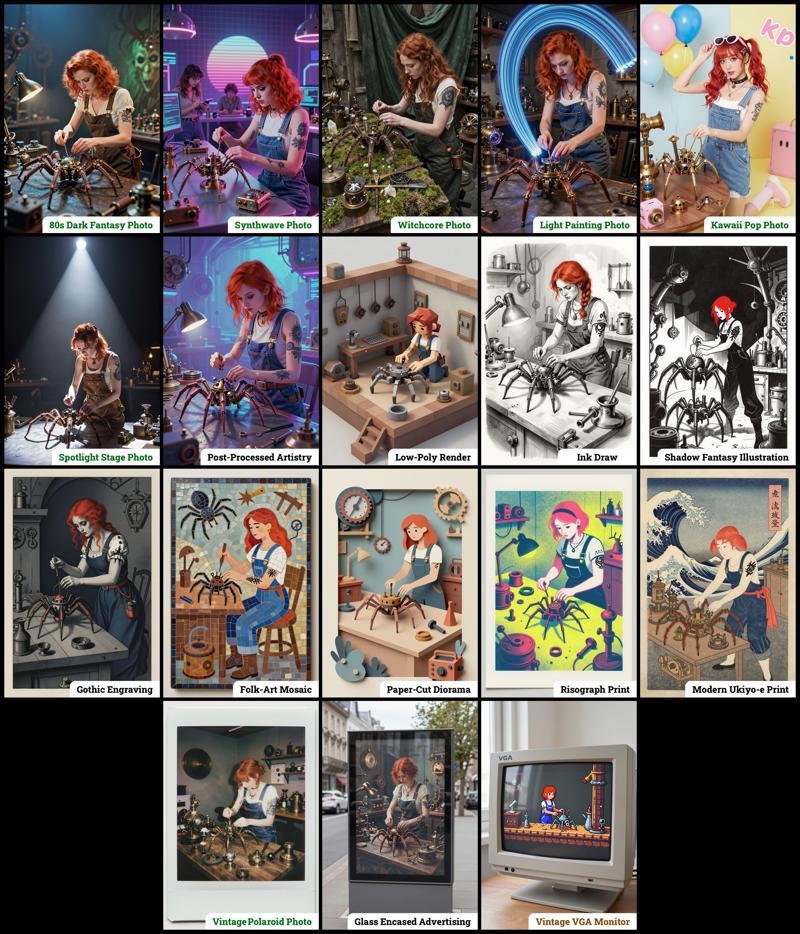 The zip contains four workflow files:
amazing-z-image-a_GGUF: Recommended for GPUs with 12GB or less.
amazing-z-image-b_GGUF: similar workflow "a", but with more experimental styles.
amazing-z-image-a_SAFETENSORS: Based directly on the ComfyUI example.
amazing-z-image-b_SAFETENSORS: similar workflow "a", but with more experimental styles.
When using ComfyUI, you may encounter debates about the best checkpoint format. From my experience, GGUF quantized models provide a better balance between size and prompt response quality compared to SafeTensors versions. However, it's worth noting that ComfyUI includes optimizations that work more efficiently with SafeTensors files, which might make them preferable for some users despite their larger size. The optimal choice depends on factors like your ComfyUI version, PyTorch setup, CUDA configuration, GPU model, and available VRAM and RAM. To help you find the best fit for your system, I've included links to various checkpoint versions below.
Required Checkpoints Files
: for "amazing-z-image_GGUF"
z_image_turbo-Q5_K_S.gguf [5.19 GB]
local directory:ComfyUI/models/diffusion_models/Qwen3-4B.i1-Q5_K_S.gguf [2.82 GB]
local directory:ComfyUI/models/text_encoders/ae.safetensors [335 MB]
local directory:ComfyUI/models/vae/4x_foolhardy_Remacri.safetensors (for illustration refining) [66.9 MB]
local directory:ComfyUI/models/upscale_models/
: for "amazing_zimage-SAFETENSORS"
Based directly on the official ComfyUI example,
z_image_turbo_bf16.safetensors (12.3 GB)
local directory:ComfyUI/models/diffusion_models/qwen_3_4b.safetensors (8.04 GB)
local directory:ComfyUI/models/text_encoders/ae.safetensors (335 MB)
local directory:ComfyUI/models/vae/4x_foolhardy_Remacri.safetensors (for illustration refining) [66.9 MB]
local directory:ComfyUI/models/upscale_models/
: for Version 3.x
If, for some reason, you need to use the older version 3.x, you will also require the following additional file:
4x_Nickelback_70000G.safetensors [66.9 MB]
Local Directory:ComfyUI/models/upscale_models/
Required Custom Nodes
The workflows require the following custom nodes:
(which can be installed via ComfyUI-Manager or downloaded from their repositories)
rgthree-comfy: https://github.com/rgthree/rgthree-comfy
ComfyUI-GGUF: https://github.com/city96/ComfyUI-GGUF
License
This project is licensed under the Unlicense license.
More info:
Description
This update includes the following new features and improvements:
New "Z-Image Enhancer"
experimental process performing a second quick pass to try to improve quality. Includes 4 options:none: the original untouched image
Base: performs two extra steps with z-image. (general use)
Natural: uses the first upscaler + two extra steps with z-image. (photography oriented)
Illustration: uses the second upscaler + two extra steps with z-image. (illustration oriented)
New "Spicy Impact Booster"
experimental addition of a subtle spicy condiment to the prompt.New "Smaller Image" switch.
Many of the styles in the 3 workflows were revamped to use the new "YOUR CONTEXT/YOUR PHOTO" formatting.
FAQ
Comments (11)
Works perfectly and it's great. Good job and thanks. :)
EDIT: I added a functional comfyui LORA loader manager in the workflow, this one: https://github.com/willmiao/ComfyUI-Lora-Manager
And rearranged the generation area to go with it. It was fun, a real treasure hunt to figure out where to connect what, especially since the Lora Manager adds its own strings for the triggers that I had to link to the existing strings and styles.
Everything is fully functional. The base was already incredible, and now it's even more so. If anyone is interested, I could share it. Thanks for this great workflow. :)
If it's not too much trouble, I'd like to take a look at your process, or at what needs to be connected where to implement it.
@Jio_R No problem, here the json of the revisited workflow with LORAs on my google drive: https://drive.google.com/file/d/16V7nSLVF7SRZVM5OPKv4dbT4UxZ_dL4p/view?usp=drive_link
Follow the wires from the Lora Manager and the trigger word toggle, and you should understand and know where to connect what if you want to use your own different Lora Manager.
@Illynir Thank you for your help and advice!
Hello, thank you for your workflow, it's excellent! Are you planning on adding Lora model loading in the future?
six fucken fingers...
Simply great. An addition would be to have the option to use (or not use) the SeedVarianceEnhancer node in the Clip Text Encode (Positive) output in the Prompts, Samplers & Sigmas group.
The switches (styles and others) do not work. Some users are complaining about similar issues on Reddit. The author on github has not yet commented. I use the desktop version of windows ComfyUI with all updates. There are no errors in workflow, there are just no switches, not at all!
This workflow is flawlessly done!!... All the switches of styles and other nodes arranged so neat and efficient..
Crazy love thissss