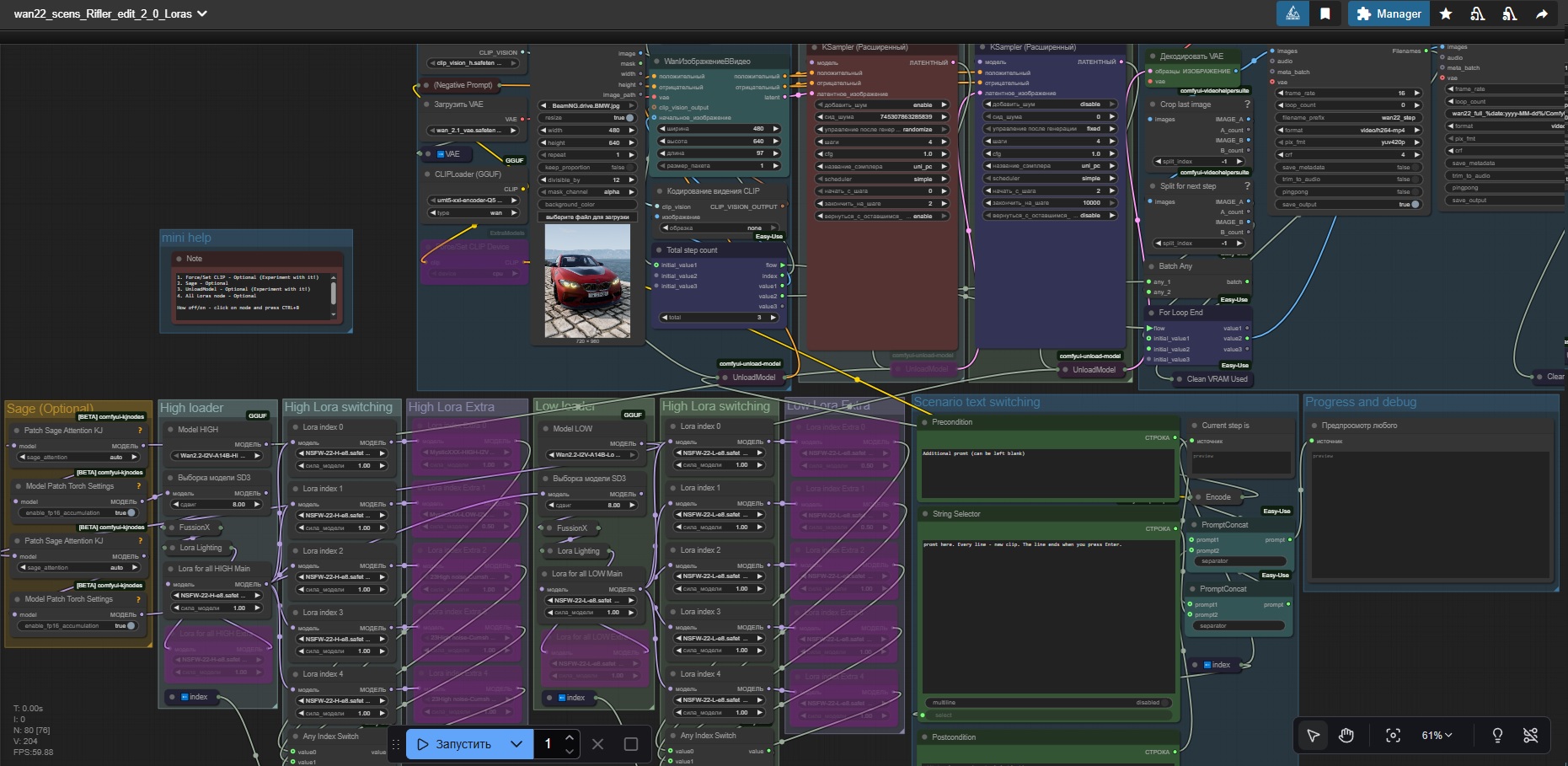
First - original workflow https://civarchive.com/models/1829052/wan-22-for-loop-video-with-scenario (All credits to thesharque588) I only made little (since version 1.5 it's not so small anymore=) ) upgrade.
Second - how this work https://civarchive.com/articles/19108
Third - I'm not an expert. I'm a noob. Most of the time, I don't even know what I'm doing. It works for me, but that doesn't mean I can help you. Sorry.
What I did:
Color correction deleted. Sorry, but this is crap
Add 2 Clean VRam
Add 3 UnloadModel
Added node "Force/set Clip Device" (1.5 update)
Added Sage Attention (2.0 update)
Added more nodes for Loras. 4 Loras nodes for each clip (2.5 update)
Replace node
WanImageToVideowithPainterI2V(2.7 update)
The result was: stable work on the RTX 3060 +32gb ram with a length of 65 and above. Before, everything froze and didn't work.
Explanation for 1.5 update:
Don't use it if you have an older CPU without AVX2 instructions! (click on node "Force/set Clip Device" and press Ctrl+B to disable)
If you have a super-powerful CPU, you can turn it on and never turn it off. But if you have a super computer, you probably don't need this workflow =)
Explanation for 2.0 update:
I added Sage to this workflow. This is completely optional (Ctrl+B to disable), but I recommend figuring out how to set it up. It's a huge speed boost!
Note in patch 1.5 after dozens of tests. "Force/set Clip Device" - With this node, generation time will increase slightly, but your PC will feel much better. I recommend leaving this node running to preserve your PC's health =) If you're willing to do anything to improve generation speed, then turn it off.
Explanation for 2.5 update:
Added more nodes for Loras. Now you can enable up to 4 Loras nodes for each clip (2 main and 2 additional). All of this is optional.
Explanation for 2.7 update:
Replace node WanImageToVideo with PainterI2V (https://github.com/princepainter/ComfyUI-PainterI2V).
Small changes + help update.
Easy install additional nodes for ComfyUI Portable:
ComfyUI Manager - https://www.comfyonline.app/comfyui-nodes/ComfyUI-Manager
How install Triton + Sage Attention (I used this guide and it work!):
Good Luck Everyone! Share the results of your generations!
Description
Up to 4 lore per video
FAQ
Comments (17)
I tested TripleKSampler (https://github.com/VraethrDalkr/ComfyUI-TripleKSampler) The video quality is higher (much higher), but the generation speed is very slow (10+ min for 4 seconds of video). Rejected. This is not for 3060 =(
But I recommend updating the Lightx2v lora (https://civitai.com/models/1585622/lightning-lora-massive-speed-up-for-wan21-wan22-made-by-lightx2v-kijai) Download:
wan2.2_i2v_A14b_high_noise_lora_rank64_lightx2v_4step_1022 and
wan2.2_i2v_A14b_low_noise_lora_rank64_lightx2v_4step_1022
The new version loras works better.
Love your workflow, have you consider adding Upscale video node?
Sorry, but no. I tested the upscaling. It's not for the 3060. The generation time increases dramatically. Maybe when I buy something more powerful.
Thank you very much for this amazing workflow, I'm still trying to get the hang of it as I'm really noob to this. Would you mind helping me understand a bit how the lora nodes affect?
I mean, I'm used to lora stack nodes or manual individual lora stacking, but in your workflow I seed a "main" lora and then some nested loras? How should I, say for example, generate a video with no loras? just bypass all of them? Or what if I want to just use 1 specific lora and nothing else? should I set it as the main lora? or bypass the main and set the first nested lora?
Can I use lightx2v lora?
Once again, thank you very much.
Hey, thank you for your kind words.
The main Lora will apply to all 5 clips. The others only apply to those listed. All of them are optional (mains too). You can turn them on and off (click on the node and press ctrl+B). This way you can get 5 clips and each of them with different loras (up to 4 lora for each clip).
Lightning LoRAs (I recommend the newest ones):
https://civitai.com/models/1838893/wan-22-lightning-loras
Also, if you gen nsfw, replace ClipVision (much better results):
https://huggingface.co/ricecake/wan21NSFWClipVisionH_v10/tree/main
Also I recommend experimenting with the "shift" value. The default is 8. I think 5-6 is better. But the choice is yours.
@Rifler1 Thank you very much once again, I will play around a bit following your indications and maybe post some results, if there's anything I can help with in gratitude for your work, just tell me, I'll be glad!
Подсказка для русских пользователей, кому сложно писать промты на энглише. Я случайно обнаружил (как всегда узнал об этом последним?), что в этом воркфлоу (наверное и в других так же?) можно писать промты на русском. Ван все отлично понимает. Так что можете не мучаться с гугл-переводчиками и прочим, а просто фигачить на русском. Может быть конечно будут какие-то косяки из-за этого, но я потестил с разными текстами и вроде все норм.
Thanks a lot for this workflow, it's working pretty great !
How can I modify it to use the regular models instead of their GGUF version ? I'm trying to increase the output quality.
Thanks
Hey. I never used regular models, so I dont know whats required to make them work. But I tested https://github.com/VraethrDalkr/ComfyUI-TripleKSampler on this workflow. The setup is simple and significantly improves quality.
@Rifler1 Thanks for your feedback! Does swapping the GGUF model to a "higher" version like Wan2.2-I2V-A14B-HighNoise-Q8_0.gguf should improve the quality ?
@innpu yep. it improve quality. You also can try this https://civitai.com/models/2097002/wan22-remix-i2v-gguf-v08
@Rifler1 Thanks, I'll try that :]. Does swapping to umt5-xxl-encoder-Q8_0.gguf instead of Q5 improve the quality also?
@innpu Not sure about the quality. But Wan should understand the promt better. Experiments needed.
@Rifler1 Thanks :]
replace the gguf loaders with "load diffuser node". Then replace the clip vision.. or was it clip loader..
Then it works with regular models.