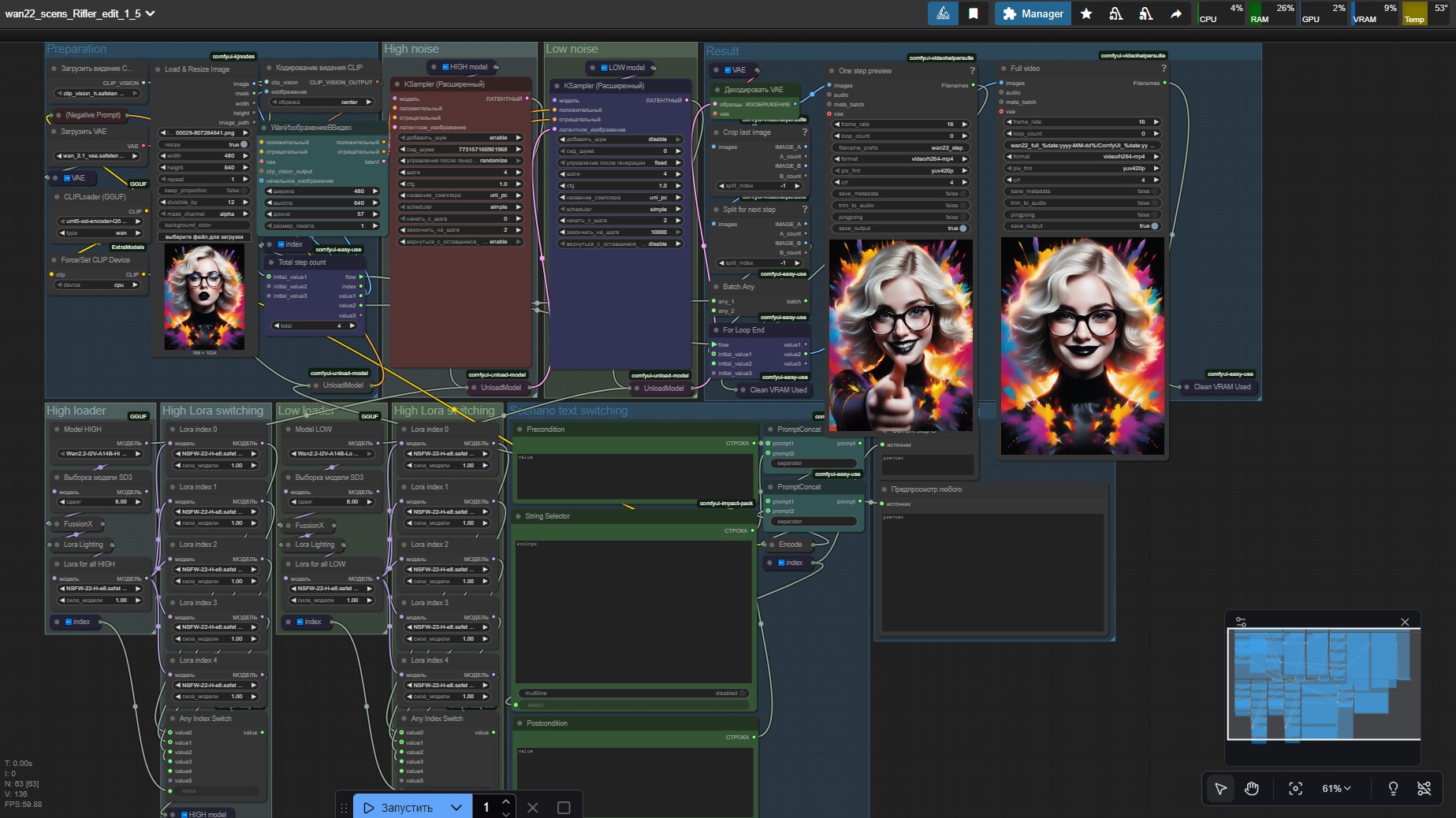
First - original workflow https://civarchive.com/models/1829052/wan-22-for-loop-video-with-scenario (All credits to thesharque588) I only made little (since version 1.5 it's not so small anymore=) ) upgrade.
Second - how this work https://civarchive.com/articles/19108
Third - I'm not an expert. I'm a noob. Most of the time, I don't even know what I'm doing. It works for me, but that doesn't mean I can help you. Sorry.
What I did:
Color correction deleted. Sorry, but this is crap
Add 2 Clean VRam
Add 3 UnloadModel
Added node "Force/set Clip Device" (1.5 update)
Added Sage Attention (2.0 update)
Added more nodes for Loras. 4 Loras nodes for each clip (2.5 update)
Replace node
WanImageToVideowithPainterI2V(2.7 update)
The result was: stable work on the RTX 3060 +32gb ram with a length of 65 and above. Before, everything froze and didn't work.
Explanation for 1.5 update:
Don't use it if you have an older CPU without AVX2 instructions! (click on node "Force/set Clip Device" and press Ctrl+B to disable)
If you have a super-powerful CPU, you can turn it on and never turn it off. But if you have a super computer, you probably don't need this workflow =)
Explanation for 2.0 update:
I added Sage to this workflow. This is completely optional (Ctrl+B to disable), but I recommend figuring out how to set it up. It's a huge speed boost!
Note in patch 1.5 after dozens of tests. "Force/set Clip Device" - With this node, generation time will increase slightly, but your PC will feel much better. I recommend leaving this node running to preserve your PC's health =) If you're willing to do anything to improve generation speed, then turn it off.
Explanation for 2.5 update:
Added more nodes for Loras. Now you can enable up to 4 Loras nodes for each clip (2 main and 2 additional). All of this is optional.
Explanation for 2.7 update:
Replace node WanImageToVideo with PainterI2V (https://github.com/princepainter/ComfyUI-PainterI2V).
Small changes + help update.
Easy install additional nodes for ComfyUI Portable:
ComfyUI Manager - https://www.comfyonline.app/comfyui-nodes/ComfyUI-Manager
How install Triton + Sage Attention (I used this guide and it work!):
Good Luck Everyone! Share the results of your generations!
Description
Another UnloadModel
Added node "Force/set Clip Device" (If you have a CPU from the mesozoic era, you don't need this! Click on node and press ctrl+B.)
Minor settings
FAQ
Comments (4)
Thanks for sharing and updating the flows. I'm not sure if v1.5 is actually faster for me even though my PC supports AVX2.
"Encode" takes longer for me, but both "KSampler" programs are faster (much faster, over 15%). In any case, you can simply disable "Force/set Clip Device", it's optional.
@Rifler1 I was just keen to give it a try :-) In my case total times seemed pretty much the same, but I'll have more of a play.
I look forward to making a t2v version.