This is a spin on the original Kijai's Wan 2.2 Animate Workflow to make it more accessible to low VRAM GPU Cards.
⚠ If in doubt or OOM errors, read the comments inside the yellow boxes in the workflow ⚠
⚠ This WF uses SageAttention. If you don't have or need Triton/Torch/SageAttention you'll have to disconnect the "WanVideo Torch Compile Settings" in the "Model Loader" group or else you'll have a Triton related error. ⚠
❕❕ Tested with 12GB VRAM / 32GB RAM
❕❕ I was able to generate 113 Frames @ 640p with this setup (10min)
❕❕ Use the Download button at the top right in this page
🟣 All important nodes are colored Purple
Main differences:
VAE precision set to fp16 instead of fp32
FP8 Scaled Text Encoder instead of FP16
(If you prefer the FP16 just copy from the Kijai's original wf node and replace my prompt setup)Video and Image resolutions are calculated automatically
Fast Enable/Disable functions (Masking, Face Tracking, etc.)
Easy Frame Window Size setting
I tried to organize everything without hiding anything, this way it should be better for newcomers to understand the workflow process.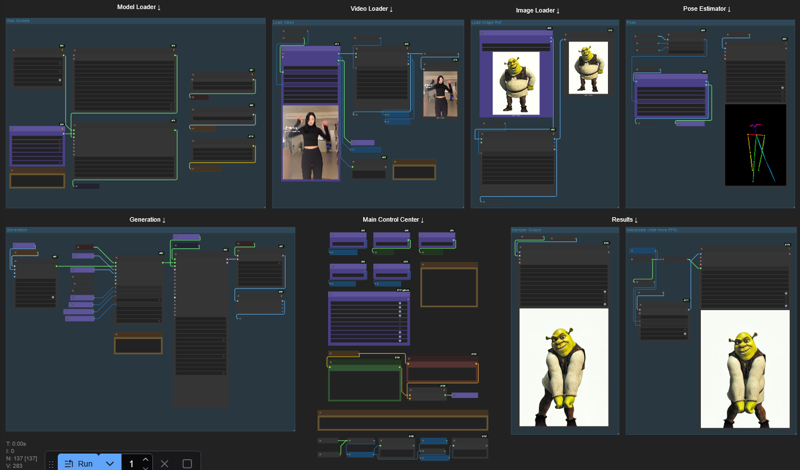
Description
Forgot to plug the audio from the original video into the interpolated output.
FAQ
Comments (38)
Works great !
If anyone gets the "ValueError("torch.backends.cuda.matmul.allow_fp16_accumulation is not available in this version of torch, requires torch 2.7.0.dev2025 02 26 nightly minimum currently")" error:
Just change precision from fp16_fast to fp16
Hi. I got it to work. But it's backwards to what I'm trying to do. Imagine changing the girl into Woody. Is there something I can change to make that happen?
I'd generate a video of woody, then take the last frame of the original girl (or whatever frame u want the transition to happen at), and use a First-To-Last Frame workflow to generate the transition/transformation? something like that. you could even just use the first frame of the video of the girl, ending on the first frame of the new woody video generation.
so this is transferring a movement to a picture right? how about transferring the character on a scene? if im right i have to edit the character into the scene first then apply this wf?
Awesome. tested and work very well. Just one issue. Even when i activate track face lips are not tracked well. sometimes no move. even it move on open pose skeleton
In generation section, there is a node link missing get_image_face to face_images from WanVideo Animate Embeds, just connect that and you are good.
Is it possible to do something wwith wan2.2 5B ? I'm stuck there ;
WanVideoSampler
Sizes of tensors must match except in dimension 0. Expected size 32 but got size 16 for tensor number 1 in the list.
probably an text encoder in wrong version, if you use kijaiand/or scaled fp8 version of things maybe switch to another version or vice versa if you don't, try fp8 try gguf, try bf16, in doubt also make sure your comfyui is latest it can help
Can someone tell me why my output looks accelerate ? anyway to fix it ? (Thanks for the workflow !)
Comfyui is crashing without error at Sampling. I'm not sure if that's OOM. I have tried the frame window size, tiled vae, and reduced resolution. I've got 16GB VRAM.
Any further insights?
Have you checked all the file paths for LORAS, encoders, etc? I had changed a file location and forgot to update workflow.
Prompt Execution Failed error is coming in this workflow
I think its because of the sageattention/triton error, just disable the node and change attention to sdpa. it will work
Well optimized, plenty of things to try👍
hi the thanks for the wf but how do i replace the reference character into the character in the video?
hmm doesn't work for me just gives me openpose stick figure video. Better documentation would be appreciated.
yeah me too, it's just stop at pose animation video
yeah same I reallly wish anyone would answer this question. I mentioned this in the reddit thread as well
Thanks, finally a 2.2 animate workflows that actually worked for me ! love you !
Currently experimenting here with higher resolutions than 720p (5090+128GB), it improves distant faces and overall quality, but it becomes so easy to get OOM errors a few seconds after "Sampling xxx frames at [resolution]" . On normal wan2.2 (with lightspeed lora) I can generate 1080p with no problem, but here it's more tricky for sure.
Enabling "tiled_vae" helps...
Apparently (maybe?), to animate more subjects it requires more VRAM, my tests with 5 people were brutal and I couldn't reach 1080p with 69 frames.
I would be curious to know how well a RTX PRO 6000 (with it's 96GB VRAM) would handle this kind of task...
I'm glad you are still using the workflow :D
I'm not that tech deep into Wan 2.2 but I made this with the help from folks of this discord server:
https://discord.gg/KnG6KUsK
Where sometimes Kijai itself help others to better understand some functionalities, limitations, workarounds, etc. If you are interested, I higly recommend you to join and participate in the "wan_chatter" room.
@Coyote_98 Hey there it doesn't let me join though the link you share...
For some reason it changes the reference image into a video version of the video instead of replacing the character in the video only. Any idea what I could be doing wrong?
I've noticed that too. That must be a factor right in the workflow that causes that. I'm not saying it's disadvantage, but it would be cool to switch between using original video clip or reference image, to keep one of these as background in the final video.
After updating the workflow nodes, this worked really well. For best results try to ensure your character image dimensions are as close as possible to the video you are trying to recreate. If not you will find that the chacter may have weird body proportions. (my big girl got skinny). On a 3060 12gb Vram I can comfortably get 5 seconds, If I want longer I DO have to adjust Divide FWS and increase it by 1. I will test more, but I am thinking a 11+ second video will need FWS set to 3 or maybe more. The Tic Tok video of around 6 seconds took 25 minutes. Not great but not terible. Resolution of the video was 576X1024. I used the Wan2.2-Animate-14B-Q4_K_M.gguf. model. Thank you for making this workflow. You efforts are much appreciated.
Can't use it because don't find any nodes (f.e. "Generateframesbycount"). I have updated COmfyUI but it doesn't find the missing nodes. Pity
comfyUI manager, 2nd button from top in middle. "install missing custom nodes". That solved my prob when i first started using this WF
Cannot execute because a node is missing the class_type property.: Node ID '#9'
Then using the manager.
Failed to find the following ComfyRegistry list. The cache may be outdated, or the nodes may have been removed from ComfyRegistry.
comfyui-mixlab-nodes
ComfyMath
This runs on 5070ti 16gb vram and 32gb ram no issues. But the results are ... i mean if you have like oposite video proportion vs photo than result is dwarf phat people in the motion :D. This resolution thing, you should do like the one did in wanvideo_WanAnimate_example_01.json. so you pick with pick height and then synchro hapens between video resolution and loaded ref image. But the way this tricks to run a model that is 17gb in size in to smaller vram i realy love that. I was try to run this newer model Wan2_2-Animate-14B_fp8_scaled_e4m3fn_KJ_v2.safetensors but still i get blured faces, basicaly person identity is very random.
the output doesnt show up at all aside from the pose estimator
I can't seem to get it working with my models because i'm quite a newbie in ComfyUI
Thanks for sharing this workflow! It does as promised and delivers very reasonable quality/speed for us hardware minorities :)
Gave it a few runs now. All works great, only thing I don't understand: skip_first_frames seems to skip a different number of frames. In the preview it shows alright, but in the DWPose estimator preview, it's off.
Is that an issue in the node (i.e. cache)? Or is that actually as expected? My select_every_nth is just 1.
How did you install and run it successfully?
@willamjasper922643 get all the nodes, get all the models (be super specific about the actual filenames), run (start with a short 2 seconds video to ensure it works. Where are you getting stuck? Any error messages?
Thanks for sharing.
This is my first workflow that can run successfully.
This workflow can transfer motion from video to the reference picture. How can i modify the workflow so this can replace character in video and maintain videos background using reference picture?
OK, i know how now. just need to reconnect img face, img bg and mask..... thanks for this great workflow...
it would be more powerful if it added some sort of upscaler to make lower resolution better.
just ran a 26 second video on my 3060 TI with 12gb VRAM & using Divide FWS: 3 - took 86 minutes, but it's proper in quality. Really impressive workflow man, thx!