This is a spin on the original Kijai's Wan 2.2 Animate Workflow to make it more accessible to low VRAM GPU Cards.
⚠ If in doubt or OOM errors, read the comments inside the yellow boxes in the workflow ⚠
⚠ This WF uses SageAttention. If you don't have or need Triton/Torch/SageAttention you'll have to disconnect the "WanVideo Torch Compile Settings" in the "Model Loader" group or else you'll have a Triton related error. ⚠
❕❕ Tested with 12GB VRAM / 32GB RAM
❕❕ I was able to generate 113 Frames @ 640p with this setup (10min)
❕❕ Use the Download button at the top right in this page
🟣 All important nodes are colored Purple
Main differences:
VAE precision set to fp16 instead of fp32
FP8 Scaled Text Encoder instead of FP16
(If you prefer the FP16 just copy from the Kijai's original wf node and replace my prompt setup)Video and Image resolutions are calculated automatically
Fast Enable/Disable functions (Masking, Face Tracking, etc.)
Easy Frame Window Size setting
I tried to organize everything without hiding anything, this way it should be better for newcomers to understand the workflow process.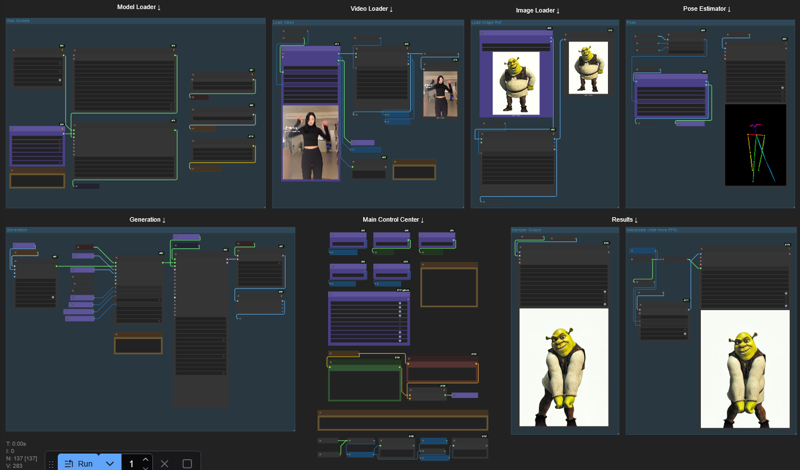
Description
This is a spin on the original Kijai's Wan 2.2 Animate Workflow to make it more accessible to low VRAM GPU Cards.
⚠ Tested with 12GB VRAM / 32GB RAM ⚠
⚠ Read the comments inside the yellow boxes in the workflow ⚠
🟣 All important nodes are colored Purple 🟣
FAQ
Comments (10)
Worked great!! I made 2 changes. The interpolate at the end for more FPS dropped the audio node.
And the resizing of the input video didnt get to the right resolution 480x832. I simply removed all the resize and forced the size on the load video (upload) node itself. Going to upload some samples.
FYI on a 5070ti its under 200s to make 81 frame vid!!!
EDIT: Had to enable hand detect in the pose estimator to get the dance right. fp8 model uses 10vram Q6 is just around 9vram. When changing from 480x832 to 480x480 the Q6 fits into 7.2gb vram so this is viable for 8gb machines.
EDIT2: Tested Q8 and it FIT!! takes up around 11.2gb VRAM but quality is better than the other two and execution time is about 5% faster that the KJ scaled. Will upload a sample.
Will you share your updated workflow?
if you are able to provide an updated workflow that'd be amazing!!
@ne7work @LionsEagles sure? its just a very minor change the workflow was 99% perfect. But you will have to tell me how to share. I have never shared anything I have done outside of discord. It's also possible that with my change from the original square aspect of 480x480 to 480x832 that it will have negative performance impacts as it will eat more RAM.
Hi! I'm glad it's running on 8GB VRAM machines :D
And you're right, I forgot to plug the original audio into the Interpolated output, thanks for pointing it out!
My approach to resolution was just to take the original video size and downscale/upscale it proportionally. I don't think that there's a "right resolution", the "480x832" is the default value that Kijai used in it's original wf, but I'm >almost< sure that it's just an arbitrary resolution based on the video he was testing at the time of release.
That being said, you were right to choose an appropriate size for your constraints, after all the "right resolution" is the one that fits into the hardware,
Just updated the wf to add audio to the interpolated video @LionsEagles @ne7work
@Harriet_h TYVM! also thanks for posting on reddit thats how i found you :)
Got this error when comes to ksampler : CompilationError: at 1:0: def triton_poi_fused__to_copy_mul_0(in_ptr0, in_ptr1, out_ptr0, xnumel, XBLOCK : tl.constexpr): ^ ValueError("type fp8e4nv not supported in this architecture. The supported fp8 dtypes are ('fp8e4b15', 'fp8e5')") Set TORCHDYNAMO_VERBOSE=1 for the internal stack trace (please do this especially if you're reporting a bug to PyTorch). For even more developer context, set TORCH_LOGS="+dynamo"
The error is related to 1 of these 3 scenarios:
1) You may not have Triton/Torch/Sageattention installed.
2) IF you have Triton/Torch/Sageattention installed there may be a problem with the instalation.
3) If you don't want to use Triton/Torch/SageAttention you'll have to disconnect the "WanVideo Torch Compile Settings" in the "Model Loader" group.
@Harriet_h Thank you so much. Solved. Awesome workflow