WAN 2.2 💠 T2V / I2V / S2V / T2I🔹4-6 steps🔹Loop 🔹SVI Video extend 🔹WanVideoWrapper Workflow🔹K3NK

NOTICE: IF YOU ARE NEW TO COMFYUI, I DONT RECOMMEND STARTING WITH THIS WORKFLOW, IS AN ALL IN ONE WORKFLOW YOU WILL GET CONFUSED.
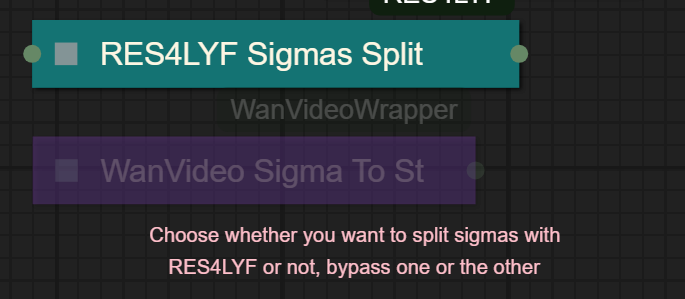
I UPDATED v2.3, YOU CAN CHOOSE IF YOU WANT RES4LYF OR WVW SIGMA SPLITTING
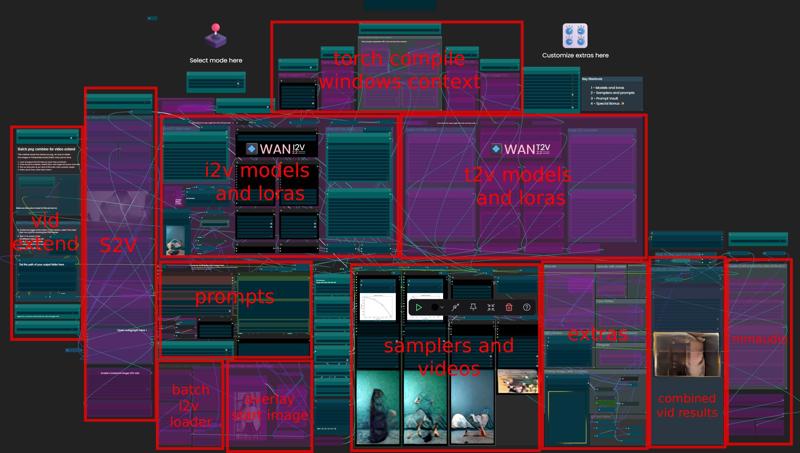
Since v1.8 im using subgraphs, you need latest comfyui with the latest frontend updates, also probably you will need to update Comfyui Manager.
For me was: setting nightly vers on the manager then update confy from the manager too.
* i allways leave the image overlay enabled, it will error if you dont have an image on it, sorry :S
v2.0
You can choose whether to merge with the loras or not, change the lora connection from the model loader to the set loras node, after that uncheck merge_loras
The toggled i added for radial sage, requieres Sage Attention to be installed, if you dont have it you should unplug the conexion i made to the attention type on the model loaders..
Be sure to update WanVideoWrapper nodes ..
The workflow works just fine with Wan2.1 if you bypass first sampler and model loader
This workflow is included with all my uploads as metadata, drag and drop a vid to comfyui.
I run a 4090 locally

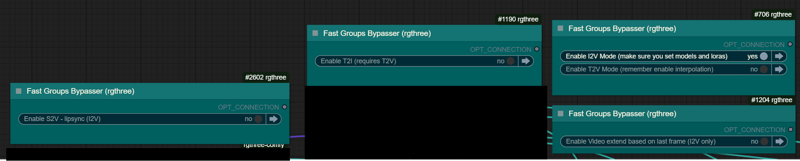
You can use it as other modes if you activate this option for enabling the required nodes.
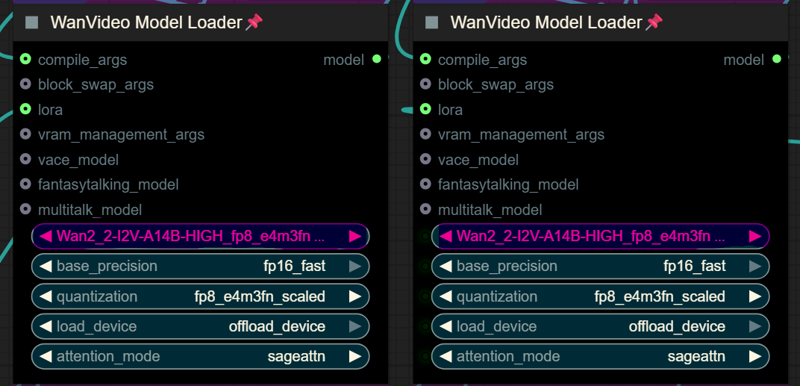
Make sure you load the correct models on the model loaders
Kijai's WanVideoWrapper Node
Wan2.2 Kijai's models
Lightx2v LoRa needed for lower steps (faster generations)
Wan22-Lightning Lightx2v alternative, newer and better in some scenarios
NSFW Clip Vision (not really needed in wan2.2)
RES4LYF Nodes
MMAUDIO
https://huggingface.co/Kijai/MMAudio_safetensors/tree/main
once installed replace nodes.py file in the mmaudio node folder with this one: https://github.com/phazei/ComfyUI-MMAudio/blob/master/nodes.py
WAN 2.2 💠 T2V / I2V
MMAUDIO NSFW
https://huggingface.co/phazei/NSFW_MMaudio (download and rename it to "mmaudio_nsfw_large_44k_v2_fp16.safetensors")
BOYONODES
K3NK IMAGE GRAB

Description
Added T2I single sampler, you must choose one when you go inside the subgraph
Fixed order of image overlay so you dont overlay the PNG frames and wont error with MMAudio
Swaped Boyo Nodes for K3NK Image grab, just keept what i needed and tweaked it a bit, now you can select the number of frames feeded to start_image and clip_vision, not a big deal but it wont hurt for PNG extended videos
FAQ
Comments (117)
I don't get it.
I've recently changed my GPU from 3090 to a 5090 (both Gaming Trio - MSI), and before the workflow worked nice. Now? It either keeps disconnecting (when I use Torchcompile, and there's no error message in the log) or gives me a Kernel bug after the high noise has completed its task (when using SageAttention).
I am baffled.
Congrats on the new gpu. I'm not sure what's wrong and quite a number of things might be wrong, but generally you oughta reinstall almost everything when you swap GPUs, just to be sure. Reinstall and get the latest of everything. (torch, sage, xformers, etc.)
yeah @CrystalVisage is prolly right, architecture is different so..
Pytorch is finnicky with 50- series gpu's. I had similar issues installing a 5060ti. I ended up following this guide to get it to work, hopefully it helps. https://github.com/comfyanonymous/ComfyUI/discussions/6643?utm_source=chatgpt.com
@CrystalVisage Yeah, pretty much thought the same.
Bother.
Welp, I'll get to work then. Thanks, bytheway. Very much appreciated, fellas.
Because you mention Torch compile... did you clean all the tritron files in $TEMP\torchinductor_[yourname] and inside the .triton directory in your c:\users\[yourname]
Might be that those clash with your new card.
@gman_umscht No, I did not, cause I'm a dummy.
Thanks for pointing that out too, mate xD
Edit: Reinstalled everything, the disconnection now happens only when using Radial Sage Attention, but at least that nasty bug to just Sage went away: it's progress.
@The_rule_of_Thetra no dummies here, I also learn new stuff every week. I made me a clean up batch file that I use after a long session before shutting down the pc. Not because I'll change the gfx card any time soon (still happy with my 4090) but I have several Comfy instances with different PyTorch versions and I did not want to run into problems with mismatched Triton artifacts.
I have a Gigabyte 5090 Waterforce, you need specific versions for he 50 series cards, do your homework before running it. Co-pilot helped me loads.
I cant seem to find this file in the links above or on the kinjai hugging face. wan_2_2_I2V_A14B-HIGH_lightx2v_4step_lora_v1030_rank_64_bf16.safetensor
Can anyone help me?
I get this manager error even after updating Comfy. Any idea? I updated comfy and cleared browser cache.
Failed to find the following ComfyRegistry list. The cache may be outdated, or the nodes may have been removed from ComfyRegistry.
comfyui-framepackwrapper_plusone
checkpoints vs base+lightning
where are you at in late 2025?
TY
I keep getting this error
LoadWanVideoT5TextEncoder().loadmodel(model_name, precision, "main_device", quantization)
^^^^^^^^^^^^^^^^^^^^^^^^^^^^^^^^^^^^^^^^^^^^^^^^^^^^^^^^^^^^^^^^^^^^^^^^^^^^^^^^^^^^^^^^^
File "E:\ComfyUI_windows_portable_nvidia\ComfyUI_windows_portable\ComfyUI\custom_nodes\ComfyUI-WanVideoWrapper\nodes_model_loading.py", line 1811, in loadmodel
raise ValueError("Invalid T5 text encoder model, fp8 scaled is not supported by this node")
ValueError: Invalid T5 text encoder model, fp8 scaled is not supported by this node
Invalid T5 text encoder model, fp8 scaled is not supported by this node
grok it, gemini it, gpt it, deepseek it, they will tell you whats going on.. or at least a good hint..
I am new to this, can you make a detailed explanation on each step please? I find myself lost after downloading the scaled model; where should I put it? on /models? or is it /models/latent_upscale_models?
Now, regarding the lightx2v, which one of all the files from the link should I donwload and where should I put it? I think it's on Models/loras, right? but which file? and so on for each step,
Thanks a lot in advance!!
"NOTICE: IF YOU ARE NEW TO COMFYUI, I DONT RECOMMEND STARTING WITH THIS WORKFLOW, IS AN ALL IN ONE WORKFLOW YOU WILL GET CONFUSED."
I hope you asked any LLM before comment xD the folders I can't remember now, but gpt, Gemini or Deepseek should know.
Fp8 scaled model goes to confyui folder - models - diffusion models.
Lora to confyui folder - models - loras, you need two.
High lora
Wan_2_2_I2V_A14B_HIGH_lightx2v_4step_lora_v1030_rank_64_bf16
Low lora
wan2.2_i2v_A14b_low_noise_lora_rank64_lightx2v_4step_1022
How do you avoid getting "cut off" gen*tals? The workflow contains the prompt "a man holding p*nis", and the resulting video results in a hand holding a cut-off p*nis.
Also, it often happens to me that people appear like eating something instead of doing f*ellatio. What goes wrong in this case? Thank you!
Why cens*ring good words?
"video results in a hand holding a cut-off p*nis." I remember getting such images with SD 1, why holding? There are better ways to describe the act: masturbation, grabbing, etc
"it often happens to me that people appear like eating something instead of doing f*ellatio. What goes wrong in this case?" Let them eat, please, they are hungry. Did you really tell them "to eat genitals"? Again, you need better prompts and loras
Prompt for "man's lower body"
Thank you. I was referring to a workflow of K3NK. I don't perfectly remember anymore, I think the latest where a penis write something with sperm on the forehead of a woman. When I ran the workflow, I saw a cut off penis in the head of a male person and fluid came out.
Only when I later saw the promo of the penis writing a word onto a woman's forehead, I realized what it should actually depict.
For me it was a typical "hungry woman" result. But since it was coming from a professional workflow that other's use, too, I thought that somebody remembered the problem and the solution. But of course, I let them eat! :)
Still my favorite workflow, can't even look at other workflows anymore for the most part! I am getting great results but would like to try raising native frames per second generated from 16 to 24, how can I do that?
PNG combine doesn't appear to be working in 2.4. 2.3 works as expected. 2.4 shows an image input error, unless I missed a widget to flip.
I also get error when combining I2V extended pngs
you're right, i fixed it, missing conexion in the load path node
@K3NK Thank you!
Seems like you may have overwritten the PNG combine fix when fixing something else? Because it doesn't work in the latest version again.
By the way, love you work. Amazing job on everything!
@drowai443 im creating a combined video right now, whats the error youre getting?
@K3NK "sequence item 1: expected str instance, NoneType found" -- it's seemingly related to setting the path for the PNGs to be saved. I set the path and it exists (e.g. D:\ComfyUI\outputs), and I follow the directions, but for whatever reason it's throwing that error. It also doesn't update the path on the other nodes and still shows your 'G:\reForge\' path, but I'm not sure that's related.
Hi K3NK! First of all, I wanted to say that your workflows for Wan2.2 are the best I've ever tried. This custom dpm++_sde/beta combo delivers the highest video quality, and overall, the level of control for model offloading allows for fine-tuning of VRAM and RAM usage. I still haven't explored all the possibilities of these fantastic workflows!
The only frustrating issue I can't figure out is the rather slow performance of the frame interpolator. Both GIMMVFI_interpolate and RIFE VFI Interpolate take about 25-30 seconds to process and double the frames of a 101-frame sequence on an RTX 5090.
Is this considered normal performance? Or would it be simpler to just generate 20 FPS videos from the start and skip interpolation altogether?
Thanks in advance for any insights!
As far as I know that's what it is, interpretation suck xD either i got oom or it will go slow as fuck, is almost taking the same time that the samplers took, is sad... If you find any other rafter methods please tell
RIFE 4 is very fast but its quality is lower
If you can get topaz video shits you skip the interpolation in comfy and then batch interpolate a bunch of videos together later in topaz. Could probably do that with comfy too somehow (batch interpolate) just targeting the videos worth keeping.
Probably the best workflow but... Damn... That's a lot of shit going on. I'm too scared to install on my main setup lol.
Anybody else having problems with the Swwan Fast Groups Muter? Mine are disabled and every trick I've tried doesn't seem to get them working.
how is "disabled"?
Disable Nodes 2.0?
@K3NK They just show up as blank with no switches. I've disabled Nodes 2.0, disabled every node other than what's in the workflow looking for conflicts, reinstalled Swwan, and even did a clean comfy install. It's a real head scratcher. BTW, your work is incredible. You've got a gift. Thanks for sharing it with the world.
@rivverswimmer2572 Having the same issue. You ever find a fix?
@Bixxxby Nope.
@rivverswimmer2572 group mutters are part of rgthree nodes, you should update those.. maybe update comfyui manager too
@rivverswimmer2572 I was using an older version of ComfyUI Core. The fix for me was this.
(With stability matrix)
- Update ComfyUI Core
- Update ComfyUI Manager
- Uninstall rgthree through manager / Stop package / Delete rgthree folder from custom-nodes
- Start ComfyUI, re-install rgthree nightly through ComfyUI manager
I had to do it a couple times, but it worked for me.
Trying out context windows and getting the following error:
Error during sampling: Expected all tensors to be on the same device, but got tensors is on cuda:0, different from other tensors on cpu (when checking argument in method wrapper_CUDA_cat)
!!! Exception during processing !!! Expected all tensors to be on the same device, but got tensors is on cuda:0, different from other tensors on cpu (when checking argument in method wrapper_CUDA_cat)
Traceback (most recent call last):
File "C:\ComfyUI - clean\ComfyUI\execution.py", line 510, in execute
output_data, output_ui, has_subgraph, has_pending_tasks = await get_output_data(prompt_id, unique_id, obj, input_data_all, execution_block_cb=execution_block_cb, pre_execute_cb=pre_execute_cb, hidden_inputs=hidden_inputs)
^^^^^^^^^^^^^^^^^^^^^^^^^^^^^^^^^^^^^^^^^^^^^^^^^^^^^^^^^^^^^^^^^^^^^^^^^^^^^^^^^^^^^^^^^^^^^^^^^^^^^^^^^^^^^^^^^^^^^^^^^^^^^^^^^^^^^^^^^^^^^^^^^^^^^^^^^^^^^^^^^^^
File "C:\ComfyUI - clean\ComfyUI\execution.py", line 324, in get_output_data
return_values = await asyncmap_node_over_list(prompt_id, unique_id, obj, input_data_all, obj.FUNCTION, allow_interrupt=True, execution_block_cb=execution_block_cb, pre_execute_cb=pre_execute_cb, hidden_inputs=hidden_inputs)
^^^^^^^^^^^^^^^^^^^^^^^^^^^^^^^^^^^^^^^^^^^^^^^^^^^^^^^^^^^^^^^^^^^^^^^^^^^^^^^^^^^^^^^^^^^^^^^^^^^^^^^^^^^^^^^^^^^^^^^^^^^^^^^^^^^^^^^^^^^^^^^^^^^^^^^^^^^^^^^^^^^^^^^^^^^^^^^^^^^^^^^^^^^^^^^^^^^^^^^^^^^^^^^^^
File "C:\ComfyUI - clean\ComfyUI\custom_nodes\comfyui-lora-manager\py\metadata_collector\metadata_hook.py", line 165, in async_map_node_over_list_with_metadata
results = await original_map_node_over_list(
^^^^^^^^^^^^^^^^^^^^^^^^^^^^^^^^^^
File "C:\ComfyUI - clean\ComfyUI\execution.py", line 298, in asyncmap_node_over_list
await process_inputs(input_dict, i)
File "C:\ComfyUI - clean\ComfyUI\execution.py", line 286, in process_inputs
result = f(**inputs)
^^^^^^^^^^^
File "C:\ComfyUI - clean\ComfyUI\custom_nodes\ComfyUI-WanVideoWrapper\nodes_sampler.py", line 3137, in process
raise e
File "C:\ComfyUI - clean\ComfyUI\custom_nodes\ComfyUI-WanVideoWrapper\nodes_sampler.py", line 1971, in process
partial_img_emb[:, 0] = torch.cat([image_cond[:4, 0], new_init_image], dim=0)
^^^^^^^^^^^^^^^^^^^^^^^^^^^^^^^^^^^^^^^^^^^^^^^^^^^^^
RuntimeError: Expected all tensors to be on the same device, but got tensors is on cuda:0, different from other tensors on cpu (when checking argument in method wrapper_CUDA_cat)
LLM being less than helpful with responses! Any ideas?
Also, mmAudio truncating audio to less than the video length. Is this to do with mmAudio expecting 24fps?
Thx!
I'll do some testing later, mmaudio works fine in I2V, it should be ok in t2v too
weird, this is i2v I'm trying, consistenly getting truncated audio :(
@4crap301 youre not using interpolation, right? i think is that.. ill look into it
@4crap301 seems like some bug when mmaudio is not getting the minimum fps i think, im trying without interpolation, setting directly 12seconds in the mmaudio node and i get 8seconds over and over again, the only thing i can come up with is that the video is at 16fps..
is totally that, mmaudio node spects more than 16fps, you know a node to duplicate frames? i already added a downsizer before feeding mmaudio node, now i need a frame duplicator of some sort..
https://github.com/kijai/ComfyUI-MMAudio/pull/52
@4crap301 fixed now, make sure you update nodes.py from the pull request
Hey, @K3NK thanks for the insanely amazing workflow. I'm getting the same error "RuntimeError: Expected all tensors to be on the same device, but got tensors is on cuda:0, different from other tensors on cpu (when checking argument in method wrapper_CUDA_cat)" with the context windows, did you manage to take a look? Thanks again!
Edit: you dont need to have the reference latent plugged in. You can safely disconnect it.
@K3NK so..... I've just tried it and I'm having the exact same issue again! Not clear why as I can see your working and what you've been disgnosing (i had the same float and save you had) and I'm still getting Sync video is too short: 3.40 < 5.31, truncating to 3.40 sec
AFK for a while now but will check back in when back, what a puzzle
same error here running on a 5090: Expected all tensors to be on the same device, but got tensors is on cuda:0, different from other tensors on cpu (when checking argument in method wrapper_CUDA_cat)
you can get it working when you unplug the pink latent noodle that goes into the reference_latent input on the node in the bottom left. I am not sure if this defeats the purpose of the whole thing but at least its working. Also the vae used in this group is bf16 while all models are fp16 but maybe thats intentional (changing it doesn't fix the problem anyway)
hey @K3NK , any thoughts on the below? would be cool to get this working
@4crap301 please share screenshots via imgurl images
long time i dont used context windows.. i just use my png extension, i wasnt a fan of context windows, for me only worked good in lipsync..
RTX 5090, I get OOM for GIMM-vfi (rescale + upscale + sharpness + filmgrain), I get error on interpolation time to time usually only work when its fresh restart of my computer. Can I offload some vram or tile interpolation while I'm doing GIMM-VFI interpolation?
BTW, This is the best workflow I ever used for my entire Comfyui expereince :)
not that im aware off, you can try decreasing the ds_factor but that will downscale a bit..
running out of ram or vram?
whats the res youre generating?
@K3NK its 768x1408 (original)
"torch.OutOfMemoryError: Allocation on device
Got an OOM, unloading all loaded models." - I think its VRAM.(I'm newbie so asked chatgpt)
It was T2v 768x1408 16fps 49frames. everything same as model loaded in workflow except one 224mb character lora.
I'm not sure but I think it worked on I2V(turning almost every options) few days ago so I tried turning most of the options for T2V as well.
@K3NK GIMMVFI Model precision is fp32 and torch_compile false(I don't know this is info needed ), btw i have 64g ram
@mandbz try reducing blockswap, i leaved it at 20 i think, thats the standard for 720 when you dont have 128gb sysram, like me
about the t2v, yeah, seems like it takes more resources, no idea why, maybe coz the aspect ratio..
@K3NK ah Thank you for your help. I lowered blockswap to 20 and lower dsfactor to 0.75. Works great, really great quality, thank you for your help :)
I can't seems to get pass 3 secs even with a 5080. I always ran out of ram if I set it to 4 secs. What else can I do to atleast get 5 secs of video? Tia
increasing blockswap?
@K3NK ill try that. Pretty knew here, but I managed to get it to work. I just wanted to do more than 3 secs video.
@K3NK if I use a 12gb vram card, what range of block swap makes the most sense?
@olivereads38255 really depends on the amount of sys ram you have and the resolution and duraton, start with 20 blocks with 720res 3sec and adjust from there
@K3NK this worked, thank you k3nk! you're the best
Thanks for the workflow! Just started trying out the I2V portion of the workflow and have a few (probably dumb) questions. I'm not using the speed lora's, just a few nsfw's, would you recommend changing any of the default settings since I am not using the speed loras? And second, how exactly do I raise the dimensions? When it is set to 720p, it is only coming back with 512, I'm sure i'm just missing something, but appreciate any tips! Thanks!
I allways use speed loras, as for the resolution the nearest bucket will calculate, you should increase, I think is the number is the shortest side, but I really don't know, I've been using it since framepack
@K3NK i remember there were lora slots dedicated to the speed loras in past versions, do we just slot them now in like any other loras and set both to 1 strength for both high and low?
@olivereads38255 yep, the speed lora is just another lora really xD
@K3NK ok phew, thanks!
Guys, what can I replace Lora Select with - it's a super inconvenient node.
I wanted Power Lora, but the connections are different
Need help with video extension. I get this error.
K3NKImageGrab.grab_latest_images() missing 1 required positional argument: 'directory_path'
It says is missing the path to your output folder, have you add it?
@K3NK Yes, I created the folders. How do you exactly add it to the node?
@mykee18893 do you see the text / instructions that nodegroup has?
you should see a text that reads "Set the path of your output folder here" there you add the path
loop always seems to change color on last frame
Perhaps it's over my head, but no matter what I try, I still get these as missing:
MMAudioFeatureUtilsLoader
MMAudioModelLoader
MMAudioSampler
I've manually installed MMAudio from the link, installed the requirements, and updated the nodes.py. Am I just missing something?
no idea being honest..
my comfyui is: ComfyUI 0.5.1, ComfyUI_frontend v1.34.9
my comfyui is: ComfyUI 0.5.1, ComfyUI_frontend v1.34.9 as well.
I'll keep playing around to see what I can figure out, I'll post back if I come up with a fix.
Can I just deactivate the audio segment?
@MCSizeMatters "You also need to replace nodes.py file in the mmaudio node folder with this one: https://github.com/phazei/ComfyUI-MMAudio/blob/master/nodes.py "?
@qek Yes, I did that as well.
no nice work, learned a lot from your WF
hope you write one day an article explaining how you keep track and manage your workflow, the updates and much more
are you performing automated/scripts/ai/agents on the json already or only by hand?
TY
Quick question!
Amazing workflow! Took a while to learn, but now I'm loving it.
However, how do I set the amount of steps for the High and Low models? I am using a 4 step GGUF model which needs 2 high steps and 2 low steps, but it always does 3 + 1 steps. 6 steps does 4+2 which is great, but I need manual control over the steps.
Any help on how I can adjust this?
loving this but can't figure out how to get concatenate function to work. i added my output folder but the workflow keeps adding an "undefined" folder to the address, which might be invalidating it and causing an error. (workflow should be using: "ComfyUI\output\106", but isntead it shows "ComfyUI\output\undefined\106\)" in the error
try adding absoulte path, i have "G:\reForge\stable-diffusion-webui-reForge\Outputs" i also have a custom path for output folder
@K3NK yeah i was abbreviating it for brevity but yeah, still no luck! i'll see if it works in another version, maybe something changed
@olivereads38255
Figured it out on my end. It's specifically looking for the directory \outputs\undefined\#
So, I put this for the directory
"D:\Program Files\Stability Matrix\Packages\ComfyUI\output\"
But under that directory, I had to add a folder titled "undefined",
Then, place the #'d folders in there.
how did you make it work? I'm on linux so the aboslute path for me is /ComfyUI/output however that is not working at all
@nickhguur yep, does not work for me too, even after I changed delimiter from windows to posix.
thanks for the wf!
(Fix in comments)
I'm getting error -
VHS_LoadImagesPath
"directory is not valid: G:\reForge\stable-diffusion-webui-reForge\Outputs\200\"
If I bypass the "concatenate videos from png" group nodes like the older version of the workflow that works for me, the workflow simply doesn't run anything.
Any ideas?
+1
You have to put in the address of where your comfyui outputs normally. When you enable the node, it puts the images in a numbered folder within there
@civitai495 yeah, the error says it:
"directory is not valid: G:\reForge\stable-diffusion-webui-reForge\Outputs\200\"
replace that for your output folder, the node needs the full path
same here, no matter what I put in there...
\workspace\madapps\ComfyUI\output should be it but I keep getting the error, also with / instead of \ or only part of the path. also: do we need to change the path in the actual Load Images (Path) node or just in textConcat?
Figured it out on my end. It's specifically looking for the directory \outputs\undefined\#
So, I put this for the directory
"D:\Program Files\Stability Matrix\Packages\ComfyUI\output\"
But under that directory, I had to add a folder titled "undefined",
Then, place the #'d folders in there.
Excellent workflow! Thanks for making it. How can I have manual control over low noise and high noise steps? I want to do 2 high noise and 2 low noise, but no matter which setting I change (Like start and end step), I cannot figure out how to directly control how many steps for each model.
Is this possible to change or impossible?
i think adjusting the sigma to step, because the shift doesnt affect the steps in my setup by some reason
@K3NK I see! I'm not quite sure how to do that. I did try setting it to 6 steps, then setting start_step to 2 and end_step to -1. This meant it was 2 + 2 steps, but it didn't look quite right. Is this what you mean? Or how do I adust the sigma to step?
What is the difference between:
- "Extended Video Ready (press Cancel and increase 'current_index' for the next vid)"
On the right, and the
- "Continue from Video (I2V btched PNG only)" group on the left hand side?
Is this supposed to be automated control for the "Multi PNG extend on last frame and combine (I2V only)" group and it's broken? Alongside K3NK Image Grab?
I managed to get it working, but I can't help but to worry I may be missing something and could get better generations.
There's a few bypassers that are blank. Like the "Final step, activate at the end for creating the video". It mentions toggling it on, confused as to what needs to be toggled though?
What exactly is the best way to extend a generation without additional contexts? If extending with K3NK Image Grab, does prompting still working as intended with the continued videos? Seems like it's not adhering on 2nd run. (Does it require contexts for better adherence between runs?)
The "Extend Video Ready" node on the right, doesn't do anything and is highlighted red, always. The Continue from Video node on the left, if the group its under is turned on, it just makes me cancel.
"Extended Video Ready (press Cancel and increase 'current_index' for the next vid)" - this is just a pause node i added for you to stop the process.. im the version im about to release i added the stop node, so you can queue and not have to manually stop the pause node
@K3NK The fast group muters on the left hand side, bypassing them does nothing. Is there a different want to toggle that i'm missing?
Just wanted to say, even though I'm having some trouble with things here and there, this workflow is AMAZING.
i've been testing the SVI with the native nodes and im not liking the speed.. wrapper is much superior and my png method can produce crispier results in some cases,, consistancy still a problem but... i will upload a new version with svi integrated just in case , you can toggle between and decide if you want svi for this particular extension or not,, if that makes any sense.. xD
@K3NK Thank you so much
@K3NK Looking forward to tinkering!
Amazing workflow, best one I could find so far!
Thank you very much for your hard work.
It is a great workflow I can almost use for everything, the only limitation so far being that I cannot make the output video have the same resolution as the input video no mater how much I try. My input image is 1920X1080 standard 16:9. If you have any tips for that I would be delighted, but otherwise, Thank you very much for the tryhard.
How did you get it to work?
@Morality01 you will need to uninstall the latest version of some python packages using pip in the right virtual environment and install others which are required/compatible with sage-attention. You also have to manually install some custom_nodes, look in the ComfyUI live log for errors and usually you just have to install the requirements.txt file inside the module folder (even though you might have installed them using the internal node manager in ComfyUI, still some nodes will require this step).
You have to check and follow whatever is on the github page of the module to be sure usually.
Check a youtube tutorial for sage attention install for example and you will get all of the commands you need to do this stuff but I do not believe there is a way to get it working without manual terminal commands, for most workflows.
P.S. The terminal inside of ComfyUI already has the virtual environment used by comfyui activated, you can input commands there, but for the sage install follow whatever the tutorial provides as methods.
man i opened this WF and i feel way too Overwhelmed I feel like I need a whole tutorial for this lol
Could you please clean up and better organize the workflow in the next version? I’m very happy with the output quality, but the workflow itself was difficult to follow, and I ended up creating a separate workflow to manage it. Additionally, there are quite a few grammatical errors in the explanations, and the tutorials are hard to follow. With clearer documentation, improved structure, and better-written guides, this could easily become one of the best workflows available.
Help: Only one frame reaches "Save interpolated" node.
The "preview" node next to it received all the frames and can save to the temp folder. However, only the first frame gets save by the "Save interpolated" node. Somehow the rest got lost somewhere between upscale, interpolation, and overlay (even though all have been bypassed).
Any idea how to fix this?
Bugfix for batch load image:
missing noodle from image value of "get image size & count" to input of I2V clip input switch.
Also, in image index, change control after generation to increment and deactivate pause workflow node for auto-loading seperate images one by one.
Love your workflow also for SFW content, quality is very high.
Crossing my fingers for SVI integration in a upcoming version. Keep up the good work!