WAN 2.2 💠 T2V / I2V / S2V / T2I🔹4-6 steps🔹Loop 🔹SVI Video extend 🔹WanVideoWrapper Workflow🔹K3NK

NOTICE: IF YOU ARE NEW TO COMFYUI, I DONT RECOMMEND STARTING WITH THIS WORKFLOW, IS AN ALL IN ONE WORKFLOW YOU WILL GET CONFUSED.
I UPDATED v2.3, YOU CAN CHOOSE IF YOU WANT RES4LYF OR WVW SIGMA SPLITTING
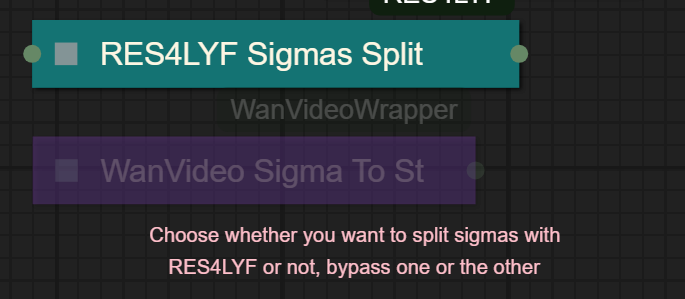
Since v1.8 im using subgraphs, you need latest comfyui with the latest frontend updates, also probably you will need to update Comfyui Manager.
For me was: setting nightly vers on the manager then update confy from the manager too.
* i allways leave the image overlay enabled, it will error if you dont have an image on it, sorry :S
v2.0
You can choose whether to merge with the loras or not, change the lora connection from the model loader to the set loras node, after that uncheck merge_loras
The toggled i added for radial sage, requieres Sage Attention to be installed, if you dont have it you should unplug the conexion i made to the attention type on the model loaders..
Be sure to update WanVideoWrapper nodes ..
The workflow works just fine with Wan2.1 if you bypass first sampler and model loader
This workflow is included with all my uploads as metadata, drag and drop a vid to comfyui.
I run a 4090 locally

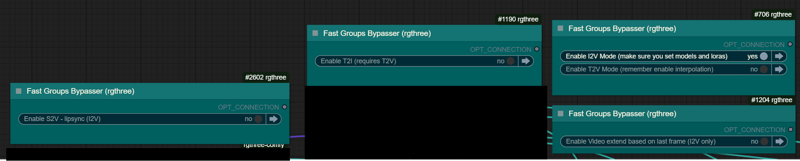
You can use it as other modes if you activate this option for enabling the required nodes.
Make sure you load the correct models on the model loaders
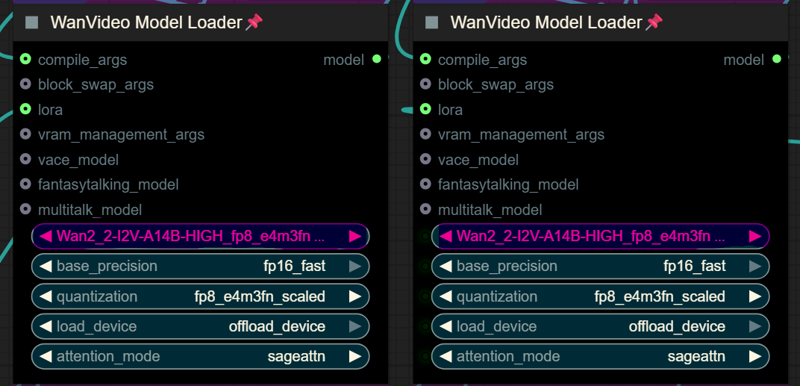
Kijai's WanVideoWrapper Node
Wan2.2 Kijai's models
Lightx2v LoRa needed for lower steps (faster generations)
Wan22-Lightning Lightx2v alternative, newer and better in some scenarios
NSFW Clip Vision (not really needed in wan2.2)
RES4LYF Nodes
MMAUDIO
https://huggingface.co/Kijai/MMAudio_safetensors/tree/main
once installed replace nodes.py file in the mmaudio node folder with this one: https://github.com/phazei/ComfyUI-MMAudio/blob/master/nodes.py
WAN 2.2 💠 T2V / I2V
MMAUDIO NSFW
https://huggingface.co/phazei/NSFW_MMaudio (download and rename it to "mmaudio_nsfw_large_44k_v2_fp16.safetensors")
BOYONODES
K3NK IMAGE GRAB

Description
added version without RES4LYF split sigmas nodes, now you can use different schedulers
FAQ
Comments (201)
Alright man, I am churning along making new long videos, I want to ask let's say I do the first 5 secs great, the 2nd 5 secs great, the 3rd there is a mistake or error, is there a way to roll back and go back to the 2nd 5 secs?
go to the png folder and delete the image frames you want to remove
Is there any way to use MMAUDIO without getting involved in the whole batch business? It always gives me an error at Big Image Switch.
i will look into it,i had some issues with proecssing order and i had to disconect the big image switch, i will try later with the more muter/repeater/relays i added in the last vers
great update, can you share us wan22-assspread-i2v720p-162epoc-high-k3nk and wan22-jellyhips-i2v-13epoc-high-k3nk? Ive check your profile and archives without any luck
I need to publish those, yeah I will this week I hope, I still training the assspread one
i keep getting low VRAM problem. i have 8 gb graphics card. Which parametters should i change to fix this within the workflow pls?
Increase blockswap values to let's say...30, but be aware you will need to have available ram, the more blockswap the more ram needed, also you should decrease resolution I guess..
To be honest with you 8GB is stretching it for Wan2.2...
@K3NK I have a 4070 Super with 12GBs of Vram, and I get the OOM error immediately upon running this before it even gets to the blockswap section.
@TribbleCon i have a 4070, what resolution/length are you running?
@jakoc75648 how do i set it up for 2.1 please?
@silverkas1980611 Wan 2.1 Lightspeed 480p https://civitai.com/models/1802623?modelVersionId=2039975
I am trying to increase the resolution from 896x512 to 1280x720 but I am not finding the way to do so, I have a 5070ti 16gb and 64gb RAM so I should be able to run it, I can easily run it in Pinokio's WanGP using the regular wan 2.2 14b i2v scaled int8 quantization. What values do I need to change to go up to 720p?
hi, i don't how to get working MMaudio, everytime i got "MMAudioSampler float division by zero"
LOOP Error is due to the subgraph not functioning properly. A fresh install of ComfyUI solves it!
same error
For those getting Float Zero errors, there is a "switch" expand it, set it to two
im dumb, where is it please ?
Switch (SEGS/legacy)?
Same error with either 1 or 2 in it.
Right so MMAudio will only work if you have "Enable Overlay Image" activated. Got it to work with a fully transparent image. Leaving this off result in the division by zero error no matter what you do.
To anyone not getting the movement theyre expecting i found increasing the noise_aug_strength in the encode helped heaps
Ooo, have you found which values work best for you?
The link to the Wan22-Lightning model 404's on Huggingface, and I can't find "lightning_i2v_high_noise.safetensors" anywhereon google.
What can we use instead?
You mean the links at the notes I added on top of the wf?
I keep getting an Out of memory error with this now, Idk why i have a 12gb 3080 i tried raising my block to swap to 40 and it didn't seem to help. anyone got some suggestions on how to make it work?
Raise your page count. I had this same problem, was too low. Raised it to about 12,000 and it ran fine, but that was base LORAs. Should work for you too though, just raise pages to 16-32 or some such. (search ---> advanced settings, then advanced tab, then advanced tab again, then programs and change virtual memory file size to something bigger than you have. Should work. Good luck!
try doin shorter vids, it should work eventually
Even with all models and nodes properly installed, this workflow throws nothing but errors.
How do i use video extend? i dont understand
thanks for forkflow. i cant find 70epoc and 90epoc and 101epoc lora
Hi k3nk, any chance of integrating VACE Fun’s new identity locking feature using a reference image for I2V? It sort of works without VACE fun but it’s fiddly to integrate into your workflow.
Do you have any wrapper example wf that I can look at?
Liked for the prompts.
Cannot execute because a node is missing the class_type property.: Node ID '#2993:2974'
Any Idea ?
Self update. There was 2 nodes active in T2V (i selected I2V but it misses disableing 2 nodes inside the T2V section when i press 4)
"NSFW Clip Vision" has been removed by its owner
It says there is no "image overlay" node. I try to download it but it doesn't appear in the manager. What should I do?
Does anyone experience ghosting using this workflow?
WanVideoSetLoRAs
'NoneType' object has no attribute 'lower'
not really sure what to do here
check if you actually have the loras set , maybe the lora youre using is corrupted i think i get thst error when the training lora has some error when saving
@K3NK i think so im new to this still lol im not really sure how to double check
@Thokrak On the third Loras box multi there is a lora set by default on the 4th or 5th row, change that to none
Love this workflow! Had to reinstall some custom nodes and after reinstalling Comfyui-ergouzi-Nodes, I seem to be missing the EG_WXZ_QH node that is labeled I2V input switch...is there another node I could swap out for this? Thanks!
Error I get when running is: Cannot execute because a node is missing the class_type property.: Node ID '#677
nm, figured it out. I needed to install pilgrim through git.
Can't get interpolated output to save anywhere
Might be using an old version, checking.
Edit: Output path is some G drive and I can't change it, and recreating and hooking up a new VHS node does not save output, nor does forcing output location.
Edit: Connected GIMM Interp directly to save node, it didn't seem like it was making it out of image overlay alive.
Welp, I updated ComfyUI and now all my generations come out completely black, 5 seconds of nothing. I tried updating triton, sageattention, installing a new comfyui portable version and importing all the models and workflow there, nothing :\
had no idea if something worked to keep it sacrosanct and never touch that folder again when it comes to this, wasted another couple of days of headaches. I think I better go back to Pinokio, don't understand how something that worked perfectly can break so easily with a simple update of comfyui and there is no way to revert.
you can revert comfy versions , if you updated your python is not that easy to roll back
i get black outputs when mixing sampler type with res4lyf split sigmas, try using only sigma to step and dpm++_sde/beta
@K3NK thanks for the reply, after another dozen attempts I managed to update the triton and sageattention and it stuck, back to working now. Now for any new workflows etc I will make a new comfyui portable and keep this one as backup since it works great :) btw I was looking more into ReActor and am I missing something or is the face swap feature of that not included in the workflow, all I have is refine. I found a video on how to disable the SFW filter so it's fully NSFW if you're interested in incorporating it into the workflow
@androsny i had faceswap but the quality is not good even for t2i .. ive never was able to get a good faceswap inside comfy
@androsny I would like hear more about the SFW filter disable, ofc asking for friend ;D
@Bliney https://www.youtube.com/watch?v=9yKE92RZxak&list=LL&index=3&t=46s this is how to do it, haven't done it myself since so far I am doing much better with the latest changes I made to the workflow
@Bliney https://codeberg.org/Gourieff/comfyui-reactor-node they had to pull this version out of github but is allowed in codeberg, just install like regular node
"Loop Detected" 3131....2005
EDIT: It was the Compile Args in the S2V WanVideoLoader. Disconnected that and it ran. No idea what would fix it if you need that section but I don't.
Got stuck again as quantisation needs to be disabled for GGUF models if anyone else is wondering, just set all the Model Loader quantisations to disabled.
----Original Comment ---
None of the modes run for me. Even with all disabled it still throws the loop error.
I've added an image in the overlay as the description advises. Only thing I changed from the download is pointing the models/lora/clip etc to the right place (just using regular Clip Vision, not the NSFW one as I don't need it).
I haven't changed any node links, and tried to follow some of the spaghetti but I couldn't find anything looping back into itself.
The first number it spits did change at one point, but I'm not sure what I did or what it was, it was 2451 or something instead of 3131. I'm guessing those are node IDs. Any ideas? Cheers
Ok I figured something out, the main reason I was getting a constantly changing appearance between one 5 sec video and the next is because in the interpoled results the image gets very much altered compared to the non interpoled video, the contrast goes up dramatically and smaller details suffer the most; for example a girl with blue eyes will have her eyes become black as the image zooms away from her and in the next 5 sec video obviously the scene will have her with black eyes. This also slowly destroys skin texture detail and so on. How can I fix this?
edit-- I fixed it by adding some new nodes to deal with the gamma variance and now it's nearly perfect, I think I'm starting to get the hang of this comfy madness :)
Could you please describe on how to manage video dimensions, especially for i2v? I'm a bit confused: the workflow has image rescale, crop that works strangely, i2v base resolution and t2v aspect ratio and size settings.
Run OOM at similar resolutions where other workflows run fine and have tried all the memory saving options I can think of in the flow for i2v
I have missing nodes i cant install, ReActorRestoreFace
BoyoImageGrab
Int in subgraph "T2I Subgraph"
I had the same problem. I fixed it by installing soundfile
pip install soundfile
Then install/re-install the nodes
@memesuper4944 This might help their reactorrestoreface but it does nothing for the BoyoImageGrab unfortunately. Sadly, it seems the creator is not around to help, either.
int node is node from the "comfyui-logic" cant remember why i didnt piked the core ones .. go inside the t2i subgraph to check..
boyo nodes are here: https://github.com/DragonDiffusionbyBoyo/Boyonodes
@K3NK The problem we're having unfortunately is ComfyUI cannot use the specific BoyoImageGrab. When installed via the github instructions or via Comfy, itself, both methods always fail. I even installed a completely fresh Comfy and it still failed to accept it. That one node fails to work even though I can see it in the installed files. Are you using a specific version of the boyo nodes that is compatible with a specific version of Comfy perhaps?
I succeeded in installing Boyonodes by installing "transformers" with "Pip install packages"
@Zzfoxxx Thanks for trying, but this does not work. At least it does not work with the latest version. I've not tried prior versions. I've also tried other solutions, too. You are correct it is transformers related as I can see that in the log, but this issue has apparently persisted since Jun and there isn't any clear established solution... I ran Pip install packages inside the boyonodes folder and even tried installing specific versions, including the dev transformers version. All failed. Still get "BoyoImageGrab" not installed.
@kudon44 My Boyonodes version is set on "nightly" and transformers is "4.57.1". I will investigate because i tried many manipulations to solve the problem, maybe it was a combination of those that solved the issue for me.
@Zzfoxxx hmmm weird. Mine doesn't have a version number option. When I tried to check that prior it has a blank box and cannot pick versions for this node set. I'll check later for the nightly version on github and that transformer version. Thanks for any other info.
I'm getting the dreaded slow motion thing even with the default settings and exactly the same loras, any fix?
i get this error whenever i open it after i updated my ui and nodes
[Some Nodes Are Missing
When loading the graph, the following node types were not found. This may also happen if your installed version is lower and that node type can’t be found.
Intin subgraph 'T2I Subgraph']
and now i'm getting the video error CompilationError: at 1:0: def triton_poi_fused__to_copy_mul_0(in_ptr0, in_ptr1, out_ptr0, xnumel, XBLOCK : tl.constexpr): ^ ValueError("type fp8e4nv not supported in this architecture. The supported fp8 dtypes are ('fp8e4b15', 'fp8e5')") Set TORCHDYNAMO_VERBOSE=1 for the internal stack trace (please do this especially if you're reporting a bug to PyTorch). For even more developer context, set TORCH_LOGS="+dynamo"
i tried changing the quantitation to e5m2 but no luck just the same error even when i disable it, are the two connected or do i just got to problems i gotta figure out?
Found the solution for T2I Subgraph?
@apfelsuchtiix762 sadly no
you are a wizzard! I do wish there was a template for this on Runpod because I can't get it to work
Use this one:
ComfyUI Sageattention
jnxmx/comfy25:new128
@memesuper4944 I'm still not sure how to get it workinf, I appreciate your response though
my 5080 cuda error out of memory, how to change set
Such a complex workflow... Unusable.
It doesn't even work out of the box. There are too many bugs.
Simplify it. Create a block version by floor, rather than everything concentrated in the middle.
https://github.com/brandschatzen1945/wan22_i2v_DR34ML4Y/blob/main/WAN_Loop.json <- this is kinda the same but much more messy. basicly. you take the end of the frame and re-use it and loop another time with different prompts. this is the basic beginner version ; not even close to perfect just for an idea of concept.
Is there any guide, text or anything about how to make extended videos? Sorry, I'm a noob with video generation on comfyui and it's more complicated than images
Do you have something that gives a bit of help with this workflow? lots of things in there that requires some context it seems, especially the batch and/or video extension on the left side of that workflow
theres instructions on that part , right? you're able to see the text or got bugged somehow?
@K3NK there is literallly no tutorial on how the fuck this workflow works man..
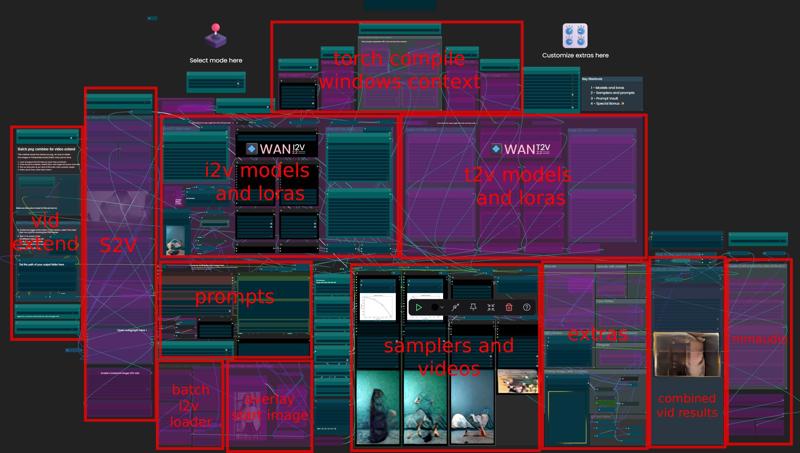
@MatorinaDaddy hahahah, i mean, can be confusing at first, but when you open it, starting from top to bottom, theres toggles and switches, once you play with those you will understand which parts gets bypased and which are not.. that can give you a good hint on whats some of the stuff even if you are a complete noob.. also if you chack the description you will see a screenshot with each section
"Some Nodes Are Missing: ReActorRestoreFace"
Log: "(IMPORT FAILED) (...) \comfyui-reactor" + connected insightface issues.
Really, I am thankful you put up this absolutely amazing workflow, Sir. You're doing rocket science to my POV here, but after almost 80h of trying to workaround this mess of ReActor's creator's code, I'm pretty much done with... everything. Is there a more omni-compatible node to replace this ReActor mess? I can't imagine I'm alone with this defiant diva of a crapnode. Sry, guys, but my nerves are really burnt by now, try to imagine doing this debugging for one node for 80hours with minimal rest in-between...
Background:
By everything that's good and making sense on this world, I have had the exe-version of CUI and tried it there, for 50hours in total to fix it. Didn't work... Then I've had enough and switched to the total fresh portable version of CUI that's browser based... yet ended with the same crap.
As I'm - like most of us here using ComfyUI by far - no coder, so I've used LLMs as a support to try to hunt down the sources of all of this, have made all kinda experiments in the process to get if fixed from all possible sides , but it keeps failing to install the stupid reactor in the very end... I have no idea what this node scripter has done to make his stuff so unbearable incompatible in comparison with every other of the 40 custom nodes I've ever installed in the process, but the level you need to be able to get this to run/fix makes you able to script it all yourself, so it's not helping... It's either Insightface not working or one of the other tiny but critical dependencies this fragile code is dancing with. And please nobody tell me it's not-fragile, if that was the case, some of the fixes should've taken effect now, but it seems like they're not clicking at all, PLUS other nodes would be as bitching around, but they just do their job in comparison to ReActor...
I even tried a third CUI variant aka the pre-installed CUI-portable: https://github.com/YanWenKun/ComfyUI-Windows-Portable
If face consistence wasn't key (planning on a music video here actually) for what I'm planning, I would've ditched it long ago, but it's of the essence for this project...
Still the same result, so I'm out of clues now and at a level of dispair I can't continue now anymore. It's a neverending nightmare. So if you or someone got anything making sense there, please share it...
I guess I will remove reactor in the next versions, is really there only for "face restore" not really needed nowadays with wan2.2 it could help in some far shots when the face gets deformed by zooming or similar, but I'm rarely using it lately
@K3NK As I am always setting up a work space environment to fully function before diving deep into the testing, (especially bc "face consistency" was a major argument for me) I didn't even come far enough at that moment to fully test the actual workflow of yours here. But knowing other workflows you did in practic, I know that you've got quite a hand for those logic setups, even if some complain about it being "too complex", but the thing is the same like with codes/scripts or even your flat at student times: It's always looking like "chaos" to anybody else, but there's a certain logic in it and it's more a matter of guidance and patience to get through it. So about that I can rly say it's amazing you added the switches to quickly swap modes and the textsboxes to explain, which I'm not quite through with; this is kinda totally great quality of life feature, you still too rarely see to my humble experience, so thank you for this!
I can't yet come forward with any results so far though, as I am still in need of a bit of recovery from the reactor thingy, (and need to work out some modeling renderings for halloween demands meanwhile) I really somehow hope it's like you say and not having a huge impact on the final result, but as much as I know Wan2.2 and longer videos it's been clear that it forgets the faces for about 20% more and more each video you set in the queue to make it a 20sec vid, e.g.. So to my exp so far, if Wan2.2 still has one weakness then it's consistency in video progression. Did you find a way with this workflow to overcome this loss of consistency?
I only know there there are several workflows out there I've tested meanwhile. My focus is on making longer videos on the song-making end and doing seamless loops for looping video backgrounds to music e.g., so you can imagine, why I crashed on your shiny release in this workflow. :)
I even consider learning this workflow of yours my last big approach on trying to get the Wan2.2 thing into a - to me - useful shape, because right now I've (also before this reactor incident) been investing weeks of time to all possible approaches in ComfyUI, trying to get other workflows to run, trying to mix the elements within my own, but so far I've been minimally successful with that for the described purpose. So I need to re-consider if Wan2.2 and the currently available community expansions for it are already far enough in ease of access so I can deal effectively with them without using up all my time on it.
@K3NK Is it as easy as just bypassing it?
@wazzypop reactor is just one node, you can delete it
@4urelia the consistancy issue is mostly when continuing scenes from last frame, what i do for penises is add one of the frames i generated with the png extend method (you have node for last frame underneath the image input), so 4ex, adding a frame with the penis in front of the woman from one of the first frames, at the end of the current run, the penis will remain the same size/shape, also for faces you can do that as well, but the ideal is to use a face/character lora, there can be color shifting tho..
I think I got this working, here's my very rough notes (let me know if something isn't clear)
Delete .venv folder from C:\Users\<User>\Documents\ComfyUI\
Start->CMD click on Command prompt
- cd Documents\ComfyUI\
- python venv .venv
- del C:\Users\<User>\Documents\ComfyUI\custom_nodes\*
- exit
Start ComfyUI
Click Install python packages
Wait for it to finish then close ComfyUI
Install Visual Studio Build Tools 2022
Download the installer from Microsoft then launch it
Inside the installer, select C++ Desktop Environment then install it. Close this when it's done
Start->CMD click on Command Prompt
- Taskkill /f /im python.exe
- cd Documents\ComfyUI
- .\.venv\Scripts\activate
- pip install ninja
- pip install sageattention --no-build-isolation
- exit
Open ComfyUI
Open workflow
Click Manager -> Install Missing Custom Nodes
Check all
Click install
Wait for it to complete, then restart ComfyUI
@K3NK And continuing clips from last frame is exactly what basic Wan2.2 does, as I've found out with both, ComfyUI Wan2.2 and WanGP pipeline to Wan2.2, turning into a different actor set entirely over time, yes ;) I wished to have a modified version of it with a control image on each continuation.
But yes, if I got it right what you're suggesting basically is: Do 81 frames, manually get the non-messed up close-to-end frames, do the next 81 frames, get the last good frames, and-so-on? I mean you're not saying it fetches the frame-PNG itself from the video to auto-continue, right?
I found that pretty interesting in WanGP as the author had a function to skip the last frames for video continuation and have transitional frame counts to make the seams more smoother. But still it wasn't good on long term videos yet. What I missed was indeed what you mentioned: A control image or a basic lora to keep things on a certain re-memory mode.
Though I need to get into making a lora first. I've worked since yrs with SD and AI generation, but I never did a lora before and as I'm doing my own characters in 3D, I would need to generate and train from scratch. I will eventually have a look at that, but I wanted to check if there's an easier way, like said method of having kinda image check-point in-between to "readjust" and remind the CUI code on how the person is looking like and what she/he wears. Ofc this can also be valid for environment, bc it's getting funky at some point with interior too as I figured.
@wazzypop Oh gosh, I'ma gonna need a quiet day to work this through. From first glance I can say I partly did some of this, (like installing the c++ environment) but not entirely this way. I'll let you know, when my duties leave me some time to try it once again. After Halloween though, too much business going on before... Thanks for sharing in advance though !
@wazzypop I did a quick (2h) detour to try it and let's say until the last step "- pip install sageattention --no-build-isolation" it was processing down the road. Yet the entire environment didn't run properly in this process in the end bc of this ofc.
Though I could imagine it's a custom paths error on my end. I've changed the model paths and stuff mostly to not run on C: drive, as this is and will always be stupid, bc every single program hooks on C:/, which is most problematic from a modular security level. I'd prefer to have programs and my OS as much separated as possible, also bc models and stuff from these programs are overloading the C-drive with gb-heavy models. Yeah.. however, that's a point that could be part of the problem. I'm running CUI.exe from F:/ drive.
The Log file of the incident was:
"
(ComfyUI) F:\Comfy-UI\ComfyUI>pip install sageattention --no-build-isolation
Collecting sageattention
Using cached sageattention-2.2.0.tar.gz (67 kB)
Preparing metadata (pyproject.toml) ... error
error: subprocess-exited-with-error
× Preparing metadata (pyproject.toml) did not run successfully.
│ exit code: 1
╰─> [13 lines of output]
(...)
File "C:\Users\Aurelia\AppData\Local\Programs\Python\Python310\lib\site-packages\setuptools\build_meta.py", line 335, in run_setup
exec(code, locals())
File "<string>", line 74, in <module>
RuntimeError: Cannot find CUDA_HOME. CUDA must be available to build the package.
[end of output]
(...)
File "C:\Users\Aurelia\AppData\Local\Programs\Python\Python310\lib\site-packages\setuptools\build_meta.py", line 335, in run_setup
exec(code, locals())
File "<string>", line 74, in <module>
RuntimeError: Cannot find CUDA_HOME. CUDA must be available to build the package.
[end of output]
note: This error originates from a subprocess, and is likely not a problem with pip.
error: metadata-generation-failed
× Encountered error while generating package metadata.
╰─> sageattention
note: This is an issue with the package mentioned above, not pip.
hint: See above for details.
(ComfyUI) F:\Comfy-UI\ComfyUI>pip install sageattention --no-build-isolation
Collecting sageattention
Using cached sageattention-2.2.0.tar.gz (67 kB)
Preparing metadata (pyproject.toml) ... error
error: subprocess-exited-with-error
× Preparing metadata (pyproject.toml) did not run successfully.
│ exit code: 1
╰─> [13 lines of output]
"
Cut into shape to minimalize text imput from this log quote, thus the "(...)".
I am aware CUDA is the render department in my 3080TI GPU, but can't guess why it's not clicking from here for this task. I probably have to re-setup the whole install version of CUI on basic directories and try this again, but as said, this is part of a larger tria&error detour, I cannot undertake right now, bc I need to get things done right now, so I'm kinda in "complicated-stuff-skip"-mode. I'm just leaving this for reference that I've tried to work it down, but I guess there's no easy solution for it, as usual, so.. yeah, here we are. :)
I'm having to do a new instance of Comfy...can I ask what versions of pytorch/trition/sage you're using to help me get past some fun errors? Thank you!
Worked through until the (to me) dead end of a NoneType Error that emerges at the step of "WanVideo Set High LoRAs".
(Pastebin link to log + Workflow included)
I've had several debugging necessities till this step, but this one I simply cannot comprehend anymore from its source or what to change at all to fix it, so I've just uploaded the intel right now with the current setup I've tried to run.
I've left the vanilla prompt of yours the same, just put in a random pic to see if the result is going to be on its rails so I only have to change the prompt in the very end.
I've had a post deleted I made in-between, bc I was able to fix it back then, but this time I'm kinda stuck for good, because it's linking to a redirection node here and I have no idea where it's really rooted at... @K3NK Please, Sir, have a kind look and tell me if you see something I can't see. If anybody else has an idea, please share, but I'm kinda stranded on that end, naively hoping it was the last bump in the road of the workflow.
Edit1: I am suspecting SageAttention to be the root of evil here, as I don't have it and while it's being deactivated in the graph/workflow, I somehow have the impression it's nonetheless looking for it? I switched attention_mode in "WanVideo Model Loader" (LOW) to "flash_attn_2"...
- https://pastebin.com/VUGz6dam
- https://www.mediafire.com/file/mhlywgzqi1hv33n/Aureliasv01_WAN2.2_T2V-I2V-S2V_K3NK_v2.3.7z/file
the pastebin shows that you might have left some loras that you dont actually have, in the lora loaders , also theres couple of errors of pause workflow nodes that is safe to ignore.. make sure you dont have any lora in the loaders , im sorry for leaving those there..
as for sage, you can find nodes called "sageattn" on top of the vae loaders, where i placed the WAN2.2 texts with icons.. you should open it and writte spda, i had a text near that node indicating that if you dont have sage you should open the node and input manually
@K3NK Oh, don't be sorry, you're here after all, did the effort and mustered the courage to release your built and I'm grateful for all of that! So thank you for caring and sticking with me here! After all it's not easy to explain those complicated things to obvious newbies like me, I can comprehend pretty much. I've got limited of those on my end, but I'll make sure to add another tip once we're through that eventually; it's not a whole lot, but it's more than only a verbal "thanks" in the very end!
To the subject:
- Yes, I guessed as much about some of the minor errors, I just thought there's no need to cut the log if it's either way being placed on pastebin in the very end. Just in case I missed something you'd find critical I didn't accidently cut it out. : )
- I've switched from "flash_attn_2" (mentioned in the edit1 above) now to "spda" on the "sageattn"-node you mentioned, as well as in the WanVideo Model Loader (LOW)!
...
╟► But he's still busy with rendering the "flash_attn_2" run I've started before I read your post atm.
╙► Current bottleneck: "WanVideo High noise sampler" Node. Running CUI on low-VRAM mode already and having a 3080TI(12gb) I made sure to check the "low_mem_load" selections everywhere I stumbled across them. Yet he's taking like 1h for only 4% of this single node's progress. For such exponential high rendering times the chances of it finishing at one time without a OOM grow thin. The settings he's chewing on usually for eternity is:
-- Context schedule enabled: 21 frames, 2 stride, 12 overlap
-- Input sequence length: 72576
-- Sampling 241 frames at 768x1152 with 3 steps.
What I've learned so far is that I could probably max out the blocks_to_swap count up to 40, but I'm thinking that wouldn't do the biggest shift, so I'm wondering if you've got some experience around that to maybe share or something left to tweak? Not sure if he's taking like forever because of the "flash_attn_2" thingy right now and if it's going to be better with "spda"...
Edit1: Yeah, it ran into OOM eventually after 3 hours of rendering. Went up to 18% roundabout for that node... Trying now the spda route.
Edit2: A Night of tinkering later... I have managed to get one video rendered with a more fitting render time. : ) I manually defined the very most of the settings to fp16 or bf16, forced the CUI to un/load part of their model pre-loads onto RAM. Two issues remain though.
- One: I have no idea what is controling the sound exactly, but it sounds a bit exaggerating and nothing like the animation at all from the sound pattern.
- And Two: the transition between the videos remains to be seen as a "ghosting" effect, so half transparent framed with slightly different movement keep mixing up with the "main-stream". I'm trying to find out if there's a way to fix it when I finally got some rest. Please share, if you've got an idea about it! : )
Thanks for the work! Can you tell me what's the GIMM-VFI interpolate step? The preview seems to correctly shows before that step and I dont see any difference after the GIMM step is finished
Not the place for this perhaps - Anyone using this on a 5090? I get stuck in a loop trying to get help from Chat and it says there is no proper Pytorch build for my setup but I see people using them. Anyone know of a reliable set up? Can't wait to use the workflow.
I personally use Stability Matrix. There you can choose between various diffusion gui, like A1111, Reforge, ComfyUI, Onetrainer, Fooocus and so on.
The install is fully automatic. WIth this you only need enough diskspace and youre good to go.
guys how on earth to use it in comfyUI? im new here nad I cant find any videos how add this to any workflow od download workflow??
hit the blue download button at the top. then take the JSON file you downloaded and drag it into the ComfyUI app
Get used to it
If you're new you should not start with this wf you will get confused ..
@K3NK ohh great advice well done thx
How the F*** does someone use this mess ?
dude check the description and see the screenshot.. also each section has its toggle on on the top part.. is an aio workflow i have a lot of switching for toggling and so,, audio for mmaiudo and also hacing the audio for the s2v nodes.. dude i use it.. and ppl like what i do, so i guess yeah, you can use it and produce nice stuf and long videos.. but im sorry im not gonna make any kind of tutorial besides the notes i added inside the actual wf.. i share this here so whoever can use it , be welcome.. my organization is prolly not the best.. but the wf works that i can tell..
@K3NK dude regardless if it works it looks like someone dropped the whole pot of spaghetti
@EthrealSkull i tried to subgraph it and i gave up coz a lot of stuff wont work inside the subgraph, i might re-organize it all someday..
Man I somehow manage to use it but that nsfw sound generation has sounds you could not even hear in your nightmares 😂
@K3NK Technically, he's not totally wrong, even if he could say it in an other way.
It took me a full hour to make the workflow loading as it should because I had to recompile a python's module for, and beside, it's not compatible with the Nvidia Blackwell architecture (sage attention doesn't work on RTX 50x0 for Windows). I used 3h to try making it works but ... I give up sadly ...
This took me a very long time to figure out but honestly I learned a lot and the results are pretty astonishing. Thanks so much and incredible work!
Okay, this is officially goated. The quality of the results are astonishing. Once you get the flow, it is really easy to use and produces the highest quality of long videos i have seen. Plus, since you control every clip composing the video, there's no chance a generation screws everything up. I was able to do 1 min videos with this...
in the I2V workflow, there are 2 chained low lora nodes - I haven't seen it like that before, how do I use that? Do I put the same or different low lora models into the chained low lora nodes?
yeah, is just for having more slots, so you dont have to use a merged checkpoint everyone loves so much .. xD you can enable "merge loras" and you will get the same speed vram savings everyone seems to love about merged checkpoints..
Is there a video tutorial? I am new to comfy, and I would like to try this workflow :)
Amazing workflow template, really shows the deep understanding you have on performance and how a generation is done. A few questions i have, im having issues with prompt adherence, and lack of motion. Is there any suggestions you have?
try other speed loras, theres plenty.. some works better than others, for example for fluids (my cumshot lora) is better to use lightx2v from wan2.1 .. is sad but it is what it is.. i wish the will allow to make 4-6 steps just with the base model and not using loras that at the end of the day, each one is producing really different results.. also try enabling or disabling the cfg float in the center part of the workflow that might help, also for slowmo reducing the duration of the video helps
@K3NK Yep. Half the game with all of this is plugging in various different loras and then messing with weights, but for a few weeks now, my best results are a mix of a 2.2 lightning high (one of Kaji's latest ones) and a 2.1 lightning low for most things.
Is this clusterfuck a joke or something?
https://i.imgur.com/j51V79v.png

🤣 you dont have rgthree nodes? https://github.com/rgthree/rgthree-comfy
Still one of the best i2v workflows. The only addition I would suggest is integrating a video extension section utilizing IPAdapter modules and a reference image to preserve identity, which would make creating longer videos a bit easier when jumping to different prompts/loras with the same subject. I.E. vid 1: facial, then IPAdapter vid 2 with reference image blowjob after the facial, or deepthroat. Another example would be a POV insertion on vid 1, then IPAdapter with face reference image for missionary sex with an orgasm lora.
It would be even more useful when the motion is more intense, i.e. a video where the subject gets turns around, pov insertion, then in vid 2 doggystyle. Identity preservation would be huge in that case, as without it, WAN will probably end up looking like an entirely different person in the second "extended" clip from the last frame.
Or a separate i2v extension workflow that utilizes IPAdapter to preserve identity with a face reference image.
i do similar with end_Frame + color match, using frames from the png sequence folder, but i guess using a reference image is better, do i need vace for that? this workflow really ony uses base models and loras.. ipadapter sounds good, you have any example workflow for me to check? ive never tinkered with those nodes
Technically, it's not built for Nvidia Blackwell architecture and CUDA 13.0. So it's unusable (SageAttention doesn't support Blackwell yet as example), and RTX 50x0 cannot be used with this workflow.
Well ... I will check for the next updates.
PS:
python 3.10.11 (tags/v3.10.11:7d4cc5a, Apr 5 2023, 00:38:17) [MSC v.1929 64 bit (AMD64)]
torch 2.9.0+cu130
cuda 13.0
ERROR: Could not find a version that satisfies the requirement triton (from versions: none)
ERROR: No matching distribution found for triton
Thank you for your hard work !!
I got it working on 5060ti. Its just difficult to install triton and sageattention. If you cant get past it manually, you can just use stability matrix which has option to install triton and sageattention automatically into comfyiu
I manged to make it work with t2i and short i2v, but i2v with over 3 seconds wasnt achievable for me with 32gb ram and 16gb vram. I am beginner tho so maybe it could be done with my resources without many drawbacks
#edit i gave up a bit of framerate and resolution, i get 5 seconds video now and after some tweaks in interpolation quality is ok without noticable distortions
Must be a windows issue then, works perfectly on linux
I have a RTX PRO 6000 Blackwell and SageAttention works with it. I'm on Linux.
@gorbatjovy593 im on windows, its working. Just installing is tricky. Workaround with stability matrix and try again
I'm having some issues with the i2v in this wf, WanVideoSetLoRAs 'NoneType' object has no attribute 'lower'
if i bypass that, the console throws up cuda OOM errors even if running on 512x512 with max block swap 48.
Im using a 4090, can anyone help me get this running? incidentally my wanvideowrapper nodes are beta is that the correct version of the nodes?
looking at it i think thats running out of system memory, ive got 32gb
'NoneType' object has no attribute 'lower' i think thats is a missing lora, make sure you remove loras that you dont have in the lora loaders
@brooga100 reduce blockswap for that
@K3NK ill give it another go, thanks
@K3NK the loras were the issue, thanks, im still getting stuck at the high noise sampler though with the cuda OOM issue, how much system ram do you have? do you think thats the issue?
@K3NK im up and running, using GGUF models, now playing with all your upscale, concatenate options <3
@brooga100 i have a 4090 with 128gb System RAM, a high blockswap value will fill up the ram, you need to find the best balance four your available sys RAM
If you get the following error:
"CuPy failed to load libnvrtc.so.12"
- activate the python virtual environment of your ComfyUI installation
- pip install cupy
- pip install cupy-cuda13x (or 12 or 11 depending on your installed CUDA version in the environment)
If you don't know which CUDA version you have installed in your virtual environment run the following command to figure it out:
python - <<'PY'
import torch
print("Torch CUDA version :", torch.version.cuda)
PY
Does someone have problem with ReActor?
yeah some has comment about it previously, you can just ignore the reactor errors and just delete the node, is just for face refining.. is good for scenes where the character face is away
the problem is onnx which is within python the current version and I think at least the previous version aren't compatible with ReActor you can down grade it to get it to work again, a quick search on youtube will provide you with a video on how to do it
This is a bit of a random question, not specific to this LoRA. Do you have any advice on creating your starter images? Your videos are all amazing, and while I have some success at creating similar videos, I can't touch the quality of yours. I have tried I2V and T2V. I find that I2V gives me the overall look I want, but, of course, when you start with an image, you inherit all of that images problems.
Cheers, and thanks for all the GREAT work you do.
most of mines are made in reForge, or a1111 with pony or ilustrous models, as of lately im doing more wan2.2 t2i, with this workflow you can create a t2v vid as start, then swap to i2v and continue the video through png sequence video extend.. is a bit tricky but it works great..
@K3NK - thank you! My basic worflow is T2I, and then when I get a nice image, I use that as I2V. And then when I get a decent first video, I start using the final frame from that as the start image for my next section.
I just haven't had great luck at creating the very first seed image. Your images are incredible. I've only been doing this for a couple of months, so still learning. I do everything in ComfyUI, so I don't know, I might be limiting what I can do. Given me newbie status, I am trying not to overwhelm myself with too many new tech stacks because I want to understand what I am doing versus just being a copy n paste goon.
edit: do you have any image creation workflows you are wiling to share? I will search here in case you have already uploaded some. Thanks!
forgive me if this is a dumb question. im relatively new to video gen. Whats the difference between RES4LYF and WWW SIGMA? and in what cases would i want/need to switch between either or?
are you kidding ? use chat gpt, grok, claude ... there a tons resources ...
just test it out, im prolly placeboing, but i feel like the res4lyf one gives a bit more crispness
@pg13kssg400 You really shouldnt consider AI a resource so exclusively like that. at least me personally i dont consider them reliable enough to replace human feedback or even the internet itself. I also find it a bit disappointing that your answer to me wanting to ask an actual person something was to ask something that isnt a person.
@K3NK ive also kinda noticed that in my testing too. i had just never heard of either so i was just curious. I deal more with language models so ive been struggling to keep up with the image side lately.
Hey There, Just wanted to say huge thanks for the effort put into this! But being the noob that I am, I'm having an issue with this. Not idea how to fix it:
I managed to fix most of the errors so far which have all be my own faault in fairness, but now I'm stuck at "WanVideoSampler 'NoneType' object is not callable. I'm guessing its something to do with the type of scheduler as that's what keeps getting highlighted but no idea how to fix it. Tried changing it to Euler but no luck.
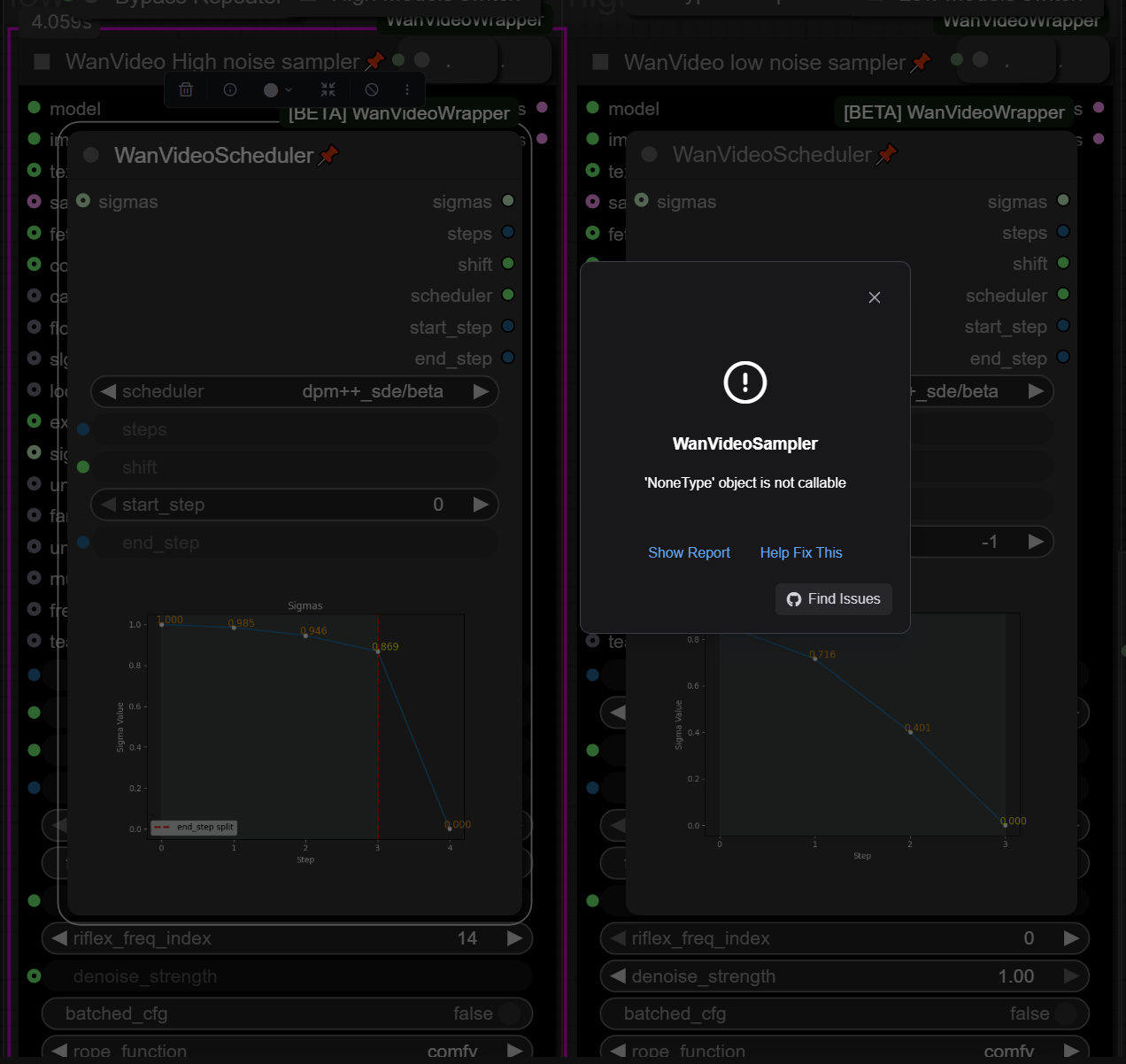
make sure you dont have any lora in the loader that you dont have in your drive
@K3NK Sadly not that, Only have the Light Loras loaded at the moment.
@G1ACX Press "show report" and send here screenshot starting from "Traceback (most recent call last)" and ending with "TypeError: 'NoneType' object is not callable".
Maybe you don't have sage attention, or other dependencies.
The lightning lora strength value is connected to the lora weight float list node WHAT? Can you please tell me how that works, what is the thought behind it? I wanted t set the strength value myself in the newest 2.3 workflow and was wondering.
Is there a chance you could create a one click deployment on runpod for this?
Many people use runpod nowadays since it offers comfyui "online" with a chosen GPU provided by them. Some people already have done this for specific workflows but yours if by far the best
Can't you write it yourself? It isn't so hard
Is there a youtube video or any kind of explanation to this workflow. I just want to run a BJ with K3NK and feel like Im learning quantum physics.
Is easy as download one of my videos, drag it to comfy, workflow will open, then install all the nodes requires, restart comfy, add your own image to the empty image input, reduce duration to 2sec (in the center section) just to be sure, and run, then when you get your first video, you will start understanding the workflow..
I understand that this workflow is too complex for beginners. But could somebody please be so kind to recommend some "beginner" workflows? Thanks!
Seems like the image bucket resize is broken with this version - videos come out at 768x1156 whatever you set the bucket to.
It's telling me I'm missing the node Int in 'Subgraph T2I' I think the filestructure in ComfyUI-Logic is different in the version this workflow uses.
Press 4 key to access the subgraph, you should see what's the issue, you have node in the log is or similar?
@K3NK The two nodes named 'Steps' and 'Split at step' in the subgraph are broken. The value type is 'UNKNOWN'
@K3NK Ended up fixing it by installing ComfyLiterals, which weirdly enough was not listed as a missing node in ComfyUI Manager.
@Ebyz yeah the manager sometimes wont show some, please give me the git url and i will add it to the description
@K3NK Sure thing, here you go: https://github.com/M1kep/ComfyLiterals
Hey guys, i faced same issue and i installed ComfyLiterals and it worked !
But now i get this error :
Loop detced 2451,795,557,254,246,244,236,1977,2599,2005
Can someone help me
this is my favorite workflow! i have a problem though: even when i use a square input image for i2v, the output is always a portrait image!
Change the Aspect Ratio to 1:1 if you are using T2v or change the sliders for resolution in I2V :)
@skpManiac can you please show me a screenshot or name of the node you're talking about? i've tried many things over the months, and nothing has worked to fix the i2v output res! the t2v node for ratio and res is still showing in the i2v process, but it has no effect on the output ofc!
It's right above where you insert your image :)
https://lookimg.com/image/Zd2HcD
@skpManiac shoot, i've fiddled with that one too but i must have not noticed the correlation! thanks maniac :)
@olivereads38255 Glad I could help you :)
ValueError: T2V (text to video) model detected, encoded images only work with I2V (Image to video) models
How can i fix it if i select i2v mode?
i got
Int in subgraph 'T2I Subgraph'Also i got
Loop detced 2451,795,557,254,246,244,236,1977,2599,2005Please help .... i did install everything !
Hi
I worked together with the google ki chat, to get all what the workflow needed. It was hard work for an amateur, I needed 18 hours. Now all work, but there are 5 loras I can't find:
wan22-throatmachine-16epoc-low-720p-k3nk.safetensors
wan22-throatmachine-90epoc-high-k3nk.safetensors
wan22-m4rici3lo-22epoc-high-k3nk.safetensors
wan22-m4rici3lo-21epoc-low-k3nk.safetensors
wann22-h4il3y-24epoc-low-k3nk.safetensors
Please send me the links or tell me where I can find them.
This workflow is so overwhelming 0_0
Your videos seem so good, but I cannot understand how to use this.
I was the same, but if you read through it step by step, just use I2V for the best results, the workflow works perfectly, you probably won't use most of it tbh :)
@skpManiac I'll give it a try cause the videos are CRAZY good.
@WaifuAIDegenPrompter, yes they are, I'm loving the stuff it's kicking out :)
I've been trying for days to get this to work, but I keep running into more issues. Now it's MMAudio that won't work. It says 'MMAudioSampler: Stack expects a non-empty TensorList'. Can't find anything helpful when searching, I'm about ready to give up on this workflow, it's too complicated.
EDIT: Figured it out, 'Enable Overlay Image' has to be on, otherwise you get this error and MMAudio does not work. So I made a transparent PNG to use as an overlay. Question though, why is it set up like this?
It does? Sorry I haven't tested that particular scenario I guess, I will upload a updated vers soon , PNG overlay is how I add the frame to my vids
@K3NK Yeah I figured as much. I'm doing my best learning the ins-and-outs of this workflow but it sure is complicated. When it works the results are amazing, but when something doesn't work I'll spend half a day figuring out how to fix it. I probably shouldn't have ignored that warning at the top of the page. ;)
Ebyz, you legend :) I've been struggling with trying to fix the MMAudio, and this works perfectly :)
Great call on using a transparent PNG, I just made one in PS and it's now working great.
THANK YOU ❤️
Is there a way to make it create music with the video? Thanks
@skpManiac Glad it helped! I haven't tried generating music with videos yet though, so I can't help you there unfortunately. Maybe @K3NK knows more.
Any possibility of splitting T2V and I2V workflows? It would improve readability by a lot.
I love this workflow, I have saved a version set up for I2V (WAN2.2 K3NK I2V v2.3) and one for T2V (WAN2.2 K3NK I2V v2.3), this way I don't have to keep messing each time I switch between I2V or T2V.
After getting MMAudio to work, thanks to Ebyz, is there a way to make it create music instead of white noise?
Thanks guys
Hey, where do I find this file? I searched all night on hugging face: wan_2_2_I2V_A14B-HIGH_lightx2v_4step_lora_v1030_rank_64_bf16.safetensor
@cleptoes https://huggingface.co/Kijai/WanVideo_comfy/blob/main/LoRAs/Wan22_Lightx2v/Wan_2_2_I2V_A14B_HIGH_lightx2v_4step_lora_v1030_rank_64_bf16.safetensors does the note on top of the workflow works?
@cleptoes Why not start your own topic instead of hijacking mine, and you might wanna use the word PLEASE when asking for help!!
@skpManiac sorry i was on a hurry didnt readed yours, you have a prompt field in the mmaudio, you probably need the official mmaudio model and not the nsfw for better music..
@K3NK ok mate, thanks for the info, I'll leave it off and add it in Filmora like I always have done :)
@skpManiac I wasn't hijacking anything, I was literally asking you. Since you got it to work you had to have found the file.
@K3NK thanks! I completely missed that note at the top somehow. Yes it works.
May I ask where I can find these workflow files?
I am continually getting the error
# ComfyUI Error Report
## Error Details
- Node ID: 1173
- Node Type: WanVideoModelLoader
- Exception Type: ValueError
- Exception Message: Can't import SageAttention: No module named 'sageattention'
Which makes no sense because I installed it through pip what is going on?