My ComfyUI workflows for using Wan 2.2
This workflows are used by me to create my art.
They are optimized for my checkpoints and created of my latest knowledge to enhance the outcome.

Versions & Information👇👇👇👇👇👇👇👇
👉 Please read below and the file descriptions "About this version" for more info's.
🎬🐈Click me! HowTo + Video
💡Some WAN 2.2 versions use high+low checkpoints, other like S2V use only a single checkpoint - make sure to read the descriptions and use the correct checkpoints.
⚠️ Do not use the workflows with the "Nodes 2.0 beta" from ComfyUi or it will mess up things.
👇👇👇👇👇👇👇👇
What you get from the comfy workflows:
♨️ Easy controls
✅ As less as possible dependencies
🪧 Detailed documentation
⛓️ Highly automatic logic
✨ Optimized results
🎬 Fully automated resolution logic
🔖 Bookmark-Shortcuts with number keys
Types of workflows
FastFidelity C-AiO
🖼️ I2V and FLF2V
🧩 Automatic aspect‑ratio calculation and fitting
✨ Multiple Upscalers
Torchlanc (very fast, color correct, low VRAM)
Upscale with Model (additional detail, high quality)
RTX Super Resolution (ultra fast, very accurate)
🤝 Video resolution matching - Fully automatic scaling and resolution calculations
🕠 Length automation - Fully automatic calculation of frame count
🫥 Watermark option
🧮 Color match feature
🎭 NAG - Negative prompting with CFG1
🪄 Interpolation feature
🌀 Perfect loop feature
🃏 Last Frame Extraction
🔖 Bookmark-Shortcuts - with number keys

FastFidelity C-SVI
🖼️ SVI (SVI 2.0 up to 10 samplers)
🧩 Automatic aspect‑ratio calculation and fitting
✨ Ultra‑fast, color‑correct upscaling (torchlanc) OR Upscale with Model
🤝 Video resolution matching - Fully automatic scaling and resolution calculations
🕠 Length automation - Fully automatic calculation of frame count
🫥 Watermark support
🪄 Interpolation feature
🔖 Bookmark-Shortcuts - with number keys

Swarm Basic
Absolute basic SwarmUI preset
Not recommended over ComfyUI for video generation
Backend Test
If this does not create the example video your ComfyUI backend is broken.
If this works, but your other workflow not, the other workflow is broken or missing dependencies
🩻 Known issues and advice's
⚠️ Some workflows may set on webp av1 encoding (VHS node) - If your computer/setup missing drivers use any other like H265 or H264!
Install ffmpeg!
Update Comfyui and custom_nodes!
Update pytorch 2.9+cu128 or higher
Make sure to read where files/models should be placed inside the workflow
Check if the filepath for model/clip/vae match your system like Linux/Windows
The plugin ComfyUI-DD-Translation can break node connection (avoid)
All older Versions are available inside my GitHub Repo.

Spacial thanks to @Abyss_Games for a really good idea and help with the "loop"!
I got some really good ideas from @Gladas workflows!
YOU are responsible for outputs as always! If you make ToS violating content and I get aware I WILL report this.
Description
## Requirements
- https://github.com/Kosinkadink/ComfyUI-VideoHelperSuite
- https://github.com/rgthree/rgthree-comfy
- https://github.com/Artificial-Sweetener/comfyui-WhiteRabbit
packaging, torchlanc
- https://github.com/kijai/ComfyUI-KJNodes
- https://github.com/yolain/ComfyUI-Easy-Use
---
## Features
- 🧩 Automatic aspect‑ratio fitting
- 🖼️ Monitor‑resolution selective upscaling
- ✨ Ultra‑fast, color‑correct upscaling (torchlanc)
- 🔖 Bookmark-Shortcuts with number keys
- 🤝 Video resolution always matching optimal Div16 WAN 2.2 resolutions
- 🫥 Watermark support
- Separated upscale logic for VRAM saving
---
## Changes
- Optimized scaling for initial image for optimal resolution borders to feed the sampler
- Added VRAM and cache handlers
- Optimizing with sub-flows
- Backend consolidations
- Reduced VRAM consumption by changing the upscale logic to the very end
## Fixes
- FLF upscale after composition was broken
- fixed the sampler inside I2V to Eiler+simple
- corrected "save output" switch
FAQ
Comments (332)
What is the best way to create long videos? When I generate videos based on the last frame image and using upscale, I run into the issue where there is visible difference between stiched videos. Also there is issue with first frame on the 2nd video being the same as last frame of 1st video, which creates little hiccup. I know I can edit it in video editors, but it's extra manual work.
Overall great worklfow, with a lot of options and it's easy to understand.
use the svi workflow that is made for long videos.it is set at 24fps so 3.xsec per stage.but color might shift over time.and do not use low lora because they alter faces.
I have similar issue with SVI with first/last frame, for example if a character is lying on the ground at the end of a scene/video, that character sits up at the start of the next scene etc. The FastFidelity C-AiO handles this really well with lastframe saving functionality that feeds into the next scene. The SVI however appears to just rely on things working out between scenes. Am I missing something obvious?
Am I getting it right that if the upscale option is turned on then MMaudio takes the upscaled version of the image? There's no point in it. Here's why from the official site:
While higher-resolution videos take longer to process due to encoding and decoding, they don't necessarily improve the final audio quality. Our AI system optimizes input frames to specific dimensions (384×384 pixels for CLIP processing and 224 pixels for Synchformer) to ensure consistent, high-quality results regardless of input resolution.
And what framerate does MMaudio take as input in this workflow after all the logics? They state that Synchformer works at 25 FPS and in videos with lower frame rates, they automatically duplicates frames to maintain processing quality.
Hi! First of all, thanks for sharing your work! It’s awesome! A question about the SVI workflow. Any advice to keep consistency as much as possible during the samples? After 3 samples it happens that the design of the initial image starts to get lost. Someone in the comments recommended removing the Low LoRA and it does help a little, but then the LoRA stops having effect. Not to mention if I use 10 samples—the character’s face or design changes a lot, becoming simplified
Realistic(not anime) image in svi to keep faces the same.
scheduler=sgm_uniform(sharper faces),steps_total=4(overall motion increases rendertimes!!!),Step_refiner 1(Detail rework).the step refiner causing the most issues it changes faces to much because it reworks everything again at the same stage twice if u set it at 2(standard setting).low lora changes every detail in the scene.if u need specific details use it only at first stage in svi.
and add the prompt "woman/man identical to reference.she/he is wearing a........(description of clothing hair weapons and so on).......stable identity."
@hartweizen thanks for comment! but i looking for some tips for anime style animations svi
Even though the loop function was not turned on, the finished video returns to the original image scene.
You are sure not to be inside the matrix?🤔😎
@darksidewalker I checked, and this is the result I get when I increase the video length to more than 81. It was definitely fine before even when I set it to 121.
@rkrmf1524161 This is definitely not a bug in the workflow. I have no clue. Anything over 81 on 16fps / 121 on 24fps will start looping back, that's WAN 2.2
If 'pingpong' in the video output is set to true, the video will play in reverse back to the first frame. If it's turned off, it plays normally.
I have an issue with RTXVideoSuperResolution no matter what version i use confyui still says it is missing can someone help me ?
This node need manual install or setting the comfyui security level to low
@darksidewalker look like it works indeed thank for the tip.
@ringogo i think your error is about missing nvidia-vfx package. And wheel-stub, if error is still there after installing nvidia-vfx. Happens to me too.
@darksidewalker I'm having the same problem installing the ComfyUI_NVIDIA_RTX_Nodes custom node. Different versions of ComfyUI don't help. I tried installing it manually from GitHub, also using the "pip install -r requirements.txt" command in the node folder, but it didn't help. I also tried changing the security level to low, but that returned an error in the manager "This action is not allowed with this security level configuration". How can I fix this if none of the above worked?
This is what it says when going to Import Failed:
Traceback (most recent call last):
File "D:\ComfyUI_windows_portable\ComfyUI\nodes.py", line 2223, in load_custom_node
module_spec.loader.exec_module(module)
File "<frozen importlib._bootstrap_external>", line 999, in exec_module
File "<frozen importlib._bootstrap>", line 488, in callwith_frames_removed
File "D:\ComfyUI_windows_portable\ComfyUI\custom_nodes\comfyui_nvidia_rtx_nodes\__init__.py", line 2, in <module>
import nvvfx
ModuleNotFoundError: No module named 'nvvfx'
@Leoxiz you did not install it correctly that's what it says, missing dependencies.
The only thing I can tell, you either install it correctly or you may try my comfyui installer.
I solved the problem with ComfyUI_NVIDIA_RTX_Nodes yesterday. The solution was to write these commands:
1) python_embeded\python.exe -m pip install wheel-stub
2) python_embeded\python.exe -m pip install nvidia-vfx
First, these commands only work with the portable version of comfyui, so if you're using a different version, you'll need to edit the beginning of these commands slightly.
Second, regarding usage: While in the main comfyui folder, open the cmd menu and simply paste the commands one by one to activate them. If for some reason this doesn't help, here's a link to another discussion of this issue: https://github.com/Comfy-Org/Nvidia_RTX_Nodes_ComfyUI/issues/2
Just a few small notes for people coming into new comfy and trying to install the custom nodes correctly...
Pretty much all nodes you can simply click the "Install All" button on the right side menu (the small top-right button opens that, where all the errors are located) to get almost all of the custom nodes, instead of tediously clicking each link in the workflow to install manually. At least for me (NVIDIA Windows user here), this worked for almost all nodes, except for the GGUF and Hunyuan nodes. You can hit the "i" icon next to those node names on the right-side panel to have it pull up in the extensions window.
The GGUF node pack doesn't install because there's two you can select from: I chose the plain "GGUF" one, not the forked one.
The Hunyuan node pack is pretty complex and seems to not install for me if attempting to install from the comfy manager, so after I uninstalled it from the manager (inside that mentioned "Extensions" window), I did a manual install from its repo
The link is in the workflow, but here's that: https://github.com/phazei/ComfyUI-HunyuanVideo-Foley
Like most other manual installations, I went to ComfyUI's custom_nodes folder, then in the address bar typed cmd, then entered in "git clone https://github.com/phazei/ComfyUI-HunyuanVideo-Foley". After that finishes, I close that cmd window, navigate in the newly made folder, then do another cmd in the address bar and did "pip install -r requirements.txt" for its dependencies
(I explained all of that cuz for whatever reason the repo doesnt have those instructions for us newbies T~T)
After that, all nodes giving no errors thankfully, hope somebody finds this helpful cuz I spent a full day trying to figure this stuff out lol
Also, if the method of "Install All" doesnt work, you probably need to do a manual install. At that point, use the provided workflow link and manually do it, like I said above! dasiwa made this accessible for even a no-knowledge person like me to try, so you can too
After installing all nodes and models, and with no errors shown in the workflow before execution, I ran the workflow. However, the workflow completed in just 0.03 seconds. The backend logs show the following: 复制 got prompt Failed to validate prompt for output 9: * ComfySwitchNode 1512:2109: - Required input is missing: on_false - Required input is missing: on_true Output will be ignored Failed to validate prompt for output 15:2025: Output will be ignored Failed to validate prompt for output 28: Output will be ignored end_vram - start_vram: 8519680 - 8519680 = 0 #1512:2095 [PreviewAny]: 0.00s - vram 0b Could you please help me understand what might be causing this issue?
Try my comfyui installer and please report back if it works.
Getting a couple errors. first when the workflow loads i get "When loading the graph, the following node types were not found: [object Object]". then when i try to run the workflow i get "Prompt execution failed Cannot excecute because a node is missing the class_type property.: Node ID '#1512:2037' ".
The workflow or installation seems broken.
Make sure all custom_nodes and comfyui are up2date. redownload the workflow. Clear browser cache before installing the workflow again.
I'm having some problem with the GGUF. I got the
ISV Noise for high, low, and S2V (checkpoint) files, but their all in .safetensor, which normally would be fine, but for some reason it's also asking for the GGUF version of them as well. Right now placeholder.gguf is selected, but it's highlighted in red, and is throwing up an error message asking me to choose something from the library (there are no GGUF files available). Since there doesn't seem to be a radio button or slider to turn the GGUF options off, and because there is no null option available, I was wondering what I should be doing in order to address this? Also the image for the first/last frames are missing for some weird reason. I've tried redownloading the file, but that doesn't seem to fix it.
Also, if it helps, I'm using a regular version of ComfyUI downloaded from the main website. Not sure if that might be causing the problem, but I figured to mention it just in case.
Yes, I also encountered the same problem. "placeholder.gguf is unknown"
Hey there, trying to install everything needed. White Rabbit spits out an import error saying: ModuleNotFoundError: No module named 'torchlanc'
I installed white rabbit inside custom nodes via git clone. I then pip installed the requirement.txt but I still got the import error.
where Am I wrong doing?
Your installation seem not to have worked, since the error says you missing the dependency that is named inside the requirements.txt.
@darksidewalker Thanks for your replay. IU apreciate your help. I am using the 1 Click Install from Tarv1s. i git cloned everything and then pip installed the requirement. It gave me errors. I can post them here or discord if u are available there.
I have this issue and I really dont know how to fix it : "loadWorkflowWarning.outdatedVersion
ComfyMathExpression
BatchImagesNode
You just need to update the ComfyUI version, since these nodes (ComfyMathExpression) are basic and built-in, it seems that cannot download them separately.
@Leoxiz Thank you! I fixed and another question is there a way to batch generation?
@KillThisLove I don't know to be honest.
Anyway to have batch generation?
Any suggestion to prompting to make the actions start immediately? I am trying to make some loop videos, so i would like the speed of the motions to be consistent. However the generated video often starts slow then ramp up to normal speed. That dont look good in video, especially in 24fps 3 seconds.
Suddenly, for no apparent reason, it started generating slow-motion videos. I don't know what's wrong, the prompt is fine. All movements are slow. And another problem, but this is probably a problem with the model and not the workflow: The action doesn't start immediately, but gradually, which takes a lot of time considering the video is 5 seconds long. If anything I'm about If anything, I'm talking about 7.2, which worked fine, but now it started to slow-motion, although I didn't update anything. I didn't download 7.5 because in this version video combiner that I needed is removed.
When I reach 46% - Preview as Text. The whole operation ends and there's no output. Is there something I'm missing? I didn't add the LTX related stuff
Did you update to v7.5?
@darksidewalker yeah, I'm using the v7.5. Another thing to add that it shows no error message so I really can't identify the cause and because I'm new to these. I've properly set up all the standard requirements except for the other LTX related settings. Just trying to do I2V :tear:
@TheBoiIsCool you may have to put some placeholder files to the loaders you don't want, since I could not manage to get comfyui mute the structures. Maybe I'll get it on next updates, but I have no fix for that atm.
7.5 is completely broken. It requires the files the author used, and the toggles doesn't disable anything. Even if I go into the subgraph and bypass the interfering nodes, it still accesses them and searches for the files that doesn't exist.
It does not, you can place any file. Make sure comfyui is up2date or you will missing nodes.
@darksidewalker It searches for file names and paths of your files. It doesn't matter what files I put there. Comfy is updated and all the nodes are too. It literally tells me in the console that the files you used are missing and refuses to work. And it doesn’t matter whether I disable those nodes with toggle switches or not. 7.2 works fine.
@MrDxrk Not possible, there are no hardcoded files. If you select other files it will use them.
@darksidewalker I don't need the LTX files, the toggle for using them isn't enabled, but it still says it can't find the files you originally specified. I also don't need the sound icon, it still complains that can't find file, although toggle is still disabled for it. Do I need to download all these models, VAE, etc. for something I don't need and insert them all? Because for 7.2 it complains in comfy itself, but it works, in the case of 7.5 it causes an error and throws out in the console all the names of your files that it cannot find.
@MrDxrk the toggle doesn't bypass only skip the nodes atm, since I still search for a better implementation. That's why it complain even if not used. You need to paste any file that is on your folders there.
@darksidewalker He’s right. I’m encountering the exact same issue. The toggles also don’t seem to work — even manually bypassing those nodes one by one has no effect.Even if I don’t use audio and set the trigger to false, it still warns me that I need the audio model.
@sixsamsoncat494 as I wrote above
@darksidewalker Is it just me or have the toggles for saving the last frame and the minimeme disappeared?
@darksidewalker doesn't work.
got prompt
Failed to validate prompt for output 15:2025:
* FrameInterpolationModelLoader 1512:2239:
- Required input is missing: model_name
* LatentUpscaleModelLoader 1512:2328:
- Required input is missing: model_name
* LatentUpscaleModelLoader 1512:2327:
- Required input is missing: model_name
* UNETLoader 1512:2324:
- Required input is missing: unet_name
Output will be ignored
Failed to validate prompt for output 28:
Output will be ignored
Failed to validate prompt for output 9:
Output will be ignored
Failed to validate prompt for output 1512:2299:
Output will be ignored
Failed to validate prompt for output 1512:2347:
Output will be ignored
I will stay on 7.2
Same issue here in my testing.
The only way to fix this has a proper switch for Wan & LTX. Enable Wan, auto disable LTX. Will be nice has separate workflow for Wan & LTX.
Also, have issue before final output get error for 'Frame Interpolate: RuntimeError: Input type (torch.cuda.HalfTensor) and weight type (torch.HalfTensor) should be the same".
@mpayne1985106 if you do not enable v2v ltx23 is not used
I'm pretty sure I'm seeing the same issue.
Even when I have some options set as false - comfy ui says that there's missing models and shows errors, so I cannot proceed to run / generate video.
Setting a random file for some of these does work as a workaround, but that's exactly what it feels like - a workaround rather than fix.
Specifically, as an example: upscale models or frame interpolation models are giving me a missing model error when I click "run". Even though these are all documented as optional, and I have set as false in my options?
I hope this helps to clarify or debug! Let me know if you need more info/context. Appreciate it.
I drastically simplified the WAN22 C-AiO with v7.6 workflow, stripping all features that are already achievable by feeding the result into other workflows like my LTX23 to make the experience cleaner and less prone to errors:
- Removed sound features
- Simplified controls
- Removed broken dependencies
- Updated descriptions
- faster processing
- Updated DaSiWa custom nodes
@darksidewalker Thanks, sorry for the late reply, I'll try the new version later.
@darksidewalker By the way, where is the last frame save switch? I can't find it in the new workflow.
@MrDxrk should be fixed with v7.7
THanks, I finally got it working. Its awesome! Short question, can i generate videos longer than 5 seconds. There is an option to enable 2 videos but I dont know how it works. it spits out an error.
There is no option for 2 videos. Only v2v voice over atm. You can do longer than 5s, but WAN22 will than starting to loop back.
I drastically simplified the WAN22 C-AiO with v7.6 workflow, stripping all features that are already achievable by feeding the result into other workflows like my LTX23 to make the experience cleaner and less prone to errors:
- Removed sound features
- Simplified controls
- Removed broken dependencies
- Updated descriptions
- faster processing
- Updated DaSiWa custom nodes
Thanks Ill give it a try
@darksidewalker there is this workflow which achieves continuos generation. basicaly you just do the first 5 seconds video. if u want to u check the make a 2nd video option and it takes the last frame automatically to generate th e2nd vid and thats repeating. I have no clue how it works but maybe you could have a look into it. Your workflow here acheves a much bigger quality and consistency for faces. I would always prefer yours. but if you could implement something like that , that would make it the ultimate one for everything workflow!
https://civitai.red/models/1866565?modelVersionId=2559451
however, thanks for your outstanding work!
Thanks for your continued updates — the latest v7.6 workflow is now running properly.
When using ComfyUI version 0.18.2 with the v75 workflow, it prompts that the FrameInterpolate node is missing. Does this node have a minimum version requirement?
I also tried it on ComfyUI 0.20.1. At first it wouldn't run, but after I placed the missing model required by the FrameInterpolate node into the corresponding folder, it reached the running stage. However, it still couldn't output the video normally. It stops after printing the following content:
text
Patching torch settings: torch.backends.cuda.matmul.allow_fp16_accumulation = False 0 models unloaded. Model WanVAE prepared for dynamic VRAM loading. 242MB Staged. 0 patches attached. Force pre-loaded 52 weights: 28 KB. Memory profile cache hit for cuda_64945f87-ead0-aed2-16c6-61fbcee6562f::672::992::1344::1984::3::fp32::linear: optimal_batch_size=3, max_safe_chunk=2048 [repeated many times...]
This looks like a technical issue with a specific ComfyUI workflow (likely related to video generation, possibly Wan2.1 or similar). The process gets stuck in the memory profiling / linear layer optimization stage and never proceeds to actual video output.
This is not an error,just information.
0.18.x has no native interpolation node that is used. 0.20.x is required.
I drastically simplified the WAN22 C-AiO with v7.6 workflow, stripping all features that are already achievable by feeding the result into other workflows like my LTX23 to make the experience cleaner and less prone to errors:
- Removed sound features
- Simplified controls
- Removed broken dependencies
- Updated descriptions
- faster processing
- Updated DaSiWa custom nodes
@darksidewalker Thanks for your continued updates — the latest v7.6 workflow is now running properly.
Hi there,
im currently running into an interessting issue which is that i cant find the videos which should be output - the job runs through fine -> no errors
But i cant seem to find the video
- when i right click the video combine node, and select the "Copy output filepath" its actually not my system but probably yours
Would be nice if you can help me :)
EDIT:
I am a complete idiot, i forgor to change the LastFrameImage, something was selected that i deleted. My Bad...
Anyways thanks for the amazing workflow.
Keep it up my dude
did you combine this workflow with painter i2v custom nodes?
No
problem in v7.6:
The input for FALSE slot in ComfySwitchNode in NAG group are not correct.
It should connect to Wan22_model_high_fromLora / Wan22_model_low_fromLora, not Sigma Shift High / Low, Or the loras are bypassed when disable NAG.
I'll have a look
help!!!
comfy_execution.graph.NodeInputError: Node 1512:2183 says it needs input on_false, but there is no input to that node at all
I cannot see this node. maybe you did copy it in?
@darksidewalker The Patch Sage Attention KJ node under the SageAttention I2V section has a switch node behind it, and there is a problem with this node
@sail0809328173 I cannot see any problem in this section
@darksidewalker sorry, my fault,maybe my modpack caused
As I mentioned before,
every time I download the newest workflow , and drag the .json to comfyui page, then I get a broken workflow:
in the group <checkpoint switch logic> , All "Context" nodes disconnected from "Context Switch" nodes. all "Context Switch" nodes disconnected from "Patch Sage Attention KJ" nodes.
see this: https://i.imgur.com/KmvIuOu.png

I Reconnect these nodes like this: https://i.imgur.com/86Q3LnN.png

@zhendao that's a problem with your installation, my workflow has them all connected
@darksidewalker I don't know why...
I dowload the lastest ComfyUI_windows_portable, Fresh installation environment from scratch,then use your v7.6 worfkflow,I still encountering the same problem : disconnected nodes as shown in the previous picture......
After reconnecting these nodes, it can run normally.
@zhendao I did a fresh install on W11 and CachyOS and both working normally. The thing you described are sometimes from a bad browser cache even if you downloaded the workflow anew.
@zhendao The workflow itself is fine — the culprit is the translation plugin ComfyUI-DD-Translation. It seems the plugin gives translations too high a priority, which causes nodes to fail to load properly when opening the workflow. I’ve found that this issue doesn’t only affect this author’s workflow; any nodes that exist in both Chinese and English may run into broken connections when the workflow is saved and then reloaded across languages. https://github.com/Dontdrunk/ComfyUI-DD-Translation/issues/182
@CAT_NYA OH, You're right! You saved me. Thank you!
@zhendao crazy catch.
@darksidewalker The plugin ComfyUI-DD-Translation is quite common among Chinese-language users. You might consider mentioning it in the documentation and advising users to avoid using this translation plugin.
@CAT_NYA Thank your for elaborating. I did mention it under known issues.
(For anime style animations on SVI) Any advice to keep consistency as much as possible during the samples? After 3 samples it happens that the design of the initial image starts to get lost. Someone in the comments recommended removing the Low LoRA and it does help a little, but then the LoRA stops having effect. Not to mention if I use 10 samples—the character’s face or design changes a lot, becoming simplified
Why does this workflow doesn't use CFGZeroStar anymore before samplers? Are they useless now?
They have no impact anymore on my testing and introduced errors with some loras, so I removed it for now.
I'd like to point out that I used smooth workflow, and with smooth fp8 models my animations were blurry, but when I loaded your models it worked like a charm.. I could give your workflow a try, even though smooth now does everything with your models heh
Well you can try my workflow, there is no harm in downloading a workflow and try. Just do what brings you best results 😄
@darksidewalker I will soon, It's on my 'to do' list! Your models are great!
v7.7 now working properly. In my test, rife_v4.26 has bugs & I get better result with rife_v4.25_heavy.
Nice hint, I'll test :) Did not test much different interpolation models.
Hello! first let me say I love your models and workflows and I use them all the time , so thank you for your hard work!
Now I come with I'm issue I'm having , recently decided to give SVI a try , downloaded your workflow , and all the requirements for it , I'm trying to use the RTX upscaling and color matching , neither seem to be working , I don't get any errors or anything , they just don't have any effect it seems , I marked them as TRUE on the settings subgroup , but yeah , I just get the normal output in the "video intermediate" , but nothing on the "video output" the one that is supposed to have the outcome of picking all the extra stuff like the upscaling , just to be clear , I do have all the requirements , Comfyui is updated , I even went and made a little workflow just to color match and use the RTX to see if they worked and yeah they worked fine , but yeah I just wanted to make it work on your workflow , but I can't figure how myself.
Thank you for the kind words!
I'll have a look :)
@darksidewalker Thanks dude , appreciate it , just thought it would be nice to have it all on that one workflow that seems to have so much thinkering put into it , instead of using a different one to do such things.
@idostuffin3d You were absolutely right, there were some bugs. v3.7 should fixing all of this.
@darksidewalker Amazing dude , I'll give it a try
@darksidewalker Been testing/using it for a few hours now , works great dude , cheers
Thanks I tried your 7.7 WF. Everythings fine until I activate the last Frame extraction. This error pops. in the previous Build i think it was 7.5 the last frame option works just fine.
TypeError: SelectFilename.select_filename() missing 1 required positional argument: 'filenames'
File "E:\ComfyUI_042026\ComfyUI-Easy-Install\ComfyUI\execution.py", line 534, in execute output_data, output_ui, has_subgraph, has_pending_tasks = await get_output_data(prompt_id, unique_id, obj, input_data_all, execution_block_cb=execution_block_cb, pre_execute_cb=pre_execute_cb, v3_data=v3_data) ^^^^^^^^^^^^^^^^^^^^^^^^^^^^^^^^^^^^^^^^^^^^^^^^^^^^^^^^^^^^^^^^^^^^^^^^^^^^^^^^^^^^^^^^^^^^^^^^^^^^^^^^^^^^^^^^^^^^^^^^^^^^^^^^^^^^^^^^^^^^^^^^^^^^^^^ File "E:\ComfyUI_042026\ComfyUI-Easy-Install\ComfyUI\execution.py", line 334, in get_output_data return_values = await asyncmap_node_over_list(prompt_id, unique_id, obj, input_data_all, obj.FUNCTION, allow_interrupt=True, execution_block_cb=execution_block_cb, pre_execute_cb=pre_execute_cb, v3_data=v3_data) ^^^^^^^^^^^^^^^^^^^^^^^^^^^^^^^^^^^^^^^^^^^^^^^^^^^^^^^^^^^^^^^^^^^^^^^^^^^^^^^^^^^^^^^^^^^^^^^^^^^^^^^^^^^^^^^^^^^^^^^^^^^^^^^^^^^^^^^^^^^^^^^^^^^^^^^^^^^^^^^^^^^^^^^^^^^^^^^^^^^^^^^^^^^^^^^^^^^^^ File "E:\ComfyUI_042026\ComfyUI-Easy-Install\ComfyUI\execution.py", line 308, in asyncmap_node_over_list await process_inputs(input_dict, i) File "E:\ComfyUI_042026\ComfyUI-Easy-Install\ComfyUI\execution.py", line 296, in process_inputs result = f(**inputs)
Edit: I went into the subgraph where the error occured. the difference between the working 7.5 and this error on 7.7 was the node DaSiWa Node Status Switch. Maybe there is an error?
Just updated to 7.7, experiencing the same
This is the extract last frame node, the wire to filenames is missing somehow.
@darksidewalker I could not look into v7.8 for now, I am at work. does it got fixed? Did you found the error? Inside that node/filename?
@JasonDerulor Was just 1 wire to be connected, that somehow got deleted 🤷
@darksidewalker awesome thanks! I looked into it but I am no Pro like you are so I could not fine the solution.
Thanks for the great workflows, would it be possible to implement FLF with your SVI workflow?
I saw a workflow here that has it https://github.com/Well-Made/ComfyUI-Wan-SVI2Pro-FLF but I'd prefer to use yours.
FLF is not a native feature of SVI and introduce artifacts. So I really do not want to implement it.
You can, if you like, implement it yourself by changing my workflow as a base.
Hello, I’m using this workflow. Following the instructions, I placed the dasiwa Wan2.2 I2V 14B | Lightspeed | Safetensors boundbite high v10 and low v10 safetensor models into both the unet and checkpoints folders under the models directory, but they still cannot be detected.
However, the VAE and UMT5 models can be detected correctly when placed in their corresponding folders.
Could you please tell me why this is happening? Is it because the workflow is incompatible with these models?
My checkpoint use the "unet" folder, there is nothing placed in checkpoint.
If you placed them there they are be detected, but you have to select them.
Hey, i see i the 3.6 workflow DasiwaWAN2212V14BLightspeed_boundbiteHighV10_FP8.safetensors, the version of boundbite you publish is FP16 or FP8 ?
Fp8 see description
I saw that the recommended shift for the boundbiteV10 model is 5, but does the SVI workflow use 8?
SVI is SVI, base model is base model, they do not need to have the same settings.
hey i keep on getting this error whenever i try to use any mmaudio how do i fix this?? error: TypeError: BigVGAN._from_pretrained() missing 2 required keyword-only arguments: 'proxies' and
For mmaudio you maybe did choose the wrong node pack or missed install steps. Also it is removed in the recent workflow
What is the method that lets me save settings in the subgraph node? If i move windows, workflows, reboot, I have to manually redo the settings that switch to defaults.
You do not need to save any subgraph node. Normally if you just save the workflow after setting what you want it will remember that state.
The colors are becoming too saturated. How can I prevent this? The issue occurs at the transition points between each video clip.
You are talking about SVI?
Hey, I've been using your workflow for a while now. It is the best one I found to do everything I need.
As of today, every time I import your workflow into a new session of Runpod / Vast.ai, it seems that the audio and combine option just aren't there anymore. I could probably produce a video, but every nodes related to combine/audio are just not there anymore. Is there any change ? Or am I suddenly doing something wrong ?
The workflow got major changes. Stripped all features that could be done better with other workflows like audio is much better with v2v feeded in my omniforge workflow
@darksidewalker Thanks for the reply, is there one of your workflow that has also the combine feature ? I like having just one workflow to work with and yours are really the best I found.
@Pwned_CA you would have to use an older version, but comfy broke the input for the combine feature versions ago, so I had to remove it
@darksidewalker I see ! Thanks for the answer ! What are you using to combine your video then ? (If you still do !)
Thanks again for taking your time to reply
@Pwned_CA Most of the time I use ShotCut or self made tools. I rarely combine inside comfyui.
Hi. Is there a custom repo I have to install? I cannot find anything in the manager. I 'm getting the error:
Install Required: DaSiWa_NodeStatusSwitch
https://github.com/darksidewalker/ComfyUI-DaSiWa-Nodes
Should be available with manager or manual install
@darksidewalker thank you.
First of all, good work, but i noticed that there is no audio bookmark / setting as described. Did it got removed in the latest version?
Did got removed, I may have to change some notes
@darksidewalker will it come back?
@78547a508b530 not for now, maybe if some new tech arrives. For now it is better to make just the video and than make a voice over with like my ltx23 workflow, that's much better atm.
probably I'm stupid, but with a fresh updated ComfyUI, your subgraph input fields are behaving very oddly. For example, "seconds" shows 0, until I open it, then I can change the value, but it still reads 0... And the toggle switches don't function.
Seems like a comfy issue but I wanted to bring it up, since when I run it straight out of the zip, it spins for ~100 seconds, then outputs... Nothing. Very disappointing haha
Try DaSiWa's installer to get a fresh ComfyUI. I did that today and with the latest workflow it all works fine.
You are probably missing custom nodes like my nodepack
@darksidewalker I used your installer as @a17575 suggested, and all is good (probably have too many nodes/scripts.
I'm seeing better results with your workflow with your boundbite model WITH the workflow than without, so that's good.
How does the "Headroom" setting work? I assume it's related to chunking but I can't find an explanation.
The explanation should be inside the workflow as note. But headroom will chunk more if higher numbers are used.
@darksidewalker I see it now, it's meantioned in the subgraph but not in the main toplevel. For reference if anyone else has the same question, the note says: "d: VRAM Headroom (use 1.0 for 24GB, 2.0 for 16GB, 3.0 for 12 GB, 4.0 for 8 GB)" And my understanding from reading some docs about that node is that it slows down generation but can allow the model to fit into smaller VRAM by chunking the model. Thanks.
hey this might have a simple solution. i wasnt able to find it... but how can i increase the framerate of a video after I genned it? i know i can use interpolation toggle before and it'll double the framerate but I'm genning it regularly first and if it's good I'd want to increase the frames... also how can i input other videos to just increase the framerate and scaling? i just came from using wan2gp and it was a button you'd press in the gallery ><
My workflow has no just interpolate option, there are hundreds of tools that can do that. Like realvideo enhancer.
@darksidewalker alright thank you! amazing work btw! it's really fast and the gens come out great!
Hi, I can use SVI workflow till V36.
I tried V37 and V38, the result is soft focus, light bloom, glowy, hazy. Can you help me fix it?
I use it with Q5 BoundBite v10.
Thanks
I have no idea what to do with that information 🤷
I encountered the same problem. In v36, I could switch between safetensor and GGUF without any problems.
But, In v37 & 38, switching to GGUF caused issues with the video , using safetensor worked perfectly.
So I switched back to v36. This is currently my favorite version.
Thanks.
@ninja01322 Thanks, I will keep using V36. My GPU is low VRAM.
What GGUF you are having issue with the V37 and V38?
@heyyes777277 BoundbiteV10_q8 High & Low , Synthseduction_q8 High & Low , SmoothMix_I2V_v2_High-Q8
I've tried various combinations, but the final video still has issues.
Everything worked fine in v36.
@ninja01322 Thank you for the input
@heyyes777277 HI . The model list in input setting is
safetensors high
safetensors low
gguf "low"
gguf "high"
not
safetensors high
safetensors low
gguf high
gguf low
try it.
Hey I remember seeing a comment somewhere about vace, that you said there are better options for looping nowadays? Mind pointing me to the right direction?
Hey! You may confuse this with video extending. Looping is always somehow difficult to manage and I have no clue if VACE is there even an option.
@darksidewalker ah okay okay! thank you. I tried messing around with some of the options in the loop part of the workflow and that seemed to help a lot in the looping. but yeah... it is hard ><
Thanks again for the workflow it helps a lot!
Really great workflow, great mix of speed and quality with the defaults, excited to experiment more.
However it seems to love to try to create loops even with the perfect loop setting off. It always ends on a very similar frame to start, which is great sometimes but not in some situations. Any solution that I may have overlooked?
Thanks for your work!!
WAN22 will always loop back after 6s, it is trained for 5s
@Darksidewalker Makes sense, thanks for the quick response!
Hello, sorry if this has been asked. I've looked at the comments too and I know the S2V was removed from the workflow. I searched your other workflows that use wan 2.2 but can't find anything for s2v. Do you have plans for redoing s2v? In anycase, thank you for this you've helped me and others a great deal. wish you a great day!
You could use an older one from my github repo. Maybe I should make a S2V only workflow, but I thought is is surpassed by LTX already.
@Darksidewalker oh I didn't know about github I was only seeing the one here. Thanks for the quick reply, I'll go check it out.
I think that "Extract Last Frame" implementation in this workflow could be better.
"Load Video FFmpeg (Path) 🎥🅥🅗🅢" node takes too much time to load, 43 seconds on my 5080 for 60 fps (385 frames) video. What if you put a native "ImageFromBatch" node with length 1 and batch_index something like 999 to get last frame surely? This way took 0.316 sec to run
[sampler]-->[vae decode]-->[ImageFromBatch]-->[Save Image]
That would not save the last image after postprocessing, but I can look into it
Added your suggestion slightly changed and made the same process to MiniMeme
love your models..but...the workflow dont seem to like me. it ran for hours didn't go pass 3 percent. i have no issue usign ur models in other workflows. my renders times are 5-12 minutes(depending what i want) or so. are these workflows for high end systems or something? im on a rtx 3060 12g with 128 ddr5 system memoery adn 12core processor
The workflow is for anything from 8GB VRAM to any amount. If it never finishes, this might be a bug or missing dependencies.
@Darksidewalker it finish at 3hours 13 minutes.... looked excellent too. let me messed around wiht the settings to see if i can shorten the time
Needs manual install or lowering the comfy security for python packages
For some reason it doesn't generate anything. I updated my comfyui and other custom nodes. Not sure what else am I missing.
flf2v should work fine, but for I2V flow, make sure there is still a last frame image as input, it won't use the last frame image when you do I2V, but your video will only appear if you have a last frame image.
@stiffen3 how strange, the previous workflow i used for wan didn't require the second image for I2V. Ive been using AiO 62 for the longest time and thought id upgrade to the latest (80).
Its a little bit annoying, but not a deal breaker. :p the new workflow as a whole is a lot cleaner.
@SmellyFox Yeah I really dig this new workflow as well, Darksidewalker is incredible.
@stiffen3 yeah for sure, best one ive used so far. chefs kiss
Thank you for the warm words! Glad it brings you fun!
Which workflow has audio built into it, I can't see MMAudio module anywhere in the latest.
Thank you for the amazing workflows though.
I stripped all audio from the WAN 22 workflow, since we can do v2v voiceovers with ltx23 now, what is superior to mmaudio in any way
@Darksidewalker So you are saying to use Wan for video generation and LTX for voice/sound generation? I'm not the most knowledgeable on different AI models.
@zombiekillerpro745 yes that's what I suggest
I strongly agree with this. LTX works extremely well and delivers amazing results together with this wonderful node.
how can I change the checkpoints? the ones that are locked in the workflow have a (1) behind them so it does not recognice my checkpoints. And since they are greyed out it cant be changed
Throw them in the correct folder, like mentioned in the workflow notes and select them.
@Darksidewalker thanks
I get good results and fast gen times. Thanks for the workflow. It's also quite simple to use once you get it running
hi I'm new to comfyui and i have a question. how would I make this workflow work with just one image instead of 2. I would like to have the option to only use one image if possible.
Just only use I2V not flf2v, that will use only the first image
Sorry to bother but can't seem to get it to run. Getting a red error box "Cannot read properties of undefined (reading workflow)". I ran the backend test wokrflow and it worked fine. Any ideas?
Update: I went through the previous versions in github and tried to see what was wrong and went all the way up to v80 and now its working? I mean I'm glad that it does but I certainly didn't download anything or update in the meantime so my case was a strange phenomenon. If anyone has the same issue a download from github seems to solve it lol
Excuse me. Where can I configure the CFG in the Fast Fidelity workflow?
Directly at the settings
Hi, I’m having a problem importing nodes in ComfyUI-LTXVideo.
Only two specific nodes are affected. When I try to import or load them, they do not work correctly.
This is a bug from the LTX custom nodes, they install a wrong kornia version. You have to manually downgrade kornia or use a installer like mine who does it.
Navigate to this folder on your computer:
C:\ComfyUI_windows_portable\ComfyUI\custom_nodes\ComfyUI-LTXVideo\
Open the file pyramid_blending.py using any text editor (Notepad, VS Code, Notepad++, etc.).
Look at the very top of the file (around lines 7–14). You will see a block of code that looks like this:
from kornia.geometry.transform.pyramid import (
PyrUp,
build_laplacian_pyramid,
build_pyramid,
find_next_
powerof_two,
is_powerof_two,
pad,
)
Change it by deleting pad, from that block, and adding a new line right below it to import pad from its proper home in PyTorch. Make it look exactly like this:
from kornia.geometry.transform.pyramid import (
PyrUp,
build_laplacian_pyramid,
build_pyramid,
find_next_powerof_two,
is_powerof_two,
)
Save the file and restart ComfyUI.
This is the best workflow I've ever used. Does anyone know why the camera zooms in without any commands? It's not a workflow issue; in other workflows, on other models, the camera slowly zooms in on its own.
i did try the rtx denoise and i didnt like it so far but i will try more.i turned off the denoise and deblurr in the backend for "only 2x RTX upscaling".The color matching is awesome! but i had to tune it down to 0,25 instead of the 0,75. i dont know how u always improve the workflows.on and on and on xD
nice job ;)
Thank you!
I did some direct comparison with zoomend images and found the denoise and deblur a good thing, but sure just disable it if it does not fit.
Yeah. Same here. The new RTX Upscale Refiner make it more video blurry.
@mpayne1985106 I did 5 tests now, and I'm really sure it does not. Maybe you did disable deblur and denoise?
@Darksidewalker As I follow tips by @hartweizen disable denoise and deblur in backend, now working properly. No more blurry.
denoise adds details but somehow is blurry.deblurr pixelates faces if u zoom in.i didnt try to change the resolution 1920x1080.but i did try to go for 3x instead of 2x for testing that.i will try more by the end of the week next week.
My settings i do everytime in a new workflow(svi) I2V realistic.
Sgm uniform,4total steps and 1 refiner,~0.65-0.83 precision,sgm uniform. Sage attention(nvidia).Video output (nvidia) nvenc av1,p010,crf 50.
And lowering the new color match to 0.25
Any recommendations on how to avoid the faces change too much, in SVI sequences? E.g. if the face changes to side view and then back...
For me set total step to 4 and refiner to 1(is set to 2 if u download from here).on each step (on every stage)describing the person reduces the face shifting."man/woman is identical to the reference image.wearing a.....(add description of skin,hair,makeup,clothing,weapons,).... stable identity." If u are doing a scene change then u can check if your description was correct.If u dont describe the person then wan adds noise to the face.high resolution helps.and keep faces as close as possible to the camera.
is there a way to bypass last frame?
Don't activate it
@Darksidewalker i mean the "Last-Frame-Image" image upload, If I bypass it or break the link to the Settings node, it does not generate
@vutro533375 just don't activate last frame extraction. You do not have to bypass it.
@Darksidewalker Yeah I dont mean the extraction, the workflow has two image inputs, first frame and last frame, what I was asking is to bypass the use of last frame
@vutro533375 it is not used if you do not activate flf2v
@vutro533375 because the new ComfyUI places a thick border around it when not having a image, pretty annoying but should matter starting in i2v
@Setian91 than just select one like the example image
@Darksidewalker yeah true that's what I did, what I was trying to say is ComfyUI pointing out issues which might not always be issues :)
Has anyone else run into an image not generating after completing the run cycle due to this:
[INFO] got prompt
[ERROR] Failed to validate prompt for output 1512:2347:
[ERROR] * ComfySwitchNode 1512:2517:
[ERROR] - Required input is missing: on_false
etc
This error pops up immediately after hitting run, however it will still cycle to the end and produce nothing.
I've gone through all of the steps in the advice section and I've even tried DasiWa's comfyui auto installer (which is amazing) but I'm still receiving this. I just came from another workflow where I was generating some wan 2.2 I2V's.
I would love to try out this workflow!
Any insight would be appreciated, my research came up with nothing. The top copy paste was from DasiWa's comfyui install. I'll paste the full error here from my comfyui portable install:
[INFO] got prompt
[ERROR] Failed to validate prompt for output 28:
[ERROR] * ImageScale 1512:1590:
[ERROR] - Required input is missing: image
[ERROR] Output will be ignored
[ERROR] Failed to validate prompt for output 1512:2344:
[ERROR] Output will be ignored
[ERROR] Failed to validate prompt for output 2502:
[ERROR] * (prompt):
[ERROR] - Required input is missing: images
[ERROR] * VHS_VideoCombine 2502:
[ERROR] - Required input is missing: images
[ERROR] Output will be ignored
[ERROR] Failed to validate prompt for output 9:
[ERROR] Output will be ignored
[ERROR] Failed to validate prompt for output 1512:2347:
[ERROR] Output will be ignored
[ERROR] Failed to validate prompt for output 2503:
[ERROR] * (prompt):
[ERROR] - Required input is missing: images
[ERROR] * SaveImage 2503:
[ERROR] - Required input is missing: images
[ERROR] Output will be ignored
[INFO] Found quantization metadata version 1
Then it continues to completion.
fuck before it was the ltx video decode node not working. i fixed that now this piece if shii is happening to mine as well.
u fine any solutions?
Update comfy and all nodes, uninstall conflicts like Chinese translator nodes.
Or use my comfyui installer.
When I was trying to figure out the same thing, after finding the sub-graph, I had fixed this error by making sure I had a 'last frame' image selected. Needing the same resolution or not I forget if it mattered.
I right clicked minimeme and last frame then bypassed them both and it cleared this error. I'm not familiar with building these workflows but I'm guessing the toggle for turning off last frame and minimeme are not turning everything off hence those two nodes are looking for missing inputs. Anyways that cleared my errors completely.
In DasiwaWan22WorkflowsI2VSVI2_fastfidelityCSVIV40
The switches are only working for sampler 1, is it normal ?
Its working for all sampler/stages.update comfiui.update All dependencies.download the v4 svi workflow again.
There was a bigger comfiui "app" update....
@hartweizen how do you update all dependencies ?
@pub365 in the top right corner"Extension".theb u have to look for the dependencies.and for dasiwa workflow u need extra nodes.u have to update them all.and always update youre comfiui.
Since the new comfiui update u need the new svi v40 workflow.
@hartweizen Still not wiorking :'( I still have 10 switches for sampler 1
@pub365 if i understand u correctly u wanna put something before the sampler on each stage or change Cfg values? if thtats so u have to go down to one of the 10 sampler(each one has its own sampler!).Sampling Box(where all 10 stages are)-sampler 1-power lora(High)-Power Lora(Low) then there is youre first "frontend" sampler.the first one is named Initial the others named Extension.
click on the top right of that(a white mini box with a arrow) then he jumping to the backend where the sampler is hidden but only for the first stage/Sampler.u have another sampler for each of the 10.
Where did your S2V workflow go for the DaSiWa Wan 2.2 14B S2V
Into the github archive, since it is not maintained
@Darksidewalker That's really a shame. I just started AI video generation and tried WAN 2.2 S2V and Latent Sync for lip alignment, and found WAN 2.2 S2V works much better than Latent Sync. Are there any other recommended models for lip sync?
In v72, nodes stopped working, and the resolution selection says "Disconnected." I downloaded v82, but it's slower and the image is MUCH worse. What happened? Is v72 broken? Everything was working perfectly until today.
The image cannot be worse, check the settings.
I updated some nodes with breaking updates, so old workflows might not work without changing the nodes.
There is a new comfiui app.u have to update to the new one.and i dont know what specifically happened i have to try myself.
In svi workflow.Before the update my vram was ~30gb(rtx5090) full and ram(96gb) was 55gb full.
Now ram dropped to ~22gb and vram going 24-31gb.
Overall everything is slower (if i render something).
Anyone else having an issue loading the LTX tiled VAE node?
Tiled VAE always can produce issues
I bypassed this node and vae switch node because the workflow doesn't work because of it.
@MrDxrk Yeah I've had to do the same. Only way around I can find.
Never mind erdem44
comment section has the answer.
This version I tried with Wan, and even though the Image and vhs Video Combine are connected from the start, it throws out 2 errors expressing that they aren't and that's as far as it gets now. Absolutely no idea why or what makes it break like this, all nodes it uses are installed, but it won't get past those 2 errors? :s
There is an bug in the VHS nodes with latest comfyui throwing a error, but normally it still works
Video quality in 8.2 has noticeably deteriorated. At first, I thought it was because I decided to try AV1 instead of h265, but switching back to h265 didn't improve the situation. That's why I decided to go back to the version I used before 8.2, 7.6. And yes, in 7.6 the quality is back to being as great as it was. I use the RTX method for upscaling. The 8.2 changelog says you added RTX method to your node pack. I think that might be the problem. The quality is much better with the old RTX upscale node. And I'll clarify that before using 8.2, I updated all nodes and comfy. For 7.6, I had to roll back the version of your node pack several versions. And I didn't change any settings of the RTX node, everything was by default. If you need a comparison of the quality of 8.2 and 7.6, I can send it wherever you need it.
Did you consider to change the deblur/Denise settings and try again? If it's just the rtx node, the quality of the workflow did not change
@Darksidewalker I didn't change the parameters of these settings because I don't have time at the moment to constantly change the values and regenerate the video until I find a value that will work the same way as in 7.6. It takes me 40 minutes to generate one. And in the case of 7.6, it saves me time. I might try it when I have more time. But for now, I'm choosing convenience😅
I corrected a bug, update the Node please, can you test?
@Darksidewalker Sorry for the late reply. I'll be able to tell you the results in about an hour.
@Darksidewalker No, it didn't get any better and now it added a black frame at the very end. I don't know why. Now I'll try without the watermark, since I see that the watermark node is also new.
@Darksidewalker No, it's the same without a watermark. But new problems have appeared: frame jumping and, as I mentioned above, a black frame at the end. I don't know if this is related to your RTX node update, but I think it's better to revert it. In short, I don't know why the quality is worse with this version of the workflow. I'll stick with 7.6 for now.
@Darksidewalker I'll try reinstalling the LTX node that's causing the errors. I've tried several times, but it refuses to install properly and keeps throwing an error. Maybe it's the problem; I've disabled it completely and bypassed tiled vae node, because I don't use it.
@MrDxrk My test had no problem, I'll test again on video and images, but what version of the nodepack you used?
@Darksidewalker 0.2.2, the one you updated to test. For 7.6, 0.1.8 if I'm not mistaken. If you're asking about your dasiwa nodepack.
@MrDxrk can you make a fresh install with my comfyui installer and tell me if the problem still persists?
It's just a portable install in any folder
@Darksidewalker can confirm that after the latest update of DaSiWa Nodes via Comfy it started to add black frame at the end of the generated video with RTX Upscale ON.
P.S. I'm using the latest version of the workflow.
I identified the problem. Well, v0.2.3 should be fixed
@Darksidewalker I'm sorry for confusing you, and for wasting your time on unnecessary changes to the RTX node in 0.2.2. The quality returned to normal, as it was in 7.6 after I disabled denoise and deblur in the RTX node. They were enabled by default, which was ruining the quality. I was only able to respond now because civitai has been working very poorly lately.
@MrDxrk 0.2.2 has a bug nonetheless. So all fine :)
@Darksidewalker deblur/Denise was the issue. Please consider to set them off on RTX upscaler, it makes quality very bad.
I have something weird happening when using the workflow. All extra settings are turned off. When using your safetensors checkpoints everything turns out fine, but with the ggufs (specifically Q6_K v11, haven't tested others) I get blurred, mosaic-y, and heavily red toned output.
Do I need to change any other settings or clip encoder or something so this works with gguf? In previous workflows I could just switch it around and it worked fine.
I should add I am using the SVI 4.0 workflow
@NamiLoverNr1 The model list in input settings is
safetensors high
safetensors low
gguf "low"
gguf "high"
not
safetensors high
safetensors low
gguf high
gguf low
try it.
@ninja01322 oh wow yeah that was the problem! Great spot from you. Weird that it's flipped around. I wonder if that is an oversight or intended
@NamiLoverNr1 comfyui widget sorting desaster 🤷
@Darksidewalker happens. The workflow is massive after all so it is easy to miss things. Great work as always anyway!
Workflow 8.3 work well. The 8.2 version was a mess.
Fot those who have blurry results, disable denoise and deblur in the RTX node in the backend.
Btw, What chunking and headroom do? How to use them?
I don't normally like these big workflows that do several things and stuff is hidden and all that, but when my workflow was messing up FFLF, I thought I would give this a shot. It works really well and it's fast, too.
im using the new truevision model, is there a workflow for that? the only one i see seems to be pre-tuned for lightspeed. if not, what do I change?
The settings are listed on the model page
Hi, I downloaded DasiwaWan22WorkflowsI2VSVI2_fastfidelityCAioV83.json
Tried to download all missing models and custom nodes, I think I've got all.
But, the workflow I have, it doesn't have "Switches and Basic Settings" tab with the nodes in there. Which I saw in some youtube video. How do I change the setting without the tab? or do I need to install something to see all nodes?
Ditto. https://files.catbox.moe/d7i80r.png
Update: Don't use Node v2.
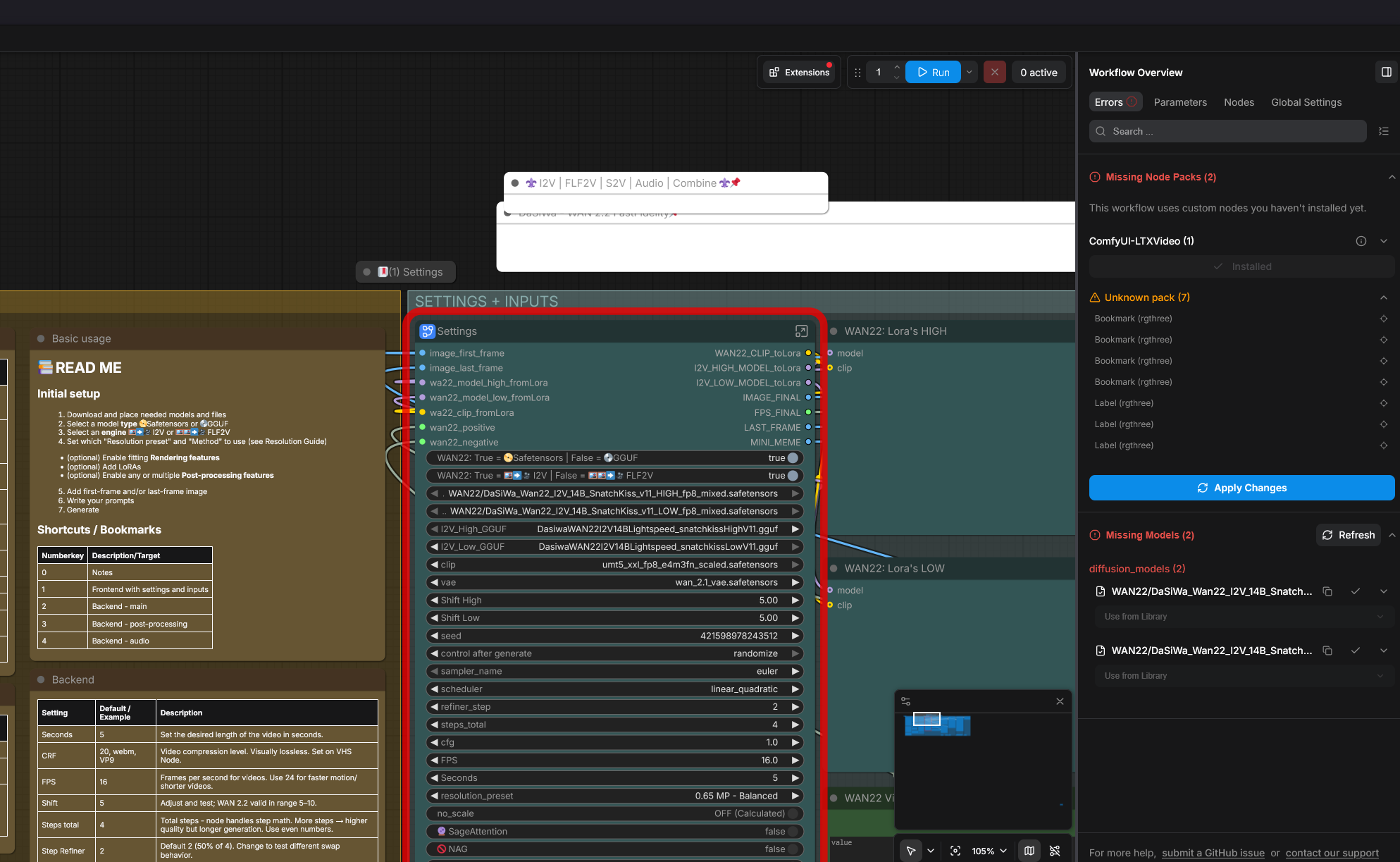
Do you mean to see the contents of the subgraph? Just double-click below the name of the subgraph.
oh! I was looking at where the upscalers are. Found those at bottom. Sorry for the dumb question
You can add your own bookmarks via rgthree-comfy, which is convenient on large workflows.
Just tried V83.json...
find error in example photo...
RuntimeError: Calculated padded input size per channel: (1 x 2 x 2). Kernel size: (1 x 3 x 3). Kernel size can't be greater than actual input size
And even when I turn no_scale off, I find that no video is saved after I complete the process. I set save_output to Video Output.
Me too
@lionhazard107 Hey I just fixed it, noob issue. Just updated my custom nodes. Tada. Working great!
@ai_machine_learner Thanks~bro
I'm trying to make a video with a resolution of 1280x720, but no matter what settings I use, the output is anything but what I need. How can I fix this?
It will always calculate the optimal resolution based on div32, except you turn scaling from image off
@Darksidewalker My images are in 1280x720. I disabled all scaling and set it to 720p.
Can you explain step-by-step how to maintain the video aspect ratio?
no_scale -> ON
Input any image, get the exact image pixels out- What I would not recommend, since this is not a valid WAN22 resolution.
If no_scale id OFF it will calculate the selected resolution based on the image with the fitting WAN22 optimal div32 resolution.
On my discord I could screenshot it, it 100% works
Sorry i finally got this workflow working with first and last frame. but i can't figure out how to run it with first frame only. instructions seem to indicate on workflow last frame is optional. but when i run it it has errors due to no image on last frame node. if i click bypass or unconnect it, it still complains missing last frame input. i looked over all the switches and i don't see a related switch. what am i missing?J
EDIT: i read other comments. it doesn't matter if i have FLF2v on or off. it still won't process due to missing last frame image or input. and i can't find any other solution. that toggle doesn't appear to do anything.
EDIT2: Turns out you do need image loaded and also that flag to "true" for it to process from single image only. in all troubleshooting i was doing and redownloading workflow to figure it out. i never loaded image again on 2nd frame so i assumed something else was wrong. it's not clear on instructions that an image must be loaded despite toggle not actually using it.
The comments are wrong, the workflow does work with first frame only, I use it 99% of the time this way.
You may have to set a last frame, what would just be the example image, but if you do not check FLF2V it will be ignored.
@Darksidewalker for me too doesn't work if flf2v off and i load only first frame. so i have to load any image to last frame. this is a logic mistake in wf.
@maxidrom It is not, it is a limitation how comfyui bypassing works. Normally there are example images by default.
I absolutely cannot get around the ComfyUI-LTXVideo: LTXVSpatioTemporalTiledVAEDecode missing issue. Clean install and fully updated to 0.24 but no luck. Tried manually installing and the workflow just doesn't want to pick it up...
if u have updated all nodes(extension-update all).u have to manually click all checkpoints in the backend.
The bode where u click all checkpoints,textencoder.there is a white button in the top right corner.it leads u to the backend.
There u have to fix all Nodes with red circle.
there is also a shortcut to just open the error massage and click on that little dot for Vae error. It leads u to that specific node with that error.
Was having the same exact issue; Downgrading kornia == 0.7.3 fixed it for me!
https://github.com/Lightricks/ComfyUI-LTXVideo/issues/494#issuecomment-4632347395
I can’t solve this problem either; I hope the author can see it.
@cvnfkdbv downgrade kornia or write the node creator on GitHub, nothing I can do.
My installer does the correct install, through.
edit pyramid_blending.py in the ComfyUI-LTXVideo folder:
Change
from kornia.geometry.transform.pyramid import (
PyrUp,
build_laplacian_pyramid,
build_pyramid,
find_next_powerof_two,
is_powerof_two,
pad,
)
from torch import Tensor
to
from kornia.geometry.transform.pyramid import (
PyrUp,
build_laplacian_pyramid,
build_pyramid,
find_next_powerof_two,
is_powerof_two,
)
from torch import Tensor
= Delete the line with "pad,". Restart comfyUI.
I FIX IT AFTER 5HOURS, use this: \python_embeded\python.exe -m pip install kornia==0.7.3
Collecting kornia==0.7.3
Where can i get the mixed safetensors?
They are all mixed
@Darksidewalker When i first loaded the workspace it asked for ...snatchkiss safetensorsmixedhigh/low and the files I downloaded from your page do not have the "mixed" label
In also have an error where those safetensors load in the I2v safetensors box where they are loaded (RuntimeError: shape '[5120, 5120]' is invalid for input of size 13929072) (i can send the whole log if need be)
And it says VHS videocombine and save image have no inputs.
Thanks for any and all help!
@Jefftheslasher That's the naming from civitai, also they need not to have that label.
I do not need any log. They are mixed, I quanted them.
If you get any errors, make sure your workflow and install is correct. That's not a checkpoint error.
1# make a working comfyui install, e.g. with my installer
2# place all needed files correctly
3# select all files correctly
Thank you for your workflow, been using it for a while. However I updated to the latest ComfyUI Desktop and now it wont work due to comfyui-videohelpersuite. reinstalling node pack doesnt work and just crashes. Any suggestions to bypass or fix this?
Thanks again!
deselect, reinstall , deselect any nodes with exclamation mark..select Ltx-video>>Requirements
Comfyui-WhiteRabbit
+ packaging, torchlanc
Sage Attention (optional)
How can I create longer videos? For example, 1 minute. There's no information about chunking.
make images in dasiwa model and use the last frame for next split, then fuse
Also, chunking is not for extending, it is a VRAM saving mechanism. Google has plenty info about that. 🤝
@camaroblackmatte581 you proposing manual generation plenty of 5s videos and then manually fuse them? so what is the value then for this wf? and why there is a time parameter in wf?
@maxidrom If you cannot see the value of all the easy to use features, well ... what should I say. Just use the basic one provided by comfyui.
The time is there and calculated so that you do not have to do it by calculating frames with seconds. You do not seem to understand how WAN22 works, so I may suggest you to read this: https://civitai.red/articles/20293/darksidewalkers-wan-22-14b-i2v-usage-guide-definitive-edition
why does the svi 4.0 workflow cause the first frame to be fine, but after a few frames everything becomes black?
Hi! Thanks for making such great work! But when I'm using FLF (both the same image), the first few frames and last few frames will always have kinda like warm up effect that causes the motion to become so low, and it looks stopped when looping. Is that some wan2.2 common issue? Or is there some setting that could help fix this problem? thx!
Is it possible to make variant for First frame/Middle frame/Last frame?
I tried using ComfyUI-Wan22FMLF by wallen0322, it worked, but had issue with very drastic color changes around middle frame. Otherwise it would've worked very well for consistent loop animations.
nice 1152x1792 40s video generated in 20 minutes. I just don't know how to remove those previews in first pass. GJ
Was audio completely removed from the workflows? The screenshot and video examples show a whole section and extra audio prompt sections that just don't exist.
I'm either doing something wrong or it was taken out?
From this one, yes it was removed, since LTX23 voice over is better.
Hello, you've created a very high-quality workflow. The videos are incredibly high quality, but I have one problem: I can't get the cut to appear after the video starts, even though it should work in Lora, which I use. Instead, the character starts morphing. Moreover, with another workflow, specifically LF t2v/i2vFFLF WF+MMAudio V1.1, with similar settings and prompts, the cut appears. What could be the cause, and is it possible to fix this?
No clue
@Darksidewalker Perhaps this will be useful to you or someone else, but I was able to activate the video editing by switching the scheduler parameter to beta.
not work for me,i use only one image and i have this error all the time,why?
Required input slots have no connection feeding them.
Upscale Image is missing a required input: image
This is only a warning from comfy for not used connection, it still works, you can ignore this
AIO workflow helped me a lot !
I don't know why but SVI workflow end up in super noised, other svi workflow works fantastic,dasiwa svi is outputting 30-40% faster than other svi but with blur and noise????
NVM svi lora was the problem i was using original one, and changed to rank128 one fixed it
how can i enhance the negative prompts? ive already enabled nag.
the video output keeps giving my b10w j0bs when im just trying to get licking.
It seems it would be quite useful to have a workflow like this, where you can specify the intermediary pictures for each step. So you could use very consinstent identities but it helps with Loras and the Prompts.
Yeah, if you manage to find a tech that enables this, tell me 😸
Your workflow includes comfyui-WhiteRabbit, but it won't install for me. No matter how many times I click "install," it's not there after a reboot. What should I do?
Try disabling TritonVAE
I cant to I2V and second image must be loaded or else i got an error :(
Just put the example there, it won't be used, the loader noods expect anything there
is there a way to make the negative prompts have weights? (to be even more negative)
Same as for positive prompt
v8.5 workflow is broken. Comyui & nodes already update to latest, Test v8.5, enable switch (Ex: Upscaled RTX, Interpolation & SageAttention) not working. Open Subgraph node, all 3 (Upscaled RTX, Interpolation & SageAttention) still in bypass node (disable). No issue with v8.3
Working on my side. Fresh comfyui install today ...
@Darksidewalker Ok. I found the issue. The latest Frontend v1.47.9 cause it broken. Working fine with Frontend v1.45.21
@mpayne1985106 sorry can you let me know how you change frontend?
@thomas852002887 I using 'ComfyUI-Easy-Install' where there included 'ComfyUI-EZi Desktop Launcher' without require using browser. In this app, go to 'Setting > Advanced > Version' there you can switch easily version for Comfyui & Frontend. Second option, you can add manually by edit 'Start ComfyUI.bat' & add the setting "-front-end-version Comfy-Org/ComfyUI_frontend@latest". Example like this: ".\python_embeded\python.exe -s ComfyUI\main.py --windows-standalone-build --front-end-version Comfy-Org/ComfyUI_frontend@latest"
Whether or not the files could be loaded into external tools was really none of your concern; I sincerely apologize for that. Your workflow allows for stable video creation, and I look forward to future updates.
Trying to use 8.6 workflow, but I am getting an error instantly about an unknown node pack (DaSiWa_EnhancedVideoCombine). I cannot find this anywhere and it does not install with your nodepack. Using Comfyui-Desktop v0.28.2.
It does install, but you need to select the nightly version since comfyui repo does for some reason pin an old version as latest.
Alternatively use GitHub to install.
@Darksidewalker Ah that is weird. Okay that resolved the problem. Thank you for taking the time.