



















Generate pictures through text,change faces on the pictures
and finally repair and enlarge them
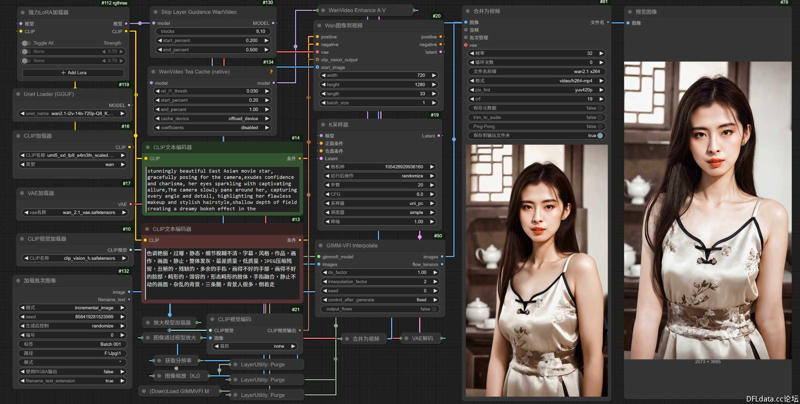
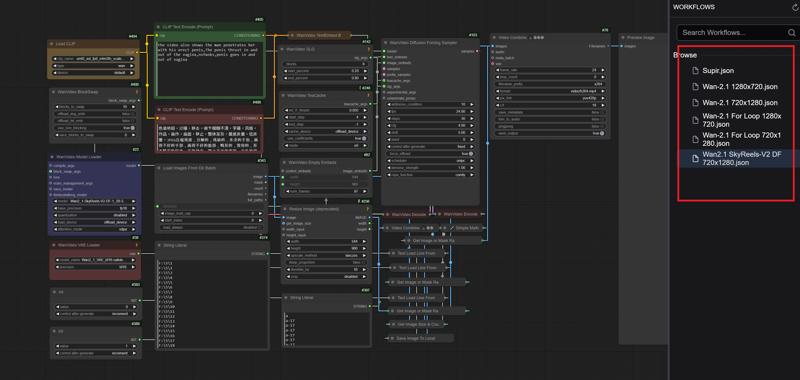
Wan-2.1 SkyReelsV2-DF Loop
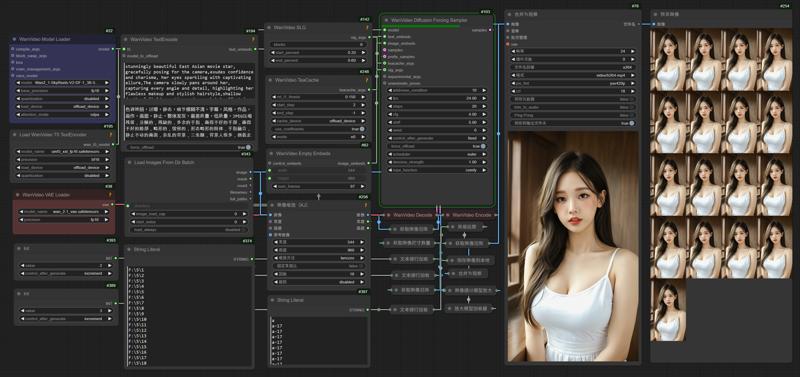
1.Comfyui
This is the Comfyui version of the deleted model. It installs the necessary nodes to ensure perfect operation and avoid installation errors. You only need to put the model download back to use it
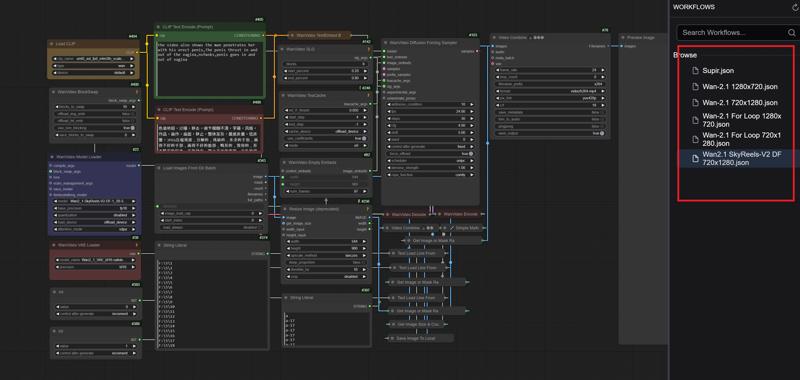
English
https://drive.google.com/file/d/1G3TOuSiygNLtTcx4vuaY92FaLWK1Tdbu/view?usp=drive_link
中文版本
https://drive.google.com/file/d/1AmVGLAVueKNvblbwC7FuwEFfeN3oB8TV/view?usp=drive_link
Official Comfyui
https://github.com/comfyanonymous/ComfyUI/releases
2.Model
ComfyUI\models\diffusion_models
Wan2_1-SkyReels-V2-DF-1_3B-540P_fp32.safetensors
Wan2_1-SkyReels-V2-DF-14B-540P_fp16.safetensors
Wan2_1-SkyReels-V2-DF-14B-540P_fp8_e4m3fn.safetensors
Wan2_1-SkyReels-V2-DF-14B-720P_fp16.safetensors
Wan2_1-SkyReels-V2-DF-14B-720P_fp8_e4m3fn.safetensors
Wan2_1-SkyReels-V2-DF-14B-720P_fp8_e5m2.safetensors
ComfyUI\models\vae
ComfyUI\models\text_encoders
umt5_xxl_fp8_e4m3fn_scaled.safetensors
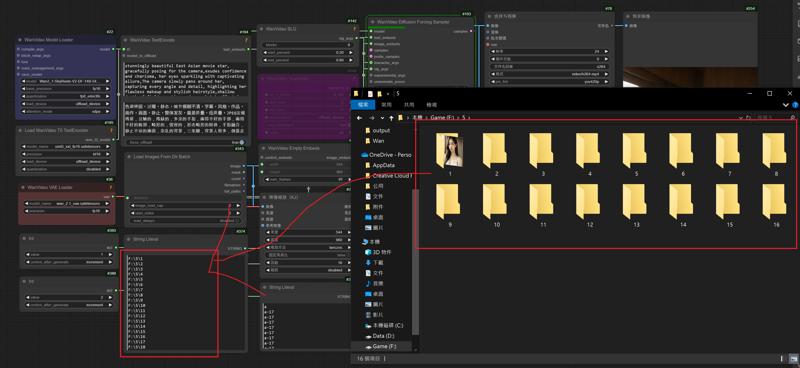
3.Add a new folder and put the pictures in "Folder 1"
Enter the folder name into the node
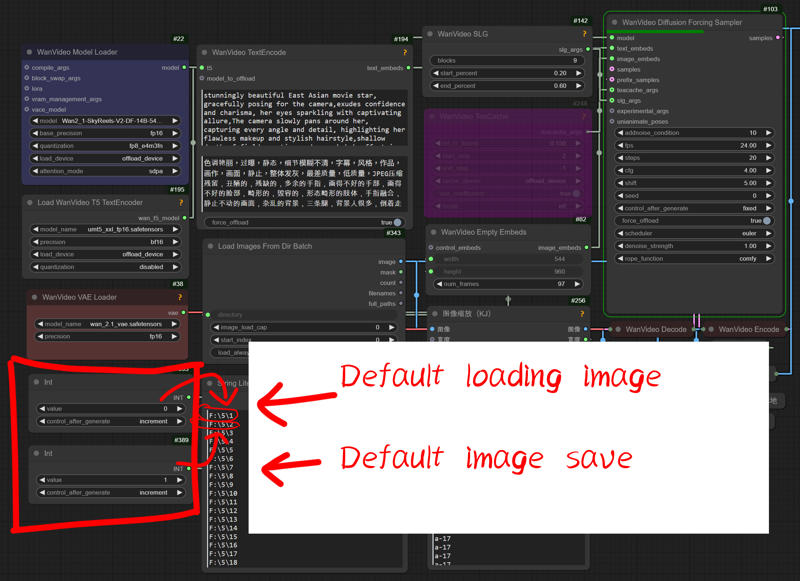
4.Set the default settings for loading and saving images to "0" and "1"
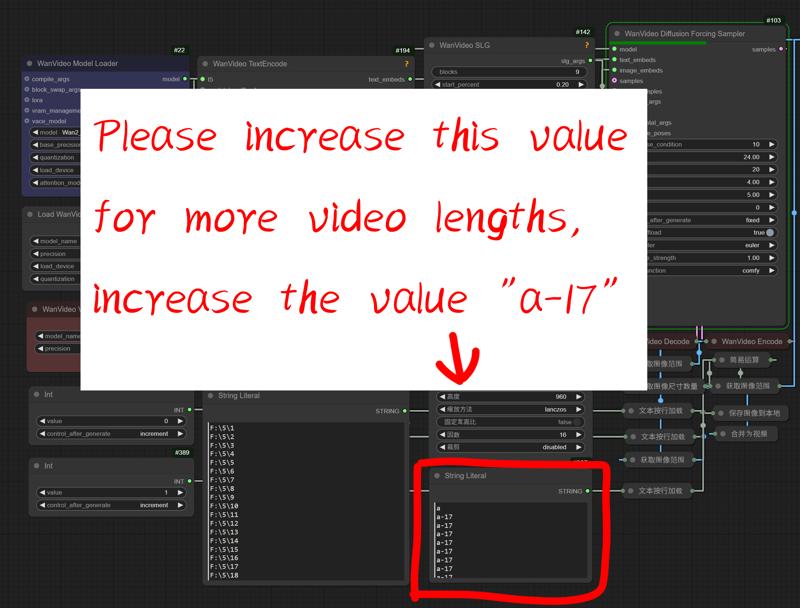
5.For longer video length please add this value
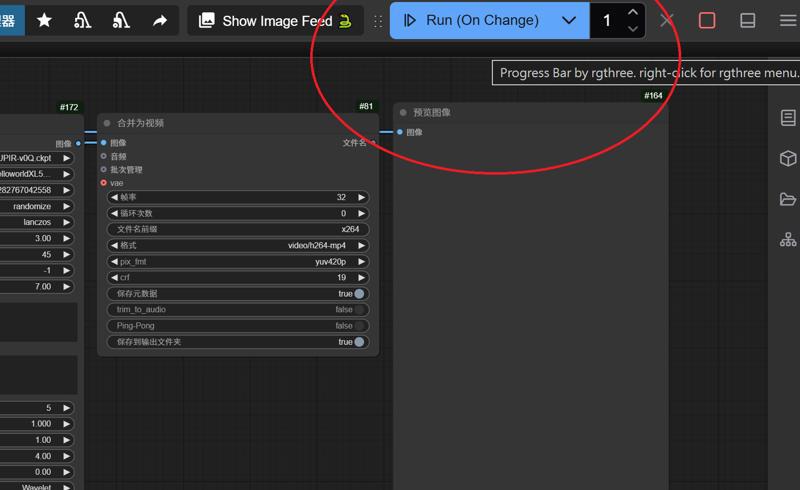
6.Switch mode to start generating videos repeatedly,Or generate it manually
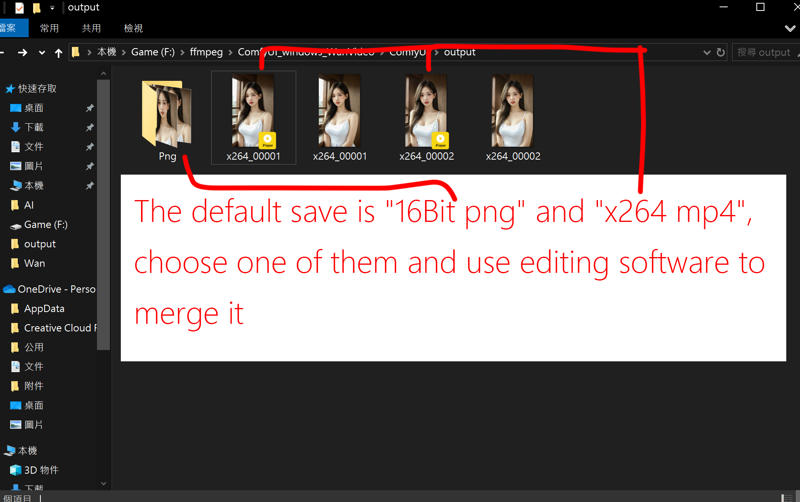
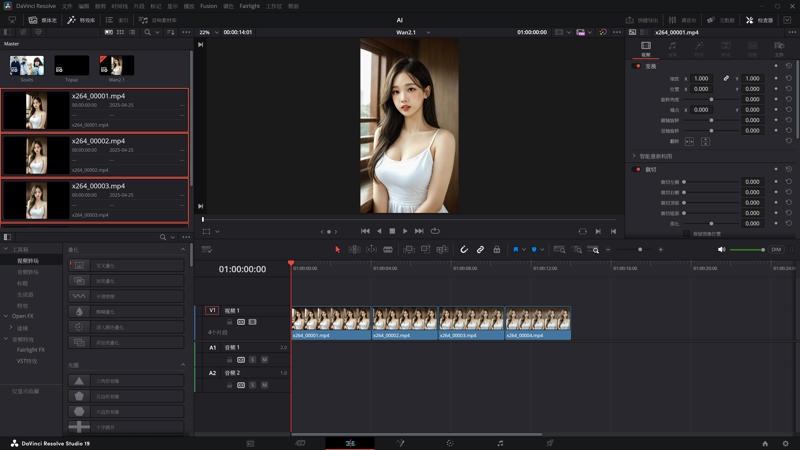
7.Merge videos using software such as "DaVinci Resolve" or "Adobe Premiere"
---
Wan-2.1 Image to Video Loop
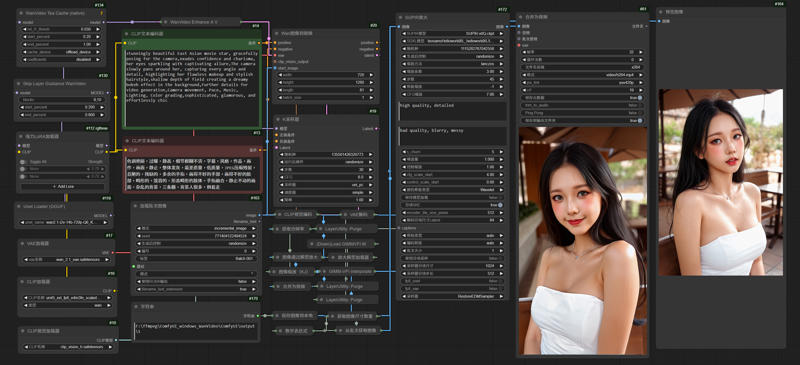
1.Comfyui
This is the Comfyui version of the deleted model. It installs the necessary nodes to ensure perfect operation and avoid installation errors. You only need to put the model download back to use it
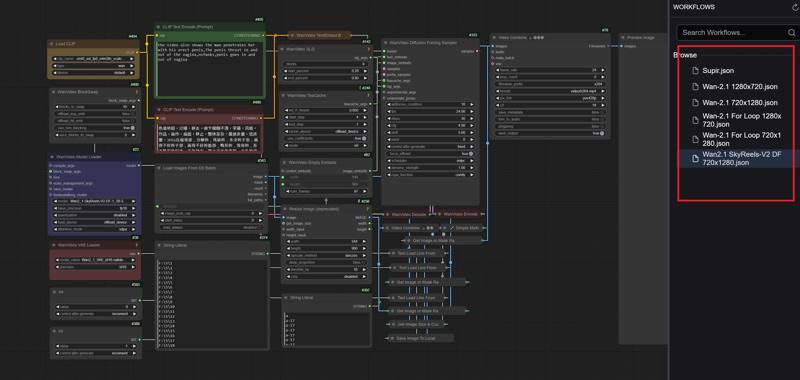
English
https://drive.google.com/file/d/1G3TOuSiygNLtTcx4vuaY92FaLWK1Tdbu/view?usp=drive_link
中文版本
https://drive.google.com/file/d/1AmVGLAVueKNvblbwC7FuwEFfeN3oB8TV/view?usp=drive_link
Official Comfyui
https://github.com/comfyanonymous/ComfyUI/releases
2.Model
ComfyUI\models\checkpoints
leosamsHelloworldXL_helloworldXL50GPT4V
SUPIR-v0Q
ComfyUI\models\clip
CLIP-ViT-bigG-14-laion2B-39B-b160k
ComfyUI\models\unet
ComfyUI\models\vae
ComfyUI\models\text_encoders
umt5_xxl_fp8_e4m3fn_scaled.safetensors
ComfyUI\models\clip_vision
ComfyUI\models\upscale_models
3.Edit your paths
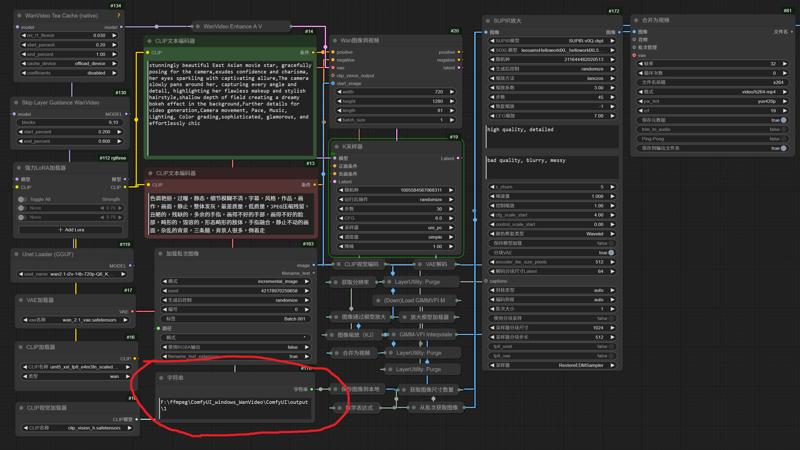
4.Edit your inage name to 999

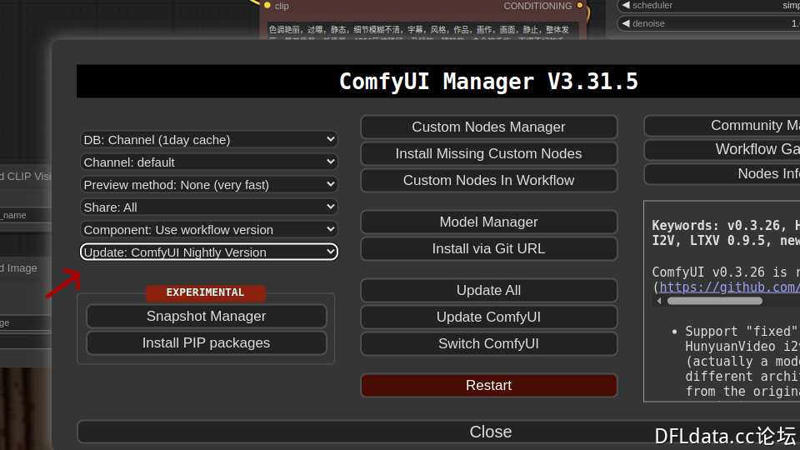
5.Updated Comfyui to Nightly
6.Change the magnification factor used by Supir to enlarge the resolution of the endframe
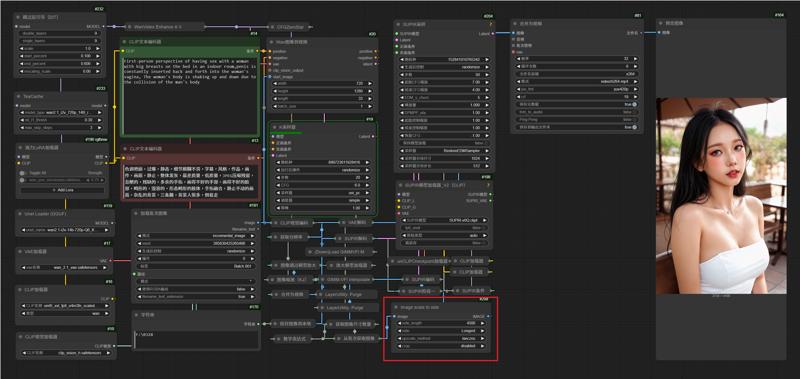
7.Edit Execution Mode
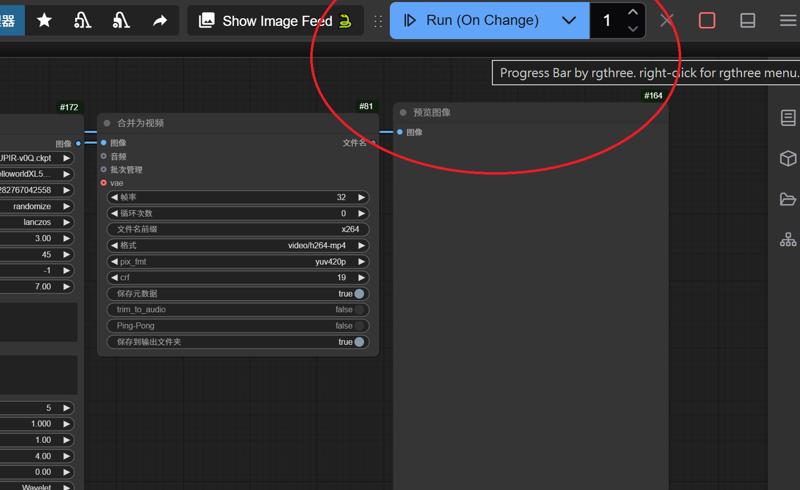
---
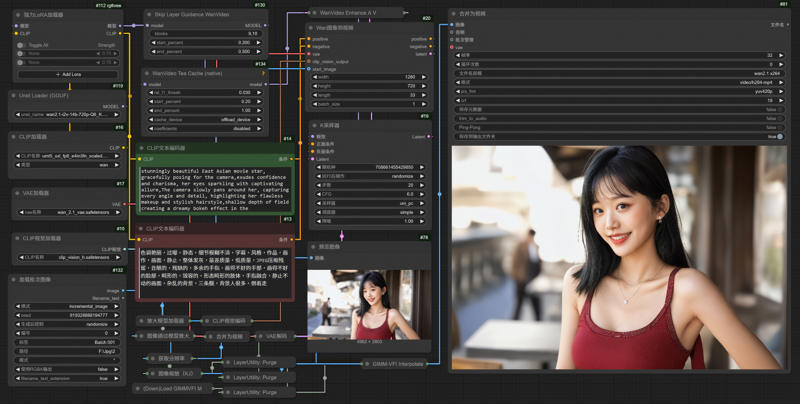
Wan-2.1 Image to Video LoRA GIMM-VFI
1.Comfyui
This is the Comfyui version of the deleted model. It installs the necessary nodes to ensure perfect operation and avoid installation errors. You only need to put the model download back to use it
English
https://drive.google.com/file/d/1G3TOuSiygNLtTcx4vuaY92FaLWK1Tdbu/view?usp=drive_link
中文版本
https://drive.google.com/file/d/1AmVGLAVueKNvblbwC7FuwEFfeN3oB8TV/view?usp=drive_link
Official Comfyui
https://github.com/comfyanonymous/ComfyUI/releases
2.Model
ComfyUI\models\unet
ComfyUI\models\vae
ComfyUI\models\text_encoders
umt5_xxl_fp8_e4m3fn_scaled.safetensors
ComfyUI\models\clip_vision
ComfyUI\models\upscale_models
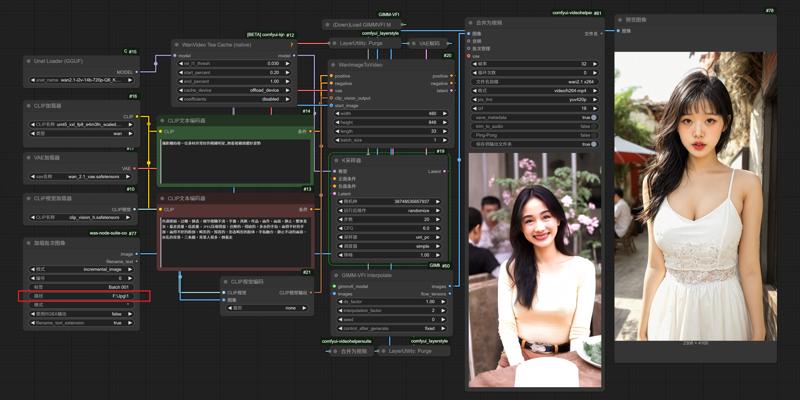
2.Edit your paths
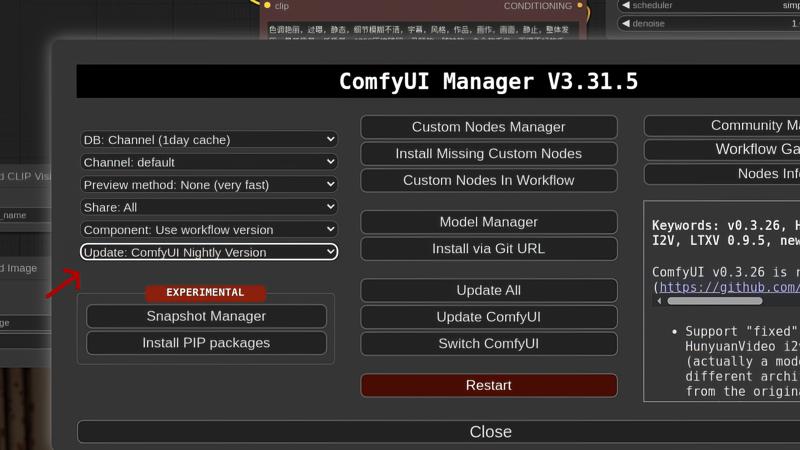
3.Updated Comfyui to Nightly
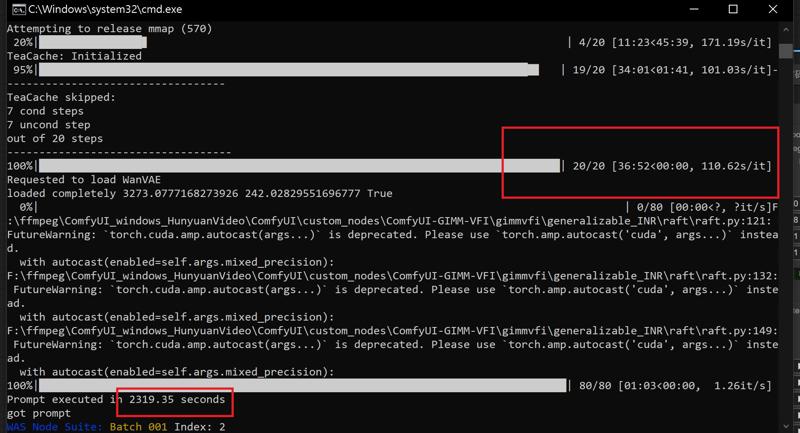
RTX 4090 24G Vram
Model: wan2.1-i2v-14b-720p-Q6_K.gguf
Resolution: 1280x720
frames: 81
Steps: 20
Rendering time:
---
Supir Face restoration
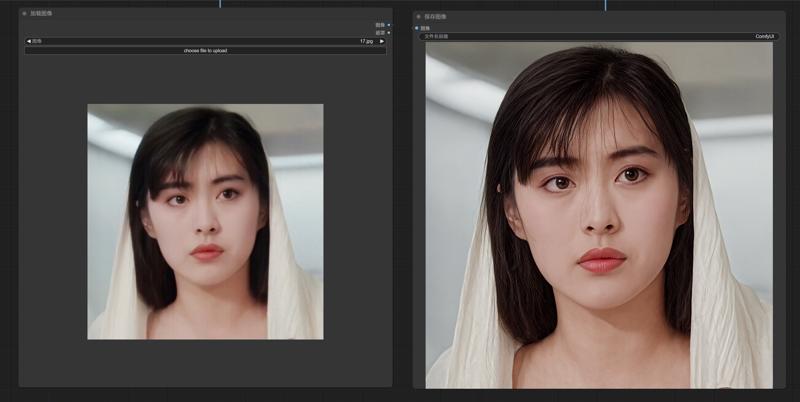
Workflows link
https://drive.google.com/file/d/1ysLZlKmAuDrWGGXmE7qRkOVw7GinuTeW/view?usp=drive_link
---
SD1.5 & SDXL - InstantID
1.Comfyui
This is the Comfyui version of the deleted model. It installs the necessary nodes to ensure perfect operation and avoid installation errors. You only need to put the model download back to use it
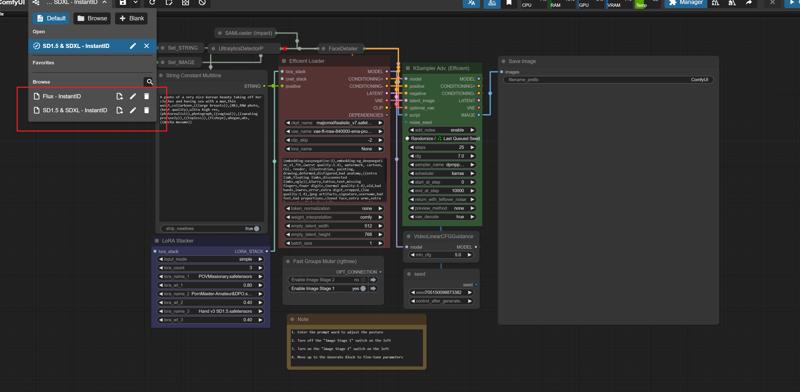
English
https://drive.google.com/file/d/10lwz7YsGxXRgGQGQr7WKAPIwSz5Qc90E/view?usp=drive_link
中文版本
https://drive.google.com/file/d/1EJ4GAw0C0ysn_CLg8Gczt2z4MQHY9A16/view?usp=drive_link
Official Comfyui
https://github.com/comfyanonymous/ComfyUI/releases
2.Model
ComfyUI\models\checkpoints
leosamsHelloworldXL_helloworldXL50GPT4V
lustifySDXLNSFWSFW_v20
majicmixRealistic_v7
SUPIR-v0Q
ComfyUI\models\loras
POVMissionary
pov-squatting-cowgirl-lora-1-mb
ComfyUI\models\vae
vae-ft-mse-840000-ema-pruned.ckpt
ComfyUI\models\clip
CLIP-ViT-bigG-14-laion2B-39B-b160k
ComfyUI\models\controlnet
ttplanetSDXLControlnet_v20Fp16.safetensors
3.InstabtID
ComfyUI/models/insightface/models/antelopev2
ComfyUI/models/instantid
ComfyUI\models\controlnet
4.
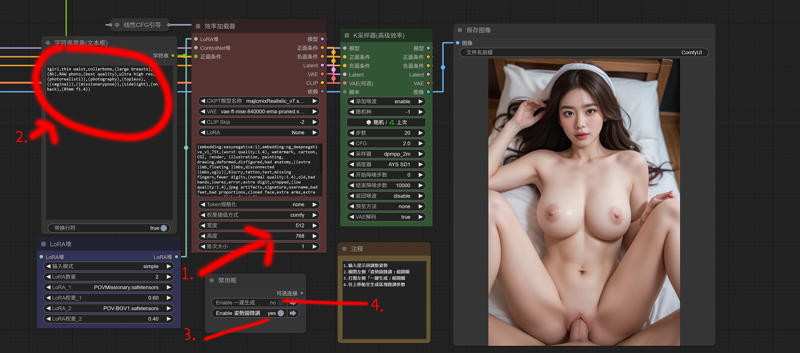
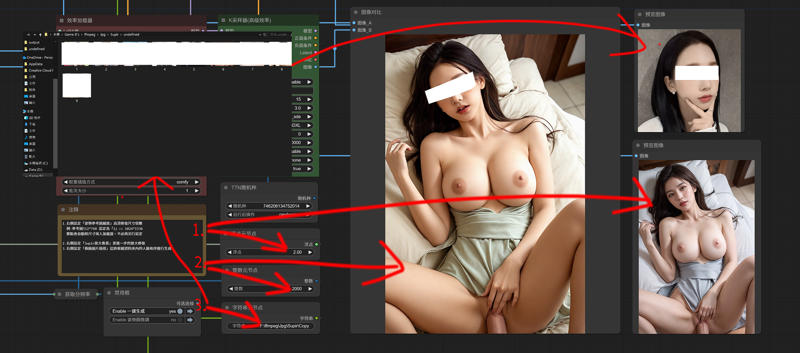
---
Flux - SDXL
ComfyUI\models\loras
Flux_小红书真实风格丨日常照片丨极致逼真
ComfyUI/models/unet/
ComfyUI/models/clip/
ComfyUI/models/vae/
Description
April 29, 2025
Rearrange nodes
FAQ
Comments (38)
大爺,我想用這工作流可一打開就一堆紅框錯誤...還有相互衝突的InstantID和zenid,另外大多都是SUPIR,但這節點已經很久沒更新了...新版COMFYUI用不了...有沒有替代方式呢
我有準備一個舊版的Comfyui連結,新版試過會爆錯,另外這邊也有整合包(百度雲盤) https://dfldata.cc/forum.php?mod=viewthread&tid=20163
大爺,我使用你論壇內的打包程式 但是打開她報錯Warning: Missing Node Types When loading the graph, the following node types were not found: AdvancedLyingSigmaSampler 宽高比 No selected item 加载失败的节点会显示为红色
是哪步驟出錯了呢
你先刪除舊的節點,路徑 ComfyUI\custom_nodes
然後下載整合的節點包放進去
之後別去更新節點應該就能用了
https://drive.google.com/file/d/1AGHCXptnHJzivcyhHxCMg2-00f2gRzN-/view?usp=drive_link (Google雲盤)
https://pan.baidu.com/s/1M5dxSt4m13zvwpBzkkpEyA?pwd=4q69 (百度雲)
我將這個放進去後,原本的問題解決了,但跑出一個新的問題 大概是
Error occurred when executing DualCLIPLoader: Error(s) in loading state_dict for CLIPTextModel: size mismatch for text_model.embeddings.token_embedding.weight: copying a param with shape torch.Size([49408, 1280]) from checkpoint, the shape in current model is torch.Size([49408, 768]).
和
Error occurred when executing Load Image Batch: cannot unpack non-iterable NoneType object File "E:\cpmfyui MIX\MIX\ComfyUI_windows_portable\ComfyUI\execution.py", line 317, in execute output_data, output_ui, has_subgraph = get_output_data(obj, input_data_all, execution_block_cb=execution_block_cb, pre_execute_cb=pre_execute_cb)
這個
@taicdf102 看起來是Flux Clip的問題,有按照Flux的Clip下載並選擇設置嗎
阿阿 有的 clip那處理完 只是用160k模型算的時候 會是黑畫面沒有圖片,另外使用一鍵生成的時候會出現
Error occurred when executing Load Image Batch: list index out of range File "E:\cpmfyui MIX\MIX\ComfyUI_windows_portable\ComfyUI\execution.py", line 317, in execute output_data, output_ui, has_subgraph = get_output_data(obj, input_data_all, execution_block_cb=execution_block_cb, pre_execute_cb=pre_execute_cb) ^^^^^^^^^^^^^^^^^^^^^^^^^^^^^^^^^^^^^^^^^^^^^^^^^^^^^^^^^^^^^^^^^^^^^^^^^^^^^^^^^^^^^^^^^^^^^^^^^^^^^^^^^^ File "E:\cpmfyui MIX\MIX\ComfyUI_windows_portable\ComfyUI\execution.py", line 192, in get_output_data return_values = mapnode_over_list(obj, input_data_all, obj.FUNCTION, allow_interrupt=True, execution_block_cb=execution_block_cb, pre_execute_cb=pre_execute_cb) ^^^^^^^^^^^^^^^^^^^^^^^^^^^^^^^^^^^^^^^^^^^^^^^^^^^^^^^^^^^^^^^^^^^^^^^^^^^^^^^^^^^^^^^^^^^^^^^^^^^^^^^^^^^^^^^^^^^^^^^^^^^^^^^^^^^^^^^^^^^^^^^^^^ File "E:\cpmfyui MIX\MIX\ComfyUI_windows_portable\ComfyUI\execution.py", line 169, in mapnode_over_list process_inputs(input_dict, i) File "E:\cpmfyui MIX\MIX\ComfyUI_windows_portable\ComfyUI\execution.py", line 158, in process_inputs results.append(getattr(obj, func)(**inputs)) ^^^^^^^^^^^^^^^^^^^^^^^^^^^^ File "E:\cpmfyui MIX\MIX\ComfyUI_windows_portable\ComfyUI\custom_nodes\was-node-suite-comfyui\WAS_Node_Suite.py", line 5304, in load_batch_images image, filename = fl.get_next_image() ^^^^^^^^^^^^^^^^^^^ File "E:\cpmfyui MIX\MIX\ComfyUI_windows_portable\ComfyUI\custom_nodes\was-node-suite-comfyui\WAS_Node_Suite.py", line 5361, in get_next_image image_path = self.image_paths[self.index] ~~~~~~~~~~~~~~~~^^^^^^^^^^^^
我有確認過圖片資料夾位置 跟圖片都有
@taicdf102 試試另一個SD1.5的工作流看圖片批次能不能跑
160K是這個"CLIP-ViT-bigG-14-laion2B-39B-b160k"嗎
這應該是後面Supir那邊的Clip,是高清修復的
算圖應該是
ComfyUI/models/clip/
沒問題了!,目前只剩這個
Error occurred when executing Load Image Batch: cannot unpack non-iterable NoneType object File "E:\cpmfyui MIX\MIX\ComfyUI_windows_portable\ComfyUI\execution.py", line 317, in execute output_data, output_ui, has_subgraph = get_output_data(obj, input_data_all, execution_block_cb=execution_block_cb, pre_execute_cb=pre_execute_cb) ^^^^^^^^^^^^^^^^^^^^^^^^^^^^^^^^^^^^^^^^^^^^^^^^^^^^^^^^^^^^^^^^^^^^^^^^^^^^^^^^^^^^^^^^^^^^^^^^^^^^^^^^^^ File "E:\cpmfyui MIX\MIX\ComfyUI_windows_portable\ComfyUI\execution.py", line 192, in get_output_data return_values = mapnode_over_list(obj, input_data_all, obj.FUNCTION, allow_interrupt=True, execution_block_cb=execution_block_cb, pre_execute_cb=pre_execute_cb) ^^^^^^^^^^^^^^^^^^^^^^^^^^^^^^^^^^^^^^^^^^^^^^^^^^^^^^^^^^^^^^^^^^^^^^^^^^^^^^^^^^^^^^^^^^^^^^^^^^^^^^^^^^^^^^^^^^^^^^^^^^^^^^^^^^^^^^^^^^^^^^^^^^ File "E:\cpmfyui MIX\MIX\ComfyUI_windows_portable\ComfyUI\execution.py", line 169, in mapnode_over_list process_inputs(input_dict, i) File "E:\cpmfyui MIX\MIX\ComfyUI_windows_portable\ComfyUI\execution.py", line 158, in process_inputs results.append(getattr(obj, func)(**inputs)) ^^^^^^^^^^^^^^^^^^^^^^^^^^^^ File "E:\cpmfyui MIX\MIX\ComfyUI_windows_portable\ComfyUI\custom_nodes\was-node-suite-comfyui\WAS_Node_Suite.py", line 5299, in load_batch_images image, filename = fl.get_image_by_id(index) ^^^^^^^^^^^^^^^
他似乎沒有辦法找到我提供給他的圖片? 是嘛
@taicdf102 是的,這個批次節點出了問題,先前我測試從頭全新安裝時報錯,是因為我去更新了這個節點,所以我提供能使用的舊點節點直接給人下載,測試在安裝上沒有報錯問題,你的圖片名稱是(1、2、3、4)排列的嗎?
對 我是用 1.2.3.4排列
@taicdf102 試試從從新導入的"加載批次圖像"節點去做連結,刪除我設置的批次節點和路徑節點,這兩個原本是同一個節點,直接在"加載批次圖像"中的路徑輸入你的路徑
有了 我將那個節點重整之後 就恢復正常了!!
最後最後還有一個疑問點是
他現在兩個圖像預覽都已經跑得出圖片
但怎麼將他們進行合成的部分呢?
目前兩個出來是分開的
我將兩個算出來後 在使用一鍵生成一次他會卡在52%然後日誌碼是以下
got prompt
Failed to validate prompt for output 614:
* CLIPLoader 551:
- Value not in list: clip_name: '160k\32bd64288804d66eefd0ccbe215aa642df71cc41\model.safetensors' not in ['160k\\open_clip_model.safetensors', '160k\\open_clip_pytorch_model.bin', '160k\\pytorch_model-00001-of-00002.bin', '160k\\pytorch_model-00002-of-00002.safetensors', '32bd64288804d66eefd0ccbe215aa642df71cc41\\model.safetensors', '32bd64288804d66eefd0ccbe215aa642df71cc41\\pytorch_model.bin', 'CLIP-ViT-bigG-14-laion2B-39B-b160k.safetensors', 'clip_l.safetensors', 't5xxl_fp8_e4m3fn.safetensors', 't5xxl_fp8_e4m3fn_scaled.safetensors']
* CLIPLoader 753:
- Value not in list: clip_name: '160k\32bd64288804d66eefd0ccbe215aa642df71cc41\model.safetensors' not in ['160k\\open_clip_model.safetensors', '160k\\open_clip_pytorch_model.bin', '160k\\pytorch_model-00001-of-00002.bin', '160k\\pytorch_model-00002-of-00002.safetensors', '32bd64288804d66eefd0ccbe215aa642df71cc41\\model.safetensors', '32bd64288804d66eefd0ccbe215aa642df71cc41\\pytorch_model.bin', 'CLIP-ViT-bigG-14-laion2B-39B-b160k.safetensors', 'clip_l.safetensors', 't5xxl_fp8_e4m3fn.safetensors', 't5xxl_fp8_e4m3fn_scaled.safetensors']
Output will be ignored
Failed to validate prompt for output 386:
Output will be ignored
WAS Node Suite: Batch 001 Index: 0
Requested to load Flux
Loading 1 new model
loaded partially 12748.63818359375 12725.718872070312 0
100%|██████████████████████████████████████████████████████████████████████████████████| 30/30 [01:24<00:00, 2.81s/it]
Requested to load AutoencodingEngine
Loading 1 new model
loaded completely 0.0 159.87335777282715 True
Diffusion using fp16
Diffusion using bf16
Encoder using bf16
Using non-tiled sampling
making attention of type 'vanilla' with 512 in_channels
Working with z of shape (1, 4, 32, 32) = 4096 dimensions.
making attention of type 'vanilla' with 512 in_channels
Attempting to load SUPIR model: [E:\cpmfyui MIX\MIX\ComfyUI_windows_portable\ComfyUI\models\checkpoints\SUPIR-v0Q.ckpt]
[Impact Subpack] Your torch version is outdated, and security features cannot be applied properly.
Loaded state_dict from [E:\cpmfyui MIX\MIX\ComfyUI_windows_portable\ComfyUI\models\checkpoints\SUPIR-v0Q.ckpt]
Attempting to load SDXL model: [E:\cpmfyui MIX\MIX\ComfyUI_windows_portable\ComfyUI\models\checkpoints\leosamsHelloworldXL_helloworldXL50GPT4V.safetensors]
E:\cpmfyui MIX\MIX\ComfyUI_windows_portable>pause
@taicdf102 下方區塊的Flux算完圖會傳給Supir v1做修復,之後會傳給換臉跟tlie做採樣順便給你一張下方區塊的預覽圖,這裡看得到批次和預覽,表示下方區塊沒問題的,接下來採樣完後會在送給Supir v2 做修復,最終產生圖片對比兩張圖,修復完和修復後,目前報錯的節點是在上面區塊的哪一個呢,外框亮紅色的
@gsk80276 目前沒有外框亮紅色的不過Supir Face 修復那個工作流程檔也是要下載丟進去的嗎? 還是內鍵就有了呢?
工作流 link
https://drive.google.com/file/d/1ysLZlKmAuDrWGGXmE7qRkOVw7GinuTeW/view?usp=drive_link
這個也是要安裝的嗎還是?
@taicdf102 這個是獨立分開的Supir工作流,只有修復舊圖的功能,針對一些解析度差的人臉照用的
@gsk80276 了解 , 目前報錯的是 最左上角兩個CLIP加載器
@gsk80276 那兩個CLIP加載器換個模型選就沒事了,目前問題是執行到71% 輪到SUPIR加載器_V2 (CLIP) ,comfyUI整個就斷線 又上跑出重新連接中 然後就沒有然後 ......
@taicdf102 它也可以不透過Clip,不過你要自己換節點,換成只有單Clip,連結的是右邊模型本身的clip
@gsk80276
紅框的是SUPIR加載器_V2 (CLIP) 他會噴出這一段
Error occurred when executing SUPIR_model_loader_v2_clip: Failed to load SUPIR model File "E:\cpmfyui MIX\MIX\ComfyUI_windows_portable\ComfyUI\execution.py", line 317, in execute output_data, output_ui, has_subgraph = get_output_data(obj, input_data_all, execution_block_cb=execution_block_cb, pre_execute_cb=pre_execute_cb) ^^^^^^^^^^^^^^^^^^^^^^^^^^^^^^^^^^^^^^^^^^^^^^^^^^^^^^^^^^^^^^^^^^^^^^^^^^^^^^^^^^^^^^^^^^^^^^^^^^^^^^^^^^ File "E:\cpmfyui MIX\MIX\ComfyUI_windows_portable\ComfyUI\execution.py", line 192, in get_output_data return_values = mapnode_over_list(obj, input_data_all, obj.FUNCTION, allow_interrupt=True, execution_block_cb=execution_block_cb, pre_execute_cb=pre_execute_cb) ^^^^^^^^^^^^^^^^^^^^^^^^^^^^^^^^^^^^^^^^^^^^^^^^^^^^^^^^^^^^^^^^^^^^^^^^^^^^^^^^^^^^^^^^^^^^^^^^^^^^^^^^^^^^^^^^^^^^^^^^^^^^^^^^^^^^^^^^^^^^^^^^^^ File "E:\cpmfyui MIX\MIX\ComfyUI_windows_portable\ComfyUI\execution.py", line 169, in mapnode_over_list process_inputs(input_dict, i) File "E:\cpmfyui MIX\MIX\ComfyUI_windows_portable\ComfyUI\execution.py", line 158, in process_inputs results.append(getattr(obj, func)(**inputs)) ^^^^^^^^^^^^^^^^^^^^^^^^^^^^ File "E:\cpmfyui MIX\MIX\ComfyUI_windows_portable\ComfyUI\custom_nodes\ComfyUI-SUPIR\nodes_v2.py", line 1171, in process raise Exception("Failed to load SUPIR model")
然後有時候是會卡在SUPIR放大那邊 就重連沒回應了
@taicdf102 SUPIR加載器_V2 有不帶Cilp的節點,試試改這個看會不會報錯,它只要連結模型本身的Cilp就好
另外想問一下 單純 RAM 32G 應該是夠跑這個吧?
@gsk80276
我換成 SUPIR加載器_V2 不帶Cilp的節點
換 SUPIR 放大 那邊卡住
@taicdf102 32G不夠,運行時尖峰能跑到90G
@gsk80276 硬性要到90以上嗎....64有機會能跑嗎
@taicdf102 分開單獨執行可能有機會省一點,參考圖、換臉、修復,流程主要是這三個,保存圖像起來,關閉節點在導入圖像單獨跑,我有附監控記憶體的Comfyui插件,你可以看看哪一個區塊最耗記憶體
好的 感謝你
@gsk80276 大佬你好 我換了ram之後 已經成功算出來了 ,但是他合成圖的臉有個大大的叉叉是該怎麼辦呢
那個叉叉會連接著眼睛鼻子嘴角 五個點
謝謝大老 我成功了
4090跑起来都要好久哦,大哥能不能搞一个速度快一点的版本啊?
我也是4090平時提示詞確定好後,都掛機抽卡,對速度無感,Supir放大本身很耗時,要速度只能降低放大倍數
@gsk80276 我看您flux流生成的图片质量就已经很高了,请问为什么还需要放大呀?
Supir能在把一些模糊的地方修復回來,這在早期不靠Tile放大的工作流程很有用,早期出圖限制在Sdxl的解析度單靠換臉出來是模糊的,後期導入Tile放大,一定程度追上了Supir,兩種都用只是讓它在變的更好,而且我測試Tile放大解析拉高太多,出圖會受影響,變成要更高解析還是要靠Supir
i want to add this to my comfy ui but never used it before so not sure were everything goes and some links dont download
Can you give me the link name I need? I'll look it up, thank you
Is there any way to control timeline in I2V Wan? i mean prompt scheduling? if yes, how? frustating the the AI must do all the storytelling