
Comfy Workflow to Generate Videos super quick and reliable using the new Pyramid Flow, now with Miniflux!
Automatic Outpainting
Vertical/Orizontal switch
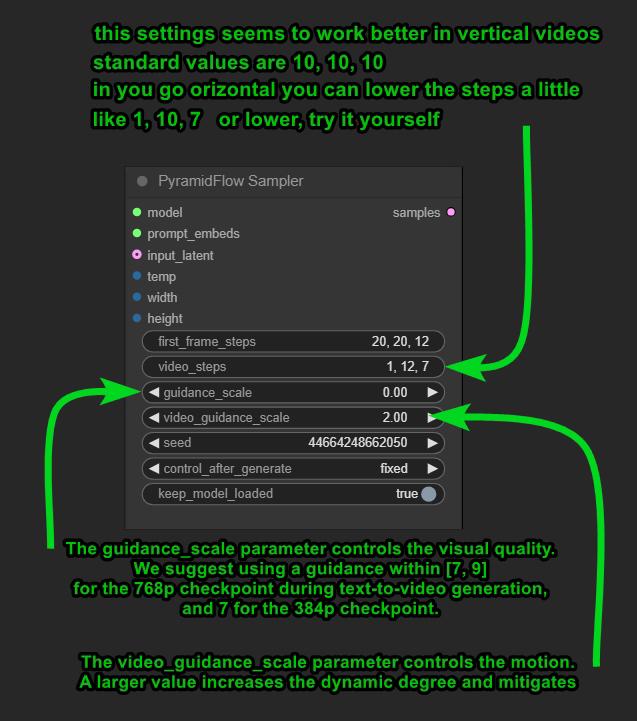
For 10-second video generation, we recommend using a guidance scale of 7 and a video guidance scale of 5.
Description
Added input image switch, to switch from orizontal to vertical images
workflow refinements
FAQ
Comments (28)
Hell yeah! Was looking forward to pyramid flow making it to comfy. Excited to try and I did not even get to Mochi yet 😅
Which one would you prefer?
at the moment Pyramid is my fav one, followed by CogXfun1.1 2b and 5b for their versatility and control.
Mochi is incredible but the fact that is slower make me want to DIE 😂
@LatentDream Pyramid is really amazing and so fast! The speed of CogVideo was already a little slow, especially when going the full 50 steps 49 frames to get a clear image, it took me ~10 minutes I believe. Only to get a weird sideways backwards motion not mentioned anywhere in the prompt or something like that and having to start over 😅
@redpinkretro thats another reason why i dont make long videos. models are still not 100% reliable to risk wasting energy for nothing. shorter is fun 😅
@LatentDream Yeah, absolutely. I remember the showcase videos for my workflow were a pain to create for the parts where I had to go full length. Shorter is definitely more fun and more reliable, as video gen falls apart so quickly after a couple seconds. Not always, but often it just gives in to entropy 😅
I want to try to chain link the last frames of pyramid clips as first frames for iterative generations to string together a longer video that has some level of stability. Though each snippet would require its own seed and could potentially drift off and would need to be redone individually. Not sure yet how, but I want to look into that 😅
@redpinkretro i thought that too (the chain) and is in my todo list..but somthing tells me it will fall in pieces. if you noticed, the inoput image after few frames is kinda modified by the model, this process 100% can't be repeated for more than 2 times without having a massive color switch and degradation. same thing i did in the COG workflow with the extend function.
@redpinkretro about the COG speed, you should definetly try other COG models, like the Xfun1.1 wich can take various size/ratio/frames amount. thats really fun and quick also. check my "its' alive" workflow i published
@LatentDream Yeah with cog you can at least use interpolation to define a solid last frame yourself. I am not too hopeful about that idea with pyramid in its current state, but maybe it will get some interpolation functionality at some point. Surely must be on the devs minds as well.
@LatentDream The XFun models are definitely so much more fun to use with all their flexibilities. I believe I downloaded a version of it at some point, but never managed to look into it. Definitely need to check it out. I also need to update mine at some point. Not satisfied with its current state. So much to do, so little time 😅
You're the video guru in Comfy! Works great. Is there a SD3 version planned? The SD3-based models support 768p up to 10-second video at 24FPS.
they are going to release more models i think.
Personally i don't use to make long videos cause usually they never works with my prompts ..
I need a special finetune to avoid thing turning into other things.. that happens so often 😁 So i keep staying under 3 seconds
you can actually change resolution of the workflow to one of this:
192 (crap)
320x192 or 192x320 (need too many steps to avoid broken result)
320x320 (useless)
384x384 (need too many steps to avoid broken result)
488x488
448x512
512x512
576x320
576x576
* 640x384 (my fav) or vertical 384x640 (wich need more steps in vertical)
* 640x448
640x640
704
704x448
768x768
832x512 or 512x832
896
960x576 or 576x960 (this one is really nice but make things a bit slower)
1024x576 or 576x1024 (slooow)
1280x768 or 768x1024 (this one is crazy slow)
i may have missed some 🙄
@LatentDream Thanks, I'll try it. Small resolutions are of little interest to me in general, longer but higher quality is better.
How Can I Use this workflow? I tried and only created an image. Not a video.
@midiaplaay Just load the image in the yellow square, load the models, write a prompt and it should work. There is nothing special there, only for the model 768 it is necessary to set the resolution not less than 768 by 768, otherwise the output will be garbage from artifacts. On a normal model you don't need to change the resolution settings, the best option is set there. Double-check the models, maybe you have loaded something wrong. Drag and drop the original workflow downloaded here, download the exact same models as they are set there, re-select them, and that's it.
@superuser111 This error "!!! Exception during processing !!! range() arg 3 must not be zero" in PyramidFlow VAE Decode
Hi! I am attempting to make a video from an image, and it seems to work great for the first second or so, then all of a sudden it collapses into a strange mess. For example, in a landscape scene it begins moving erratically and blending into each other, and with people their faces sort of melt away and it all gets meshed together. I've tried messing with so many of the settings to no avail. I'm wondering you have any insight as to why this may happen. Thank you!
is all about steps and cfg and luck.
more video steps equal more details, wich dont necessary means better results.
i suggest you to experiment a lot with short lenght videos so use few frames and change video steps to understand how it works
I am using pyramid flow installed via pinokio. I am getting better results than HaiperAI on my $1k laptop with a nVidia 4060. Maybe give the pinokio one a go. it worked right off the bat, only one setting and prompts for img2vid. Only horizontal, but i put vertical images on the horizontal neutral colored background and works great.
The 768 version of the miniflux model is out. Compared to the old version, it looks really good.
yeah it is! very different results but i guess depends on what you are looking for. for simple movements the smaller is good enough
@LatentDream I was impressed with what it can do well and at higher resolutions. For example 1024x1024. I liked the result very much.
Please, any tutorial for using this workflow?
Just load the image in the yellow square, load the models, write a prompt and it should work. There is nothing special there, only for the model 768 it is necessary to set the resolution not less than 768 by 768, otherwise the output will be garbage from artifacts. On a normal model you don't need to change the resolution settings, the best option is set there. Double-check the models, maybe you have loaded something wrong. Drag and drop the original workflow downloaded here, download the exact same models as they are set there, re-select them, and that's it.
This error "!!! Exception during processing !!! range() arg 3 must not be zero" in PyramidFlow VAE Decode
@midiaplaay https://github.com/kijai/ComfyUI-PyramidFlowWrapper/issues/46 Try to recreate the VAE node by right-clicking, at the bottom of the menu there will be an item (fix node recreate). Use Google, there's a lot there already.
@superuser111 thanks for help man. actually i was playing with thte 768 model yesterday, i must say that sometimes gives really different results and you are right, it require higher resolutions to work. but i'm ok with the smaller one cause is faster too 😛
@superuser111 I did! Thanks.