


Overview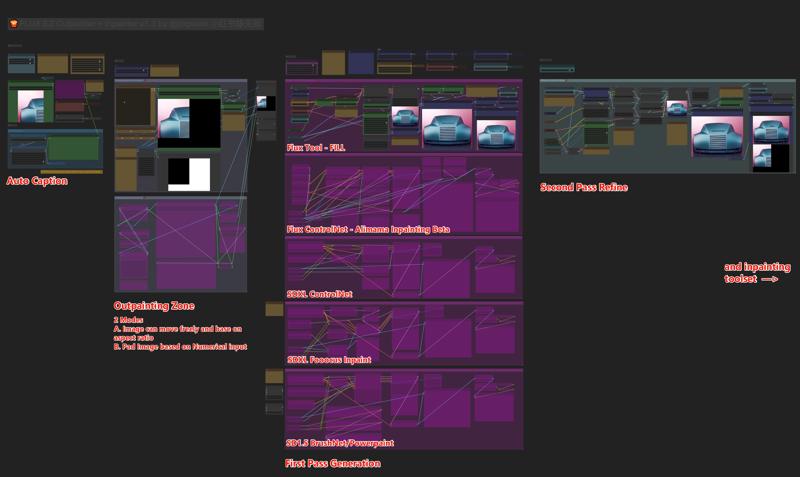
NEW Update v1.3!
1.3:
Newly added Flux Tool Fill model Support for Outpainting!
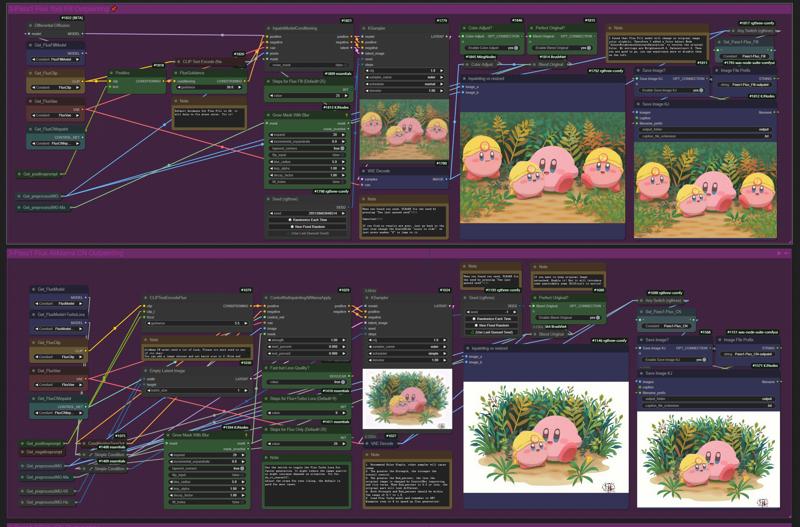 Better input image size calculation! Now the image and Mask will be automatically converted to supported size at which the inpainting model is trained.
Hello!
You can quickly navigate the entire workflow by typing in numbers 1 to 4. Start by uploading your image and work from left to right.
I’ve highlighted key points near each important node and group. Happy Outpainting! If you notice anything I might have missed, please let me know, and I’ll update it to improve.
I’ve created four separate Outpainting subgroups for you to experiment with:
Flux Tool - Fill
Flux ControlNet Inpaint from Alimama
SDXL Union ControlNet (inpaint mode)
SDXL Fooocus Inpaint
SD1.5 BrushNet/PowerPaint (Legacy model support)
Remember, you only need to enable one of these. The Fast Group Bypasser at the top will prevent you from enabling multiple ControlNets to avoid filling up VRAM.
I highly recommend starting with the Flux AliMama ControlNet Outpainting method. It’s easy to set up and ready to go. The other options, including SDXL CN and SDXL Fooocus methods, are legacy inpainting and outpainting methods, which still perform well with certain types of images. I encourage you to try them all yourself. Currently, I believe the AliMama Beta Inpainting model is slightly undertrained, which may sometimes create black borders near the edges of the image. You might want to switch to a different seed for better results.
I’ve also included the traditional BrushNet/PowerPaint inpainting method for you to try. It was the best during the SD1.5 era. BrushNet is good for inpainting, while PowerPaint works well for both inpainting and outpainting. Unfortunately, PowerPaint is no longer compatible with SDXL.
指南:
您可以通过输入数字1到4快速导航整个工作流程。首先上传您的图像,并从左到右进行操作。
我已在每个重要节点和组附近突出显示了关键点。祝您愉快地进行图像扩展!如果您发现我遗漏了什么,请告诉我,我会更新以改进。
我为您创建了四个独立的图像扩展子组,供您进行实验:
Flux Tool - Fill
Flux ControlNet 局部重绘 from 阿里妈妈
SDXL Union ControlNet(填充模式)
SDXL Fooocus Inpaint
SD1.5 BrushNet/PowerPaint(旧版模型支持)
请记住,您只需启用其中一个。顶部的快速组旁路器会阻止您启用多个ControlNet,以避免占用过多的VRAM。
我强烈推荐从Flux AliMama ControlNet图像扩展方法开始。这种方法设置简单,随时可以使用。其他选项,包括SDXL CN和SDXL Fooocus方法,属于旧版填充和扩展方法,它们在某些类型的图像中仍然表现出色。我鼓励您自己尝试。目前,我认为AliMama Beta填充模型略显不足,可能会在图像边缘产生黑边。您可以尝试更换不同的种子,以获得更好的效果。
我还包括了传统的BrushNet/PowerPaint填充方法供您尝试。它在SD1.5时代是最好的。BrushNet适合填充,而PowerPaint则适用于填充和扩展两者。不幸的是,PowerPaint不再支持SDXL。
The Thumbnail Animation created using this workflow. Please Try!
动画我用的这个工作流生成的,CogVideoX还是很强大的,回头再发一个修改后优化版本的动画的工作流
Model you need:
Base Model:
Flux - Pixelwave (Highly recommand!)
https://civarchive.com/models/141592/pixelwave
If you like to try SDXL or SD1.5 method, use any corresponding model as you desire.
I used Juggernaut XL and majicmix
ControlNet:
For Flux
AliMama Inpaint Beta ControlNet (Recommand)
https://huggingface.co/alimama-creative/FLUX.1-dev-Controlnet-Inpainting-Beta
Flux Turbo Alpha Lora (Optional)
https://huggingface.co/alimama-creative/FLUX.1-Turbo-Alpha
For SDXL (Optional)
SDXL ControlNet Union ProMax
https://huggingface.co/xinsir/controlnet-union-sdxl-1.0
For Fooocus (Optional)
Please check other source for more guide on this, it used to the best inpaint technique next to BrushNet
https://huggingface.co/lllyasviel/fooocus_inpaint
For BrushNet/Powerpaint (Optional)
Link inside the repo description
https://github.com/nullquant/ComfyUI-BrushNet
V1.25 Update
New Outpainting Area (Numerical) Method
Inpainting workflow (Step 5) to iron out all inperfection!
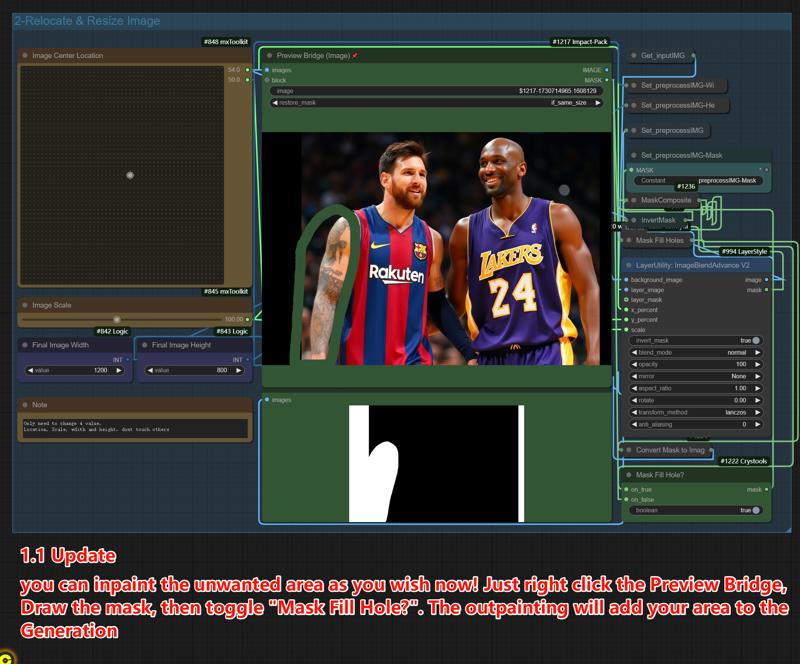
Custom Mask before Outpainting (v1.1)
V1.2 Update
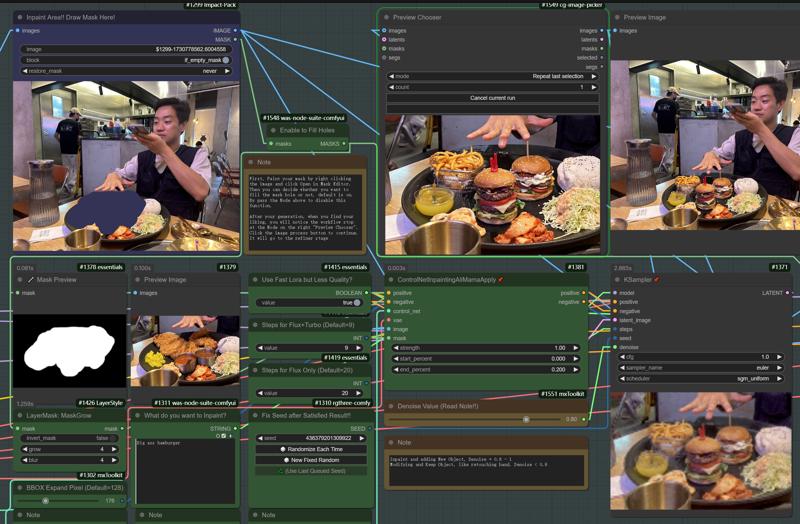
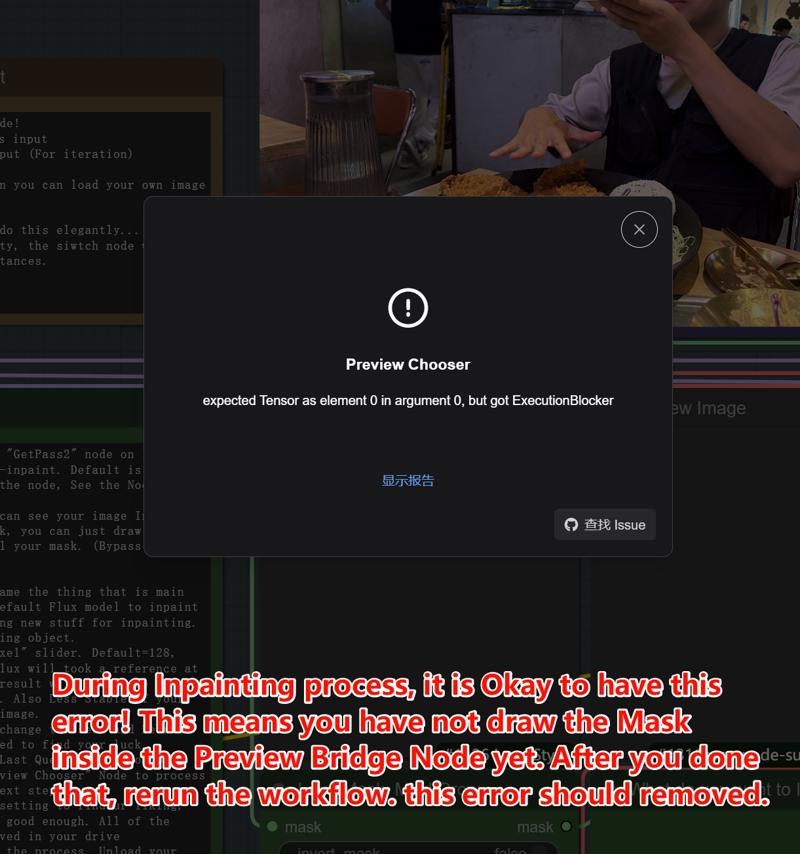
In the Brand new inpainting Workflow Section Dont panic when you have this error! See the image and Note inside workflow to find out.
This just means that you need to draw your mask inside the Preview Bridge.
V1.1 Update
Please contact me on in instagram.com/jingtianli
and on https://www.reddit.com/user/jingtianli
or 小红书 静天战
Thank you!
Description
V1.25 Add Numerical Inpaint Mask Method (See description)
V1.2 Add Inpainting Workflow!
Initial Release
FAQ
Comments (2)
Where does this node come from?
Missing Node Types When loading the graph, following node types were not found AdvancedLyingSigmaSampleroh you can just delete this node, it is not useful after many test,
I have deleted that node, sorry please redownload this workflow.