

no need to buzz me, i'm fine. ty 💗 feedbacks are much more appreciated.
check older versions for more video examples.
Credits and acknowledgments at bottom below.
__________________________________________________________________________________________________
This ComfyUI workflow offer different ways to make I2V by using 6 Video models:
LTX
CogVideoX-5B-1.5-I2V
Pyramid Flow
CogVideoX-Fun-v1.1-InP (2B)
CogVideoX-Fun-v1.1-InP (5B)

⚠️⚠️⚠️⚠️⚠️⚠️⚠️⚠️⚠️⚠️⚠️⚠️⚠️⚠️⚠️⚠️⚠️⚠️⚠️⚠️⚠️
This is designed to be fast and accessible, featuring a Front-End UI (Console) that includes all the necessary settings to easily produce high-quality videos as fast as possible, without the need to constantly navigate through tons of different modules. It also incorporates various additional experimental methodologies I use, which require the installation of multiple custom nodes.
As a result, this workflow is not recommended for beginners.
For a simpler experience, try the MINI version included in the zip, a stripped-down variant of the full workflow.
The workflow incorporates settings based on my hands-on experience with various video models, settings that may differ from the standard configurations typically associated with each model.
__________________________________________________________________________________________________
- - - | IT'S ALIVE | - - -
This is the result of over a month of work, almost daily.
I still keep improving it, optimizing and adding useful settings I came across or that i find by experimenting.
The workflow is designed so that you never have to leave the control room (console);
everything you need is right there at your fingertips.
Some extra tweaking commands are accessible via keyboard shortcuts (more info below).
__________________________________________________________________________________________________
Different methods are provided and can be selected with a slider:
Creative: In this mode, a single image is used as input, and the model generates a video with full creative freedom, determining its own ending.
*This method works with all Video models avaible in the menu.Sticky: In this mode, a single image is used as input, and the workflow automatically generates an ending frame that closely resembles the input image but with a slightly different perspective or altered facial expression if a person is detected. This new image, which resembles and references the input image, can be fine-tuned using convenient sliders available in the "Tweaking" section. This allows for maintaining the overall composition throughout the video.
*This method works only with COG models (for now), so make sure to activate it in the console.Zoom: In this mode, a single image is used as input, and the final frame of the video is a zoomed-in version of the input image. The zoom level can be adjusted in the "tweaking" menu. *This method works only with COG models (for now)
Img1→Img2 (Custom Start/End mode): This mode allows for the use of two or three images as inputs, enabling the model to create transitions between them. It is particularly useful for controlled animations and performs well with 5B COG models. *This method works only with COG models (for now)
Img1→Img1: This mode uses a single input image as start and end, so focuses more on maintaining the composition of the input image *This method works only with COG models (for now)
__________________________________________________________________________________________________
Shortcuts:
You can navigate through the only sections you need by using 3 keyboard keys:
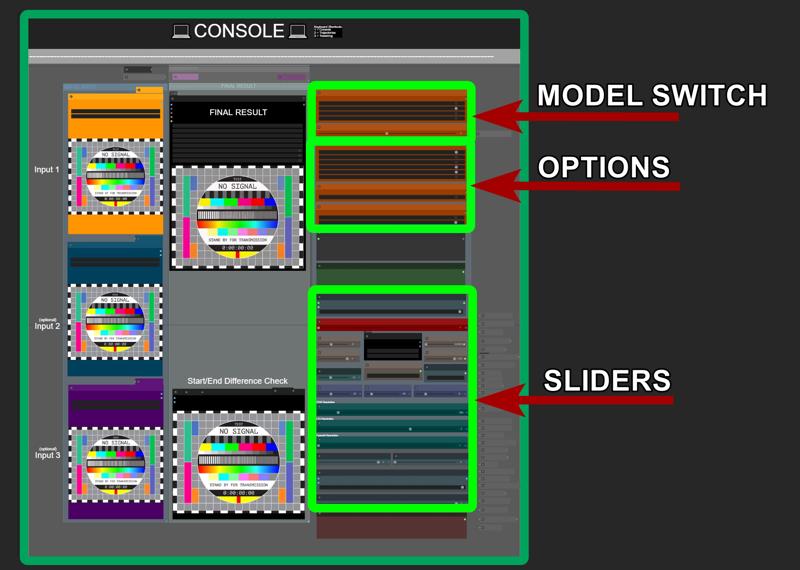
1 = CONSOLE
Press the "1" key to access the console, where all the settings you need are available and easy to access.
2 = TRAJECTORIES (TORA - COG)
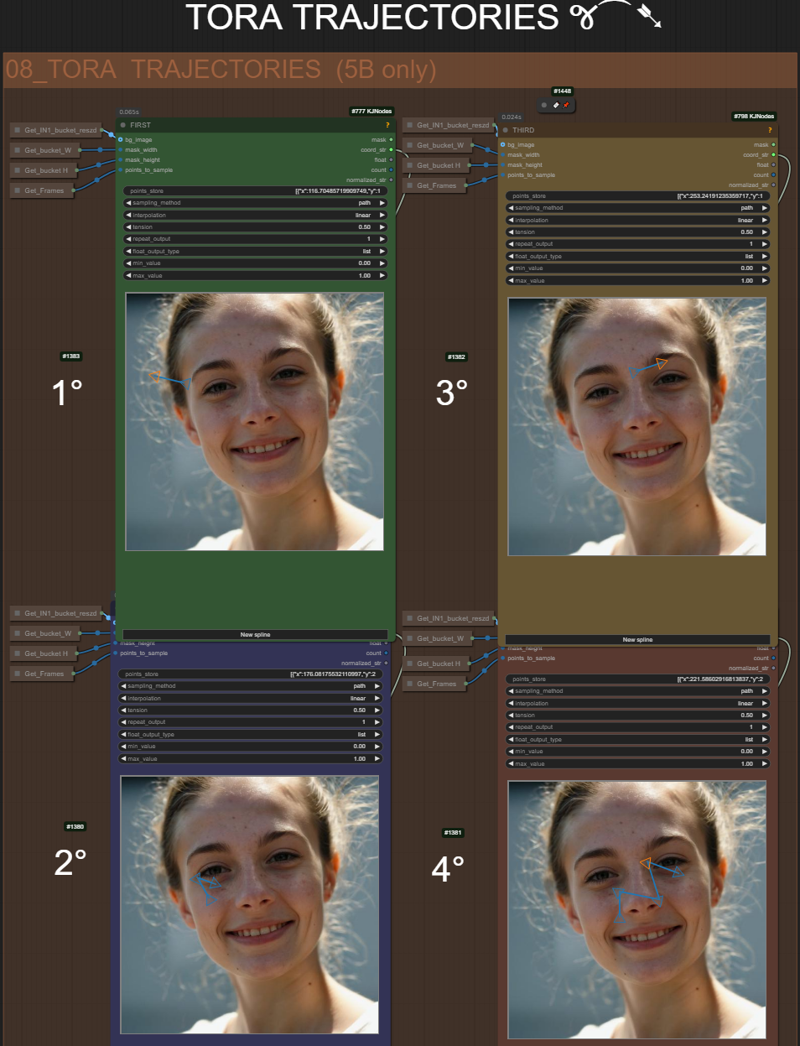
Press the "2" key to access Tora Trajectories
This method is exclusive to COG models.
The only compatible model avaible in this workflow that works with TORA is "5BInP"
and must be selected as showed below:

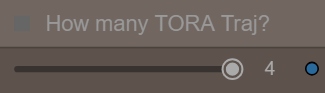
Four combinable trajectories are available .
You can activate only 1, 2, 3, or all four using a dedicated slider avaible in the console:
Be aware that each time you change the base resolution or input image you must redo all trajectories.
3 = TWEAKING
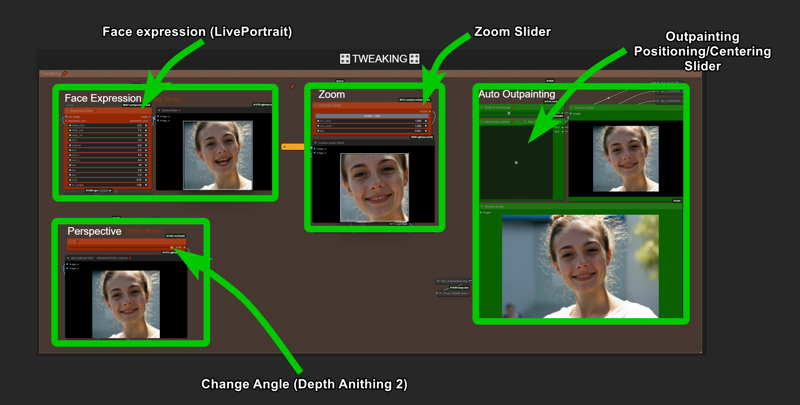
Press the "3" key to access Tweaking section.
Here you can adjust the ending frame for STICKY MODE to closely resembles the input image but from a slightly different perspective/angle or a different face expression/head position, ensuring the final frame remains similar or nearly identical to the initial image while incorporating subtle variations.
Auto Outpainting is avaible on the right, so you can copy the result and paste it back as input in case you need (Outpainting need to be activated in the console)
__________________________________________________________________________________________________
Cleaning VRAM when change model is reccomended:
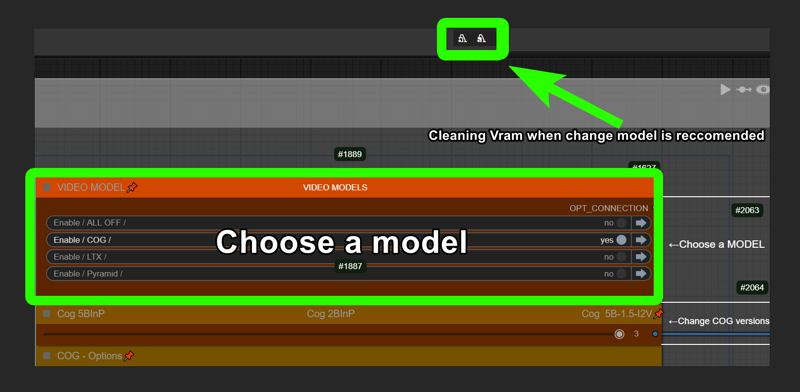
__________________________________________________________________________________________________
__________________________________________________________________________________________________
__________________________________________________________________________________________________
### Troubleshooting:
This error message in console is completly normal:

### Minimum Hardware Requirements:
12GB VRAM for low resolution.
### Render Times:
On 3090 takes from 5 seconds to 2 minutes or more for each videos, depending on models/resolution/steps.
### Important COG Suggestions And Examples:
- To achieve a good, consistent result, then using "First/Last" mode, the two images need to be similar (same location, people, and very close positioning of everything) eg: You can choose to use any images, but you'll get the best results if you use two images that are fairly similar. For example, try pick two screenshots from a random internet video or two 3D characters posed in two different poses. or two similar AI-generated images 🙄
- Stay around 10-15 steps, go higher for better quality. (it's hit or miss below that, although I’ve gotten some nice ones at 5 steps).
- For quick tests, use a lower base resolution (like 320). At that resolution it takes around 10 seconds on my 3090.
- If the results are full of artifacts, switch to "custom prompt only" to avoid auto-prompting and get more stable, consistent animations, by simplify the prompt. Write something simple
(check manual written in the workflow)
Simple prompts like "a person posine, blink, camera shake" or words wiggle, earthquake, lens flares, blink, camera shake, handheld camera have already been tested here with great success. Please share your findings!
- If the video seems too fast for your settings, turn on interpolation in group and raise the "extra interpolation multiplier" or change the video length in the COG settings group according to user manual written right inside the workflow.
### Other Considerations:
I've tested Cog A LOT and changed the values from the standard settings to something I think works better/faster, at least based on my tests.
Feel free to make your own changes (and if you find better settings, please let us know)!
no need to buzz me, i'm fine. ty💗 feedbacks are much more appreciated.
__________________________________________________________________________________________________
*Please note:
do not confuse the different Cog models, as there are many, and they differ from one another.
I suggest taking a look around to understand what the other Cog models are capable of. There is a bit of confusion around,
here's a spredsheet by Kijay to clarify some misunderstanding
https://docs.google.com/spreadsheets/d/16eA6mSL8XkTcu9fSWkPSHfRIqyAKJbR1O99xnuGdCKY/edit?gid=0#gid=0
In general if you are looking for a way to produce videos quickly, with the most dynamic options, resolutions, ratios, first/last, trajectories then I recommend sticking to this workflow or at least using the models I use in this workflow.
SINCE TORA IS NOW COMPATIBLE WITH THIS XFUN VERSIONS OF COG I ADDED IT IN THE FLOW.
__________________________________________________________________________________________________
__________________________________________________________________________________________________
CHANGELOGS:
V8.0
changelog:
completly redone the entire workflow + cleanup and better logic.
added 3 video models
added auto outpainting
added liveportrait
Creative mode now works as it should, with no images selected as ending
holy s**t this took me a week to finish
__________________________________________________________________________________________________
V7.0
changelog:
Workflow clean, bug fixes.
__________________________________________________________________________________________________
V6.0
changelog:
added 4 Tora trajectories
More UI controls
Better settings, refinements and tips inlcuded
to use tora be sure you are using 5B model (there's a switch to change from 2B to 5B)
then:
1)deactivate "let's Cog" in groups
2)load an image, run
3) setup 4 trajectories (control+click to break the splines in multiple points)
4) activate "let's Cog" and run (the "extend video" will automatically turn on when you activate "let's cog", deactivate it for now untill i figure how to extend this tora mode)
__________________________________________________________________________________________________
V5.0
changelog:
Extra Extend ( ability to load a third image to create a video using 3 images)
More UI controls
Better settings, refinements and tips inlcuded
__________________________________________________________________________________________________
V4.0
changelog:
EXTEND now works for all modes (except first last mode)
improved UI
+ lora strenght slider
+ seeds management
+ prompt strenght
+ COG frames amount control
+ model selector 2B/5B
+ negative prompts
other changes:
efficiency improvements
completly revisited chain system
some minor fixes
__________________________________________________________________________________________________
V3.0
|changelog|:
improved UI:
added lora loader and strenght slider
model selector 2B/5B
negative prompts
some workflow efficiency improvements
other changes:
switched to a faster interpolation method
some minor fixes
updated user's manual
__________________________________________________________________________________________________
V2.0
|changelog|:
more refined workflow
more options
simple ui
added User's Manual
__________________________________________________________________________________________________
__________________________________________________________________________________________________
A special thanks to Kijai , Purz and the team at Rgthree , DreamProject and VideoHelperSuite, who dedicated their time for help me resolve some steps i thought were impossible to solve.
I encourage you all to visit their pages and support their projects
__________________________________________________________________________________________________
__________________________________________________________________________________________________
📽️H A V E F U N📽️
Description
thanks for feedback, all conflicts should be fixed now.
The workflow is also updated with latest cog nodes.
FAQ
Comments (59)
oct 2024.
Still my fav I2V workflow
Hi, am I the only one who have this error :
Cannot execute because a node is missing the class_type property.: Node ID '#209'
what can i do please ? I think i have pb with mixlab
uhm no idea sorry. everything updated?
@LatentDream python is 3.10, is it the reason ? ( i am afraid to update because i have pinokio )
I got this as well, this was the last and only node I couldnt find
@bigfishman @kuro59
i added a new version in the same ZIP file now, is called MINI,
with less stuff, only essentials.
Hopefully you'll be more lucky with that.
@LatentDream thanks ill try it out !
My computer died because it ran out of memory. For reference, my RAM is 32GB. Why does this happen?
Yes, for some reason both models are loaded at once, both 5B and 2B at the same time (not sure why). I have 32 ram too and everything works. Set the swap file to 47 gb. If video memory is also lacking, enable "enable sequential cpu offload" in CogVideoModel and enable "Enable vae tilling" in all CogVideo Decode. I also replaced the clip loader node T5 encoder with GGUF Q3. You can also replace the basic models with GGUF, but for some reason they work only in the old version of CogVideo node. After updating it gives an error. And also there is no lora (at least in the old version).
@superuser111 hey brother 🙂 yes low ram/vram should should change T5 and deactivate nodes not used probably. I'm on 64ram and 3090. Focused on Vram and saw it never went above 12 so i wrote the description as is.
Enable VAE tiling was active till V4, i choose to deactivate cause some tile can cause overlap but again, less RAM/VRAM maybe better adjust this settings accordingly expecialy if generating A LOT of frames.
About the lora: Thats up to you to load a lora or not. there are really few loras around for COG
@LatentDream Hi bro! I have 12 gb Vram, and I can tell you for sure, when "Enable vae tilling" is not active, it crashes with an error. You don't notice it because the memory is probably used for a short time. Without "enable sequential cpu offload", it also crashes immediately. About the lora, I get an error when enabling it in v4. I don't understand why, I downloaded the same lora as in workflow. I will try in v5. Thank you for such a cool workflow!
@superuser111 thanks! i now added that vae tiling in the mini workflow wich i added in the zip
Hi, i have a error: "'list' object has no attribute 'startswith'" with node nr. 445, can u help me please?
no idea. sorry
If you want you can try redownload the ZIP file, wich now include a second version called MINI,
with less stuff loaded inside, only essentials.
Maybe you'll have more luck with that
I can't find the following nodes:
CogVideoXFunResizeToClosestBucket
AppendStringsToList
be sure you install missing nodes. ComfyUI-CogVideoXWrapper in particular
@LatentDream reinstalling helped
What am I missing I keep getting Depthflow
The truth value of an array with more than one element is ambiguous. Use a.any() or a.all()
depthanything2 is used to simulate different angle view of the input images, to make video extend mode works in "sticky mode". is just an option. don't use the "stiky" mode and bypass depth anything group or delete it completly if you are experiencing issues
awesome thank you
i added a new version in the same ZIP file now, is called MINI,
with less stuff, only essentials.
Hopefully you'll be more lucky with that.
@LatentDream I only see ITS_ALIVE_5_FINAL.json in the zip file for the latest version. I downloaded all versions and none of them had a mini file
@lewisayers252 You were unlucky to arrive at the wrong moment when I was replacing the versions. Now you can download it
The workflow includes multiple nodes, some of them keep getting updates so the workflow keep break one day or the other.
I’m doing my best. sorry. installed a clean comfy, updated on the latest version of everything and made some adjustements.
V7 is up. give it a try.
The workflow includes multiple nodes, some of them keep getting updates so the workflow keep break one day or the other.
I’m doing my best. sorry. installed a clean comfy, updated on the latest version of everything and made some adjustements.
V7 is up. give it a try.
Anyone know how to get past the string function node in the math group? Have tried messing with the variables but nothing works. Loaded in as "replace", "no", "5", "4".
I limited the control panel to 01 lets cog, and 08 Florence caption. But I get the red outline on the string function node. Appreciate any help.
why you need to touch that math panel? thats only some math for switching images for the extend mode
@LatentDream Exactly! that's my question :) I'm hoping to leave it alone. The whole process gets stuck at the math panel. No idea why. Any tips? To be more precise its the "string function" and "text to number" nodes that get the red outline. Be great to see someone open the workflow, and see what they have to do to get a working generation. Currently I make sure all the models in the green box are there (the only difference from the example is that I can't find: "tfxxl_fp8_e4m3fn_scaled", so instead I use: "tfxxl_fp8_e4m3fn" ...could that be an issue?) . Then I load an image, add a prompt and hit queue pompt.
you can try redownload the ZIP file, wich now include a second version called MINI,
with less stuff loaded inside, only essentials. Hopefully you'll be more lucky with that.
The workflow includes multiple nodes, some of them keep getting updates since they’re relatively new, like the COG ones, so the workflow break.
I’m doing my best. sorry.
I just released a new update, v7. give it a try.
I tried to run it for 4 hours today but I ran into many problems, am I going about this fundamentally wrong somehow?
I was able to get it down to just missing one node
ChatGPTShowText or smth
lemmeknow, I just deleted it from the json and am trying to see if it works without it, node #209
maybe you mean "showTextFotGPT" from Comfy-MixLab-Nodes. You need that in order to mix custom prompt and auto prompt. if you are not interested in auto prompting you can just bypass the entire thing as well as Florence
If you want you can try redownload the ZIP file, wich now include a second version called MINI,
with less stuff loaded inside, only essentials
@LatentDream Yeah it worked when I removed it so I just went with it, but good to know what it was for
@bigfishman had to reinstall everything from skratch and i got the same exact problem. i just swapped that node with "show any" from easy-use pack. it was a node to show text that probably isnt updated from long time and dont work anymore it seems
@LatentDream Ok sounds good!
Theres only 1 workflow in the zip and it doesn't contain the tora workflow?
You were unlucky to arrive at the wrong moment when I was replacing the versions. Now you can download it
@LatentDream
Damn bad timing. I guess I got bad timing again aswell.
Lots of errors in mini and full workflows nothing works
* CogVideoXFunSampler 428:
- Value 1003046072779429 bigger than max of 2048: height
For some unknown reason it keeps setting the height to this ridiculous number and erroring
- Value not in list: scheduler: '0.5' not in ['DPM++', 'Euler', 'Euler A', 'PNDM', 'DDIM', 'CogVideoXDDIM', 'CogVideoXDPMScheduler', 'SASolverScheduler', 'UniPCMultistepScheduler', 'HeunDiscreteScheduler', 'DEISMultistepScheduler', 'LCMScheduler']
And it keeps trying to set a float as the scheduler value. I cant even open up your older workflows to see what its meant to be because older workflows are glitching aswell now with the same problem
The positive and negative prompt sockets on CogVideoXWrapper aren't connected to anything, so its throwing an error also
Here I recorded the problem https://youtu.be/pKpAX_1TIx0.
Cant complain that I didn't post an image or something this time :P
And yes everything is updated.
Any ideas on why the workflows are broken?
Thought I'd have another go at trying to get your workflows working but it seems like all the tora stuff is connect wrong aswell
Failed to validate prompt for output 304:
* CogVideoXFunSampler 428:
- Return type mismatch between linked nodes: vid2vid_images, TORAFEATURES != IMAGE
CogVideoXFunSampler
Error while processing rearrange-reduction pattern "B (T H W) C -> (B T) C H W". Input tensor shape: torch.Size([2, 10752, 1920]). Additional info: {'H': 19, 'W': 28}. Shape mismatch, can't divide axis of length 10752 in chunks of 532
@cjanderson88506 Yes, ComfyUI is a complex thing that can just break any workflow after any update. For some reason I have a completely different sampler, no previews in it, and the scheduler in its place. Try to install this workflow on a clean Comfy, nodes conflict very often. I can tell you for sure, everything works here, I only have an error when I turn on Lora, I haven't figured out why, everything else works fine.
The workflow includes multiple nodes, some of them keep getting updates so the workflow keep break one day or the other.
I’m doing my best. sorry. installed a clean comfy, updated on the latest version of everything and made some adjustements.
V7 is up. give it a try.
@cjanderson88506 Also, the problem may be in Python 3.12, people say many nodes do not work correctly on it. Try version 3.11.9, I use it.
hi thanks for the mini add, i have still an issue with comyui art venture, i didnt see a response that work for me on the net. anyone here has found a solution ? or is it possible to change that node with another ?
The workflow includes multiple nodes, some of them keep getting updates since they’re relatively new, like the COG ones, so the workflow break.
I’m doing my best. sorry.
I just released a new update, v7. give it a try.
So weird, getting Allocation on Device error. I have 32G ram. I tried the suggestions in the other comment to no avail.I also sometimes get "The size of tensor a (number) must match the size of tensor b (15451) at non-singleton dimension 1. The whole things halts.
Additionally, I'm getting a "Failed to validate prompt for output 812:
* ImageCompositeMasked 810:
- Required input is missing: source"
error in console, not sure if that's fatal/related or not.
The workflow includes multiple nodes, some of them keep getting updates since they’re relatively new, like the COG ones, so the workflow break.
I’m doing my best. sorry.
I just released a new update, v7. give it a try.
@LatentDream Omg, no need to apologize! Thanks for the response and your work on this. Will test it out next time I'm able!
I always ran out of ram early in the workflow (also 32GB). I changed the 5b node so that it loaded the same 2b model as the 2b node and I was barely able to squeak by with 82% ram usage. I think both the 2b and 5b models are being loaded at the same time. I tried disabling the 5b node but the switch requires it. I am going to try removing the switch and connect the 2b node directly and see if that works. If it does, I think changing from an after load switch to a bypass will resolve these kinds of issues.
-----update-----
that worked to control the ram issue. I ran into another problem after that and was (kind of) able to resolve it. Like you mentioned before, the nodes are being updated frequently. CogVideoXFun Sampler threw and error stating that height was an unknown key. I used fix node v2 from the context menu. that changed the fields shown on the node. several of the input parameters, including height, have been moved into the node itself. This disconnected some of the input values, namely, CogVideoXFun Resize T. The workflow completed after this. I wonder if there is a way to lock down the version of a given node so you are not chasing random node updates on your workflow. I think it's great in concept, just a bit tricky to keep up with.
I suppose I should note my system specs for reference. I have an Nvidia 3090 with 24GB of vram, 32GB of system ram and I am running comfy in docker. this keeps things like this from crashing my computer :) The docker container hits 100% about when I am at 85% host ram. So I am not getting the full 32GB, somewhere around 16GB give or take is what the container is getting. now that I have dug into this a bit, I think I need to provision more ram to docker in general.
@lewisayers252 yeah you are right, i forgot to enable the tiles, you can do it by yourself meanwhile i release another update. is an option right under the cog module that avoid filling ram/vram too heavily.
@lewisayers252 turn on "enable_vae_tiling" on each Cog video Decode node. i'll set that enabled as default on next update, wich will include live portrait too 😎
I already had vae tiling enabled so that part was not a hindrance. My biggest problem was the CogVideo Models getting dumped into ram on load. They were both loading even though you only select one. I was able to get a workflow to complete by bypassing the switch and disabling one of the cog model loaders. 2b worked fine but 5b by itself flooded my ram. I am incrementally increasing the ram allocation to docker to try to give it enough room to breathe. I get why the developer of these cog model loaders load into ram before vram. the transfer between ram and vram is almost instant which really speeds up processing. I just wish there was some better config options to control how the models load.