
What is this?
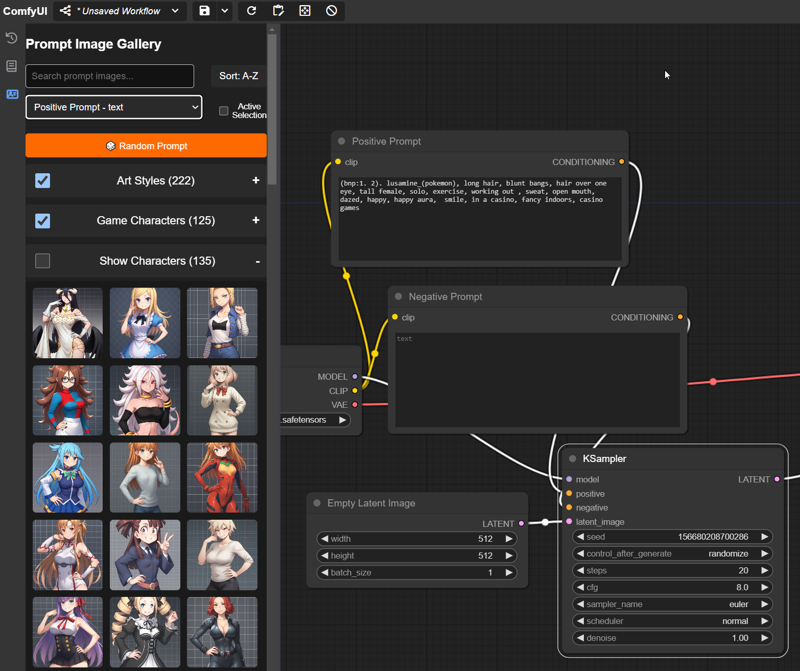
A custom node that adds a UI element to the sidebar that allows for quick and easy navigation of images to aid in building prompts. Download all the supported image packs to have instant access to over 100 trillion wildcard combinations for your renders, or upload your own custom images for quick and easy reference.
(Note: All supported packs are tailored for Pony. Art Styles won't apply well elsewhere, but other packs should be "fine.")
Updates
v1.1
Added support for all of the latest wildcard vaults, up to Artstyles III (09/22/24)
Up to 320 supported art styles for Pony!
Revamped data handling so now new libraries can be added without needing new code (yay!)
Added new option to DISABLE automatic library updates (turn this off if you mess with the new json file)
Added support for "random" items (2 are included in the Stereotypes G1 Vault)
Some code cleanup that no one really cares about.
v1.0
Initial release, no reason to download it now honestly but keeping it here just in case.
Features
Snazzy sidebar menu that holds images you can use for prompt building - click and go!
Built in support for all of Navimixu's PonyXL Wildcards Vault
If you get all these you've got access to ~950 options and ~ 150trillion combinations 😲
"Smart" Search and Sort functions (Search works by both name and theme, so you can search for things like "cute")
Easily add your own images to the Custom category
Automatic metadata extraction for prompt tags on custom images (only works with default ComfyUI nodes ATM, works well with FLUX though!)
Drag and drop images with embedded workflows to load it on the canvas (similar to how the new queue works)
Installation
Registry / Github (preferred)
Install it via the Registry - https://registry.comfy.org/publishers/kinglord/nodes/comfyui_prompt_gallery
or
git clonethis repo into your ComfyUI custom nodes folder
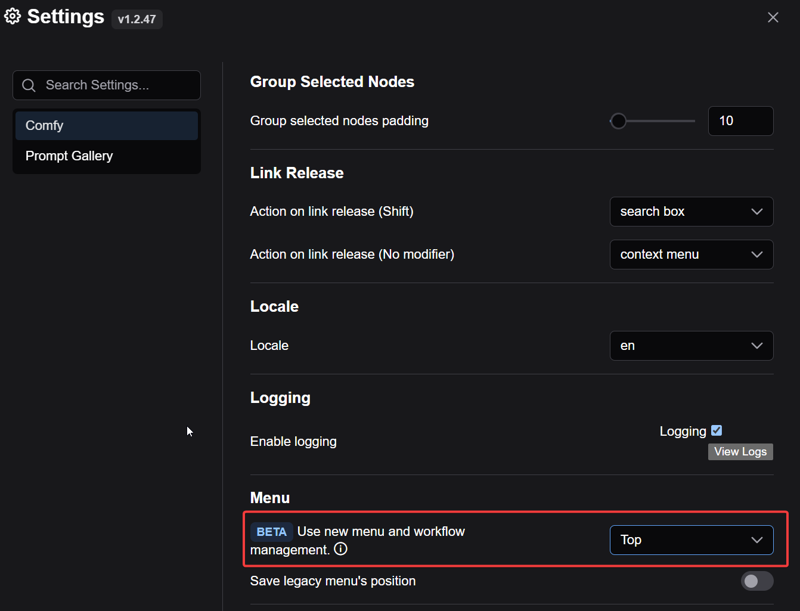
Make sure you are using the new menu
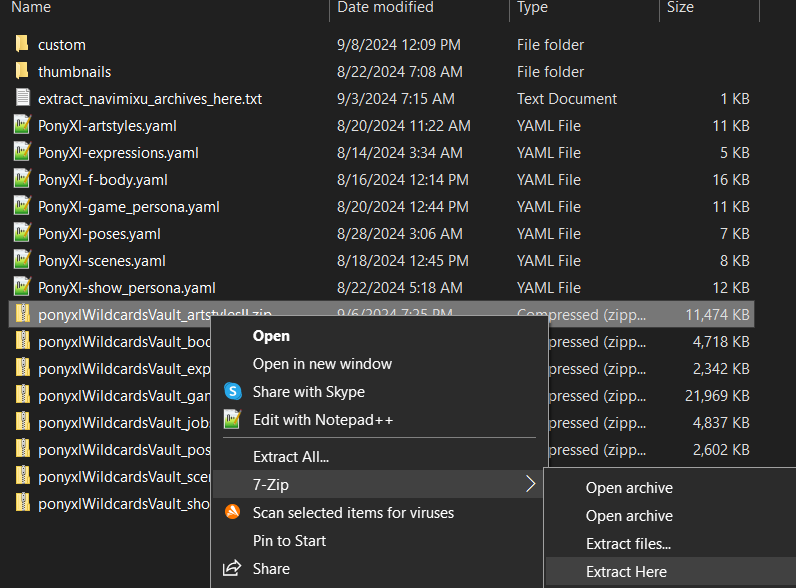
Download any or all (or none if you're gonna be like that) of Navimixu's PonyXL Wildcards Vault and extract them into the
promptImagesfolder (located inside this custom node directory). If you do it right your folder should look like this with all the pack images in various subfolders underthumbnails- (you don't have to keep the zip files):
Manual
Download the zip file attached to this post and then "Extract/Unzip Here" into your ComfUI Custom Nodes directory.
I don't know how often I'll be updating the file here which is why I recommend one of the other versions above, but I won't tell you how to live your life
You too, need to use the new menu
Follow the same download instructions as above ^.
Usage
Click on any image in the gallery to copy its prompt tags to the node of your choice or to the clipboard for easy pasting.
You can also select any node in your WF you want to send the text to it "automagically" for super easy prompt building!
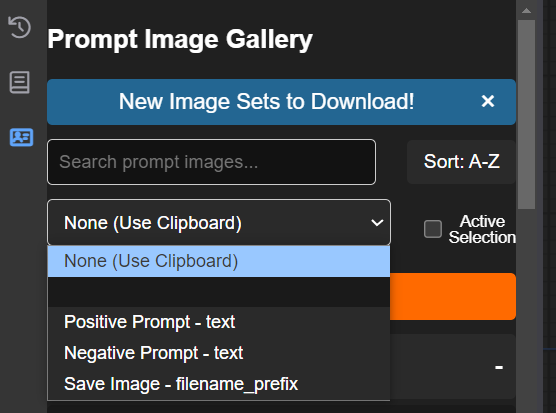 Choose from any assortment of categories to build your very own complete "wildcard" style prompts. 🎲
Add some images to the sidebar yourself via the Custom category.
Drag and drop custom images with embedded workflows onto the canvas to load their workflow.
Customize the look and feel of the UI via the integrated Settings options!
NOTE - If you use Pony in particular the Art Style category makes it super easy to see what various tags can do!
Limitations
Doesn't do well getting metadata from complex workflows or prompts in non-core nodes. (You can help make this better if you find something it fails with and let me know.)
The category order also controls the order of the prompt tags during random prompt generation, it lets you control the ordering at least.
Requirements
This is a front end plugin so you must use the new menu for to work, you can enable it in the ComfyUI settings here (Top or Bottom doesn't matter)
ComfyUI 0.1.3+
No python requirements since it's just front end code!
Credits
@navimixu (MVP)
I also totally yoinked one of their placeholder images 💖
Comfy Org (Duh)
Special shoutout to ltdrdata for helping me get things out of the Input folder 💙
Description
Initial Release
FAQ
Comments (13)
we need something like this but for loras, a lora gallery to know what the lora is (sometimes, when you have over 200 loras you don't really know them by name but by looks
I try not to duplicate other efforts if I can help it, and what you're looking for I think you'll find here. There's a lot of other code as well in this but the assets downloader is very handy (i don't honestly use the other stuff)
https://github.com/Nuked88/ComfyUI-N-Sidebar
@KingLord I love you for giving me this link, however i do quite prefer your sidebar, i will respect your decision to make the same thing
@Casanova_ Sure thing, and what I built doesn't really duplicate anything he's doing, I was just talking about why I don't think I'd built a Lora side panel since his does a good job of that, you can use mine and his together! I am building something Lora related that's a bit different though, and I think you'll enjoy it.
@Casanova_ https://github.com/hayden-fr/ComfyUI-Model-Manager Here's another one if you're still looking. Also check out the fork as it has a bit more features. https://github.com/cdb-boop/ComfyUI-Model-Manager
@blaqua I've had a few people still ask about this, I checked out what you linked and it's not bad, but I'm wondering if there's room for just a simple fast sidebar to deal with local content. Do you use the other node a lot, and if so do you have thoughts?
@KingLord I mostly use the fork of Model Manager as it gives me an experience similar to A1111 where you can view all of your models in a grid view. I think it functions as a fast sidebar personally, and you can change which side it's attached to, as well as resizing it and the thumbnails.
I used to use this as my way of previewing loras, but I loved the grid view from A1111 so when I found the Model Manager I completed replaced the pythongosss nodes (also they seem to be broken right now).
My favorite feature of the Model Manager is the ability to drag and drop models from the grid view onto existing nodes to replace the model. It has a metadata viewer, and a tag viewer built in, and the fork has the ability to pull model info and images from civitai as well as opening the civitai page from ComfyUI.
Hey @Casanova_ - took me a while as this was pretty challenging, but I did take my own swing at this. It follows my usual style, no dependencies at all, and super fast compared to everything else I tried. Would love for you and anyone else here to give it a shot and let me know how you like it! - https://civitai.com/models/880319
@KingLord thanks, i will try it right now
Side bar never shows up?
Since this uses the sidebar you need to be on a newish version of Comfy, at least 0.1.3, and you'll need to enable the new menu via settings, my post has details on how to do that part.
@KingLord Ahhh I didn't see before, thank you
Took me some effort to set up, because I'm not computer literate, but so worth the effort. Verry handy to create scenes rapidly, tons of options. Does need a specific workflow in Swarm, as the default gives save errors. Thank you for all the work you put into this. I also like the layout of the ui, works really well.