









I am testing a new workflow that I plan to integrate in my Modular Workflow. It a sort of "upscaler/detailer" based on a Latent Noise Injection workflow (thanks to Matteo from Latent Vision and his video: https://youtu.be/ST_LXaWaY7g?si=2kbbEShngwJGYXvZ ). You can also add FLUX LoRA's, but some LoRA may need different settings in the Latent Noise Injection values.. so if you want to add LoRA's you will have to fine tune the Latent Injection settings.
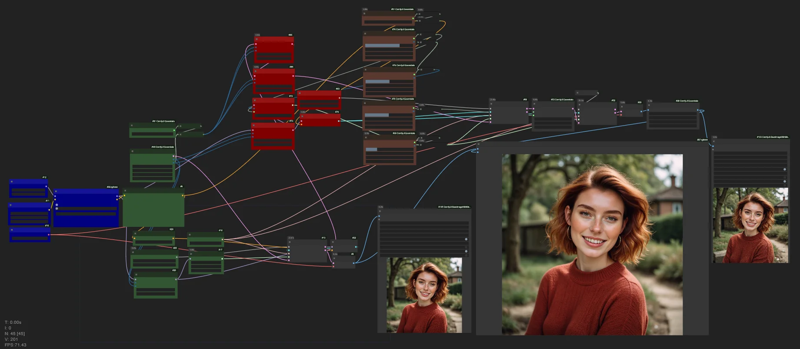
You start with a basic workflow for FLUX:
1) Blue nodes - load the model, set the prompt, image size, scheduler/sampler, Flux guidance, steps.. set the Latent Upscale (if you wanto to use it se a number no larger than 2.0. If you don't want to upscale set it to 1.0)
2) Brown nodes - adjust Latent Noise Injection settings. Leave the default values the first times to test the settings one by one.
3) You will generate two image, one is the normal FLUX image, the other is the one with Latent Injection applied. You can compare the two image with a slider-compare node.
Description
FAQ
Comments (5)
Wow, I'm really impressed with the results! Is there a way to add img2img functionality and an upscaler to enhance it further?
Fixed noise seed?
Thanks for your work!
I like your workflow and the way it adds details very much. It feels more like the good old HiRes fix than working with Ultimate SD Upscaler.
But I have to admit that I haven't fully understood the technology behind the “latent noise injection” yet.
Hence the naive question: Is there a reason why the “noise seed” of the red and gray nodes are fixed at 42 and 1?
I assume that everything in your workflow is set to “fixed” in order to be able to adjust the parameters of the nodes better? Without having to calculate the entire workflow every time...
Intuitively, I would now set them to “randomize”, as a "random noise" somehow seems to make more sense to me than a “fixed noise” ;)
Or does the algorithm need exactly this seed to work properly?
there are so many denoising values in the upper part? Could you provide some insights of the best way to use them. Also i am getting artefacts on my noise injection output..
Great work though i want to learn more <3
Is there something similar in Forge UI? Thank you
I love your organized workflows, the lora one is a godsend, and I'm hoping to use your all in one once you have good refiner tools built in. Sadly I think they're still needed (i had srted using https://civitai.com/models/716929/flux-refiner-workflow for now). So here's hoping!
Looks like we don't have an active mirror for this file right now.
CivArchive is a community-maintained index — we catalog mirrors that volunteers upload to HuggingFace, torrents, and other public hosts. Looks like no one has uploaded a copy of this file yet.
Some files do get recovered over time through contributions. If you're looking for this one, feel free to ask in Discord, or help preserve it if you have a copy.