
Super minimalistic clean Comfy UI Flux Dev workflow.
UPD if you encounter the bug with latest comfy UI update, (UI freezes on interacting with some nodes) here is how to fix it:
It has been fixed upstream:
You can apply that PR manually in the meantime. Change line 67033 in ComfyUI\web\assets\index-Dfv2aLsq.js from this:
const isCollapsed = shape === LiteGraph.CARD_SHAPE && node.flags.collapsed;to this:
const isCollapsed = shape === LiteGraph.CARD_SHAPE;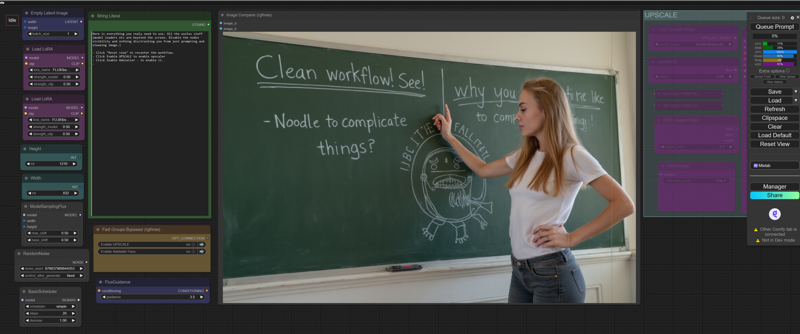
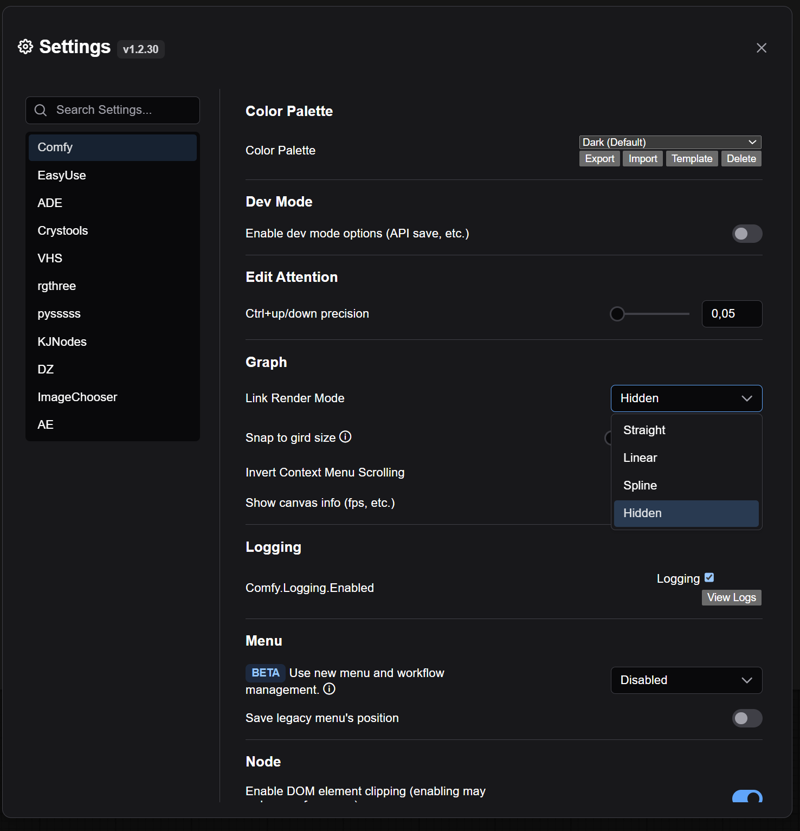 To hide the spaghetti lines click Hidden and enjoy.
Description
Changed 2 LORAs to rgthree Power Lora Loader. Now you can use as many LORAs as you need.
FAQ
Comments (52)
High Five, for your clean workflow , i added the use of the 8 step hyper lora, and lowered all the steps of your work flow for amazing results ! Many thanks!
A note:
Instead of using an empty ClipTextEncode for negative conditioning, it would be better to use a [ConditioningZeroOut] node, with the Conditioning output from PositiveConditioning as the input. Even an empty string, when run through conditioning, provides weights.
In short: [ClipTextEncode(Positive)] conditioning } -> {conditioning [ConditioningZeroOut] conditioning} -> {negative [Sampler]
Also: If you're not going to do any extra sampling on the outputs from CustomSamplerAdvanced before decoding (even if you're going to use it as an image input to other nodes), make sure you use the denoised_output instead of the regular output. The output latent still has noise mixed into the latent space, which will cause VAE Decode, to interpret it as image data. You'll get cleaner images this way.
Great tips! Can you explain in short why it's bad to have empty conditioning and what happens when it provides weights and why is it bad? Does it change the generated image? Or maybe it slows down processing? BTW, Matteo Spinelli (aka "Latent Vision" on Youtube) also recommends using the "denoised_output" when creating the final image.
@mmdd2543 I added an image in the gallery showing the difference between three uses of conditioning. One with a value in the text prompt, one with an empty text prompt, and one with ConditioningZeroOut. Regardless of what of the tensor is, it's going to be applied during sampling if your sampler uses a -ve conditioning input. The way that computers and specifically, GPU's do multiplication, if either side of the operator is a 0, it doesn't even try to perform the calculation and sets the output to 0. But, more than that, the empty conditioning tensor is full of -extremely- small numbers, which makes the calculations exponentially more expensive to process. And, even if it's just a small amount, those weights -will- affect your generation, which could cause things like loss of prompt adherence. So, zeroing out your negative conditioning is both computationally, and aesthetically, important.
- Ada
@cosmogonaut That is very interesting. Thank you
Can you make a GGUF version please?
Just replace model loaded with gguf one
Why can't the clip loader and model loader not see my models? If I use another model loader, it sees the models fine. I used the extra_model_paths.yaml file to point to a sdwebui instance.
are you sure it can't see your models? or it cant find the model name it has by default? Have you tried clicking on a model name to see the full list of models available in your model/unet folder? dev model should be in Unet "сomfyUI_windows_portable\ComfyUI\models\unet" and clips in "ComfyUI_windows_portable\ComfyUI\models\clip"
Love this – please do one that adds ControlNet Union!
I think Flux controlnet is very bad for now.
@protector131090 Well I wouldn’t have disagreed before this: https://huggingface.co/InstantX/FLUX.1-dev-Controlnet-Union
Looks good, thanks! But what's up with the "Fast Groups Bypasser" node? Whenever I try to interact with it, the gui freezes. (I tried changing index-Dfv2aLsq.js as you suggested, but this is still happening)
This is a ComfyUI bug introduced with latest update...and not a workflow issue. I wrote an instruction how to fix it in description.
UPD if you encounter the bug with latest comfy UI update, (UI freezes on interacting with some nodes) here is how to fix it:
It has been fixed upstream:
Fix collapsed regression in #114 Comfy-Org/litegraph.js#126
You can apply that PR manually in the meantime. Change line 67033 in ComfyUI\web\assets\index-Dfv2aLsq.js from this:
const isCollapsed = shape === LiteGraph.CARD_SHAPE && node.flags.collapsed;to this:
const isCollapsed = shape === LiteGraph.CARD_SHAPE;As I said, I made that change, but it still freezes.
@redparisai please double check it applied. Just now mine started to freeze again and turns out comfy pushed update and changed the line back. I did the fix again and no freezing.
@redparisai please redownload latest version again. I just made some changes that should help. If they dont - all we got left is to wait till comfy pushes an update to fix the bug.
@protector131090 Great, thanks!
what is the point of the face detailer, it looks like it doesn't go into the upscaler. Am was missing something?
Yes it dos not go in upscaler. You dont need it with Upscaler. Upscaler renders perfect faces.
You need adetailer with standard res to fix faces or/and increase likeness of a character face with LoRA
I've been using this workflow for quite a while now and without any doubt I have to say that this is the best Flux workflow I could find so far.
Seems broken? There's no node to select the Flux model. Not only that, I can't use with a previous image to improve it.
Some workflows uses Unet folder instead of checkpoint folder, copy flux model and retry, this may solve your problem.
I had to replace the loader with a gguf loader to get it going.
This is very good workflow dude. Thanks for that.
how can i use this for img 2 img?
It would be relatively easy to adapt it to img2img
Hey @davedrewhull898 could you be more precise?
Excuse me, can someone tell me where I should put my Positive Prompt? I cant find it.
click reset view. There will be huge green box that takes like 30% of screen view
Green node called String
this is what i´m looking for but always i get error "AV_FaceDetailer" is miising but ComfyUI Manager don´t recognize this node as missing
force update comfy or clean install. that is a bug
@protector131090 I have already done this, nothing has changed
@nanunana your error is related to face detailer. Turn it off if you dont need it. Or go to their github page posting your error there. They might help.
Same problem here
If you have the missing node installed try to delete and the add the same node again and related noodle(s)manually. This may solve your problem....
@umutgklp No.
@nanunana ¯\_(ツ)_/¯
I still get this, not sure how to fix.
@whoissellingmyemail delete comfy UI. clean install. install comfy UI manager. load the worflow and install missing nodes.
@whoissellingmyemail The name of the node has changed. Look for face detailer in your nodes and replace it
@yoadster693 exactly what I did. Replace with FaceDetailer and swap the connections
Hello. I uploaded new version of the workflow! V1.4 to fix the problem
is there a way to use loras for just the adetailer section?
Hello. I uploaded new version of the workflow! V1.4 to fix the problem
I'm not using the AV_FaceDetailer but it is broken as you can't seem to install it as a package.
Thanks for the workflow!
Hello. I uploaded new version of the workflow! V1.4 to fix the problem
This is the best Flux workflow I have tried yet. Just be sure to replace the detailer with the FaceDetailer node as the included one is unavailable. Introduced to FluxShift which I never knew about and offers much better control when mixed with FluxGuidance. Thank you!
how can i change the seed value for generating an image, cause I'm getting the same type of image for the prompt, also after the image passes through the detailer, the image quality reduces, in the UltralyticsDetectorProvider node there's a big red X showing up on the SEGM_DETECTOR, should i connect it to something?
PS. I'm new to comfy ui
Hello. I uploaded new version of the workflow! V1.4 to fix the problem