


ComfyStereo
From: https://github.com/Dobidop/ComfyStereo feel free to post feedback and to provide help
Introduction
- Stereo Image Node – A port of the Automatic1111 stereo script with added features like edge-aware and direction-aware blurring of the depth map. Left-right, cross-eyed, and anaglyph modes are available in the node.
- DeoVR View Node – A node for launching and viewing images and videos in DeoVR.
DeoVR View Node Setup
In DeoVR, set "Enable remote control" to true in the developer settings.
To launch DeoVR from this node, you must configure the path to DeoVR.exe in the configuration file:
ComfyUI\custom_nodes\comfystereo\config.jsonDefault Path:
"C:\\Program Files (x86)\\Steam\\steamapps\\common\\DeoVR Video Player\\DeoVR.exe"Important Notes:
- You must already have an image or video open in DeoVR before this node can change what is displayed in the headset.
- If DeoVR is on its main menu screen, this will not work.
- The launcher skips the main menu screen automatically, but if you manually start DeoVR, you need to open an image/video before using this node.
---
New Features & Depth Map Blurring
New functionality includes edge-aware and direction-aware blurring of the depth map, additional interpolation methods, and stereo distortion improvements.
Depth map blurring:
- Reduces artifacts and harsh transitions in the final stereo image, especially at higher divergence settings.
- Trade-off: It increases computation time (5-25%). If speed is a concern, you may want to disable it.
- depth_map_threshhold sets the depth map gradient sharpness application cutoff. Low values will apply the blur to more shallow gradients, blurring the depth map more broadly (which can negativbely affect the end result). Higher values isolates the steeper gradients.
How to Enable Adaptive Blurring
- Set 'depth_map_blur' = True.
Mask Output Considerations
- The mask output is imperfect and is mainly useful for the "No Fill" and "Imperfect Fill" options. This outputs a black and white image of the areas which were not filled in.
---
Stereo Image Generation Methods
Key Parameters
Separation (`separation`)
- Defines an additional horizontal shift percentage applied to the left and right images.
- Modifies the distance between the stereo pair, affecting alignment.
Divergence (`divergence`)
- Controls the strength of the 3D effect (in percentage terms).
- A higher divergence increases depth perception, while a lower value creates a flatter effect.
Stereo Balance (`stereo_balance`)
- Determines how divergence is distributed between the two eyes.
- 0.0 = Even distribution
- Positive/negative values shift the effect toward one eye.
Stereo Offset Exponent (`stereo_offset_exponent`)
- Adjusts depth-to-offset mapping, influencing how depth values are converted into horizontal shifts.
---
Infill Methods
Some fill methods are faster, while others preserve structure better.
- Naive methods are slightly quicker.
- Polylines Soft is often the best general filler.
Comparison of Infill Techniques
No Fill Shifts pixels based on depth without filling gaps.
No Fill - Reverse Projection Works backward to assign pixel values but leaves gaps.
Imperfect Fill - Hybrid Edge Mixes "Polylines" and "Reverse Projection" for better structure.
Fill - Naive Fills gaps using nearest pixels (causes stretching).
Fill - Naive Interpolating Uses interpolation to smooth gaps.
Fill - Polylines Soft Uses polylines with soft edges to maintain structure.
Fill - Polylines Sharp Similar to "Soft" but with sharper transitions.
Fill - Post-Fill "No fill" + edge-aware interpolation.
Fill - Reverse Projection + Post-Fill "Reverse Projection" + directional interpolation.
Fill - Hybrid Edge with Fil lEnhanced "Hybrid Edge" with adaptive smoothing.
---
Installation
Easy Method (Recommended)
Use ComfyUI-Manager for quick installation.
Manual Installation
Clone the repository and place it in ComfyUI's custom_nodes directory:
git clone https://github.com/Dobidop/ComfyStereo.git
pip install -r requirements.txt
---
Example Workflow
Image workflow
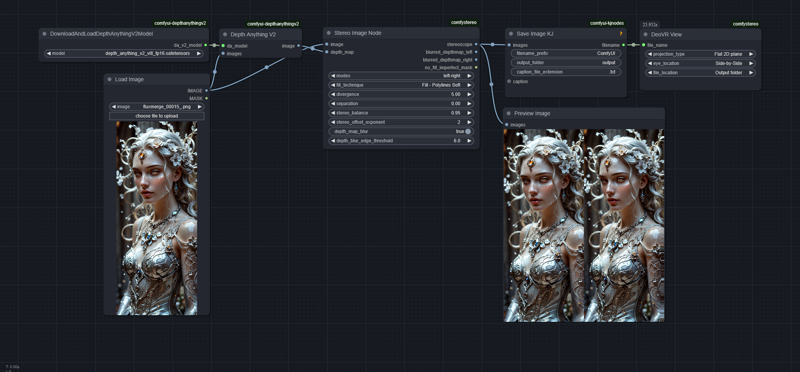
Video workflow
https://github.com/user-attachments/assets/0a61bc30-1821-40b8-b90d-12733f85bdea)
---
Troubleshooting
- Low CPU utilization?
- Try updating Python and ComfyUI-Manager—this fixed the issue for one user.
Description
Improved depth map blurring
Improved DeoVR launcher
FAQ
Comments (9)
VERY interesting, wonder if there is a way to view the results on the quest 3
I know that videos are fine with the app i use to watch 3d films on it... but that does not do images.
That might work. Not sure how can be done with the current setup as the file is copied to a temporary directory since I couldn't get the pure parameter-based commands to with DeoVR.
The command is sent to DeoVR via a socket, so you might basically be able to send commands over the network to the Quest at https://<yourQuest3IP>:<portnumber_of_DeoVR>
I think it should be possible to get DeoVR to open up an URL as well if the parameter-based commands were fully working.
@Dobidop well i was more thinking saving and loading later, I dont use DeoVR, I use 4xvr as it supports samba sharing (though does not support image files). Will look into all this when i have more time in a couple of days though.
@DaveTheAIMad I'll look into it as well. I've only used DeoVR on steam so good to know of other clients as well.
Finally tested it. really nice effect =) But the stronger the stereo effect, the stronger the streching, of course.
A method that fills the missing parts by generating new information using a generative model would be awsome! Do you think something like that will come in the near future ?
Glad you liked it! Looked into that stuff but that's beyond my skill.
Was trying to implement https://github.com/SamsungLabs/RIC but didn't get very far, but that should be exactly what you're talking about :)
@Dobidop hah if you can't do it after all your work so far then I also can't do it for sure ;P
@Dobidop I was trying to make it work with what this node provides, and I think I could, if I would only get a more informative mask. I need a maks that would be an exponent based on how stretched the pixel is. I will try to implement it, vibe code it, but I might also make my own system in software and languages I'm more familiar with..
@illinar would be awesome if you could make it work!