


This workflow contains system prompts of VLM prompt enhancer for all T2VA, I2VA, L2VA, FL2VA and Ref2VA.
It supports local gguf VLM models. e.g. Gemma 4, Qwen 3.6
No API needed.
Purpose: To make user prompt conform with MiniMax official prompting guide.
Local VLM node accepts: 3 images, 1 video, 1 audio Multiple images, videos and audio after recent update.
Choose a big MoE VLM model (i.e. something with -A?B) instead of a small non-MoE model.
Set "cpu_moe": true to speed up VLM with limited vram. (Q8 Gemma 4 26B-A4B model needs only 6GB vram.)
To set image_min_tokens for Gemma 4, follow n_ubatch > image_max_tokens > image_min_tokens. (e.g. 2240, 2240, 560)
Qwen 3.6 (e.g. Q6 35B-A3B) can also be used instead of Gemma 4. Just set image_min_tokens to 1024 and n_ctx to a larger value (e.g. 16384).
Custom node used:
ComfyUI_Simple_Qwen3-VL-gguf
ComfyUI_Simple_Qwen3-VL-gguf supports 3 images, 1 video and 1 audio input. Please update to the latest nightly version. It requires installation of llama-cpp-python wheel and Nvidia CUDA Toolkit. (Comfyui's built-in CUDA might not work.)
e.g.
cmd
cd /d C:\StabilityMatrix\Data\Packages\ComfyUI\venv\Scripts\
python.exe -m pip install ???.whl
ComfyUI-SolAttn_triton
Comfyui kitchen attention seems faster.
System prompts modified from:
H3_LLM_Instructions
rzgar
Thanks for their work. Cheers.
Description
FAQ
Comments (9)
I tried referencing a video in this workflow, but it stops here with an error.
https://files.catbox.moe/35rq2y.png
If I disconnect "Get_input_vid1" and try to reconnect it, the connection fails. It seems it doesn't support image-type inputs; is there any workaround for this?
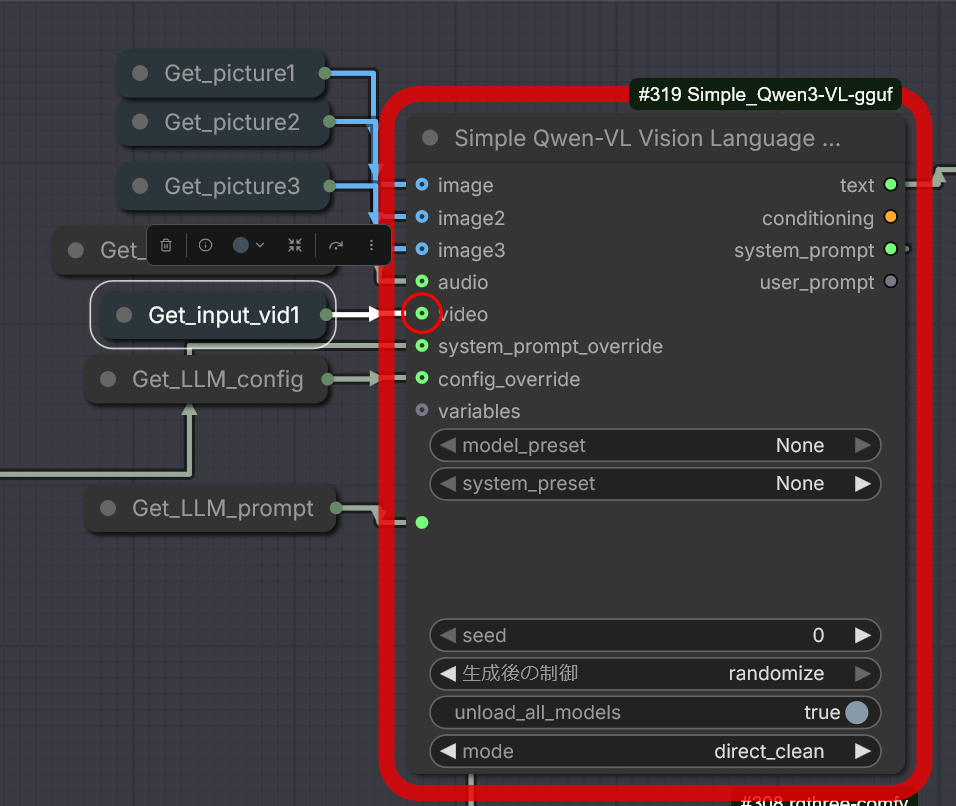
I personally haven't experienced this error before. The custom node has always been accepting image-type videos. Maybe you could ask the author. He/she's really nice and has helped me alot with the usage of the node in the issue page. Cheers.
@cloudreadypc
I came across a post in the Issues section that appeared to be yours. I tried something based on the ideas there, and it worked.
The issue was due to the version. It seems that version 3.9 is installed automatically, but it doesn't accept input; switching to version 3.9-nightly resolved the problem. Thank you.
I struggled a bit for the installation of llamacpp, but now it works really well.
I tried several workflows for prompt enhancement and to me this is the most effective, also very easy to follow once you get the overall structure.
Thank you!
ComfyUI_Simple_Qwen3-VL-gguf\qwen3vl_run.py", line 345, in _inference
chat_handler = Gemma4ChatHandler(**handler_kwargs, **extra_handler_kwargs)
TypeError: MTMDChatHandler.__init__() got an unexpected keyword argument 'enable_thinking'
Just do one thing:
In the ComfyUI interface, find this parameter on the Qwen/Gemma node (LLM Model Config):
==== enable_thinking
and set it to:
false
Anyway, it started working—I turned it off and then back on.
And it works whether the mode is off or on.
Phew...
@SERGEY73 The official prompt guide, especially Ref2VA, is rather complex. That's why I used very large model (Gemma 4 26B-A4B) and switched thinking mode on. As long as it's a MoE model, vram should be very free. Cheers.
What about video and audio?
I connected the output and got an audio error.
❌ Inference failed:
Gemma4ChatHandler: This mmproj model instance does not support audio inputs.
Check console for details.
A user below said updating to version 3.9-nightly fix the problem. Cheers.