

Size Difference Slider
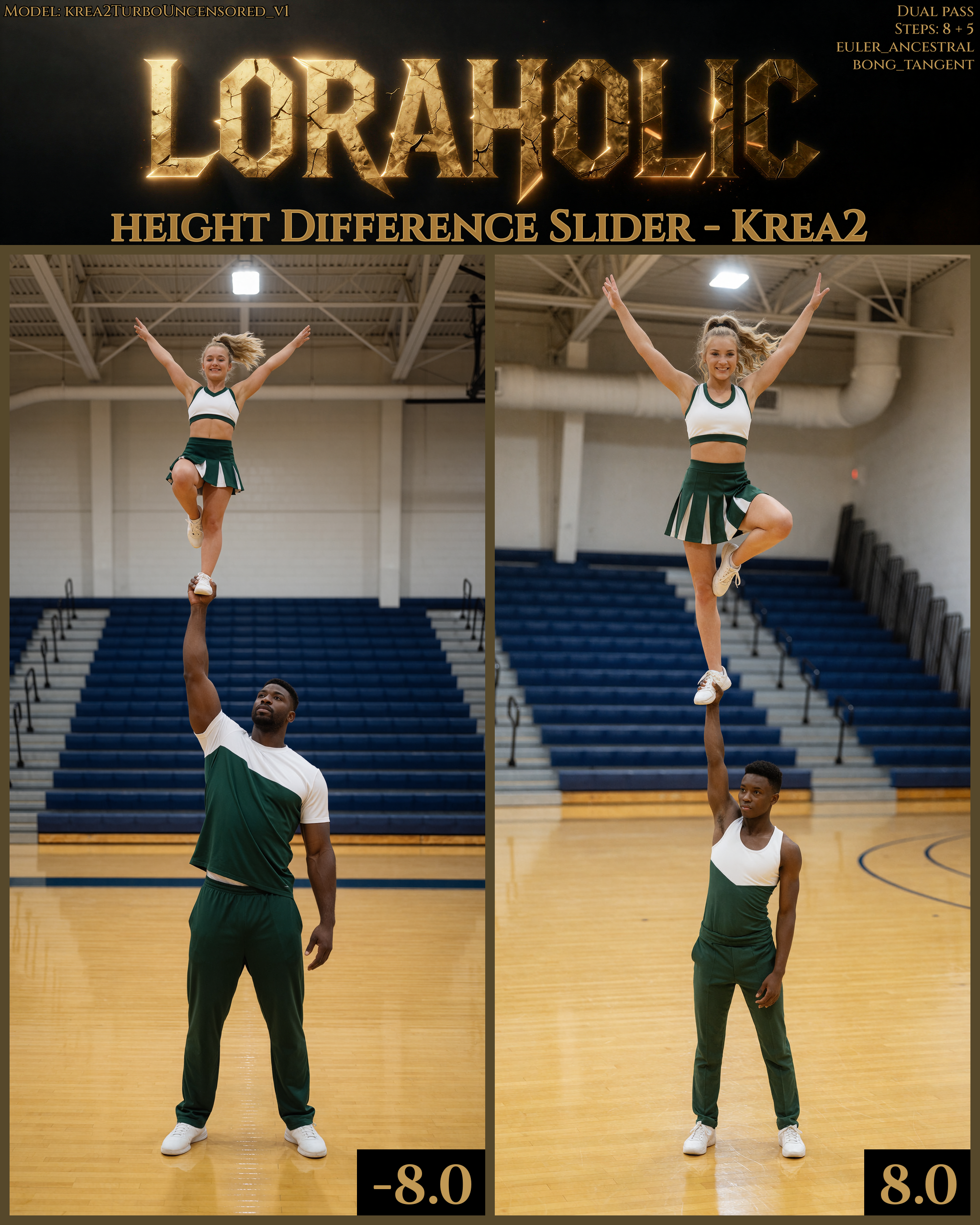
This was suppose to be a height difference slider, but i dont think height is the correct thing to describe this as, since the guys get huge, not only tall as i wanted. But i find it fun to use so i might aswell share it with you all.
This also work for negative values, but not as good as in positive.
I have set the category of this to "Concept" instead of tool because its not as clean as my other LoRAs. But to get the effect i was looking for i needed to go hard on the training.
It should be age-safe as long as you keep the prompts age-safe.
Usage: Combe it with prompts for a much better effect, but it can be used without prompting as well.
Check out my prompting guide to get the perspective of the sample images i made for this LoRA:
Controlling "Zoom" With Words Alone
Recommended range -5.0 to 9.0
Description
FAQ
Comments (21)
Congrats on number 1 rank in tool creators!
Thanks. Been there before. It really dont matter that much.
The top tool creator is usually a person who just dumps out tons of workflows, with new versions every other day XD
i'm saving it before it gets deleted
Why would it get deleted? I don't understand. Someone plz explain.
It wont get deleted. People are delulu
1) there are several height difference LoRA for other models on the site
2) nothing gets truly deleted anyway. civarchive has all the banned models
@Loraholic just a joke about civi's card drama
Through this, I was able to create 'height differences' in Krea2, which were impossible to achieve with Z-image 😃
Amazing stuff!
Dude! How the actual fuck are you this fast? You're a LoRA-making machine!
Not only that; EVERY single LoRA does that it says on the box, is incredibly responsive – without having to shoehorn the strangest triggerwords known to man into the prompts, insanely good at doing one thing and one thing only without affecting the rest of the image (which is fantastic), AND best of all; they're tiny.
You are amazing, sir.
Thanks again
//Rob
Would kill for a ZIT version!
Not possible. At least for me. I tried so many times and it never worked for Z. Just jump ship over to Krea2.
cool, but makes one necessarily a male when magnified
It was trained with tall male + short female at positive values, and short male + tall female at negative values.
So it is trained with both gender at its core prompts, so it will always try to follow those concepts when used.
@Loraholic So is the reverse, Tall female + short male, possible if you use negative values?
@bugmaker86722 Yes. But males are taller in general in krea2, so the "shift" where women become taller is close to where the model starts to break down. So i dont recommend using it on a regular basis. But it does work. Women become about 1 head taller then guys.
Here is a image i made when i tested it as a height difference slider. But i clearly didnt end up naming it that. But the sample is made with the same model.
And i belive the values was flipped at that point.
https://i.gyazo.com/373b4b8453f83a6708f2512b1bb05458.png
@Loraholic Gotcha, thanks for the explanation. Looks like it indeed works at negative values, but like you said, the difference in size is minimal. Plus it more often than not creates issues with limb proportions or other glitchy side effects.
I like to make tiny women (6 to 8 inches tall) I had no luck getting women of that size with the Lora?? the model can make tiny women with the right prompt and when it does it is the best! but it is hit and miss when combinding loras.. Any sugestions????
Probably the best thing you could do is to gather the best 20-30 images you have of the concept and make a LoRA out of it yourself. It is pretty easy to make a normal LoRA, and everyone can manage to make a LoRA if they just sit down and look at a tutorial for 20 minutes.
Making a LoRA for Krea2 is exactly the same as for other models, so you if you dont find a good tutorial for Krea2 since its so new, a tutorial for Zimage would work exactly the same.
@Loraholic Thanks I am thinking about it!! Thanks for the reply!!
use the word "miniature"
Details
Files
size_diff_krea2_loraholic.safetensors
Mirrors
size_diff_krea2_loraholic.safetensors
size_diff_krea2_loraholic.safetensors
size_diff_krea2_loraholic.safetensors
size_diff_krea2_loraholic.safetensors
Size Difference Slider - Krea2 - -5 +9.safetensors
size_diff_krea2_loraholic.safetensors
size_diff_krea2_loraholic.safetensors
size_diff_krea2_loraholic.safetensors
size_diff_krea2_loraholic.safetensors
size_diff_krea2_loraholic.safetensors