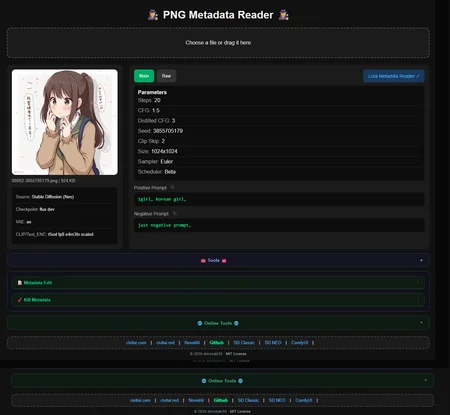
Reads metadata from PNG/JPG and videos.
As long as there is some internal metadata.
It reads the information and organizes it in the same pattern for everything, showing the main values to the user, with parameters, models, and assets used.
The code is open for anyone who wants to check it out here > shirosaki33/PNG-Metadata-Reader: simple html to read metadata information from AI content (IMG/VID)
Use online > https://shirosaki33.github.io/PNG-Metadata-Reader/png%20metadata%20reader.html
Just HTML, drag and drop into the browser and use.
use directly on SD > shirosaki33/sd-metadata-online: You can use all metadata via SD card directly in the new tab. An internet connection is required for this to work.
Description
Comments (10)
PNG metadata reader button for lora metadata reader is calling "lora%20metadata%20reader.html" which is not correct name. On github there are diferent versions on tag vs current. Is there a v20 lora metadata reader?
Also PNG metadata reader, can you add support for other files like jpeg? Here is a great reader for reference: https://github.com/Xypher7/ai-image-metadata-editor
The LoRa one only works if both local HTML files are in the same folder. It's already compatible with JPG/JPEG/WebM/mp4.
Now it will scan the LoRa if there is information in the metadata in the PNG and will change the name to a link.
@shirosaki33 Hi, Of course it is in the same folder. Just that it calls out a different name. I fixed it by modifying the code but I just wanted to let you know.
There is also two versions of Lora Metadata Reader here and on your github, one ends with v1. Beginning code inside the html contains (viewBox='0 0 64 64')and the other v1 (viewBox='0 0 32 32') Which one is the latest? This is just to identify which html I'm looking at.
@essence25
a yes. I haven't updated the download zip files yet, since I'm still working a lot on the code. It's better to download both from GitHub or just use the online
@shirosaki33 Hmm, I dropped some jpeg/jpg images that work fine in the Meta Editor I linked you above but in yours it says "⚠️ No metadata found in this file. ⚠️".
These are JPG files from Civitai that have the A1111 or Forge metadata in them so they should work. PNG work fine. Maybe checkout the code in the Meta Editor to see how it processes jpeg's. Thank you for the work btw.
@shirosaki33 Awesome!! Let me know when it is finished and I will test it etc.
@essence25
Can you link me to these photos? I need them to check the code in order to implement fixes.
You just need to confirm that the photos actually have metadata and weren't manually added to the page.
@shirosaki33 Probably all from these sets: https://civitai.com/images/119818517 & https://civitai.com/images/123734325. The mentioned meta editor shows the embedded WF just fine from all of these.
@essence25
working now
Looks like we don't have an active mirror for this file right now.
CivArchive is a community-maintained index — we catalog mirrors that volunteers upload to HuggingFace, torrents, and other public hosts. Looks like no one has uploaded a copy of this file yet.
Some files do get recovered over time through contributions. If you're looking for this one, feel free to ask in Discord, or help preserve it if you have a copy.