

Original link: https://sololo.xyz/article/23-basic-workflow-flux2-klein-i2i-v22-4-in-1-image-editing
This workflow supports FLUX.2 klein in both 4B and 9B versions.
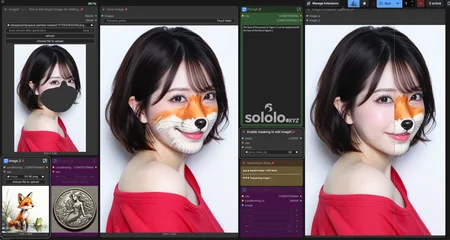
It’s a 4-in-one workflow that includes Single Image Editing, Inpainting with Mask, Multi-Image Reference, and Single Image Outpainting.
So far, FLUX2 Klein remains my top choice for locally deployed image editing. Since publishing Basic Workflow: FLUX.2-klein I2I v2.0 | 4-in-1 image editing, I’ve been using this workflow consistently and discovered a few minor bugs during use. This update mainly includes:
Fixed a bug where content replacement was not obvious enough during multi-image editing.
Added LoRA support. This workflow has been tested on ComfyUI 0.15.1. If you were previously using v2.0, you can simply replace it with this version. No additional plugins or nodes are required.
The overall layout of the workflow is basically the same as before.

A LoRA Loader has been added to the lower-left corner. You can use different LoRAs for image editing when needed.
All other functions remain the same as in v2.0.

The bug affecting partial content replacement on Image 1 during multi-image reference editing has been fixed. Good results can now be achieved whether or not a LoRA is used.

If you’re only replacing the face or part of the face, use a mask.
If you’re replacing the entire head, including the hair, you can skip the mask.
Even without third-party LoRAs, Klein’s built-in editing capability can produce solid results.
For more usage instructions and examples, please refer to the v2.0 documentation: Basic Workflow: FLUX.2-klein I2I v2.0 | 4-in-1 image editing
Want more of my models? Visit my website: sololo.xyz
Latest releases first, HUNDREDS of models FREE to download.
♥ Support me on Ko-fi: https://ko-fi.com/solo_lee
♥ Telegram channel: https://t.me/sololeeai
♥ Model orders: https://sololo.xyz/commission
Thanks so much for your support! ♥

Description
Original link: https://sololo.xyz/article/23-basic-workflow-flux2-klein-i2i-v22-4-in-1-image-editing
For more usage instructions and examples, please refer to the v2.0 documentation: Basic Workflow: FLUX.2-klein I2I v2.0 | 4-in-1 image editing
FAQ
Comments (11)
Nice and simple, seems to work well. Do you have any prompt suggestions for the "multi image reference" or how it works?
Thank you!
Klein is very good at understanding and following prompts. As long as you simply describe what you want it to do in natural language, you can usually get good results.
You can refer to the prompts in my sample images, writing them that simply is perfectly fine.
You can also refer to a short article I wrote earlier:
https://sololo.xyz/article/18-basic-workflow-flux2-klein-i2i-v20-4-in-1-image-editing
https://sololo.xyz/article/16-play-with-flux-2-klein-a-simple-image-editing-test
@solo_lee awesome! you're doing killer work - much appreciated
@dreadinterface Thank you! : )
Awesome and simple workflow, thanks a lot!
However, I have some issues with the multi-image edit (so basically the mix of 3 images). Due to some reason I always get a weird blur of all the 3 images as a result. It works well with only 2 images. Do you have any idea what this could be?
Note: I followed the steps on your blog, I even tried to more or less use similar images and prompts as you did.
Oh, also also recommend trying out the comfyui-klein-edit-composite (Link). It works wonders, and basically fully eliminates the weird Pixel Shift issues and skewed colors of Flux Klein2. It is easy to add to your workflow, I already updated it for myself.
Hi, thanks for your comment.
I did some testing on my end and couldn’t reproduce the “weird blur” issue you mentioned. I’d probably need a few more details from you to figure out what’s causing it. When you were blending the three images, did you have a LoRA, mask, or Outpainting enabled?
While testing three-image blending, I did notice a different minor bug. I’ll fix it and update the workflow when I get some time.
Also, the comfyui-klein-edit-composite node you mentioned looks really interesting. I’ll consider adding it to this workflow. Thanks!
Hi, thanks a lot for taking the time and looking into it!
To answer your question: When trying out the blending with 3 images, I did not use any LoRAs, masks or outpainting.
I'll try to tinker around this weekend, maybe I'll find something (I'll let you know in case I'm successful)
@Heinzelbert Looking forward to hearing from you. Good luck! : )
awesome workflow, do you have any suggestions for uncensoring or decensoring black bar or mosiacs? it seems to work hit or miss when using this workflow
I personally use this workflow a lot for editing single images. One thing I do quite often is remove white, black, or other colored borders from one or more sides of an image. So far, it's been working really well for that, and in most cases I can get a good result in just one pass.
The model I use by default is Klein 9B, and the prompt is usually very simple, something like: "remove the white border on the left side of the image."
I haven't tried mosaic removal myself yet, but I do often use it for things like removing text, watermarks, extra people, or unwanted background elements, and the results have been pretty good. The prompts are usually simple too, something like "remove all text" or "remove the person on the right."
For a task like mosaic removal, I think there are really two key parts:
1. Detecting where the mosaic is
2. Reconstructing and repainting whatever is being covered by it
The first part usually isn't difficult. The model should be able to recognize the mosaic area pretty accurately, and you can also use a mask to target it more precisely.
The hard part is the second one. In general, generating normal, common content and blending it back into the image isn't a big problem. But if the covered area involves certain specific body parts, most base models struggle with that because of the model's built-in limitations. One way around it is to switch to another Klein-based model that supports NSFW content, or use a relevant LoRA.