


V1 | V2 | READ the 'How to use' , don't skip it
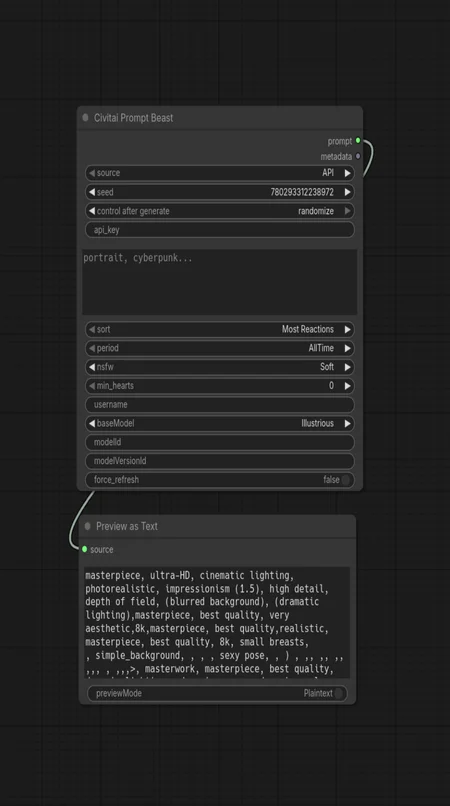
🦁 A powerful ComfyUI custom node for fetching, filtering, and randomizing prompts from Civitai or offline JSONL files.
This version addressed the issue with the cache and allowing you to directly access the functionality of V1 (10K TOP NSFW dataset for offline use) as well.
Download -> unzip -> save your API key in civitai_key.txt, or as an environment variable CIVITAI_API_KEY, or in the node's API field (if you know what you're doing) -> place the folder in:
/ComfyUI/custom_nodes/{here}Move the folder "civitai_prompts" and its content to:
/ComfyUI/models/{here}restart the ComfyUI and search for Civitai Prompt Beast or load the basic workflow from the 'workflow' folder.
How to Use
Get your API Key: Go to your Civitai User Settings and generate an API Key.
Secure Setup (Recommended):
If doesn't exist, create a file named civitai_key.txt inside this node's folder.
Paste your API key inside.
Leave the api_key widget in ComfyUI empty. This ensures your key is not embedded in shared workflows or image metadata. (unless you use a save node that doesn't share the metadata)
Configure the Node:(Optional)
Choose "API" for online fetching from Civitai
Choose "JSONL File" for offline use.
Query: Enter search terms ("cyberpunk", "anime portrait").
Base Model: Select the architecture (SDXL 1.0, Pony, etc).
Sort/Period: Choose how to find the best images (e.g., "Most Reactions" over "Month").
Model/Version ID: Copy a specific ID from a Civitai URL to scrape prompts only from that specific model.
Use force_refresh to get fresh results from Civitai.
Cache reduces API calls but may cause repeats on small result sets.

Description
- Force refresh to bypass cache
JSONL File Mode (Offline)
-------------------------
Loads prompts from a local JSONL file without needing an API key.
- File location: ComfyUI/models/civitai_prompts/prompts.jsonl
- Format: {"id": 1, "prompt": "your prompt text here"}
- Perfect for offline use or curated prompt collections