

LTX-2.3 Image to Video AudioSync Simple V4b (NEW)
[2026/03/19] Corrected the location of the Clear Cache All and Clean VRAM Used nodes.
v4: High-speed upscaling is now possible with "RTX Video Super Resolution"
Added VRAM and cache purge nodes for more stable rendering.
Thanks to matros99's suggestion!
This workflow enables
high-speed upscaling of RTX Video Super Resolution
without any loss of image quality.
The initial scale value is "2"(Within a subgraph node)

Note: The ComfyUI-LTXVideo node does not work with PyTorch Version 2.12.0+cu130.
The model used is the same as V3
Custom Nodes
https://github.com/Lightricks/ComfyUI-LTXVideo
https://github.com/rgthree/rgthree-comfy
https://github.com/kijai/ComfyUI-KJNodes
https://github.com/Kosinkadink/ComfyUI-VideoHelperSuite
Added custom node
https://github.com/yolain/ComfyUI-Easy-Use
https://github.com/Comfy-Org/Nvidia_RTX_Nodes_ComfyUI
Tested with ComfyUI 0.16.4
ComfyUI versions 0.17.x and later are unstable, so please do not update to version 0.17 until a stable version is released.
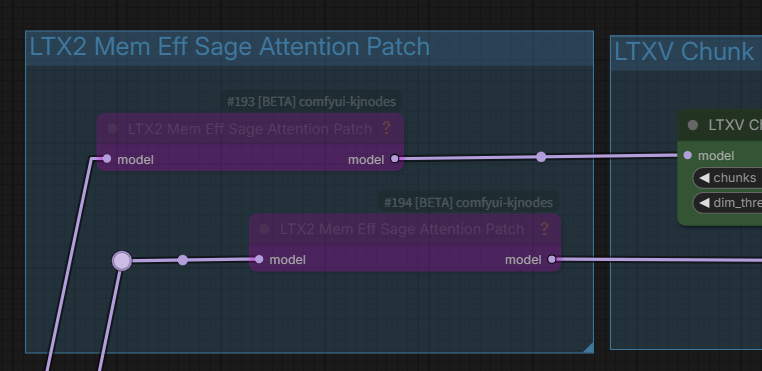
Notes on the LTX2 Mem Eff Sage Attention Patch
In some cases, "Sage Attention Patch" nodes may be used for RTX 50xx GPU users (CUDA conflict). If it works fine for them, they shouldn't change anything.
Notes on the RTX-VSR Problem
If anyone having dependency errors for RTX nodes in comfyui Portable here's the solution :
https://github.com/Comfy-Org/Nvidia_RTX_Nodes_ComfyUI/issues/11
Thank you for the information from learnrijo !
Discontinued
I stopped releasing version 3 because I have a superior V4 workflow.
LTX-2.3 Image to Video AudioSync Simple V3.2c
Update latent_upscale_models to ltx-2.3-spatial-upscaler-x2-1.1.safetensors
Hotfix for x2 spatial upscaler for long video generation (v1.1).
Includes mel-Band RoFormer version (Mel-Band RoFormer separates audio to improve lip-sync accuracy.)
Override gemma-3-12b text encoder in TextGenerateLTX2Prompt with new Lora
If TextGenerateLTX2Prompt refuses to generate a prompt, TextGenerateLTX2Prompt "no".
TextGenerate may be rejected if the I2V image or prompt is sensitive.

Note: ComfyUI version 0.17 or later,the subgraph display breaks. Please do not update yet.
The official Comfy video_ltx2_i2v_AudioSync workflow has been launched,
replacing the current native workflow. Both are functionally almost the same, but the official one may be better.
Therefore, there is no longer any need to stick to the native workflow,
and V3 uses Some memory reduction custom nodes.
Test images and audio included
Required : ComfyUI 0.16.x
Requires audio data such as MP3 and one image
Required SageAttention
Recommended: gemma-3-12b-it-abliterated_heretic_lora_rank64_bf16.safetensors,
checkpoints
ltx-2.3-22b-dev-fp8.safetensors
or
ltx-2.3-22b-dev-nvfp4.safetensors (for Blackwell GPU) Image quality degrades
text_encoders
gemma_3_12B_it_fp4_mixed.safetensors
loras
ltx-2.3-22b-distilled-lora-384-1.1.safetensors
gemma-3-12b-it-abliterated_heretic_lora_rank64_bf16.safetensors or
gemma-3-12b-it-abliterated_lora_rank64_bf16.safetensors
latent_upscale_models
ltx-2.3-spatial-upscaler-x2-1.1.safetensors
Custom Nodes
https://github.com/Lightricks/ComfyUI-LTXVideo
https://github.com/rgthree/rgthree-comfy
https://github.com/kijai/ComfyUI-KJNodes
https://github.com/Kosinkadink/ComfyUI-VideoHelperSuite
LTX-2.3 Image to Video AudioSync Simple Native Workflow(v1.1)
All ComfyCore Node-Native Workflow [2026/03/08]
Required : ComfyUI 0.16.4
Requires audio data such as MP3 and one image
Comfyui 0.16.4 template base + audio sync added mod +
No custom nodes are required, but the latest ComfyUI (0.16.4) is required.
There is an unknown effect at the end, but I don't know how to solve it.
ZIP file contains one test image and sound
If you get OOM in VAE Decode (Tiled) at long lengths, try lowering the temporal size, however lowering it too much may result in noise and ghosting. It's trial and error.

" yes" to enable Prompt enhancement
" no" to bypass prompt enhancement
If text generation is refused " no"
Disable_i2v " true " to T2V (Maybe it works?)

When using TextGenerateLTX2Prompt (Prompt Enhancement), it may take some time to generate.
checkpoints
ltx-2.3-22b-dev-fp8.safetensors
text_encoders
gemma_3_12B_it_fp4_mixed.safetensors
loras
ltx-2.3-22b-distilled-lora-384.safetensors
latent_upscale_models
ltx-2.3-spatial-upscaler-x2-1.0.safetensors
No custom nodes required
tested on :ComfyUI version: 0.16.4, Python: 3.12.12, pytorch : 2.10.0+cu130
Geforce RTX5060Ti16GB, 64GB System memory
V2.1:Added T2V switch [2026/03/08]
LTX-2.3 Image to Video AudioSync Simple Workflow(v2.1)
One image and audio required
Uses ComfyUI template models except for checkpoints (ltx-2.3-22b-dev-fp8,safetensors : 29.1GB)
It is likely to work because it conforms to the ComfyUI template workflow.
Added T2V switch (2026/03/08)
Set disable_i2v to "true" for T2V, but if Image Latency Switch is "true", the specified image size and ratio will be used, so it is better to set Image Latency Switch to "false" and switch to EmptyLTXVLatent (false).


TextGenerateLTX2Prompt performs image analysis and prompt enhancement. It is memory-efficient when used with the Gemma-3-12B text encoder as the LLM.

NSFW may not be prompted?
If it doesn't work as expected, try "Bypassing TextGenerateLTX2Prompt"

checkpoints
ltx-2.3-22b-dev-fp8.safetensors
text_encoders
gemma_3_12B_it_fp4_mixed.safetensors
loras
ltx-2.3-22b-distilled-lora-384.safetensors
latent_upscale_models
ltx-2.3-spatial-upscaler-x2-1.0.safetensors
MelBandRoFormer_comfy
MelBandRoformer_fp32.safetensors

Custom Nodes
https://github.com/Lightricks/ComfyUI-LTXVideo
https://github.com/rgthree/rgthree-comfy
https://github.com/kijai/ComfyUI-KJNodes
https://github.com/kijai/ComfyUI-MelBandRoFormer
https://github.com/Kosinkadink/ComfyUI-VideoHelperSuite
https://github.com/pixelpainter/comfyui-mute-bypass-by-ID
tested on :ComfyUI version: 0.16.0, Python: 3.12.12, pytorch : 2.10.0+cu130
Geforce RTX5060Ti16GB, 64GB System memory
LTX-2 Image to Video AudioSync Simple Workflow(V.1)
A simple workflow incorporating AudioSync into ComfyUI video_ltx2_i2v template workflow
If the audio data is longer than 60 seconds, the image may be distorted.
2D: Anime-style images may be distorted.
I have never created a video with a lot of movement, so in that case, please use it with some tweaks to the prompts or change various LoRa settings.
It uses LoRa : ltx-2-19b-ic-lora-lipdubbing.safetensors to accelerate lip sync, so if you need something else, replace it with Camera LoRa etc.
May not work in low memory environments
Tested on ComfyUI 0.15.1: GeForce RTX5060Ti 16GB, 64GB system RAM
Generation time of over 20 minutes for a 60-second video
Requires audio data such as MP3 and one image
Required SageAttention
checkpoints
- ltx-2-19b-dev-fp8.safetensors
text_encoders
- gemma_3_12B_it_fp8_scaled.safetensors?download=true
-ltx-2-19b-embeddings_connector_distill_bf16.safetensors?download=true
loras
- ltx-2-19b-distilled-lora-384.safetensors
-ltx-2-19b-ic-lora-detailer.safetensors?download=true
- ltx-2-19b-ic-lora-lipdubbing.safetensors?download=true
latent_upscale_models
-ltx-2-spatial-upscaler-x2-1.0.safetensors
MelBandRoFormer_comfy
-MelBandRoformer_fp32.safetensors?download=true
Model Storage Location
Custom Nodes
https://github.com/Lightricks/ComfyUI-LTXVideo
https://github.com/pythongosssss/ComfyUI-Custom-Scripts
https://github.com/kijai/ComfyUI-KJNodes
https://github.com/Kosinkadink/ComfyUI-VideoHelperSuite
https://github.com/kijai/ComfyUI-MelBandRoFormer
If Sage-Attention is not installed, use the LTX2 Mem Eff Sage Attention Patch as a bypass group node. This will increase the generation time.



Description
v4: High-speed upscaling is now possible using "RTX Video Super Resolution" without compromising image quality.
Added VRAM and cache purge nodes.
This package includes two workflows: a standard version and a version that includes mel-Band RoFormer.
FAQ
Comments (33)
Hi can anyone tell me how to stop the terrible music being generated, every time I try to make a video there's always annoying music music in the background.
Thanks.
I'm honestly sorry, but I had Professor Grok generate those lyrics for me.
Hi,🤣 sorry I think you misunderstood me your video is great no problem, but when I generate a video I always get music usually a piano playing some random tune I just can't seem to generate a video without music and I can't understand why.
Regards.
@Jezz I see, so it's probably best to stop distributing songs with obscene lyrics translated into Thai, since the file size will be large.
But it's strange that unknown music is mixed in; it should be separated. Thanks for the report, but why is that happening?
@ukr8b3g201 I'm not sure it happens with all the workflows that I have tried, if I find an answer I will let you know.
@Jezz Unfortunately, there's nothing we can do about it. I hope you can find a workflow that works without problems. Thank you.
Hi, you placed the Clear + Clean nodes incorrectly. In your v4 setup, memory cleaning loses its purpose. Right now you’re clearing memory after video generation, which is wrong, memory must be cleaned before generation.
Cache and VRAM cleaning must happen before the actual video generation or sampling.
You have two placement options:
1. Place them between the Load Image output and First Frame (2 nodes + 3 connections).
2. Place them inside the nested workflow on the left connector of First Frame. Disconnect both cables, insert Clean and Clear nodes, reconnect to the left input of First Frame, and route outputs to Resize Image/Mask and TextGenerateLTX2Prompt (2 nodes + 4 connections).
Always use only one pair of cleaning nodes, don’t duplicate them, it’s unnecessary.
I use this in all workflows and it significantly helps prevent crashes.
It seems I was using the Clear Cache All and Clean VRAM Used nodes in a way that was pointless. Wow, you're very knowledgeable. I think it would be better if you distributed the workflow. Thanks, matros99!
How to install Nvidia_RTX_Nodes_ComfyUI for portable comfyui ?
Yes, Nvidia_RTX_Nodes_ComfyUI works in portable ComfyUI.
Install via ComfyUI Manager: search "RTX" or "Nvidia_RTX_Nodes_ComfyUI".
Requires RTX GPU (RTX Video Super Resolution node for upscaling images/videos).
@ukr8b3g201 Value not in list: lora_name: 'ltx-2.3-22b-distilled-lora-384.safetensors' not in (list of length 46) i have downloaded this lora , but where do i use this, there's no option
@ukr8b3g201 nevermind, nice workflow. Thanks.
@learnrijo Thanks for the report; I've modified the workflow to represent Lora just in case.
@ukr8b3g201 Great, Thanks again.
And if anyone having dependency errors for RTX nodes in comfyui Portable here's the solution : https://github.com/Comfy-Org/Nvidia_RTX_Nodes_ComfyUI/issues/11
@learnrijo Thank you for the helpful information!
LOL, I just updated to 0.17 because of all the new RTX stuff... I'm guessing even your previous workflows are gonna be broken for me now?
Hmm, I'm not sure. Version 0.17.x has a bug where the subgraph display is messed up and the previous workflow isn't saved after restarting, so I've stopped at 0.16.4.
V3 has been discontinued; V4 is better, although I wouldn't really want to use it with version 0.17.
@ukr8b3g201 got it, guess I'll have to skip it for now... so this is up to Comfyui to fix the bug, right, it's not up to the community?
@artificialotaku I agree, it's especially annoying when the previous workflow gets reset.
Hi, we’re still not understanding each other.
- Please download my workflow (Maim_v2.zip) and take a look at it, I’m still using your version 3.2 and it works excellently for me
link - https://github.com/delphitwo-hash/Workflow.git
- Pay attention to how the memory cleaning should be connected
- Keep the original purpose of the switch and rewire RTX VSR
- The RTX switch isn’t necessary at all, if you don’t want it just set the upscale in RTX VSR to 1
- Also warn users of your workflow about an issue with the “Sage Attention Patch” nodes for RTX 5090 GPU users (CUDA conflict). -=That’s exactly my case=-. If it works fine for them, they shouldn’t change anything
Hello, it seems I can't view your workflow as it's showing a 404 error. I uploaded updated files, including a possible oversight in connecting the Clear node to Resize Image/Mask, and adding an explanation for the Upscale Factor in RTX-VSR. Thanks as always!
Hi, I hope you’re able to view the images “w1.jpg” and “w2.jpg”.
https://www.2i.cz/images/2026/03/20/w1.jpg
https://www.2i.cz/images/2026/03/20/w2.jpg
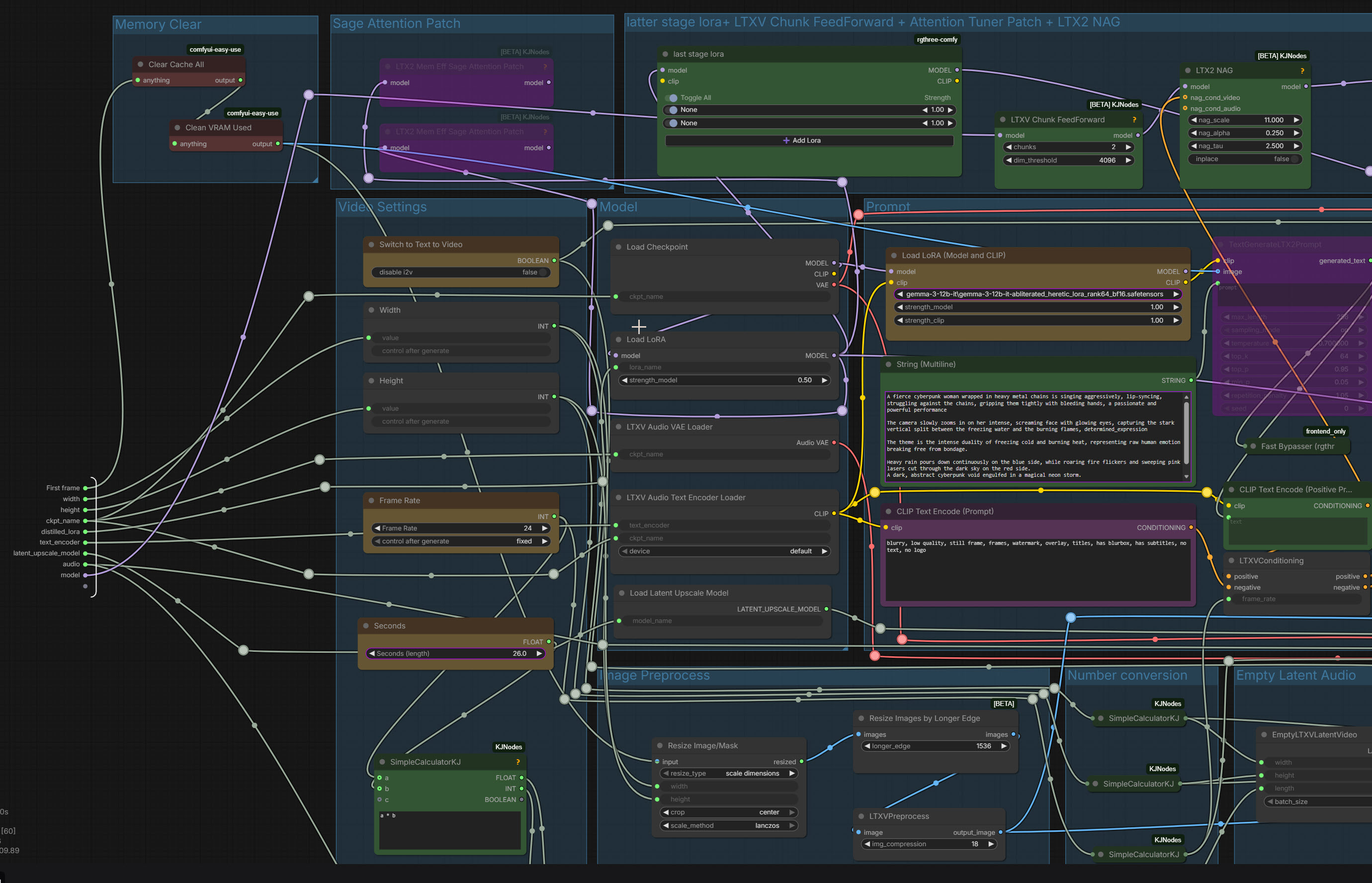
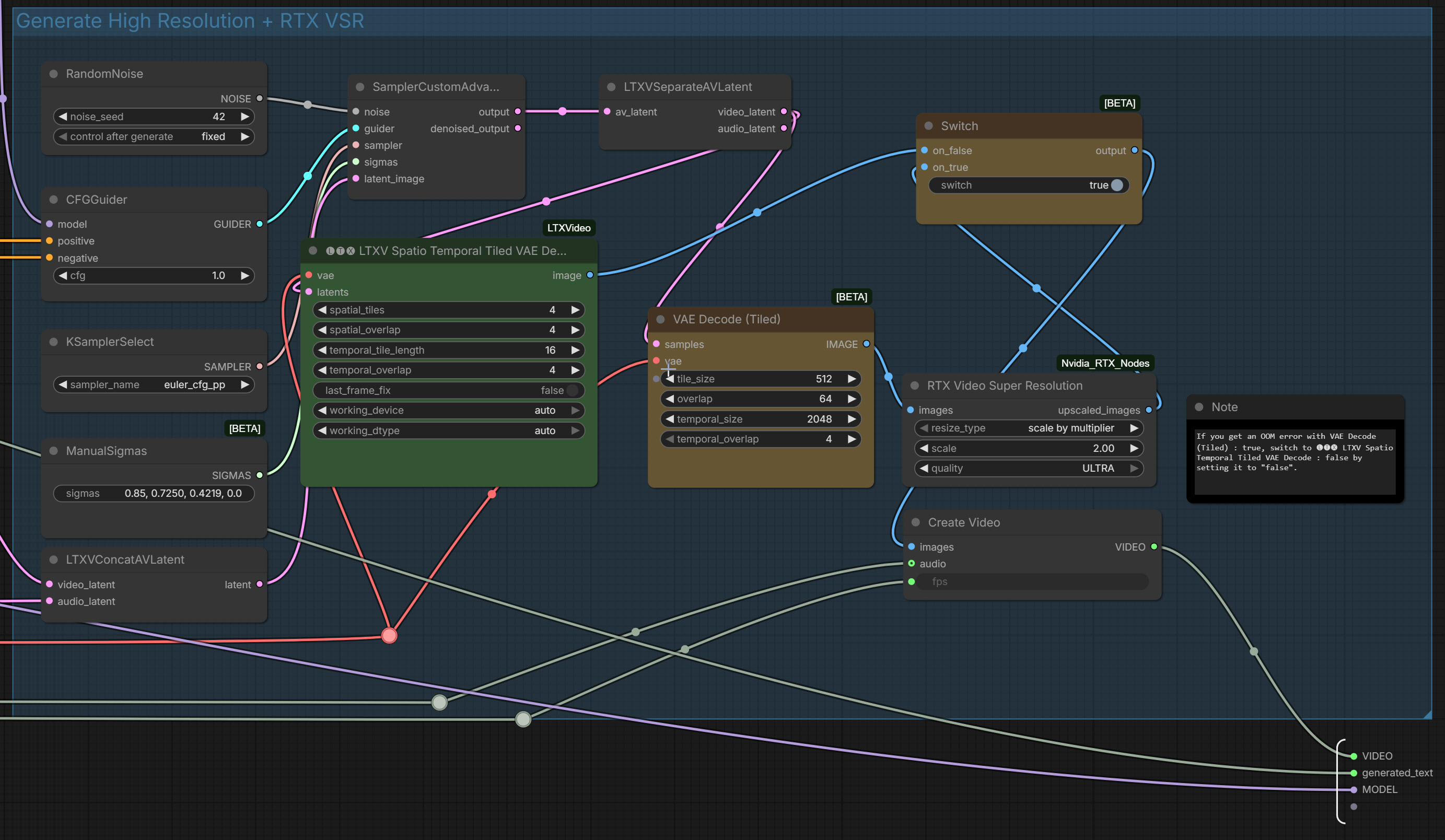
I've reviewed your workflow. I see, the general flow is the same as V4. Thanks for the guidance; it helped me create a stable version.
By the way, where does the Float in SimpleCalculatorKJ connect to?
The SimpleCalculatorKJ node (from the ComfyUI-KJNodes pack) works as a universal calculator and provides three different outputs: INT (whole number), FLOAT (decimal number), and BOOLEAN (true/false).
You connect the FLOAT output to any input or widget in ComfyUI that expects a floating-point (decimal) number. Where exactly you connect it depends on what you are calculating.
Here are the most common use cases (specifically from our LTX-Video workflow):
Framerate (FPS): If you are calculating or passing the FPS value (e.g., 24), the FLOAT output connects to the frame_rate input on the LTXVConditioning node and the fps input on the CreateVideo node.
Audio/Video Duration (Seconds): If you are calculating the duration of the clip in seconds, the FLOAT output connects to audio processing nodes, such as the duration input on the TrimAudioDuration node.
Other common uses: Denoise strength, CFG scale, various multiplier scales, or LoRA weights—all of these require Float values.
Rule of thumb: You connect it wherever ComfyUI needs a decimal number. If you try to connect a FLOAT to an input that strictly requires a whole number (like INT for image width/height), ComfyUI simply won't let you make the connection.
Considering backward compatibility, I think using KJ nodes for Math Expressions is a good idea.
Thank you for the detailed explanation about INT, FLOAT, etc.
@ukr8b3g201 I agree with you.
Hey! I noticed a small but crucial issue with the frame calculation in the current workflow that causes audio desync (especially with lip-sync) and slightly shorter video outputs than expected.
The Problem:
Currently, the SimpleCalculatorKJ node (under Video Settings) uses the formula a b (Frame Rate Seconds). For example, 24 FPS * 7 seconds = 168 frames.
However, due to the temporal compression architecture of LTX-Video (and its VAE), the model works optimally when the total frame count follows the formula (b * 8) + 1.
When it gets exactly 168 frames, the VAE often drops or truncates the last few frames to fit its tensor blocks. This means a 5.0s or 7.0s generation might actually output a 4.76s or 6.7s video. This completely breaks audio synchronization and makes seamless Image-to-Video (I2V) transitions impossible.
The Fix:
You don't need to add any new nodes, just update the existing calculator:
Locate the SimpleCalculatorKJ node (the one directly below the Seconds node that multiplies them).
Change the formula in the text box from a*b to: (a*b) + 1
Why this is a game-changer:
Now, if you set the video to 7.0 seconds at 24 FPS, the calculator will output exactly 169 frames ((24 * 7) + 1).
169 is a perfect "LTX-Video number" (21 * 8 + 1). The model won't drop a single frame!
The exact duration of your video will be 169 / 24 = 7.0416 seconds.
In your Audio Load node, you can now safely set the duration to 7.0 s, and for your next sequential I2V clip, simply shift the audio start_time exactly by 7.04s.
Your lip-sync will now match perfectly across multiple clips!
Thank you for investigating the audio sync issue and for the detailed verification. I have already uploaded the corrected version. Actually, I believe your issue is also a reference to the problem with the Comfy default template. Thank you as always.
Correct the mathematical syntax of the formula in the calculator a*b+1.
Correct it to (a*b)+1 by simply adding parentheses. This will make the formula mathematically correct and easier for the computer to understand.
Thanks, I see, I've fixed it!
Not a bad workflow at all. But for some reason heavy on the memory. I can generate at 1536x in some other workflows but on this even 1280x seems to get bottlenecked, especially over 6 seconds. Motion adherence obviously needs to improve. RTX super resolution is great when the input image is clear and the output is above 1280x. Saves a lot of time, I use it in my other workflows too.
Thank you so much for sharing your workflow! It's amazing!