the optical realism & physics node does not show up as an 'in this workflow' node inside comfyui manager, for some reason, so comfyui manager won't bring it up as a missing node to install. but you can search for 'optical realism' in the full list of nodes and install it that way.
if you are getting an error (red outline) with the 'universal settings' subgraph and the 'ak base settings' node inside it, check to make sure that the sampler is one you have installed, i think i left the dpmpp_2_sde_heun sampler there and that's not one of the default ones, i don't think. switching to a different one on the list might fix this error.
update! version 2.1 "willow"
this small update adds comparison images to the steps tester and a selector for the number of test panels to run in the lora tester. it also updates the detailer tester to use sam3, which requires triton to be installed from the command line. if you need assistance please let me know!
welcome to my test kitchen!
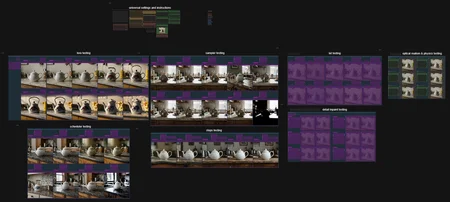
this workflow will help you test loras, samplers, schedulers and steps on newly generated images, as well as luts, detailing and optical effects on a loaded image. i hope it's easy enough to use. the area to the right of the instructions node is the universal settings section. put in your models, prompts, seed randomization preference and image size preference. you will also want to put in a default sampler, scheduler and steps. note that the randomizer puts the same seed into every panel, to limit unwanted variation in the test. you can re-run your tests with a new universal seed or the same one, depending on how you set the randomizer node.
the lora tester will use the sampler, schedule and steps that you've put here (as well as the base loras - the ones that you're not testing, the ones maybe you're testing against).
the sampler tester will use the scheduler and steps you have in this universal setup, the scheduler tester will use the sampler and steps, and the steps tester will use the sampler and scheduler. this way you don't have to fiddle with any more settings than absolutely necessary.
below this note is the activator panel. turn on the testing area you want to work with and then tweak the settings in that area.
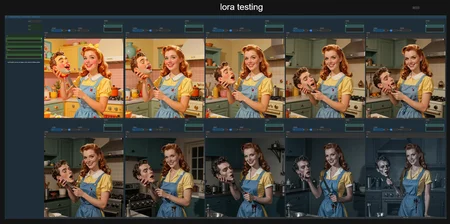
the lora tester lets you pick a lora (green panel) for the test. remember that any base lora in the universal settings will always be on. the starting strength is the minimum lora strength you want to test, and the strength step is how much you want to increase that strength across each preview.
the remaining three image gen testers let you pick one of the three main attributes of sampling to vary for your test: sampler, scheduler or number of steps. whichever variables aren't being tested will be taken from the universal settings. for the variable you are testing, go to the top of each panel in the testing area and set it how you want. (the steps tester is the simplest: five panels, stepping from 2 to 10 along even numbers. you can change these, of course, but for most purposes they're the best range for z-image turbo anyway.)
the lut, detailer and optical effect testers require a loaded image in the universal settings area. the detailer and optical effect testers have a lot of variables you can tweak, so make sure to isolate them one at a time.
as always, if you have any questions, please ask, i will help if i can!
--sft
Description
v2.0 "teapot" - this version adds three new tests! lut testing, detail inpaint testing and optical realism & physics testing! helper notes are in each area, which are now bookmarked.
FAQ
Comments (14)
1:whatever I try to do , I imediately get a warning "can't access property "output", res is undefined", where is this thing hidden ?, . 2: furthermore , trying to put this on SDXL-Lora testing, but when I activate the "Model Loader selector" on enable Difusion model, no option for SDXL, .. 3: the load checkpoint (right beside the Test group activator ) , is this only for Flux models ??
i built it for z image turbo, i don't think it will work with sdxl without some tweaking. i have run into the "can't access property" error and i think it was because i updated to the comfyui beta about a week ago. it affected all of my workflows. one of the custom nodes must not work with the beta right now. i ended up having to do a complete reinstall of comfyui portable to bring it back to the stable release.
@SaoirseTeagan ok, that explains this ""can't access property "output", res is undefined", I guess, well thanks, perhaps you will update this great workflow (in theory ) someday
@eflin3131 are you running the comfyui beta? the workflow is working for me on the 14.2 release
on comfyui 0.15.1 is not working. It has a problem with AK nodes. Even though the pack is installed, it can't find AK base settings.
@gontz861 are you not able to install the custom node at all? or do the nodes not show up even if you do install it?
@gontz861 i did a test update to 0.15.1 and i'm even having trouble with the rgthree nodes, apparently there's a conflict with the newest front end version that makes the context nodes not work. maybe something similar is affecting the ak nodes. can you try temporarily running with the lower version? this might work as a flag in the batch file (got it from the rgthree git page):
--front-end-version Comfy-Org/[email protected]
So, I tried also with the older version of the front-end, same situation. I have red nodes for ak base settings and another one (optical realism & physics test 1-6). I can search and find and access AK Base but not AK Base settings.
@gontz861 ok, that makes me think there is some kind of dependency that it doesn't know about. for example i know that getting sam3 to show up requires triton to be installed, if it's not it just doesn't appear in the node list. this is the github page for the node pack:
https://github.com/akawana/ComfyUI-AK-Pack
you could try the instructions at the bottom for a manual install to see if that helps:
cd ComfyUI/custom_nodes
git clone https://github.com/akawana/ComfyUI-Utils-extra.git
i will look into it further as well!
@gontz861 oh i found something strange about optical realism - if you're using the comfyui manager, it doesn't detect the presence of optical realism in the workflow, so it won't put it in the list of nodes to download. if you are using the manager you can search for "optical realism" and it will show up and you can install it if it's not already installed, and hopefully that will fix it.
@gontz861 oh one more question for you, what is the sampler setting on the ak base settings node? (should also be what's in the subgraph node 'universal sampler and scheduler') if it is the dpmpp_2m_sde_heun sampler that could also be the problem, I don't think the heun version is a default one, so you might not have it, I should probably change that. if you are using a different sampler but still getting the red outline let me know. i checked the github page for that node and there doesn't seem to be any unexpected dependencies, but i am still digging!
I 'm sure it is on my side. I can't run the example workflows from ak plugin examples. I must have conflict in my venv
@gontz861 that is really strange, if i come across anything i will let you know!
@gontz861 maybe the newest update to 0.17.1 / 1.41.19 fixes the problems? they fixed the rgthree issues.