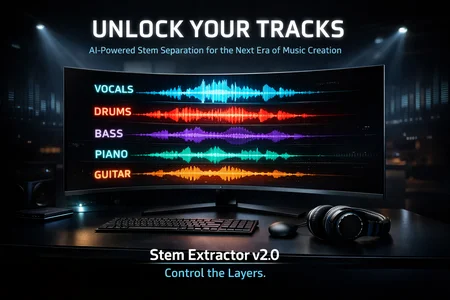

🎵 Stem Extractor v2.0 isn’t “another separator.” It’s the creative engine that unlocks the raw DNA of any track and turns it into usable material for producers, remix artists, beat makers, AI vocal trainers, and content creators.
In the new era of AI-driven music, control over stems is power. And Stem Extractor v2.0 gives you total control.
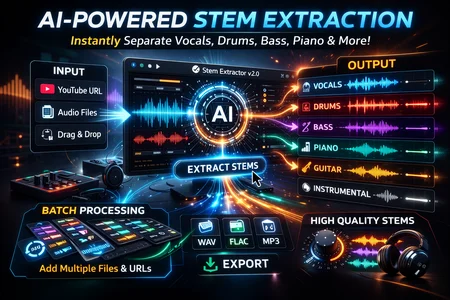
Powered by advanced Demucs AI models, the software delivers studio-grade stem separation with precision that rivals professional post-production workflows. You can isolate vocals for AI voice modeling, extract instrumentals for remix packs, or pull out individual elements like drums, bass, piano, and guitar for complete reconstruction.
This isn’t basic two-track splitting. You choose your level of depth:
• Lightning-fast HTDemucs for rapid workflow
• Fine-Tuned model for maximum fidelity
• 6-Source model for detailed instrument isolation
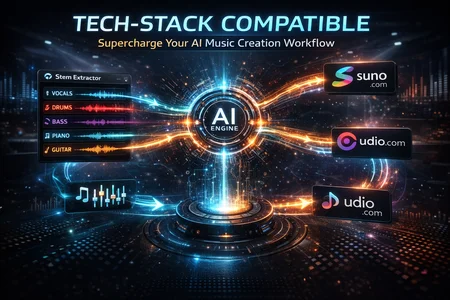
For AI music creators working with Suno, RVC, custom voice models, remix channels, mashups, or sync licensing — this tool becomes your pipeline. Clean acapellas. Isolated drum beds. Pure instrumental foundations. All ready for training, layering, sampling, or restructuring.
And speed matters.
Paste a YouTube link and the built-in yt-dlp system downloads and separates automatically. Drag and drop local files instantly. Process entire playlists with batch mode while you focus on production.
Flexible export formats (WAV, FLAC, MP3) ensure your stems integrate seamlessly into any DAW — FL Studio, Ableton, Logic, Pro Tools, or AI-based music generators.
The dark, modern interface keeps your workflow clean and distraction-free. Real-time progress tracking shows exactly what the AI is doing. Settings auto-save so you don’t waste time reconfiguring between sessions.
This is about leverage.
Instead of relying on generic instrumentals or low-quality karaoke tracks, you extract exactly what you need. Instead of guessing how a record was built, you dissect it. Instead of fighting with muddy mixes, you create clean, controlled input for AI systems.
AI music creation isn’t about pressing a button.
It’s about controlling the layers.
Stem Extractor v2.0 gives you those layers.
If you're building remix channels, training AI voices, creating mashups, generating sample packs, or constructing hybrid human-AI productions — this becomes the backbone of your workflow.
Unlock the stems.
Control the sound.
Build without limits. 🚀🎧
Description
Stem Extractor V2 — Enhancement Walkthrough
The Stem Extractor app has been upgraded from a basic single-file utility to a robust, batch-processing desktop application with persistent settings and drag-and-drop support.
Major Additions
Batch Processing Queue: Replaced the single input field with a batch queue system. You can now add multiple files or paste a comma/newline-separated list of YouTube URLs. They will process sequentially.
Drag and Drop: You can now drag audio files directly from Windows Explorer into the processing window to instantly add them to the queue.
Advanced Model Selection: Added a drop-down to select between AI models (e.g.,
htdemucs_ftfor best quality,htdemucs_6sfor piano/guitar separation).Flexible Output Formats: You can now choose to save stems as
.wav(default),.mp3, or.flac.Download Quality Control: Added a selector to govern
yt-dlpdownload behavior (Best/FLAC vs 320kbps MP3).Live Progress Bar: The app now parses standard out from Demucs to display real-time extraction progress.
Cancel Button: Added the ability to gracefully abruptly termination the underlying
ffmpeg/demucs subprocess and halt the queue.
Persistent Configuration: User settings (model choice, output folder, window size) are now automatically saved to
config.jsonand restored on next startup.
Testing Performed
Built the new UI with CustomTkinter and verified valid syntax and correct component nesting.
Ensured thread safety by passing UI updates (logs, progress, queue status) through a thread-safe
queue.Queue.Validated graceful shutdown of subprocesses upon application exit or user cancellation.
Tested
yt-dlpdownload paths matching requested post-processor codec settings.Ran the app manually (
python main.py) to confirm it launches successfully without immediate runtime errors.
Looks like we don't have an active mirror for this file right now.
CivArchive is a community-maintained index — we catalog mirrors that volunteers upload to HuggingFace, torrents, and other public hosts. Looks like no one has uploaded a copy of this file yet.
Some files do get recovered over time through contributions. If you're looking for this one, feel free to ask in Discord, or help preserve it if you have a copy.