🎬 I2V · First Last Frame · Loop — Upscale & Interpolate | All-in-One Wan 2.2 Workflow
A 3-in-1 ComfyUI workflow for WAN 2.2 video generation - because switching between separate workflows got old fast. Everything you need is loaded once in a central Control Center, and you just flip a switch for the branch you want. This makes using my other workflows obsolete. But you can still use them if you prefer to have a single workflow for each task.
✨ What this workflow can do
🖼️ Image to Video (I2V) Your everyday workhorse. Load an image, write a prompt, run it. Supports a Batch Image Loader to automatically process all images from a folder sequentially — no manual loading per run.
🔁 First Last Frame (FLF) Define the start and end frame of your scene and let the model figure out what happens in between. Great for controlled transitions and cinematic shots.
🔄 Loop Like FLF, but uses the same image for both start and end — generating a seamless loop. Perfect for endlessly repeating clips.
⬆️ Upscale & Interpolate Both can be toggled independently via Fast Groups Bypasser nodes. Use one, both, or neither — your choice.
💾 Save Last Frame Extracts and saves the final frame of your video for chaining into the next run. The secret sauce behind long-form video generation.
⚙️ Key Features
🎛️ Central Control Center - set your model, VAE, CLIP, resolution, steps and Speed LoRAs once, use across all branches
⚡ Lightning LoRA support (Lightx2v / High + Low) with a dual-step sampler setup for faster renders
🔀 Dynamic Prompts support with wildcard syntax for flexible, randomized prompting
🧩 Power LoRA Loaders per branch - each branch has its own independent LoRA setup
📦 Supports both FP8 scaled, Model merges and GGUF model variants
📁 Model Folder Structure
Place your files inside your ComfyUI installation as follows:
models/diffusion_models→ Wan 2.2 model filesmodels/LoRAs→ Speed LoRAs and concept LoRAsmodels/vae→ VAEmodels/text_encoders→ CLIP / text encoder
⚠️ After loading the workflow, click each model loader and select your files from the dropdown. Paths won't resolve automatically.
Full setup instructions, recommended LoRA strengths and all download links are included inside the workflow in the markdown guide node. 📋
Description
FAQ
Comments (39)
Will definitely be giving this a shot, looking forward to trying it out! ❤️
Same here!
Awesome. Tell me what you think and upload your videos to the gallery. 👍🏻
@fatberg_slim Having some slight teething problems but I think that's just due to me not having my LoRA stack fully dialed in.
Overall this is a great workflow. The way the nodes are laid out is super clean and easy to read. I really like the toggle switches, too.
Thank you for your hard work! ❤️ This certainly will be my go-to from now on!
@Lucedus What's the problem with the loop? Sometimes it's just not 100% smooth, I did notice that as well. Often a different image, prompt or just generating again might help. But I'll look into it and see if I missed something. Thanks for the feedback, excited for your example video.
@fatberg_slim Classic CivitAI flagged it, unable to verify generation. I'll try and fix that in the morning.
And there's no problem really, I'm just having some slight quality issues likely just due to my inexperience with stacking multiple LoRAs
@Lucedus typically if you just include a few words of prompt it will unflag.
@Lucedus Yes, that's correct. Always add the prompt manually when saving without metadata out of ComfyUI. The video combine node after upscale and interpolation currently has "save with metadata" set to off. You can turn it on or like Semen Demon said, add the prompt manually after upload.
Coming from someone who has inspired me to learn more, and do better, this is very much appreciated!
That's so nice. Thank you. ❤️ Have fun with it and ask away should anything be unclear.
@fatberg_slim thank you!
thanks for your work and for share it!
Hi i use mostly your SVI workflow which is amazing, any chance you could incorporate SVI FFLF as seen here?: https://www.reddit.com/r/comfyui/comments/1r8as6v/svi_20_pro_custom_node_with_firstlast_frame/
Heya, thanks for the comment. I think you're confusing me with someone else? I didn't release an SVI workflow in the past. Just standard I2V workflows.
@fatberg_slim oh sorry i may be confused then.
You are a genius, and you are a very kind person.
<img src="https://image.233233.fun/file/1771779537789_image.png" alt="image.png" width=100% />
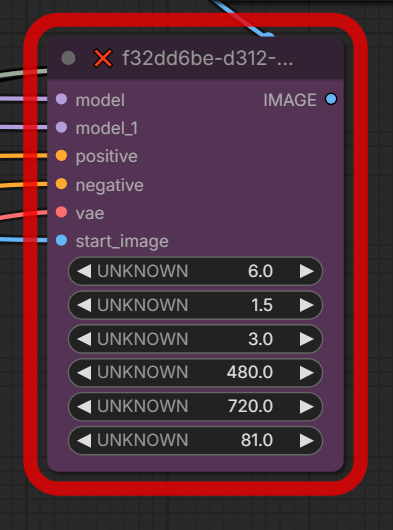
missing custom nodes, and the missing node could not be found:
Failed to find the following ComfyRegistry list. The cache may be outdated, or the nodes may have been removed from ComfyRegistry.
comfy-core
comfy-core
comfy-core
There must be something wrong with your Comfy install. The nodes in the subgraph are all comfy-core. No custom nodes in there.
Ok, I have a weird issue, and it happens with ALL the first to last frame w2.2 I2V workflows that I've tried:
at the end of the video, I Always get a weird flash, All the times...
Any idea what might cause it?
I use the .safetensor models, not .gguf
Hey, what kind of flash is it? Can you provide an example?
@fatberg_slim
here's a cropped clip, with only the last part, with the weird yellow flash at the very end
https://www.redgifs.com/watch/scaredmonumentalwhelp
By asking Grok, I was able to pinpoint a possible fix: I had set the video length too long, at 8 seconds; by lowering it back to the standard 5 seconds the flash disappeared. I'll do more testing later to see if it was a fluke or an actual fix.
@naughtyskynet Yes, the 8 seconds could have been the problem. It's a common problem you'll get color drift when going over 5 seconds.
Hello i have a question about this workflow. do the lora loaders not need a getnode for the clip? and if i were to add the sage attention nodes to the control center, would it mess up the quality of the video? Thanks again for sharing this amazing workflow!
Hi! Thanks for the question. The Power LoRA Loader doesn't need a CLIP connection. You can leave it as is, it works fine. About sage attention: I have sage attention activate with ComfyUI boot. If you do that, you don't need an extra sage attention node because it uses sage attention anyway. As long as it reads "Using sage attention" during boot sequence you're fine.
@fatberg_slim ill look into that. thank you again i appreciate the help.
This workflow and the videos you've made are great, keep up the good work. What are your thoughts on SVI?
Thanks a lot. 🙏 Honestly I don't like SVI that much. I mean yes, it's easy to make long and seamless videos with it but you're limited in LoRA usage and prompt adherence is not great. I like the last frame approach more; gives you more control but takes longer.
Great workflow! Thank you. How come my generation doesn't end with my last uploaded frame? Any tips?
You're welcome.
The workflow comes with the frames set to 81 (5 seconds). The last frame is extracted right after the VAE decode node, at the end of the sampling subgraph. The image from batch node is set to 80 to extract and save the last frame. When changing the length of the clip you're generating, you also have to change the frames in the image from batch node.
If you didn't change the length, I have no idea why it's not saving the last frame in your case. It should work right out of the box for 81 frames.
I uploaded the first and last images, expecting the video to start with the initial image and animate to the final one. However, the generated video didn't end with the last uploaded frame; instead, it continued to produce its own final frame (as a normal image-to-video would).
@ianfulgar Sorry, I misunderstood. When using the First Last Frame section make sure to disable the Image 2 Video as well as the Loop section. It should work that way - at least it did for me while testing it. Can you share a video with the workflow embedded so I can drag it into Comfy and take a look? Maybe I can spot what's wrong.
If you are changing the video duration and you are using the table inside the workflow, only the number for 5 seconds (81) is actually correct. You need to add +1 to all the others (so 33, 49, etc.) otherwise you will not get the proper last frame but a flash.
This workflow is so straightforward thank you - Eat, clog, grease, repeat
Thanks for the review. I'm glad you're having a good time with it. The main point for me was not to have an overblown feature set, but a solution that produces good results fast. 👍
Great workflow, thanks !
Hi, that shouldn't be happening. Did you activate the First Last Frame Section and deactivated the Image 2 Video section?
This is the first workflow from a top creator which I can really understand, no issues at all, thank master!