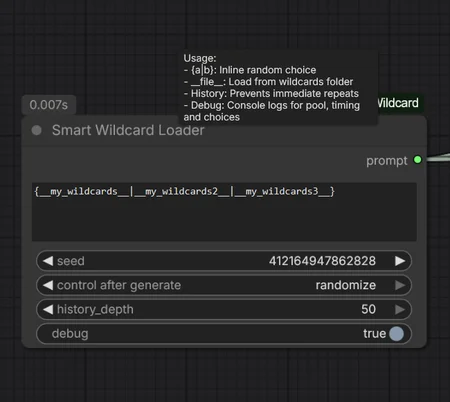
How to Use
Inline: {red|blue|green} picks one option directly from your text.
Files: __subjects__ picks a random line from wildcards/subjects.txt.
Multi-Pick: __colors__+3 picks 3 unique colors from the file.
Pattern Search: __*locati*__ finds any file containing "locati" (like locations.txt or old_location.txt).
Folder Pool: __creatures/**__ pools every .txt file inside wildcards/creatures/ — including all subfolders — into one big pool and picks from it.
Whole Collection: __**__ pools your entire wildcard library and picks from everything.
Nested: You can mix them! Example: {__hero__|__villain__} in __*world*__.
Deep Nesting: Wildcards inside wildcard files get resolved too. If creatures.txt contains A dragon with __dragon_color__ scales, the inner marker resolves automatically. Goes up to 8 levels deep, with cycle protection — files that reference each other stop cleanly instead of looping.
Style Preset: The style dropdown prepends a style to your prompt (e.g. cyberpunk style, ...). Set it to random to roll one of 32 presets from your seed — deterministic, so the same seed always gives the same style.
Browse: The browse dropdown lists every wildcard in your collection, subfolders included. Pick one to append a line from it, or leave it on none.
Inventory: The second output wildcard_index prints your whole collection as plain text, grouped by folder. Connect it to a ShowText node.
Syntax Overview
SyntaxWhat it does{a|b|c}Inline random pick__name__One line from name.txt__name__+3Three unique lines from name.txt__*part*__Any file matching the pattern__folder/*__Pool all .txt directly in folder/__folder/**__Pool all .txt recursively in folder/__**__Pool the entire wildcard collection.
!
🎲 SmartWildcardLoader — v3.2 Update
✨ What's New
Fixed: Underscore Names (finally!)
`__my_wildcard_name__` now resolves correctly. Previous versions silently
ignored wildcard names containing underscores — this was the single most
common cause of unresolved markers. If you renamed files to avoid underscores,
you can rename them back.
New: Folder Pools
Point wildcards at entire folders and have them pool together:
| Syntax | Behavior |
|---|---|
| `__folder/name__` | Direct path lookup |
| `__folder/*__` | Pools ALL .txt files directly inside `folder/` |
| `__folder/**__` | Pools ALL .txt files recursively, incl. subfolders |
| `____**__` | Pools your ENTIRE wildcards collection |
Pooling merges every line of every matching file into one fair pool — no bias
toward smaller files.
New: Wildcards Inside Wildcards
Lines in your wildcard files can now contain their own wildcards and
`{option A|option B}` brackets. Resolution is fully recursive (up to 8 levels
deep) with automatic cycle protection — files that reference each other
stop cleanly instead of looping forever.
New: Style Engine
Built-in style dropdown with 32 presets (cinematic, cyberpunk, film noir,
ukiyo-e, studio ghibli, vaporwave, dark academia and more) plus a `random`
option that rolls a style from your seed — deterministic, so the same seed
always yields the same style.
New: Browse Dropdown
A dropdown listing every available wildcard in your collection — including
files in subfolders. Select one to append a pick from it to your prompt, or
keep it on `none` to ignore.
New: Wildcard Index Output
A second output (`wildcard_index`) gives you a plain-text overview of your
entire wildcard collection, grouped by folder. Pipe it into a ShowText node
for a live inventory.
Kept From Previous Versions
- Deterministic seeding (MD5 sub-seeds): same seed = identical output
- Auto-Pool: exhaust a file before repeats (history_depth 0)
- `+N` syntax for multiple simultaneous picks
- `{a|b}` bracket logic
- History tracking with pool reset
- Debug console output with timing stats
📥 Install
1. Copy `SmartWildcardLoader.py` into `ComfyUI/custom_nodes/SmartWildcardLoader/`
2. Restart ComfyUI
3. Your wildcards go in `ComfyUI/wildcards/` (created automatically,
scanned recursively)
⚠️ Notes
- The browse dropdown reads the filesystem when the node loads — reload the
browser page after adding new .txt files to see them listed
- `#` comment lines and blank lines in wildcard files are ignored
- Backwards compatible: existing workflows keep working; new inputs fill
with defaults, the new output can stay unconnected
Update Notes: v1.1
New Features & Improvements:
Recursive Search: Wildcards are now found automatically in subfolders (e.g.,
__hero__finds/wildcards/rpg/hero.txt).Integrated Styles: New dropdown menu to quickly apply aesthetic styles (e.g., Psychedelic, Surreal, Cyberpunk) as a prefix.
Smart Empty-Check: The node will not process or add styles if the text input is empty, preventing accidental resource waste.
Enhanced Debugging: Console now logs the selected item, total pool size, and remaining items in the current history cycle.
Stability: Improved regex parsing and bracket
{a|b}resolution to prevent crashes from malformed syntax.
Smart Wildcard Loader: Quick Start
Update Notes: Smart Wildcard Loader (v1.03)
Improved Parsing & Debugging
Robust Wildcard Handling: The parser now intelligently ignores incomplete or unclosed markers (e.g.,
__unfinished_tag), preventing prompt corruption.Enhanced Debugging: Added console warnings for invalid markers and missing wildcard files when
debugis enabled.
New Features (v1.02)
Auto-Pool Mode: Set
history_depthto 0 to automatically detect file length. It will exhaust every single line before any word repeats.Reset Button: Use the
reset_historytoggle to instantly wipe the memory and all frequency stats.Frequency Tracking: If
history_depth > 0, the console highlights repeated picks in RED and tells you exactly how often they have appeared.Skip Counter: Tracks the node's "workload" by counting how many lines were skipped to respect your history settings.
Why use this?
Total Variety: Ensures you see every single line of your wildcard files before a repeat occurs.
Deep Logic: Files can contain other tags, allowing for infinitely complex prompt chains.
Efficiency: All memory is stored in RAM. It’s fast and resets when you restart ComfyUI.
Description
FAQ
Comments (5)
You learn something new every day! I wasn't aware of that feature, so thank you for pointing it out. I have already integrated it into the current build.
@Keksethief Wow! Thank you!
Very nice and useful, thank you.
I'm glad you found the node useful.
Looks like we don't have an active mirror for this file right now.
CivArchive is a community-maintained index — we catalog mirrors that volunteers upload to HuggingFace, torrents, and other public hosts. Looks like no one has uploaded a copy of this file yet.
Some files do get recovered over time through contributions. If you're looking for this one, feel free to ask in Discord, or help preserve it if you have a copy.