


Segment anything and edit, swap, inpaint on them using Flux.2 Klein (or Dev)!
Crop and stitch makes it so irrelevant parts of the image will not be altered, it will be faster and you can precisely control which edit (or reference image) goes where.

How to use the workflow
IMPORTANT TL;DR first on setting up the most important things.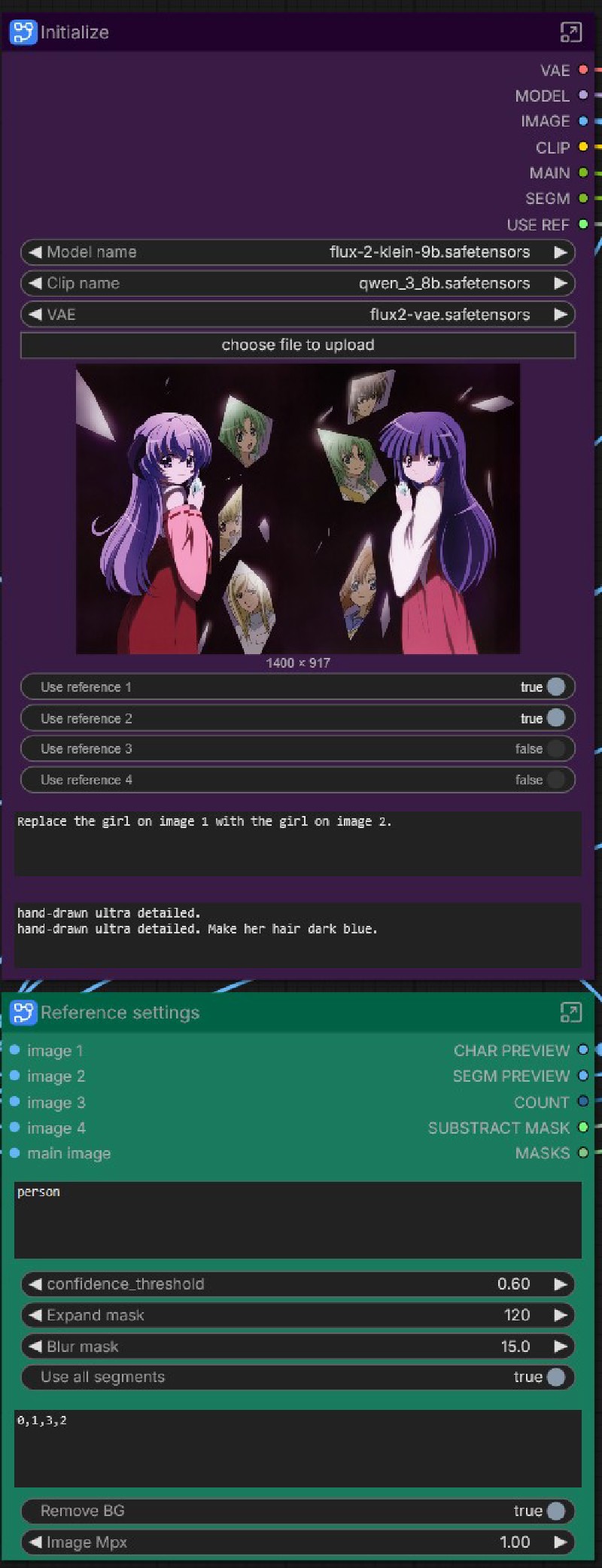 After setting the models, you have to at least prompt on the initialize node (top prompt will be applied to each segment, bottom is per-segment-prompt).
At the Reference settings you have to prompt what to edit.
These are the most important things, the rest you can adjust as you get to know the workflow better.
Initialize
- Select Model, CLIP and VAE.
- Upload image to edit.
- Select if you want to use reference image for each segment.
- Prompt all (will be added first for every segment loop).
- Prompt the segmented area individually (new line / enter between segments).
Reference settings
- Scale reference image size to Megapixels.
- Remove BG: cuts background from the reference image.
- Segment: prompt what you want to edit (character, or in the example vase).
- Confidence: how "strict" the segmentation is; ie. lower gets less likely results, a very high value will only find what you've prompted for if it is extremely likely. Generally 0.3-0.5 works great.
- Expand and blur mask is usually used to give the generation "more space" to move around; unmasked areas will not be touched.
- Substract: useful when you have something within the mask that you absolutely want to keep as is (eg. the eyes of the segmented character, when you only want to edit other parts on her).
- [SAM3/SAM2] model: select your segmentation model.
- Use all segments: true will loop through every resulted segments. If you set it to false, you can select which segments to use. Refer to the Preview Segment node on the left - which is highly recommended to run first to preview the resulting segments before prompting and selecting them!
Load image 1-4
- Load reference images. If you have more segments than reference images, the rest will run only as normal edit (with no reference)! You can add more images if you need - or ask me to make them, if you don't want to engineer inside.
Loop sampler
- Use random seed: workaround to get random seeds within subgraphs. Set it to false for manual seed.
- Seed (when not using random)
- Steps, sampler, guidance (cfg) as normally
- Scheduler: choose between Flux.2, Beta with model or normal schedulers; if set to normal, "scheduler for normal" lets you choose among the "usual" schedulers. My tests told me setting it to Beta is great - but you can always test and see what works best for you.
- Scale: up/down scale segmented area upon crop.
I have included 2 types of workflows, both with SAM2 and SAM3 version:
- A simple edit (with no reference images); the rest of the functionality is the same.
- A reference edit with up to 4 reference images (do ask me if you need more).
Description
FAQ
Comments (13)
Thanks for sharing this workflow! I’ve been trying it out over the past couple of days since your Reddit post, and I’ve learned a lot from working through it.
You're most welcome!
Hey! Thank you for your work, I can't wait to get it working. Currently when loading your workflow for SAM3 RefFlow, the "reference settings" node looks very poor compared to the one on your screenshot... I have installed all the custom nodes through the Manager, so I don't get why.
Running it t just outputs the first previous segment (nr 0). See screenshots here: https://imgur.com/a/Ra4RwAL
Oh damn that looks like a problem with the subgraph.
Some inputs got disconnected for some reason.
Can you open it up and re-link those inputs?
(Also irrelevant now, and not sure if it's like this only for the screenshot, but make sure you load images on all 4 Load image nodes, even if you don't use them by disabling tne "Use reference image 2-4").
Hit me up again if you can't fix it, I'll try and come up with a solution.
@yorgash Ohh... Thank you for your quick answer, and sorry to disturb. I am completely new to all of this, so I am not sure about how to proceed with what you are asking.
Here is how the subgraphs look like: https://imgur.com/a/9z1wzOS
(Thanks for the comment about loading 4 images nodes)
@nebullanw804 It seems like SAM3 update is to blame now that you opened up, mine has a segment prompt inside, yours does not.
I'll check to make sure as soon as I can after a good night's sleep. I'm not sure if mine is older (and if so why they removed prompt from newer), but I'll have to check out what RMBG3.0 came up with and possibly update the workflow with that.
Damn all these updates already :D
@nebullanw804
Added v2.0 and swapped SAM2, SAM3 and RemBG with the new RMBG3.0 nodes.
Also unpacked sub-subgraphs which might have also led to some input disconnects.
had some issues with kaytools, couild not install. searched on comfyuimanager and found 2 instances of kaytools, one got installed.
Getting red nodes under reference settings at crop settings. 3 k remove background are red and also 3 Switch Any nodes are the same
The Switch Any should by Crystools nodes, those are sadly very hard to work. around.
The remove background is way less important (as in only useful some times, but can usually more than love without), so if you can't install it (or other similar rembg nodes to swap with) you can delete it, just make sure you delete the switch as well, or simply connect the image rembg gets as input to both "true" and "false" of the "Remove background" switch.
If that didn't make sense to you, I can make that bypass for you, but the Crystools' switch any nodes are a must, since the workflow uses those switches for every inside logic as well as manual switches.
Added v2.0 and swapped SAM2, SAM3 and RemBG with the new RMBG3.0 nodes.
Explained horribly and this isnt inpainting. Downvoted
does real ipainting work for klein? Seems like most workflows I try are just editing
Some people have never used these SAM and segment tools at all. This could be broken down a lot better because the workflow is a complete pain to get working. It just runs with 0 steps completed.