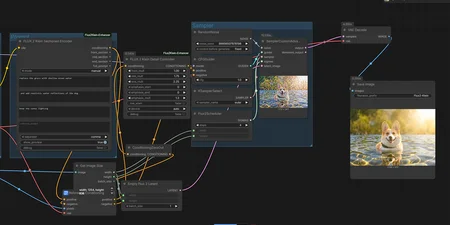
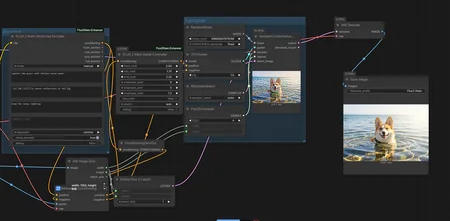
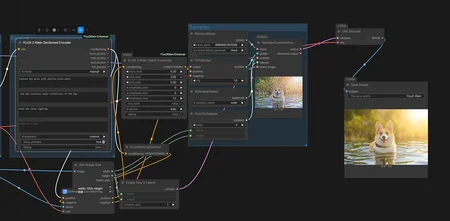
UPDATE JAN 30TH, 2026 ( Possibly Final)
I traced the actual forward pass of Flux Klein to understand how reference latents work. Turns out the reference image and text conditioning are completely separate streams until late in the model.
What I found:
The reference latent sits in metadata as a [1, 128, H, W] tensor. It gets patchified and concatenated with the noisy latent before entering the image stream. Text goes through its own stream. They only merge in the single blocks near the end.
With reference latent: img_in sees [1, 8140, 128] (reference + noisy concatenated) Without reference latent: img_in sees [1, 4070, 128] (just noisy)
This means you can control them independently.
New nodes added:
FLUX.2 Klein Ref Latent Controller
Direct control over the reference latent tensor before it enters the model.
strength- scales the reference signal. 0 makes it behave like txt2img. 1 is normal. 2+ locks harder to the reference structure.blend_with_noise- degrades the reference with noise. useful for loosening structure while keeping general composition.spatial_fade- applies a gradient so different regions have different strength. center_out preserves the middle and lets edges deviate. edges_out does the opposite.spatial_fade_strength- how aggressive the fade is. 0 is no fade, 1 is maximum.channel_mask_start/channel_mask_end- apply modifications to specific latent channels only.
FLUX.2 Klein Text/Ref Balance
Single slider for quick control.
balanceat 0 means reference dominates, prompt is ignoredbalanceat 0.5 is normal balanced behaviorbalanceat 1 means prompt dominates, reference is ignored
FLUX.2 Klein Text Enhancer
Cleaned up version of the text conditioning modifier.
magnitude- scales text embeddings. below 1 weakens prompt, above 1 strengthens it.contrast- sharpens or blends token differences. uses safe math that won't invert at negative values.normalize_strength- equalizes token magnitudes across the prompt.skip_bos- leaves the first token alone since it has a massive norm that shouldn't be touched.
How to test the ref controller:
Run three generations with same seed and prompt. Set strength to 0, then 1, then 2. If 0 looks like txt2img and 2 looks more locked to your source image, it's working.
repo: https://github.com/capitan01R/ComfyUI-Flux2Klein-Enhancer
Sampler used in the workflow can be found here : https://civarchive.com/models/2334962?modelVersionId=2626535
UPDATE JAN 26TH, 2026
Flux Klein can be inconsistent with preserving subjects and objects. Sometimes it works perfectly, other times it ignores what you're trying to keep. There's no built-in way to control this behavior.
I added preservation control to my enhancer nodes. Flux Klein doesn't expose this natively but the node makes it possible.
The modes:
dampen is the recommended mode for precise preservation. Use 1.00 to 1.30 for reliable results. You can push to 1.40-1.50 if you need tighter control but that varies by prompt.
linear applies modifications at full strength then blends with the original. Less consistent than dampen but has its uses.
hybrid does both - dampens then blends. Probably more than most people need.
blend_after is the same as linear.
How to use it:
The optimal value changes with each prompt. One generation might need 1.25, another needs 1.45. That's why having fine control is useful.
Standard range is 0.0 to 1.0. Higher values work when Flux Klein struggles to maintain details. Negative values exist for experimentation.
Why this helps:
Flux Klein doesn't provide preservation controls. You're relying on the model to maintain what matters. This node lets you control how much gets preserved while still allowing the prompt to work. Makes generations more predictable when you need specific elements to stay consistent.
prompt used :
"subject from source image, keep the subject, keep exact anatomy, add a SpongeBob hat on the subject's head",
        "full frontal angle, change the action to swimming deep in the ocean, keep scale of body proportions, add more depth to natural fur texture, add more depth to the shades",
        "add a perfect lighting"
Updated Custom node on and more details GitHub if you want to check it out.
Or via the Comfy manager
workflow used can be found from the example photos in Github
UPDATE JAN 21TH, 2026
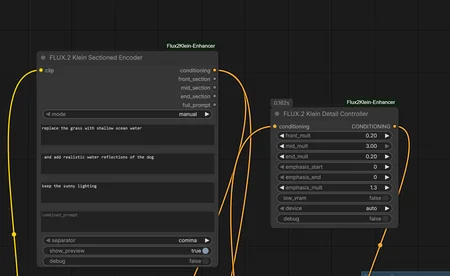
Added new support node to the FLUX.2 Detail Controller
Target: A user friendly node to help users comfortably section their prompts to add target mult to them using the FLUX.2 Detail Controller.
The node is sectioned to three parts front/mid/end just like the Detail Controller node + a combined box "Basically for Vanilla use".
update your node via git pull or the comfyui manager
UPDATE JAN 20TH, 2026
Since open source is all about honesty and transparency, I found errors that needed to be corrected on my initial release. Even though it worked to some extent, the code was undoing some of its own work due to a mean-recentering step I had in there.
What was happening:
Enhancement: scale=1.250, mag 893.77 -> 1117.21   ← Applied
Output change: mean=0.000000                      ← But final output unchanged
The enhancement was running internally, but the final tensor going to the sampler was nearly identical to input. If you got results before, it was mostly from edit_text_weight which bypassed this issue.
What changed:
New Old
text_enhance
magnitude
detail_sharpen
contrast
coherence_experimental
Removed (was unstable)
edit_blend_mode
Removed
active_token_end: 77 hardcoded
Auto-detect from attention mask
New presets for text-to-image:
              BASE   GENTLE   MOD   STRONG   AGG     MAX
              ----    ----    ----    ----    ----    ----
magnitude:    1.20    1.15    1.25    1.35    1.50    1.75
contrast:     0.00    0.10    0.20    0.30    0.40    0.60
normalize:    0.00    0.00    0.00    0.15    0.25    0.35
edit_weight:  1.00    1.00    1.00    1.00    1.00    1.00
New presets for image edit:
              PRESERVE   SUBTLE   BALANCED   FOLLOW   FORCE
              --------   ------   --------   ------   -----
magnitude:       0.85     1.00       1.10     1.20    1.35
contrast:        0.00     0.05       0.10     0.15    0.25
normalize:       0.00     0.00       0.10     0.10    0.15
edit_weight:     0.70     0.85       1.00     1.25    1.50
How to verify it actually works now:
Set debug: true. You should see non-zero output change:
Output change: mean=42.53, max=1506.23If mean is 0, something is wrong.
Pull latest from the repo. Old workflows will break due to renamed parameters.
As for the 4B model, I want to first get a full grip on the 9B before moving to that. Different architecture needs different handling and I'd rather do it right than rush another release that needs fixing.
Same tip as before: if you don't get the desired result, don't change parameters immediately. Re-read your prompt first. If you must change parameters, fix the seeds and adjust gradually.
Also adjusted the second node called Detail Controller for regional emphasis:
- front_mult: first 25% of tokens (usually subject)
- mid_mult: middle 50% (usually details)
- end_mult: last 25% (usually style terms)
Optional node for fine control. Main enhancer covers most cases.
original post : here
repo: https://github.com/capitan01R/ComfyUI-Flux2Klein-Enhancer
Released a custom node for ComfyUI that modifies FLUX.2 Klein conditioning to improve prompt following and faithfulness, especially in image edit mode.
What I found:
FLUX.2 Klein outputs conditioning tensors of shape [1, 512, 12288]. Positions 0-77 contain the actual text embeddings with high variance (std ~40). Positions 77-511 are padding with low variance (std ~2).
This node only modifies the active region (0-77) and detects image edit mode automatically by checking for reference_latents in the metadata.
The settings that worked best for me on image edit:
text_enhance: 1.50
edit_text_weight: 2.00
everything else at default
For text-to-image the detail_sharpen parameter helps with separating concepts in complex prompts, but for image edit you mainly need text_enhance and edit_text_weight.
GitHub: https://github.com/capitan01R/ComfyUI-Flux2Klein-Enhancer
install via manager : ComfyUI-Flux2Klein-Enhancer
Let me know if you run into issues or have suggestions. The debug toggle prints tensor statistics so you can verify it's actually changing the conditioning and not just passing through.
Description
v2.2.0
added additional node "FLUX.2 Klein Sectioned Encoder"
FAQ
Comments (1)
Sorry people have been dirtbags.
I love the new encoder to go with the controller. I was wondering if you could (or already have) posted a bit more detail on the Controller settings though (and maybe what to expect with various changes to the settings. I've been on the Github page and saw what they do, but it would be great to have a bit more info on what to expect with numeric changes!