IF YOU ARE WONDERING WHAT V2 IS OR YOU'RE HERE BECAUSE OF MISMATCHES AFTER UPDATING COMFY THE FIX IS IN!
UPDATE KJNODES AND COMFY!!!!!
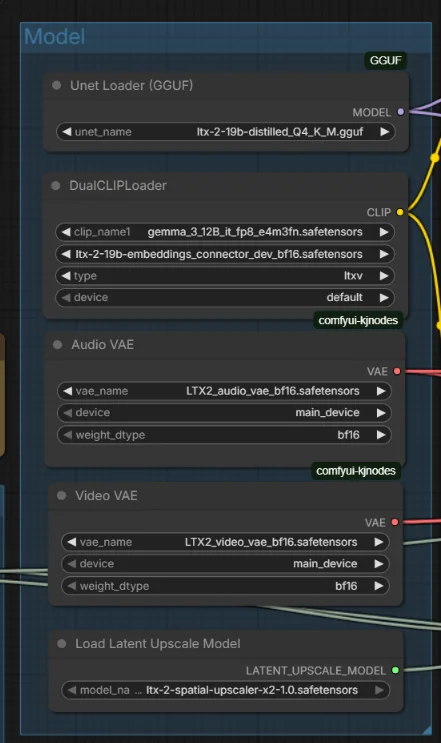
WE NOW PUT THE EMBEDDINGS INTO THE MODEL LOADER AND THE CLIP BUT IT IS ONLY LOADED ONCE! DOES NOT USE MORE MEMORY!
UPDATE KJNODES AND COMFY!!!!!
THIS WAS A NECESSARY CHANGE AFTER COMFY REORGANIZED WHERE THE EMBEDDING MODEL WOULD LOAD INTO. REQUIRED UPDATE!
PLEASE TAKE NOTE OF NEW DEV+LORA COMBO! WE NOW USE FP4 GEMMA TEXT ENCODER!!!! CHECK MODELS!!! WE NOW HAVE PREVIEWS USING TINY VAE!!! CHECK MODELS!!!! CHECK MODELS!!! DID I MENTION TO CHECK ALL YOUR MODELS!!! DO EEEEEEET!
WE ALSO HAVE THE LORAS SETUP CORRECTLY AND THERE ARE SOME FUN ONES OUT ALREADY! NODE IS READY TO GO FOR YOU!
5 TOTAL GGUF 12GB WORKFLOWS!
t2v, i2v, v2v extend, ta2v, ia2v!
Hello everyone! This workflow has come a long way since 1.0 actually. It doesn't seem like it when you first look but, boy this has been a project for me!
Here we have quite a few workflows for LTX-2 using GGUF and running on at least 12GB VRAM and 48GB system ram.
First we have your typical t2v and i2v workflows.
Second we now have two new audio driven workflows! ta2v which is supply a text prompt ONLY and some audio get a neat generated video with your audio! The other is an ia2v where you supply an image and an audio file and it lip-syncs up nicely. I tried to keep everything as simple as possible.
Then the one I like the most v2v extend. Feed ltx2 a few seconds of video, create a prompt to continue the video and watch the magic happen!!
I got done with the workflows, I now need to get all the info out there but I wanted to get these into the wild so everyone can start having fun with them!
I HAVE CREATED TWO ENHANCEMENT NODES FOR THE AUDIO!!
YOU WILL NOTICE 2 NEW NODES TOWARD THE END OF THE WORKFLOW FOR AUDIO ENHANCEMENT. CLICK THE BLUE LINK BELOW FOR MY GITHUB PAGE, INSTALLATION INSTRUCTIONS, AND USEAGE NOTES!
URABEWE-COMFYUI-AUDIOTOOLS
Description
V1.1 with updated nodes for new Video VAE
FAQ
Comments (76)
The 1.1 update fixed the problem. You did it! You crazy SOB you did it!!! THIS WORKS!!! OUR PURGATORY HAS ENDED.
Noice! Have fun!! I know I am! Memes all day
Did what exactly? Its just a workflow
@ylvlylvuyv374212 well it wasn't really anything I think they were just happy. The original workflow got sent out all was good until Kijai made an update 2 hours later while I was sleeping. So, I updated the workflow and now it's all good. Just people out here having personalities ya know?
Also for a lot of people all other workflows and avenues were a dead end. I'm pretty sure a lot were about to pass on this model. Hopefully this workflow and the others that I'm sure have sprung up everywhere will bring people to use the model so we get even better versions!
Does the Workflow work with 8Gigs of vram? I've been trying to use this model for about a week already :(
Hello, bloger. I have get the video with full mosaic. I need help! qwq
Did you use the new v1.1 workflow? Update KJNodes? Update GGUF? Make sure you're using only the models I linked in the workflow and place them in the locations listed. You MUST use the v1.1 workflow for this to work.
@Urabewe got the same issue as OP, my GGUF nodes are updated to nightly 1.1.10 and my KJnodes are updated to 1.2.5 and my outputs look like a single undulating mosaic pattern and the sound of buzzing using the default 1.1 t2v workflow. not sure what else to try.
@sortinghatsixtyn9817 everyone I have talked to over the past few days it has been the gguf nodes causing the problem. Try going back to main branch instead of nightly. If that doesn't work a few people had to completely uninstall and clone the repo again.
@Urabewe thanks for the response, sound like redoing everything and possibly redownloading all models is the only options, Thanks again!!
@sortinghatsixtyn9817 a lot going on with comfy right now and a lot of people are thinking it's the workflow. Hopefully you get it all sorted out.
@Urabewe yeah, so many people with successful outfit using your workflow, its probably something weird on my side. Thanks Again !!
This does not work for me, i have a 3080ti with 12gb vram and 32gb ddr4 and it crashed at vae decode.
Everything runs fine until the steps are done and comfy tries to load video VAE, then it crashes. Comfy, GGUF, and KJNodes are all up to date. Also, everything is exactly the same except using gemma fp4 version because I have RTX 3060 and can't run e4m3fn.
Uninstalling and installing KJNodes from scratch fixed the load video VAE crash, but now because of my low ram (16 GB), VAE Decode (Tiled) either crashes comfy or my computer. Lowering temporal_size either didn't help or was worse. Is there a way around this?
@itsnottme Comfy doesn't seem to unload the models properly. I have 64GB, with my swapfile off, and I can only do one or two videos before restarting Comfy.
Stuck in SamplerCustomAdvanced. Anyone faced this before?
Works on Mac M1! ty!
can I ask what your current version of cuda is?
@Marict Mac doesnt have cuda
Mac M2 here.
Produces a very weird super-saturated fuzzy video with correct sound, like the video VAE is incorrect or something.
This appears to have been fixed by updating both the Kanji nodes and the GGUF nodes in the manager.
Thank you.
Works on Mac M2 Max 64gb without any problem.
848x480 took about 5 minutes to generate.
is the bypassed lora in the t2v wf supposed to work if we enable it? I'm referring to ltx-2-19b-distilled-lora-384.safetensors. Or is this just a placeholder to put other loras?
Its working now.. I think updating GGUF custom node is what fixed it.
Using a 3060 with 12 GB
Any suggestions?
VAEDecodeTiled
Allocation on device This error means you ran out of memory on your GPU. TIPS: If the workflow worked before you might have accidentally set the batch_size to a large number.
had the batch set to 1.
For awhile Comfy has only worked for me with the options "--disable-pinned-memory --disable-smart-memory".
@Ken_g6 I had the --disable-smart-memory disabled in my startup sh script, but didnt have pinned memory according to ai
1. --disable-smart-memory: "Force ComfyUI to aggressively offload to regular ram instead of keeping models in vram when it can."
- This is useful for low VRAM cards but NOT recommended for 12GB
- It will constantly move models between GPU and CPU, which is slow
2. --disable-pinned-memory: "Disable pinned memory use."
- Pinned memory is page-locked memory in RAM that doesn't get swapped to disk
- It's faster for GPU data transfers
- Disabling it can save system RAM but will slow down transfers
- For RTX 3060 12GB, you likely have enough system RAM, so disabling this isn't necessary
Ended up having Opencode change my settings to the below because of my system the way its setup
Created optimized script for your specs:
Optimizations Applied:
1. --normalvram - Balanced mode for 12GB VRAM
2. --fp16-vae - Saves VRAM on VAE without quality loss
3. --dont-upcast-attention - Prevents FP32 upcast, saves VRAM
4. --reserve-vram 1.0 - Protects OS from VRAM exhaustion
5. Smart memory enabled - Utilizes your massive 125GB RAM pool
6. Pinned memory enabled - Faster CPU↔GPU transfers
7. CUDA segments + 512MB split - Reduces fragmentation
8. 24 CPU threads - Maximizes parallel processing
Why these settings work best for you:
- Your 125GB RAM means smart memory can offload without performance penalty
- 12GB VRAM is perfect for normal mode (not too restrictive, not wasteful)
- 24 CPU threads gives great parallel processing for offloaded operations
- No need for --disable-smart-memory or --disable-pinned-memory - they would hurt performance
You got me at 'that one thing that goes "PING!"' <3
Monty P. forever :)
Does the Workflow work with 8Gigs of vram? I've been trying to use this model for about a week already :(
The RTX 4060 with 8GB VRAM works flawlessly with 32GB RAM, thanks man, great workflow!
Another workflow garbage. Lot of downloads and settings, lot of oom and finally noised messy nothing.
Hello, upgrade your GGUF nodes to the lastest version fixed the problem for me try it sir
Will you be updating your wf based on this: https://www.reddit.com/r/StableDiffusion/comments/1qdug07/ltx2_updates/
? hope so!
I was testing it out yesterday. I will probably end up making two workflows with the regular sampler and the other for those that don't want to install or don't have the ltx comfy nodes.
I'm waiting to see what happens. I don't want to be constantly updating workflows so I'm letting it all kind of settle before updating anything.
Thanks for sharing this relatively simple workflow.
I had to change the DualClipLoader to run on the CPU as was getting OOM.
Glad you got it running. I'll be changing the encoder to an fp4 in a future update. You can get it from comfy org ltx2 on hugging face right now and see if that helps on GPU.
Update is on hold until everything dies down a bit. Then I'll have a workflow with most of not all of the updated nodes and encoders and stuff.
Does the I2V workflow work with a square image?
I've tried setting custom resolution and longer edge to be the same as the image (1080) but keep getting an error.
Many thanks.
@whatthedeuce it should. Just set the resolution and keep the longer edge the same. I have yet to really mess with that. Still building and working it all out so next release is a bit more polished. I now have the audio driven workflow, video extend workflow where you feed 5 seconds of video and it extends, and have improved the base i2v and t2v workflows.
But if you just set resolution it should work just fine. What is the error you are getting?
@Urabewe thanks I figured it out. If my input was 1080x1080 I could do long edge of 480 and then blank image 480x480 and success. Earlier the long edge was set to 1080.
The workflow is producing high definition results in blazing fast time, but there is real issue with how it's using my image reference, can you help me? Essentially it uses the image reference for the first frame of the video but then generates a completely different video based solely on the text prompts. Any advice would be greatly appreciated
Maybe you are using the t2v workflow by mistake. there are two.
@ermbaby there is an image input in the workflow, pretty sure its the I2V
@pusherj15409 a few people have this issue. I'm not sure except maybe prompting. If you're using the models listed then try describing the image first
"A man wearing a blue shirt sitting at a table in a busy cafe, a waitress stands behind him"
Then use that to direct the prompt "the man in the blue shirt speaks while looking at the camera. Then waitress comes up behind the man and smacks him in the head"
@Urabewe I did some research and it looks like it may have to do with LTX generally working better being generative vs. manipulating an image. I guess my use-case and therefore prompts haven't been leaning towards the generative side of things
@pusherj15409 ohhh,were you trying to use it like reference to video? Image to video will animate your image where reference to video will take your character and you can then basically make a text to video with that character. So far no, ltx can't do that. But,that doesn't mean some crazy bastard won't find a way to do it
@Urabewe No I am using as strictly I2V, but the problem I outlined in my initial comment is still happening. I think it has something to do with my settings or prompting but I can't pin point the issue
Thanks for the workflow. It works ok. I think LTX2 is a very peculiar model. It is not got at handling simple prompts it also does not hold the character shape when zooming out from a i2v. I guess its not really suited to I2V yet. It might have a use case but possibly it will be more useful as T2V.
Hi, can anyone tell me what the problem is? All the voices are coming out unintelligible or hissing.
Could be a memory problem (?), Did you try to reduce video the resolution?
@MaximilianPs As I understand it, the problem was in the encoder. I thought the NSFV one would work, but no.
@AC62 I notice some problems too, and I fixed it by changing the video resolution! (512x768 for example)
@MaximilianPs I'll try that later too, thanks for your help)
LET ME SAY THAT'S THE BEST WORKFLOW ATM!
I also strongly advice to use:
--windows-standalone-build --lowvram --disable-async-offloadBetter if you have also --use-sage-attention but for me it won't work with LTX nodes.
This is by far the best workflow I have used. The only issue I have thus far is it keeps placing music over the video...even if I prompt it not to. If anyone has any ideas would be great.
Other then that this work flow blows me away how good and fast it is.
Even commercial models do that. I prefer to create audio separately and use a workflow that syncs to the audio.
Thanks for the info. Ill give that a try. Oh I am using the I2V json btw.
are there tricks to getting T2V to work with portrait vs landscape aspect ratios? Each time I try I get a video with my subject out of the frame.
actually, seems to be working now. at least 448x704... are there magic values that work better with this model?
I'm using 960x576
@MaximilianPs I'm specifically asking about portrait mode. Thanks.
Improving Consistency?
I guess increasing CFC it isn't a good idea, but what about the other parameters? What can we tweak with I2V ?
Consistency is a huge problem for ltx2 unfortunately. Right now I don't know of much that can be done about it.
You can try Euler, Euler a, lcm I have pretty good success with those others are good. A lot of people are using the res_2s from the res4lyf repo as well.
Small improvement for I2V to compute the exact frames, length (in second) and Image Size :)
https://imgur.com/a/edDorMd
I'm getting the error
LTXVEmptyLatentAudio
'VAE' object has no attribute 'latent_frequency_bins'
I have the video and audio VAEs in my VAE folder.
had the same issue, update your kjnodes and it will work
It's not working for me at all. The first frame is okay and then I get just a warbly colorful checkerboard pattern and crackling noises. I have downloade all models and described in the textbox in the workflow.
Lots of people complaining about these sorts of problems. I did just update the workflwos.... check'em out
Just downloaded the workflows and still have this kind of problem. Using the I2V workflow atm
@akoblitz359 it's not the workflow because plenty of people have been using it this whole time and as well as me.
Have you uninstalled and reinstalled the gguf nodes yet? Most people with this problem that is where it was.
If you are getting a video that means the workflow works but one of the nodes is bad as in needs an update. Make sure comfy itself is up to the latest version as well.
Other than that I'm not sure what would cause the static.
This sounds like the same problem I am having. Initial image in the video comes through then instantly becomes a jumbled mess. Just downloaded the workflow today and updated comfy and all nodes in manager today.
It ended up being the gguf node. I had clicked uninstall, but comfy didnt actually uninstall. Had to go into the folder and delete it before I could reinstall and it worked. Thanks!
@Taerfa nice glad you got it going and awesome video you posted!