

IF YOU ARE THE CREATOR OF THIS MODEL PLEASE CONTACT US TO GET IT TRANSFERRED TO YOU!
Created by u/-Olorin
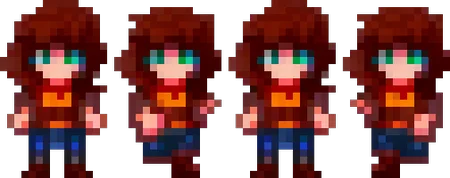
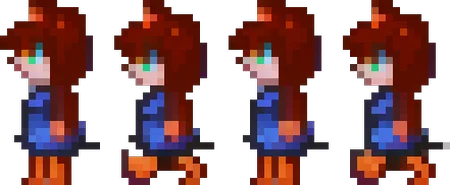
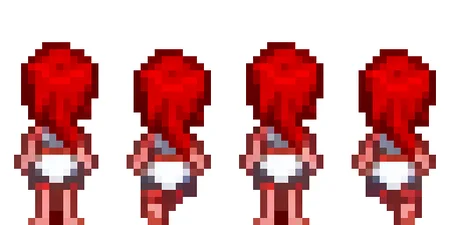
This Stable diffusion checkpoint allows you to generate pixel art sprite sheets from four different angles. These first images are my results after merging this model with another model trained on my wife. merging another model with this one is the easiest way to get a consistent character with each view. still requires a bit of playing around with settings in img2img to get them how you want. for left and right, I suggest picking your best result and mirroring. after you are satisfied take your photo into photoshop or Krita, remove the background, and scale to the desired size. after this you can scale back up to display your results; this also clears up some of the color murkiness in the initial outputs. Originally posted on Hugging Face by Onodofthenorth!
Description
This Stable diffusion checkpoint allows you to generate pixel art sprite sheets from four different angles. These first images are my results after merging this model with another model trained on my wife. merging another model with this one is the easiest way to get a consistent character with each view. still requires a bit of playing around with settings in img2img to get them how you want. for left and right, I suggest picking your best result and mirroring. after you are satisfied take your photo into photoshop or Krita, remove the background, and scale to the desired size. after this you can scale back up to display your results; this also clears up some of the color murkiness in the initial outputs.
FAQ
Comments (12)
I would like to give this try, but i am not sure how to make it work. Should i add a spreadsheet? what do i do after that? do you have any prompt sample i could study?
I'm new to this, i realized that the key words are the triggers in the prompts, i just need to try something very simple.
@masterkillx Will try this out and maybe make a tutorial
Require prompt example to generate the character face to a specific direction, for example, face to the camera. The generated content always faces the right side. Didn't know how to control it...
https://huggingface.co/Onodofthenorth/SD_PixelArt_SpriteSheet_Generator
For the front view use "PixelartFSS"
For the right view use "PixelartRSS"
For the back view use "PixelartBSS"
For the left view use "PixelartLSS"
cant download
Safetensor version?
When I try to download, I got an Eorror Download File. Is there anyone else get this question?
yes it doesnt work I reported the file I may reupload it if they dont fix it
download link is broken
it feels more like a randomizer
Details
Available On (1 platform)
Same model published on other platforms. May have additional downloads or version variants.