
v3.1 hotfix
Fix around the most recent subgraph issues involving images nested in subgraphs.
LoRA-Manager no longer needed - replaced by Power LoRA loader.
v3.0 update!
When opening the workflow, set your start image and video first!
New features include:
- Removed clutter
- Eliminated all custom nodes dependency besides the most essential three:
ComfyUI-KJNodes
ComfyUI-Easy-Use
rgthree-comfy
And ComfyUI-Lora-Manager for the LoRA stackers
A simple workflow for "infinite length" video extension provided by SVI v2.0 where you can give infinite prompts - separated by new lines - and define each scene's length - separated by ",".
Put simply, you load your models, set your image size, write your prompts separated by enter and length for each prompt separated by commas, then hit run.
Detailed instructions per node.
Load video
If you want to extend an existing video, load it here. By default your video generation will use the same size (rounded to 16) as the original video. You can override this at the Sampler node.
Selective LoRA stackers
Copy-pastable if you need more stacks - just make sure you chain-connect these nodes! These were a little tricky to implement, but now you can use different LoRA stacks for different loops. For example, if you want to use a "WAN jump" LoRA only at the 2nd and 4th loop, you set "Use at part" parameter to 2, 4. Make sure you separate them using commas. By default I included two sets of LoRA stacks. You can overlapping stacks no problem. Toggling them off or setting "Use at part" to 0 - or a number higher than the prompts you're giving it - is the same as not using them.
Load models
Load your High and Low noise models, SVI LoRAs, Light LoRAs here as well as CLIP and VAE.
Settings
Set your anchor image, generation width / height.
Give your prompts here - each new line (enter, linebreak) is a prompt.
Then finally give the length you want for each prompt. Separate them by ",".
Sampler
Sampling settings (steps for high/low, seed, cfg).
"Use source video" - enable it, if you want to extend existing videos.
"Override video size" - if you enable it, the video will be the width and height specified in the Settings node.
"Override anchor image" - it will use the image you loaded in Settings even if you're extending video - useful when trying to avoid quality degradation or having a bad anchor for the video's last frame.
Description
Selective LoRA stacker
Video extend functionality
Quality of life improvements
FAQ
Comments (49)
Does this work for images to video if you do not have a video you want to extend?
Yes, if your uncheck source video, it works as i2v.
When I press the buttons, it still wants to add the video for me.
Same with your use additional lora's button. It will not disable once you toggle to false.
That's weird. I could only test it on a few PCs, but they didn't have the problem with the buttons. Is your Comfy and all your nodes up to date?
It should use a simple boolean connected to the Crystools' "Switch Any" nodes in all cases.
Boolean is either Comfy Core (so built-in) or possibly EasyLogic nodes.
So what I suspect is either of these nodes - Crystools, EasyLogic or ComfyUI itself might be outdated.
@yorgash same problem btw
This seems like a fantastic WF, and I want to thank you greatly. Especially the abillity to extend an existing video.
However it suffers from some major draw back:
1. You can't remove lora's from the main lora stack. Just disable them.
2. You can't rearrange the lora/models to make it more user friendly. I would like to select the high model and them the low model. Not all the high models and lora's and then the low models and loras.
3. To add lora to any sub section you need to type in the lora, which it means I need to navigate to the lora folder and write the full name. Why not put it in a normal lora selector?
You can open up the subgraph (top right corner), and remove them.
Now that it has the stacker, it is a bit redundant.
Rearranging the models also a feature of subgraphs: you can open up, and drag each control where you want.
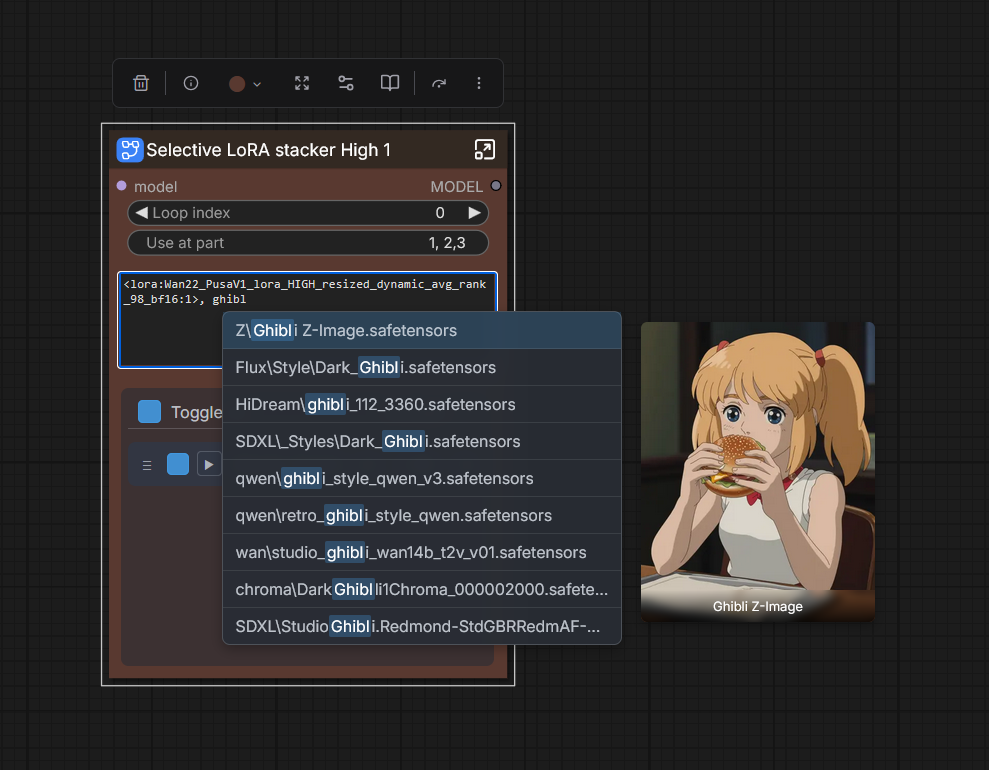
The LoRA Manager's LoRAs should be okay with only writing in part of the LoRA names, like this:
https://i.postimg.cc/rz6xCkNb/ss.png
You might have to open LoRA Manager (http://127.0.0.1:8188/loras) and refresh to update LoRA database, you can click fetch to get thumbnails for each LoRA too.
An error occurs when you change your resolution:
ImageBatchExtendWithOverlap
Source and new images must have the same shape: torch.Size([480, 270]) vs torch.Size([480, 264])
There is no such error with the image.
Also, the workflow will not start unless you add at least some image. What if I don't have an image but only a video?)))
it would also be possible to control the FPS of the original video, otherwise in the final glued video, the initial original video is too slow (it all depends on the initial FPS of the video).
I guess you'll have to create empty image, save it and load it :D
I could have made an image enabler node, but that'd mean downloading an entire node pack for it.
The ImageBatchExtendWithOverlap is weird, should automatically fit your video side (I mean to set resize image node to multiple of 16, but I'll look into it. This looks like your input video didn't get resized, so when it tried to overlap with the created video segment (which WAN automatically sized div by 16) it was a mismatch.
If you want to try and manually fix it, open up the sampler node, they find the video input's subgraph, and check up on the ImageResizeV2 node.
Maybe you'll have to upload Kijai / KJNodes or swwan nodes, if you're already using that to latest (nightly) version.
@yorgash Your default resolution works fine. But when we try to change it, an error occurs. Please see what the problem is, thank you.
I am not sure how to get the video load part removed and just start with an image. When I bypass the video loader and group inside the Sampler I just get errors.
Thanks for this workflow!
seems like I resolved it by slapping whatever video in there
Hello!
Yeah, you have to feed it a random video.
If you only want to do i2v, you set the sampler's "Source video" setting to disabled.
@yorgash it looks like that feeding it with a random video is the only way to do i2v at the moment, the "Source video" control doesn't seem to work. Or, better, it works only if a random video is already present in the first node. GG for the great job, mate.
@yorgash Get Video Components is red?? i have a source video in there but im trying to use the image to video
I've tried running this one, but it just sends an alert saying there's a loop, and that it's not submitting the workflow. Has anyone else solved this?
Having the same problem
@hook0r I fixed it. You have to find the setting in comfyUI for detecting loops and disable it.
@Alberist well this was easier to solve than expected. Thank you. But now i'm getting the "could not convert string to float: ''" error :(
I'm liking exploring your workflow! May I suggest something? You can use the "easy use" any converter to convert float to string. You are using a complete new pack (which add another pack dependency) just because of it, and you are already using easy use for loops and other things. Thanks for the workflow!
nice, is it possible to add differents prompt for each clips?
Hello!
Yes, you can give different prompts, prompt lengths (frames) and different set of LoRAs.
I'm not seeing where to add the starting image for i2v.
Eagerly awaiting v3 which might be able to do the simplest thing like convert string to float.
thx. can u add sage attention?
This workflow looks great, I've spent a lot of time exploring and understanding it, unfortunately, no matter what I do, I get the following error as soon as I press run :
"can't access property "output", res is undefined"
It appears instantly. No other information is displayed. I've never seen this before.
Of course everything is up to date.
Hmm that's a first for me too.
Will try to test it on some more systems, if I can reproduce and resolve, I'll get back to you.
Amazing work but I just get a video that degrades immensively ver yfast as if the SVI isnt even used, tried several times but I get the same degraded video every time.
Also i only get 1 video, not the amount i specify with the paragraphs and frames separaated by ","
That's an amazing work of art. indeed very simple if you don't have to modify anything. but the most complex one if you have to, you're definitely very talented, i couldn't reproduce it but i understand it enough to modify it. here's my thought:
1-first the prompt adherence is unfortunately worst than others that i've tried, even after trying everything like removing loras, changing sampler, cfg.... etc. changing camera view/setting is particulary more difficult
2- the lora stacker is not very user friendly and loading mine in didn't seems to work, i've loaded rgthree power lora loader and it worked and is, in my opinion much more user friendly.
3- the common svi color shifting is still present :( which is probably due to the current svi and not the workflow itself.
4- i had a problem with your seedgenerator. i've updated all the required pack and this nodes was just stubborn, had to replace it since it is not identified from which pack it is from.
5- i really like having different ksampler on my others workflows so if let's say scene 6 is problematic i can change seed or lora strenght to fix it without generating the whole 6 scene again. no idea how it could work on this setup tho.....
Don't let troll and bad comment get to you, that is really an amazing work, hope your talent get recognized and i'll definitely follow your other/future work!
Sorry to ask, but where do you specify output video width?
Solved: somehow the width field in the Settings Subparagraph was hidden. Unpacking the paragraph solved it.
For some reason, my videos are not continuous, but each video starts with a loaded image, and then when I splice two videos together, they switch places (first 2 videos, then 1). Does anyone else have this problem?
Yes. Its random and nonsense. Most of the time the transition shows the anchor image its like the latent cutting didnt work properly.
I2V generations with this workflow just generate noise. Any suggestions for what I might be doing wrong? My setup appears to be identical to the provided screenshot.
This workflow looks really good, I just had one question on something I'm confused about. It looks like the workflow requires a photo when running, but what if we're just trying to extend an already existing video? I understand the video gets uploaded in the 'upload video' node, but what are we supposed to put in the photo node for those situations where we don't have a photo, but only an existing video? Thanks for your work.
You have to select a random image as is now, but it won't be used if you're using "source video" (only a limitation of Comfy I didn't work around)
@yorgash awesome; this workflow is incredibly useful. Good job!
This is a really great workflow and speeds up and simplifies the process of generating long form videos dramatically.
When I first started looking for SVI workflows, I wanted something dynamic and this workflow is exactly that. Can scale up in length as needed without ridiculous complexity or endlessly copy/pasting subgraphs.
Initially, I struggled with this workflow, finding that no matter how many additional clips I sequenced or how many prompts I included, the workflow seemed to just "stick" to the anchor frames and only progressing through prompts in the final clip.
After lots of testing and rework, I found that the base model has a LOT to do with this. For whatever reason, some of the previous models I attempted to use simply had very poor prompt adherence. After spending time on this workflow, I was able to find a combination of models/settings that works very well with this workflow. In particular, I now use WAN 2.2 Enhanced SVI model with lightning LORAs. Other merge checkpoints, while great for single clips, would just get "stuck" on the anchor frames.
Very very pleased with this setup.
I've added a few extra nodes to this workflow to config to my liking and overall couldn't be happier now that I've sorted out my initial model prompt adherence issues. Extra nodes for my config include:
-MoE KSampler
-Easy Apply PuLID for character consistency
-ReActor for further character consistency
-Model patches for speed/performance
-Tiled VAE Decode
-And of course, upscaling.
The thing that makes it really hard is finding an anchor in the clip that actually has the character.
That's why taking the last frame would degrade the quality very much.
I was trying - having some luck, but not consistent enough - to come up with different methods to change anchor by the last frame that actually had a full frame in it, and not blurry, but the methods to do that are either not reliable enough to implement, or very, very slow.
@yorgash I came back here and updated my comment. Gotta say, 10/10 workflow. I'm glad you were able to solve the "dynamic length" in a workflow. Reason for updating my comment is because I found that the issue is NOT in your workflow at all, but in fact was my models. I now run WAN SVI Enhanced Lightning model, with lightning LORAs and have really great prompt adherence. Prior attempts were using "merged" checkpoints, which worked really great on 81 frames but for whatever reason these models just simply couldn't break free from the anchor frames.
Really loving the workflow now, kudos.
@primez19 Thank you! I have had a loooong weekend, so I'm happy something good happened for a change :)
@primez19 Could you please share your enhanced workflow? It sounds really interesting.
It seems that after generating a fists continuiation it fails with:
File "/home/xxx/dev/ComfyUI/custom_nodes/ComfyUI-KJNodes/nodes/image_nodes.py", line 1968, in imagesfrombatch
raise ValueError(f"Source and new images must have the same shape: {source_images.shape[1:3]} vs {new_images.shape[1:3]}")
ValueError: Source and new images must have the same shape: torch.Size([658, 1152]) vs torch.Size([656, 1152])
Plus I couldn't find the unwrapped/ungrupped flow you mentioned in your description.
I love how easy this is to extend, I'm getting great results from it. This is really cool. Thanks!
how to use it, i tried generate from image, but it only generate first line prompt, never generate second line
Excellent workflow. When I use the i2v model alone, the generated videos always mysteriously return to the first frame after more than 5 seconds. Using your workflow, the video content can be generated very smoothly.