





If you like my work Kindly like,rate and comment XD
These nodes are for : ComfyUI
ComfyUI:
ComfyUI is an advanced node based UI utilizing Stable Diffusion. It allows you to create customized workflows such as image post-processing, or conversions.
Auto Update:
-when you run comfyUI, the suit will generate a config file
The file looks like this :
{
"autoUpdate": true,
"branch": "main",
"openAI_API_Key": "sk-#################################"
}
this file is used to control Auto update, and to manage any other settings the tool requires
File Description:
"autoUpdate": can be (true) or (false),
"branch": default is ("main")
other options for branch:
"v2.1.X": means it will only update bug fixes for v2 version.
"main" means it will always be on latest stable build, this may add new nodes suddenly (also usually it assume you update comfy)
"develop": it will contain latest stuff I'm working on now, but may contain bugs
"openAI_API_Key": if you want to use the ChatGPT or Dall-E2 features, you need to add your open-AI API key, you can get it from (Account API Keys - OpenAI API)
How to use
you must update comfyUI first before using this version
As this version relies heavily on the new feature of comfyUI : the ability to switch inputs to be widgets and widgets to be inputs
Download the zip file.
Extract to ..\ComfyUI\custom_nodes : like this image :
restart comfy if it was running (reload web, not enough)
you will find my nodes under new group O/…
You can check the workflow folder to find great examples of how to use the tool
Kindly be notified that you can load the images in the downloaded ZIP/workflows in comfyUI to load the workflow that was used to generate it
Current Nodes:
//7/4/2023 -----------------------------------------------------------------
selectLatentFromBatchNode
if you generate multiple images, it allows you to pick which to use
for example, if you generate 4 images, it allows you to select 1 of them to do further processing on itor you can use it to process them sequentially
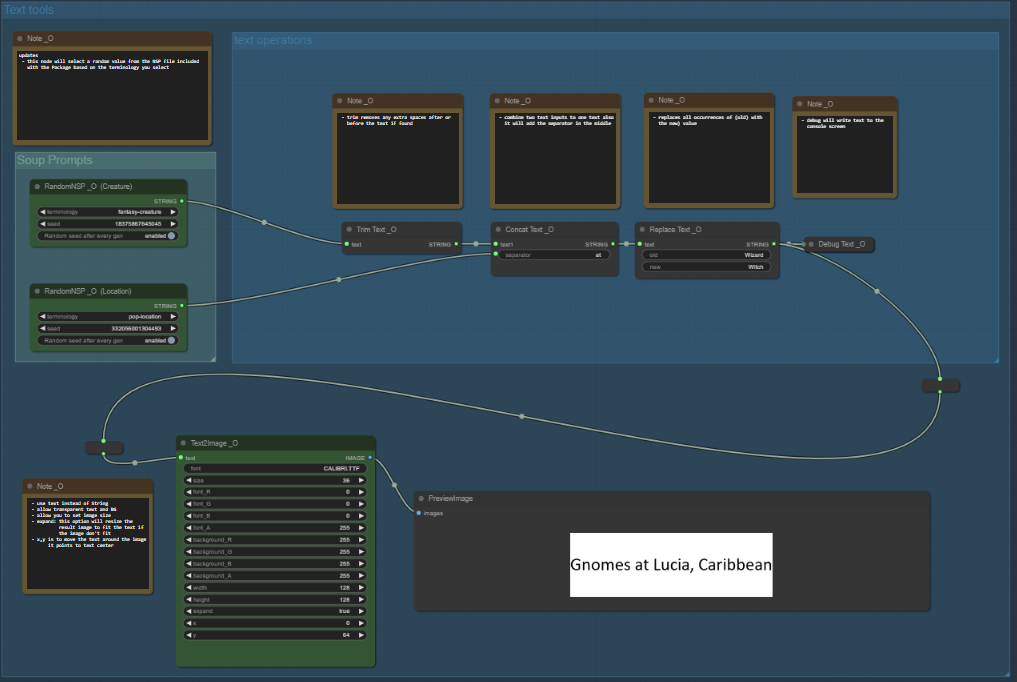
NSP
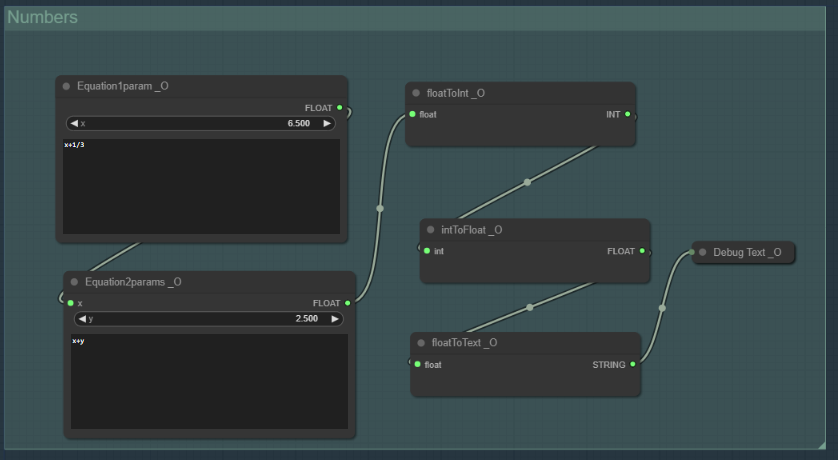
this node allow you to select random value from SoupPrompts fileequations
- this node allow you to perform math equations on the input
- there are two variants
- 1 input (X)
- 2 inputs (X,Y)
(you can convert the x and y to inputs by right click on them, so you can use values from another node)if you like this node tell me i can enhance it so you can select inputs number
// 22/3/2023 -----------------------------------------------------------------
OpenAI Nodes
OpenAI ChatGPT and DALLE-2 API as nodes, so you can use them to enhance your workflow
ChatGPT-Advanced
Load_openAI
to initialize openAI for next nodes
Advanced ChatGPT nodes
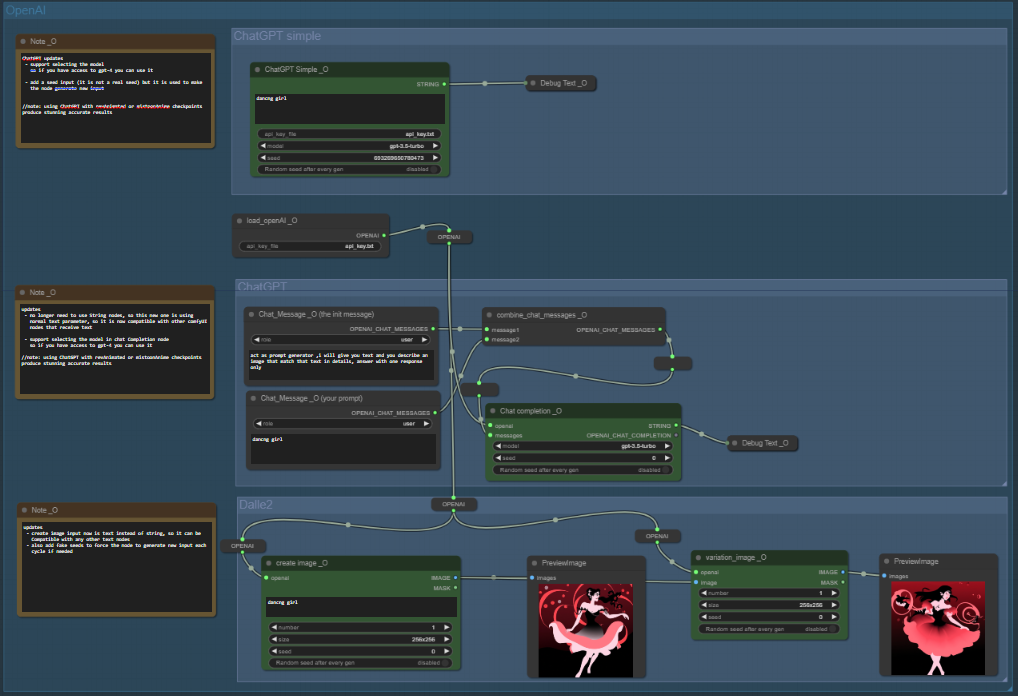
chat_message :
create a message to send it to chatGPTcombine_chat_messages:
used to group messages together before sending them to chatGPTChat_Completion:
the magic node this node will send the messages to ChatGPT and receive response from it , the response will be the output stringdebug_Completion:
this to help you check the whole response
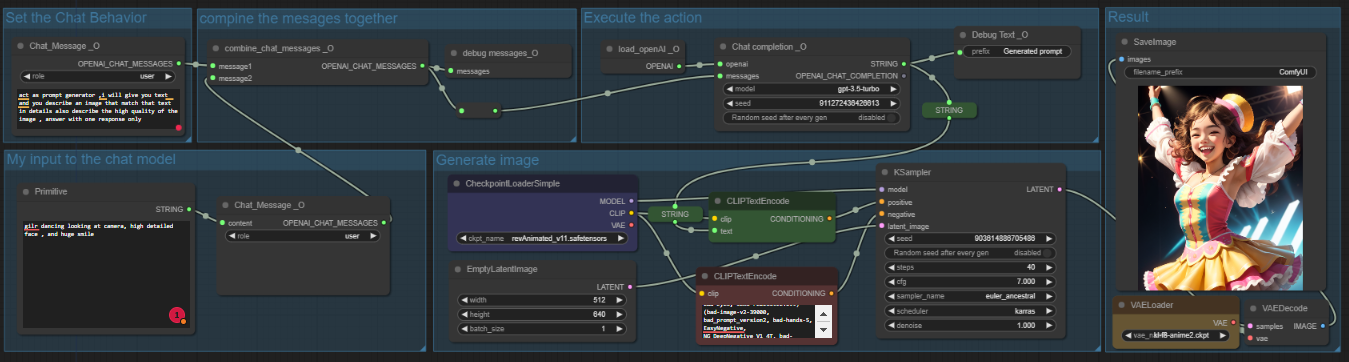
in this workflow, I used ChatGPT to create the prompt,
at start, I send 2 messages to ChatGPT
first message is to tell ChatGPT how to behave and what is the prompt format that I need from him
in the second message I send what I want in this case young girl dancing (I added young, so her clothes become decent XD don't misunderstand me please )
after that I feed the messages to the completion node “it is called like that in their API sorry”
and congrats, you have a nice input for your image
DallE-2 Image nodes
create_image:
used to create and image using DALLE-2 for now only 1 image each time, will update it in next patch to allow multiple imagesvariation_image:
this node will generate variations similar to the image you send to it
this is a full workflow where
1- use ChatGPT to generate a prompt
2- send that prompt to DALLE-2
3- give the generated image to Stable Diffusion to paint over it
4- use DALLE-2 to create variations from the output
ChatGPT-simple
This node harnesses the power of chatGPT, an advanced language model that can generate detailed image descriptions from a small input.
You need to have OpenAI API key , which you can find at https://beta.openai.com/docs/developer-apis/overview
Once you have your API key, add it to the api_key.txt file
I have made it a separate file, so that the API key doesn't get embedded in the generated images.
<you can load this image in comfyUI to load the workflow>
String Suit
add multiple nodes to support string manipulation also a tool to generate image from text

String:
node that can hold string (text)Debug String
this node will write the string on the consoleConcat string
this node is used to combine two strings togetherTrim string
this is used to remove any extra spaces at the start or the end of a stringReplace string & replace string advanced
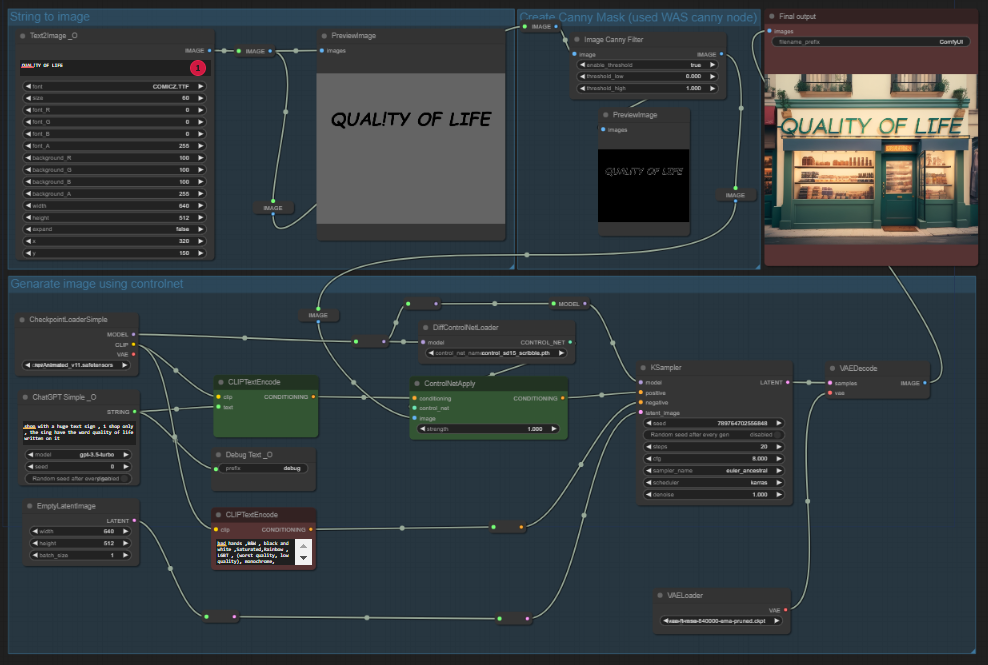
used to replace part of the text by another part>>>> String2image <<<<
this node will generate an images based on a text, which can be used with controlNet to add text to the image.
— the tool support fonts “add the font you want in fonts folder”
“If you load the example image in comfyUI the workflow that generated it will be loaded”>>>>CLIPStringEncode <<<
The normal ClipTextEncode node but this one receive the text from the string node, so you don't have to retype your prompt twice anymore
in this example I used depth filter but if you are using WAS nodes you can convert the text to canny using WAS canny filter it will give much better results with the canny controlNet
Other tools
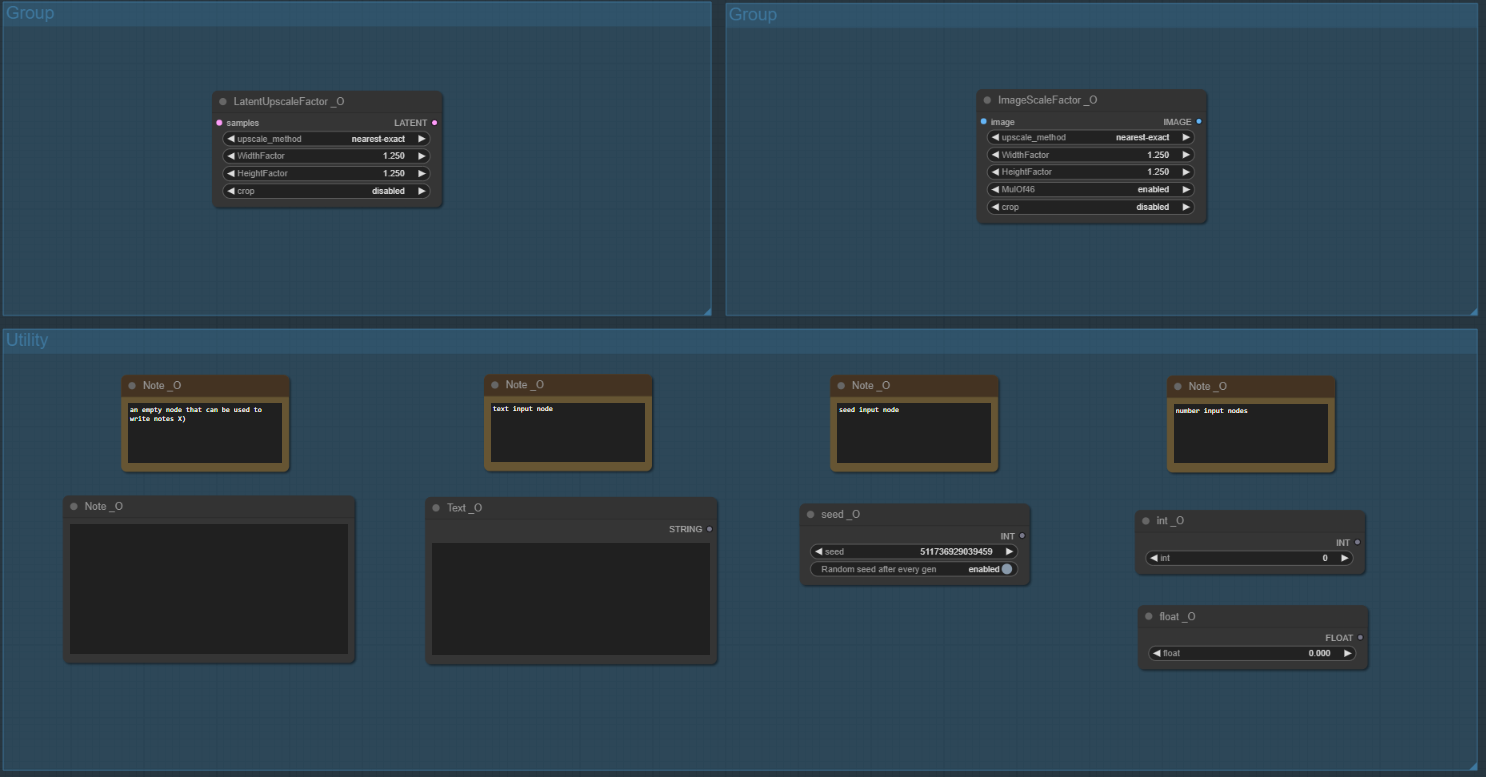
LatentUpscaleMultiply:
it is a variant from the original LatentUpscale tool but instead of using width and height you use a multiply number
for example, if the original images dimensions are (512,512) and the mul values were (2,2) the result image will be (1024,1024)
also you can use it to downscale if needed by using fractions ex:(512,512) mul (.5,.5) → (256,256)
Node Path: O/Latent/LatentUpscaleMultiply
there are also many brilliant nodes in this package
WAS's Comprehensive Node Suite - ComfyUI | Stable Diffusion Other | Civitai
thanks for reading my message, I hope that my tools will help you.
Discord: Omar92#3374
Description
-- this version will autoUpdate itself
FAQ
Comments (32)
updates locked behind a timed paywall. Shame as I really liked these.
is the beta thing require money OMG ok will open it
ok i removed the beta thing didnt know it costs money , kindly tell me after you test it if it works fine for you
and thanks so much for using my tool
yep I made a mistake in assuming it was a developer option where you were informed of that. Sorry chap
Is there a way to have "LupscaleFactor" with one value for both dimensions?
ok will create that
ok i added that node (next time you run it should auto update) and then you should have the new things
@omar92 it still writes in the console "Failed to auto update Quality of Life Suit". It works but no new module. I'll update it manually.
@omar92 after updating manually, i saw the new module and it works. great, thanks!
@Olbanets do you know why update failed
@omar92 I don't have more information. You can give me a version with detailed output and I'll see.
It seems like the Image scale is doing something to the aspect ratio, if the input image is 1:1 then its ok, but if its not then it scales it in the inverse.
It is taking 3:2 and making it 2:3, or taking 3:2 and making 3:2 (I think)
i tried posting a image sample, it doesnt look like it lets me, i have one on imgur if needed.
did i mix width with height , will check , thanks for reporting this
the bug is fixed , and it is on main now , so next time you run the package shall update and it shall be fixed
So the two new versions don't work for me. Hundreds of error messages. I have reinstalled Comfy several times now over the weekend all on a new computer but it does not work. None of your workflows from the beginning work. Only the one with ChatGTP that I made myself. And I have not managed to create any text in 3 weeks. I give up now and delete the whole shit. Too bad, the idea was good.
can you connect with me in discord i can help you fix it
Is it possible to include other extensions in the auto-update feature? As the number of installed extensions keeps increasing, being able to add Git URLs to the configuration file would greatly help in reducing the time spent checking for updates.
Thank you.
will try to do such tool , thanks for the idea
Still have the next error during every star:
Failed to auto update Quality of Life Suit
QualityOfLifeSuit_Omar92_DIR: E:\SD\ComfyUI_windows_portable\ComfyUI\custom_nodes\ComfyUI-QualityOfLifeSuit_Omar92-main\src\..
Looks like you hardcoded the folder name. It can't start being git clone instead of downloading the zip.
can anyone help me to run this in comfyUi ? i cant i dont know why
hi , what is the problem that is facing you
@omar92 hey excited to get this working. I was having a similar issue with others:
ChatGPT Simple _O:
- Value not in list: model: 'gpt-3.5-turbo' not in []
are there models that need to be downloaded, and what folder should I include them in
thanks for all your help
Error occurred when executing Text2Image _O: 'ImageDraw' object has no attribute 'textsize'
Could you replace ChatGPT with an open model in the near future? The API is inaccessible in certain regions.
I have no Gpt Models - or I cannot locate the folder. ComfyUI, Win10, QoLv2 DallE nodes etc
Bugged, the author is not solving the issues on github
I did a solve kindly test again
Details
Files
Available On (1 platform)
Same model published on other platforms. May have additional downloads or version variants.