

Z-Image-Turbo_clear
VAE: Z-Image_clear_vae
Compare to Z-Image-Turbo (Original)
Z-Image-Turbo_clear | Z-Image-Turbo

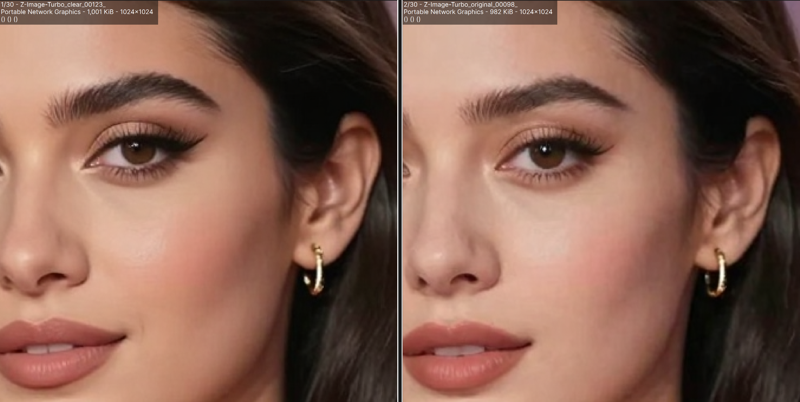
The Z-Image-Turbo_clear model is a fine-tuned version of Z-Image-Turbo that improves details compared to the original.
For better results, please use it with the dedicated VAE, Z-Image_clear_vae.
Model Formats and Image Quality
Generally, the image quality ranks in the following order:
FP32 > FP16 ≒ BF16 > INT8_ConvRot_HQ > MXFP8 > FP8_svd_scaled > FP8
FP32 is mainly recommended for training purposes.
FP16 / BF16 can generate high-quality illustrations.
INT8_ConvRot_HQ offers an excellent balance of speed and quality while using roughly half the VRAM of FP16 / BF16.
MXFP8, FP8_svd_scaled, and FP8 are currently not recommended, as they are inferior to INT8_ConvRot_HQ in both speed and image quality.
For a detailed comparison of each format, please refer to this page.
Recomended Settings
Sampler:
euler
res_multistep
Scheduler: beta
Steps: 9
ModelSamplingAuraFlow: shift 7.5 (3-9)
Upscaler
your choice, examples:
Tips (External Sites)
License
Description
FAQ
Comments (8)
Thanks! Honestly, I was waiting for you to start working on z-image :) I hope you’ll upload FP8 and GGUF version
Thanks for the comment! I've uploaded the FP8 version. Since this model is already quite lightweight, I don't plan to make a GGUF version.
pre-RTX 2000 getting black outputs
FB16
@Kongyiji12825ijjj
Yes, the FP16 format is inherently less stable than BF16, so this kind of issue can sometimes occur depending on your environment (especially with older GPUs).
I am unsure whether your specific defect is originating from the Sampler or the VAE, but if you can successfully generate images using the FP32 or BF16 format, please use one of those instead.
SDXL VAE case: https://huggingface.co/madebyollin/sdxl-vae-fp16-fix
where can I find a workflow for this?
Uploaded a PNG image containing the ComfyUI workflow to Hugging Face.
https://huggingface.co/easygoing0114/Z-Image-Turbo_clear/blob/main/README.md#workflow
@easygoing0114 great. thanks!