11.7 Note: Use Krea2 edit only with this Lora
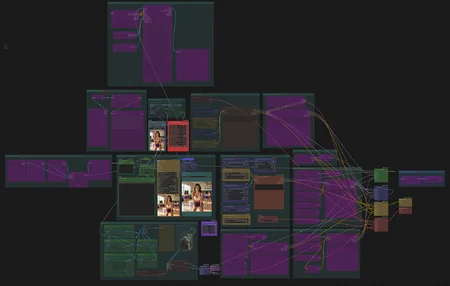
Since version 11.0, the separate model groups that had to be disabled or enabled have been replaced by a single universal loader and presets selector. There are several example presets included in the workflow, but you can create any number of your own using any combination of models, CLIPs, CFG, steps, and more. Just set your own paths to .safetensors or .gguf models and click "Save" or "Save As" to create a new preset with a new name and settings. You can also store a selected list of LoRAs in the Lora Manager recipes section (there is a "Save to recipe" action in the right-click menu of the LoRA list in the frontend). Note: If SDXL switch is enabled, unet, clip and vae settings are ignored.
If manager fails to find LLM and lora nodes, install them from git url - https://github.com/willmiao/ComfyUI-Lora-Manager
LLM node: https://github.com/KingManiya/ComfyUI-LLM-text-processor (Automatic setup currently supports Windows x64 CUDA 13 only. Other platforms require manual setup of llama.cpp release binaries.) (see bbox examples below)
Workflow can be used with Sage Attention enabled in Comfyui launch arguments (it can be easily installed from https://github.com/wildminder/AI-windows-whl?tab=readme-ov-file with no need to install compiler)
New node packs since 11.0: https://github.com/chanon/comfyui-obvpm (presets selector) (needs to be updated to latest version for v.11.3) and https://github.com/nexusfinancial-dev/ComfyUI-AutoMultiGPU (universal model loader with OOM protection)
New node pack since 10.4 https://github.com/orex2121/comfyui-OreX with many useful nodes (currently using only style selector)
This workflow support Nodes 2.0 and:
Flux 3 Klein, Qwen Image 2.1, Ming Image 0.1, Ideogram 4, Z-Image, Krea-2, Flux, Flux 2, Flux 2 Klein, Anima, Qwen Image, Qwen Image Edit, SDXL/Pony, txt2img, img2img, Inpaint functionality.
Presets selector.
Shortcuts for fast navigation. Try to press 0,1,2,s,u,l buttons
Face swap (not that perfect atm)
Krea-2 generation with image (or images) reference
Double sampling (switch under sampler)LLM to describe images and enhance prompts
SD Upscale (recommended model https://huggingface.co/Acly/Omni-SR)
ControlNet only for Edit models in img2img group (just describe your image in prompt and add some instruction like "use input image as normal map reference")
Outpainting in Edit/Kontext mode
safetensor and gguf checkpoints and text encoders
AfterDetailer
Powerful multi Lora loader (Lora manager)
Multi or single images load for Edit/Kontext/Krea Reference
LLM Models:
VRAM 8 Gb: (Use old system prompt)
VRAM 12+ Gb: (use LLM-system-uni-gemma.txt system prompt)
VRAM 16 Gb: (use LLM-system-uni-qwen-27b.txt system prompt)
VRAM 24 Gb: (use LLM-system-uni-qwen-27b.txt system prompt)
Put models and folder with system prompt here:
📂 ComfyUI/
├── 📂 models/
│   └── 📂 LLM/
│       ├── Gemma-4-E4B-Uncensored-HauhauCS-Aggressive-Q8_K_P.gguf
│       ├── mmproj-Gemma-4-E4B-Uncensored-HauhauCS-Aggressive-f16.gguf
│       ├── Qwen3.8-27B-Uncensored-IQ4_XS.gguf
│       ├── mmproj-Qwen3.8-27B-Uncensored-F16.gguf
│       └── 📂 prompts/
│           ├── LLM-system-uni-qwen-27b.txt
│           ├── LLM-system-uni-gemma.txt
│           ├── LLM-system-Old.txt
│           ├── LLM-system-Old-sdxl.txt
Starting from v8.0, it is possible to enhance T2I prompts on the fly using switches in the T2I group. You still need to manually copy and paste prompts from the LLM group to the I2I group, but you can directly describe Image 1 loaded in the I2I block.
Follow the short block notes for more information.
User prompts in both groups are now divided into two parts. The first part (Fixed) is never passed to the LLM block for processing and will always remain unchanged at the beginning of the prompt. The second part (User Prompt) can be passed to the LLM (if enabled) and improved.
Quick User Guide (How to Use LLM Tool)
1. Basic Image Description (Default Behavior)
If you just want a stunning, highly detailed text-to-image prompt based on an image or in text prompt (upload or don't upload an image):
What it does: The AI will output a rich, 200–450 word prompt detailing the camera angle, exact poses, clothing, lighting, and background. It automatically keeps everything in sharp focus unless instructed otherwise.
2. Changing Styles (Anime to Real, Sketch to 3D, etc.)
If you want to keep the exact pose and composition of your image but change the style entirely:
Upload an image + type your desired style (e.g., "turn into a cinematic photograph", "Pixar 3D animation", or "oil painting").
What it does: The AI acts as a "style translator." It extracts the exact physical skeleton (poses, camera angle) from your image and rewrites the scene from scratch in the new style.
Note: It will automatically fix cartoonish proportions if you ask for a photo, and it will never use lazy phrases like "keep the original pose." It just describes the new masterpiece as if it already exists.
3. Explicit Editing Instructions (InstructPix2Pix)
If you don't want a full scene description, but specifically need a short, direct command for an editing model (like "change the dress to red" or "make it winter"):
Upload an image + type [edit] + your command (e.g., [edit] make her hair blonde).
What it does: It outputs a concise, 80–200 word editing instruction for edit models detailing how the textures and lighting should change.
4. Forcing a Specific Aspect Ratio
The AI usually guesses the aspect ratio by looking at your image. If you want to force a specific canvas size for the output JSON or tags:
Include TARGET CANVAS: W:H in your text (e.g., TARGET CANVAS: 16:9 or TARGET CANVAS: 3:4).
5. Using Specialized Developer Modes
If you are passing this output directly into specific image models or workflows, you can trigger specialized single-line JSON or tag outputs by simply including one of these "magic words" in your message:
[sdxl] → Outputs a comma-separated list of Danbooru/SDXL tags (great for Pony/Illustrious).
[ideo] → Outputs Ideogram 4.0 JSON structure.
[moss] → Outputs MOSS-Image JSON.
[ming] → Outputs Ming-Image-0.1 JSON.
[bbox] → Outputs Flux 3 Klein bounding-box arrays with spatial coordinates. (You can also combine [bbox] and [edit] together for spatial editing!).
Summary of Best Practices:
You don't need to over-explain. Just say "cinematic photo" and the AI will automatically add skin pores, film grain, and realistic lighting. Say "Disney 3D" and it will naturally add soft global illumination and stylized features.
Don't ask the AI to compare. Don't say "keep the background the same but change the character." Just ask for the final result you want to see - "change the character" and it is. The AI is programmed to strictly maintain the original layout automatically.
Description
ControlNet fix
Because of strange Z-Image Controlnet behavior, now it works only at first half-1 steps.
Because of that new steps slider added with only even numbers available.
FAQ
Looks like we don't have an active mirror for this file right now.
CivArchive is a community-maintained index — we catalog mirrors that volunteers upload to HuggingFace, torrents, and other public hosts. Looks like no one has uploaded a copy of this file yet.
Some files do get recovered over time through contributions. If you're looking for this one, feel free to ask in Discord, or help preserve it if you have a copy.