



If you want help or share artwork please join the discord server where i also update everyone on new tools and versions: https://discord.gg/5djEeQ3wpU
My kofi (any amount helps with AI bills): https://ko-fi.com/donutsdelivery
# Donut Workflow V4 Beta
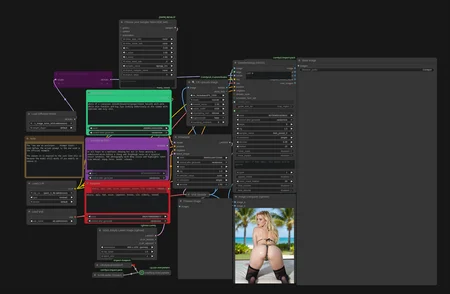
A Krea2 workflow built around DonutNodes, with a redesigned interface for model setup, LoRAs, editing, prompts, generation and saving. DonutNodes supplies the controls and processing nodes; this workflow brings them together.
Workflow file: DonutWF_v4_beta.json · DonutNodes on GitHub
## Quick start
1. Install or update DonutNodes to the code accompanying this beta. Restart ComfyUI and refresh the browser after updating. An older registry build that lacks DonutImageSave or DonutEditStudio cannot run this workflow.
2. Download DonutWF_v4_beta.json from this workflow’s download files. Drag it into ComfyUI or use Open. If GitHub shows a file preview, use Download raw file.
3. Choose Install Missing Nodes → Install All, accept the default pack versions, and Apply Changes/restart. No WAS package is required.
4. Select your models in 01 · Models, then use Download missing for files supported by Donut's model catalog. Install any reported uncatalogued files separately, or select models you already have.
5. Review the enabled LoRAs, prompts, seed, resolution and output settings. Leave Editing off for a first text-to-image run, then click Run.
The beta workflow must be distributed with the updated node code. The local installation test used the development checkout, not the older registry release. Workflow V4 Beta and the DonutNodes package version are separate version numbers.
### Companion packs
Manager detects these from the workflow, including the unconnected nodes inside Required node packs. Keep that subgraph: it makes internally used dependencies visible to the missing-node installer.
- ComfyUI-bleh: Sampler preset
- ComfyUI Impact Pack: Detection, SAM and face-detail processing
- ComfyUI Impact Subpack: Ultralytics detector provider
- Derfuu ComfyUI ModdedNodes: Text boxes
- ComfyUI Krea2 Edit: Identity-edit integration
- Krea2 NAG: Negative attention guidance
- Krea Seed Variance Enhancer: Seed-dependent conditioning variance
WAS and rgthree's label nodes are no longer needed by this workflow. Existing installations may keep those packs for other workflows; updating Donut does not uninstall them.
### Models and downloads
The supplied configuration selects the following files. These are the saved choices, not a promise that every file is needed in every mode or included in this repository.
- Primary diffusion model: finepornV4INT8NVFP4BF16_v4.safetensors
- Secondary diffusion model: krea2_turbo_bf16.safetensors
- Text encoder: qwen3vl_4b_fp8_scaled.safetensors
- VAE: qwen-image/qwen_image_vae.safetensors
- Upscaler: 4x_NickelbackFS_72000_G.pth
- Face detector: bbox/face_yolov8m.pt
- SAM: sam_vit_b_01ec64.pth
- Enabled generation LoRA: krea2/Krea2_NSFW_Aesthetics_V1.safetensors
- Edit LoRA: krea2/krea2_identity_edit_v1_2.safetensors
Use ComfyUI's corresponding model folders. Single-model mode does not load the secondary model. Editing uses the identity-edit LoRA; editing off requires no reference images. Review the saved model/LoRA choices before distributing your own preset.
Download missing only downloads after a click. It uses the repository's reviewed model catalog model_sources.json), checks file size and SHA-256, and can reuse matching renamed files. It reports missing catalog entries rather than guessing download links. Some hosts require your own access credentials: Civitai uses Donut's local API-key setting; Hugging Face can use HF_TOKEN.
## What’s in the workflow
Numbered cards expose everyday controls, with additional controls under Advanced. The source loaders and generation wiring live inside inspectable subgraphs. Graph and App Mode use the same underlying settings.
- Models: choose a single model or two-model merge, encoder, VAE and upscaler.
- LoRAs & block weights: add, remove, reorder and enable LoRAs; edit strengths and block weights through sliders or numeric fields.
- Image setup & editing: set the output size and optional editing references.
- Prompts: edit the general/face, scene and negative text, with wildcard tools.
- Seed & guidance: control the shared seed, NAG and seed variance.
- Generate & finish: adjust sampling, first/second upscale and face detail.
- Latest result: choose a stage preview or follow the latest output; inspect the final expanded prompt and stage progress.
- Save images: choose the destination, format, quality and filename behavior.
## Editing and reference guidance
For editing, enable Editing, upload/paste/drop image A as the base scene, and optionally use image B for the subject/identity. Enter the edit instruction and adjust the crop and output sizing. With B connected, face identity comes from B. Image A alone remains supported.
Reference guidance is a separate optional path for borrowing visual elements through Krea2's native image conditioning. Describe what to borrow in the prompt. It does not use the edit LoRA and pauses while Editing is enabled.
Save after changing references or crops. Reference images are stored separately under ComfyUI/user/donut/edit_references/; copy that folder too when moving a personal workflow to another installation. The distributed beta has empty reference slots.
## Wildcards
Use the Wildcard library card to create or edit one-choice-per-line text files. Insert haircolor* to use user/wildcards/haircolor.txt; nested names such as clothes/shirt* and __haircolor__ syntax also work. The shared seed drives expansion, so a fixed seed keeps choices repeatable. Copy your wildcard files when moving installations; they are not embedded in the workflow JSON.
## Saving images
Donut Image Save replaces WAS's save node. The supplied settings preserve output/Final, the seed-based filename, WebP quality 100 and numbered saves with overwrite disabled. The secondary resized output remains a core ComfyUI save.
The Donut saver supports 8-bit PNG, JPEG, WebP, TIFF, GIF and BMP; output/temp locations; delimiter and number placement; lossless WebP; and optional PNG/WebP workflow metadata. It does not include WAS's history browser, color-profile socket or high-bit-depth/EXR modes. Those features were unused in the migrated configuration.
## Moving from V3
Open V4 Beta as a separate workflow. Keep your V3 JSON and copy your own model choices, LoRAs, prompts and settings through the visible controls. Do not copy raw widget arrays between versions: the layout and inputs changed. Re-select references in Edit Studio and copy any personal wildcard/reference files.
V3 already supported editing, face detail, model merging, LoRA stacking and upscaling. V4 Beta reorganizes and extends that workflow; it does not introduce face detailing or promise better image quality simply from the version change. See the accompanying CHANGELOG.md for the actual differences.
## Beta validation and reporting
A fresh Linux/Python 3.12.7 venv with the current DonutNodes source passed default Install All → restart → full generation, without WAS or a manual package repair. Base generation, first upscale, two face refinements and WebP saving completed on an RTX 4070. The saved 1728 × 1344 image matched the previous WAS save byte-for-byte with the same configuration. Six saver tests and 34 registration/dependency-isolation tests passed.
That acceptance run used editing off and the second upscale disabled, and reused model files. It does not certify every configuration, model downloads, other GPUs, or Windows/macOS installation. Companion requirements still install two OpenCV variants in the tested environment; a warning remains, but imports and inference passed. No fixed minimum VRAM requirement has been established.
When reporting a problem, include your workflow file with private content removed, DonutNodes/ComfyUI versions, OS, GPU/VRAM, active mode and full error traceback. Donut Dependency Check can provide dependency diagnostics.
Detailed test notes accompany the node source in docs/validation/no-was-fresh-install-2026-09-09.md.
ComfyUI/
└── models/
├── diffusion_models/
│ ├── krea2_turbo_bf16.safetensors
│ └── finepornV4INT8NVFP4BF16_v4.safetensors
│
├── text_encoders/
│ └── qwen3vl_4b_fp8_scaled.safetensors
│
├── vae/
│ └── qwen-image/
│ └── qwen_image_vae.safetensors
│
├── loras/
│ └── krea2/
│ ├── krea2_identity_edit_v1_2.safetensors
│ └── Krea2_NSFW_Aesthetics_V1.safetensors
│
├── upscale_models/
│ └── 4x_NickelbackFS_72000_G.pth
│
├── sams/
│ └── sam_vit_b_01ec64.pth
│
└── ultralytics/
└── bbox/
└── face_yolov8m.pt
Description
FAQ
Comments (35)
Thanks for sharing!
I can't get the workflow to work lol, but anyway, I managed to install everything without any problems and that's rare!
um 1.1 has no workflow... just a png..
You need to download it.
Drag it into your comfyui
@DrakulValmont666 I did dude and the contents is literally just a picture. Am I misunderstanding something??
@StellarFlower You then need to drag it onto your Comfyui interface, so that the workflow and the names of the missing nodes are displayed.
after installing missing custom nodes and running i get error
RuntimeError: Cannot use bleh_preset_0 - present not defined. Ensure BlehSetSamplerPreset runs before sampling.
fixed in newest version. a link was missing.
@DonutsDelivery Ah, great! I can't wait to test the new version then, because I managed to get 1.1 working last night, but by working around the bleh node and modifying the samplers. Thanks for the update!
yes workflow does not work
fixed in newest version. a link was missing.
Good workflow. Bit complicated, I had to re-organize it and replace a couple of missing nodes, download bbox models, but it works well. Thanks.
Version 1.2 works perfectly. Now I just need to get to grips with it and understand it better. Thank you.
Have fun! If the image it first generated isn't as good as the preview it is because I improved the prompt. The settings are the same.
There is no WF for 1.2?
I'll have to re-upload it when I get home in a few hours, sorry for the inconvenience.
Good framework for SDX/Z-Image work flow. Number of things hidden behind nodes that aren't needed like the BlehSetSamplerPreset. The third facedetailer for the nsfw fix doesn't work due to the default 'clip' input from the anywhere node which needs to be hard wired to the SDXL checkpoint. I would suggest for anyone to scrub through the logic and modify to your likening. Still a good starting point for a Z-Image/SDXL refinement workflow at least until the support ramps up for Z-Image.
Ive uploaded a new file with the sdxl clip hard Wired. Sorry for the inconvenience
Hello, since you seem so well-informed, why not collaborate with the creator of the process to publish the final version? This isn't a criticism, I should clarify, but a suggestion, as I'm eager to fully utilize Z's capabilities. Sincerely.
@DonutsDelivery Hi there I just tried to download this workflow again but i still have the same issue with the third facedetailer. Do I need to wait for the new download link to become available?
@madmannebruz813 strange, ill double check
@madmannebruz813 it should be fixed now. added download links for the models in a note above it.
@DrakulValmont666 I was actually thinking the same. I'll reach out...
@DonutsDelivery all working thanks man.
How can I generate a man’s penis”
use a penis lora and replace pussy detection model with a penis detection model.
@DonutsDelivery Where should I download penis lora? Its format is .pt. I'm a novice and it's very complicated.
@DonutsDelivery It has been solved. Your workflow is so easy to use. I love you. It would be better if there was an anal test.
Lacks everything, too complex to use, unsuitable for newbies
Newbies gen with chatgpt
@DonutsDelivery no newbie here, but your tiled upscale node doesn't seem to update. any ideas? I was thinking maybe a pip update or something. not sure tbh
@MysticMindAi strangely enough my comfy registry says the latest version is 1.0.35, but my manager says the latest is 1.0.29... altho im using nightly (since i make the node). a few options: make sure comfy is up to date. change to nightly if you can. if that dosent work, clone the repo directly into your custom nodes the old way. https://github.com/DonutsDelivery/ComfyUI-DonutNodes/tree/main
@DonutsDelivery Updating Comfy worked! Much thanks!